
Quick verdict
- What it is
- Store information collected; an Apoku editorial summary is not yet published.
- At a glance
-
- Free to download
Categories and search queries
Official categories
- Business
- Productivity
Apoku categories
Key functions
| Function | Availability | Access | Scope | Evidence |
|---|---|---|---|---|
| Free app | Yes | Free | Context-specific | Store published |
Screens
App Store
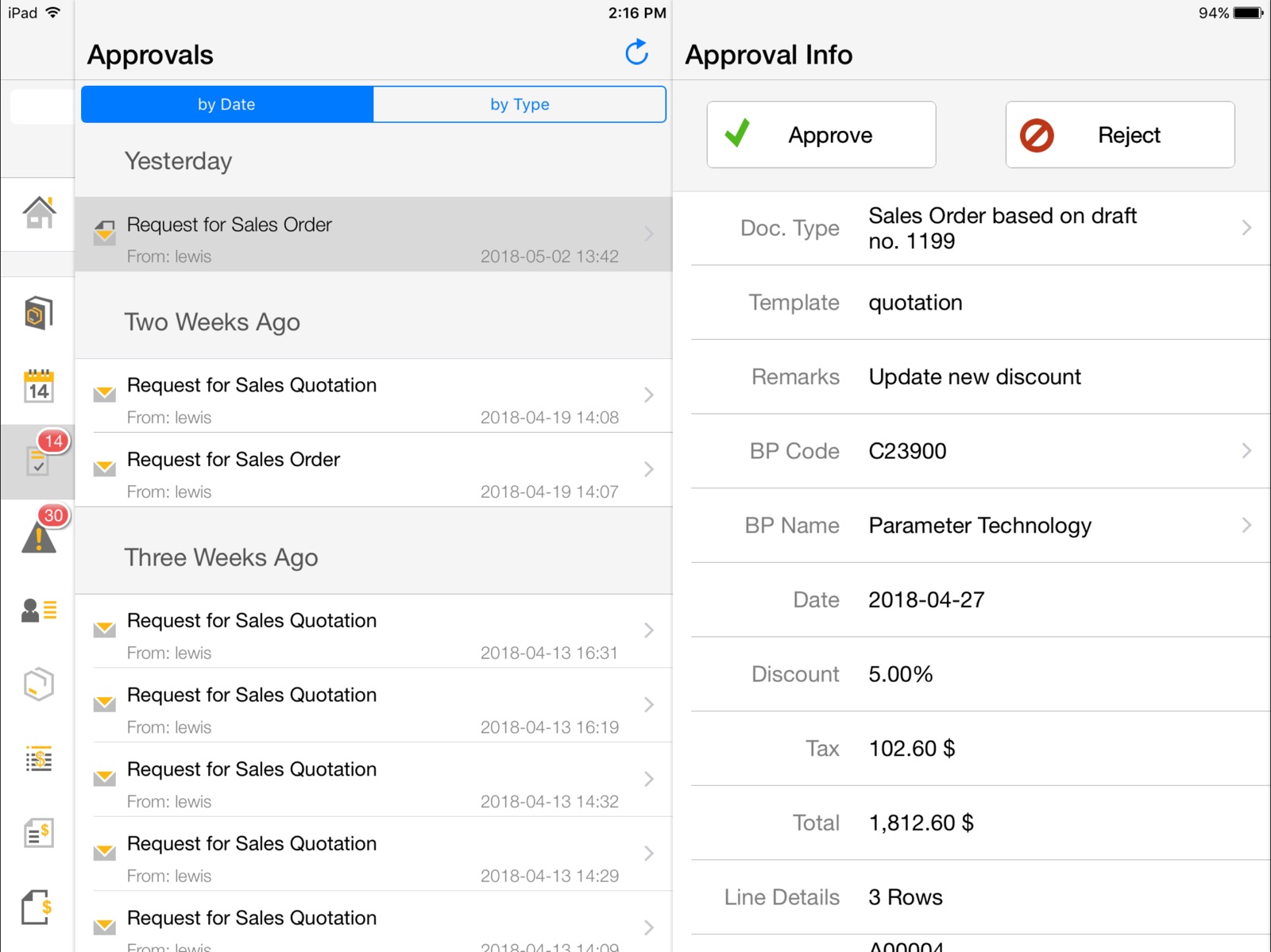
10 store screenshots



Pricing & paywalls
App Store
- Free to download
Ratings & reviews
App Store
-
1/5If you don’t care, just tell us please
Honestly SAP, this is just embarrassing at this point. It’s been a year since an update to this complicated PIA app? If you aren’t moving forward with Business One just tell us. You seem to be falling more and more behind other SME ERPs. B1 seems to require an integration for everything now and doesn’t have viable mobile apps or web clients. Get it together SAP or just say you aren’t moving forward with it. This is beyond frustration for all of us.
SCchamps2009 · 31 Jul 2026
-
1/5This app really need an update and bug fixes!!
We are SAP B1 client since more than 5 years. I like SAP and as a manager mostly traveling around the world with my mobile devices this App is vital to me for being up-to-date in a smart way. I use the App more than I use the software on my laptop. I wonder why SAP doesn’t care about this App? It is not well maintained nor updated. The last check/bug fix listed on the store is 1 year ago.
Wolfgang Wallas · 31 Jul 2026
-
1/5SAP is stuck in the 90s
This app feels “tacked” on to the convoluted and tedious system that is SAP. The setup is a hassle, the interface isn’t up-to-date. And SAP B1 in general really has to make a leap and evolve to make it compatible with todays software usability standards. It might have been amazing in the 90s and function wise is OK even today, but usability is close to non-existant. Don’t get complacent SAP, as that path has only one destination.
r3dsky · 31 Jul 2026
-
4/5Latest version needs help
An amazing app that is easy to use very powerful. Latest version has some issues, screen fails to rotate after viewing a report.
Rural55 · 31 Jul 2026
-
1/5Demo does not work!
Why place a demo when it won’t connect? Hopefully this helps fix it: "Processing Failed. Internal server error; contact your system administrator." I’m using my personal iPad on an unrestricted home network.
sad demo · 31 Jul 2026
Privacy & accessibility
App Store
Privacy
- Data Not Collected Developer declared
Accessibility
No accessibility labels collected yet.
Versions
App Store
-
1.10.0
• Sales documents are significantly enhanced, such as print layout, multiple item selection, editable header information in opportunities, and sales employee assignment in header or stage information • New "Activities" module with substantial functional extensions, such as activity type, "My Activities" calendar, and easy assignment to sales documents • Improved sales catalog supports price lists, user-defined field selection, and refresh of single products • Alerts allow you to drill down to the document • Instant printing of documents and reports with AirPrint • Extensive personalized settings for each module • Modified concept for extending the app
-
1.10.1
• Advanced security concept for SSL connections and configurable warning of invalid SSL certificates (SAP Notes reference 2019275) • The Apple Mac address is replaced with a device ID and “Permission Denied” is displayed on incorrect device ID setting (SAP Notes reference 1602674) • Several technical improvements The following features are available with version 1.10.0: • Sales documents are significantly enhanced, such as print layout, multiple item selection, editable header information in opportunities, and sales employee assignment in header or stage information • New "Activities" module with substantial functional extensions, such as activity type, "My Activities" calendar, and easy assignment to sales documents • Improved sales catalog supports price lists, user-defined field selection, and refresh of single products • Alerts allow you to drill down to the document • Instant printing of documents and reports with AirPrint • Extensive personalized settings for each module • Modified concept for extending the app
-
1.10.3
• Optimization for iOS 8 and iPhone 6/iPhone 6 Plus
-
1.11.1
• Cockpit and advanced dashboard integration for SAP HANA (iPad only) • Support for downloading/uploading attachments to business partners, sales documents, activities, and service calls • Function for copying contacts from business partners to device address book and vice versa • Display of delivery documents • Enforcement of valid SSL certificates (SAP Notes reference 2019275) • Option for providing feedback about the app • Improvements for sales documents, sales catalog, activities, and business partners
-
1.11.12
• Technical improvements (SAP Notes 2421866, 2391247, and 2170661)
-
1.11.14
Technical improvements (SAP Notes: 2518691, 2518657, 2513358, 2489661, 2457421, and 2537646)
-
1.11.16
Technical improvements (SAP Notes: 2591855, 2592004, 2588096 and 2170661)
-
1.11.17
Technical improvements (SAP Note 2632873)
-
1.11.18
Technical improvements (SAP Note 2642540)
-
1.11.2
• Enjoy the latest features of SAP Business One, version for SAP HANA using an additional configuration option of the new demo server powered by SAP HANA • Technical improvements: SAP Notes 2143095, 2151246, 2126704, 2169821, 2171589, 2144862
-
1.11.20
Technical improvements (SAP Note 2592004)
-
1.11.21
Technical improvements (SAP Notes 2170661, 2767811, 2755306)
-
1.11.22
Technical improvements (SAP Notes 2812058, 2823792)
-
1.11.23
Technical improvements (SAP Notes 2866482, 2942841)
-
1.11.24
BUG FIXES • Issue where a sales quotation could not be created after viewing UDFs has been fixed. (SAP Note 3086960) • Issue where some parameters in reports were displayed in wrong format has been fixed. (SAP Note 3200222) • Issue allowing the app to run on a jailbroken device has been fixed. (SAP Note 3317271) • Issue where line total and quantity were not displayed due to a long item description has been fixed. (SAP Note 3434978) • Issue where the app crashed when calling contact persons has been fixed (SAP Note 3443603) • Issue where the app sometimes crashed when scrolling through approval details has been fixed. (SAP Note 3484692) • Issue where the app returned to login page after navigating back from dashboard details has been fixed. (SAP Note 3670638)
-
1.11.25
· 10 Mar 2026
BUG FIXES • Issue where app stops responding on iPhone Air running iOS 26.1 or higher has been fixed. (SAP Note 3694714)
-
1.11.6
• Demo mode uses a server powered by SAP HANA as new default setting • Corrected Sales Analysis dashboard (SAP Note 2221314) • Technical improvements (SAP Notes 2285134 and 2289273)
-
1.11.8
• Technical improvements (SAP Notes 2296217, 2306297, 2314623, 2342477, and 2317128) • iOS 10 compatibility
-
1.7.5
This patch fixes an issue on the iPhone, where an item that is added to a sales order or quotation may overwrite an existing item (SAP note 1780603). The following features are available with version 1.7.0: • Non-concurrent access with up to two mobile devices per user allowed • Support of selection criteria for the SAP Crystal Reports software • Selection of a company database from a list at logon • Enhanced sales documents with additional options for handling, viewing, and editing • Use of SAP's in-memory technology with generic support of SAP Business One, version for SAP HANA • Optimized for iOS 6 and iPhone 5
-
1.8.1
Several new scenarios are now available in conjunction with SAP Business One, version for SAP HANA, which uses SAP's in-memory technology: • Enterprise search integration • Pervasive analytics for BPs and inventory • Cash flow forecast dashboard • ATP check when creating sales orders • Delivery rescheduling for existing sales order items Additional enhancements include: • "Warehouse" and "Delivery Date" can be changed for existing document items • Inventory can be displayed by warehouse when creating sales documents • User-defined fields are supported at document row level • Validation check is performed for mandatory user-defined fields • Date picker supports time selection for task-type activities • The SAP Business One OnDemand solution is supported with a domain user logon and an automatic configuration using the link from an e-mail
-
1.8.4
• Dashboards refresh in iOS 6.0 or higher • Sales quotation document details now open properly • Pervasive analytics available for SAP Business One 8.82, version for SAP HANA • Report module now available when connected to SAP Business One OnDemand 1.0
-
1.9.1
• Sales catalog to showcase products with descriptions and illustrations, featured by interactive comparison and order/quotation integration (iPad) • Assignment of sales employees when editing sales orders or sales quotations • Option of adding activities to sales opportunities • Filters for lists of business partners, opportunities, and service calls • Payment terms and default pricelist for business partners • Support for SAP Business One 9.0 • Features for pervasive analytics on SAP Business One 9.0, version for SAP HANA, such as cube data source, predictive ability, and a customized dashboard
-
1.9.3
• Enhanced user-defined fields (SAP Notes reference 1886340) • Sales order entry is more fail-safe, avoiding time-out issues (SAP Notes reference 1846475) • Contact Person ID field supports special characters (SAP Notes reference 1874087) • Several minor technical improvements
-
1.9.5
• iOS7 user experience • Enterprise search for SAP Business One analytics powered by SAP HANA • Enhanced user-defined fields (SAP Notes reference 1904867) • Several minor improvements
-
1.9.6
• Support for SAP Business One Cloud 1.1 and SAP Business One 9.0, version for SAP HANA PL03 • Several minor technical improvements
Alternatives
- Microsoft Warehouse Management — Same category + similar ratings
Availability by market
- US
Data quality & evidence
- Page completeness
- Live store listing
- Last verified
- 31 Jul 2026
- Sources
- App Store
- Apoku editorial summary has not been published yet.