AppCorpus MCP gives your agent current app data, prices, screens, features and sources.
View JSON
GET /api/v3/apps/6761543729
{
  "app_id": 6761543729,
  "canonical_url": "https://appcorpus.com/apps/rss24-rss-news-reader-6761543729",
  "identity": {
    "name": "RSS24: RSS News Reader",
    "slug": "rss24-rss-news-reader",
    "developer": {
      "name": "Abdylas Tynyshov",
      "url": "https://appcorpus.com/developers/abdylas-tynyshov-developer_e8149be10a35b07d3c3e868b8210b0fd"
    },
    "icon_url": "https://is1-ssl.mzstatic.com/image/thumb/Purple211/v4/4b/e7/7a/4be77ac0-36c8-92f7-7d8c-6f01fb036e5c/AppIcon-0-0-1x_U007epad-0-1-85-220.png/512x512bb.jpg",
    "stores": [
      "apple"
    ],
    "platforms": [
      "iphone",
      "ipad"
    ],
    "status": {
      "state": "active",
      "label": "Active",
      "last_checked": "2026-08-06",
      "last_checked_label": "6 Aug 2026",
      "banner": null,
      "region_note": null
    }
  },
  "listings": [
    {
      "store": "apple",
      "status": "ACTIVE",
      "url": "https://apps.apple.com/us/app/rss24-rss-news-reader/id6761543729?uo=4",
      "rating": 5.0,
      "rating_count": 1,
      "formatted_price": "Free",
      "is_free": true,
      "has_iap": false,
      "has_subscription": false,
      "version": "1.9.0",
      "updated": "2026-05-21",
      "currency": "USD"
    }
  ],
  "summary": {
    "one_liner": null,
    "summary": null,
    "best_for": [],
    "not_for": [],
    "status": "fallback",
    "at_a_glance": [
      "Free to download"
    ]
  },
  "categories": {
    "official": [
      "News",
      "Utilities"
    ],
    "appcorpus": [
      {
        "category_id": "news-magazines",
        "label": "News & magazines",
        "url": "https://appcorpus.com/categories/news-magazines"
      },
      {
        "category_id": "utilities",
        "label": "Utilities",
        "url": "https://appcorpus.com/categories/utilities"
      }
    ]
  },
  "use_cases": [],
  "features": [
    {
      "capability_id": "free_app",
      "label": "Free app",
      "availability": "yes",
      "access_level": "free",
      "scope": null,
      "evidence": "Store published"
    }
  ],
  "pricing": [
    {
      "store": "apple",
      "formatted_price": "Free",
      "is_free": true,
      "has_iap": false,
      "has_subscription": false,
      "currency": "USD",
      "market": "es",
      "last_verified": "2026-08-06",
      "rows": [
        "Free"
      ]
    }
  ],
  "screens": [
    {
      "url": "https://is1-ssl.mzstatic.com/image/thumb/PurpleSource211/v4/16/83/17/168317eb-dab7-2b33-0051-31693f7a8f46/ipad1.png/1600x1600bb.jpg",
      "store": "apple",
      "platform": "ipad",
      "alt": "RSS24: RSS News Reader ipad screenshot 1"
    },
    {
      "url": "https://is1-ssl.mzstatic.com/image/thumb/PurpleSource211/v4/16/83/17/168317eb-dab7-2b33-0051-31693f7a8f46/ipad1.png/360x480bb.jpg",
      "store": "apple",
      "platform": "ipad",
      "alt": "RSS24: RSS News Reader ipad screenshot 2"
    },
    {
      "url": "https://is1-ssl.mzstatic.com/image/thumb/PurpleSource221/v4/08/d3/2b/08d32bff-b3c3-8b23-78c6-e6ffad350515/ipad2.png/1600x1600bb.jpg",
      "store": "apple",
      "platform": "ipad",
      "alt": "RSS24: RSS News Reader ipad screenshot 3"
    },
    {
      "url": "https://is1-ssl.mzstatic.com/image/thumb/PurpleSource221/v4/08/d3/2b/08d32bff-b3c3-8b23-78c6-e6ffad350515/ipad2.png/360x480bb.jpg",
      "store": "apple",
      "platform": "ipad",
      "alt": "RSS24: RSS News Reader ipad screenshot 4"
    },
    {
      "url": "https://is1-ssl.mzstatic.com/image/thumb/PurpleSource221/v4/c2/8e/d6/c28ed6df-b249-2cc6-a01b-efe300eed585/ipad4.png/1600x1600bb.jpg",
      "store": "apple",
      "platform": "ipad",
      "alt": "RSS24: RSS News Reader ipad screenshot 5"
    },
    {
      "url": "https://is1-ssl.mzstatic.com/image/thumb/PurpleSource221/v4/c2/8e/d6/c28ed6df-b249-2cc6-a01b-efe300eed585/ipad4.png/360x480bb.jpg",
      "store": "apple",
      "platform": "ipad",
      "alt": "RSS24: RSS News Reader ipad screenshot 6"
    },
    {
      "url": "https://is1-ssl.mzstatic.com/image/thumb/PurpleSource211/v4/2e/b9/c0/2eb9c03f-64b3-0b53-4567-1b3a0b30db6d/itunes_screenshots0a.png/1320x1600bb.jpg",
      "store": "apple",
      "platform": "iphone",
      "alt": "RSS24: RSS News Reader iphone screenshot 7"
    },
    {
      "url": "https://is1-ssl.mzstatic.com/image/thumb/PurpleSource221/v4/a1/9e/7d/a19e7d6c-5851-3713-d16e-e6dac47aa146/itunes_screenshots6.png/1320x1600bb.jpg",
      "store": "apple",
      "platform": "iphone",
      "alt": "RSS24: RSS News Reader iphone screenshot 8"
    },
    {
      "url": "https://is1-ssl.mzstatic.com/image/thumb/PurpleSource211/v4/13/1e/82/131e82f6-6d18-9b1b-8a02-b0b09902244b/itunes_screenshots1.png/1320x1600bb.jpg",
      "store": "apple",
      "platform": "iphone",
      "alt": "RSS24: RSS News Reader iphone screenshot 9"
    },
    {
      "url": "https://is1-ssl.mzstatic.com/image/thumb/PurpleSource221/v4/2c/6b/9c/2c6b9cfd-f281-cd63-85e1-77fbf6946d50/itunes_screenshots2.png/1320x1600bb.jpg",
      "store": "apple",
      "platform": "iphone",
      "alt": "RSS24: RSS News Reader iphone screenshot 10"
    },
    {
      "url": "https://is1-ssl.mzstatic.com/image/thumb/PurpleSource211/v4/56/30/61/56306197-12ac-5e6b-1de4-617749f11cc3/itunes_screenshots5.png/1320x1600bb.jpg",
      "store": "apple",
      "platform": "iphone",
      "alt": "RSS24: RSS News Reader iphone screenshot 11"
    },
    {
      "url": "https://is1-ssl.mzstatic.com/image/thumb/PurpleSource221/v4/9c/59/89/9c5989f3-84f6-cadf-d011-af4f878fae86/itunes_screenshots7.png/1320x1600bb.jpg",
      "store": "apple",
      "platform": "iphone",
      "alt": "RSS24: RSS News Reader iphone screenshot 12"
    },
    {
      "url": "https://is1-ssl.mzstatic.com/image/thumb/PurpleSource221/v4/b7/e7/03/b7e703b6-18cb-3c61-3821-fb32f20f64c8/itunes_screenshots3.png/1320x1600bb.jpg",
      "store": "apple",
      "platform": "iphone",
      "alt": "RSS24: RSS News Reader iphone screenshot 13"
    },
    {
      "url": "https://is1-ssl.mzstatic.com/image/thumb/PurpleSource221/v4/09/60/6c/09606c9e-036a-1412-9783-0793322aa83c/itunes_screenshots4.png/1320x1600bb.jpg",
      "store": "apple",
      "platform": "iphone",
      "alt": "RSS24: RSS News Reader iphone screenshot 14"
    }
  ],
  "ratings": [
    {
      "store": "apple",
      "average": 5.0,
      "count": 1,
      "market": "es",
      "observed_at": "2026-08-06",
      "reviews": []
    }
  ],
  "privacy": [
    {
      "store": "apple",
      "declarations": [
        {
          "title": "Data Not Collected",
          "detail": "",
          "source": "Developer declared"
        }
      ],
      "accessibility": []
    }
  ],
  "changes": [
    {
      "store": "apple",
      "version": "1.0",
      "released_at": null,
      "notes": ""
    },
    {
      "store": "apple",
      "version": "1.1.0",
      "released_at": null,
      "notes": "- Added Top Picks and Latest sort modes, switchable from the feed header - Swipe right-to-left on any article to dismiss it (short swipe reveals a delete button, long swipe removes immediately) - Read articles now stay visible during the current session and are removed on the next refresh - Onboarding expanded to 3 steps: welcome, recommended feeds, and adding your own custom feed - Articles with future-dated timestamps now display as \"Just now\" instead of \"in 30 min\" - Pull-to-refresh animation no longer flashes during normal scrolling"
    },
    {
      "store": "apple",
      "version": "1.2.0",
      "released_at": null,
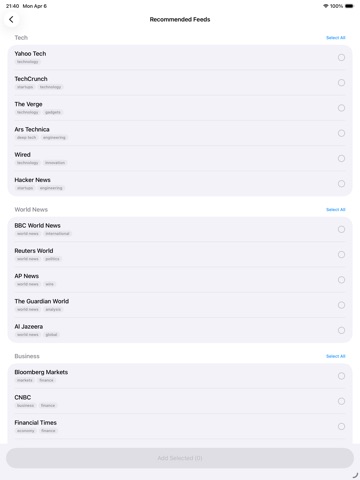
      "notes": "- Improved adding recommended feeds. Recommended sources now open in a dedicated picker, with clearer selection, automatic closing after add, and confirmation once feeds are added. - Swiping to reveal the Remove button on one article card now automatically closes any other card that was previously open, so you only ever see one Remove button at a time - An exposed Remove button on the feed closes itself after 10 seconds of inactivity - Right-aligned primary \"Validate Feed\" button on both onboarding and settings Add Feed pages - Numbered step indicators (1 and 2) in front of Feed URL and Tags section headers - http:// URLs are automatically upgraded to https:// on save - Keyboard now dismisses immediately when you tap Validate Feed - Edit Sources now refreshes automatically after adding feeds via the in-sheet Recommended Feeds picker"
    },
    {
      "store": "apple",
      "version": "1.3.0",
      "released_at": null,
      "notes": "- Filter by Source — New section in the filter sheet lets you view all articles from a single source. - Swipe-to-dismiss polish — Only one row stays open at a time; opening a new swipe closes the previous. - Bug fixes — Stabilized test suite and a small fix where settings changes weren't always reflected immediately after closing the sheet."
    },
    {
      "store": "apple",
      "version": "1.4.3",
      "released_at": null,
      "notes": "- Large widget — Top Picks or Latest headlines on your home screen, configurable by source or tag, refreshing every 15 minutes - Share article — Share button on the article reader with rich text payload and plain text fallback for WhatsApp, Telegram, and other messaging apps - Fixed theme switching to System mode not picking up the device appearance until relaunch - Inline validation on Edit Source — missing tags now highlight the tag input field in red instead of showing an error message - Adopt iOS 26 Liquid Glass button styles across the app - Cleaner Add Feed experience - Faster theme updates when switching to System"
    },
    {
      "store": "apple",
      "version": "1.5.0",
      "released_at": null,
      "notes": "- Faster feed refresh: feeds now fetch in parallel (5 at a time) instead of one after another, so refresh time scales with your slowest feed, not the sum of all of them - Skip-when-unchanged: feeds that report no changes via ETag/Last-Modified return instantly without re-downloading - Smoother article scrolling on first launch: visible thumbnails are pre-warmed so they appear without a flash - Reader opens with the thumbnail already loaded instead of re-downloading it - Reduced UI churn: pull-to-refresh skips a full feed rebuild when nothing changed"
    },
    {
      "store": "apple",
      "version": "1.6.0",
      "released_at": null,
      "notes": "- New: Mute Words — hide articles whose titles contain words or phrases you don't want to see, set under Settings → Reading Experience → Mute Words - Mute Words also apply to the home screen widget - Edit or remove muted entries by swiping a row right-to-left"
    },
    {
      "store": "apple",
      "version": "1.7.0",
      "released_at": null,
      "notes": "Filter by Keyword - show only articles whose title or summary contains a word or phrase you want to follow, set under Settings → Reading Experience → Keywords"
    },
    {
      "store": "apple",
      "version": "1.8.0",
      "released_at": null,
      "notes": "- Import RSS feeds with an OPML file - find it under Add New RSS Feed → OPML File - OPML folders become tags automatically; feeds at the root receive an \"imported\" tag you can rename later in Manage RSS Feeds - Duplicate, unreachable, and unparseable feeds are clearly marked and locked out of the import to avoid surprise \"0 added\" results"
    },
    {
      "store": "apple",
      "version": "1.9.0",
      "released_at": "2026-05-21",
      "notes": "Search in RSS24: - Tap the search button in the bottom bar to quickly find articles from your recent feeds, including stories you’ve already read or dismissed. - Search is fast, private, and runs on your device, so you can re-find what caught your eye without an account, tracking, or a server-side history. OPML Import: - OPML import now has a Select All / Deselect All control on each category in the import preview, so you can choose feeds by group instead of one at a time."
    }
  ],
  "alternatives": [
    {
      "app_id": 6748862650,
      "name": "NiceNews: RSS & Video Reader",
      "url": "https://appcorpus.com/apps/nicenews-rss-video-reader-6748862650",
      "reason": "Same category + similar ratings"
    },
    {
      "app_id": 6746756038,
      "name": "Simplio RSS Reader",
      "url": "https://appcorpus.com/apps/simplio-rss-reader-6746756038",
      "reason": "Same category + similar ratings"
    },
    {
      "app_id": 6758981613,
      "name": "RSS - News & Article Reader",
      "url": "https://appcorpus.com/apps/rss-news-article-reader-6758981613",
      "reason": "Same category + similar ratings"
    },
    {
      "app_id": 6746401622,
      "name": "Hiwe",
      "url": "https://appcorpus.com/apps/hiwe-6746401622",
      "reason": "Same category + similar ratings"
    },
    {
      "app_id": 6762285945,
      "name": "NewsHub - RSS News Reader",
      "url": "https://appcorpus.com/apps/newshub-rss-news-reader-6762285945",
      "reason": "Same category + similar ratings"
    },
    {
      "app_id": 6758023629,
      "name": "Amethyst – RSS & News Reader",
      "url": "https://appcorpus.com/apps/amethyst-rss-news-reader-6758023629",
      "reason": "Same category + similar ratings"
    }
  ],
  "evidence_summary": {
    "index_state": "S1",
    "evidence_level": 1,
    "level_label": "Live store listing",
    "indexable": true,
    "last_verified_at": "2026-08-06",
    "unknown_fields": [
      "Independent summary has not been published yet."
    ],
    "sources": [
      "App Store"
    ]
  },
  "availability_markets": {
    "live": [
      "us"
    ],
    "selected": "es",
    "note": "No LIVE observation for ES yet."
  },
  "feature_events": {
    "events": []
  },
  "features_slice": {
    "plans": [
      {
        "code": "free",
        "label": "Free",
        "kind": "free",
        "status": "inferred",
        "prices": [],
        "trial": null
      }
    ],
    "features": [],
    "unknown_features": [],
    "data_cutoff": "6 Aug 2026"
  }
}