AppCorpus MCP gives your agent current app data, prices, screens, features and sources.
View JSON
GET /api/v3/apps/1099541177
{
  "app_id": 1099541177,
  "canonical_url": "https://appcorpus.com/apps/robyte-remote-for-roku-tv-app-1099541177",
  "identity": {
    "name": "RoByte: Remote for Roku TV App",
    "slug": "robyte-remote-for-roku-tv-app",
    "developer": {
      "name": "Tinybyte Apps LLC",
      "url": "https://appcorpus.com/developers/tinybyte-apps-llc-developer_afe93cae192b7443cf527274c8693503"
    },
    "icon_url": "https://is1-ssl.mzstatic.com/image/thumb/Purple221/v4/c3/a9/96/c3a99601-ab3d-d61e-3c40-13f77d623af0/AppIcon-0-0-1x_U007emarketing-0-11-0-85-220.png/512x512bb.jpg",
    "stores": [
      "apple"
    ],
    "platforms": [
      "iphone",
      "ipad"
    ],
    "status": {
      "state": "active",
      "label": "Active",
      "last_checked": "2026-08-30",
      "last_checked_label": "30 Aug 2026",
      "banner": null,
      "region_note": null
    }
  },
  "listings": [
    {
      "store": "apple",
      "status": "ACTIVE",
      "url": "https://apps.apple.com/us/app/robyte-remote-for-roku-tv-app/id1099541177?uo=4",
      "rating": 4.5,
      "rating_count": 255862,
      "formatted_price": "Free",
      "is_free": true,
      "has_iap": true,
      "has_subscription": false,
      "version": "2.3.1",
      "updated": "2026-08-06",
      "currency": "USD"
    }
  ],
  "summary": {
    "one_liner": null,
    "summary": null,
    "best_for": [],
    "not_for": [],
    "status": "fallback",
    "at_a_glance": [
      "Free to download",
      "In-app purchases"
    ]
  },
  "categories": {
    "official": [
      "Utilities",
      "Entertainment"
    ],
    "appcorpus": [
      {
        "category_id": "utilities",
        "label": "Utilities",
        "url": "https://appcorpus.com/categories/utilities"
      },
      {
        "category_id": "entertainment",
        "label": "Entertainment",
        "url": "https://appcorpus.com/categories/entertainment"
      }
    ]
  },
  "use_cases": [],
  "features": [
    {
      "capability_id": "family_sharing",
      "label": "Family Sharing",
      "availability": "yes",
      "access_level": "unknown",
      "scope": "App Store",
      "evidence": "Store published"
    },
    {
      "capability_id": "free_app",
      "label": "Free app",
      "availability": "yes",
      "access_level": "free",
      "scope": null,
      "evidence": "Store published"
    },
    {
      "capability_id": "in_app_purchases",
      "label": "In-app purchases",
      "availability": "yes",
      "access_level": "free_limited",
      "scope": null,
      "evidence": "Store published"
    }
  ],
  "pricing": [
    {
      "store": "apple",
      "formatted_price": "Free",
      "is_free": true,
      "has_iap": true,
      "has_subscription": false,
      "currency": "USD",
      "market": "us",
      "last_verified": "2026-08-30",
      "rows": [
        "premium feature: Channels — $1.99",
        "premium feature: Keyboard — $0.99",
        "premium feature: Volume+Swipe — $1.99",
        "RoByte Premium — $3.99",
        "RoByte Pro — $2.99",
        "RoByte Pro — $3.99",
        "RoByte Pro — $19.99",
        "RoByte Pro — $23.99"
      ]
    }
  ],
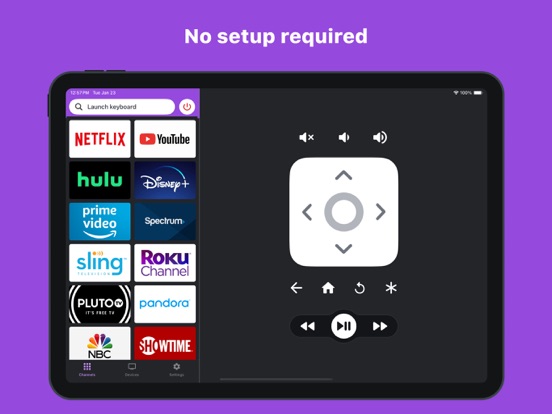
  "screens": [
    {
      "url": "https://is1-ssl.mzstatic.com/image/thumb/PurpleSource126/v4/ef/2f/8a/ef2f8a3a-0dcf-0227-0997-9954b7caa281/675d1dae-3a45-41ab-8e00-752e40e181bd_Remote-iPad.jpg/1600x1600bb.jpg",
      "store": "apple",
      "platform": "ipad",
      "alt": "RoByte: Remote for Roku TV App ipad screenshot 1"
    },
    {
      "url": "https://is1-ssl.mzstatic.com/image/thumb/PurpleSource126/v4/5b/72/85/5b7285f4-c5b1-b40b-fbe1-01384466e7a3/987a13db-32f4-4252-be79-bfe9710f5faa_Devices-iPad.jpg/1600x1600bb.jpg",
      "store": "apple",
      "platform": "ipad",
      "alt": "RoByte: Remote for Roku TV App ipad screenshot 2"
    },
    {
      "url": "https://is1-ssl.mzstatic.com/image/thumb/PurpleSource116/v4/f9/e4/c6/f9e4c612-eefb-1f0c-d589-581b3a669418/58136933-6cac-4875-93dc-7a1b0d0ee821_Remote-iPad.jpg/552x414bb.jpg",
      "store": "apple",
      "platform": "ipad",
      "alt": "RoByte: Remote for Roku TV App ipad screenshot 3"
    },
    {
      "url": "https://is1-ssl.mzstatic.com/image/thumb/PurpleSource116/v4/87/1f/01/871f01f6-3c4d-6fae-5417-415b3f4919f2/1977c6bd-e33b-4e77-a598-c8d6aaa4dd6a_Keyboard-iPad.jpg/1600x1600bb.jpg",
      "store": "apple",
      "platform": "ipad",
      "alt": "RoByte: Remote for Roku TV App ipad screenshot 4"
    },
    {
      "url": "https://is1-ssl.mzstatic.com/image/thumb/PurpleSource116/v4/dc/2d/a5/dc2da5a0-c504-031a-ba2b-08c27e6d3561/0b19f8a4-0c82-410a-802c-79f90ba2cdf3_Devices-iPad.jpg/552x414bb.jpg",
      "store": "apple",
      "platform": "ipad",
      "alt": "RoByte: Remote for Roku TV App ipad screenshot 5"
    },
    {
      "url": "https://is1-ssl.mzstatic.com/image/thumb/PurpleSource116/v4/6d/dc/17/6ddc17d7-daa8-00fa-12ca-c7a8fad158d7/b54d0e7c-f882-415f-9451-65b003ddab66_Keyboard-iPad.jpg/552x414bb.jpg",
      "store": "apple",
      "platform": "ipad",
      "alt": "RoByte: Remote for Roku TV App ipad screenshot 6"
    },
    {
      "url": "https://is1-ssl.mzstatic.com/image/thumb/PurpleSource116/v4/50/f6/fc/50f6fc4c-35f6-7aaa-9b3f-c4507e598f50/cbaeee84-3867-4b5c-8100-6a4abf732070_Remote.jpg/1242x1600bb.jpg",
      "store": "apple",
      "platform": "iphone",
      "alt": "RoByte: Remote for Roku TV App iphone screenshot 7"
    },
    {
      "url": "https://is1-ssl.mzstatic.com/image/thumb/PurpleSource126/v4/96/03/9d/96039d14-82b4-f2a4-e7db-39025388c629/ead51c42-dd30-4a67-94d2-62c61b7d5edb_Channels.jpg/1242x1600bb.jpg",
      "store": "apple",
      "platform": "iphone",
      "alt": "RoByte: Remote for Roku TV App iphone screenshot 8"
    },
    {
      "url": "https://is1-ssl.mzstatic.com/image/thumb/PurpleSource116/v4/0d/db/88/0ddb88b0-1263-ce68-e9e5-e3b7a2d61124/17971986-e7b6-4ecd-bdd2-10c9e8217fd5_Devices.jpg/1242x1600bb.jpg",
      "store": "apple",
      "platform": "iphone",
      "alt": "RoByte: Remote for Roku TV App iphone screenshot 9"
    },
    {
      "url": "https://is1-ssl.mzstatic.com/image/thumb/PurpleSource126/v4/f4/7d/db/f47ddbca-77b5-471a-9fe0-9429e0d08fc2/01a6eb3c-b491-4d89-a4c9-24846be97cf9_Keyboard.jpg/1242x1600bb.jpg",
      "store": "apple",
      "platform": "iphone",
      "alt": "RoByte: Remote for Roku TV App iphone screenshot 10"
    }
  ],
  "ratings": [
    {
      "store": "apple",
      "average": 4.5,
      "count": 255862,
      "market": "us",
      "observed_at": "2026-08-30",
      "reviews": [
        {
          "rating": 5,
          "title": "Great if your kid loses the remote!",
          "body": "This app has saved my sanity SO many times. I've literally gotten to the point where I have to tether the remotes to something to avoid one of my kids losing them. Well, they also know how to un-tether them. So when that happens, not often thank goodness, I can still work the TV's with this app until the remote is found. It's also been good for a chuckle a time or two. I've used it to change channels and pause the tv when someone is watching. They think the TV is possessed or something. LOL! But always good to stop before they start to get mad. 🤪",
          "author": "ScizzorHappy",
          "date": "30 Aug 2026"
        },
        {
          "rating": 3,
          "title": "Disappointed",
          "body": "I was convinced to purchase pro because I thought it would be an awesome upgrade. What I didn’t know is that the volume wouldn’t work even though my roku supports it. Also, if my family uses it, they have to purchase the upgrades themselves, which I can almost understand but it was not clear before the purchase. Further,if I want it on my iPad, I have to purchase the upgrades again, this I can not understand since it is my own device and I have already paid for the upgrades. By far the most disappointing aspect is the difficulty in finding away to contact support. Perhaps some of my issues are fixable however the only way I could find to contact support was through a review. No contact info on the App Store and if you click on app support you get a website with only basic information and still no way to contact the developer. Hopefully we can all get some support and information moving forward.",
          "author": "Skooter63",
          "date": "30 Aug 2026"
        },
        {
          "rating": 1,
          "title": "Don’t waste your money on this app!",
          "body": "I can find no place to contact the developers to report problems. Even their one page website has no contact information. So I’m trying here. This app used to work great. Recent versions of the app have continuous connection problems. I get frequent connect to Wi-Fi errors when my iPhone is already connected. Then it can’t find the Rokus I have even though I’ve hardcoded their IP addresses in the app and confirmed they’re correct. Eventually it does find them after 5 minutes or so. This app never used to do this. I tried deleting it and reinstalling. This did not solve anything but added a new issue. I had bought the pro version of this app years ago when it was just a single one time price not the current subscription model. There is no place for me to enter my old purchase information.",
          "author": "Bob-Ohh",
          "date": "30 Aug 2026"
        },
        {
          "rating": 5,
          "title": "Great concept. Poor execution",
          "body": "When it works, it’s awesome. The problem is that I have to go through complicated reset procedures almost daily. I always get the error message “cannot connect to roku device” After you turn everything off and back on, force close the app, delete the device off your app, and reconnect it, you can then use the feature for a day or two. This is a problem with all of our phones/iPods and all three of our roku devices. You might as well just get up and adjust your volume manually at the tv. It’s less of a hassle.",
          "author": "annoyed typer",
          "date": "30 Aug 2026"
        },
        {
          "rating": 5,
          "title": "great app",
          "body": "has worked great for me so far. i deleted the official roku app because it might be “free” but it’s actually at the cost of mining your data. and selling it to third parties. don’t believe me? go check whatever ad they’re posting and see if it’s not related to something you searched recently on another device. predatory and gross. ROBYTE however is awesome and does not run ads. i think not being able to use the volume for the free version is a small price to pay, and it actually makes me WANT to pay for the subscription because they’re not scummy like the “official” roku app.",
          "author": "over.social.media",
          "date": "30 Aug 2026"
        }
      ]
    }
  ],
  "privacy": [
    {
      "store": "apple",
      "declarations": [
        {
          "title": "Data Not Linked to You",
          "detail": "Analytics — Diagnostics — Crash Data",
          "source": "Developer declared"
        },
        {
          "title": "Data Not Linked to You",
          "detail": "Analytics — Diagnostics — Performance Data",
          "source": "Developer declared"
        },
        {
          "title": "Data Not Linked to You",
          "detail": "Analytics — Usage Data — Product Interaction",
          "source": "Developer declared"
        },
        {
          "title": "Data Not Linked to You",
          "detail": "App Functionality — Diagnostics — Crash Data",
          "source": "Developer declared"
        },
        {
          "title": "Data Not Linked to You",
          "detail": "App Functionality — Diagnostics — Performance Data",
          "source": "Developer declared"
        },
        {
          "title": "Data Not Linked to You",
          "detail": "Product Personalization — Usage Data — Product Interaction",
          "source": "Developer declared"
        },
        {
          "title": "Data Not Linked to You",
          "detail": "Diagnostics",
          "source": "Developer declared"
        },
        {
          "title": "Data Not Linked to You",
          "detail": "Usage Data",
          "source": "Developer declared"
        }
      ],
      "accessibility": []
    }
  ],
  "changes": [
    {
      "store": "apple",
      "version": "2.1.12",
      "released_at": null,
      "notes": "Fixes a bug that sometimes caused the volume feature to work incorrectly."
    },
    {
      "store": "apple",
      "version": "2.1.13",
      "released_at": null,
      "notes": "Bug fixes"
    },
    {
      "store": "apple",
      "version": "2.1.14",
      "released_at": null,
      "notes": "• New Devices page design • Device names are improved • Scanning for devices is improved • New haptic feedback on key presses • General UI improvements • Reduced the download size of the app • Bug fixes"
    },
    {
      "store": "apple",
      "version": "2.1.15",
      "released_at": null,
      "notes": "• New Devices page design • Device names are improved • Scanning for devices is improved • New haptic feedback on key presses • General UI improvements • Reduced the download size of the app • Bug fixes"
    },
    {
      "store": "apple",
      "version": "2.1.16",
      "released_at": null,
      "notes": "• New Devices page design • Device names are improved • Scanning for devices is improved • New haptic feedback on key presses • General UI improvements • Reduced the download size of the app • Bug fixes"
    },
    {
      "store": "apple",
      "version": "2.1.17",
      "released_at": null,
      "notes": "Bug fixes"
    },
    {
      "store": "apple",
      "version": "2.1.18",
      "released_at": null,
      "notes": "Bug fixes"
    },
    {
      "store": "apple",
      "version": "2.1.19",
      "released_at": null,
      "notes": "Bug fixes"
    },
    {
      "store": "apple",
      "version": "2.1.20",
      "released_at": null,
      "notes": "Bug fixes"
    },
    {
      "store": "apple",
      "version": "2.2.0",
      "released_at": null,
      "notes": "Bug fixes"
    },
    {
      "store": "apple",
      "version": "2.2.1",
      "released_at": null,
      "notes": "Fixes an visual issue with the widget"
    },
    {
      "store": "apple",
      "version": "2.2.10",
      "released_at": null,
      "notes": "Fixes an issue where some users weren't able to control their Roku devices."
    },
    {
      "store": "apple",
      "version": "2.2.11",
      "released_at": null,
      "notes": "Bug fixes and stability improvements"
    },
    {
      "store": "apple",
      "version": "2.2.12",
      "released_at": null,
      "notes": "Bug fixes and stability improvements"
    },
    {
      "store": "apple",
      "version": "2.2.13",
      "released_at": null,
      "notes": "Bug fixes and stability improvements"
    },
    {
      "store": "apple",
      "version": "2.2.14",
      "released_at": null,
      "notes": "Bug fixes"
    },
    {
      "store": "apple",
      "version": "2.2.15",
      "released_at": "2026-03-19",
      "notes": "Bug fixes and stability improvements"
    },
    {
      "store": "apple",
      "version": "2.2.2",
      "released_at": null,
      "notes": "• Refreshed remote design • New power and volume buttons for Roku TVs • All new interactive widgets! Now you can control your Roku from your home screen."
    },
    {
      "store": "apple",
      "version": "2.2.3",
      "released_at": null,
      "notes": "• Refreshed remote design • New power and volume buttons for Roku TVs • All new interactive widgets! Now you can control your Roku from your home screen."
    },
    {
      "store": "apple",
      "version": "2.2.4",
      "released_at": null,
      "notes": "• Refreshed remote design • New power and volume buttons for Roku TVs • All new interactive widgets! Now you can control your Roku from your home screen."
    }
  ],
  "alternatives": [
    {
      "app_id": 6450893675,
      "name": "Remote Control for Roku TV ◦",
      "url": "https://appcorpus.com/apps/remote-control-for-roku-tv-6450893675",
      "reason": "Same category + similar ratings"
    },
    {
      "app_id": 1373781810,
      "name": "Universal remote for Roku tv",
      "url": "https://appcorpus.com/apps/universal-remote-for-roku-tv-1373781810",
      "reason": "Same category + similar ratings"
    },
    {
      "app_id": 1658640524,
      "name": "Remoku - Remote Controller",
      "url": "https://appcorpus.com/apps/remoku-remote-controller-1658640524",
      "reason": "Same category + similar ratings"
    },
    {
      "app_id": 1016562846,
      "name": "Rokie - Remote for Roku Player",
      "url": "https://appcorpus.com/apps/rokie-remote-for-roku-player-1016562846",
      "reason": "Same category + similar ratings"
    },
    {
      "app_id": 6471626032,
      "name": "TV Remote for Roku ·",
      "url": "https://appcorpus.com/apps/tv-remote-for-roku-6471626032",
      "reason": "Same category + similar ratings"
    }
  ],
  "evidence_summary": {
    "index_state": "S1",
    "evidence_level": 1,
    "level_label": "Live store listing",
    "indexable": true,
    "last_verified_at": "2026-08-30",
    "unknown_fields": [
      "Independent summary has not been published yet."
    ],
    "sources": [
      "App Store"
    ]
  },
  "availability_markets": {
    "live": [
      "us"
    ],
    "selected": "us",
    "note": null
  },
  "feature_events": {
    "events": [
      {
        "type": "major_update",
        "occurred_at": "2026-07-31 18:03:00.712122+00:00",
        "plan_code": null,
        "capability_id": null,
        "previous": {},
        "current": {},
        "scope": {
          "store_id": "apple",
          "change_id": "change_1ffcb0c222900b06bd7db9213174289c",
          "storefront_id": "us"
        },
        "source": "store_diff"
      }
    ]
  },
  "features_slice": {
    "plans": [
      {
        "code": "premium-feature-channels",
        "label": "premium feature: Channels",
        "kind": "unknown",
        "status": "store_listed",
        "prices": [
          {
            "storefront": "us",
            "formatted": "$1.99",
            "billing_period": null
          }
        ],
        "trial": null
      },
      {
        "code": "premium-feature-keyboard",
        "label": "premium feature: Keyboard",
        "kind": "unknown",
        "status": "store_listed",
        "prices": [
          {
            "storefront": "us",
            "formatted": "$0.99",
            "billing_period": null
          }
        ],
        "trial": null
      },
      {
        "code": "premium-feature-volume-swipe",
        "label": "premium feature: Volume+Swipe",
        "kind": "unknown",
        "status": "store_listed",
        "prices": [
          {
            "storefront": "us",
            "formatted": "$1.99",
            "billing_period": null
          }
        ],
        "trial": null
      },
      {
        "code": "premium",
        "label": "RoByte Premium",
        "kind": "unknown",
        "status": "store_listed",
        "prices": [
          {
            "storefront": "us",
            "formatted": "$3.99",
            "billing_period": null
          }
        ],
        "trial": null
      },
      {
        "code": "pro",
        "label": "RoByte Pro",
        "kind": "unknown",
        "status": "store_listed",
        "prices": [
          {
            "storefront": "us",
            "formatted": "$19.99",
            "billing_period": null
          },
          {
            "storefront": "us",
            "formatted": "$23.99",
            "billing_period": null
          },
          {
            "storefront": "us",
            "formatted": "$2.99",
            "billing_period": null
          },
          {
            "storefront": "us",
            "formatted": "$3.99",
            "billing_period": null
          }
        ],
        "trial": null
      }
    ],
    "features": [],
    "unknown_features": [
      "family_sharing"
    ],
    "data_cutoff": "30 Aug 2026"
  }
}