
Quick verdict
- What it is
- Store information collected; independent summary not yet available.
- At a glance
-
- From $6.99/mo
- Free to download
- In-app purchases
Categories and search queries
Official categories
- Developer Tools
- Utilities
AppCorpus categories
Key functions
| Function | Availability | Access | Scope | Evidence |
|---|---|---|---|---|
| Free app | Yes | Free | — | Store published |
| In-app purchases | Yes | Limited free | — | Store published |
Screens
App Store
18 store screenshots

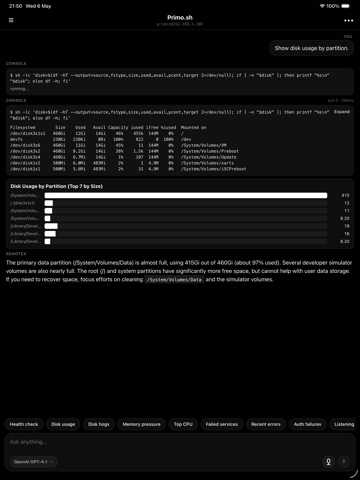

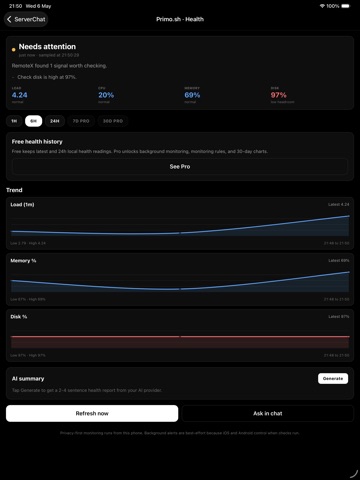
Pricing & paywalls
App Store
Shown for US
- RemoteX Pro Monthly — $6.99/month
- RemoteX Pro Monthly — $59.99/year ($4.99/mo)
Ratings & reviews
App Store
Shown for US
No store reviews collected for App Store · DE
Privacy & accessibility
App Store
Privacy
- Data Linked to You — Analytics — Diagnostics — Crash Data Developer declared
- Data Linked to You — Analytics — Purchases — Purchase History Developer declared
- Data Linked to You — Analytics — Usage Data — Product Interaction Developer declared
- Data Linked to You — App Functionality — Contact Info — Email Address Developer declared
- Data Linked to You — App Functionality — Diagnostics — Crash Data Developer declared
- Data Linked to You — App Functionality — Diagnostics — Performance Data Developer declared
- Data Linked to You — App Functionality — Identifiers — User ID Developer declared
- Data Linked to You — App Functionality — Purchases — Purchase History Developer declared
- Data Linked to You — App Functionality — Usage Data — Product Interaction Developer declared
- Data Linked to You — App Functionality — User Content — Other User Content Developer declared
- Data Linked to You — Contact Info Developer declared
- Data Linked to You — Diagnostics Developer declared
- Data Linked to You — Identifiers Developer declared
- Data Linked to You — Purchases Developer declared
- Data Linked to You — Usage Data Developer declared
- Data Linked to You — User Content Developer declared
Accessibility
No accessibility labels collected yet.
Versions
App Store
- 1.0
-
1.2.0
RemoteX 1.2.0 adds Library, AI authoring, smarter alerts, and faster navigation. Save reusable Snippets and Playbooks in the new Library. Snippets capture common diagnostic intents, while Playbooks let you run multi-step server routines from chat. Create alerts and workflows with plain English. Describe what you want, like “warn me if disk usage stays above 85% for 10 minutes” or “redeploy node app,” and RemoteX turns it into a deterministic rule or step list using your AI provider. Chat now supports @-mentions for Snippets and Playbooks, so your saved actions are always close at hand. Alerts are smarter too. Attach a Snippet or Playbook to a monitoring rule, and RemoteX can suggest the linked action when the alert fires. Files are easier to work with: browse remote and local files as a tree, preview code with syntax highlighting and line numbers, and copy file contents quickly. This release also adds global search across servers, chats, Snippets, and Playbooks; cleaner server-focused navigation; and one Pro subscription across iOS, Android, and Mac.
-
1.2.1
What’s New in 1.2.1 - Fixed chat Stop button behavior so active runs stop cleanly and command cards no longer stay stuck on “running”. - Improved retry handling for failed AI provider and connection errors. - Added protection against accidentally sending the same prompt twice while a run is already active. - Added image attachments in chat with preview/removal and vision-model checks. - Added smarter chat titles from the first user question. - Improved provider quota/rate-limit messages for Gemini, GitHub Copilot, and other AI providers. - Improved GitHub Copilot sign-in reliability and rate-limit handling. - Refined command output cards and activity summaries for a cleaner chat experience. - Fixed several dark-mode chat polish issues and small stability bugs.
-
1.2.10
· 5 Jul 2026
New in RemoteX 1.2.10: - Added a mobile SSH Shell screen with one-off commands, saved command receipts, recent command history, and an optional interactive terminal. - Improved approval, activity, and command output flows so read-only work stays cleaner and write actions produce clearer receipts. - Added mobile skill improvements, including imported skill support and removing imported skills. - Improved review/diff handling for changed files. - Fixed stale waiting states, chat scroll behavior, shell lifecycle issues, and several mobile stability/polish problems.
-
1.2.2
• Add a server from anywhere — the menu, the sidebar, or right inside a chat. • Clearer Free vs Pro: you always see what's included and how to upgrade. • Monitoring rules beyond the Free limit now show a clear "Paused" state instead of quietly not running. • Reliability and polish across chat, snippets, and playbooks.
-
1.2.3
RemoteX 1.2.3 adds a more capable chat workflow for server operations. What’s new: - Plan mode: ask RemoteX to propose steps first, approve or reject them, then watch progress as each step runs. - Summarize chat: create a quick recap of the current conversation. - Local memory: Pro users can save useful server conversations locally and recall matching context in future chats. - Improved composer actions: Plan mode, files, summarize, memorize, and server actions are easier to reach from the chat input. - Archived chats: archived conversations can now be restored or deleted from Storage & Data. - Monitoring improvements: rule events are visible, with smoother activity and command rollups. - Better server drawer polish, including open/closed folder icons and clearer server state. - Multiple reliability and UI fixes around plan progress, chat actions, memory, and command display.
-
1.2.4
New Pro & trusted-device support: • Improved Pro status, pairing, and restore flows • Privacy-friendly license checks and anonymous app health stats
-
1.2.6
What's New Kubernetes & Databases • Add Kubernetes clusters via kubeconfig — list resources, read pod logs, propose kubectl actions through the same Face-ID approval card SSH uses. • Add Postgres, MySQL, SQLite, and Redis as connections. List schemas, sample rows, run read-only queries, EXPLAIN — all with row and timeout caps. • Reach private clusters or databases through a saved SSH server as a bastion. RemoteX opens the tunnel, rewrites the kubeconfig server URL, and overrides TLS SNI so client certs still verify. File Attachments • Attach PDF, Excel, Word, PowerPoint, CSV, JSON, YAML, logs, or code straight into chat. Each file shows as a labelled chip; the model reads the contents alongside your question. • Tap a file in the remote tree to send it to chat or save to the Files app. Smarter Agent • When a database lives on the same host as your SSH server, the agent knows they're related — shell questions go to the host, queries go to the database. • Approval cards show "Target · via bastion" when the action will pass through a tunnel, so it's unambiguous which physical machine the command touches. • System prompt no longer leaks internal headers when asked vague questions like "what is this?" Less Friction • AI provider keys no longer prompt Face ID on every message. App-lock + the per-mutation biometric are enough. • Home screen has a proper Settings gear icon (top-right). • Remote file tree opens folders on the first tap, not the second. • Kubeconfigs that use client certificates, exec credentials, token files, or auth providers now parse correctly. • Cold start no longer keeps connections locked until you pull-to-refresh. • Keyboard gap when typing is gone. • Read-only badge is green on both light and dark mode (was blue on light). Encrypted Backups • .rxbackup files round-trip database connections and credentials across Mac and mobile alongside SSH and Kubernetes. • Restoring a backup no longer re-introduces per-message Face ID on the imported AI keys. Connection Pinning • SSH host-key pins now lock the key algorithm. A swapped server-key algorithm is treated as a host change instead of silently accepted.
-
1.2.7
Faster, quieter sync. • iCloud sync no longer blocks the app on launch or when returning from the background • Opening a chat or server now pulls the latest from your Mac instantly • Large syncs merge in the background without freezing the UI • Fixed a crash when expanding command outputs right after a sync • Per-screen reload — only the screen you're looking at refreshes
-
1.2.8
This update makes iCloud sync rock-solid, especially on large workspaces: • Sync no longer freezes the app or makes your phone run hot — your devices stay in sync without re-doing work in the background. • Sync stays out of your way: it pauses while the agent is working, and the "Syncing with iCloud" notice now only appears for the first-time import on a new device, not every routine sync. • Faster reconnect to your synced workspace after reopening the app. Also fixed: • The model and reasoning-effort controls in the chat box now wrap to two lines, so every label is readable on narrower phones. • Changing the reasoning-effort level updates instantly. • A new chat shows its auto-generated name right away in the server list. • "Erase all local data" now fully clears everything.
Alternatives
- CosmoRemote AI Control — Same category + similar ratings
- Salamander AI — Same category + similar ratings
- xInfra: SNMP | SSH | Telnet — Same category + similar ratings
- Lody - Run Code Agent Anywhere — Same category + similar ratings
- Termify - AI SSH Terminal — Same category + similar ratings
- SSH Terminator — Same category + similar ratings
Availability by market
- US
Data quality & evidence
- Page completeness
- Live store listing
- Last verified
- 7 Aug 2026
- Sources
- App Store
- Independent summary has not been published yet.