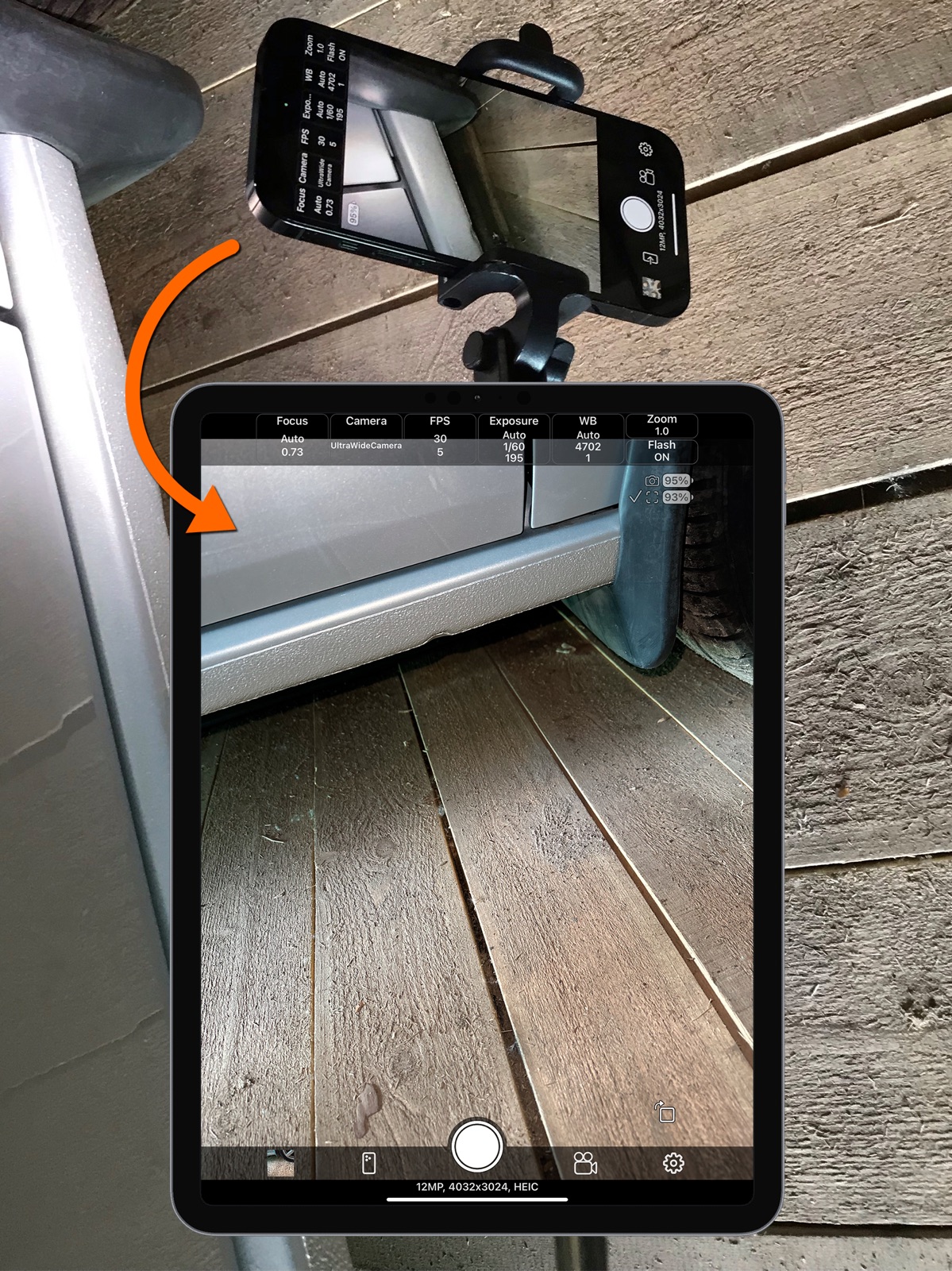
Apoku MCP provides app discovery, detailed cards, evidence, sources and screenshots where available. Unknown or conflicting prices stay explicit.
View JSON
GET /api/v3/apps/6470156115
{
  "app_id": 6470156115,
  "canonical_url": "https://appcorpus.com/apps/remote-camera-control-via-air-6470156115",
  "identity": {
    "name": "Remote Camera Control via Air",
    "slug": "remote-camera-control-via-air",
    "developer": {
      "name": "Dmitriy Kharutskiy",
      "url": "https://appcorpus.com/developers/dmitriy-kharutskiy-developer_bf5e9b8d475f05a2c795bfb8fce4b416"
    },
    "icon_url": "https://is1-ssl.mzstatic.com/image/thumb/Purple211/v4/af/41/45/af4145a3-ca7e-11fb-b495-ae417731cecd/AppIcon__U0028Gradient_U0029-0-0-1x_U007epad-0-0-0-1-0-0-85-220.png/512x512bb.jpg",
    "stores": [
      "apple"
    ],
    "platforms": [
      "iphone",
      "ipad"
    ],
    "status": {
      "state": "active",
      "label": "Active",
      "last_checked": "2026-08-05",
      "last_checked_label": "5 Aug 2026",
      "banner": null,
      "region_note": null,
      "data_state": "stale",
      "data_state_label": "Some store data may be out of date"
    }
  },
  "listings": [
    {
      "store": "apple",
      "status": "ACTIVE",
      "url": "https://apps.apple.com/us/app/remote-camera-control-via-air/id6470156115?uo=4",
      "rating": 4.0,
      "rating_count": 22,
      "formatted_price": "Free",
      "is_free": true,
      "has_iap": true,
      "has_subscription": null,
      "version": "2.5",
      "updated": "2026-08-05",
      "currency": "USD"
    }
  ],
  "summary": {
    "one_liner": null,
    "summary": null,
    "best_for": [],
    "not_for": [],
    "status": "fallback",
    "at_a_glance": [
      "Free to download",
      "In-app purchases"
    ]
  },
  "categories": {
    "official": [
      "Photo & Video",
      "Utilities"
    ],
    "appcorpus": [
      {
        "category_id": "photo-video",
        "label": "Photo & video",
        "url": "https://appcorpus.com/categories/photo-video"
      },
      {
        "category_id": "utilities",
        "label": "Utilities",
        "url": "https://appcorpus.com/categories/utilities"
      }
    ]
  },
  "use_cases": [],
  "features": [
    {
      "capability_id": "free_app",
      "label": "Free app",
      "availability": "yes",
      "access_level": "free",
      "scope": null,
      "evidence": "Store published"
    },
    {
      "capability_id": "in_app_purchases",
      "label": "In-app purchases",
      "availability": "yes",
      "access_level": "free_limited",
      "scope": null,
      "evidence": "Store published"
    }
  ],
  "pricing": [
    {
      "store": "apple",
      "formatted_price": "Free",
      "is_free": true,
      "has_iap": true,
      "has_subscription": null,
      "currency": "USD",
      "market": "us",
      "last_verified": "2026-08-05",
      "rows": [
        "Full version — $2.99"
      ],
      "state": "current"
    }
  ],
  "screens": [
    {
      "url": "https://is1-ssl.mzstatic.com/image/thumb/PurpleSource211/v4/f2/44/64/f244640f-01ee-c92b-9e9a-fffa00a538b4/13-1.png/1600x1600bb.jpg",
      "store": "apple",
      "platform": "ipad",
      "alt": "Remote Camera Control via Air ipad screenshot 1"
    },
    {
      "url": "https://is1-ssl.mzstatic.com/image/thumb/PurpleSource221/v4/8c/25/83/8c258369-18ae-f3ef-1305-b903a6d8e43e/13-2.png/1600x1600bb.jpg",
      "store": "apple",
      "platform": "ipad",
      "alt": "Remote Camera Control via Air ipad screenshot 2"
    },
    {
      "url": "https://is1-ssl.mzstatic.com/image/thumb/PurpleSource221/v4/6c/9a/e1/6c9ae1bf-3aaf-4102-3e3c-26de01c30a11/13-3.png/1600x1600bb.jpg",
      "store": "apple",
      "platform": "ipad",
      "alt": "Remote Camera Control via Air ipad screenshot 3"
    },
    {
      "url": "https://is1-ssl.mzstatic.com/image/thumb/PurpleSource211/v4/51/1c/3f/511c3f82-ba69-b968-bf16-c4594dbeffcb/13-4.png/1600x1600bb.jpg",
      "store": "apple",
      "platform": "ipad",
      "alt": "Remote Camera Control via Air ipad screenshot 4"
    },
    {
      "url": "https://is1-ssl.mzstatic.com/image/thumb/PurpleSource211/v4/19/fa/2c/19fa2cd5-1c42-0dbd-5c33-b1c4621508d1/13-5.png/1600x1600bb.jpg",
      "store": "apple",
      "platform": "ipad",
      "alt": "Remote Camera Control via Air ipad screenshot 5"
    },
    {
      "url": "https://is1-ssl.mzstatic.com/image/thumb/PurpleSource221/v4/e2/80/e1/e280e112-0498-dad8-c1e8-ecec4de4ae8c/13-6.png/1600x1600bb.jpg",
      "store": "apple",
      "platform": "ipad",
      "alt": "Remote Camera Control via Air ipad screenshot 6"
    },
    {
      "url": "https://is1-ssl.mzstatic.com/image/thumb/PurpleSource221/v4/ab/38/6e/ab386e77-4215-04a5-ac39-ec720870886a/13-7.png/1600x1600bb.jpg",
      "store": "apple",
      "platform": "ipad",
      "alt": "Remote Camera Control via Air ipad screenshot 7"
    },
    {
      "url": "https://is1-ssl.mzstatic.com/image/thumb/PurpleSource221/v4/be/64/14/be64145b-8e2f-1df0-2c6d-9f5d28254be7/13-8.png/1600x1600bb.jpg",
      "store": "apple",
      "platform": "ipad",
      "alt": "Remote Camera Control via Air ipad screenshot 8"
    },
    {
      "url": "https://is1-ssl.mzstatic.com/image/thumb/PurpleSource211/v4/71/81/d7/7181d76f-4eab-0d65-a11e-0e2e738b8983/6.5-1.png/1284x1600bb.jpg",
      "store": "apple",
      "platform": "iphone",
      "alt": "Remote Camera Control via Air iphone screenshot 9"
    },
    {
      "url": "https://is1-ssl.mzstatic.com/image/thumb/PurpleSource211/v4/56/37/ac/5637ac54-4ae3-49aa-aeb2-42575da569dc/6.5-2.png/1284x1600bb.jpg",
      "store": "apple",
      "platform": "iphone",
      "alt": "Remote Camera Control via Air iphone screenshot 10"
    },
    {
      "url": "https://is1-ssl.mzstatic.com/image/thumb/PurpleSource221/v4/75/e3/ce/75e3cef5-eda3-e07d-504a-6dd50d3d6613/6.5-3.png/1284x1600bb.jpg",
      "store": "apple",
      "platform": "iphone",
      "alt": "Remote Camera Control via Air iphone screenshot 11"
    },
    {
      "url": "https://is1-ssl.mzstatic.com/image/thumb/PurpleSource211/v4/24/76/ab/2476aba7-6f82-cf65-08e6-d35c31b01e4b/6.5-4.png/1284x1600bb.jpg",
      "store": "apple",
      "platform": "iphone",
      "alt": "Remote Camera Control via Air iphone screenshot 12"
    },
    {
      "url": "https://is1-ssl.mzstatic.com/image/thumb/PurpleSource221/v4/e2/e7/8c/e2e78c6c-9b86-5d9f-c574-e028dda29d6c/6.5-5.png/1284x1600bb.jpg",
      "store": "apple",
      "platform": "iphone",
      "alt": "Remote Camera Control via Air iphone screenshot 13"
    },
    {
      "url": "https://is1-ssl.mzstatic.com/image/thumb/PurpleSource211/v4/03/b4/3a/03b43aa6-dbfd-84ba-8dcc-0dad9a9adb1e/6.5-6.png/1284x1600bb.jpg",
      "store": "apple",
      "platform": "iphone",
      "alt": "Remote Camera Control via Air iphone screenshot 14"
    },
    {
      "url": "https://is1-ssl.mzstatic.com/image/thumb/PurpleSource211/v4/37/52/cf/3752cf66-b4ca-32c9-3d94-2d04c0779e45/6.5-7.png/1284x1600bb.jpg",
      "store": "apple",
      "platform": "iphone",
      "alt": "Remote Camera Control via Air iphone screenshot 15"
    },
    {
      "url": "https://is1-ssl.mzstatic.com/image/thumb/PurpleSource221/v4/06/4b/eb/064bebde-5744-390a-2c5a-1cb644857b7e/6.5-8.png/1284x1600bb.jpg",
      "store": "apple",
      "platform": "iphone",
      "alt": "Remote Camera Control via Air iphone screenshot 16"
    },
    {
      "url": "https://is1-ssl.mzstatic.com/image/thumb/PurpleSource211/v4/ed/4c/e5/ed4ce52a-961d-3de3-443c-176e6f94d136/6.5-9.png/1284x1600bb.jpg",
      "store": "apple",
      "platform": "iphone",
      "alt": "Remote Camera Control via Air iphone screenshot 17"
    },
    {
      "url": "https://is1-ssl.mzstatic.com/image/thumb/PurpleSource221/v4/3a/0a/a6/3a0aa636-a9ef-e8cd-4c2a-248b147fdd41/6.5-10.png/1284x1600bb.jpg",
      "store": "apple",
      "platform": "iphone",
      "alt": "Remote Camera Control via Air iphone screenshot 18"
    }
  ],
  "data_states": {
    "screens": "current"
  },
  "ratings": [
    {
      "store": "apple",
      "average": 4.0,
      "count": 22,
      "market": "us",
      "observed_at": "2026-08-05",
      "state": "current",
      "reviews": [
        {
          "rating": 5,
          "title": "Must Have for Newtonian Telescope",
          "body": "This app is perfect for using while collimating newtonian telescopes. The image overlay and the ability to adjust focus and zoom lets you use this app and your existing phone to replace a multi-hundred dollar alinement camera. I would recommend that you get a phone holder to keep your camera in line with the imaging plane. I have not tried the remote capability yet, but it is perhaps worth ft for adjusting larger scopes to see real time what you are doing without moving back and forth to the eyepiece. I don’t normally rate app, but this one is too useful to not. If you have no idea what i mean when I say “collimating a newtonian,” but you need a app that gives you the option of manual control over you phone camera, then this app is the one for you.",
          "author": "2737428/7:!,82!.81!,!:8/!!3&&",
          "date": "5 Aug 2026"
        },
        {
          "rating": 5,
          "title": "Photos for Charity Auction",
          "body": "An organization that I volunteer for has on-line auctions for fund raisers. I photograph the donated items in a tiny room without professional looking backdrops or lighting. I attached a phone tripod mount adapter where the light was on a junk swing arm lamp. Voila! Steady arm with a camera in position. The Remote Camera Via Air Control allowed me to use my iPad to finish setting up the shots being taken by my iPhone attached to the swing arm perfectly. Yes you do see everything in the shot on the iPad but it's the iPhone doing the work. Love it! I had bought another app called CameraRemote to do this job. It was just a glorified remote button. Could not see a thing from iPad.",
          "author": "daDisplacedYooper",
          "date": "5 Aug 2026"
        },
        {
          "rating": 5,
          "title": "Fixed!!",
          "body": "I love this app. When I first installed it, the camera up button did not work for taking a picture. I wrote the developer he replied and fixed it the next day.. It was difficult to hit the camera button while holding the phone behind your back but now you can simply use the volume up button.",
          "author": "Rick_Ben",
          "date": "5 Aug 2026"
        },
        {
          "rating": 5,
          "title": "Professional utility at consumer price",
          "body": "Great remote for your iPhone! Provides all the needed utility to get your new/old iPhones into a remote photo tool. Perfect for consumers or professionals. Simple, effective design by a software developer who listens to your suggestions! I have been in media production for over 40 years and truly appreciate this app. Well done! Worth X3 what you charge.",
          "author": "PJWSTL",
          "date": "5 Aug 2026"
        },
        {
          "rating": 5,
          "title": "It Works Perfectly",
          "body": "I wanted a way to view my iPhone camera image on my iPad mini as it’s a larger screen. I tried several other apps but each of them were either buggy or not simple to use. This app works perfectly, it’s simple to use, it’s extremely inexpensive, and it has solved my problem. Great app.",
          "author": "mmarcus999",
          "date": "5 Aug 2026"
        }
      ]
    }
  ],
  "privacy": [
    {
      "store": "apple",
      "declarations": [
        {
          "title": "Data Not Collected",
          "detail": "",
          "source": "Developer declared"
        }
      ],
      "accessibility": []
    }
  ],
  "changes": [
    {
      "store": "apple",
      "version": "1.0",
      "released_at": null,
      "notes": ""
    },
    {
      "store": "apple",
      "version": "1.1",
      "released_at": null,
      "notes": "• Saving settings. • Grid. • Deleting photos and videos. • Other small improvements."
    },
    {
      "store": "apple",
      "version": "1.1.1",
      "released_at": null,
      "notes": "• Control using volume buttons or \"shutter\" remote control button. • Bug fixes."
    },
    {
      "store": "apple",
      "version": "1.2",
      "released_at": null,
      "notes": "• Pause video recording. • Opening saved camera settings when recording video. But if the saved settings have a different video format, the video format will not change. • Increased the maximum possible frame sending rate. • Timer. • Photo overlay. • Disable display of the image on the device acting as a camera. • Mirror flip of the image on the device acting as a screen. • Bug fixes."
    },
    {
      "store": "apple",
      "version": "2.0",
      "released_at": null,
      "notes": "• Saving photos in TIFF, PNG, Apple ProRAW formats (if supported by the device). • Various grid options, including the ability to display your own PNG grid file. PNG file must have a transparent background. • A series of photos with a custom time interval between photos and the number of photos in the series. • Averaging a series of frames to remove moving objects. • Selecting where to save photos and videos. In the photo library of the \"Photos\" app. In the folder of this app or any other app that has a folder in the \"Files\" app. On an external drive connected to the iPhone/iPad, while the external drive can be encrypted. You can even record video to an external drive, but for this, the write speed to the external drive must be high enough. When saving to something other than the photo library of the \"Photos\" app, you can create and change subfolders for saving within the already selected location for saving photos and videos. Use the text input field \"Subfolder for saving\". Using the \"/\" symbol, you can write several nested folders. For example: \"Subfolder/Subsubfolder/SubSubSubfolder/\". The nesting level of folders is not limited. • Customize the file name when saving to something other than the photo library in the \"Photos\" app. Sequence number, date and time, prefix, suffix. • Offset for auto exposure. • Default device role. • Now when you lock the camera settings with one button, the focus is not locked. • Full support for iPad. • Bug fixes."
    },
    {
      "store": "apple",
      "version": "2.1",
      "released_at": null,
      "notes": "• Time-lapse video. • Cinematic video stabilization. • Camera focus on touch. • Diagonal grid. • Hide camera settings panel. • Stretch image to full screen for iPad. • Silent mode. • Easily enable slow motion video recording. • Bug fixes."
    },
    {
      "store": "apple",
      "version": "2.2",
      "released_at": null,
      "notes": "• Viewing photos and videos on a device that acts as a screen. • Capturing photos in video recording mode. With the dimensions of the selected video format. • Indication of the video stabilization mode, which takes into account the support of stabilization by the selected video format. • Bug fixes."
    },
    {
      "store": "apple",
      "version": "2.2.1",
      "released_at": null,
      "notes": "• Bug fixes."
    },
    {
      "store": "apple",
      "version": "2.3",
      "released_at": null,
      "notes": "• Using the device's camera when the same device acts as a screen. • Taking photos at 48 MP resolution. If the device has cameras that support this resolution. • Selecting the thickness of the grid lines. • Bug fixes."
    },
    {
      "store": "apple",
      "version": "2.4",
      "released_at": null,
      "notes": "• Adaptation to windowed apps mode on iPad. • Adjustable offset grid image for your own grid PNG file. • The ability to enable indication of a taken photo by briefly turning the flash on or off immediately after taking the photo."
    },
    {
      "store": "apple",
      "version": "2.4.1",
      "released_at": null,
      "notes": "• Bug fixes."
    },
    {
      "store": "apple",
      "version": "2.4.2",
      "released_at": null,
      "notes": "• Bug fixes."
    },
    {
      "store": "apple",
      "version": "2.4.3",
      "released_at": null,
      "notes": "• Bug fixes."
    },
    {
      "store": "apple",
      "version": "2.4.4",
      "released_at": null,
      "notes": "• Bug fixes."
    },
    {
      "store": "apple",
      "version": "2.5",
      "released_at": "2026-04-23",
      "notes": "• Interface rotation lock. • Reconnect button when connection is lost. • Option to enable keeping enabled functions when restarting the app."
    }
  ],
  "alternatives": [
    {
      "app_id": 538378035,
      "name": "Camera for Stop Motion Studio",
      "url": "https://appcorpus.com/apps/camera-for-stop-motion-studio-538378035",
      "reason": "Same category + similar ratings"
    }
  ],
  "evidence_summary": {
    "index_state": "S1",
    "evidence_level": 1,
    "level_label": "Live store listing",
    "indexable": true,
    "last_verified_at": "2026-08-05",
    "unknown_fields": [
      "Apoku editorial summary has not been published yet."
    ],
    "sources": [
      "App Store"
    ]
  },
  "availability_markets": {
    "live": [
      "us"
    ],
    "selected": "us",
    "note": null
  },
  "feature_events": {
    "events": []
  },
  "features_slice": {
    "plans": [
      {
        "code": "full-version",
        "label": "Full version",
        "kind": "unknown",
        "status": "store_listed",
        "prices": [
          {
            "storefront": "us",
            "formatted": "$2.99",
            "billing_period": null,
            "scope_status": "scoped",
            "market_mismatch": false,
            "source_market": "us",
            "observed_at": "2026-08-05 23:07:06.955684+00:00"
          }
        ],
        "trial": null
      }
    ],
    "features": [],
    "unknown_features": [],
    "data_cutoff": "5 Aug 2026"
  }
}