
Quick verdict
- What it is
- Store information collected; an Apoku editorial summary is not yet published.
- At a glance
-
- Free to download
- In-app purchases
Categories and search queries
Official categories
- Developer Tools
- Utilities
Apoku categories
Key functions
| Function | Availability | Access | Scope | Evidence |
|---|---|---|---|---|
| Free app | Yes | Free | Context-specific | Store published |
| In-app purchases | Yes | Limited free | Context-specific | Store published |
| Family Sharing | Unknown | Unknown | Scope unknown | Store published |
Screens
App Store
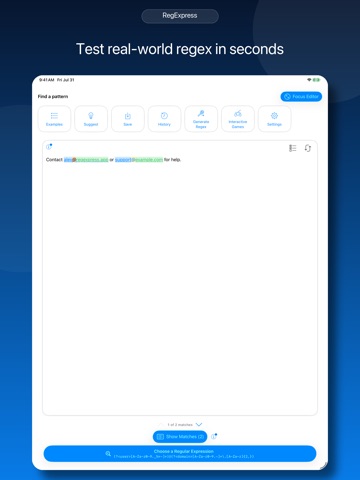
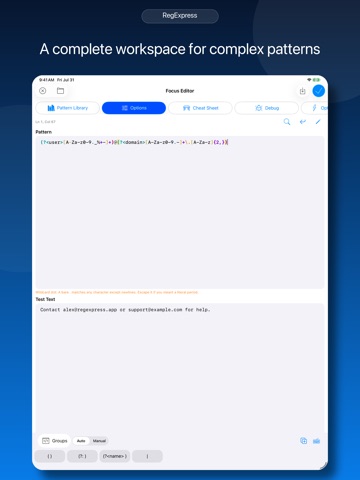
40 store screenshots


Pricing & paywalls
App Store
- RegExpress Pro — $4.99
Ratings & reviews
App Store
-
1/5The tutorial itself is unfinished and baffling
The app looks like it has really cool features but the text of the menus and reference material uses layouts that actually look incomplete or broken, making me doubt the reliability of every thing else, unfortunately.
Infideluxe · 6 Aug 2026
Privacy & accessibility
App Store
Privacy
- Data Not Collected Developer declared
Accessibility
No accessibility labels collected yet.
Versions
App Store
- 1.0
-
2.0
- iCloud sync implementation - Favorites system - Folders and organization - Complete tutorial path (beginner → advanced) - Interactive exercises with validation - Progress tracking - Comprehensive reference guide - Syntax highlighting improvements - Enhanced capture group visualization - Search & replace functionality with live preview
-
3.0
- Examples modal - Regex Reference Guide close button from text to image - iCloud sync implementation - Favorites system - Folders and organization - Switch to Swift RegEx only and removed Javascript - Pattern optimization suggestions - Performance metrics and analysis - Pattern debugging visualization - Component-based pattern constructor - Pattern recommendations based on input - Redesigned UI
-
3.01
- Bug fixes - Removed iCloud
-
4
RegExpress 4.0 is here with our biggest update yet! We're introducing RegExpress Pro to support ongoing development while keeping core features free for everyone. NEW PRO FEATURES: • Visual Debug Mode - See exactly how your regex executes step-by-step. Watch patterns match character by character and understand why matches succeed or fail. • Performance Analyzer - Track execution times, identify slow patterns, and get optimization suggestions to prevent performance bottlenecks in your applications. • Pattern Optimizer - Receive intelligent recommendations to improve your regex patterns for better performance and readability. • Smart Pattern Search - Find patterns instantly with full-text search across names, descriptions, and regex content. Filter by folders, dates, and regex flags with search history. • Unlimited Pattern Library - Save unlimited patterns and organize them in folders. Free users can save up to 5 patterns. • Advanced Learning Paths - Master complex regex concepts with our expanded tutorial system featuring structured modules and interactive exercises. • Export & Import - Share pattern libraries across devices and with teammates using JSON, CSV, or plain text formats. • Pattern Constructor - Build complex patterns visually with our guided pattern creation tool. WHAT STAYS FREE: • Core regex testing and matching • Pattern highlighting and syntax help • Basic tutorials and learning tools • Common regex options and flags • Save up to 5 patterns ENHANCED EXPERIENCE: • Redesigned Settings with better organization • Improved folder management and navigation • Enhanced pattern recommendations • Better error handling and user feedback • Performance improvements throughout the app DEVELOPER FOCUSED: RegExpress Pro is designed for developers who need professional regex tools. Whether you're debugging complex patterns, optimizing performance-critical code, or teaching regex concepts to your team, Pro features save hours of development time. SEAMLESS TRANSITION: All existing users can continue using core features for free. Pro features enhance your workflow without disrupting your current patterns or workflows. LAUNCH SPECIAL: Get RegExpress Pro for just $3.99 - professional regex tools that pay for themselves with the first pattern you debug or optimize. Your support helps us continue building the best regex development tool for iOS. Thank you for being part of the RegExpress community!
-
4.01
- Bug fixes
-
4.5
Welcome to RegExpress v4.5 - our most significant update yet! This major release brings groundbreaking performance improvements, enhanced accessibility, and powerful new features. Performance Revolution Experience lightning-fast regex testing with our new compilation caching system. Patterns now execute up to 80% faster with microsecond response times for repeated operations. Enhanced Accessibility RegExpress now works seamlessly with all assistive technologies including comprehensive VoiceOver support, full Switch Control compatibility, and optimized navigation for users with motor impairments. Quick Actions Grid The redesigned home screen features an intuitive grid layout providing instant access to your pattern library, tutorials, settings, and frequently used features. No more hunting through menus. Multi-Window iPad Support iPad users gain complete multi-window support for multitasking. Open multiple RegExpress windows simultaneously to compare patterns, reference tutorials while testing, or work on different projects side-by-side. Advanced keyboard shortcuts included. Smart Auto-Save Never lose work again with intelligent auto-save functionality that preserves patterns, test text, match results, and session state in real-time. Resume exactly where you left off after app restarts. Improved Freemium Experience Dramatically expanded free tier with unlimited pattern testing, basic tutorials, pattern saving, and export functionality. Pro users enjoy advanced analytics, unlimited cloud storage, premium tutorials, and priority support. Enhanced Pattern Management Major library improvements include faster search with instant results, nested folders and tags, batch operations, and enhanced export options with metadata preservation. Advanced Debug Tools New visualization features help understand pattern execution with step-by-step highlighting, detailed performance metrics, optimization suggestions, and comprehensive error reporting. Refined Interface Every screen polished for better usability with improved syntax highlighting, cleaner typography, consistent spacing, and better contrast ratios meeting accessibility standards. Stability Improvements Dozens of bug fixes and optimizations including 30% reduced memory usage, 40% faster launch times, and eliminated crashes through extensive testing. Developer Features Professional tools include real-time pattern validation, improved regex flavor support, better Unicode handling, and enhanced clipboard integration. Educational Enhancements Expanded tutorial system with advanced topics, interactive exercises, real-world programming examples, and progress tracking for your regex learning journey. RegExpress v4.5 makes regular expressions accessible and powerful for everyone from beginners to experts. Update today and experience the future of regex testing on iOS.
-
5.0
RegExpress v5 is our biggest release yet, restyling the entire workspace with Apple's new Liquid Glass design and unlocking smarter ways to build, test, and learn regex. ## Fresh Liquid Glass UI - Adopt Liquid Glass styling across modals, tutorial overlays, pattern and content inputs, and pro upgrade flows so everything feels native on iOS 26. - Quick Actions, Try buttons, and performance views now use glass buttons with crisp blue accents for better readability. ## Regex Playground & Assistant - Step into the revamped Regex Playground featuring guided achievements, AI-powered Pattern Assistant suggestions, and a centered, distraction-free workspace. - Saved pattern toolbar adds instant close controls while Show Matches reliability is improved. ## Power Tools for Pros - Multi-window support and advanced keyboard shortcuts on iPad make heavy editing and testing faster. - Smart workflow upgrades deliver auto-save, analytics, naming suggestions, duplicate detection, and regex compilation caching for snappier runs. - New Import Suite and enhanced import/export validation streamline bringing patterns in from other tools. ## Learn Faster - Expanded learning paths with clear pro locking, refreshed interactive game achievements, and accurate tutorial highlights keep progress intuitive. ## Access for Everyone - Accessibility improvements cover contrast, voice, and motion preferences. - Updated freemium model broadens the free tier while preserving pro exclusives. Plus: launch screen cleanup, upgraded purchase flows, and dozens of polish fixes across the app.
-
6
New: - iCloud Sync for patterns, folders, favorites, history, tutorial progress, and game stats with status card, manual “Sync Now,” auto-sync, cellular, and notification toggles. - Regex flavor picker adds NSRegularExpression, JavaScript/ECMAScript, Python, and PCRE2 alongside Swift so saved patterns keep the right engine. - Generate and share code snippets for Swift, JavaScript, Python, Java, C#, and Ruby from the pattern tools and library. - Share or open patterns via regexpress:// deep links (pattern, sample text, and flavor) directly from the library export sheet. - New Spanish and Brazilian Portuguese localizations with an in-app language selector. - Rich regex explanation sheet replaces the old alert with summaries, warnings, token breakdowns, AST view, and examples. Improvements: - Catastrophic backtracking guard warns before running risky patterns and offers fix guidance or Pro-only auto-fix hints. - Debug view now charts execution timelines and slow-token heatmaps for clearer performance diagnostics. - Debounced validation, precompile, and optimization tasks are now cancellable, avoiding stale runs and keeping editing responsive. Bug Fixes: - Pattern and folder lists refresh from persistent storage before reads, reducing stale entries after edits or sync. - Cancelled pending validation/precompile tasks when new runs start to prevent outdated errors or highlights from appearing.
-
6.1
**Personalize Your Experience** - NEW: 8 beautiful color themes to customize the app's appearance - NEW: Customizable quick actions on the home screen - arrange your favorite tools for faster access **Improved Help System** - Contextual help buttons throughout the app for instant guidance - Help tips appear right where you need them, no more interrupting overlays **Smoother Workflow** - Non-intrusive backtracking warning indicator replaces the blocking popup - Cleaner interface with streamlined navigation - Consistent Pro badges make premium features easy to identify **Bug Fixes & Polish** - Fixed text content overflow issues - Fixed What's New popup appearing repeatedly - Various UI improvements for a more polished experience
-
6.11
Introducing RegExpress Pro We've added a Pro upgrade to support ongoing development while keeping core regex testing free forever. Free Features: • Full regex pattern testing with real-time matching • Save up to 7 patterns • 5 Regex Golf challenges to test your skills • 45-second debug visualizer preview • Syntax highlighting and cheat sheet Pro Upgrade ($3.99 - one-time purchase): • Unlimited pattern saves with iCloud sync • Visual step-by-step debugging • Code generation for Swift, JavaScript, Python & more • Test suite with regression testing • All learning paths and Regex Golf challenges • Full pattern explanations and performance metrics No subscription required - unlock Pro once and it's yours forever.
-
6.12
- Bug fixes
-
6.13
- Price change
-
7
Version 7 focuses on making RegExpress more generous, more visual, and faster to use. The free tier now lets you save up to 20 patterns, keep 50 history items, use folders and search, and start with 3 tutorial modules. RegExpress Pro now has a lower one-time price of $4.99. Several Pro tools can also be tried before upgrading, including the visual debugger, pattern optimizer, pattern constructor, visual diagrams, pattern recommendations, pattern comparison, test suites, and code generation. New visual regex diagrams turn patterns into zoomable railroad-style diagrams, with warnings and token details to help you understand complex expressions. Quick Actions are now configurable. Choose which shortcuts appear in the main toolbar, including Library, Tools, Reference, Options, Keyboard, Playground, AI Assistant, Optimize, Debug, Builder, Test Suite, Save, History, Compare, Settings, Clear, and Code. Workspace test suite generation can create test cases from the current editor, connect them to a pattern, and open the generated suite for regression testing. Theme support has been expanded with a dedicated theme picker and app-wide color updates, plus refreshed light, dark, and tinted app icons. Simplified Chinese has been added alongside English, Spanish, and Brazilian Portuguese. Help tips, sheet headers, results filtering, search and replace, reference screens, pattern comparison, optimization, and tutorial/reference areas have been refreshed for clearer guidance and more consistent controls. This update also includes reliability fixes for drafts, iCloud sync, pattern history, imports, export formatting, accessibility identifiers, UI tests, performance tools, and several regex engines.
-
8
· 1 Aug 2026
Version 8 is a major upgrade built around safer execution, flavor accuracy, and a faster professional workflow. Meet the new Focus Editor, a multiline workspace with a persistent token dock, flavor-aware options, railroad diagrams, code snippets, and direct access to building and testing tools. Run expressions with five distinct engines: Swift Regex, Foundation (ICU), JavaScript/ECMAScript, Python Compatibility Mode, and native PCRE2. Options, examples, the cheat sheet, Pattern Builder, optimizer, comparisons, and diagrams now adapt to the selected flavor. Execution is more responsive and reliable, with automatic or manual runs, cancellation, clearer errors, match limits, and improved protection from expensive backtracking. Save complete .regexpress workspaces, reopen .regproj test projects, and keep patterns, options, text, replacements, tests, notes, and metadata together. Structured local storage and sync improvements make saved work more dependable. Test suites now include richer results, edge-case intelligence, performance limits, progress, cancellation, and pattern health details. Pattern comparison now includes flavor-aware match, compatibility, and performance differences. Generate Regex has been redesigned around plain-language requirements, positive and negative examples, strictness, portability, expected captures, previews, and refinement. Recommendations, optimization, examples, and automatic library collections have also been improved. New productivity features include the command palette, Spotlight search, App Shortcuts, Share Extension support, deep links, incremental replacement previews, and improved workspace sharing. Version 8 also introduces a clearer free tier. Core regex creation and testing remain free, with useful allowances for saved patterns, history, test cases, Generate Regex, and previews of advanced tools. RegExpress Pro remains a one-time purchase with no subscription. This release also includes redesigned Examples, keyboard and scrolling fixes, accessibility improvements, localization updates, and many reliability refinements throughout the app.
Alternatives
- RegEx Verifier — Same category + similar ratings
- RegexMate — Same category + similar ratings
- ViRE – Regex You Can Read — Same category + similar ratings
- Screenshot Studio - App Mockup — Same category + similar ratings
- Nex Terminal-SSH & SFTP client — Same category + similar ratings
- Developer AI — Same category + similar ratings
Availability by market
- US
Data quality & evidence
- Page completeness
- Live store listing
- Last verified
- 6 Aug 2026
- Sources
- App Store
- Apoku editorial summary has not been published yet.