AppCorpus MCP gives your agent current app data, prices, screens, features and sources.
View JSON
GET /api/v3/apps/6757373204
{
  "app_id": 6757373204,
  "canonical_url": "https://appcorpus.com/apps/recipe-scout-save-cook-6757373204",
  "identity": {
    "name": "Recipe Scout: Save & Cook",
    "slug": "recipe-scout-save-cook",
    "developer": {
      "name": "Noah Canzoneri Crozier",
      "url": "https://appcorpus.com/developers/noah-canzoneri-crozier-developer_eadc6ceaccd579b4f288230aca9de8bd"
    },
    "icon_url": "https://is1-ssl.mzstatic.com/image/thumb/Purple211/v4/b7/c6/f2/b7c6f28c-ec96-0790-6df7-3a38c88f1fcc/AppIcon-0-0-1x_U007epad-0-1-85-220.png/512x512bb.jpg",
    "stores": [
      "apple"
    ],
    "platforms": [
      "iphone",
      "ipad"
    ],
    "status": {
      "state": "active",
      "label": "Active",
      "last_checked": "2026-08-07",
      "last_checked_label": "7 Aug 2026",
      "banner": null,
      "region_note": null
    }
  },
  "listings": [
    {
      "store": "apple",
      "status": "ACTIVE",
      "url": "https://apps.apple.com/us/app/recipe-scout-save-cook/id6757373204?uo=4",
      "rating": 5.0,
      "rating_count": 3,
      "formatted_price": "Free",
      "is_free": true,
      "has_iap": true,
      "has_subscription": false,
      "version": "3.1.0",
      "updated": "2026-08-06",
      "currency": "USD"
    }
  ],
  "summary": {
    "one_liner": null,
    "summary": null,
    "best_for": [],
    "not_for": [],
    "status": "fallback",
    "at_a_glance": [
      "From $3.49/mo",
      "Free to download",
      "In-app purchases"
    ]
  },
  "categories": {
    "official": [
      "Food & Drink"
    ],
    "appcorpus": [
      {
        "category_id": "food-drink",
        "label": "Food & drink",
        "url": "https://appcorpus.com/categories/food-drink"
      }
    ]
  },
  "use_cases": [],
  "features": [
    {
      "capability_id": "free_app",
      "label": "Free app",
      "availability": "yes",
      "access_level": "free",
      "scope": null,
      "evidence": "Store published"
    },
    {
      "capability_id": "in_app_purchases",
      "label": "In-app purchases",
      "availability": "yes",
      "access_level": "free_limited",
      "scope": null,
      "evidence": "Store published"
    }
  ],
  "pricing": [
    {
      "store": "apple",
      "formatted_price": "Free",
      "is_free": true,
      "has_iap": true,
      "has_subscription": false,
      "currency": "USD",
      "market": "us",
      "last_verified": "2026-08-07",
      "rows": [
        "Recipe Scout Plus Monthly — $3.49/month",
        "Recipe Scout Plus Monthly — $29.99/year ($2.49/mo)"
      ]
    }
  ],
  "screens": [
    {
      "url": "https://is1-ssl.mzstatic.com/image/thumb/PurpleSource211/v4/ea/36/67/ea366703-dbfc-77ee-1244-5e0591c7417b/slide-1.png/1600x1600bb.jpg",
      "store": "apple",
      "platform": "ipad",
      "alt": "Recipe Scout: Save & Cook ipad screenshot 1"
    },
    {
      "url": "https://is1-ssl.mzstatic.com/image/thumb/PurpleSource211/v4/ea/36/67/ea366703-dbfc-77ee-1244-5e0591c7417b/slide-1.png/360x480bb.jpg",
      "store": "apple",
      "platform": "ipad",
      "alt": "Recipe Scout: Save & Cook ipad screenshot 2"
    },
    {
      "url": "https://is1-ssl.mzstatic.com/image/thumb/PurpleSource221/v4/ab/2d/31/ab2d31cf-3f67-30ec-fdad-1289ea41fbe4/slide-2.png/1600x1600bb.jpg",
      "store": "apple",
      "platform": "ipad",
      "alt": "Recipe Scout: Save & Cook ipad screenshot 3"
    },
    {
      "url": "https://is1-ssl.mzstatic.com/image/thumb/PurpleSource221/v4/ab/2d/31/ab2d31cf-3f67-30ec-fdad-1289ea41fbe4/slide-2.png/360x480bb.jpg",
      "store": "apple",
      "platform": "ipad",
      "alt": "Recipe Scout: Save & Cook ipad screenshot 4"
    },
    {
      "url": "https://is1-ssl.mzstatic.com/image/thumb/PurpleSource221/v4/13/4d/d5/134dd592-b125-24a0-b519-a67cf6b1fe4b/slide-3.png/1600x1600bb.jpg",
      "store": "apple",
      "platform": "ipad",
      "alt": "Recipe Scout: Save & Cook ipad screenshot 5"
    },
    {
      "url": "https://is1-ssl.mzstatic.com/image/thumb/PurpleSource221/v4/13/4d/d5/134dd592-b125-24a0-b519-a67cf6b1fe4b/slide-3.png/360x480bb.jpg",
      "store": "apple",
      "platform": "ipad",
      "alt": "Recipe Scout: Save & Cook ipad screenshot 6"
    },
    {
      "url": "https://is1-ssl.mzstatic.com/image/thumb/PurpleSource211/v4/19/26/6a/19266a3f-da0b-2c01-f118-755b94e23e7e/slide-4.png/1600x1600bb.jpg",
      "store": "apple",
      "platform": "ipad",
      "alt": "Recipe Scout: Save & Cook ipad screenshot 7"
    },
    {
      "url": "https://is1-ssl.mzstatic.com/image/thumb/PurpleSource211/v4/19/26/6a/19266a3f-da0b-2c01-f118-755b94e23e7e/slide-4.png/360x480bb.jpg",
      "store": "apple",
      "platform": "ipad",
      "alt": "Recipe Scout: Save & Cook ipad screenshot 8"
    },
    {
      "url": "https://is1-ssl.mzstatic.com/image/thumb/PurpleSource221/v4/e5/4a/85/e54a8568-5b1a-1fed-520c-c01a101444ae/slide-5.png/1600x1600bb.jpg",
      "store": "apple",
      "platform": "ipad",
      "alt": "Recipe Scout: Save & Cook ipad screenshot 9"
    },
    {
      "url": "https://is1-ssl.mzstatic.com/image/thumb/PurpleSource221/v4/e5/4a/85/e54a8568-5b1a-1fed-520c-c01a101444ae/slide-5.png/360x480bb.jpg",
      "store": "apple",
      "platform": "ipad",
      "alt": "Recipe Scout: Save & Cook ipad screenshot 10"
    },
    {
      "url": "https://is1-ssl.mzstatic.com/image/thumb/PurpleSource211/v4/bc/e2/50/bce2500f-42b6-7059-1fcd-4ea839cf8de3/slide-6.png/1600x1600bb.jpg",
      "store": "apple",
      "platform": "ipad",
      "alt": "Recipe Scout: Save & Cook ipad screenshot 11"
    },
    {
      "url": "https://is1-ssl.mzstatic.com/image/thumb/PurpleSource211/v4/bc/e2/50/bce2500f-42b6-7059-1fcd-4ea839cf8de3/slide-6.png/360x480bb.jpg",
      "store": "apple",
      "platform": "ipad",
      "alt": "Recipe Scout: Save & Cook ipad screenshot 12"
    },
    {
      "url": "https://is1-ssl.mzstatic.com/image/thumb/PurpleSource211/v4/a4/8b/a0/a48ba0db-684d-ced0-472b-84d04ea3a1fe/slide-7.png/1600x1600bb.jpg",
      "store": "apple",
      "platform": "ipad",
      "alt": "Recipe Scout: Save & Cook ipad screenshot 13"
    },
    {
      "url": "https://is1-ssl.mzstatic.com/image/thumb/PurpleSource211/v4/a4/8b/a0/a48ba0db-684d-ced0-472b-84d04ea3a1fe/slide-7.png/360x480bb.jpg",
      "store": "apple",
      "platform": "ipad",
      "alt": "Recipe Scout: Save & Cook ipad screenshot 14"
    },
    {
      "url": "https://is1-ssl.mzstatic.com/image/thumb/PurpleSource221/v4/fc/f1/cd/fcf1cdb8-f0c1-4cd2-0172-da289627a9c3/slide-8.png/1600x1600bb.jpg",
      "store": "apple",
      "platform": "ipad",
      "alt": "Recipe Scout: Save & Cook ipad screenshot 15"
    },
    {
      "url": "https://is1-ssl.mzstatic.com/image/thumb/PurpleSource221/v4/fc/f1/cd/fcf1cdb8-f0c1-4cd2-0172-da289627a9c3/slide-8.png/360x480bb.jpg",
      "store": "apple",
      "platform": "ipad",
      "alt": "Recipe Scout: Save & Cook ipad screenshot 16"
    },
    {
      "url": "https://is1-ssl.mzstatic.com/image/thumb/PurpleSource211/v4/50/80/ec/5080ec2f-3e92-37aa-49c8-ebb679e82d9e/slide-1.png/1242x1600bb.jpg",
      "store": "apple",
      "platform": "iphone",
      "alt": "Recipe Scout: Save & Cook iphone screenshot 17"
    },
    {
      "url": "https://is1-ssl.mzstatic.com/image/thumb/PurpleSource221/v4/eb/30/28/eb3028ff-8eb8-feb0-8018-b5ee5e154692/slide-2.png/1242x1600bb.jpg",
      "store": "apple",
      "platform": "iphone",
      "alt": "Recipe Scout: Save & Cook iphone screenshot 18"
    },
    {
      "url": "https://is1-ssl.mzstatic.com/image/thumb/PurpleSource221/v4/c8/ab/4b/c8ab4ba4-70d5-6840-69f3-fdcb43703b24/slide-3.png/1242x1600bb.jpg",
      "store": "apple",
      "platform": "iphone",
      "alt": "Recipe Scout: Save & Cook iphone screenshot 19"
    },
    {
      "url": "https://is1-ssl.mzstatic.com/image/thumb/PurpleSource211/v4/10/d7/2d/10d72d36-df68-f333-dcb0-fd928b2873e3/slide-4.png/1242x1600bb.jpg",
      "store": "apple",
      "platform": "iphone",
      "alt": "Recipe Scout: Save & Cook iphone screenshot 20"
    },
    {
      "url": "https://is1-ssl.mzstatic.com/image/thumb/PurpleSource221/v4/3c/7f/34/3c7f34f7-f755-d651-dfc2-2b7f1cd9a343/slide-5.png/1242x1600bb.jpg",
      "store": "apple",
      "platform": "iphone",
      "alt": "Recipe Scout: Save & Cook iphone screenshot 21"
    },
    {
      "url": "https://is1-ssl.mzstatic.com/image/thumb/PurpleSource221/v4/17/95/08/17950828-811c-2018-b607-a1b1c2142e90/slide-6.png/1242x1600bb.jpg",
      "store": "apple",
      "platform": "iphone",
      "alt": "Recipe Scout: Save & Cook iphone screenshot 22"
    },
    {
      "url": "https://is1-ssl.mzstatic.com/image/thumb/PurpleSource221/v4/39/06/a6/3906a6b6-e358-0353-41cd-a80be30ffa4a/slide-7.png/1242x1600bb.jpg",
      "store": "apple",
      "platform": "iphone",
      "alt": "Recipe Scout: Save & Cook iphone screenshot 23"
    },
    {
      "url": "https://is1-ssl.mzstatic.com/image/thumb/PurpleSource221/v4/ac/41/16/ac41163c-8840-352a-ba28-6b594fde0130/slide-8.png/1242x1600bb.jpg",
      "store": "apple",
      "platform": "iphone",
      "alt": "Recipe Scout: Save & Cook iphone screenshot 24"
    }
  ],
  "ratings": [
    {
      "store": "apple",
      "average": 5.0,
      "count": 3,
      "market": "us",
      "observed_at": "2026-08-07",
      "reviews": [
        {
          "rating": 5,
          "title": "10/10",
          "body": "Very useful for looking up new recipes, nice there’s a feature for written notes too",
          "author": "Charlie4345b",
          "date": "7 Aug 2026"
        }
      ]
    }
  ],
  "privacy": [
    {
      "store": "apple",
      "declarations": [
        {
          "title": "Data Not Collected",
          "detail": "",
          "source": "Developer declared"
        }
      ],
      "accessibility": []
    }
  ],
  "changes": [
    {
      "store": "apple",
      "version": "1.0",
      "released_at": null,
      "notes": ""
    },
    {
      "store": "apple",
      "version": "1.2.0",
      "released_at": null,
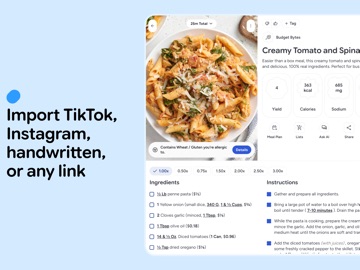
      "notes": "Since our last App Store release, we’ve focused on making recipe import smarter, search more helpful, and the overall app experience smoother. SMARTER RECIPE IMPORTS - Major improvements to photo/OCR recipe import accuracy. - You can now import videos/post from Instagram, Tiktok, and Youtube - You can now select images from your camera roll to import from. - Better handling of tricky formatting in ingredients and instructions. - Improved import flow with a cleaner, more guided selection experience. BETTER DISCOVERY AND RECOMMENDATIONS - Much faster dish options, with better images - New option to quickly search for recipes from dish results. - Enhanced cookbook filtering (including liked/disliked preferences). OTHER UPGRADES - Improved import popup copy for better clarity during recipe intake. - Tightened preferred-source sorting so source lists stay more compact and readable. - Updated timer behavior to use the default alarm sound. - Improved speed of ingredient smart multiplication - Multiple bug fixes in unit conversion, scaling, and dish navigation."
    },
    {
      "store": "apple",
      "version": "2.0.0",
      "released_at": null,
      "notes": "This release introduces Shopping Lists, a brand-new way to turn recipes into organized grocery runs. We’ve also improved search, Ask AI, imports, and overall app polish. INTRODUCING SHOPPING LISTS - Create shopping lists from your recipes or add custom items manually. - Share lists with friends and see updates in real time. - Smarter item merging, grouping, unit handling, and quantity math. - Shopping lists work with offline mode. IMPROVED SEARCH, IMPORTS, ASK AI, AND OFFLINE MODE - Upgraded recipe search for faster, more reliable results. - Added recipe autocomplete and improved microphone input. - Improved ingredient parsing and rendering for imported recipes. - Fixed streaming issues during recipe import and improved image-scan nutrition handling. - Refined Ask AI features, user interface, and reliability. OTHER UPGRADES - Refreshed account, settings, popup, source, and recipe result UI. - Added new empty states and improved tablet/split-screen styling. - Improved cooking mode with a new save-to-cookbook button. - Improved app launch performance and caching - Fixed bugs with cookbook tags, viewer navigation, and animation issues."
    },
    {
      "store": "apple",
      "version": "2.1.0",
      "released_at": null,
      "notes": "This minor release improves Shopping Lists, Ask AI, imports, onboarding, and overall app polish. SHOPPING LIST IMPROVEMENTS - Improved real-time - Added last-updated sorting and clearer list preview subtitles. - Improved item display so amounts and units appear more naturally. - Added preferred-unit conversion for shopping list items. - Improved behavior when adding an item that already exists but was checked off. - Increased touch targets and fixed iOS bounce issues in shopping lists. OTHER UPGRADES - Refined visuals plus a new rounded font. - Added visible thought traces to Ask AI chat. - Improved large webpage recipe imports. - Brand new onboarding experience."
    },
    {
      "store": "apple",
      "version": "2.2.0",
      "released_at": null,
      "notes": "This release introduces allergen flagging, a new way for Recipe Scout to help you spot recipes that may contain ingredients you avoid, plus improvements to Shopping Lists, Ask AI, imports, onboarding, and everyday cooking. ALLERGEN FLAGGING - Added food allergy setup with support for major allergen categories including milk, eggs, peanuts, tree nuts, soy, wheat/gluten, fish, shellfish, and sesame. - Recipes can now show allergy warnings when they contain or may contain one of your selected allergens. - Added detail views that show which ingredient triggered each warning, including whether it was a stronger “contains” match or a softer “may contain” match. SHOPPING LIST IMPROVEMENTS - Added smarter list previews with last-updated sorting, clearer subtitles, and quicker loading speeds. - Improved item formatting so amounts, ranges, and units read more naturally. - Added preferred-unit display for shopping list items when conversions are available. - Improved behavior when re-adding an item that was already checked off. ASK AI UPGRADES - Added visible thinking traces so Ask AI feels more transparent while working. IMPORT RECIPE IMPROVEMENTS - Improved recipe section/header detection. - Made shared URL imports faster by jumping directly to the import progress screen. OTHER POLISH - Added a brand new onboarding experience. - Improved recipe search styling and difficulty labels. - Polished timer cards, countdown rendering, and cooking mode layout. - Added assorted fixes for navigation, list previews, recipe display, and app responsiveness."
    },
    {
      "store": "apple",
      "version": "2.2.1",
      "released_at": null,
      "notes": "Bug fixes"
    },
    {
      "store": "apple",
      "version": "3.0.0",
      "released_at": null,
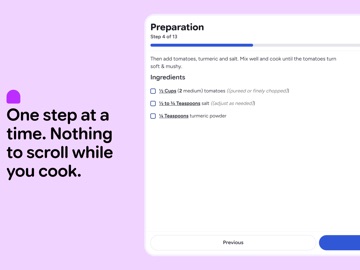
      "notes": "What’s New in 3.0.0 This release introduces a brand new Step-by-Step cooking mode, a complete AI-powered Meal Planner, upgraded pinned tabs, and a brand new look and feel. STEP-BY-STEP COOKING - Added an interactive Step-by-Step cooking mode that breaks down recipes one step at a time. - Automatically matches relevant ingredients to each step. MEAL PLANNING & AI GENERATION - Plan which recipes to cook for the week, and easily create shopping lists from your plan. - AI-powered \"Help Me Plan\" feature to automatically generate weekly meal plans tailored to your cookbook. PINNED TABS & NAVIGATION - Upgraded pinned tabs with improved recipe pickers and seamless tab switching. - Added seamless in-app popups for opening shared recipes and accepting shared lists. PERFORMANCE & POLISH - Upgraded Ask AI and Meal Planning backend models for noticeably faster responses. - Removed theme based recipes in lists in favor of a consistent color schema throughout the app."
    },
    {
      "store": "apple",
      "version": "3.1.0",
      "released_at": "2026-08-06",
      "notes": "What's New in 3.1.0 This release introduces improvements to Shopping Lists, an overhaul of Meal Planning, smarter AI-assisted recipes and scanning, and the ability to add your own notes to recipes. SHOPPING LISTS - Everything is faster. - Faster and smoother rendering of new custom items, with better animation. - Refined the add-to-shopping-list picker, input handling, and keyboard dismissal. MEAL PLANNING & PREP - Cleaner UI with ability to swipe between weeks. ASK AI & SCANNING - Added ability to add photos to the Ask AI feature. - Refined the Scan to import experience and updated the underlying document scanner for speed and accuracy. EXTRAS & POLISH - Add custom notes to recipes. - New allergen popup. - Fixed timer notification navigation from a cold launch and revamped the global timer popup. - Android back gestures now exit Step-by-Step and split view instead of the whole of cooking mode. - Various UI refinements throughout the app."
    }
  ],
  "alternatives": [
    {
      "app_id": 6766194412,
      "name": "ChefMe: Save Recipes",
      "url": "https://appcorpus.com/apps/chefme-save-recipes-6766194412",
      "reason": "Same category + similar ratings"
    },
    {
      "app_id": 6760672470,
      "name": "Sprout Cooking: Meal Planner",
      "url": "https://appcorpus.com/apps/sprout-cooking-meal-planner-6760672470",
      "reason": "Same category + similar ratings"
    }
  ],
  "evidence_summary": {
    "index_state": "S1",
    "evidence_level": 1,
    "level_label": "Live store listing",
    "indexable": true,
    "last_verified_at": "2026-08-07",
    "unknown_fields": [
      "Independent summary has not been published yet."
    ],
    "sources": [
      "App Store"
    ]
  },
  "availability_markets": {
    "live": [
      "us"
    ],
    "selected": "us",
    "note": null
  },
  "feature_events": {
    "events": []
  },
  "features_slice": {
    "plans": [
      {
        "code": "plus",
        "label": "Recipe Scout Plus Monthly",
        "kind": "subscription",
        "status": "store_listed",
        "prices": [
          {
            "storefront": "us",
            "formatted": "$3.49",
            "billing_period": "monthly"
          },
          {
            "storefront": "us",
            "formatted": "$29.99",
            "billing_period": "yearly"
          }
        ],
        "trial": null
      }
    ],
    "features": [],
    "unknown_features": [],
    "data_cutoff": "7 Aug 2026"
  }
}