
Quick verdict
- What it is
- Store information collected; independent summary not yet available.
- At a glance
-
- Free to download
- In-app purchases
Categories and search queries
Official categories
- Books
- Books & Reference
- Productivity
AppCorpus categories
Key functions
| Function | Availability | Access | Scope | Evidence |
|---|---|---|---|---|
| Family Sharing | Yes | Unknown | App Store | Store published |
| Free app | Yes | Free | — | Store published |
| In-app purchases | Yes | Limited free | — | Store published |
Screens
15 store screenshots


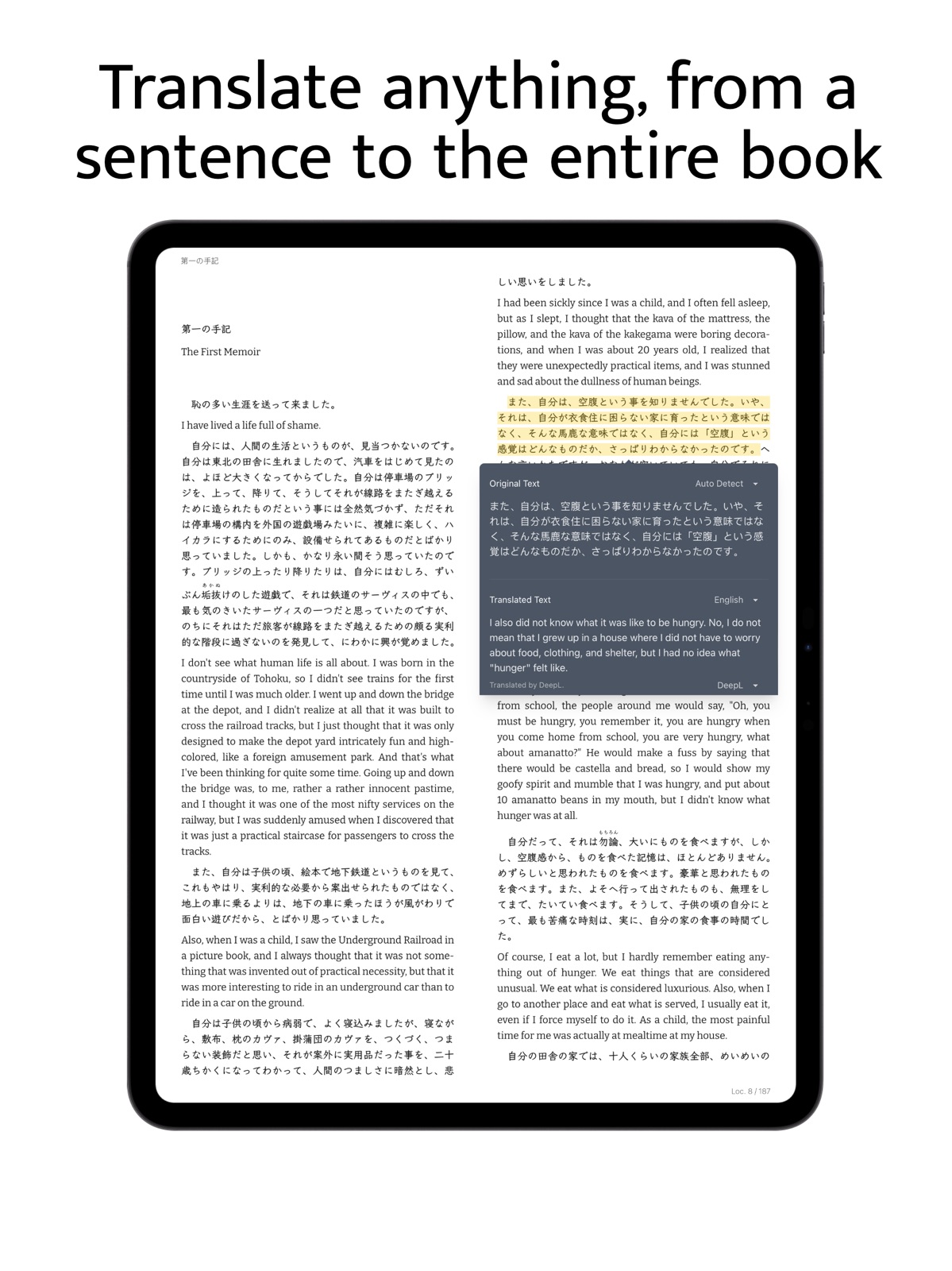
15 store screenshots


Pricing & paywalls
- Free to download
- In-app purchases
- Free to download
- In-app purchases: $4.99 - $49.99 per item
Ratings & reviews
-
5/5KOReader sync is a godsend!
I love using alternate software on my Kindle. The only stock feature I missed was the ability to pick up where I left off on my phone later on. With the new update, this app finally gives back the same functionality. It took me some trial and error to get matching files to the app, but now it works without a second thought. I can’t overstate my gratitude to the dev team for making such great software—the fact that its open source is even better. If a future update could enable syncing files as well as progress, that would merit at least a sixth star! But as it is, this app absolutely earns its name. Definitely the best e-reader on the App Store for my use case.
patrickb.rown · 31 Jul 2026
-
5/5The level of control, of customizability...
I want to control everything about my reading experience, down to whether or not the text is hyphenated when it is wrapped to the next line, the line spacing, and information at the bottom of my screen. And this somehow does all of this, and more, like importing font files and dictionary files! Finally, it does not randomly offload books to the cloud, which Apple Books does every single time.
creative carve climb (゚□゚) · 31 Jul 2026
-
5/5THE App for Advanced and Normal Readers - Read Anything Anywhere
This app is the app everyone needs but they don’t realize. Think about it this way, why would you watch TV on a single device when you can watch it anywhere you are or ANY device. This is what this app is for, reading your own ebooks on any platform with seamless syncing and reading interface customization. A must have for any ebook owner with many devices. It just works.
ryanjav · 31 Jul 2026
-
5/5Great
It has easy syncing between iPhone and iPad, using space on a free server so it doesn’t use up your iCloud space. It has great options and features like font weight, spacing, quick Wikipedia lookup, the normal highlighting and notes/annotations, audio read-out. It has a nice icon, better icon than Yomu or Eboox. (Those two are pretty good but I like Readest the best.) It doesn’t steal your personal info to sell you to advertisers or criminals. A couple problems are that many interface buttons are unlabelled and it’s not clear what they do…though I know that helps on avoiding interface translation work. On iPhone specifically, the Font button (“A”) brings up a very broken weird dysfunctional small/large menu. But anyway the app is great. 5 stars ⭐️⭐️⭐️⭐️⭐️
WoodenBoxOfReviews · 31 Jul 2026
-
5/5Bluetooth controls
I absolutely love this app. It’s amazing and it’s very intuitive to operate. The only challenge I have with it is not being able to control it with my Bluetooth device like AirPods to pause and play. We’re taking out a headphone and having it paused. Which also means it doesn’t work in my car Bluetooth. It only works on my headphones. Can the team please work on that? Or tell me what I’m doing wrong.
Coach HH · 31 Jul 2026
-
1/5
KOreader Sync is broken, which makes this app useless. The issue seems to be that it cannot sync based on filename due to files being imported, despite the fact that I clearly indicated it to use the files in their original location. So I guess I'll have to use KOreader instead.
Diego FC · 31 Aug 2026
-
5/5
good app thank youuu
Gellacone Pinky · 31 Aug 2026
-
4/5
it's great overall , the only problem I have is with highlighting I want to highlight a sentence it does the whole page or even a paragraph which is beyond frustrating . I truly love this app but I would love if the problem gets fixed
Emmanuella · 31 Aug 2026
-
5/5
this is definitely a great option to use for all epub book you own. love i can see where are in chapter
Lesa Kensmoe · 31 Aug 2026
-
4/5
it is a very good app and very thoughtful made but one thing that bugged me is that when reading a web novel , the chapter name is only shown in the header and not in the page itself. so while reading I didn't notice that a new chapter has started(also in paragraph mode). pls change this and it will be the best reader. love your app
Pabitra Sahoo · 31 Aug 2026
Privacy & accessibility
Privacy
- Data Not Linked to You — Analytics — Diagnostics — Crash Data Developer declared
- Data Not Linked to You — Analytics — Diagnostics — Other Diagnostic Data Developer declared
- Data Not Linked to You — Analytics — Diagnostics — Performance Data Developer declared
- Data Not Linked to You — Analytics — Location — Coarse Location Developer declared
- Data Not Linked to You — Analytics — Usage Data — Product Interaction Developer declared
- Data Not Linked to You — Diagnostics Developer declared
- Data Not Linked to You — Location Developer declared
- Data Not Linked to You — Usage Data Developer declared
Accessibility
- Dark Interface — SUPPORTED Store published
- Differentiate Without Color Alone — SUPPORTED Store published
- Larger Text — SUPPORTED Store published
- Reduced Motion — SUPPORTED Store published
- Sufficient Contrast — SUPPORTED Store published
- VoiceOver — SUPPORTED Store published
Privacy
- Data collected — App functionality — Files and docs Developer declared
- Data shared — Account management — Personal info — Name Developer declared
- Data shared — Analytics — App activity — App interactions Developer declared
- Data shared — Analytics — App activity — Other actions Developer declared
- Data shared — Analytics — App activity — Other user-generated content Developer declared
- Data shared — Analytics — App info and performance — Crash logs Developer declared
- Data shared — Analytics — App info and performance — Diagnostics Developer declared
- Data shared — Analytics — App info and performance — Other app performance data Developer declared
- Data shared — App functionality — Files and docs Developer declared
- Security practices — The developer has committed to follow the Play Families Policy for this app. See the policy — Committed to follow the Play Families Policy Developer declared
- Security practices — Your data is transferred over a secure connection — Data is encrypted in transit Developer declared
- Security practices — The developer provides a way for you to request that your data be deleted — You can request that data be deleted Developer declared
Accessibility
No accessibility labels collected yet.
Versions
-
0.10.1
– Reading: Added continuous scroll and spread layout support for EPUBs – Reading: Added current time and battery display in footer – Reading: Added TTS, annotation support, pinch-to-zoom, and scroll mode for PDFs – Library: Added backup/restore to a zip file and batch metadata refresh – Footnotes: Added back navigation with link history and more responsive popup sizing – Annotations: Added loupe display when selecting text in instant annotation mode – Text-to-Speech: Fixed TTS reading position tracking in scrolled mode
-
0.10.4
– Reading: Added single section scroll option, keyboard shortcuts help dialog, and reading ruler improvements – Reading: Fixed embedded font loading and applied theme colors to PDFs – Reading: Fixed occasional freeze, image sizing on resize, and vertical writing mode compatibility – Annotations: Fixed annotations grouped under wrong chapter and added highlight opacity setting – Text-to-Speech: Added dedicated TTS settings tab with highlight opacity and keyboard shortcuts for navigation – Sync: Added Hardcover.app sync integration and improved KOSync progress accuracy – KOReader Plugin: Added full annotation sync option and fixed sync-related crashes – OPDS: Added custom catalog headers with web proxy consent and fixed feed display issues – Speed Reading: Added per-chapter progress bar and speed selector dropdown – Theme: Added atmosphere Easter egg with video overlay and ambient audio
-
0.10.6
– Library: Much faster browsing for large collections – Reading: Added an option to keep the book's original paragraph layout – Reading: Fixed page navigation for Arabic books – PDF: Fixed TTS reading interruptions at line breaks in PDFs – PDF: You can now apply your chosen theme colors to PDFs – Sync: Added HTTP Basic auth support for CWA – Sync: Improved progress sync with Hardcover.app – OPDS: You can now edit your registered catalogs, with better handling of download filenames – Speed Reading: Your reading position now syncs across devices – Platform: Fixed window buttons on macOS, reduced crashes on iOS
-
0.11.1
– Dictionaries: You can now import your own StarDict and MDict dictionaries – Sync: Your custom dictionaries, custom fonts, background textures and OPDS catalogs now sync across devices – KOReader Sync: Browse your full Readest Library from inside KOReader, with improved sync diagnostics – OPDS: Stream books over OPDS-PSE and optionally auto-download new titles from feeds – Library: Added an optional 4-digit PIN lock at app launch to keep your library private – Library: You can now drag entire folders to import books – Speed Reading: Reading position now resumes correctly across devices and inside long sections – Fixes: Many fixes across PDFs, MOBIs, EPUBs, TTS, scrolling, and accessibility
-
0.11.12
– Reading: Fixed full-page cover images and cover backgrounds that didn't display correctly under a page texture – Reading: Fixed a crash when opening large PDF files on mobile devices – Reading: You can now save or share an image straight from the image viewer – Speed Reading: Fixed the control bar overlapping the playback controls on mobile – Sync: Books without a reading status no longer jump back to the top after every sync – Sync: Your per-device reading view settings now stay local instead of syncing between devices – OPDS: Fixed the Add Catalog dialog appearing behind Settings on mobile
-
0.11.17
– Sync: Added WebDAV and Google Drive sync for your books and reading data – Widgets: Added home-screen reading widgets on mobile so you can jump straight back into your book – Reading: You can now open and read Markdown(.md) files – Reading: You can select a word by double-clicking it, and search gained regex and nearby-words modes – Reading: Added a sticky progress bar with chapter markers, and keyboard shortcuts to fine-tune text selection – Library: Added a Recently Read shelf to quickly pick up where you left off, plus a separate background texture for your library – Text-to-Speech: Added offline voices on iOS, a setting to highlight by word or by sentence – PDF: Smoother pinch-zoom and panning, faster scrolling on mobile, and a new contrast option in the view menu – More: Customize the highlight toolbar across all books, filter exported annotations by color and style
-
0.11.18
– Reading: Added Auto Scroll, a hands-free mode that scrolls the page for you at an adjustable pace, plus middle-click autoscroll on the desktop – Reading: Added slide and page-curl animations when turning pages for a more natural feel – Reading: Fixed page turning and the reading ruler for vertical right-to-left books, PDF text selection when system font scaling is on, and header/footer readability over light PDFs in dark mode – Text-to-Speech: Redesigned read-aloud as a mini player with an expandable full player, and playback now keeps going even after you close the book – Sync: Added S3-compatible cloud storage and a new Cloud Sync screen to choose and switch between your sync providers – Integrations: Added a Calibre plugin to push books and custom columns into Readest, and improved OPDS sign-in and auto-download for self-hosted catalogs – Library: New books dropped into watched folders now import automatically, and you can sort your shelf by reading progress – More: Added a speak button in the dictionary popup, a cleaner theme switcher, and per-rule toggles for proofreading
-
0.11.2
– Dictionary: Look up words with your device's built-in system dictionary, plus faster MDict and StarDict imports – Library: Import books from a folder with format and size filters, or read them in place from external folders without copying – Reading: The reading ruler now follows individual lines, you can swipe along the edge to adjust brightness on mobile, and customize hardware-button page turning – Annotations: Create global highlights that apply to every matching passage in a book – Text-to-Speech: Added a hotkey to highlight the sentence being read aloud, and made TTS more reliable – Fonts: Fixed custom fonts disappearing after restarting or reloading the app – iOS: Fixed the reader not updating when you switch between light and dark mode – Fixes: Many improvements across PDFs, EPUBs, Sync, Scrolling, Highlighting
-
0.11.20
· 23 Jul 2026
– Text-to-Speech: Read-aloud voices can now be downloaded per book for offline listening, and adjustable pauses between sentences and paragraphs – Sync: Added OneDrive as a cloud provider, you can now sync to several providers at once – Reading: Added a right-edge swipe to change Auto Scroll speed, footnotes in Markdown books, and copying text now keeps its paragraph breaks – Reading: Smoother page-turn animations, steadier text selection on iOS, and a redesigned custom theme editor that stays readable on mobile – Annotations: You can now copy a highlight or note together with a deep link that jumps straight back to its spot in the book – Library: You can now sort and filter your shelf by time remaining, and the Recently Read shelf and widget show only books you're currently reading – PDF: Fixed a crash that could happen when turning pages or zooming large PDFs on iOS
-
0.9.100
– Text-to-Speech: Automatically moves to the next chapter when the current chapter finishes – Reading: Improved RSVP layout and stability – Reading: Fixed an issue where some EPUB books could not adjust font size – Annotations: Added a magnifier (loupe) when adjusting text selection – Annotations: Text selection now snaps to word boundaries for better accuracy – Annotations: Custom highlight colors now apply correctly in the sidebar – Dictionary: Added a back button for easier navigation – Dictionary: Fixed an issue where Dictionary and Wikipedia could not open on Android – Metadata: Added collapsible sections in Book Details – Metadata: Added support for parsing series information from Calibre-exported EPUB files
-
0.9.101
– Text-to-Speech: Fixed an issue where TTS could not continue to the next chapter – Reading: Fixed an issue importing very large TXT files on iOS – Reading: Fixed the layout of the reading ruler in scrolled mode – Reading: Smoother page-turn animations for a more fluid experience – Reading: Added a gallery mode to zoom and browse images within books – Annotations: Page numbers are now displayed and exported with highlights and notes – Annotations: Added support for exporting highlights to Readwise – OPDS: Fixed missing book descriptions in OPDS feeds
-
0.9.81
– Accessibility: Added support for VoiceOver, making books accessible to readers with visual impairments – Sync: Progress is now synced across different versions of the same book by aggregated metadata – Library: Groups are now displayed in list view for easier organization – Library: Added delete confirmation when removing books from the context menu – PDF: Disabled swipe-up gesture for toggling the action bar when zoomed in – Fonts: Fixed an issue where embedded fonts in ebooks were occasionally not applied – Reader: Fixed an issue where newly created highlights sometimes would not appear – Reader: Enabled scrolling in the menu when the menu is too long
-
0.9.82
– Sync: More reliable syncing between KOReader and Readest – MOBI: Fixed an issue where some footnotes in MOBI/AZW files were not parsed correctly – Settings: Added global settings menu to the library page – iOS: Fixed an issue where custom theme colors were not handled correctly on older Safari versions – TTS: Added more languages for Edge TTS
-
0.9.86
– TTS: Made the TTS icon less distracting during read-aloud mode – Settings: Added an option to adjust screen brightness while reading – Settings: Added support for custom background images – PDF: Fixed an issue where scrolling and panning didn’t work correctly when zoomed in – Reader: Added keyboard shortcuts for toggling bookmarks – Reader: Annotations are now rendered instantly when opening files
-
0.9.88
– TTS: Fixed issue where the read-aloud indicator disappeared too quickly – Layout: Overriding book layout no longer affects explicitly set text alignment – Reader: Added localized number display for reading progress in vertical layout – Reader: Enhanced swipe responsiveness for smoother page transitions
-
0.9.90
– Sync: Faster library syncing and support for in-app one-time purchases of extra cloud storage – TTS: You can now choose the target language for read-aloud on translated books – Reader: New keyboard shortcuts make it easier to move between sections – Reader: Smoother scrolling for a more comfortable reading experience – Reader: Footnotes in definition lists are now fully supported – Reader: Improved search accuracy and display of search results – Reader: Clearer error messages when importing books – Reader: Improved safety when loading book content – Reader: Restores your last reading page if the app was closed in the background – Settings: You can now choose your own highlight colors – Settings: Added option to adjust screen brightness automatically
-
0.9.91
– TTS: Added options to customize the highlight style during read-aloud – TTS: You can now choose the target language for read-aloud on translated books – Sync: Faster library syncing and support for in-app one-time purchases of extra cloud storage
-
0.9.92
– Bookshelf: Added support for nested groups to organize your books more flexibly – Sync: Improved reliability by automatically retrying failed book syncs – UI: Storage capacity is now displayed with precise values in the user profile – Reader: You can now import files directly into the currently selected book group – Account: You can now update the email address linked to your Readest account – Footnotes: Added compatibility for more footnote formats
-
0.9.93
– Sync: Improved reliability for new accounts so your books sync correctly from the start – Library: Fixed an occasional issue where returning to the library could get stuck – Layout: Improved image display in paginated mode so images won't exceed the available height – TXT: Improved performance and stability when opening and parsing TXT files – Fonts: Fixed an issue where monospace fonts were not applied correctly in code blocks
-
0.9.94
– OPDS: You can now browse and download ebooks directly from OPDS catalogs – PDF: Added a hand-tool mode that makes navigating PDF pages easier – CJK: Added one-tap conversion between Simplified and Traditional Chinese – Library: Added a new option to adjust cover sizes in grid view – TTS: Fixed an issue where the page would scroll when showing the annotator – iOS: Fixed occasional failures when opening books on older iOS versions (16.4 and below)
-
0.9.95
– OPDS: You can now search, browse, and download ebooks directly from OPDS catalogs – OPDS: Improved compatibility with Calibre Web for reliable downloads – OPDS: Fixed an issue where book covers from self-hosted Calibre OPDS servers did not display correctly – Cloud Storage: You can view and delete files stored in your cloud storage directly from the app – Bookshelf: Added support for importing books from a folder recursively – Bookshelf: You can now rename your bookshelf groups – EPUB: Added support for SVG covers from Standard Ebooks – Annotations: Keyboard shortcuts no longer copy selected text into the notebook – Footnotes: Footnote popups now scale properly on small screens – Touch/Styli: Removed the context menu for smoother interaction on touch and stylus devices – PDF: Improved zoomed-in navigation and hand-tool behavior for smoother page navigation
-
0.9.96
– TTS: Resolved an issue where Edge TTS was blocked in certain regions – OPDS: Improved compatibility with older versions of Calibre Web – OPDS: Added an instant search bar for faster browsing in OPDS catalogs – OPDS: Added a curated book catalog from Standard Ebooks – Comics: Fixed layout issues to improve comic book reading – Layout: Footnote popups now adapt correctly to different screen sizes – Layout: Fixed an issue where the maximum inline width was not applied to EPUBs – Sync: Improved file downloading by correctly handling special characters in filenames – UI: Added an option to temporarily dismiss the reading progress bar – Settings: Screen brightness adjustments now apply only to the reader view – iOS: You can now open files directly in Readest from the Files app
-
0.9.97
– Annotations: Added annotation bubble icons directly on text with instant note popups – Annotations: Enabled quick highlighting when selecting text – Annotations: Added the ability to edit the text range of existing highlights – Annotations: Added an annotation navigation bar for easier browsing – OPDS: Fixed an issue where CBZ files could not be downloaded from OPDS catalogs – OPDS: Improved compatibility with Komga OPDS servers – OPDS: Added support for OPDS servers using self-signed SSL certificates – PDF: Fixed an issue where some PDF files failed to open – Search: Added search term history for quicker repeated searches – Text-to-Speech: Reduced excessive pauses between sentences for smoother playback – File Transfer: Introduced a background transfer queue for uploading and downloading books – Proofreading: Added a proofread tool that can replace text directly within books
-
0.9.98
– Bookshelf: Added the ability to export original book files directly from the book details dialog – Bookshelf: Added a new sorting option to organize books by publish date – Bookshelf: Improved performance for large library with faster and more stable imports – OPDS: Improved download reliability by correctly detecting filenames for PDF and CBZ files – Proofreading: Added support for whole-word replacement to make text corrections more precise – Notes: Added the ability to export notes using a customizable template – PDF: Added support for panning within PDF documents for easier navigation – PDF: Improved performance by pre-rendering the next page for smoother page transitions – Text-to-Speech: Added support for word replacement to improve pronunciation during playback – E-ink: Improved reading stability by preventing unwanted scrolling when animations are disabled or on e-ink devices – Discord: Added Discord Rich Presence to display your current reading status on Desktop platforms – Fonts: Improved web font loading for faster and more stable text rendering
-
0.9.99
– Reading: Added a reading ruler (line highlight) to help guide your eyes while reading – Reading: Added paragraph-by-paragraph reading mode for more focused navigation – Reading: Added a speed reading mode to support faster reading workflows – Reading: Added support for gamepad input to turn pages – Accessibility: Improved VoiceOver support in dropdown menus for smoother navigation – Accessibility: Page navigation buttons are now always visible to screen readers – Accessibility: Reading progress is now updated correctly when navigating with screen readers – Annotations: Expanded highlight customization with more color options – Annotations: Added an option to export annotations as plain text – Library: Added grouping by author and series for better library organization – Library: Added support of marking books as finished – Settings: Added fuzzy search to quickly find settings even with partial keywords – Table of Contents: Added page numbers for nested TOC entries – Text-to-Speech: Added navigation controls to return to the current reading position
- 0.12.1 · 9 Aug 2026
Alternatives
- Yomu EBook Reader — Same category + similar ratings
- Readingo — Same category + similar ratings
Availability by market
- US
Data quality & evidence
- Page completeness
- Live store listing
- Last verified
- 31 Aug 2026
- Sources
- App Store, Google Play
- Independent summary has not been published yet.