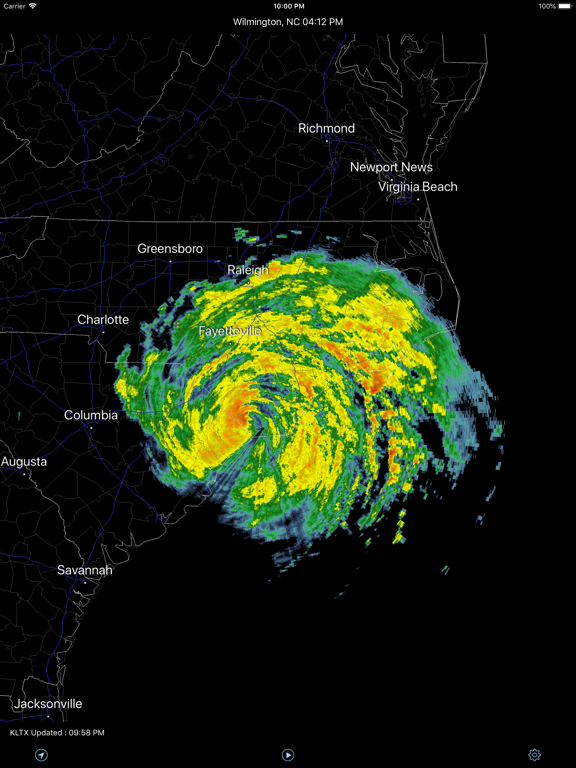
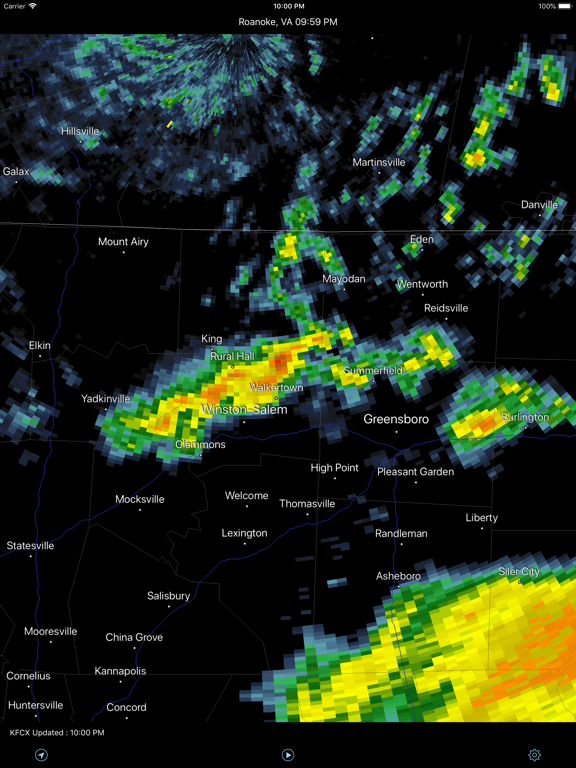
Apoku MCP provides app discovery, detailed cards, evidence, sources and screenshots where available. Unknown or conflicting prices stay explicit.
View JSON
GET /api/v3/apps/419048258
{
  "app_id": 419048258,
  "canonical_url": "https://appcorpus.com/apps/radar-pro-419048258",
  "identity": {
    "name": "Radar Pro",
    "slug": "radar-pro",
    "developer": {
      "name": "Bryan Neel",
      "url": "https://appcorpus.com/developers/bryan-neel-developer_2b9e9ffea67a77bcf345435318fadd8d"
    },
    "icon_url": "https://is1-ssl.mzstatic.com/image/thumb/Purple221/v4/d2/8f/76/d28f761d-d6f7-d291-90bc-177e9ed645dc/AppIcon-0-0-1x_U007emarketing-0-11-0-85-220.png/512x512bb.jpg",
    "stores": [
      "apple"
    ],
    "platforms": [
      "iphone",
      "ipad"
    ],
    "status": {
      "state": "active",
      "label": "Active",
      "last_checked": "2026-08-06",
      "last_checked_label": "6 Aug 2026",
      "banner": null,
      "region_note": null,
      "data_state": "stale",
      "data_state_label": "Some store data may be out of date"
    }
  },
  "listings": [
    {
      "store": "apple",
      "status": "ACTIVE",
      "url": "https://apps.apple.com/us/app/radar-pro/id419048258?uo=4",
      "rating": 4.5,
      "rating_count": 149,
      "formatted_price": "Free",
      "is_free": true,
      "has_iap": false,
      "has_subscription": null,
      "version": "2.0.0",
      "updated": "2026-08-06",
      "currency": "USD"
    }
  ],
  "summary": {
    "one_liner": null,
    "summary": null,
    "best_for": [],
    "not_for": [],
    "status": "fallback",
    "at_a_glance": [
      "Free to download"
    ]
  },
  "categories": {
    "official": [
      "Weather",
      "Travel"
    ],
    "appcorpus": [
      {
        "category_id": "weather",
        "label": "Weather",
        "url": "https://appcorpus.com/categories/weather"
      },
      {
        "category_id": "travel",
        "label": "Travel",
        "url": "https://appcorpus.com/categories/travel"
      }
    ]
  },
  "use_cases": [],
  "features": [
    {
      "capability_id": "free_app",
      "label": "Free app",
      "availability": "yes",
      "access_level": "free",
      "scope": null,
      "evidence": "Store published"
    }
  ],
  "pricing": [
    {
      "store": "apple",
      "formatted_price": "Free",
      "is_free": true,
      "has_iap": false,
      "has_subscription": null,
      "currency": "USD",
      "market": "us",
      "last_verified": "2026-08-06",
      "rows": [
        "Free to download"
      ],
      "state": "current"
    }
  ],
  "screens": [
    {
      "url": "https://is1-ssl.mzstatic.com/image/thumb/PurpleSource221/v4/be/2f/9a/be2f9ae3-e041-dcd6-2286-e25fc0aeb0ef/Simulator_Screenshot_-_iPad_Pro_13-inch__U0028M5_U0029_-_2026-03-11_at_00.16.13.png/1600x1600bb.jpg",
      "store": "apple",
      "platform": "ipad",
      "alt": "Radar Pro ipad screenshot 1"
    },
    {
      "url": "https://is1-ssl.mzstatic.com/image/thumb/Purple221/v4/96/5a/f5/965af5ec-07ef-f4c6-7b0c-dd29152a6b53/pr_source.png/576x768bb.png",
      "store": "apple",
      "platform": "ipad",
      "alt": "Radar Pro ipad screenshot 2"
    },
    {
      "url": "https://is1-ssl.mzstatic.com/image/thumb/PurpleSource221/v4/31/83/f1/3183f16c-14d3-25e2-0ac9-0d44577dec02/Simulator_Screenshot_-_iPad_Pro_13-inch__U0028M5_U0029_-_2026-03-11_at_00.16.03.png/1600x1600bb.jpg",
      "store": "apple",
      "platform": "ipad",
      "alt": "Radar Pro ipad screenshot 3"
    },
    {
      "url": "https://is1-ssl.mzstatic.com/image/thumb/Purple211/v4/81/61/ed/8161ed25-ec48-be43-64ee-0d7e086ad082/pr_source.png/576x768bb.png",
      "store": "apple",
      "platform": "ipad",
      "alt": "Radar Pro ipad screenshot 4"
    },
    {
      "url": "https://is1-ssl.mzstatic.com/image/thumb/PurpleSource211/v4/ee/87/08/ee870860-ddfa-1707-3801-e6ec0f8aecc0/Simulator_Screenshot_-_iPad_Pro_13-inch__U0028M5_U0029_-_2026-03-11_at_00.15.55.png/1600x1600bb.jpg",
      "store": "apple",
      "platform": "ipad",
      "alt": "Radar Pro ipad screenshot 5"
    },
    {
      "url": "https://is1-ssl.mzstatic.com/image/thumb/Purple221/v4/4f/4f/40/4f4f407b-ac08-0b7f-0879-aab1b40727ef/pr_source.png/576x768bb.png",
      "store": "apple",
      "platform": "ipad",
      "alt": "Radar Pro ipad screenshot 6"
    },
    {
      "url": "https://is1-ssl.mzstatic.com/image/thumb/PurpleSource211/v4/fa/41/13/fa4113f6-24b6-309a-a325-982dd7bb921d/Simulator_Screenshot_-_iPad_Pro_13-inch__U0028M5_U0029_-_2026-03-11_at_00.17.20.png/1600x1600bb.jpg",
      "store": "apple",
      "platform": "ipad",
      "alt": "Radar Pro ipad screenshot 7"
    },
    {
      "url": "https://is1-ssl.mzstatic.com/image/thumb/Purple221/v4/94/66/b7/9466b780-a32d-b226-edae-02fe4bb3b3b2/pr_source.png/552x414bb.png",
      "store": "apple",
      "platform": "ipad",
      "alt": "Radar Pro ipad screenshot 8"
    },
    {
      "url": "https://is1-ssl.mzstatic.com/image/thumb/PurpleSource211/v4/41/42/12/4142123c-d459-33b7-53c9-664cc633a37b/Simulator_Screenshot_-_iPad_Pro_13-inch__U0028M5_U0029_-_2026-03-11_at_00.16.23.png/1600x1600bb.jpg",
      "store": "apple",
      "platform": "ipad",
      "alt": "Radar Pro ipad screenshot 9"
    },
    {
      "url": "https://is1-ssl.mzstatic.com/image/thumb/Purple221/v4/5a/7d/fb/5a7dfb62-f226-9a63-1430-e1d4587606b8/pr_source.png/576x768bb.png",
      "store": "apple",
      "platform": "ipad",
      "alt": "Radar Pro ipad screenshot 10"
    },
    {
      "url": "https://is1-ssl.mzstatic.com/image/thumb/PurpleSource211/v4/a5/b7/6a/a5b76a3c-3be4-91a0-4c91-3a0c69e38907/Simulator_Screenshot_-_iPad_Pro_13-inch__U0028M5_U0029_-_2026-03-11_at_00.18.06.png/1600x1600bb.jpg",
      "store": "apple",
      "platform": "ipad",
      "alt": "Radar Pro ipad screenshot 11"
    },
    {
      "url": "https://is1-ssl.mzstatic.com/image/thumb/Purple211/v4/9a/f2/74/9af27497-c838-7326-867b-a905eefc0bde/pr_source.png/576x768bb.png",
      "store": "apple",
      "platform": "ipad",
      "alt": "Radar Pro ipad screenshot 12"
    },
    {
      "url": "https://is1-ssl.mzstatic.com/image/thumb/PurpleSource211/v4/39/71/46/39714607-c010-f787-2f16-821dd18268c2/Simulator_Screenshot_-_iPad_Pro_13-inch__U0028M5_U0029_-_2026-03-11_at_00.21.47.png/1600x1600bb.jpg",
      "store": "apple",
      "platform": "ipad",
      "alt": "Radar Pro ipad screenshot 13"
    },
    {
      "url": "https://is1-ssl.mzstatic.com/image/thumb/PurpleSource211/v4/2e/e7/60/2ee760f2-5346-d048-98a4-b305359db334/Simulator_Screenshot_-_iPad_Pro_13-inch__U0028M5_U0029_-_2026-03-11_at_00.16.45.png/1600x1600bb.jpg",
      "store": "apple",
      "platform": "ipad",
      "alt": "Radar Pro ipad screenshot 14"
    },
    {
      "url": "https://is1-ssl.mzstatic.com/image/thumb/PurpleSource211/v4/a0/cf/e7/a0cfe782-a255-fcf2-7f11-0d6d343393a9/Simulator_Screenshot_-_iPad_Pro_13-inch__U0028M5_U0029_-_2026-03-11_at_00.17.25.png/1600x1600bb.jpg",
      "store": "apple",
      "platform": "ipad",
      "alt": "Radar Pro ipad screenshot 15"
    },
    {
      "url": "https://is1-ssl.mzstatic.com/image/thumb/PurpleSource211/v4/4c/85/78/4c857806-6c00-8fd3-f956-2b1ca482a035/Simulator_Screenshot_-_iPad_Pro_13-inch__U0028M5_U0029_-_2026-03-11_at_00.17.43.png/1600x1600bb.jpg",
      "store": "apple",
      "platform": "ipad",
      "alt": "Radar Pro ipad screenshot 16"
    },
    {
      "url": "https://is1-ssl.mzstatic.com/image/thumb/Purple221/v4/b5/8b/4e/b58b4e04-87d9-0dd0-6952-2f730a2dac6f/pr_source.png/1125x1600bb.jpg",
      "store": "apple",
      "platform": "iphone",
      "alt": "Radar Pro iphone screenshot 17"
    },
    {
      "url": "https://is1-ssl.mzstatic.com/image/thumb/Purple211/v4/39/d3/92/39d392ac-f48b-acd9-f5c8-0c24fe7ce1cb/pr_source.png/1125x1600bb.jpg",
      "store": "apple",
      "platform": "iphone",
      "alt": "Radar Pro iphone screenshot 18"
    },
    {
      "url": "https://is1-ssl.mzstatic.com/image/thumb/Purple221/v4/f2/51/76/f2517672-1f19-3c74-2404-419762b02e40/pr_source.png/1125x1600bb.jpg",
      "store": "apple",
      "platform": "iphone",
      "alt": "Radar Pro iphone screenshot 19"
    },
    {
      "url": "https://is1-ssl.mzstatic.com/image/thumb/Purple221/v4/fd/6a/75/fd6a759b-7ccb-1459-e988-b8f2f3c416bd/pr_source.png/1600x1125bb.jpg",
      "store": "apple",
      "platform": "iphone",
      "alt": "Radar Pro iphone screenshot 20"
    },
    {
      "url": "https://is1-ssl.mzstatic.com/image/thumb/Purple221/v4/b3/8a/20/b38a201d-4f6c-f2f1-bcc8-351590610855/pr_source.png/1125x1600bb.jpg",
      "store": "apple",
      "platform": "iphone",
      "alt": "Radar Pro iphone screenshot 21"
    },
    {
      "url": "https://is1-ssl.mzstatic.com/image/thumb/Purple211/v4/7a/95/96/7a95961d-bd4d-96cd-5064-3ecb603fcd4c/pr_source.png/1125x1600bb.jpg",
      "store": "apple",
      "platform": "iphone",
      "alt": "Radar Pro iphone screenshot 22"
    }
  ],
  "data_states": {
    "screens": "current"
  },
  "ratings": [
    {
      "store": "apple",
      "average": 4.5,
      "count": 149,
      "market": "us",
      "observed_at": "2026-08-06",
      "state": "current",
      "reviews": [
        {
          "rating": 5,
          "title": "Simple, Reliable Weather App That Needs CarPlay Support",
          "body": "I’ve been using Radar Pro for years, and one of the best things about it is its simplicity and clean design. The app does exactly what it needs to without feeling bloated. My only real complaint is the lack of Apple CarPlay support. Being able to quickly check the weather on the car display without grabbing my phone would be a huge improvement and safer while driving. Other than that, I still highly recommend the app, and I would definitely pay again if CarPlay support becomes available. I also purchased the previous version years ago and have been happy with it ever since.",
          "author": "OmegaSystem",
          "date": "6 Aug 2026"
        },
        {
          "rating": 1,
          "title": "Very Disappointed",
          "body": "Can’t tell much with this app! What a waste of my money! I thought it would be more detailed of the weather but you can barely make out what’s going on. There are better free apps!",
          "author": "Nutbutt11",
          "date": "6 Aug 2026"
        },
        {
          "rating": 5,
          "title": "My location",
          "body": "The app won’t show me my location. It used to. Something wrong? I love the app.",
          "author": "Girand",
          "date": "6 Aug 2026"
        },
        {
          "rating": 1,
          "title": "App not worth it",
          "body": "I have the IPhone 8 and have constant issues with this app. No ability to position for my location info, sloppy scrolling, screen locks up or blinks rather then scrolling.",
          "author": "Bootsy62",
          "date": "6 Aug 2026"
        },
        {
          "rating": 1,
          "title": "Terrible",
          "body": "Images are grossly pixilated, poor resolution, don’t bother wasting space on your device with this piece of software junk.",
          "author": "azgrapefruit",
          "date": "6 Aug 2026"
        }
      ]
    }
  ],
  "privacy": [
    {
      "store": "apple",
      "declarations": [
        {
          "title": "Data Not Collected",
          "detail": "",
          "source": "Developer declared"
        }
      ],
      "accessibility": []
    }
  ],
  "changes": [
    {
      "store": "apple",
      "version": "1.0",
      "released_at": null,
      "notes": ""
    },
    {
      "store": "apple",
      "version": "1.0.1",
      "released_at": null,
      "notes": "Tested on iOS 4.3. Performance improvements. Minor bug fixes."
    },
    {
      "store": "apple",
      "version": "1.1",
      "released_at": null,
      "notes": "Severe Weather Warnings Map Display and Statement Text ● Tornado ● Thunderstorm ● Flash Flood Alaska, Hawaii, and Puerto Rico Radar Sites now supported. Now all operational NEXRAD sites are supported with the exception of Guam. 154 Radar Sites. Map display switched to Mercator projection. Map has been optimized for increased performance/lower memory usage. Various bug fixes and additional performance improvements."
    },
    {
      "store": "apple",
      "version": "1.2",
      "released_at": null,
      "notes": "**Name changed to Radar Pro to consolidate Mac and iOS versions. Animation Feature -------------- Animation is now available by selecting the Play Button on the bottom of the screen. When this button is pressed, a secondary toolbar is displayed allowing interaction with the animation sequence. Selecting the X button on this toolbar closes the animation sequence and returns the display to the static view. User Interface Changes ------------------ Radar Selection via Screen: To select a radar from the screen, simply move the map view to the desired location and select the radar icon on the bottom toolbar. This will display the latest radar data from the closest radar site to the geographic center of the display. Radar Selection and Status Information via Button: To select from a list of available radars or view the radar status information, the left button on the toolbar is now used to bring up the radar selection screen. Warnings Button: Warnings are now available from the top right button. Selecting this button will bring up the warning display list. Refresh Button: A refresh button is now available to immediately refresh the radar image. Note that typically the NWS updates radar imagery every 5 to 12 minutes. Warnings System Changes -------------------- On the warning detail screen, selecting the \"View In Map\" closes the warning screen and moves the map display to the selected warning and automatically chooses the closest radar to the warning location. Location Service ------------- Selecting the location icon now automatically selects the closest radar and displays the most recent radar imagery. New Settings ----------- The refresh time for both radar data and warnings are now user definable."
    },
    {
      "store": "apple",
      "version": "1.2.1",
      "released_at": null,
      "notes": "- Resolved issue where location icon was not showing on some devices. - Resolved issue where last map position was not being saved between app launches. - Minor tweaks and performance improvements."
    },
    {
      "store": "apple",
      "version": "1.2.2",
      "released_at": null,
      "notes": "- Added Canada and Mexico maps to provide context for users along the borders. - Increased number of city labels visible at higher zoom levels. - Performance improvements. - Minor bug fixes."
    },
    {
      "store": "apple",
      "version": "1.3",
      "released_at": null,
      "notes": "- Tested on iOS 5.0 - Warnings System enhancements. - More accurate radar data position calculation. - Double-tap to zoom - Performance enhancements and bug fixes."
    },
    {
      "store": "apple",
      "version": "1.3.1",
      "released_at": null,
      "notes": "- Fixed crash on some devices when receiving bad warning data. - Updated to Retina display for iPad. - Added Langley Hill (Northwest Washington) radar site. - Various performance improvements and minor bug fixes."
    },
    {
      "store": "apple",
      "version": "1.4",
      "released_at": null,
      "notes": "● Added New Radar Products, Base Reflectivity Tilts 1-4. ● Radar Site Favorites System. ● Radar Site Status Indicators. ● Bug fixes and performance improvements."
    },
    {
      "store": "apple",
      "version": "1.4.1",
      "released_at": null,
      "notes": "- Updated for iOS 6 and the iPhone 5 - Various bug fixes and performance improvements"
    },
    {
      "store": "apple",
      "version": "1.5",
      "released_at": null,
      "notes": "- Update to iOS 9 - Auto Radar Selection - Several Updates and Bug Fixes"
    },
    {
      "store": "apple",
      "version": "1.5.1",
      "released_at": null,
      "notes": "Performance improvements and updates."
    },
    {
      "store": "apple",
      "version": "2.0.0",
      "released_at": "2026-03-21",
      "notes": "* Optimized radar image loading and display. * Added radar site status reporting. * Tweaked radar site list interface. * User interface performance improvements."
    }
  ],
  "alternatives": [
    {
      "app_id": 6756086497,
      "name": "Echoes Weather: Radar & Models",
      "url": "https://appcorpus.com/apps/echoes-weather-radar-models-6756086497",
      "reason": "Same category + similar ratings"
    },
    {
      "app_id": 6744540041,
      "name": "Xtreme Weather - Pro Radar",
      "url": "https://appcorpus.com/apps/xtreme-weather-pro-radar-6744540041",
      "reason": "Same category + similar ratings"
    },
    {
      "app_id": 6670187343,
      "name": "Brzzy Weather: Local Forecasts",
      "url": "https://appcorpus.com/apps/brzzy-weather-local-forecasts-6670187343",
      "reason": "Same category + similar ratings"
    }
  ],
  "evidence_summary": {
    "index_state": "S1",
    "evidence_level": 1,
    "level_label": "Live store listing",
    "indexable": true,
    "last_verified_at": "2026-08-06",
    "unknown_fields": [
      "Apoku editorial summary has not been published yet."
    ],
    "sources": [
      "App Store"
    ]
  },
  "availability_markets": {
    "live": [
      "us"
    ],
    "selected": "us",
    "note": null
  },
  "feature_events": {
    "events": []
  },
  "features_slice": {
    "plans": [],
    "features": [],
    "unknown_features": [],
    "data_cutoff": "6 Aug 2026"
  }
}