
Quick verdict
- What it is
- Store information collected; independent summary not yet available.
- At a glance
-
- $9.99
- In-app purchases
Categories and search queries
Official categories
- Utilities
- Travel
AppCorpus categories
Key functions
| Function | Availability | Access | Scope | Evidence |
|---|---|---|---|---|
| In-app purchases | Yes | Limited free | — | Store published |
Screens
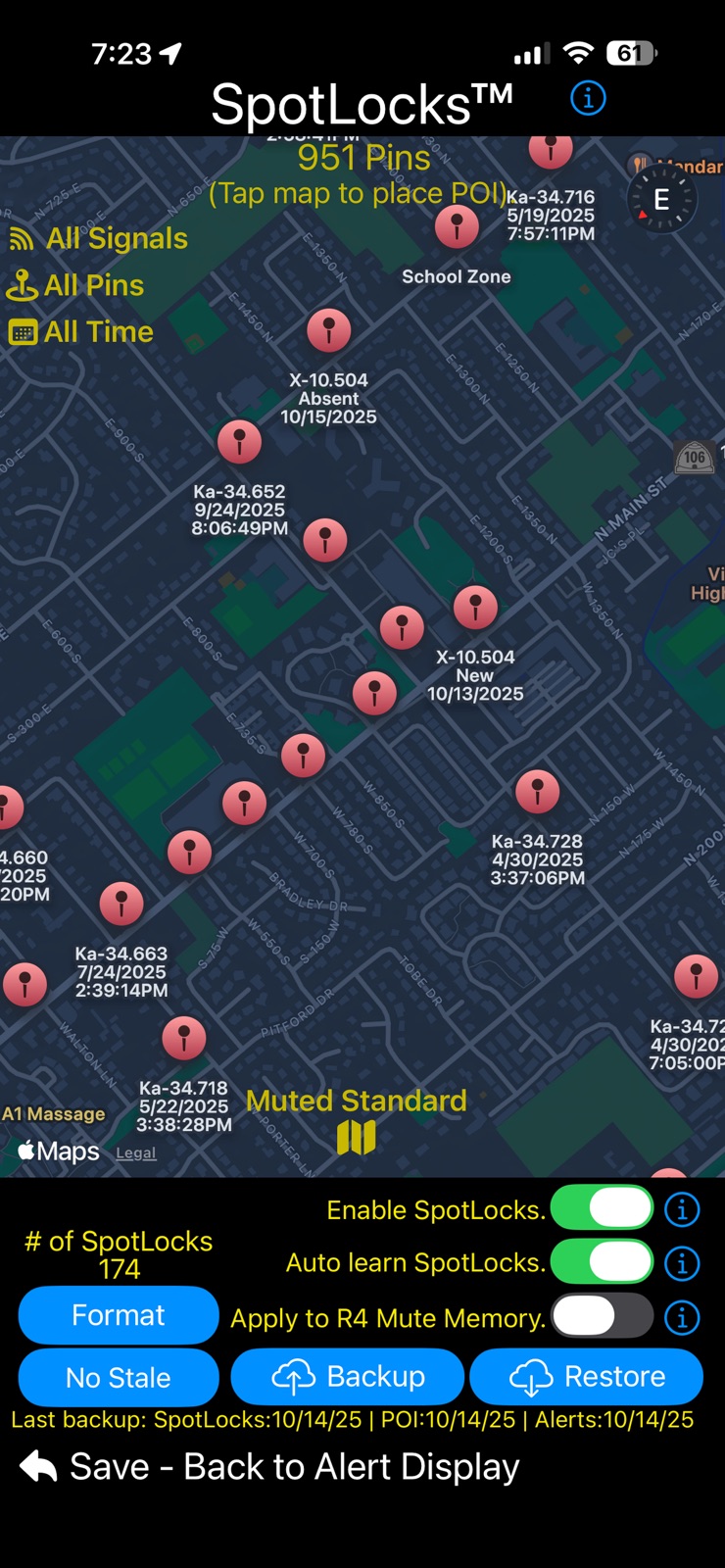
App Store
10 store screenshots


Pricing & paywalls
App Store
- Price: $9.99
- In-app purchases
Ratings & reviews
App Store
-
5/5Edit : Great app for the R4
Edit: After being advised of the one setting that made me dislike the app was in a different tab. Now the settings I was looking for are now changed I really like this app! Thank you for pointing it out from the Developer and have now given the app a 5 star. I like the look of the app and its functions. I have a big issue with the app changing settings on me automatically. Example is the speed limit warning. Just having the app open and not even going into settings on the app will change it for you every time. Very annoying when on the freeway and get a warning of going over 70mph. I cannot find this setting in the app which means I have to change it on the device every time I open the app. Not easy when driving and the R4 is in a spot not easy to get to. Also not all the settings are available on the app. You get the most of the basic settings. These are reasons why I give it a 2 star.
Ruckinjoe · 31 Jul 2026
-
5/5Good app
After using the radar alone and trying the this app with it I was amazed how it helps turn downs false signal on normal roads. I do have one feature or bug I still can’t figured out. The city over speed warning comes on even when I turn it pass 60. I want to go faster than 60 and it does it on the toll road too. I have to reset to factory settings to get rid of it. I hope they can tell me how I can turn it off or and fix the bug even when I’m on the highway with speed faster than 60. Update: love this app as they provided instructions how to turn off the speed warning limit. 5star app!
Duppyducky · 31 Jul 2026
-
5/5Indispensable
It is difficult to imagine that this app works so well with just its default settings that it made me believe my R4 wasn’t working properly. The truth is, I was getting a vast number of false alerts that this app helped to mute - while Keeping track in the log for later review. The only thing I haven’t figured out how to do it to use the map function in the app to go back and mark certain spots as false alerts. You can mark the type of alert, but there doesn’t seem to be away to mark as a false alert. Otherwise perfect. The in app settings config for the R4 is very helpful too.
Ryuk-1 · 31 Jul 2026
-
5/5Must have app for R4 owners
I typically don’t write reviews for apps, but since this is a paid app and an app that performs flawlessly, the developer deserves to have a positive review written. I would’ve paid $20 for this app. It allows you to adjust most settings that you would normally have to do on the R4 itself. Also, you can see many more details of what the R4 is detecting that the small display can’t show. If I had one recommendation it would be to have a Landscape option that also flips the display so you could use it as a Head Up Display against the windshield. That would be awesome.
RaiderSmiley · 31 Jul 2026
-
5/5Great app, definitely worth the $10, 1 small problem
The app works great, connects to my r4 fast and has a easy interface. Only problem for me is the advanced false assist, I live in a small town and the cops here still use k band. More times than not the app will “ghost” the cop car and act like it’s a Honda/acura. My solution would be able to tweak the advanced false assist, make it so your able to turn off ghost mode, while keeping the other options so you don’t have to completely turn false assist off.
Taco Gaming · 31 Jul 2026
Privacy & accessibility
App Store
Privacy
- Data Not Collected Developer declared
Accessibility
No accessibility labels collected yet.
Versions
App Store
- 1.0
-
1.01.11
"Feels like a new detector!", -e This is what people are saying after using R4 Companion™ - See what all the fuss is about, try it for yourself! Seamless integration was the goal of this new update. If you liked R4 Companion before this release, you are going to LOVE it after! This update features many great improvements / optimizations to the various systems within R4 Companion. Spread the word, it is only going to get better. New feature updates will be coming soon! If you have an idea / suggestion for a future version, please visit https://crackedpixel.com/contact-us to let us know. Thanks! Version 1.01 Updates *** Signal processing engine optimizations. *** • Even better user experience with muting and priority alert unmuting of the detector. • Fixed low speed 'Mute On', 'Mute Off' being displayed multiple times on the detector at the onset of Ka alerts. • Optimizations and improvements on the muting system as a whole. • 'Priority Alert' main screen optimizations. *** MRCD/CT, GT3/GT4 Improvements. *** • MRCD/CT GT3/GT4 are now considered HIGH priority and are reflected as such when detected on your travels. • MRCD/CT GT3/GT4 are no longer auto learned for SpotLocks. • MRCD/CT, GT3/GT4 are no longer candidates for 'weak signal' muting. *** Misc. Optimizations & Bug Fixes *** • Fixed 'Pairing' dialog being shown briefly on a successful connection, when detector is already paired. • Fixed times when a Memory Muted / Auto Muted signal didn't show the 'locked' icon on main alert screen.
-
1.02.11
"Feels like a new detector!", -e This is what people are saying after using R4 Companion™ - See what all the fuss is about, try it for yourself! Seamless settings integration was the goal of this new update. If you liked R4 Companion before this release, you are going to LOVE it after! This update features the ability to modify the most popular settings on your R4 radar detector right from the app! See the list below for a complete list of the settings you can modify (more settings coming in future updates). Spread the word, it is only going to get better. If you have an idea / suggestion you would like included in a future update, please visit https://crackedpixel.com/contact-us to let us know. Thanks! Version 1.02 Updates: • Optimized weak muting and ghost muting using historical data. • Added ability to turn ON/OFF announcements for when the 'SpotLocks system' locks a location (New setting can be found on the audio settings screen). • Tuned existing K-Notch for Acuras/Hondas based on historical data. • Added ability to tun ON/OFF the function of SpotLocks automatically writing the location to your detector's "manual mute" memory when a locked SpotLock is created (This setting is found on the map screen). • Enhanced 'auto learn' functionality of SpotLocks to NOT unlock/delete Spotlocks when the associated band has been turned off in the detector's firmware. • Added volume adjustment sliders for the detector's main and mute volume levels to the main alert screen. • Added the ability view and change the R4 mode between Advanced, Highway, City and Auto to the main alert screen. • Added a new state for the 'mute button' on the main alert screen. It will now show when the detector is no longer receiving a signal, but is still displaying it on the detector (known as 'signal latch'). The 'mute button' will show "Sig Latch" to signify the signal is no longer being detected. • Added a new R4 settings screen to modify some of the more popular R4 settings (more to come in future updates). The list of settings that can be modified are as follows: • All Threat ON/OFF • K Blk 1 ON/OFF/WEAK/MUTE • K Blk 2 ON/OFF/WEAK/MUTE • Laser ON/OFF • X Band ON/OFF • K Band ON/OFF • K Pop ON/OFF • K Filter ON/OFF • K Scans (Narrow, Wide, Extended) • TSF ON/OFF • Ka Band ON/OFF • Ka Pop ON/OFF • Ka Filter ON/OFF • Ka Scans (Narrow, Wide, Segmented) • Ka 1-9 Segs ON/OFF • Auto Mute Volume ON/OFF • Change Alert Display (#1, #2). • Select Display Color • Select Display Brightness • Select Priority Band • Auto Mute Memory ON/OFF • Select Auto Mute Memory Bands *** Other bug fixes / optimizations to the various radar companion systems. ***
-
1.03.13
"Feels like a new detector!", -e This is what people are saying after using R4 Companion™ - See what all the fuss is about, try it for yourself! Seamless settings integration was the goal of this new update. If you liked R4 Companion before this release, you are going to LOVE it after! This update features the ability to modify the most popular settings on your R4 radar detector right from the app! See the list below for a complete list of the settings you can modify (more settings coming in future updates). Spread the word, it is only going to get better. If you have an idea / suggestion you would like included in a future update, please visit https://crackedpixel.com/contact-us to let us know. Thanks! Version 1.03 Updates: • Improved Bluetooth connection speed (now up to 60% faster) and re-connection reliability. • New 'Alert History' formatting. • Improved 'quiet ride' / 'GPS mute' system. • If GPS is turned off/doesn't connect on the detector, the app will default to the iPhone GPS providing a more precise GPS experience. • New 'GPS Warmup' feature that keeps the detector quiet for a 'user set' number of seconds or until a GPS connection is established with your detector and/or iPhone. Useful for parking garages etc. • New ability to unlock a Ka 'mute mem' or 'auto mem' from within the app. • Improved app's handling of POP/MRCD/T/GT3/4 signals and announcements. • Added 'Pop' type (Ka vs K) to alert log. • Fixed a bug where a 'ghost' mute could unmute during the signal "latch" period. • Fixed a rare bug where the alert could remain on screen after there were no more alerts present. • Fixed bug of having a 'Mute Mem' Ka location voice announced. • Fixed bug of a 'Mute Mem' Ka not being greyed out on the app's main alert screen. Version 1.02 Updates: • Optimized weak muting and ghost muting using historical data. • Added ability to turn ON/OFF announcements for when the 'SpotLocks system' locks a location (New setting can be found on the audio settings screen). • Tuned existing K-Notch for Acuras/Hondas based on historical data. • Added ability to tun ON/OFF the function of SpotLocks automatically writing the location to your detector's "manual mute" memory when a locked SpotLock is created (This setting is found on the map screen). • Enhanced 'auto learn' functionality of SpotLocks to NOT unlock/delete Spotlocks when the associated band has been turned off in the detector's firmware. • Added volume adjustment sliders for the detector's main and mute volume levels to the main alert screen. • Added the ability view and change the R4 mode between Advanced, Highway, City and Auto to the main alert screen. • Added a new state for the 'mute button' on the main alert screen. It will now show when the detector is no longer receiving a signal, but is still displaying it on the detector (known as 'signal latch'). The 'mute button' will show "Sig Latch" to signify the signal is no longer being detected. • Added a new R4 settings screen to modify some of the more popular R4 settings (more to come in future updates). The list of settings that can be modified are as follows: • All Threat ON/OFF • K Blk 1 ON/OFF/WEAK/MUTE • K Blk 2 ON/OFF/WEAK/MUTE • Laser ON/OFF • X Band ON/OFF • K Band ON/OFF • K Pop ON/OFF • K Filter ON/OFF • K Scans (Narrow, Wide, Extended) • TSF ON/OFF • Ka Band ON/OFF • Ka Pop ON/OFF • Ka Filter ON/OFF • Ka Scans (Narrow, Wide, Segmented) • Ka 1-9 Segs ON/OFF • Auto Mute Volume ON/OFF • Change Alert Display (#1, #2). • Select Display Color • Select Display Brightness • Select Priority Band • Auto Mute Memory ON/OFF • Select Auto Mute Memory Bands *** Other bug fixes / optimizations to the various radar companion systems. ***
-
1.04.5
"Feels like a new detector!", -e This is what people are saying after using R4 Companion™ - See what all the fuss is about, try it for yourself! If you liked R4 Companion before this release, you are going to LOVE it after! Modify the most popular settings on your R4 radar detector right from the app! See the list below for a complete list of the settings you can modify (more settings coming in future updates). Spread the word, it is only going to get better. If you have an idea / suggestion you would like included in a future update, please visit https://crackedpixel.com/contact-us to let us know. Thanks! Version 1.04 Updates: • Added the option to have the radar detector's alert tones play through the app. The new setting is found in the 'Audio Settings' of R4 Companion. • The app will read your detector's settings for each signal type's alert tone (1-12) and use the associated alert tone within the app for alerts. • Fixed issue when using the largest system and/or bold font would cut off/wrap some UI text. ***TIP: Setting the main volume for the detector to 0 on the main alert screen and enabling the detector alert tones, will eliminate the brief audio "blips" you would normally hear when a mute command is first sent to the detector. Only potential threats will then trigger audio through your speaker or audio system providing an extremely quiet ride. Other recent updates prior to 1.04: • Improved Bluetooth connection speed (now up to 60% faster) and re-connection reliability. • New 'Alert History' formatting. • Improved 'quiet ride' / 'GPS mute' system. • If GPS is turned off/doesn't connect on the detector, the app will default to the iPhone GPS providing a more precise GPS experience. • New 'GPS Warmup' feature that keeps the detector quiet for a 'user set' number of seconds or until a GPS connection is established with your detector and/or iPhone. Useful for parking garages etc. • New ability to unlock a Ka 'mute mem' or 'auto mem' from within the app. • Improved app's handling of POP/MRCD/T/GT3/4 signals and announcements. • Added 'Pop' type (Ka vs K) to alert log. • Added ability to turn ON/OFF announcements for when the SpotLocks system locks a location (New setting can be found on the audio settings screen). • Tuned existing K-Notch for Acuras/Hondas based on historical data. • Added ability to tun ON/OFF the function of SpotLocks automatically writing the location to your detector's "manual mute" memory when a locked SpotLock is created (This setting is found on the map screen). • Added volume adjustment sliders for the detector's main and mute volume levels to the main alert screen. • Added the ability view and change the R4 mode between Advanced, Highway, City and Auto to the main alert screen. • Added a new state for the 'mute button' on the main alert screen. It will now show when the detector is no longer receiving a signal, but is still displaying it on the detector (known as 'signal latch'). The 'mute button' will show "Sig Latch" to signify the signal is no longer being detected. • Added a new R4 settings screen to modify some of the more popular R4 settings (more to come in future updates). The list of settings that can be modified are as follows: • All Threat ON/OFF • K Blk 1 ON/OFF/WEAK/MUTE • K Blk 2 ON/OFF/WEAK/MUTE • Laser ON/OFF • X Band ON/OFF • K Band ON/OFF • K Pop ON/OFF • K Filter ON/OFF • K Scans (Narrow, Wide, Extended) • TSF ON/OFF • Ka Band ON/OFF • Ka Pop ON/OFF • Ka Filter ON/OFF • Ka Scans (Narrow, Wide, Segmented) • Ka 1-9 Segs ON/OFF • Auto Mute Volume ON/OFF • Change Alert Display (#1, #2). • Select Display Color • Select Display Brightness • Select Priority Band • Auto Mute Memory ON/OFF • Select Auto Mute Memory Bands *** Other bug fixes / optimizations to the various radar companion systems. ***
-
1.05.16
"Feels like a new detector!", -e This is what people are saying after using R4 Companion™ - See what all the fuss is about, try it for yourself! If you liked R4 Companion before this release, you are going to LOVE it after! Modify the most popular settings on your R4 radar detector right from the app! See the list below for a complete list of the settings you can modify (more settings coming in future updates). Spread the word, it is only going to get better. If you have an idea / suggestion you would like included in a future update, please visit https://crackedpixel.com/contact-us to let us know. Thanks! Version 1.05 Updates: • Fixed bug when "Detector Tones" are enabled to play through the app and the laser tone would not play. • Various improvements and enhancements to voice announcements. Other recent updates prior to 1.05: • Added the option to have the radar detector's alert tones play through the app. The new setting is found in the 'Audio Settings' of R4 Companion. • The app will read your detector's settings for each signal type's alert tone (1-12) and use the associated alert tone within the app for alerts. • Fixed issue when using the largest system and/or bold font would cut off/wrap some UI text. ***TIP: Setting the main volume for the detector to 0 on the main alert screen and enabling the detector alert tones, will eliminate the brief audio "blips" you would normally hear when a mute command is first sent to the detector. Only potential threats will then trigger audio through your speaker or audio system providing an extremely quiet ride. • Improved Bluetooth connection speed (now up to 60% faster) and re-connection reliability. • New 'Alert History' formatting. • Improved 'quiet ride' / 'GPS mute' system. • If GPS is turned off/doesn't connect on the detector, the app will default to the iPhone GPS providing a more precise GPS experience. • New 'GPS Warmup' feature that keeps the detector quiet for a 'user set' number of seconds or until a GPS connection is established with your detector and/or iPhone. Useful for parking garages etc. • New ability to unlock a Ka 'mute mem' or 'auto mem' from within the app. • Added 'Pop' type (Ka vs K) to alert log. • Added ability to turn ON/OFF announcements for when the SpotLocks system locks a location (New setting can be found on the audio settings screen). • Tuned existing K-Notch for Acuras/Hondas based on historical data. • Added ability to tun ON/OFF the function of SpotLocks automatically writing the location to your detector's "manual mute" memory when a locked SpotLock is created (This setting is found on the map screen). • Added volume adjustment sliders for the detector's main and mute volume levels to the main alert screen. • Added the ability view and change the R4 mode between Advanced, Highway, City and Auto to the main alert screen. • Added a new state for the 'mute button' on the main alert screen. It will now show when the detector is no longer receiving a signal, but is still displaying it on the detector (known as 'signal latch'). The 'mute button' will show "Sig Latch" to signify the signal is no longer being detected. • Added a new R4 settings screen to modify some of the more popular R4 settings (more to come in future updates). The list of settings that can be modified are as follows: • All Threat ON/OFF • K Blk 1 ON/OFF/WEAK/MUTE • K Blk 2 ON/OFF/WEAK/MUTE • Laser ON/OFF • X Band ON/OFF • K Band ON/OFF • K Pop ON/OFF • K Filter ON/OFF • K Scans (Narrow, Wide, Extended) • TSF ON/OFF • Ka Band ON/OFF • Ka Pop ON/OFF • Ka Filter ON/OFF • Ka Scans (Narrow, Wide, Segmented) • Ka 1-9 Segs ON/OFF • Auto Mute Volume ON/OFF • Change Alert Display (#1, #2). • Select Display Color • Select Display Brightness • Select Priority Band • Auto Mute Memory ON/OFF • Select Auto Mute Memory Bands *** Other bug fixes / optimizations to the various radar companion systems. ***
-
1.06.8
"Feels like a new detector!", -e This is what people are saying after using R4 Companion™ - See what all the fuss is about, try it for yourself! If you liked R4 Companion before this release, you are going to LOVE it after! Modify the most popular settings on your R4 radar detector right from the app! See the list below for a complete list of the settings you can modify (more settings coming in future updates). Spread the word, it is only going to get better. If you have an idea / suggestion you would like included in a future update, please visit https://crackedpixel.com/contact-us to let us know. Thanks! Version 1.06 Updates: • New onboarding screens to help new users perform the one-time pairing process with their detector. Other recent updates prior to 1.06: • Fixed bug when "Detector Tones" are enabled to play through the app and the laser tone would not play. • Various improvements and enhancements to voice announcements. • Added the option to have the radar detector's alert tones play through the app. The new setting is found in the 'Audio Settings' of R4 Companion. • The app will read your detector's settings for each signal type's alert tone (1-12) and use the associated alert tone within the app for alerts. • Fixed issue when using the largest system and/or bold font would cut off/wrap some UI text. ***TIP: Setting the main volume for the detector to 0 on the main alert screen and enabling the detector alert tones, will eliminate the brief audio "blips" you would normally hear when a mute command is first sent to the detector. Only potential threats will then trigger audio through your speaker or audio system providing an extremely quiet ride. • Improved Bluetooth connection speed (now up to 60% faster) and re-connection reliability. • New 'Alert History' formatting. • Improved 'quiet ride' / 'GPS mute' system. • If GPS is turned off/doesn't connect on the detector, the app will default to the iPhone GPS providing a more precise GPS experience. • New 'GPS Warmup' feature that keeps the detector quiet for a 'user set' number of seconds or until a GPS connection is established with your detector and/or iPhone. Useful for parking garages etc. • New ability to unlock a Ka 'mute mem' or 'auto mem' from within the app. • Added 'Pop' type (Ka vs K) to alert log. • Added ability to turn ON/OFF announcements for when the SpotLocks system locks a location (New setting can be found on the audio settings screen). • Tuned existing K-Notch for Acuras/Hondas based on historical data. • Added ability to tun ON/OFF the function of SpotLocks automatically writing the location to your detector's "manual mute" memory when a locked SpotLock is created (This setting is found on the map screen). • Added volume adjustment sliders for the detector's main and mute volume levels to the main alert screen. • Added the ability view and change the R4 mode between Advanced, Highway, City and Auto to the main alert screen. • Added a new state for the 'mute button' on the main alert screen. It will now show when the detector is no longer receiving a signal, but is still displaying it on the detector (known as 'signal latch'). The 'mute button' will show "Sig Latch" to signify the signal is no longer being detected. • Added a new R4 settings screen to modify some of the more popular R4 settings (more to come in future updates). The list of settings that can be modified are as follows: • All Threat ON/OFF • K Blk 1 ON/OFF/WEAK/MUTE • K Blk 2 ON/OFF/WEAK/MUTE • Laser ON/OFF • X Band ON/OFF • K Band ON/OFF • K Pop ON/OFF • K Filter ON/OFF • K Scans (Narrow, Wide, Extended) • TSF ON/OFF • Ka Band ON/OFF • Ka Pop ON/OFF • Ka Filter ON/OFF • Ka Scans (Narrow, Wide, Segmented) • Ka 1-9 Segs ON/OFF • Auto Mute Volume ON/OFF • Change Alert Display (#1, #2). • Select Display Color • Select Display Brightness • Select Priority Band • Auto Mute Memory ON/OFF • Select Auto Mute Memory Bands
-
1.07.3
"Feels like a new detector!", -e This is what people are saying after using R4 Companion™ - See what all the fuss is about, try it for yourself! If you liked R4 Companion before this release, you are going to LOVE it after! Modify the most popular settings on your R4 radar detector right from the app! See the list below for a complete list of the settings you can modify (more settings coming in future updates). Spread the word, it is only going to get better. If you have an idea / suggestion you would like included in a future update, please visit https://crackedpixel.com/contact-us to let us know. Thanks! Version 1.07 Updates: • Added new relevant code/optimizations from R9 development. • 'GPS Cooldown' added to 'GPS Warmup' feature. • Enlarged High Resolution Alert Meter and Noise Meter for easier reading. • Groundwork architecture completed for future feature(s). • Added ability to erase POI, Ka & Laser Alerts from the map via the format button. • New robust iCloud map data backup functionality: • Added ability to backup/restore all, or just backup SpotLocks, POI, and Ka and Laser Alerts individually. • New Alert log event, "Urgent" based on your urgency alert settings. • Bug fix for when a Ka alert has been muted and then a X/K Spotlocked signal is received, it would unmute the Ka alert. • Bug fix for when you max out the number of POIs you are unable to delete any POIs. Previous Updates: • Added the option to have the radar detector's alert tones play through the app. • The app will read your detector's settings for each signal type's alert tone (1-12) and use the associated alert tone within the app for alerts. ***TIP: Setting the main volume for the detector to 0 on the main alert screen and enabling the detector alert tones, will eliminate the brief audio "blips" you would normally hear when a mute command is first sent to the detector. Only potential threats will then trigger audio through your speaker or audio system providing an extremely quiet ride. • Improved Bluetooth connection speed (now up to 60% faster) and re-connection reliability. • New 'GPS Warmup' feature that keeps the detector quiet for a 'user set' number of seconds or until a GPS connection is established with your detector and/or iPhone. Useful for parking garages etc. • New ability to unlock a Ka 'mute mem' or 'auto mem' from within the app. • Added 'Pop' type (Ka vs K) to alert log. • Added ability to turn ON/OFF announcements for when the SpotLocks system locks a location (New setting can be found on the audio settings screen). • Tuned existing K-Notch for Acuras/Hondas based on historical data. • Added ability to tun ON/OFF the function of SpotLocks automatically writing the location to your detector's "manual mute" memory when a locked SpotLock is created (This setting is found on the map screen). • Added volume adjustment sliders for the detector's main and mute volume levels to the main alert screen. • Added the ability view and change the R4 mode between Advanced, Highway, City and Auto to the main alert screen. • Added a new state for the 'mute button' on the main alert screen. It will now show when the detector is no longer receiving a signal, but is still displaying it on the detector (known as 'signal latch'). The 'mute button' will show "Sig Latch" to signify the signal is no longer being detected. • Added a new R4 settings screen to modify some of the more popular R4 settings (more to come in future updates) including: • All Threat ON/OFF • K Blk 1 ON/OFF/WEAK/MUTE • K Blk 2 ON/OFF/WEAK/MUTE • Laser ON/OFF • X Band ON/OFF • K Band ON/OFF • K Pop ON/OFF • K Filter ON/OFF • K Scans (Narrow, Wide, Extended) • TSF ON/OFF • Ka Band ON/OFF • Ka Pop ON/OFF • Ka Filter ON/OFF • Ka Scans (Narrow, Wide, Segmented) • Ka 1-9 Segs ON/OFF • Auto Mute Volume ON/OFF • Change Alert Display (#1, #2). • Select Display Color • Select Display Brightness • Select Priority Band • Auto Mute Memory ON/OFF • Select Auto Mute Memory Bands
-
1.08.9
"Feels like a new detector!", -e This is what people are saying after using R4 Companion™ - See what all the fuss is about, try it for yourself! If you liked R4 Companion before this release, you are going to LOVE it after! Modify the most popular settings on your R4 radar detector right from the app! See the list below for a complete list of the settings you can modify (more settings coming in future updates). Spread the word, it is only going to get better. If you have an idea / suggestion you would like included in a future update, please visit https://crackedpixel.com/contact-us to let us know. Thanks! Version 1.08 Updates: • First major update to "SpotLock" system (location based lockouts) since its release. • New and improved SpotLock 2.0 and Advanced False Assist 3.0. Both data driven systems have been updated using 4 years of historical data. This takes your detector to a whole new level of quietness and safety against real threats. • Enhanced "detector tone" functionality. 'Mutes to silent' now to match the functionality of the detector. • 4 new mute types added to alert history log: "User R4" for when the user presses the physical mute button. "R4 Latch" to support Uniden's latch mute - when the detector is muted & the signal goes away & then re-occurs within a short period. "User app" for when a user mutes the detector by taping on the phone screen during an active alert. "Ka, K, X Timer" for when the detector is muted after the user's set amount of time. • Improved GPS Cooldown/Warmup functionality under certain conditions. • Fix for when "BT Scanning" is set to OFF, but random connections still happen. Previous Updates: • Added ability to erase POI, Ka & Laser Alerts from the map via the format button. • Added ability to backup/restore all, or just backup SpotLocks, POI, and Ka and Laser Alerts individually. • Added the option to have the radar detector's alert tones play through the app. • The app will read your detector's settings for each signal type's alert tone (1-12) and use the associated alert tone within the app for alerts. ***TIP: Setting the main volume for the detector to 0 on the main alert screen and enabling the detector alert tones, will eliminate the brief audio "blips" you would normally hear when a mute command is first sent to the detector. Only potential threats will then trigger audio through your speaker or audio system providing an extremely quiet ride. • Improved Bluetooth connection. • New 'GPS Warmup' feature that keeps the detector quiet for a 'user set' number of seconds or until a GPS connection is established with your detector and/or iPhone. Useful for parking garages etc. • Added ability to tun ON/OFF the function of SpotLocks automatically writing the location to your detector's "manual mute" memory when a locked SpotLock is created (This setting is found on the map screen). • Added volume adjustment sliders for the detector's main and mute volume levels to the main alert screen. • Added the ability view and change the R4 mode between Advanced, Highway, City and Auto to the main alert screen. • Added a new R4 settings screen to modify some of the more popular R4 settings (more to come in future updates) including: • All Threat ON/OFF • K Blk 1 ON/OFF/WEAK/MUTE • K Blk 2 ON/OFF/WEAK/MUTE • Laser ON/OFF • X Band ON/OFF • K Band ON/OFF • K Pop ON/OFF • K Filter ON/OFF • K Scans (Narrow, Wide, Extended) • TSF ON/OFF • Ka Band ON/OFF • Ka Pop ON/OFF • Ka Filter ON/OFF • Ka Scans (Narrow, Wide, Segmented) • Ka 1-9 Segs ON/OFF • Auto Mute Volume ON/OFF • Change Alert Display (#1, #2). • Select Display Color • Select Display Brightness • Select Priority Band • Auto Mute Memory ON/OFF • Select Auto Mute Memory Bands
-
1.09.4
"Feels like a new detector!", -e This is what people are saying after using R4 Companion™ - See what all the fuss is about, try it for yourself! If you liked R4 Companion before this release, you are going to LOVE it after! Modify the most popular settings on your R4 radar detector right from the app! See the list below for a complete list of the settings you can modify (more settings coming in future updates). Spread the word, it is only going to get better. If you have an idea / suggestion you would like included in a future update, please visit https://crackedpixel.com/contact-us to let us know. Thanks! Version 1.09 Updates: • Optimizations and misc. bug fixes. Version 1.08 Updates: • First major update to "SpotLock" system (location based lockouts) since its release. • New and improved SpotLock 2.0 and Advanced False Assist 3.0. Both data driven systems have been updated using 4 years of historical data. This takes your detector to a whole new level of quietness and safety against real threats. • Enhanced "detector tone" functionality. 'Mutes to silent' now to match the functionality of the detector. • 4 new mute types added to alert history log: "User R4" for when the user presses the physical mute button. "R4 Latch" to support Uniden's latch mute - when the detector is muted & the signal goes away & then re-occurs within a short period. "User app" for when a user mutes the detector by taping on the phone screen during an active alert. "Ka, K, X Timer" for when the detector is muted after the user's set amount of time. • Improved GPS Cooldown/Warmup functionality under certain conditions. • Fix for when "BT Scanning" is set to OFF, but random connections still happen. Previous Updates: • Added ability to erase POI, Ka & Laser Alerts from the map via the format button. • Added ability to backup/restore all, or just backup SpotLocks, POI, and Ka and Laser Alerts individually. • Added the option to have the radar detector's alert tones play through the app. • The app will read your detector's settings for each signal type's alert tone (1-12) and use the associated alert tone within the app for alerts. ***TIP: Setting the main volume for the detector to 0 on the main alert screen and enabling the detector alert tones, will eliminate the brief audio "blips" you would normally hear when a mute command is first sent to the detector. Only potential threats will then trigger audio through your speaker or audio system providing an extremely quiet ride. • Improved Bluetooth connection. • New 'GPS Warmup' feature that keeps the detector quiet for a 'user set' number of seconds or until a GPS connection is established with your detector and/or iPhone. Useful for parking garages etc. • Added ability to tun ON/OFF the function of SpotLocks automatically writing the location to your detector's "manual mute" memory when a locked SpotLock is created (This setting is found on the map screen). • Added volume adjustment sliders for the detector's main and mute volume levels to the main alert screen. • Added the ability view and change the R4 mode between Advanced, Highway, City and Auto to the main alert screen. • Added a new R4 settings screen to modify some of the more popular R4 settings (more to come in future updates) including: • All Threat ON/OFF • K Blk 1 ON/OFF/WEAK/MUTE • K Blk 2 ON/OFF/WEAK/MUTE • Laser ON/OFF • X Band ON/OFF • K Band ON/OFF • K Pop ON/OFF • K Filter ON/OFF • K Scans (Narrow, Wide, Extended) • TSF ON/OFF • Ka Band ON/OFF • Ka Pop ON/OFF • Ka Filter ON/OFF • Ka Scans (Narrow, Wide, Segmented) • Ka 1-9 Segs ON/OFF • Auto Mute Volume ON/OFF • Change Alert Display (#1, #2). • Select Display Color • Select Display Brightness • Select Priority Band • Auto Mute Memory ON/OFF • Select Auto Mute Memory Bands
-
1.10.5
Now supports the new Uniden R4w detector! "Feels like a new detector!", -e This is what people are saying after using R4 Companion™ - See what all the fuss is about, try it for yourself! If you liked R4 Companion before this release, you are going to LOVE it after! Modify the most popular settings on your R4 radar detector right from the app! See the list below for a complete list of the settings you can modify (more settings coming in future updates). Spread the word, it is only going to get better. If you have an idea / suggestion you would like included in a future update, please visit https://crackedpixel.com/contact-us to let us know. Thanks! Version 1.16 Update: • Support for new R4w detector. • Added detector firmware version to the main alert screen. • Added new firmware update notification to the main alert screen. • Updated "detector settings" to work with the latest 136 firmware for R4. • Updated "detector settings" to work with the latest 114 firmware for R4w. • Enhancements to 'trip details' and 'alert log' to show total signal count. Previous Updates: • First major update to "SpotLock" system (location based lockouts) since its release. • New and improved SpotLock 2.0 and Advanced False Assist 3.0. Both data driven systems have been updated using 4 years of historical data. This takes your detector to a whole new level of quietness and safety against real threats. • 4 new mute types added to alert history log: "User R4" for when the user presses the physical mute button. "R4 Latch" to support Uniden's latch mute - when the detector is muted & the signal goes away & then re-occurs within a short period. "User app" for when a user mutes the detector by taping on the phone screen during an active alert. "Ka, K, X Timer" for when the detector is muted after the user's set amount of time. • Added ability to erase POI, Ka & Laser Alerts from the map via the format button. • Added ability to backup/restore all, or just backup SpotLocks, POI, and Ka and Laser Alerts individually. • Added the option to have the radar detector's alert tones play through the app. • The app will read your detector's settings for each signal type's alert tone (1-12) and use the associated alert tone within the app for alerts. ***TIP: Setting the main volume for the detector to 0 on the main alert screen and enabling the detector alert tones, will eliminate the brief audio "blips" you would normally hear when a mute command is first sent to the detector. Only potential threats will then trigger audio through your speaker or audio system providing an extremely quiet ride. • Improved Bluetooth connection. • New 'GPS Warmup' feature that keeps the detector quiet for a 'user set' number of seconds or until a GPS connection is established with your detector and/or iPhone. Useful for parking garages etc. • Added ability to tun ON/OFF the function of SpotLocks automatically writing the location to your detector's "manual mute" memory when a locked SpotLock is created (This setting is found on the map screen). • Added volume adjustment sliders for the detector's main and mute volume levels to the main alert screen. • Added the ability view and change the R4 mode between Advanced, Highway, City and Auto to the main alert screen. • Added a new R4 settings screen to modify some of the more popular R4 settings (more to come in future updates) including: • All Threat ON/OFF • K Blk 1 ON/OFF/WEAK/MUTE • K Blk 2 ON/OFF/WEAK/MUTE • Laser ON/OFF • X Band ON/OFF • K Band ON/OFF • K Pop ON/OFF • K Filter ON/OFF • K Scans (Narrow, Wide, Extended) • TSF ON/OFF • Ka Band ON/OFF • Ka Pop ON/OFF • Ka Filter ON/OFF • Ka Scans (Narrow, Wide, Segmented) • Ka 1-9 Segs ON/OFF • Auto Mute Volume ON/OFF • Change Alert Display (#1, #2). • Select Display Color • Select Display Brightness • Select Priority Band • Auto Mute Memory ON/OFF • Select Auto Mute Memory Bands
-
1.11.2
Now supports the new Uniden R4w detector! "Feels like a new detector!", -e This is what people are saying after using R4 Companion™ - See what all the fuss is about, try it for yourself! If you liked R4 Companion before this release, you are going to LOVE it after! Modify the most popular settings on your R4 radar detector right from the app! See the list below for a complete list of the settings you can modify (more settings coming in future updates). Spread the word, it is only going to get better. If you have an idea / suggestion you would like included in a future update, please visit https://crackedpixel.com/contact-us to let us know. Thanks! Version 1.11 Update: • Fix for rare crash getting detector's firmware version. Version 1.10 Update: • Support for new R4w detector. • Added detector firmware version to the main alert screen. • Added new firmware update notification to the main alert screen. • Updated "detector settings" to work with the latest 136 firmware for R4. • Updated "detector settings" to work with the latest 114 firmware for R4w. • Enhancements to 'trip details' and 'alert log' to show total signal count. Previous Updates: • First major update to "SpotLock" system (location based lockouts) since its release. • New and improved SpotLock 2.0 and Advanced False Assist 3.0. Both data driven systems have been updated using 4 years of historical data. This takes your detector to a whole new level of quietness and safety against real threats. • 4 new mute types added to alert history log: "User R4" for when the user presses the physical mute button. "R4 Latch" to support Uniden's latch mute - when the detector is muted & the signal goes away & then re-occurs within a short period. "User app" for when a user mutes the detector by taping on the phone screen during an active alert. "Ka, K, X Timer" for when the detector is muted after the user's set amount of time. • Added ability to erase POI, Ka & Laser Alerts from the map via the format button. • Added ability to backup/restore all, or just backup SpotLocks, POI, and Ka and Laser Alerts individually. • Added the option to have the radar detector's alert tones play through the app. • The app will read your detector's settings for each signal type's alert tone (1-12) and use the associated alert tone within the app for alerts. ***TIP: Setting the main volume for the detector to 0 on the main alert screen and enabling the detector alert tones, will eliminate the brief audio "blips" you would normally hear when a mute command is first sent to the detector. Only potential threats will then trigger audio through your speaker or audio system providing an extremely quiet ride. • Improved Bluetooth connection. • New 'GPS Warmup' feature that keeps the detector quiet for a 'user set' number of seconds or until a GPS connection is established with your detector and/or iPhone. Useful for parking garages etc. • Added ability to tun ON/OFF the function of SpotLocks automatically writing the location to your detector's "manual mute" memory when a locked SpotLock is created (This setting is found on the map screen). • Added volume adjustment sliders for the detector's main and mute volume levels to the main alert screen. • Added the ability view and change the R4 mode between Advanced, Highway, City and Auto to the main alert screen. • Added a new R4 settings screen to modify some of the more popular R4 settings (more to come in future updates) including: • All Threat ON/OFF • K Blk 1 ON/OFF/WEAK/MUTE • K Blk 2 ON/OFF/WEAK/MUTE • Laser ON/OFF • X Band ON/OFF • K Band ON/OFF • K Pop ON/OFF • K Filter ON/OFF • K Scans (Narrow, Wide, Extended) • TSF ON/OFF • Ka Band ON/OFF • Ka Pop ON/OFF • Ka Filter ON/OFF • Ka Scans (Narrow, Wide, Segmented) • Ka 1-9 Segs ON/OFF • Auto Mute Volume ON/OFF • Change Alert Display (#1, #2). • Select Display Color • Select Display Brightness • Select Priority Band • Auto Mute Memory ON/OFF • Select Auto Mute Memory Bands
-
1.12.1
Now supports the new Uniden R4w detector! "Feels like a new detector!", -e This is what people are saying after using R4 Companion™ - See what all the fuss is about, try it for yourself! If you liked R4 Companion before this release, you are going to LOVE it after! Modify the most popular settings on your R4 radar detector right from the app! See the list below for a complete list of the settings you can modify (more settings coming in future updates). Spread the word, it is only going to get better. If you have an idea / suggestion you would like included in a future update, please visit https://crackedpixel.com/contact-us to let us know. Thanks! Version 1.12 Update: • More robust notifications of firmware and/or database updates. • Firmware/database update notification added to trip details summary. • Compiled with latest XCode 16.2 SDK. Previous Updates: • Support for new R4w detector. • Updated "detector settings" to work with the latest 137 firmware for R4. • Updated "detector settings" to work with the latest 115 firmware for R4w. • Enhancements to 'trip details' and 'alert log' to show total signal count. • First major update to "SpotLock" system (location based lockouts) since its release. • New and improved SpotLock 2.0 and Advanced False Assist 3.0. Both data driven systems have been updated using 4 years of historical data. This takes your detector to a whole new level of quietness and safety against real threats. • 4 new mute types added to alert history log: "User R4" for when the user presses the physical mute button. "R4 Latch" to support Uniden's latch mute - when the detector is muted & the signal goes away & then re-occurs within a short period. "User app" for when a user mutes the detector by taping on the phone screen during an active alert. "Ka, K, X Timer" for when the detector is muted after the user's set amount of time. • Added ability to erase POI, Ka & Laser Alerts from the map via the format button. • Added ability to backup/restore all, or just backup SpotLocks, POI, and Ka and Laser Alerts individually. • Added the option to have the radar detector's alert tones play through the app. • The app will read your detector's settings for each signal type's alert tone (1-12) and use the associated alert tone within the app for alerts. ***TIP: Setting the main volume for the detector to 0 on the main alert screen and enabling the detector alert tones, will eliminate the brief audio "blips" you would normally hear when a mute command is first sent to the detector. Only potential threats will then trigger audio through your speaker or audio system providing an extremely quiet ride. • Improved Bluetooth connection. • New 'GPS Warmup' feature that keeps the detector quiet for a 'user set' number of seconds or until a GPS connection is established with your detector and/or iPhone. Useful for parking garages etc. • Added ability to tun ON/OFF the function of SpotLocks automatically writing the location to your detector's "manual mute" memory when a locked SpotLock is created (This setting is found on the map screen). • Added volume adjustment sliders for the detector's main and mute volume levels to the main alert screen. • Added the ability view and change the R4 mode between Advanced, Highway, City and Auto to the main alert screen. • Added a new R4 settings screen to modify some of the more popular R4 settings (more to come in future updates) including: • All Threat ON/OFF • K Blk 1 ON/OFF/WEAK/MUTE • K Blk 2 ON/OFF/WEAK/MUTE • Laser ON/OFF • X Band ON/OFF • K Band ON/OFF • K Pop ON/OFF • K Filter ON/OFF • K Scans (Narrow, Wide, Extended) • TSF ON/OFF • Ka Band ON/OFF • Ka Pop ON/OFF • Ka Filter ON/OFF • Ka Scans (Narrow, Wide, Segmented) • Ka 1-9 Segs ON/OFF • Auto Mute Volume ON/OFF • Change Alert Display (#1, #2). • Select Display Color • Select Display Brightness • Select Priority Band • Auto Mute Memory ON/OFF • Select Auto Mute Memory Bands
-
1.13.2
Now supports the new Uniden R4w detector! "Feels like a new detector!", -e This is what people are saying after using R4 Companion™ - See what all the fuss is about, try it for yourself! If you liked R4 Companion before this release, you are going to LOVE it after! Modify the most popular settings on your R4 radar detector right from the app! See the list below for a complete list of the settings you can modify (more settings coming in future updates). Spread the word, it is only going to get better. If you have an idea / suggestion you would like included in a future update, please visit https://crackedpixel.com/contact-us to let us know. Thanks! Version 1.13 Update: • Fixed issue in initial pairing. • More robust notifications of firmware and/or database updates. • Firmware/database update notification added to trip details summary. • Compiled with latest XCode 16.2 SDK. Previous Updates: • Support for new R4w detector. • Updated "detector settings" to work with the latest 137 firmware for R4. • Updated "detector settings" to work with the latest 115 firmware for R4w. • Enhancements to 'trip details' and 'alert log' to show total signal count. • First major update to "SpotLock" system (location based lockouts) since its release. • New and improved SpotLock 2.0 and Advanced False Assist 3.0. Both data driven systems have been updated using 4 years of historical data. This takes your detector to a whole new level of quietness and safety against real threats. • 4 new mute types added to alert history log: "User R4" for when the user presses the physical mute button. "R4 Latch" to support Uniden's latch mute - when the detector is muted & the signal goes away & then re-occurs within a short period. "User app" for when a user mutes the detector by taping on the phone screen during an active alert. "Ka, K, X Timer" for when the detector is muted after the user's set amount of time. • Added ability to erase POI, Ka & Laser Alerts from the map via the format button. • Added ability to backup/restore all, or just backup SpotLocks, POI, and Ka and Laser Alerts individually. • Added the option to have the radar detector's alert tones play through the app. • The app will read your detector's settings for each signal type's alert tone (1-12) and use the associated alert tone within the app for alerts. ***TIP: Setting the main volume for the detector to 0 on the main alert screen and enabling the detector alert tones, will eliminate the brief audio "blips" you would normally hear when a mute command is first sent to the detector. Only potential threats will then trigger audio through your speaker or audio system providing an extremely quiet ride. • Improved Bluetooth connection. • New 'GPS Warmup' feature that keeps the detector quiet for a 'user set' number of seconds or until a GPS connection is established with your detector and/or iPhone. Useful for parking garages etc. • Added ability to tun ON/OFF the function of SpotLocks automatically writing the location to your detector's "manual mute" memory when a locked SpotLock is created (This setting is found on the map screen). • Added volume adjustment sliders for the detector's main and mute volume levels to the main alert screen. • Added the ability view and change the R4 mode between Advanced, Highway, City and Auto to the main alert screen. • Added a new R4 settings screen to modify some of the more popular R4 settings (more to come in future updates) including: • All Threat ON/OFF • K Blk 1 ON/OFF/WEAK/MUTE • K Blk 2 ON/OFF/WEAK/MUTE • Laser ON/OFF • X Band ON/OFF • K Band ON/OFF • K Pop ON/OFF • K Filter ON/OFF • K Scans (Narrow, Wide, Extended) • TSF ON/OFF • Ka Band ON/OFF • Ka Pop ON/OFF • Ka Filter ON/OFF • Ka Scans (Narrow, Wide, Segmented) • Ka 1-9 Segs ON/OFF • Auto Mute Volume ON/OFF • Change Alert Display (#1, #2). • Select Display Color • Select Display Brightness • Select Priority Band • Auto Mute Memory ON/OFF • Select Auto Mute Memory Bands
-
1.14.1
Now supports the new Uniden R4w detector! "Feels like a new detector!", -e This is what people are saying after using R4 Companion™ - See what all the fuss is about, try it for yourself! Version 1.14 Update: • Compiled with latest XCode. • Fixed case where audio volume wasn't being restored for certain announcements. If you liked R4 Companion before this release, you are going to LOVE it after! Modify the most popular settings on your R4 radar detector right from the app! See the list below for a complete list of the settings you can modify (more settings coming in future updates). Spread the word, it is only going to get better. If you have an idea / suggestion you would like included in a future update, please visit https://crackedpixel.com/contact-us to let us know. Thanks! Previous Updates: • Support for new R4w detector. • More robust notifications of firmware and/or database updates. • Firmware/database update notification added to trip details summary. • Updated "detector settings" to work with the latest 137 firmware for R4. • Updated "detector settings" to work with the latest 115 firmware for R4w. • Enhancements to 'trip details' and 'alert log' to show total signal count. • First major update to "SpotLock" system (location based lockouts) since its release. • New and improved SpotLock 2.0 and Advanced False Assist 3.0. Both data driven systems have been updated using 4 years of historical data. This takes your detector to a whole new level of quietness and safety against real threats. • 4 new mute types added to alert history log: "User R4" for when the user presses the physical mute button. "R4 Latch" to support Uniden's latch mute - when the detector is muted & the signal goes away & then re-occurs within a short period. "User app" for when a user mutes the detector by taping on the phone screen during an active alert. "Ka, K, X Timer" for when the detector is muted after the user's set amount of time. • Added ability to erase POI, Ka & Laser Alerts from the map via the format button. • Added ability to backup/restore all, or just backup SpotLocks, POI, and Ka and Laser Alerts individually. • Added the option to have the radar detector's alert tones play through the app. • The app will read your detector's settings for each signal type's alert tone (1-12) and use the associated alert tone within the app for alerts. ***TIP: Setting the main volume for the detector to 0 on the main alert screen and enabling the detector alert tones, will eliminate the brief audio "blips" you would normally hear when a mute command is first sent to the detector. Only potential threats will then trigger audio through your speaker or audio system providing an extremely quiet ride. • Improved Bluetooth connection. • New 'GPS Warmup' feature that keeps the detector quiet for a 'user set' number of seconds or until a GPS connection is established with your detector and/or iPhone. Useful for parking garages etc. • Added ability to tun ON/OFF the function of SpotLocks automatically writing the location to your detector's "manual mute" memory when a locked SpotLock is created (This setting is found on the map screen). • Added the ability view and change the R4 mode between Advanced, Highway, City and Auto to the main alert screen. • Added a new R4 settings screen to modify some of the more popular R4 settings (more to come in future updates) including: • All Threat ON/OFF • K Blk 1 ON/OFF/WEAK/MUTE • K Blk 2 ON/OFF/WEAK/MUTE • Laser ON/OFF • X Band ON/OFF • K Band ON/OFF • K Pop ON/OFF • K Filter ON/OFF • K Scans (Narrow, Wide, Extended) • TSF ON/OFF • Ka Band ON/OFF • Ka Pop ON/OFF • Ka Filter ON/OFF • Ka Scans (Narrow, Wide, Segmented) • Ka 1-9 Segs ON/OFF • Auto Mute Volume ON/OFF • Change Alert Display (#1, #2). • Select Display Color • Select Display Brightness • Select Priority Band • Auto Mute Memory ON/OFF • Select Auto Mute Memory Bands
-
1.15.10
"Feels like a new detector!", -e This is what people are saying after using R4 Companion™ - See what all the fuss is about, try it for yourself! Version 1.15 is a big update - New for this version: • MyRadarIQ™ - Threat assessment intelligent system for the radar companion series of apps. A new meter, visible at the top of the main alert screen, will show a graphical representation of the probability of a police presence (Ka or Laser) in the direction of your travel. Using your personal alert data, whenever a high probability exists for an encounter ahead, you will know about it well in advance of facing the actual threat. The meter will go from yellow (low threat), to orange (medium threat), to red (high threat) and flash on and off and a voice announcement will occur. The meter will also flash red when a Ka or Laser alert is actively being received to help draw attention to the alert. Probabilities are calculated down to the actual day of the week you are traveling, increasing the accuracy on any given day. • Added ability to modify R4 detector settings for 'auto mute volume level', 'KBlock2', & 'KBlock3' from within the app. • Latest historical BSM/CAS data for better protection against K falsing. • New accessibility option flashes the screen when an alert occurs. • New iOS 26 Liquid Glass UI elements. • New light, dark, & tinted icons. • Improved speed calculations providing better accuracy and smoothing. • Updated NZ Firmware detection. • Additional fix for "Spot Lock" voice announcement ducking audio not returning to normal volume. • Compiled with latest XCode 26. • Misc. optimizations and bug fixes. If you liked R4 Companion before this release, you are going to LOVE it after! Modify the most popular settings on your R4 radar detector right from the app! See the list below for a complete list of the settings you can modify (more settings coming in future updates). Spread the word, it is only going to get better. If you have an idea / suggestion you would like included in a future update, please visit https://crackedpixel.com/contact-us to let us know. Thanks! Previous Updates: • First major update to "SpotLock" system (location based lockouts) since its release. • New and improved SpotLock 2.0 and Advanced False Assist 3.0. Both data driven systems have been updated using 5 years of historical data. This takes your detector to a whole new level of quietness and safety against real threats. • Added ability to backup/restore all, or just backup SpotLocks, POI, and Ka and Laser Alerts individually. • Added the option to have the radar detector's alert tones play through the app. • The app will read your detector's settings for each signal type's alert tone (1-12) and use the associated alert tone within the app for alerts. ***TIP: Setting the main volume for the detector to 0 on the main alert screen and enabling the detector alert tones, will eliminate the brief audio "blips" you would normally hear when a mute command is first sent to the detector. Only potential threats will then trigger audio through your speaker or audio system providing an extremely quiet ride. • New 'GPS Warmup' feature that keeps the detector quiet for a 'user set' number of seconds or until a GPS connection is established with your detector and/or iPhone. Useful for parking garages etc. • Added ability to tun ON/OFF the function of SpotLocks automatically writing the location to your detector's "manual mute" memory when a locked SpotLock is created (This setting is found on the map screen). • Added the ability view and change the R4 mode between Advanced, Highway, City and Auto to the main alert screen.
-
1.16.4
"Feels like a new detector!", -e This is what people are saying after using R4 Companion™ - See what all the fuss is about, try it for yourself! Version 1.16 Updates: • New detector settings menu. • Instantly see your changes when modifying detector settings. • More reliable BT connections. • Compiled with latest iOS 26.1 XCode. Other recent big updates: • MyRadarIQ™ - Threat assessment intelligent system for the radar companion series of apps. A new meter, visible at the top of the main alert screen, will show a graphical representation of the probability of a police presence (Ka or Laser) in the direction of your travel. Using your personal alert data, whenever a high probability exists for an encounter ahead, you will know about it well in advance of facing the actual threat. The meter will go from yellow (low threat), to orange (medium threat), to red (high threat) and flash on and off and a voice announcement will occur. The meter will also flash red when a Ka or Laser alert is actively being received to help draw attention to the alert. Probabilities are calculated down to the actual day of the week you are traveling, increasing the accuracy on any given day. • Latest historical BSM/CAS data for better protection against K falsing. • New accessibility option flashes the screen when an alert occurs. • New iOS 26 Liquid Glass UI elements. • New light, dark, & tinted icons. • Improved speed calculations providing better accuracy and smoothing. • Updated NZ Firmware detection. • Additional fix for "Spot Lock" voice announcement ducking audio not returning to normal volume. If you liked R4 Companion before this release, you are going to LOVE it after! Modify settings on your R4 radar detector right from the app! Spread the word, it is only going to get better. If you have an idea / suggestion you would like included in a future update, please visit https://crackedpixel.com/contact-us to let us know. Thanks! Other noteworthy updates: • First major update to "SpotLock" system (location based lockouts) since its release. • New and improved SpotLock 2.0 and Advanced False Assist 3.0. Both data driven systems have been updated using 5 years of historical data. This takes your detector to a whole new level of quietness and safety against real threats. • Added ability to backup/restore all, or just backup SpotLocks, POI, and Ka and Laser Alerts individually. • Added the option to have the radar detector's alert tones play through the app. • The app will read your detector's settings for each signal type's alert tone (1-12) and use the associated alert tone within the app for alerts. ***TIP: Setting the main volume for the detector to 0 on the main alert screen and enabling the detector alert tones, will eliminate the brief audio "blips" you would normally hear when a mute command is first sent to the detector. Only potential threats will then trigger audio through your speaker or audio system providing an extremely quiet ride. • New 'GPS Warmup' feature that keeps the detector quiet for a 'user set' number of seconds or until a GPS connection is established with your detector and/or iPhone. Useful for parking garages etc. • Added ability to tun ON/OFF the function of SpotLocks automatically writing the location to your detector's "manual mute" memory when a locked SpotLock is created (This setting is found on the map screen). • Added the ability view and change the R4 mode between Advanced, Highway, City and Auto to the main alert screen.
-
1.17.2
"Feels like a new detector!", -e This is what people are saying after using R4 Companion™ - See what all the fuss is about, try it for yourself! New for version 1.17: • Pair it and forget about it! It just works. *New* - Robust Bluetooth connection engine works seamlessly in the background to manage all your R4 devices. • *New* - better support for background connections when switching between different R4 detectors. If you are running multiple R4s across multiple vehicles, this update is for you! • Seamless background connections between different R4 detectors, no need to bring R4 Companion to the foreground to connect. Other recent big updates: • MyRadarIQ™ - Threat assessment intelligent system for the radar companion series of apps. A new meter, visible at the top of the main alert screen, will show a graphical representation of the probability of a police presence (Ka or Laser) in the direction of your travel. Using your personal alert data, whenever a high probability exists for an encounter ahead, you will know about it well in advance of facing the actual threat. The meter will go from yellow (low threat), to orange (medium threat), to red (high threat) and flash on and off and a voice announcement will occur. The meter will also flash red when a Ka or Laser alert is actively being received to help draw attention to the alert. Probabilities are calculated down to the actual day of the week you are traveling, increasing the accuracy on any given day. • New detector settings menu. • Instantly see your changes when modifying detector settings. • Latest historical BSM/CAS data for better protection against K falsing. • New accessibility option flashes the screen when an alert occurs. • New iOS 26 Liquid Glass UI elements. • New light, dark, & tinted icons. • Improved speed calculations providing better accuracy and smoothing. • Updated NZ Firmware detection. • Additional fix for "Spot Lock" voice announcement ducking audio not returning to normal volume. If you liked R4 Companion before this release, you are going to LOVE it after! Modify settings on your R4 radar detector right from the app! Spread the word, it is only going to get better. If you have an idea / suggestion you would like included in a future update, please visit https://crackedpixel.com/contact-us to let us know. Thanks! Other noteworthy updates: • First major update to "SpotLock" system (location based lockouts) since its release. • New and improved SpotLock 2.0 and Advanced False Assist 3.0. Both data driven systems have been updated using 5 years of historical data. This takes your detector to a whole new level of quietness and safety against real threats. • Added ability to backup/restore all, or just backup SpotLocks, POI, and Ka and Laser Alerts individually. • Added the option to have the radar detector's alert tones play through the app. • The app will read your detector's settings for each signal type's alert tone (1-12) and use the associated alert tone within the app for alerts. ***TIP: Setting the main volume for the detector to 0 on the main alert screen and enabling the detector alert tones, will eliminate the brief audio "blips" you would normally hear when a mute command is first sent to the detector. Only potential threats will then trigger audio through your speaker or audio system providing an extremely quiet ride. • New 'GPS Warmup' feature that keeps the detector quiet for a 'user set' number of seconds or until a GPS connection is established with your detector and/or iPhone. Useful for parking garages etc. • Added ability to tun ON/OFF the function of SpotLocks automatically writing the location to your detector's "manual mute" memory when a locked SpotLock is created (This setting is found on the map screen). • Added the ability view and change the R4 mode between Advanced, Highway, City and Auto to the main alert screen.
-
1.18.2
"Feels like a new detector!", -e This is what people are saying after using R4 Companion™ - See what all the fuss is about, try it for yourself! This is a HUGE update. Version 1.18 includes: • Full navigation functionality in preparation for future CarPlay integration. • New alert screen (portrait & landscape views). *Option to view classic or new alert screen with a tap of a button. • New alert screen banners showing detailed alert, false assist, POI, MyRadarIQ, over speed warnings and other detailed detector status information. • Alternate Route selection with highway, and toll avoidance. • Navigation screen shows arrival time, distance & trip time remaining. • 'Show traffic' option while navigating. • 'Recent trip' quick selection. • Nearby points of interest selection. • Quick Nav selection from classic alert screen. • Quickly switch back from navigation screen to classic alert details screen. • “Free Drive” (map / no map) alert screen when not in navigation mode. • Free Drive without map display option (battery saver). • Disable “trip details” pop up. • Posted speed limit displayed on main alert screen (US, CA, AU, NZ). • Customizable low speed muting based on PSL. • Updated main screen graphics and layout. • Updated MyRadarIQ meter and functionality. • Updated "ghost muted" graphics. • Updated graphics for alerts, silenced alerts, POI. • SpotLock engine version 03012026 - latest historical data. • Advanced false assist engine version 03012026 - latest 5+ years of historical data. • Misc. bug fixes and optimizations If you liked R4 Companion before this release, you are going to LOVE it after! Spread the word, it is only going to get better. If you have an idea / suggestion you would like included in a future update, please visit https://crackedpixel.com/contact-us to let us know. Thanks! Other recent big updates: • MyRadarIQ™ - Threat assessment intelligent system for the radar companion series of apps. A new meter, visible at the top of the main alert screen, will show a graphical representation of the probability of a police presence (Ka or Laser) in the direction of your travel. Using your personal alert data, whenever a high probability exists for an encounter ahead, you will know about it well in advance of facing the actual threat. The meter will go from yellow (low threat), to orange (medium threat), to red (high threat) and flash on and off and a voice announcement will occur. The meter will also flash red when a Ka or Laser alert is actively being received to help draw attention to the alert. Probabilities are calculated down to the actual day of the week you are traveling, increasing the accuracy on any given day. • Instantly see your changes when modifying detector settings. • New accessibility option flashes the screen when an alert occurs. • Pair it and forget about it! It just works. *New* - Robust Bluetooth connection engine works seamlessly in the background to manage all your R4 devices. • Better support for background connections when switching between different R4 detectors. If you are running multiple R4s across multiple vehicles, this update is for you! • Seamless background connections between different R4 detectors, no need to bring R4 Companion to the foreground to connect. • Added ability to backup/restore all, or just backup SpotLocks, POI, and Ka and Laser Alerts individually. • Added the option to have the radar detector's alert tones play through the app. • The app will read your detector's settings for each signal type's alert tone (1-12) and use the associated alert tone within the app for alerts. ***TIP: Setting the main volume for the detector to 0 on the main alert screen and enabling the detector alert tones, will eliminate the brief audio "blips" you would normally hear when a mute command is first sent to the detector. Only potential threats will then trigger audio through your speaker or audio system providing an extremely quiet ride.
-
1.19.4
"Feels like a new detector!", -e This is what people are saying after using R4 Companion™ - See what all the fuss is about, try it for yourself! This is a HUGE update. New for version 1.31: • Map zoom level customization for navigation map. • Set detector mode from new alert screen. • Full navigation functionality in preparation for future CarPlay integration. • New alert screen (portrait & landscape views). *Option to view classic or new alert screen with a tap of a button. • New alert screen banners showing detailed alert, false assist, POI, MyRadarIQ, over speed warnings and other detailed detector status information. • Alternate Route selection with highway, and toll avoidance. • Navigation screen shows arrival time, distance & trip time remaining. • 'Show traffic' option while navigating. • 'Recent trip' quick selection. • Nearby points of interest selection. • Quick Nav selection from classic alert screen. • Quickly switch back from navigation screen to classic alert details screen. • “Free Drive” (map / no map) alert screen when not in navigation mode. • Free Drive without map display option (battery saver). • Disable “trip details” pop up. • Posted speed limit displayed on main alert screen (US, CA, AU, NZ). • Customizable low speed muting based on PSL. • Updated main screen graphics and layout. • Updated MyRadarIQ meter and functionality. • Updated "ghost muted" graphics. • Updated graphics for alerts, silenced alerts, POI. • SpotLock engine version 03012026 - latest historical data. • Advanced false assist engine version 03012026 - latest 5+ years of historical data. • Misc. bug fixes and optimizations If you liked R4 Companion before this release, you are going to LOVE it after! Spread the word, it is only going to get better. If you have an idea / suggestion you would like included in a future update, please visit https://crackedpixel.com/contact-us to let us know. Thanks! Other recent big updates: • MyRadarIQ™ - Threat assessment intelligent system for the radar companion series of apps. A new meter, visible at the top of the main alert screen, will show a graphical representation of the probability of a police presence (Ka or Laser) in the direction of your travel. Using your personal alert data, whenever a high probability exists for an encounter ahead, you will know about it well in advance of facing the actual threat. The meter will go from yellow (low threat), to orange (medium threat), to red (high threat) and flash on and off and a voice announcement will occur. The meter will also flash red when a Ka or Laser alert is actively being received to help draw attention to the alert. Probabilities are calculated down to the actual day of the week you are traveling, increasing the accuracy on any given day. • Instantly see your changes when modifying detector settings. • New accessibility option flashes the screen when an alert occurs. • Pair it and forget about it! It just works. *New* - Robust Bluetooth connection engine works seamlessly in the background to manage all your R4 devices. • Better support for background connections when switching between different R4 detectors. If you are running multiple R4s across multiple vehicles, this update is for you! • Seamless background connections between different R4 detectors, no need to bring R4 Companion to the foreground to connect. • Added the option to have the radar detector's alert tones play through the app. • The app will read your detector's settings for each signal type's alert tone (1-12) and use the associated alert tone within the app for alerts. ***TIP: Setting the main volume for the detector to 0 on the main alert screen and enabling the detector alert tones, will eliminate the brief audio "blips" you would normally hear when a mute command is first sent to the detector. Only potential threats will then trigger audio through your speaker or audio system providing an extremely quiet ride.
-
1.20.2
"Feels like a new detector!", -e This is what people are saying after using R4 Companion™ - See what all the fuss is about, try it for yourself! This is a HUGE update. New for version 1.20: • Navigation map enhancements. • Full navigation functionality in preparation for future CarPlay integration. • New alert screen (portrait & landscape views). *Option to view classic or new alert screen with a tap of a button. • New alert screen banners showing detailed alert, false assist, POI, MyRadarIQ, over speed warnings and other detailed detector status information. • Map zoom level customization for navigation map. • Set detector mode from new alert screen. • Alternate Route selection with highway, and toll avoidance. • Navigation screen shows arrival time, distance & trip time remaining. • 'Show traffic' option while navigating. • 'Recent trip' quick selection. • Nearby points of interest selection. • Quick Nav selection from classic alert screen. • Quickly switch back from navigation screen to classic alert details screen. • “Free Drive” (map / no map) alert screen when not in navigation mode. • Free Drive without map display option (battery saver). • Disable “trip details” pop up. • Posted speed limit displayed on main alert screen (US, CA, AU, NZ). • Customizable low speed muting based on PSL. • Updated main screen graphics and layout. • Updated MyRadarIQ meter and functionality. • Updated "ghost muted" graphics. • Updated graphics for alerts, silenced alerts, POI. • SpotLock engine version 03012026 - latest historical data. • Advanced false assist engine version 03012026 - latest 5+ years of historical data. • Misc. bug fixes and optimizations If you liked R4 Companion before this release, you are going to LOVE it after! Spread the word, it is only going to get better. If you have an idea / suggestion you would like included in a future update, please visit https://crackedpixel.com/contact-us to let us know. Thanks! Other recent big updates: • MyRadarIQ™ - Threat assessment intelligent system for the radar companion series of apps. A new meter, visible at the top of the main alert screen, will show a graphical representation of the probability of a police presence (Ka or Laser) in the direction of your travel. Using your personal alert data, whenever a high probability exists for an encounter ahead, you will know about it well in advance of facing the actual threat. The meter will go from yellow (low threat), to orange (medium threat), to red (high threat) and flash on and off and a voice announcement will occur. The meter will also flash red when a Ka or Laser alert is actively being received to help draw attention to the alert. Probabilities are calculated down to the actual day of the week you are traveling, increasing the accuracy on any given day. • Instantly see your changes when modifying detector settings. • New accessibility option flashes the screen when an alert occurs. • Pair it and forget about it! It just works. *New* - Robust Bluetooth connection engine works seamlessly in the background to manage all your R4 devices. • Better support for background connections when switching between different R4 detectors. If you are running multiple R4s across multiple vehicles, this update is for you! • Seamless background connections between different R4 detectors, no need to bring R4 Companion to the foreground to connect. • Added the option to have the radar detector's alert tones play through the app. • The app will read your detector's settings for each signal type's alert tone (1-12) and use the associated alert tone within the app for alerts. ***TIP: Setting the main volume for the detector to 0 on the main alert screen and enabling the detector alert tones, will eliminate the brief audio "blips" you would normally hear when a mute command is first sent to the detector. Only potential threats will then trigger audio through your speaker or audio system providing an extremely quiet ride.
-
1.21.10
CarPlay!! Huge Release - Now works with CarPlay! "Feels like a new detector!", -e This is what people are saying after using R4 Companion™ - See what all the fuss is about, try it for yourself! New for version 1.21: • Full navigation functionality. • New alert banner "SignalScope" shows signal strength over time of the current priority alert. • New alert screen (portrait & landscape views). *Option to view classic or new alert screen with a tap of a button. • New alert screen banners showing detailed alert, false assist, POI, MyRadarIQ, over speed warnings and other detailed detector status information. • Map zoom level customization for navigation map. • Set detector mode from new alert screen. • Alternate Route selection with highway, and toll avoidance. • Navigation screen shows arrival time, distance & trip time remaining. • 'Show traffic' option while navigating. • 'Recent trip' quick selection. • Nearby points of interest selection. • Quick Nav selection from classic alert screen. • Quickly switch back from navigation screen to classic alert details screen. • “Free Drive” (map / no map) alert screen when not in navigation mode. • Free Drive without map display option (battery saver). • Posted speed limit displayed on main alert screen (US, CA, AU, NZ). • Customizable low speed muting based on PSL. • Updated main screen graphics and layout. • Updated MyRadarIQ meter and functionality. • Updated "ghost muted" graphics. • Updated graphics for alerts, silenced alerts, POI. • SpotLock engine version 03012026 - latest historical data. • Advanced false assist engine version 03012026 - latest 5+ years of historical data. • Misc. bug fixes and optimizations If you liked R4 Companion before this release, you are going to LOVE it after! Spread the word, it is only going to get better. If you have an idea / suggestion you would like included in a future update, please visit https://crackedpixel.com/contact-us to let us know. Thanks! Other recent big updates: • MyRadarIQ™ - Threat assessment intelligent system for the radar companion series of apps. A new meter, visible at the top of the main alert screen, will show a graphical representation of the probability of a police presence (Ka or Laser) in the direction of your travel. Using your personal alert data, whenever a high probability exists for an encounter ahead, you will know about it well in advance of facing the actual threat. The meter will go from yellow (low threat), to orange (medium threat), to red (high threat) and flash on and off and a voice announcement will occur. The meter will also flash red when a Ka or Laser alert is actively being received to help draw attention to the alert. Probabilities are calculated down to the actual day of the week you are traveling, increasing the accuracy on any given day. • Instantly see your changes when modifying detector settings. • New accessibility option flashes the screen when an alert occurs. • Pair it and forget about it! It just works. *New* - Robust Bluetooth connection engine works seamlessly in the background to manage all your R4 devices. • Better support for background connections when switching between different R4 detectors. If you are running multiple R4s across multiple vehicles, this update is for you! • Seamless background connections between different R4 detectors, no need to bring R4 Companion to the foreground to connect. • Added the option to have the radar detector's alert tones play through the app. • The app will read your detector's settings for each signal type's alert tone (1-12) and use the associated alert tone within the app for alerts. ***TIP: Setting the main volume for the detector to 0 on the main alert screen and enabling the detector alert tones, will eliminate the brief audio "blips" you would normally hear when a mute command is first sent to the detector. Only potential threats will then trigger audio through your speaker or audio system providing an extremely quiet ride.
-
1.22.2
CarPlay!! Huge Release - Now works with CarPlay! "Feels like a new detector!", -e This is what people are saying after using R4 Companion™ - See what all the fuss is about, try it for yourself! V1.22 - Misc bug fixes and optimizations. Other recent big updates: • Full navigation functionality. • Alert banner "SignalScope" shows signal strength over time of the current priority alert. • Alert screen (portrait & landscape views). *Option to view classic or new alert screen with a tap of a button. • Alert screen banners showing detailed alert, false assist, POI, MyRadarIQ, over speed warnings and other detailed detector status information. • Navigation map zoom level customization. • Set detector mode from new alert screen. • Alternate Route selection with highway, and toll avoidance. • Navigation screen shows arrival time, distance & trip time remaining. • 'Show traffic' option while navigating. • 'Recent trip' quick selection. • Nearby points of interest selection. • Quick Nav selection from classic alert screen. • Quickly switch back from navigation screen to classic alert details screen. • “Free Drive” (map / no map) alert screen when not in navigation mode. • Free Drive without map display option (battery saver). • Posted speed limit displayed on main alert screen (US, CA, AU, NZ). • Customizable low speed muting based on PSL. • Updated main screen graphics and layout. • Updated MyRadarIQ meter and functionality. • Updated "ghost muted" graphics. • Updated graphics for alerts, silenced alerts, POI. • SpotLock engine version 03012026 - latest historical data. • Advanced false assist engine version 03012026 - latest 5+ years of historical data. • Misc. bug fixes and optimizations If you liked R4 Companion before this release, you are going to LOVE it after! Spread the word, it is only going to get better. If you have an idea / suggestion you would like included in a future update, please visit https://crackedpixel.com/contact-us to let us know. Thanks! • MyRadarIQ™ - Threat assessment intelligent system for the radar companion series of apps. A new meter, visible at the top of the main alert screen, will show a graphical representation of the probability of a police presence (Ka or Laser) in the direction of your travel. Using your personal alert data, whenever a high probability exists for an encounter ahead, you will know about it well in advance of facing the actual threat. The meter will go from yellow (low threat), to orange (medium threat), to red (high threat) and flash on and off and a voice announcement will occur. The meter will also flash red when a Ka or Laser alert is actively being received to help draw attention to the alert. Probabilities are calculated down to the actual day of the week you are traveling, increasing the accuracy on any given day. • Instantly see your changes when modifying detector settings. • New accessibility option flashes the screen when an alert occurs. • Pair it and forget about it! It just works. *New* - Robust Bluetooth connection engine works seamlessly in the background to manage all your R4 devices. • Better support for background connections when switching between different R4 detectors. If you are running multiple R4s across multiple vehicles, this update is for you! • Seamless background connections between different R4 detectors, no need to bring R4 Companion to the foreground to connect. • Added the option to have the radar detector's alert tones play through the app. • The app will read your detector's settings for each signal type's alert tone (1-12) and use the associated alert tone within the app for alerts. ***TIP: Setting the main volume for the detector to 0 on the main alert screen and enabling the detector alert tones, will eliminate the brief audio "blips" you would normally hear when a mute command is first sent to the detector. Only potential threats will then trigger audio through your speaker or audio system providing an extremely quiet ride.
-
1.23.3
· 22 Jul 2026
Now works with CarPlay! "Feels like a new detector!", -e This is what people are saying after using R4 Companion™ - See what all the fuss is about, try it for yourself! New for version 1.23: • CarPlay support - Fullscreen/Dashboard • CarPlay background alerts • Live Activities for CarPlay, iPhone, Apple Watch. Other recent big updates: • Full navigation functionality. • Alert banner "SignalScope" shows signal strength over time of the current priority alert. • Alert screen (portrait & landscape views). *Option to view classic or new alert screen with a tap of a button. • Alert screen banners showing detailed alert, false assist, POI, MyRadarIQ, over speed warnings and other detailed detector status information. • Navigation map zoom level customization. • Set detector mode from new alert screen. • Alternate Route selection with highway, and toll avoidance. • Navigation screen shows arrival time, distance & trip time remaining. • 'Show traffic' option while navigating. • 'Recent trip' quick selection. • Nearby points of interest selection. • Quick Nav selection from classic alert screen. • Quickly switch back from navigation screen to classic alert details screen. • “Free Drive” (map / no map) alert screen when not in navigation mode. • Free Drive without map display option (battery saver). • Posted speed limit displayed on main alert screen (US, CA, AU, NZ). • Customizable low speed muting based on PSL. • Updated main screen graphics and layout. • Updated MyRadarIQ meter and functionality. • Updated "ghost muted" graphics. • Updated graphics for alerts, silenced alerts, POI. • SpotLock engine version 03012026 - latest historical data. • Advanced false assist engine version 03012026 - latest 5+ years of historical data. If you liked R4 Companion before this release, you are going to LOVE it after! Spread the word, it is only going to get better. If you have an idea / suggestion you would like included in a future update, please visit https://crackedpixel.com/contact-us to let us know. Thanks! • MyRadarIQ™ - Threat assessment intelligent system for the radar companion series of apps. A new meter, visible at the top of the main alert screen, will show a graphical representation of the probability of a police presence (Ka or Laser) in the direction of your travel. Using your personal alert data, whenever a high probability exists for an encounter ahead, you will know about it well in advance of facing the actual threat. The meter will go from yellow (low threat), to orange (medium threat), to red (high threat) and flash on and off and a voice announcement will occur. The meter will also flash red when a Ka or Laser alert is actively being received to help draw attention to the alert. Probabilities are calculated down to the actual day of the week you are traveling, increasing the accuracy on any given day. • Instantly see your changes when modifying detector settings. • Flashes screen when an alert occurs. • Pair it and forget about it! It just works. *New* - Robust Bluetooth connection engine works seamlessly in the background to manage all your R4 devices. • Better support for background connections when switching between different R4 detectors. If you are running multiple R4s across multiple vehicles, this update is for you! • Added the option to have the radar detector's alert tones play through the app. • The app will read your detector's settings for each signal type's alert tone (1-12) and use the associated alert tone within the app for alerts. ***TIP: Setting the main volume for the detector to 0 on the main alert screen and enabling the detector alert tones, will eliminate the brief audio "blips" you would normally hear when a mute command is first sent to the detector. Only potential threats will then trigger audio through your speaker or audio system providing an extremely quiet ride.
Availability by market
- US
Data quality & evidence
- Page completeness
- Live store listing
- Last verified
- 31 Jul 2026
- Sources
- App Store
- Independent summary has not been published yet.