
Quick verdict
- What it is
- Store information collected; an Apoku editorial summary is not yet published.
- At a glance
-
- Free to download
Categories and search queries
Official categories
- Business
- Productivity
- Finance
Apoku categories
Key functions
| Function | Availability | Access | Scope | Evidence |
|---|---|---|---|---|
| Free app | Yes | Free | Context-specific | Store published |
Screens
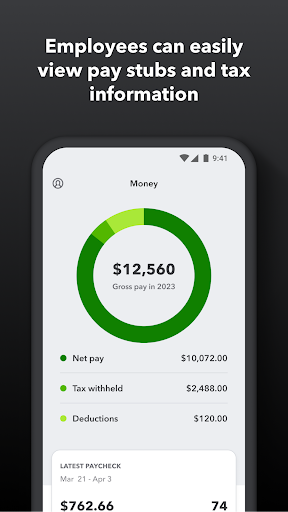
15 store screenshots


18 store screenshots



Pricing & paywalls
- Free to download
- Free to download
Ratings & reviews
-
2/5Holding out hope
I recently opened a salon loft where I rent a space and this was the program they have a contract with. Everything was working seamlessly until I had my accountant link her account with mine so she could handle my books. That’s when it went all down hill. I lost all my previous recipes and inventory and the only answers we got from quickbooks customer service (after 2 hours on the phone) was to screen shot all of my info so we could MANUALLY enter everything all over again. Fine. Only was a months worth of receipts. Next issue was I went to check out a client and my whole app had changed. No longer a tip option. No longer a way for me to turn on the sales tax as previously available. Call customer service and they have never seen this happen to the GoPayment app. Go figure I get to be the case that tests their product to the max. So 3 hours on the phone, sending screen shots while I’m working on clients. To end up with no solution and they have to have their team look into it on Monday. So far it has screwed up how simple it was to check out clients let alone the hundreds of products I have to re enter. I HOPE they can fix this because I was loving the app. But I fear I might have to look into other options and something that can actually sync with an appointment booking app.
Bahbahwho · 6 Aug 2026
-
1/5What a sorry excuse for a payment app
After being on hold for hours, I get a hold of tech support who had no clue what they were doing. It’s almost as if this company hired random people who lied on their resume and gave them a vague guidebook on troubleshooting. I made one transaction with this app and it’s been a headache since then. I was able to get funds deposited in my account from the transaction but when they went to charge me a fee for the transaction they couldn’t take their money. I was confused because the account and routing info I gave them was accurate but the first tech I spoke to just couldn’t comprehend what I was saying at all. How was it, that they were able to deposit money into my bank account but couldn’t withdraw their fee from that same bank account especially when my info on their site was correct? The guy I spoke to that tried walking me through it had an attitude with me because I interrupted him. I tried telling him that my account information was correct on my end and he had me enter it again, even after entering it again he said it wasn’t correct on his side. I told him it didn’t sound like an issue on my end and he said with an attitude “I can help you with this but that’s up to you”. I also called my bank to make sure there wasn’t an issue on their end and there wasn’t. Simply put, it’s a mess over at this company, I will be closing my account and going with an app I can count on.
TheHomeRepairGuy · 6 Aug 2026
-
1/5Go payments does not interact w qb’s??
We use go payments app at our business .. I just notice (duh ). That when we do a sales receipt w the app (go payments ) I can see it on my app on iPhone however (no sales receipt #).. then have to go on my desktop w online to create a receipt so it can be counted w my sales.. ???? How is this ?? I do not have the info to see anything about the sales ( like description of sales etc..) so I go payment w q.b to import and make a receipt.... why?? Why can the go payment app or info generate the sales as in the app on phone ?? Too much go back and forth w this quick books stuff.. we have use quick book for 7 years and is the worst app// online account info software ever!!! I call and even got a kelly person (after I call and complained to BBB )from the corporate headquarters to solve some issues with the credit card display error .. still not working correctly she hasn’t called me over a month and now the merchant service of intuit is messing up ... crazy crazy.. not a good software and the customer service reads from a book w no solution when one spends hours on the phone w them ... like I said now the merchant service is charging twice or declines a cards the like minutes the cards is expected!!!! I call after 2 hours ( nice girl Tried ) she sent a trouble shooting information so we can do it!!! Really!!!:(. The BBB and the Merchant compliance people are going to hear my voice my complaints..
Butterflygirl1240 · 6 Aug 2026
-
2/5Would be perfect if...
I wish there was a way to link payments on the GoPayment app to existing invoices in Quickbooks because that’s the ONLY reason I downloaded the app & got the card reader. My business deals 100% in invoices, and I thought this would allow me to take payments from customers to put toward their invoices, but it does not. It automatically creates sales receipts that you cannot link to their open invoices as payments. I spoke to support and they confirmed, no you cannot link sales receipts to open invoices. They suggested I delete the sales receipt and enter the payment manually. I wish that the QB website & app description would have made it clear that this was not a system for receiving payments on existing invoices— it’s only for creating new sales receipts & taking payment on said sales receipts. I’m frustrated that this is not what I needed even though I was led to believe that it would be. Apart from not doing the one thing that I wanted it to, the rest of the app works fine. Card reader doesn’t seem to have any issues working properly. The payment I received via GoPayment showed up in Quickbooks almost immediately (even if it was a sales receipt instead of a payment like I would have preferred).
ecwhitman · 6 Aug 2026
-
2/5New bluetooth reader is terrible!
I have LOVED gopayment! It’s been wonderful for my business. Reliable, easy to use, and integrates with my quickbooks account. They just released new bluetooth readers. I am hard on my readers and my plug in readers are on the brink of falling apart since I dropped it several times. I also frequently misplace them, so I like to have plenty of readers on hand in my various offices. I recently ordered two more readers, expecting what I usually get (plug in chip reader). Instead I got the bluetooth readers, I thought, cool, something new. They are huge and annoying to have to carry around instead of easily plugging in and moving with my ipad. They had NO instructions. NO mention of them on the website with instructions. I kind of figured out how to use them myself (although the app has the picture of the stripe to insert the credit card on the opposite side!). The problem: IT DOESNT HOLD A CHARGE! I called and they said this is normal to hold a charge for ONE HOUR. That means I would have to keep it plugged into a wall socket the whole time. That is unreasonable and doesn’t work for my business. I may need to change processing companies just because of their RIDICULOUS CHIP READER! I have been with quickbooks for YEARS. UGGGH!
deedeestar32 · 6 Aug 2026
-
1/5
A horrible job putting out the newest update. The app now loads at a snail's pace and constantly glitches, switching between different UIs on its own. To make matters worse, the timesheets are way too messy to read.
Surinder Sidhu · 27 Sep 2026
-
5/5
helpful tool
Vernon Keezer · 27 Sep 2026
-
5/5
best app
Harveer Singh Rathour · 27 Sep 2026
-
5/5
nice
Denise Bennett · 27 Sep 2026
-
5/5
I love this app
Carman Koster · 27 Sep 2026
Privacy & accessibility
Privacy
- Data Linked to You — Analytics — Diagnostics — Crash Data Developer declared
- Data Linked to You — Analytics — Diagnostics — Other Diagnostic Data Developer declared
- Data Linked to You — Analytics — Diagnostics — Performance Data Developer declared
- Data Linked to You — Analytics — Identifiers — User ID Developer declared
- Data Linked to You — Analytics — Location — Coarse Location Developer declared
- Data Linked to You — Analytics — Usage Data — Product Interaction Developer declared
- Data Linked to You — App Functionality — Contact Info — Email Address Developer declared
- Data Linked to You — App Functionality — Contact Info — Name Developer declared
- Data Linked to You — App Functionality — Contact Info — Phone Number Developer declared
- Data Linked to You — App Functionality — Contact Info — Physical Address Developer declared
- Data Linked to You — App Functionality — Contacts Developer declared
- Data Linked to You — App Functionality — Financial Info — Other Financial Info Developer declared
- Data Linked to You — App Functionality — Financial Info — Payment Info Developer declared
- Data Linked to You — App Functionality — Identifiers — User ID Developer declared
- Data Linked to You — App Functionality — Location — Precise Location Developer declared
- Data Linked to You — App Functionality — Other Data — Other Data Types Developer declared
- Data Linked to You — App Functionality — Purchases — Purchase History Developer declared
- Data Linked to You — App Functionality — User Content — Audio Data Developer declared
- Data Linked to You — App Functionality — User Content — Other User Content Developer declared
- Data Linked to You — App Functionality — User Content — Photos or Videos Developer declared
- Data Linked to You — Developer’s Advertising or Marketing — Identifiers — Device ID Developer declared
- Data Linked to You — Developer’s Advertising or Marketing — Identifiers — User ID Developer declared
- Data Linked to You — Developer’s Advertising or Marketing — Usage Data — Product Interaction Developer declared
- Data Linked to You — Other Purposes — Diagnostics — Crash Data Developer declared
- Data Linked to You — Other Purposes — Diagnostics — Other Diagnostic Data Developer declared
- Data Linked to You — Other Purposes — Diagnostics — Performance Data Developer declared
- Data Linked to You — Third-Party Advertising — Identifiers — Device ID Developer declared
- Data Linked to You — Third-Party Advertising — Usage Data — Product Interaction Developer declared
- Data Linked to You — Contact Info Developer declared
- Data Linked to You — Contacts Developer declared
- Data Linked to You — Diagnostics Developer declared
- Data Linked to You — Financial Info Developer declared
- Data Linked to You — Identifiers Developer declared
- Data Linked to You — Location Developer declared
- Data Linked to You — Other Data Developer declared
- Data Linked to You — Purchases Developer declared
- Data Linked to You — Usage Data Developer declared
- Data Linked to You — User Content Developer declared
- Data Used to Track You — Identifiers — Device ID Developer declared
- Data Used to Track You — Identifiers — User ID Developer declared
- Data Used to Track You — Identifiers Developer declared
- Data Used to Track You — Usage Data — Product Interaction Developer declared
- Data Used to Track You — Usage Data Developer declared
Accessibility
No accessibility labels collected yet.
Privacy
- Data collected — Analytics — App activity — App interactions Developer declared
- Data collected — Analytics — App info and performance — Crash logs Developer declared
- Data collected — Analytics — App info and performance — Diagnostics Developer declared
- Data collected — Analytics — Device or other IDs Developer declared
- Data collected — App functionality — Location — Precise location Developer declared
- Data collected — App functionality — Photos and videos — Photos Developer declared
- Data collected — App functionality, Account management — Personal info — Email address Developer declared
- Data collected — App functionality, Account management — Personal info — Name Developer declared
- Data collected — App functionality, Account management — Personal info — Phone number Developer declared
- Data collected — App functionality, Analytics, Account management — Personal info — User IDs Developer declared
- Data shared — Analytics — App activity — App interactions Developer declared
- Data shared — Analytics — App info and performance — Crash logs Developer declared
- Data shared — Analytics — App info and performance — Diagnostics Developer declared
- Data shared — Analytics — Device or other IDs Developer declared
- Security practices — Your data is transferred over a secure connection — Data is encrypted in transit Developer declared
- Security practices — The developer provides a way for you to request that your data be deleted — You can request that data be deleted Developer declared
Accessibility
No accessibility labels collected yet.
Versions
-
23.12.2
- Minor bug fixes and improvements
-
24.02.0
- Minor bug fixes and improvements
-
24.04.0
- Minor bug fixes and improvements
-
24.06.0
- Minor bug fixes and improvements
-
24.08.0
- Minor bug fixes and improvements
-
24.08.1
A new feature enabled merchants to take payments through a payment link.
-
24.11.0
We squashed some bugs and made some improvements.
-
24.12.0
We squashed some bugs and made some improvements.
-
25.03.0
We squashed some bugs and made some improvements.
-
25.04.0
We squashed some bugs and made some improvements. And Tap to Pay on iPhone is now available in the GoPayment app. You can accept in-person, contactless payments, right on your iPhone
-
25.05.0
We squashed some bugs and made some improvements. And Tap to Pay on iPhone is now available in the GoPayment app. You can accept in-person, contactless payments, right on your iPhone
-
25.05.1
We squashed some bugs and made some improvements. And Tap to Pay on iPhone is now available in the GoPayment app. You can accept in-person, contactless payments, right on your iPhone
-
25.07.1
We squashed some bugs and made some improvements. And Tap to Pay on iPhone is now available in the GoPayment app. You can accept in-person, contactless payments, right on your iPhone
-
25.08.1
We squashed some bugs and made some improvements. And Tap to Pay on iPhone is now available in the GoPayment app. You can accept in-person, contactless payments, right on your iPhone
-
25.09.1
We squashed some bugs and made some improvements. And Tap to Pay on iPhone is now available in the GoPayment app. You can accept in-person, contactless payments, right on your iPhone
-
25.1.0
We squashed some bugs and made some improvements.
-
25.10.0
We squashed some bugs and made some improvements. And Tap to Pay on iPhone is now available in the GoPayment app. You can accept in-person, contactless payments, right on your iPhone
-
25.1.1
We squashed some bugs and made some improvements.
-
25.11.0
We squashed some bugs and made some improvements. And Tap to Pay on iPhone is now available in the GoPayment app. You can accept in-person, contactless payments, right on your iPhone
-
25.1.2
We squashed some bugs and made some improvements.
-
25.12.0
We squashed some bugs and made some improvements. And Tap to Pay on iPhone is now available in the GoPayment app. You can accept in-person, contactless payments, right on your iPhone
-
26.01.0
We squashed some bugs and made some improvements. And Tap to Pay on iPhone is now available in the GoPayment app. You can accept in-person, contactless payments, right on your iPhone
-
26.02.0
We squashed some bugs and made some improvements. And Tap to Pay on iPhone is now available in the GoPayment app. You can accept in-person, contactless payments, right on your iPhone
-
26.03.0
We squashed some bugs and made some improvements. And Tap to Pay on iPhone is now available in the GoPayment app. You can accept in-person, contactless payments, right on your iPhone
-
26.04.0
· 20 Apr 2026
We squashed some bugs and made some improvements. And Tap to Pay on iPhone is now available in the GoPayment app. You can accept in-person, contactless payments, right on your iPhone
- 4.98.2.20260911.1.RELEASE · 18 Sep 2026
Alternatives
- Payment for Stripe — Same category + similar ratings
- Square Invoices: Invoice Maker — Same category + similar ratings
- GoDaddy Commerce: POS Payments — Same category + similar ratings
- Self Employed - Accounting — Same category + similar ratings
- SwipeSimple - Point of Sale — Same category + similar ratings
- Payanywhere: Point of Sale POS — Same category + similar ratings
Availability by market
- US
Data quality & evidence
- Page completeness
- Live store listing
- Last verified
- 27 Sep 2026
- Sources
- App Store, Google Play
- Apoku editorial summary has not been published yet.