
Quick verdict
- What it is
- Store information collected; independent summary not yet available.
- At a glance
-
- Free to download
Categories and search queries
Official categories
- Weather
- News
AppCorpus categories
Key functions
| Function | Availability | Access | Scope | Evidence |
|---|---|---|---|---|
| Free app | Yes | Free | — | Store published |
Screens
App Store
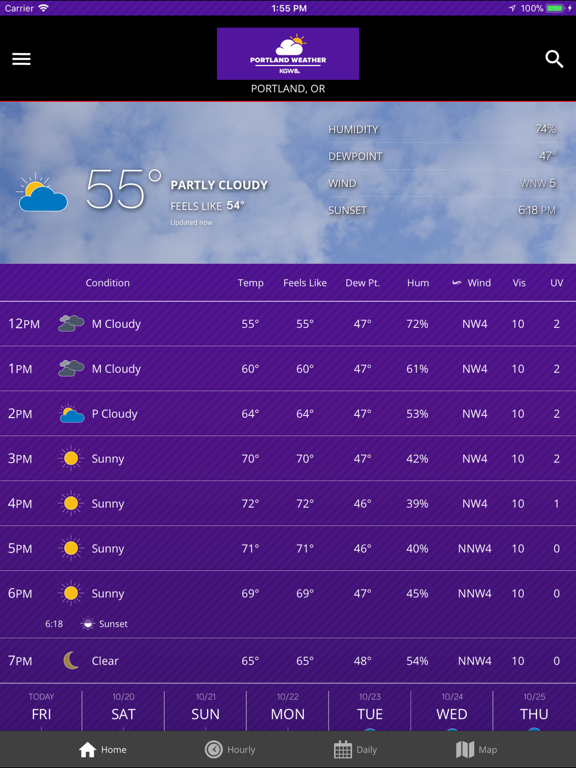
11 store screenshots



Pricing & paywalls
App Store
- Free
Ratings & reviews
App Store
-
5/5Wud prefer solid background
Rating Update refers to v4.7.5 Now a 5 star app! Everything I need, clearly available AND easy to read. Thank you! It’s really a 5 Star app with everything most people wud need. BUT I gave it 3 Stars because it’s very difficult to read. As lovely as it is, the background photo of kayak on the dock makes it too hard to read print for hourly and daily forecasts. Perhaps I’m missing how to change it in settings but if that’s the case maybe where & how to change it needs to be easier to find. If there isnt a way to change it plz consider adding that option
Having_Fun_Now · 6 Aug 2026
-
5/5This our go-to source for weather forecasts
My wife and I check out the forecast with this app at least twice a day. Besides the graphics and text, I like the radar; I can watch the rain coming down all over the country!
Norgie1934 · 6 Aug 2026
-
5/5Not as good as the old version
The temperature is often way off the actual temperature, the map doesn't work well and sometimes it doesn't load at all.
TheGinn · 6 Aug 2026
-
4/5Good app one major flaw
Good app, easy to use, good interface, etc. It has one very annoying feature. The KDW logo remains floating over much of the text making it difficult to read on the iPad. I can’t see a way to get rid of it. It’s really annoying because it’s right on top of what you are reading.
kdaphoto · 6 Aug 2026
-
5/5Works across the country.
I thought this app would just be good for Portland Metro area. I have found it works across the country, also identifying the city I was in like when traveling by train. It seems plenty accurate enough to know how to dress.
SandraPDX · 6 Aug 2026
Privacy & accessibility
App Store
Privacy
- Data Linked to You — App Functionality — Contact Info — Email Address Developer declared
- Data Linked to You — App Functionality — Identifiers — Device ID Developer declared
- Data Linked to You — App Functionality — Location — Precise Location Developer declared
- Data Linked to You — App Functionality — User Content — Photos or Videos Developer declared
- Data Linked to You — Developer’s Advertising or Marketing — Identifiers — Device ID Developer declared
- Data Linked to You — Developer’s Advertising or Marketing — Location — Precise Location Developer declared
- Data Linked to You — Developer’s Advertising or Marketing — Usage Data — Advertising Data Developer declared
- Data Linked to You — Third-Party Advertising — Identifiers — Device ID Developer declared
- Data Linked to You — Third-Party Advertising — Location — Precise Location Developer declared
- Data Linked to You — Third-Party Advertising — Usage Data — Advertising Data Developer declared
- Data Linked to You — Contact Info Developer declared
- Data Linked to You — Identifiers Developer declared
- Data Linked to You — Location Developer declared
- Data Linked to You — Usage Data Developer declared
- Data Linked to You — User Content Developer declared
- Data Not Linked to You — Analytics — Usage Data — Product Interaction Developer declared
- Data Not Linked to You — App Functionality — Usage Data — Product Interaction Developer declared
- Data Not Linked to You — Usage Data Developer declared
- Data Used to Track You — Identifiers — Device ID Developer declared
- Data Used to Track You — Identifiers Developer declared
- Data Used to Track You — Location — Precise Location Developer declared
- Data Used to Track You — Location Developer declared
- Data Used to Track You — Usage Data — Advertising Data Developer declared
- Data Used to Track You — Usage Data Developer declared
Accessibility
No accessibility labels collected yet.
Versions
App Store
-
4.10.600
Location Management *Press location in top bar to change, edit and add locations *In the left menu for changing locations, press the 3 dots next to the location to edit location settings and make a location capable of receiving push notifications. Visual Map Enhancements *New color palette makes it easier to see the difference between map-based alerts More Information Available on the Map *Pressing on map based Alerts will show the bulletin text *Pressing on Storm Tracks outlines possible storm threats *Pressing on Earthquakes or Tropical Tracks provides more detail than ever before
-
4.6.2108
* updated resources
-
4.6.2109
- updated resources
-
4.7.101
New Map Experience! *Press the 3 dots to access map layers options *Press and hold on any Weather Condition, Storm Symbol or Alert and drag it into the Quick Pick area to quickly change weather layers without accessing all map layers options Easily view all videos in the app *Press on a video and you will see all videos within the app displayed so you can easily browse
-
4.7.102
* added earthquake tracker
-
4.7.301
- updated resources - bug fixes
-
4.7.500
- updated graphics - bug fixes
-
4.7.802
* bug fixes
-
4.8.800
* Choose between a Dark, Satellite or Light base map * Next to the play button, toggle to view the timeline for past only, future only and combined past and future * Press the 3 dots to access map layers options * Press and hold on any Weather Condition, Storm Symbol or Alert and drag it into the Quick Pick area to quickly change weather layers without accessing all map layers options * White eyeball added to Edit Locations screen to allow for simple location change
-
4.8.901
* performance improvements
-
5.0.401
Improved weather data source to give you accurate current conditions and forecasts from your favorite weather source!
-
5.0.902
* performance improvements
-
5.10.502
Performance Improvements
-
5.11.503
Performance Improvements
-
5.12.702
Performance Improvements
-
5.1.400
* performance improvements
-
5.1.401
* performance improvements
-
5.1.402
* performance improvements
-
5.17.614
Bug fixes and performance improvements
-
5.4.804
Implemented support for active links within video descriptions Fixed an issue on iOS 15 where searching for certain locations would close the app. A bug caused TV Station notifications to be turned off in the previous version of the app. If you are upgrading from a previous release and wish to receive alerts & notifications, please go to the app's settings screen and re-enable them. Numerous bug fixes and stability improvements Removed app store support for iOS 12, users on older operating systems will need to update their operating system to update their apps.
-
5.4.902
Implemented support for active links within video descriptions Fixed an issue on iOS 15 where searching for certain locations would close the app. A bug caused TV Station notifications to be turned off in the previous version of the app. As such we will be turning them back on for any user with alerts enabled. If you do not want the station alerts on, you can turn them off within the settings menu. Numerous bug fixes and stability improvements Removed app store support for iOS 12, users on older operating systems will need to update their operating system to update their apps.
-
5.4.910
Performance improvements
-
5.5.400
Resolved bug which sometimes led to map presets getting overridden Added detailed view when clicking on Daily item in the home screen Reduced Application Download size Stability & Performance Improvements
-
5.6.506
Performance improvements
-
6.2.520
· 7 Jul 2026
Bug fixes and performance improvements
Alternatives
- KGWN Storm Tracker 5 — Same category + similar ratings
- Sioux Falls Live StormTRACKER — Same category + similar ratings
Availability by market
- US
Data quality & evidence
- Page completeness
- Live store listing
- Last verified
- 6 Aug 2026
- Sources
- App Store
- Independent summary has not been published yet.