
Quick verdict
- What it is
- Store information collected; an Apoku editorial summary is not yet published.
- At a glance
-
- Free to download
- In-app purchases
Categories and search queries
Official categories
- Productivity
- Health & Fitness
Apoku categories
Key functions
| Function | Availability | Access | Scope | Evidence |
|---|---|---|---|---|
| Free app | Yes | Free | Context-specific | Store published |
| In-app purchases | Yes | Limited free | Context-specific | Store published |
Screens
App Store
18 store screenshots
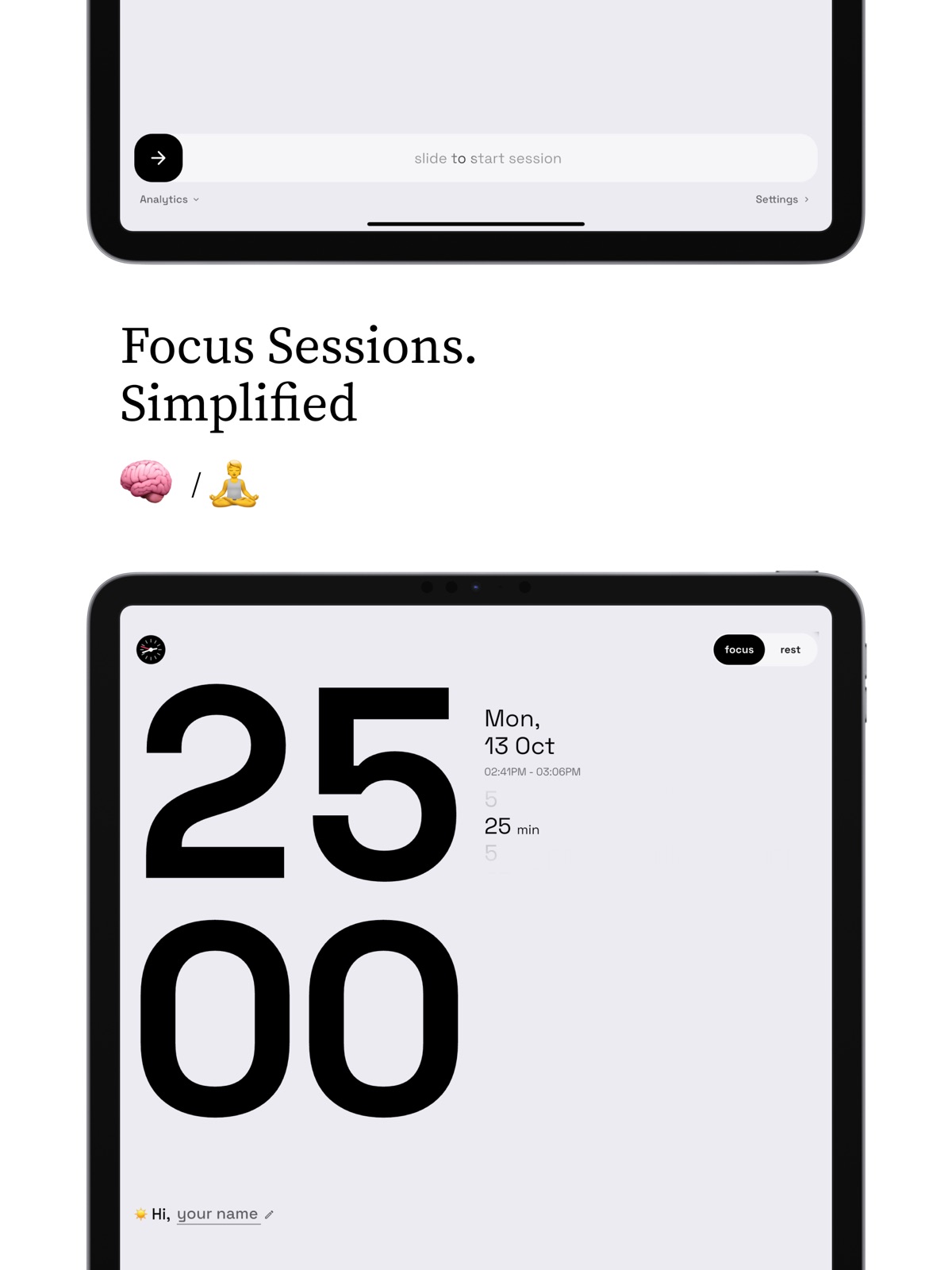
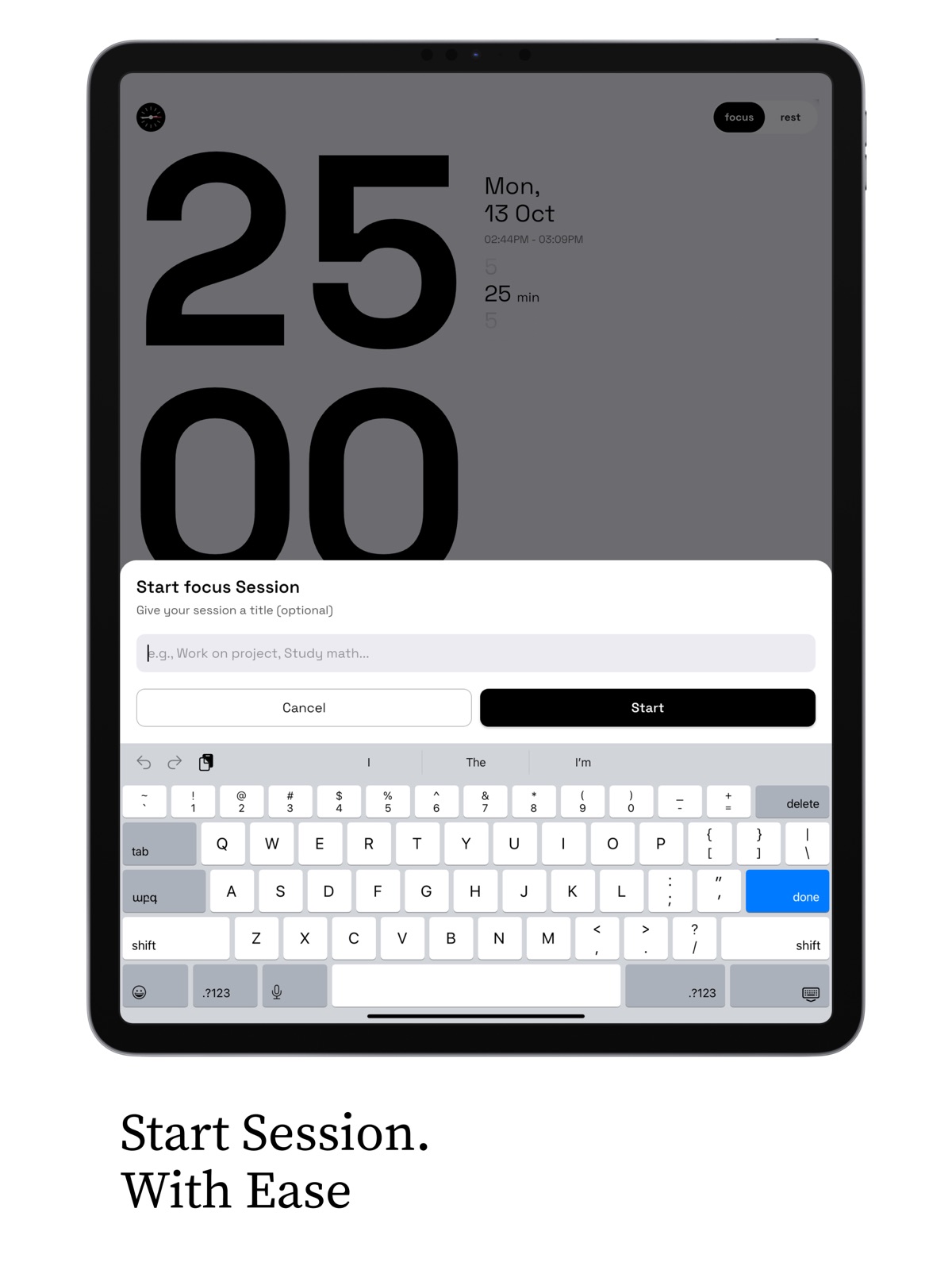
Pricing & paywalls
App Store
- Five Coffees — $4.99
- Lifetime Pro Access — $24.99
- One Coffee — $0.99
- Pomidor Pro — $2.99
- Pomidor Pro — $14.99
- Three Coffees — $2.99
Ratings & reviews
App Store
-
5/5Great App!
By far the best Pomodoro app I have used so far. My only requests would be to able to adjust the timer duration from the main screen using a scroll wheel or some other UX feature, and to have the ability to sync focus sessions to Apple Calendar. Once again, a great app that takes care of my focus needs.
Abduj18 · 7 Aug 2026
-
5/5Best Pomodoro App
This is hands down the best Pomodoro I’ve ever used. The UI is incredibly clean, modern, and intuitive — everything just feels so smooth and thoughtfully designed. It’s a joy to use every day, and it really helps me stay focused and productive without any clutter or distractions. Highly recommend to anyone looking to level up their workflow!
IronDre · 7 Aug 2026
-
5/5Clean design
To go along with a declutter mind set, this app is well designed with a clean minimal interface. It's definitely helps you focus and or rest. I've only started using and I love it!
JohnFC73 · 7 Aug 2026
-
5/5Simple and useful!
Executes the pomidoro function well. Also includes analytics and some nice extras. The app is pretty attractive as well. Meets my needs!
Herron355 · 7 Aug 2026
-
5/5Incredible app!!
Seriously amazing app. Great design and super professional. I hope there is a plan for a macOS version
Fu-Man-Chu · 7 Aug 2026
Privacy & accessibility
App Store
Privacy
- Data Not Collected Developer declared
Accessibility
- Dark Interface — SUPPORTED Store published
- Larger Text — SUPPORTED Store published
- Reduced Motion — SUPPORTED Store published
Versions
App Store
- 1.0
-
1.0.1
UI improvements for smoother animations and cleaner visuals.
-
1.0.10
This update focuses on visual polish and speed, making Landby feel smoother and more responsive than ever. - Improved the first splash animation – transitions are now faster, cleaner, and more fluid across all devices. - Refined multiple UI and UX details – better button alignment, smoother scrolling, and improved layout responsiveness. - Optimized loading performance to reduce initial startup time. - Fixed several minor bugs to ensure a more stable and seamless experience. As always, this update continues to refine the overall feel and performance of the app to keep your workflow distraction-free and enjoyable.
-
1.0.11
This update focuses on improving overall stability and experience. - Fixed several bugs and minor performance issues. - Refined multiple UI and UX details for smoother interactions. - Improved animations and layout consistency across the app. As always, thank you for using Pomidor - your feedback helps us make every update better.
-
1.0.12
This update brings important improvements to performance, visuals, and accuracy across the app. - Improved overall app performance for a faster and smoother experience. - Fixed an issue with the Productivity by Hour calculations to ensure accurate tracking. - Enhanced the splash screen with faster loading and cleaner animation. - Polished several UI and UX elements for a more consistent and refined feel. Thank you for using Pomidor. Your feedback continues to help us improve with every update.
-
1.0.13
This update includes a set of important fixes and refinements to keep the app running smoothly. - Hotfixed the status bar color issue on iOS for a cleaner and more consistent appearance. - Improved overall app performance for faster interactions. Thank you for using Pomidor. Your feedback helps us deliver better updates every time.
-
1.0.14
This update makes Pomidor smoother and more reliable than ever. - Improved overall performance and responsiveness - Refined UI elements for a cleaner, more consistent experience - Adjusted layouts and interactions for better usability - Enhanced flow across key screens to make navigation feel more intuitive Thank you for using Pomidor! Your feedback helps us continually improve the app.
-
1.0.16
In this version, we focused on stability and reliability during your focus sessions. - Fixed potential bugs and glitches on the Active Session screen - Improved session stability, ensuring a smoother and distraction-free experience - Refined system behavior to maintain consistency while focusing Enjoy a more dependable Pomidor experience - one session at a time.
-
1.0.17
Improved handling of accidental swipes on the active session screen when minimizing the app, making sessions more stable and interruption-free. Added additional fixes and improvements based on user feedback to enhance overall performance and experience. Improved App Store presentation to better reflect Pomodor's focus and productivity features. Updated app title, subtitle, and keywords for clearer discovery and relevance. Minor metadata refinements to ensure a more consistent and polished App Store experience.
-
1.0.18
Discover our other apps right from the settings page. We've also improved the onboarding experience, made timer interactions smoother by preventing accidental swipes during sessions, and squashed a few bugs along the way.
-
1.0.19
Meet the Daily Focus Planner - swipe down from the timer (or tap the checklist next to the clock) to plan your tasks for today. Estimate how many pomodoros each task needs, start a focus session straight from a task, and watch your progress fill in as you complete sessions. Unfinished tasks? Move them to tomorrow with one tap. Your plan syncs across your devices with iCloud and works fully offline. We've also made the app faster and more reliable under the hood, and squashed a few bugs along the way.
-
1.0.2
Lock Screen activity widget improvements and sleek UI fixes for a smoother, more responsive experience
-
1.0.20
· 28 Jul 2026
New Task History lets you look back at previous days and pull any past task right back into today's plan. Your plan syncs across your devices and works fully offline. We've also made Live Activities and the Dynamic Island more reliable when starting a session, and squashed a few bugs along the way.
-
1.0.3
A fresh update to keep your focus sessions smoother than ever! Now you’ll see your analytics in hour:minutes format, and personalize your sessions. You can choose how your timer ends - with sound/vibration - and yes, the app got a brand-new icon too! Additionally, a few subtle tweaks were made for improved alignment, scrolling, and the inclusion of a “Rate my app” and “Buy me a coffee” feature to show some appreciation.
-
1.0.4
Pomidor just got a major upgrade to make your focus sessions smoother, smarter, and more powerful. New Features - Timeless Focus Mode: Count up instead of down for distraction-free deep work. - Custom Midnight Theme: A new dark style for late-night sessions. - Session Tags: Manage and organize your focus sessions by category or task. - Improved Statistics: Better charts and insights to help you track progress. - New $1 PRO Plan: Unlock all features for just one dollar per month. Enhancements Refined UI and UX for a cleaner, faster experience. Performance improvements for smoother use. Stay focused, stay consistent, and let Pomidor handle the rest.
-
1.0.5
Pomidor just got even better — focus smarter, track easier, and customize your sessions your way! New Features - App Icon Switch: Customize Pomidor’s app icon to match your style. - Performance Hotmap Screen: Visualize your productivity peaks with the new heatmap. - Filter by Tag in Analytics: Quickly track sessions by category or task. - Sound Selection: Choose your preferred timer completion sound — never miss a session! Enhancements - UI & UX Improvements: Even cleaner, smoother, and more intuitive interface. - Overall Performance Boost: Faster, more responsive experience across the app. Stay focused, stay productive, and let Pomidor make every session count.
-
1.0.6
This update brings some of the most requested improvements and a brand new way to unlock Pomidor forever. - Added Lifetime Access - say goodbye to subscriptions. Pay once and enjoy all Pro features for life. - Introduced new ambient scenes: Forest, Arctic, and Mocha for more immersive focus sessions. - Updated Activity Widget to fully support Timeless Mode for a smoother countdown-free experience. - Removed the session title prompt when starting a timer. You can now edit the title anytime during the session for better flow. We’ve also made small performance and stability improvements to make your focus sessions more seamless than ever. Thanks for using Pomidor to focus, rest, and create balance in your day.
-
1.0.7
This update makes Pomidor even more complete, with new ways to connect, support, and unlock access. - Lifetime Access is now live – upgrade once and enjoy Pomidor Pro forever, no renewals needed. - Added a new Developer Support section in Settings – reach out directly or share your feedback with ease. - Introduced Redeem Codes in the subscription sheet – quickly activate offers or unlock access in one tap. As always, we’ve included small improvements and fixes to keep your focus sessions running smoothly and reliably. Thank you for supporting Pomidor – your feedback and focus keep us improving every release.
-
1.0.8
This update makes Pomidor even more personalized, with fresh looks, powerful insights, and smoother focus sessions. - Added 4 new themes – Forest, Arctic, Mocha, and Code – to match your perfect focus vibe. - Introduced new Home Screen Widgets for Analytics & Performance – track your progress at a glance. - Added new Informational Screens for Pro Features – discover everything Pomidor Pro offers. - Active Session Screen now features Custom Emojis based on your selected theme. And as always, this update includes many UI refinements, design polish, and performance improvements to keep your focus sessions seamless and enjoyable. Thank you for being part of Pomidor – your focus and feedback inspire every release.
-
1.0.9
This update makes Landby even more immersive and intelligent - built to help you stay focused, inspired, and fully in control of your workspace. - Added Ambient Sounds support – choose from calm, electronic, or nature-inspired soundscapes to help you stay in flow while you work or code. - Introduced new Productivity Analytics – visualize your performance trends, daily streaks, and focus insights right inside your dashboard. - Improved Themes and refined UI/UX – smoother animations, balanced color palettes, and enhanced layout consistency for a cleaner, faster experience. - Added a new flag to control title prompts – you can now choose whether the app should ask for a title automatically or skip it based on your preferences. You can now join our Reddit community at r/Pomidor to share feedback, discover updates, and connect with other focused creators. We have a section for that now on the settings page. As always, this update includes many stability enhancements, design polish, and performance improvements to keep your experience seamless and enjoyable. Thank you for being part of Landby – your feedback and focus drive every update we build.
Alternatives
- focus timer & tracker - foku. — Same category + similar ratings
- Clarity Focus Timer To Do List — Same category + similar ratings
Availability by market
- US
Data quality & evidence
- Page completeness
- Live store listing
- Last verified
- 7 Aug 2026
- Sources
- App Store
- Apoku editorial summary has not been published yet.