
Quick verdict
- What it is
- Store information collected; independent summary not yet available.
- At a glance
-
- Free download · core features require a paid plan
- In-app purchases
- From $1.49/mo
Categories and search queries
Official categories
- Developer Tools
- Utilities
AppCorpus categories
Key functions
| Function | Availability | Access | Scope | Evidence |
|---|---|---|---|---|
| Free app | Yes | Free | — | Store published |
| In-app purchases | Yes | Limited free | — | Store published |
| Subscription | Yes | Paid | — | Store published |
Screens
App Store
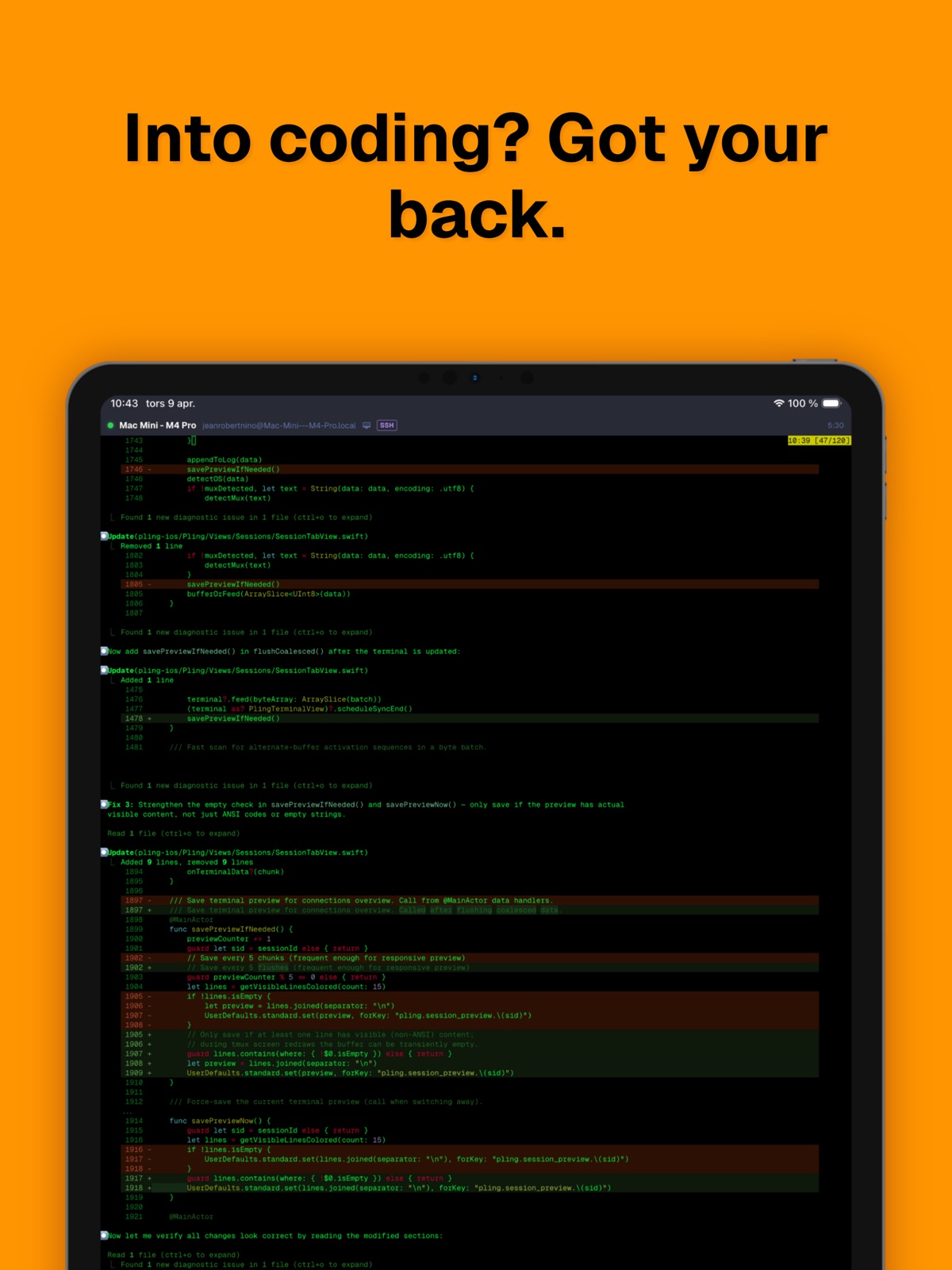
15 store screenshots



Pricing & paywalls
App Store
- Pling Pro — $17.99/year ($1.49/mo) (derived from the IAP title)
Ratings & reviews
App Store
No store reviews collected for App Store · US
Privacy & accessibility
App Store
Privacy
- Data Linked to You — App Functionality — Contact Info — Email Address Developer declared
- Data Linked to You — App Functionality — Identifiers — Device ID Developer declared
- Data Linked to You — App Functionality — Identifiers — User ID Developer declared
- Data Linked to You — App Functionality — Purchases — Purchase History Developer declared
- Data Linked to You — Contact Info Developer declared
- Data Linked to You — Identifiers Developer declared
- Data Linked to You — Purchases Developer declared
- Data Not Linked to You — App Functionality — Diagnostics — Performance Data Developer declared
- Data Not Linked to You — App Functionality — Location — Precise Location Developer declared
- Data Not Linked to You — Diagnostics Developer declared
- Data Not Linked to You — Location Developer declared
Accessibility
- Dark Interface — SUPPORTED Store published
- Larger Text — SUPPORTED Store published
- Reduced Motion — SUPPORTED Store published
- VoiceOver — SUPPORTED Store published
Versions
App Store
- 1.0.14
-
1.1.10
Enhanced Session Picker Attach to existing tmux and Zellij sessions directly when connecting to a host. Pling detects running sessions on the server and lets you attach, create new, or kill stale ones. No more typing tmux attach manually. Picture-in-Picture Terminal (Experimental Feature) Keep your terminal visible in a floating window while using other apps. PiP renders a live snapshot of your active session that stays on screen. Set it to trigger automatically when you leave the app, or start it manually from the session action menu. Improved Terminal Stability Various under-the-hood improvements for a smoother, more reliable terminal experience across the board.
-
1.2.10
Enhanced Session Picker Attach to existing tmux and Zellij sessions directly when connecting to a host. Pling detects running sessions on the server and lets you attach, create new, or kill stale ones. No more typing tmux attach manually. Picture-in-Picture Terminal (Experimental Feature) Keep your terminal visible in a floating window while using other apps. PiP renders a live snapshot of your active session that stays on screen. Improved Stability Various under-the-hood improvements for a smoother, more reliable app experience across the board.
-
1.3.10
Tailscale Device Import Paste a Tailscale API key and import every device on your tailnet as a Pling host in one tap. Connect by MagicNS name, no IPs to remember. Your Tailscale app handles the networking, so routing just works as iong as it is running. Docker Container Logs Tap any container on a host to stream its logs live. Pling finds the docker binary wherever it lives (PATH, Homebrew, /us/local/bin) so it works on macoS, Linux, and orchestrated boxes without setup. More Terminal Fonts A new selection of monospaced fonts to pick from in Settings > Terminal Font. Includes ligature-aware options so arrows, comparisons, and markdown symbols render cleanly in editors and git diffs.
-
1.5.10
HUGE SUMMER UPDATE! Tailscale Device Import Paste a Tailscale API key and import every device on your tailnet as a Pling host in one tap. Connect by MagicDNS name. This means: no IPs to remember. Your Tailscale app handles the networking, so routing just works as long as it's running. Shared tmux & zellij Sessions Pling agent now detects tmux and zellij sessions on your servers and lets you attach, share with guests, or kill them from the new Sharing hub. Pair on a long-running session from your phone without anyone having to redial in. Hetzner Cloud Server Import Drop in a Hetzner Cloud API token and pull every server (IPv4 and IPv6) into Pling as a saved host. Same one-tap flow we already have for AWS and DigitalOcean. Chat Mode A new way to talk to the AI assistant; type questions, attach screenshots from your photo library, and get answers in a conversational thread instead of one-shot commands. Toggle it per-session or set it as the default in Settings. Annotate Images Before Sending Drawing tools on every attached image. Circle the error, underline the line number, or scribble a note before you ship it to the AI or off to a teammate. Built on PencilKit so Apple Pencil and finger input both feel right. Docker Container Logs Tap any container on a host to stream its logs live. Pling finds the docker binary wherever it lives (PATH, Homebrew, /usr/local/bin) so it works on macOS, Linux, and orchestrated boxes without setup. New Snippet Packs Curated command snippets for Docker, systemd, and Adobe Campaign Classic. Enable a pack from Settings → Snippets and the commands show up in your terminal accessory bar. No copying from a wiki, no guessing flags. Enhanced Onboarding A redesigned welcome flow that walks you through hosts, push, AI, and Chat Mode on first launch, with a skip option at every step. Faster setup whether you're a first-timer or restoring from iCloud. More Languages Pling now speaks Czech, Indonesian, Thai, and Vietnamese, bringing the total to 24 languages. Homebrew Install for Pling Agent On macOS, install the Pling agent with a single brew install; service ops, logs, and config live under your brew prefix and start automatically after token setup. More Terminal Fonts A fresh selection of monospaced fonts in Settings → Terminal Font, including ligature-aware options so arrows, comparisons, and markdown symbols render cleanly in editors and git diffs. Alternate App Icons Three new icons to pick from in Settings. Bonfire, Midnight, and Capybara: alongside the default. Match Pling to your home screen aesthetic. Capybara's my oldest daughter's favorite, so give it a try.
-
1.5.11
HUGE SUMMER UPDATE! Tailscale Device Import Paste a Tailscale API key and import every device on your tailnet as a Pling host in one tap. Connect by MagicDNS name. This means: no IPs to remember. Your Tailscale app handles the networking, so routing just works as long as it's running. Shared tmux & zellij Sessions Pling agent now detects tmux and zellij sessions on your servers and lets you attach, share with guests, or kill them from the new Sharing hub. Pair on a long-running session from your phone without anyone having to redial in. Hetzner Cloud Server Import Drop in a Hetzner Cloud API token and pull every server (IPv4 and IPv6) into Pling as a saved host. Same one-tap flow we already have for AWS and DigitalOcean. Chat Mode A new way to talk to the AI assistant; type questions, attach screenshots from your photo library, and get answers in a conversational thread instead of one-shot commands. Toggle it per-session or set it as the default in Settings. Annotate Images Before Sending Drawing tools on every attached image. Circle the error, underline the line number, or scribble a note before you ship it to the AI or off to a teammate. Built on PencilKit so Apple Pencil and finger input both feel right. Docker Container Logs Tap any container on a host to stream its logs live. Pling finds the docker binary wherever it lives (PATH, Homebrew, /usr/local/bin) so it works on macOS, Linux, and orchestrated boxes without setup. New Snippet Packs Curated command snippets for Docker, systemd, and Adobe Campaign Classic. Enable a pack from Settings → Snippets and the commands show up in your terminal accessory bar. No copying from a wiki, no guessing flags. Enhanced Onboarding A redesigned welcome flow that walks you through hosts, push, AI, and Chat Mode on first launch, with a skip option at every step. Faster setup whether you're a first-timer or restoring from iCloud. More Languages Pling now speaks Czech, Indonesian, Thai, and Vietnamese, bringing the total to 24 languages. Homebrew Install for Pling Agent On macOS, install the Pling agent with a single brew install; service ops, logs, and config live under your brew prefix and start automatically after token setup. More Terminal Fonts A fresh selection of monospaced fonts in Settings → Terminal Font, including ligature-aware options so arrows, comparisons, and markdown symbols render cleanly in editors and git diffs. Alternate App Icons Three new icons to pick from in Settings. Bonfire, Midnight, and Capybara: alongside the default. Match Pling to your home screen aesthetic. Capybara's my oldest daughter's favorite, so give it a try.
-
2.0.11
Workspaces Save a named bundle of hosts and their tmux/zellij sessions, then one-tap restore the whole set on any iCloud-synced device. Pick multiple existing sessions at once, queue brand-new ones, or snapshot your currently-open sessions into a fresh workspace. Lives in Sessions, Infrastructure, right next to SSH and SFTP. iCloud Vault Sync SSH private keys and host passwords now sync across iPhone and iPad via iCloud Keychain. No more re-typing the same sudo password on every device. A new audit screen under Settings, Keys & security shows exactly what's syncing, when each category last synced, and what stays device-only by design. Face ID before enabling. Synced items disappear automatically if you sign out of iCloud. Active Sessions Carousel The connections strip at the top of the Sessions tab is now a live carousel. Each card shows a real snapshot of its running session, refreshed continuously. Double-tap to jump in, long-press for Quick Resume (a full browser with pin/unpin/open shortcuts). Pin the sessions you keep coming back to so they stay on the carousel even when their tab is closed. Port Forwarding Control Surface Add, rename, toggle and remove SSH port forwards live on a connected host without reopening the session. The Add host sheet validates ports as you type, scrolls to the rule you just touched. SFTP Improvements The file browser now has in-directory search via the standard iOS search bar, and multi-select with bulk delete and share-sheet bulk download. Chat + Terminal Attachments Drop photos and files into chat mode or the terminal composer. The new staging sheet lets you tap any thumbnail to edit it before sending, and uploads stream with a live overlay. Smoother iPad Split Terminals Drag the divider between split panes on iPad and watch them respond properly. Plus a pile of bugs squished.
-
2.2.10
Agentic Command Tell Pling what you want done in plain English and it runs the SSH session for you: planning each step, dispatching agent, reading the output, and adjusting as it goes. It asks a quick question when it hits a real decision and stops to check with you before anything destructive. Kick it off from the new Spotlight-style launcher or the Command Agent button in any terminal. Screen: Remote Desktop See and control a host's full graphical desktop right inside the app, streamed live as smooth, hardware-accelerated H.264 video. Move the pointer with precision, type on the on-screen keyboard, pinch to zoom and pan, and push the resolution, frame rate and bitrate as high as your connection allows. Wake on LAN Power on a sleeping machine without getting up. Pling can auto-detect its MAC address from an active SSH session or take one you enter by hand, then send the magic packet straight to it or bounce it through another host on the same network, with live status until it wakes. Sign in with Google Sign in with Google now sits right alongside Sign in with Apple. Link both to a single Pling account so your hosts, keys and settings follow you to every device, and merge a second account into your main one if you started out on the wrong sign-in. Your Pling Account Signing up now creates a Pling account that's yours. Sign in to Pling on the web with it today, and it's the groundwork for Pling coming to more of your devices, with your hosts, keys and settings synced across every one. Your profile photo rides along too, so it's the same wherever you sign in. Live Host Status Every host card now tells you at a glance whether it's reachable, with a live online dot and a badge when the Pling agent is installed. Offline hosts quietly hide the actions you can't use right now, so the menu only ever shows what actually works. Smarter Sessions Tap a host that already has a tmux or zellij session running and Pling jumps straight back into it instead of opening a duplicate. And when a host can't be reached, it offers to close out the dead sessions in a single tap.
-
2.3.10
Agentic Command Tell Pling what you want done in plain English and it runs the SSH session for you: planning each step, dispatching agent, reading the output, and adjusting as it goes. It asks a quick question when it hits a real decision and stops to check with you before anything destructive. Kick it off from the new Spotlight-style launcher or the Command Agent button in any terminal. Screen: Remote Desktop See and control a host's full graphical desktop right inside the app, streamed live as smooth, hardware-accelerated H.264 video. Move the pointer with precision, type on the on-screen keyboard, pinch to zoom and pan, and push the resolution, frame rate and bitrate as high as your connection allows. Wake on LAN Power on a sleeping machine without getting up. Pling can auto-detect its MAC address from an active SSH session or take one you enter by hand, then send the magic packet straight to it or bounce it through another host on the same network, with live status until it wakes. Sign in with Google Sign in with Google now sits right alongside Sign in with Apple. Link both to a single Pling account so your hosts, keys and settings follow you to every device, and merge a second account into your main one if you started out on the wrong sign-in. Your Pling Account Signing up now creates a Pling account that's yours. Sign in to Pling on the web with it today, and it's the groundwork for Pling coming to more of your devices, with your hosts, keys and settings synced across every one. Your profile photo rides along too, so it's the same wherever you sign in. Live Host Status Every host card now tells you at a glance whether it's reachable, with a live online dot and a badge when the Pling agent is installed. Offline hosts quietly hide the actions you can't use right now, so the menu only ever shows what actually works. Smarter Sessions Tap a host that already has a tmux or zellij session running and Pling jumps straight back into it instead of opening a duplicate. And when a host can't be reached, it offers to close out the dead sessions in a single tap.
-
2.3.11
· 25 Jul 2026
Session Sharing, Upgraded Share a terminal and your link now comes with a QR code, a live viewer count, and time remaining at a glance. Viewers can raise a hand to ask for typing access and you grant it with a tap. The web viewer reconnects on its own after a blip, keeps the terminal exactly the host's size, and loads instantly with nothing fetched from third parties. Agentic Command Tell Pling what you want done in plain English and it runs the SSH session for you: planning each step, dispatching agent, reading the output, and adjusting as it goes. It asks a quick question when it hits a real decision and stops to check with you before anything destructive. Kick it off from the new Spotlight-style launcher or the Command Agent button in any terminal. Screen: Remote Desktop See and control a host's full graphical desktop right inside the app, streamed live as smooth, hardware-accelerated H.264 video. Move the pointer with precision, type on the on-screen keyboard, pinch to zoom and pan, and push the resolution, frame rate and bitrate as high as your connection allows. Wake on LAN Power on a sleeping machine without getting up. Pling can auto-detect its MAC address from an active SSH session or take one you enter by hand, then send the magic packet straight to it or bounce it through another host on the same network, with live status until it wakes. Sign in with Google Sign in with Google now sits right alongside Sign in with Apple. Link both to a single Pling account so your hosts, keys and settings follow you to every device, and merge a second account into your main one if you started out on the wrong sign-in. Your Pling Account Signing up now creates a Pling account that's yours. Sign in to Pling on the web with it today, and it's the groundwork for Pling coming to more of your devices, with your hosts, keys and settings synced across every one. Your profile photo rides along too, so it's the same wherever you sign in. Live Host Status Every host card now tells you at a glance whether it's reachable, with a live online dot and a badge when the Pling agent is installed. Offline hosts quietly hide the actions you can't use right now, so the menu only ever shows what actually works. Smarter Sessions Tap a host that already has a tmux or zellij session running and Pling jumps straight back into it instead of opening a duplicate. And when a host can't be reached, it offers to close out the dead sessions in a single tap.
Alternatives
- Appy for Appwrite — Same category + similar ratings
- Tmux Term — Same category + similar ratings
Availability by market
- US
Data quality & evidence
- Page completeness
- Live store listing
- Last verified
- 31 Jul 2026
- Sources
- App Store
- Independent summary has not been published yet.