
Quick verdict
- What it is
- Store information collected; independent summary not yet available.
- At a glance
-
- From $4.99/mo
- Free to download
- In-app purchases
Categories and search queries
Official categories
- Photo & Video
AppCorpus categories
Key functions
| Function | Availability | Access | Scope | Evidence |
|---|---|---|---|---|
| Free app | Yes | Free | — | Store published |
| In-app purchases | Yes | Limited free | — | Store published |
Screens
App Store
14 store screenshots

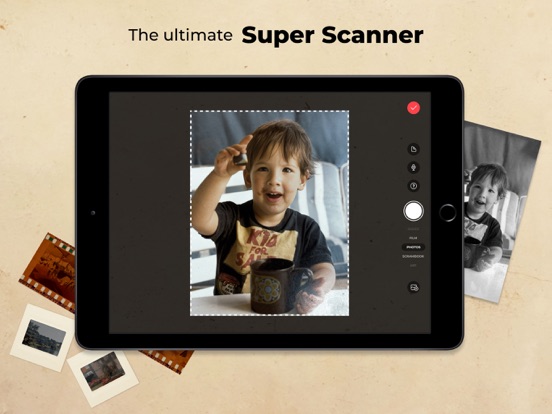


Pricing & paywalls
App Store
- Photomyne account (yearly) — $59.99/year ($4.99/mo)
- Photomyne account (yearly) — $6.99
- Photomyne account (yearly) — $9.99
- Photomyne account (yearly) — $29.99
- Photomyne account (yearly) — $35.99
- Photomyne membership — $14.99
- Photomyne membership — $19.99
- Photomyne membership — $59.99
- Restore photo credits — $3.99
Ratings & reviews
App Store
-
5/5unbelievably great
Oh my heck, I never expected an app to be so easy and accurate to use. I can do multiple pictures at a time and they come out individually as if I did each one separately. I can color the black and white an they look just like they were taken in color. It is so easy to send the album up to google photos. Just select the photos you want and click on “send to google photos” and “poof” there they are. I tried a couple of other apps and there is too much you have to do with them, like move a circle to each corner rather than just scan and go with Photomyne. Another thing I love about Photomyne is you can just keep scanning until you are finished with the project and then save them all in its own album with just one click. Also , at this time they are gifting me with a phone holder that I can use for steadier scans. This will assist me in taking better pictures in the future. I scanned over 400 pictures by hand in a little over an hour because of the ability to scan more than one picture at a time. Well, as you can see, I am totally impressed with this app. You won’t be disappointed having to pay for the app, because you will be done scanning those old pictures that you have been putting off so quickly that you will say, ”what? I am done all ready, Sandy, go take some more pictures so that I can scan some more”! Richard Hollister
skyhawk II · 30 Aug 2026
-
5/5Perfect archive app for Boomer generation
Photomyne is an amazing app that allows you to scan multiple photos per scan saving valuable time. Place 4 or 5 photos together, the scan will recognize, crop and save them for you…oh…and it also includes ai to IMPROVE the quality of your photos! Get out that box of your grandparents turn of the century images and have at it! There are lots of extra goodies included too. An ai feature that allows you to take a portrait and bring it to life. I tried it with a baby picture. It looks like a short vintage video but spooky real. But bottom line, if you have boxes or trunks full of photos that are collecting dust, don’t have friends or family clamoring to inherit them, you can save them digitally while you are downsizing and purging. OH, and another thing. If you are really getting your geek on, there is a NEGATIVES setting. Got old negatives from God knows where? This feature (with a light board and careful framing with your phone) will capture the image and recover something you thought you would have to spend more $$ on at a photo processing store. Can’t wait to see what features they add. There is more, but these are the things I use the most.. Thanks, Photomyne for helping me organize my overwhelming pile of memories.
Todd Waddington · 30 Aug 2026
-
4/5Better than expected
To be honest I didn’t expect much from this app. I was pleasantly surprised and now am amazed at the quality of the images. Trying to get images from a negative did not work for me but that was not my primary use. I bought a phone holder and took a pic one page at a time. Images were very good. Once digitized it allowed the black and white images to be enhanced and colorized. Having a detailed, colorized picture of my 21 year old father from a grainy 1950 picture was amazing. Then his face was animated with their “live” feature which was a bit creepy and amazing at the same time. You can take a single picture or page at a time. The app will automatically straighten and crop each picture, a great feature but the cropping will remove any dates written on the side. Make sure to add date in the caption. You can easily share your pictures with friends or relatives with a link, much like a team or zoom call. “Reorder pictures”is the phrase they use to reorganize pictures within an album. No, you are not buying prints from Photomyme. The additional cost of the AI live feature is worth it. Many other features but like any software the more you use it the more you explore the advanced features. I have yet to move photos to my computer. I would recommend to do that before your subscription expires as you could lose them. I bought the yearly plan to avoid any loss within the next year. I like the app and may continue the subscription after a year. However, I want the images saved somewhere else in case this app is discontinued in the future.
Protect our privacy · 30 Aug 2026
-
5/5Impressed!
I cannot say just how much I love this app. It is so easy to create digital images from still photos. My mom passed away unexpectedly several years ago and we hadn’t taken time to go through her pictures until a recent scare with hurricane Helene and the thought of loosing those precious memories in an instant. I got my moms pictures and quickly starting dry them and start the process of sorting them for myself and siblings. I told my husband that I wished I could get them converted to digital copies so that we could all have a copy, but also to preserve them in the event of property loss situation. I then found this app, and downloaded it to try, and was immediately impressed! I scanned pictures for hours and told all my family about it. I purchased the membership to be able to enjoy all the benefits and also took advantage of the prime day sales for accessories. I am excited to get the remainder of my moms, mine and my mother in laws pictures all digital! Thank you thank you! I will tell everyone I know about this wonderful app.
Pilotmom76 · 31 Jul 2026
-
2/5Glorified Cloud Storage Now
Don’t use this app. Photomyne has eliminated the PhotoShare option that came with the app when I subscribed. Photomyne, used to let you set permissions for Albums and share them with friends and family based on whether you wanted them to view or to view and edit. Photomyne eliminated this important feature with no notification anywhere in the app while continuing to charge the same price for the app. Once you shared an album with someone, they just logged in and all the updates to the album were there. Now you can only share photos same way you would from your albums on your phone. PhotoShare was the one reason I chose Photomyne. I only found out through help Chat that this huge feature was gone. The help chat said it was eliminated to add new features. The only thing that was added was AI which they charge for but throw in a few freebies. Even with the membership the “new features” cost you in addition to your membership fee. The photo editing tools have always been weak with the apps sharing ability being its strength which is now gone. One of the suggestions by Support of Photomyne was just to give out my login to the app to my friends and family. What???? My original rating of the app was 5 star. Not even close now. Now I have to find a new app that does what this one USED to do. Disappointed doesn’t even describe how I feel.
NoWayEver1000 · 30 Aug 2026
Privacy & accessibility
App Store
Privacy
- Data Linked to You — Analytics — Diagnostics — Performance Data Developer declared
- Data Linked to You — Analytics — Identifiers — Device ID Developer declared
- Data Linked to You — Analytics — Identifiers — User ID Developer declared
- Data Linked to You — Analytics — Purchases — Purchase History Developer declared
- Data Linked to You — Analytics — Usage Data — Product Interaction Developer declared
- Data Linked to You — App Functionality — Contact Info — Email Address Developer declared
- Data Linked to You — App Functionality — Contact Info — Phone Number Developer declared
- Data Linked to You — App Functionality — Identifiers — Device ID Developer declared
- Data Linked to You — App Functionality — Identifiers — User ID Developer declared
- Data Linked to You — App Functionality — Purchases — Purchase History Developer declared
- Data Linked to You — App Functionality — Usage Data — Product Interaction Developer declared
- Data Linked to You — Developer’s Advertising or Marketing — Contact Info — Email Address Developer declared
- Data Linked to You — Developer’s Advertising or Marketing — Contact Info — Name Developer declared
- Data Linked to You — Developer’s Advertising or Marketing — Identifiers — User ID Developer declared
- Data Linked to You — Developer’s Advertising or Marketing — Purchases — Purchase History Developer declared
- Data Linked to You — Developer’s Advertising or Marketing — Usage Data — Product Interaction Developer declared
- Data Linked to You — Other Purposes — Contact Info — Physical Address Developer declared
- Data Linked to You — Other Purposes — Identifiers — User ID Developer declared
- Data Linked to You — Other Purposes — User Content — Audio Data Developer declared
- Data Linked to You — Other Purposes — User Content — Customer Support Developer declared
- Data Linked to You — Other Purposes — User Content — Other User Content Developer declared
- Data Linked to You — Other Purposes — User Content — Photos or Videos Developer declared
- Data Linked to You — Product Personalization — Contact Info — Name Developer declared
- Data Linked to You — Product Personalization — Identifiers — Device ID Developer declared
- Data Linked to You — Product Personalization — Identifiers — User ID Developer declared
- Data Linked to You — Product Personalization — Purchases — Purchase History Developer declared
- Data Linked to You — Product Personalization — Usage Data — Product Interaction Developer declared
- Data Linked to You — Third-Party Advertising — Identifiers — Device ID Developer declared
- Data Linked to You — Contact Info Developer declared
- Data Linked to You — Diagnostics Developer declared
- Data Linked to You — Identifiers Developer declared
- Data Linked to You — Purchases Developer declared
- Data Linked to You — Usage Data Developer declared
- Data Linked to You — User Content Developer declared
- Data Not Linked to You — Analytics — Diagnostics — Crash Data Developer declared
- Data Not Linked to You — App Functionality — Diagnostics — Crash Data Developer declared
- Data Not Linked to You — Diagnostics Developer declared
- Data Used to Track You — Identifiers — Device ID Developer declared
- Data Used to Track You — Identifiers Developer declared
Accessibility
No accessibility labels collected yet.
Versions
App Store
-
29.3
General improvements and bug fixes.
-
29.4
General improvements and bug fixes.
-
29.5
General improvements and bug fixes.
-
29.6
General improvements and bug fixes.
-
29.7
General improvements and bug fixes.
-
29.8
General improvements and bug fixes.
-
30.0
General improvements and bug fixes.
-
31.0
General improvements and bug fixes.
-
31.2
General improvements and bug fixes.
-
31.3
General improvements and bug fixes
-
31.4
General improvements and bug fixes.
-
31.5
General improvements and bug fixes
-
31.6
General improvements and bug fixes.
-
32.0
This version includes two new experimental AI features: Magic Restore (Beta) repairs glare, damage, and faded colors, and Magic Motion (Beta) transforms still photos into short, natural-looking video clips.
-
32.1
This version includes two new experimental AI features: Magic Restore (Beta) repairs glare, damage, and faded colors, and Magic Motion (Beta) transforms still photos into short, natural-looking video clips.
-
32.2
General improvements and bug fixes
-
32.3
This version includes the option to apply AI Magic Restore on a batch of selected photos, for enhancing a large amount of photos in a short time.
-
32.4
General improvements and bug fixes.
-
32.5
General improvements and bug fixes.
-
32.6
General improvements and bug fixes
-
33.0
General improvements and bug fixes.
-
34.0
General improvements and bug fixes
-
34.1
General improvements and bug fixes
-
35.0
General improvements and bug fixes
-
35.1
· 13 Jul 2026
General improvements and bug fixes
-
35.2
· 10 Aug 2026
General improvements and bug fixes.
Alternatives
- Journi Print | Photobooks — Same category + similar ratings
- AI Photo Video Editor, Enhance — Same category + similar ratings
- FixMyPics - Restore Old Photos — Same category + similar ratings
- Antique Identifier Zophi — Same category + similar ratings
- AI Photo Editor - BgMaster™ — Same category + similar ratings
- Popsa | Print Your Photos — Same category + similar ratings
Availability by market
- US
Data quality & evidence
- Page completeness
- Live store listing
- Last verified
- 30 Aug 2026
- Sources
- App Store
- Independent summary has not been published yet.