
Quick verdict
- What it is
- Store information collected; independent summary not yet available.
- At a glance
-
- Free to download
Categories and search queries
Official categories
- Education
- Books
AppCorpus categories
Key functions
| Function | Availability | Access | Scope | Evidence |
|---|---|---|---|---|
| Free app | Yes | Free | — | Store published |
Screens
App Store
27 store screenshots

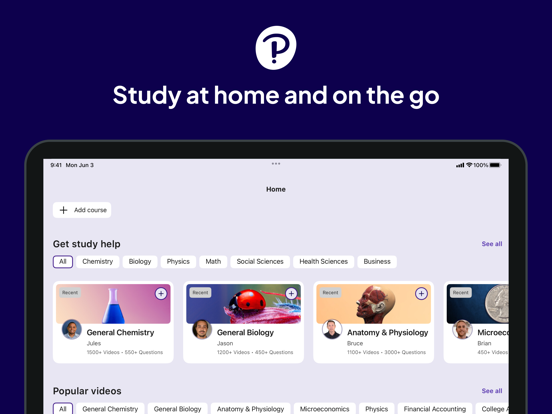

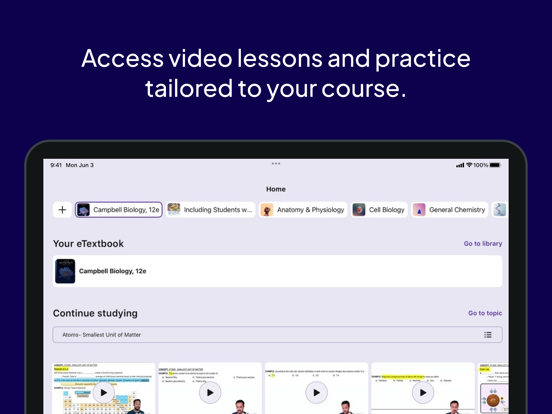
Pricing & paywalls
App Store
- Free
Ratings & reviews
App Store
-
3/5Love the app, but it also needs work
I love using this app on my iPad when I can’t really take out my computer/bring it with me. I like having the ability to access my textbooks, and there’s definitely great features to it like highlighting, commenting, flashcards, etc. That being said, those features definitely could use some refining. When I go to highlight, it’s not always accurate and it just looks funky. It can be pretty frustrating to try to highlight and then also see how weird it looks afterward. I wish there was a more natural swiping action for when you do want to highlight. Also, what’s up with the zooming in and out? Any time I try to zoom in, it takes me to the next page over or so. If I want to zoom in on a specific paragraph that’s like a half inch in size on my iPad screen, the whole app just goes haywire and takes me to the next page. That’s a pain when I’m going over math equations since they’re so tiny and I always need to zoom. Also, once I’m finally zoomed in enough that it the app doesn’t go crazy and look like a wizard turning pages in a spell book with magic, I’ll try to use 2 fingers to slide over to the next problem (from left side to right side of the page), it also thinks I’m trying to turn the page rather than just slide over a bit. I love this app, but I really would like that to get fixed and I’m sure I’m not the only person with these frustrations. Overall, great idea and app minus those few issues.
tsamanah · 30 Aug 2026
-
3/5Needs Improvement, almost great.
Pearson has great functions like being able to write flash cards or take notes. It also has audio so you can listen to the text. But they really need to improve the programmed voice to not say things like “underscore” over twenty times when reciting end of chapter questions that have five blanks in it for answers. She (the voice) also fails to pronounce the phonetic pronunciations of terms offered in the book. It’s very awkward with her saying one syllable then spelling the next. She’s clearly an automated voice that they turned loose on the text with no edits. For auditory learners this is problematic. Her tone however, with the exception of some oddly pronounced words, is rather decent. They do need to program her to pause after a dash but over all it’s tolerable between her fumbling through headings, outlines and bulleted lists. Forget about hitting to enter to start a new line with flash cards. When you save it it will smash all the words together anyway so if you need to make a list of things, you’re screwed. I still like the lady and her intonation, but she’s not a replacement for the texts and a big company like Pearson should really work on the accessibility for people who need the audio. One last thing, it needs a button to go full screen with the interface so you aren’t on dark mode with your toolbar and tabs headlighting you.
AuntDino · 30 Aug 2026
-
3/5Still Frustrated
I teach several courses per semester and have done so for more than 15 years. I adopted MyMathLab early on after moving to Pearson, and this app is now the third attempt by Pearson to provide a digital textbook for the courses I teach. The apps continue to improve despite some irritating setbacks. You would think that after so many years, I would be able to arrange the order of my books? (thank you for allowing this in MyLab with the pin and drag options). And when will the duplicates end? It should not be so difficult to locate the book that I want to use. My biggest complaint, though, is the syncing of the app with the website. You would think that this would be a nice feature but it makes it impossible to “hold my finger on a page” to answer a students question and then go back to where I was on the exercise page. And as an instructor, or tenured professor to make the point, I shouldn’t have access to textbooks removed because the MyLab course expired. I used to have contacts at Pearson who set access privileges for some of my textbooks, which migrated over to this new app. But it was a hassle and I don’t have the patience to go through this again. Overall, I appreciate having the app for my iPad. I just wish it were more useful and better suited for instructors.
Tttoooooo ssslllooowww · 30 Aug 2026
-
1/5Hard to use
I like this app overall, but trying to read is a pain. I use my phone because it’s the easiest option I have. But If I accidentally touch the screen, the home button and toolbar pops up and sometimes just as I’m trying to scroll through the chapter. This is VERY annoying as it makes it hard to pay attention to the actual text. Plus, a lot of the time on a heading change, you can’t just scroll anymore, the page “gets stuck” for lack of better words and won’t scroll up until you have the heading all the way at the top and then you can scroll again, or, I’m reading and go to continue scrolling and instead of the whole page moving, just the text under the next heading moves, also annoying and frustrating when I’m trying to read fluidly. Plus, these two issues lead back to my first of the home button and toolbar popping up for no reason. If apps like Kindle and Libby the Library have this stuff figured out, so should this app. Plus, I’d like the option of just “turning the page” like an actual book. You know where it’s only one page per section of reading. This app has multiple pages for indeterminate lengths where you are scrolling and you still have to “turn the page” to get to the next section of reading. Maybe model yourselves after already successful reading apps and you’ll be a better app to use or just let us choose where to open the book if you can’t figure out how to make your own work. This is annoying and unhelpful and you want me to like an app that is practically impossible to use to read, which seems to be one of the main uses of the app. I’m not impressed.
Emmyhorsez96 · 30 Aug 2026
-
1/5Needs a Major Overhaul
It hurts my heart that I had no choice but to spend $130 on this etext, because I needed the proprietary statistics software that came with it to complete my assignments. I guess when students have no choice but to buy a software product, the product manufacturer isn’t then inclined to keep that software updated and user friendly. For one thing, there is no turning the phone for a wider view of the tiny text. Only vertical, sorry. And when you try to zoom in it is jumpy and unpredictable, and you’ll likely lose too much text so just keep it tiny and vertical and deal with the headache you will inevitably get. The desktop software isn’t much better. Search function is awful - sometimes terms will come up but when you click on them… nothing. No action. Does it at least tell you what page the term is on? Nope. Tough luck. Try google. And then you can’t zoom OUT - this is wild. I can’t fit the page on one screen/browser. And there are these little ‘tips for success’ on the sides of the pages that narrow the margins, making one long column when what would actually be user friendly is a nice square of text that perfectly fits one page into the browser window. I just don’t understand how this expensive platform can be so bad all around. Is anyone trying at all? Had anyone at Pearson actually tried to use these texts? Cmon guys. Quit robbing people. We’re students, for chrissakes!
Roar411 · 30 Aug 2026
Privacy & accessibility
App Store
Privacy
- Data Linked to You — Analytics — Contact Info — Email Address Developer declared
- Data Linked to You — Analytics — Contact Info — Name Developer declared
- Data Linked to You — Analytics — Contact Info — Phone Number Developer declared
- Data Linked to You — Analytics — Diagnostics — Crash Data Developer declared
- Data Linked to You — Analytics — Diagnostics — Other Diagnostic Data Developer declared
- Data Linked to You — Analytics — Diagnostics — Performance Data Developer declared
- Data Linked to You — Analytics — Identifiers — Device ID Developer declared
- Data Linked to You — Analytics — Identifiers — User ID Developer declared
- Data Linked to You — Analytics — Location — Coarse Location Developer declared
- Data Linked to You — Analytics — Search History Developer declared
- Data Linked to You — Analytics — Usage Data — Other Usage Data Developer declared
- Data Linked to You — Analytics — Usage Data — Product Interaction Developer declared
- Data Linked to You — Analytics — User Content — Customer Support Developer declared
- Data Linked to You — Analytics — User Content — Other User Content Developer declared
- Data Linked to You — App Functionality — Contact Info — Email Address Developer declared
- Data Linked to You — App Functionality — Contact Info — Name Developer declared
- Data Linked to You — App Functionality — Contact Info — Phone Number Developer declared
- Data Linked to You — App Functionality — Diagnostics — Crash Data Developer declared
- Data Linked to You — App Functionality — Diagnostics — Other Diagnostic Data Developer declared
- Data Linked to You — App Functionality — Diagnostics — Performance Data Developer declared
- Data Linked to You — App Functionality — Identifiers — Device ID Developer declared
- Data Linked to You — App Functionality — Identifiers — User ID Developer declared
- Data Linked to You — App Functionality — Location — Coarse Location Developer declared
- Data Linked to You — App Functionality — Other Data — Other Data Types Developer declared
- Data Linked to You — App Functionality — Search History Developer declared
- Data Linked to You — App Functionality — Usage Data — Other Usage Data Developer declared
- Data Linked to You — App Functionality — Usage Data — Product Interaction Developer declared
- Data Linked to You — App Functionality — User Content — Customer Support Developer declared
- Data Linked to You — App Functionality — User Content — Other User Content Developer declared
- Data Linked to You — Developer’s Advertising or Marketing — Contact Info — Email Address Developer declared
- Data Linked to You — Developer’s Advertising or Marketing — Contact Info — Name Developer declared
- Data Linked to You — Developer’s Advertising or Marketing — Identifiers — User ID Developer declared
- Data Linked to You — Developer’s Advertising or Marketing — Location — Coarse Location Developer declared
- Data Linked to You — Developer’s Advertising or Marketing — Other Data — Other Data Types Developer declared
- Data Linked to You — Developer’s Advertising or Marketing — Search History Developer declared
- Data Linked to You — Developer’s Advertising or Marketing — Usage Data — Other Usage Data Developer declared
- Data Linked to You — Developer’s Advertising or Marketing — Usage Data — Product Interaction Developer declared
- Data Linked to You — Developer’s Advertising or Marketing — User Content — Customer Support Developer declared
- Data Linked to You — Developer’s Advertising or Marketing — User Content — Other User Content Developer declared
- Data Linked to You — Other Purposes — Contact Info — Email Address Developer declared
- Data Linked to You — Other Purposes — Contact Info — Name Developer declared
- Data Linked to You — Other Purposes — Contact Info — Phone Number Developer declared
- Data Linked to You — Other Purposes — Identifiers — Device ID Developer declared
- Data Linked to You — Other Purposes — Identifiers — User ID Developer declared
- Data Linked to You — Other Purposes — Location — Coarse Location Developer declared
- Data Linked to You — Other Purposes — Other Data — Other Data Types Developer declared
- Data Linked to You — Other Purposes — Search History Developer declared
- Data Linked to You — Other Purposes — Usage Data — Other Usage Data Developer declared
- Data Linked to You — Other Purposes — Usage Data — Product Interaction Developer declared
- Data Linked to You — Other Purposes — User Content — Customer Support Developer declared
- Data Linked to You — Other Purposes — User Content — Other User Content Developer declared
- Data Linked to You — Product Personalization — Contact Info — Email Address Developer declared
- Data Linked to You — Product Personalization — Contact Info — Name Developer declared
- Data Linked to You — Product Personalization — Identifiers — Device ID Developer declared
- Data Linked to You — Product Personalization — Identifiers — User ID Developer declared
- Data Linked to You — Product Personalization — Location — Coarse Location Developer declared
- Data Linked to You — Product Personalization — Other Data — Other Data Types Developer declared
- Data Linked to You — Product Personalization — Search History Developer declared
- Data Linked to You — Product Personalization — Usage Data — Other Usage Data Developer declared
- Data Linked to You — Product Personalization — Usage Data — Product Interaction Developer declared
- Data Linked to You — Product Personalization — User Content — Customer Support Developer declared
- Data Linked to You — Product Personalization — User Content — Other User Content Developer declared
- Data Linked to You — Contact Info Developer declared
- Data Linked to You — Diagnostics Developer declared
- Data Linked to You — Identifiers Developer declared
- Data Linked to You — Location Developer declared
- Data Linked to You — Other Data Developer declared
- Data Linked to You — Search History Developer declared
- Data Linked to You — Usage Data Developer declared
- Data Linked to You — User Content Developer declared
Accessibility
No accessibility labels collected yet.
Versions
App Store
-
1.2.689
Usability improvements and bug fixes
-
1.2.700
Usability improvements and bug fixes
-
1.2.708
Usability improvements and bug fixes
-
1.2.717
Usability improvements and bug fixes
-
1.2.723
Usability improvements and bug fixes
-
1.3.108
Usability improvements and bug fixes
-
1.3.126
Usability improvements and bug fixes
-
1.3.132
Usability improvements and bug fixes
-
1.3.137
Usability improvements and bug fixes
-
1.3.146
Usability improvements and bug fixes
-
1.3.150
· 27 Jul 2026
Usability improvements and bug fixes
-
1.3.16
Usability improvements and bug fixes
-
1.3.164
Usability improvements and bug fixes
-
1.3.170
· 20 Aug 2026
Usability improvements and bug fixes
-
1.3.18
Usability improvements and bug fixes
-
1.3.26
Usability improvements and bug fixes
-
1.3.32
Usability improvements and bug fixes
-
1.3.34
Usability improvements and bug fixes
-
1.3.40
Usability improvements and bug fixes
-
1.3.47
Usability improvements and bug fixes
-
1.3.55
Performance improvements and bug fixes
-
1.3.67
Usability improvements and bug fixes
-
1.3.75
Usability improvements and bug fixes
-
1.3.80
Usability improvements and bug fixes
-
1.3.87
Usability improvements and bug fixes
-
1.3.9
Usability improvements and bug fixes
-
1.3.99
Usability improvements and bug fixes
Alternatives
- Yuzu eReader — Same category + similar ratings
- Cengage Read — Same category + similar ratings
- RedShelf — Same category + similar ratings
- McGraw Hill Express Library — Same category + similar ratings
- Top Hat - Better Learning — Same category + similar ratings
- Wiley Reader — Same category + similar ratings
Availability by market
- US
Data quality & evidence
- Page completeness
- Live store listing
- Last verified
- 30 Aug 2026
- Sources
- App Store
- Independent summary has not been published yet.