
Quick verdict
- What it is
- Store information collected; independent summary not yet available.
- At a glance
-
- Free to download
- In-app purchases
Categories and search queries
Official categories
- Productivity
AppCorpus categories
Key functions
| Function | Availability | Access | Scope | Evidence |
|---|---|---|---|---|
| Free app | Yes | Free | — | Store published |
| In-app purchases | Yes | Limited free | — | Store published |
Screens
App Store
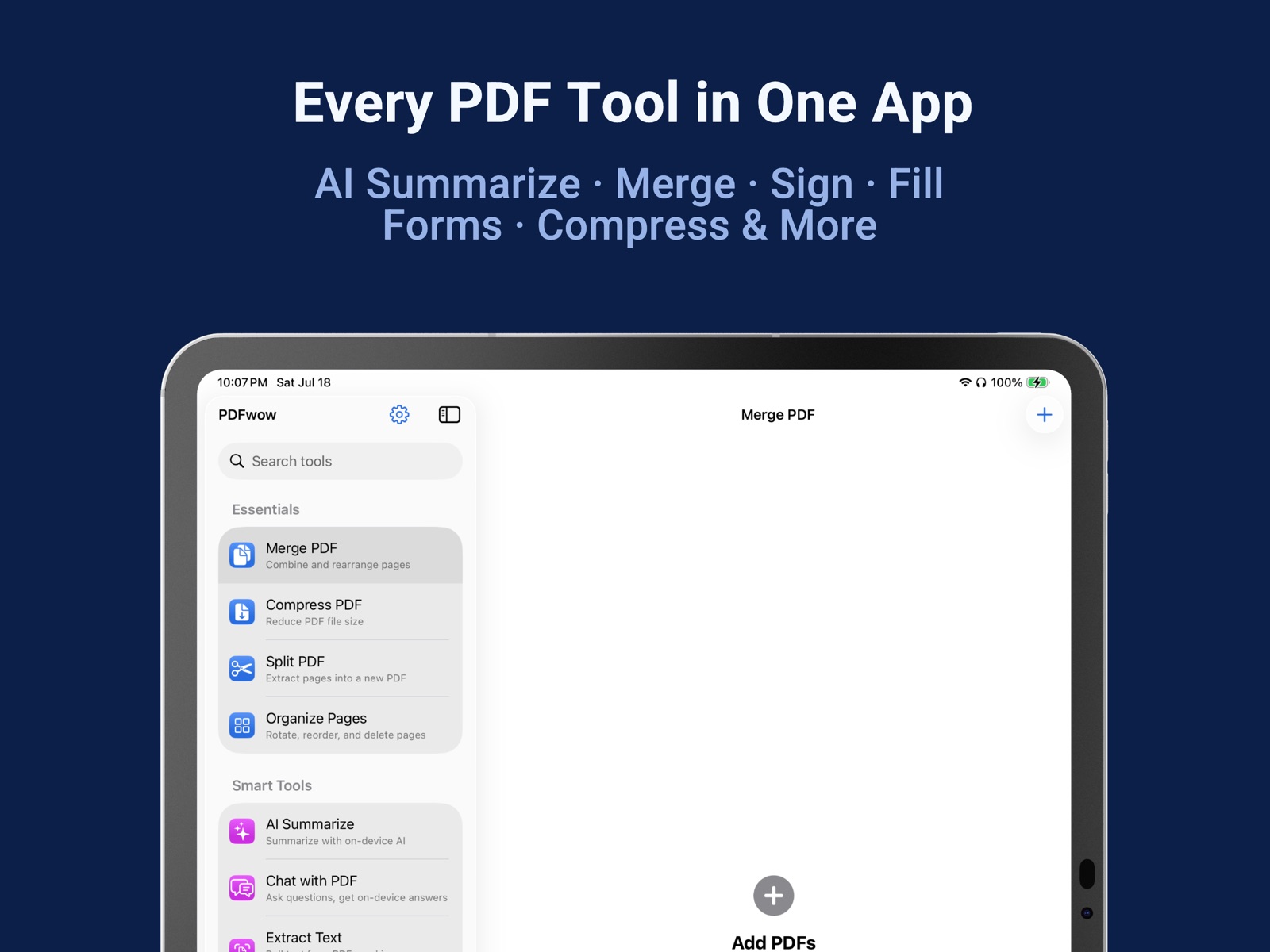
4 store screenshots
Pricing & paywalls
App Store
- Unlimited PDF Export and Print — $49.99
- Unlock Full Access — $9.99
- Unlock Full Access — $39.99
Ratings & reviews
App Store
-
5/5New User
In a bind with outdated Acrobat Pro - searched for a program to combine pdf files and this one came up. It was an immediate life saver!
skeptic951 · 6 Aug 2026
-
3/5Just PURCHASED
you can not see or export your documents until you pay $4.99. They should have put the price upfront like every other app instead of trying to be sneaky. And weird to charge a price when they only convert PDF's (not word documents). ehh I may keep it around but I will continue to shop around for a full-service document merging app.
Mimi real views · 6 Aug 2026
-
1/5Same devloper as Scanner App but not functional
I have been using the Scanner app version 1.6 and just got tired of messing with Preview to combine PDF files. In the Scanner app there is a button which says " Combine PDF Files" (oh good...piece of cake now right?). No, it takes you to Apple's Mac app store to 'Open' the Combine PDF Files. Oh great. Download app and click on Combine PDF Files and guess what...you will have needed to save each individual PDF page you scanned and saved with. unique name to combine the files. If you think, aha but there is a Scan button in this app you will surprised that it will not connect to your scanner but wants you to scan from iphone. // This should be one app and scan all docsuments and then merge or edit the pages you want in the mergte. AND both apps cost money. Not good business practice. You need to fix this and combine the two programs to work together seamlessly.
Bilbothejust · 6 Aug 2026
-
1/5Changes my text to some foreign language
I struggled to get the right documents to merge then when it did and I opened on my computer to make sure it looked right it changed to words to some sort of kryptic language that made no sense. Waste of money and could have cost me business had I not reviewed what it looked like be for sendig to the bank.
Akirscht · 6 Aug 2026
-
2/5the app works I guess
it all works well but they convienently let you know at the end that you cant actually save your work until you pay $8. I'd say avoid the app just because of this malicious attempt at making money. i would be much more willing to pay the money if the developers were honest from the start. instead, you do hours of labor just to have your work held ransom until you pay.
Burkeley Stinson · 6 Aug 2026
Privacy & accessibility
App Store
Privacy
- Data Not Collected Developer declared
Accessibility
No accessibility labels collected yet.
Versions
App Store
- 1.0
-
1.1
- New: Fill Form — Open PDFs with fillable fields and tap to fill them in. Fields are highlighted so you know exactly where to type. - Smarter Text Extraction — Extract Text now understands document structure, including tables and paragraphs, for cleaner results. - AI Summarize works on scanned documents — PDFs made from scanned pages are now recognized and summarized just like regular PDFs. - Key Facts — After summarizing, extract names, dates, and amounts from your document with one tap. - Redesigned Sign & Annotate — Cleaner layout, easier signature placement, and you can now edit text after placing it. - iPad sidebar — On iPad, browse all tools in a sidebar while your document stays open beside it. - Background compression — Start compressing and switch apps. Your progress continues and shows in the Dynamic Island.
-
1.2
- Smart Filename uses on-device AI to suggest a meaningful name when you create or merge PDFs - Read PDFs and AI summaries aloud — pick your voice, follow along with sentence-by-sentence highlighting - Translate extracted text and summaries into another language, side by side - Pin your favorite tools to the top of the sidebar
-
1.3
Chat with PDF Ask any PDF — receipt, lease, manual — a question and get on-device answers. Works on documents of any length. Smart Redact Let on-device AI find emails, phone numbers, IDs, and addresses, then black them out with one tap. AI Summarize, better than ever - Brief, Standard, or Detailed summaries - Key Facts: people, dates, and amounts pulled out for you - Tap any fact to jump to where it came from in the PDF - Receipts and invoices recognized automatically - Live Activity keeps long jobs visible from the Lock Screen A few helpful nudges Friendly tips point you toward things you might miss — like pinning your favorite tools to the top.
-
1.4
A friendlier loading experience for AI Summarize and Chat with PDF. You'll now see the first page of your document right away, with a clear progress bar so you always know what's happening — no more silent waits. NEW: PDF to Word Turn any PDF into an editable, Word-compatible file, entirely on your iPhone or iPad. Apple Intelligence polishes the formatting — headings, paragraphs, bullets, and bold — while preserving every word. The result opens cleanly in Microsoft Word, Apple Pages, and Google Docs.
-
1.5
NEW TOOLS • Organize Pages — rotate, reorder, or delete pages inside any PDF • Word to PDF — turn .docx files into PDFs, right on your iPhone or iPad • Fill scanned forms — no fillable fields? Tap anywhere to type SMARTER REDACTION • Now works on scanned documents too • Choose what to detect: emails, phones, IDs, or addresses • Or describe anything — like "account numbers" — and AI finds the matches for you to review • Pinch to zoom for precise boxes AI UPGRADES • Chat with PDF now cites its sources — tap a page to jump right to it • Scanned PDFs convert to Word • Copy detected tables as CSV from Extract Text • Export your translations as a bilingual PDF LITTLE BIG THINGS • Recents — jump back into your latest PDFs from the sidebar
-
1.6
• Home Screen widget — add Quick Tools to open a tool in one tap. • Smart Autofill can fill out forms from the info you save. • Scan a page right inside Extract Text — no need to import a file first. Smoother and more reliable • Many small fixes that make every tool faster and more dependable.
-
1.7
A steadier, friendlier PDFwow. A big batch of improvements — all still 100% on your device. • Organize Pages: tap any page to see it up close before you rotate, reorder, or delete. • Word to PDF: preview your converted PDF before you export it — see exactly what you'll get. • Password-protected PDF? PDFwow now tells you clearly, right away — no more confusing blank results. • Files you open from Mail, Files, or Safari now stay in your Recents longer. • Watermark now handles rotated and scanned pages perfectly. • Plus many small fixes so every tool finishes the job and tells you honestly if something goes wrong. • Got a Word file? Share it to PDFwow and it opens right in Word to PDF. • Search that speaks your language: type "combine pdfs", "shrink", or "summary" and the right tool appears. • Sign & Annotate: tap "Page 1 of 5" to jump straight to any page — and your signed file is now named "(Signed)". • Merge PDF: add photos right alongside your PDFs — each photo becomes a page. Pages now show bigger, clearer previews too. • Compress PDF: text stays selectable and searchable. Need to fit under a size limit? Pick 1, 5, or 10 MB and we'll find the best quality that fits — and tell you honestly if your PDF can't get that small. • Split PDF: cut one PDF into several parts in a single pass. • Watermark: stamp your logo or any picture across the pages — not just words. • Sign & Annotate: type your name to get a neat cursive signature — no shaky drawing needed. • AI Summarize: no Apple Intelligence on your device? You get a Quick Summary made from the document's key sentences. • PDF to Word: your converted file is a real Word document (.docx). PDFs with tables are saved in a Word-compatible format so your tables are kept. • Long task? You can now cancel instead of waiting. Password-protected PDFs are explained clearly instead of failing silently. • Plus dozens of small touches: cleaner screens, clearer buttons, better support for larger text sizes and VoiceOver, and iPad keyboard shortcuts (⌘1–⌘9 to switch tools).
-
1.8
· 4 Aug 2026
EASIER TO SEE WHAT TO TAP Each tool now highlights the button for its main step, and it says what it does instead of showing only an icon. The delete button no longer sits in the easiest spot to hit by accident. BETTER ON iPAD • Page thumbnails are bigger and sharper in Merge, Split and Organize Pages • A new "Open a Document" button gets you started right away SMALLER IMPROVEMENTS • Compress: the size options are easier to find • Photo to PDF now leads with your photo library instead of the camera • Chat with PDF has a friendlier starting screen As always, everything happens on your device.
Availability by market
- US
Data quality & evidence
- Page completeness
- Live store listing
- Last verified
- 6 Aug 2026
- Sources
- App Store
- Independent summary has not been published yet.