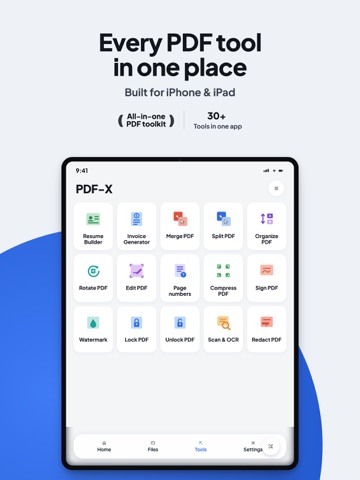
AppCorpus MCP gives your agent current app data, prices, screens, features and sources.
View JSON
GET /api/v3/apps/6740541651
{
  "app_id": 6740541651,
  "canonical_url": "https://appcorpus.com/apps/pdf-x-pdf-editor-scanner-6740541651",
  "identity": {
    "name": "PDF-X: PDF Editor & Scanner",
    "slug": "pdf-x-pdf-editor-scanner",
    "developer": {
      "name": "Shahmeer Tahir",
      "url": "https://appcorpus.com/developers/shahmeer-tahir-developer_eff201e9de901bf7498b3699cfc34a7f"
    },
    "icon_url": "https://is1-ssl.mzstatic.com/image/thumb/Purple211/v4/50/81/0d/50810df4-fe80-7e0f-a54f-dd2bffa70f99/icon_pdf_x-0-0-1x_U007epad-0-1-sRGB-85-220.png/512x512bb.jpg",
    "stores": [
      "apple"
    ],
    "platforms": [
      "iphone",
      "ipad"
    ],
    "status": {
      "state": "active",
      "label": "Active",
      "last_checked": "2026-08-07",
      "last_checked_label": "7 Aug 2026",
      "banner": null,
      "region_note": null
    }
  },
  "listings": [
    {
      "store": "apple",
      "status": "ACTIVE",
      "url": "https://apps.apple.com/us/app/pdf-x-pdf-editor-scanner/id6740541651?uo=4",
      "rating": 0.0,
      "rating_count": 0,
      "formatted_price": "Free",
      "is_free": true,
      "has_iap": true,
      "has_subscription": false,
      "version": "1.0.26",
      "updated": "2026-07-14",
      "currency": "USD"
    }
  ],
  "summary": {
    "one_liner": null,
    "summary": null,
    "best_for": [],
    "not_for": [],
    "status": "fallback",
    "at_a_glance": [
      "From $12.95/mo",
      "Free to download",
      "In-app purchases"
    ]
  },
  "categories": {
    "official": [
      "Productivity",
      "Utilities"
    ],
    "appcorpus": [
      {
        "category_id": "productivity",
        "label": "Productivity",
        "url": "https://appcorpus.com/categories/productivity"
      },
      {
        "category_id": "utilities",
        "label": "Utilities",
        "url": "https://appcorpus.com/categories/utilities"
      }
    ]
  },
  "use_cases": [],
  "features": [
    {
      "capability_id": "free_app",
      "label": "Free app",
      "availability": "yes",
      "access_level": "free",
      "scope": null,
      "evidence": "Store published"
    },
    {
      "capability_id": "in_app_purchases",
      "label": "In-app purchases",
      "availability": "yes",
      "access_level": "free_limited",
      "scope": null,
      "evidence": "Store published"
    },
    {
      "capability_id": "shareplay",
      "label": "SharePlay",
      "availability": "yes",
      "access_level": "unknown",
      "scope": "App Store",
      "evidence": "Store published"
    }
  ],
  "pricing": [
    {
      "store": "apple",
      "formatted_price": "Free",
      "is_free": true,
      "has_iap": true,
      "has_subscription": false,
      "currency": "USD",
      "market": "us",
      "last_verified": "2026-08-07",
      "rows": [
        "Premium Annual — $2.99/week",
        "Premium Annual — $19.99/year ($1.66/mo)",
        "Premium Annual — $0.99"
      ]
    }
  ],
  "screens": [
    {
      "url": "https://is1-ssl.mzstatic.com/image/thumb/PurpleSource211/v4/51/fd/4d/51fd4d8e-7a67-0573-43eb-012e40b29b9a/tab1.jpg/1600x1600bb.jpg",
      "store": "apple",
      "platform": "ipad",
      "alt": "PDF-X: PDF Editor & Scanner ipad screenshot 1"
    },
    {
      "url": "https://is1-ssl.mzstatic.com/image/thumb/PurpleSource211/v4/51/fd/4d/51fd4d8e-7a67-0573-43eb-012e40b29b9a/tab1.jpg/360x480bb.jpg",
      "store": "apple",
      "platform": "ipad",
      "alt": "PDF-X: PDF Editor & Scanner ipad screenshot 2"
    },
    {
      "url": "https://is1-ssl.mzstatic.com/image/thumb/PurpleSource221/v4/a8/10/fd/a810fd0c-a299-3f83-b533-fa0acedfe20c/iPad___2064_2752__U00281_U0029_1.jpg/1600x1600bb.jpg",
      "store": "apple",
      "platform": "ipad",
      "alt": "PDF-X: PDF Editor & Scanner ipad screenshot 3"
    },
    {
      "url": "https://is1-ssl.mzstatic.com/image/thumb/PurpleSource211/v4/cb/56/1b/cb561b42-ec67-2e15-c641-23edc200dc6e/tab2.jpg/1600x1600bb.jpg",
      "store": "apple",
      "platform": "ipad",
      "alt": "PDF-X: PDF Editor & Scanner ipad screenshot 4"
    },
    {
      "url": "https://is1-ssl.mzstatic.com/image/thumb/PurpleSource221/v4/a8/10/fd/a810fd0c-a299-3f83-b533-fa0acedfe20c/iPad___2064_2752__U00281_U0029_1.jpg/360x480bb.jpg",
      "store": "apple",
      "platform": "ipad",
      "alt": "PDF-X: PDF Editor & Scanner ipad screenshot 5"
    },
    {
      "url": "https://is1-ssl.mzstatic.com/image/thumb/PurpleSource211/v4/cb/56/1b/cb561b42-ec67-2e15-c641-23edc200dc6e/tab2.jpg/360x480bb.jpg",
      "store": "apple",
      "platform": "ipad",
      "alt": "PDF-X: PDF Editor & Scanner ipad screenshot 6"
    },
    {
      "url": "https://is1-ssl.mzstatic.com/image/thumb/PurpleSource221/v4/b0/6f/18/b06f18c6-3dbf-24e9-cc90-35e31b25cf60/tab3.jpg/1600x1600bb.jpg",
      "store": "apple",
      "platform": "ipad",
      "alt": "PDF-X: PDF Editor & Scanner ipad screenshot 7"
    },
    {
      "url": "https://is1-ssl.mzstatic.com/image/thumb/PurpleSource221/v4/3f/a6/23/3fa623fe-b29f-2704-7820-bf6c5e39c7ce/iPad___2064_2752__U00285_U0029_1.jpg/1600x1600bb.jpg",
      "store": "apple",
      "platform": "ipad",
      "alt": "PDF-X: PDF Editor & Scanner ipad screenshot 8"
    },
    {
      "url": "https://is1-ssl.mzstatic.com/image/thumb/PurpleSource221/v4/b0/6f/18/b06f18c6-3dbf-24e9-cc90-35e31b25cf60/tab3.jpg/360x480bb.jpg",
      "store": "apple",
      "platform": "ipad",
      "alt": "PDF-X: PDF Editor & Scanner ipad screenshot 9"
    },
    {
      "url": "https://is1-ssl.mzstatic.com/image/thumb/PurpleSource211/v4/b4/81/f8/b481f80b-09e9-2199-5cc5-a0a6bce7673c/tab4.jpg/1600x1600bb.jpg",
      "store": "apple",
      "platform": "ipad",
      "alt": "PDF-X: PDF Editor & Scanner ipad screenshot 10"
    },
    {
      "url": "https://is1-ssl.mzstatic.com/image/thumb/PurpleSource221/v4/3f/a6/23/3fa623fe-b29f-2704-7820-bf6c5e39c7ce/iPad___2064_2752__U00285_U0029_1.jpg/360x480bb.jpg",
      "store": "apple",
      "platform": "ipad",
      "alt": "PDF-X: PDF Editor & Scanner ipad screenshot 11"
    },
    {
      "url": "https://is1-ssl.mzstatic.com/image/thumb/PurpleSource211/v4/b4/81/f8/b481f80b-09e9-2199-5cc5-a0a6bce7673c/tab4.jpg/360x480bb.jpg",
      "store": "apple",
      "platform": "ipad",
      "alt": "PDF-X: PDF Editor & Scanner ipad screenshot 12"
    },
    {
      "url": "https://is1-ssl.mzstatic.com/image/thumb/PurpleSource221/v4/d1/46/87/d14687f5-cbef-32ff-6e9c-0685fd505f04/tab5.jpg/1600x1600bb.jpg",
      "store": "apple",
      "platform": "ipad",
      "alt": "PDF-X: PDF Editor & Scanner ipad screenshot 13"
    },
    {
      "url": "https://is1-ssl.mzstatic.com/image/thumb/PurpleSource221/v4/66/cf/b6/66cfb656-f3cc-968e-44a2-2423d6be3ba7/tab6.jpg/1600x1600bb.jpg",
      "store": "apple",
      "platform": "ipad",
      "alt": "PDF-X: PDF Editor & Scanner ipad screenshot 14"
    },
    {
      "url": "https://is1-ssl.mzstatic.com/image/thumb/PurpleSource221/v4/d1/46/87/d14687f5-cbef-32ff-6e9c-0685fd505f04/tab5.jpg/360x480bb.jpg",
      "store": "apple",
      "platform": "ipad",
      "alt": "PDF-X: PDF Editor & Scanner ipad screenshot 15"
    },
    {
      "url": "https://is1-ssl.mzstatic.com/image/thumb/PurpleSource221/v4/66/cf/b6/66cfb656-f3cc-968e-44a2-2423d6be3ba7/tab6.jpg/360x480bb.jpg",
      "store": "apple",
      "platform": "ipad",
      "alt": "PDF-X: PDF Editor & Scanner ipad screenshot 16"
    },
    {
      "url": "https://is1-ssl.mzstatic.com/image/thumb/PurpleSource221/v4/bb/ca/3c/bbca3cec-9243-3514-e99e-b92df2d7d7f0/ss1.jpg/1242x1600bb.jpg",
      "store": "apple",
      "platform": "iphone",
      "alt": "PDF-X: PDF Editor & Scanner iphone screenshot 17"
    },
    {
      "url": "https://is1-ssl.mzstatic.com/image/thumb/PurpleSource221/v4/06/ae/22/06ae222b-a88b-117c-b21d-7e8baebc0ef4/png_to_jpg1780051321122_1.jpg/1242x1600bb.jpg",
      "store": "apple",
      "platform": "iphone",
      "alt": "PDF-X: PDF Editor & Scanner iphone screenshot 18"
    },
    {
      "url": "https://is1-ssl.mzstatic.com/image/thumb/PurpleSource221/v4/71/c5/76/71c5760f-4bf4-893c-1d89-7e0301199314/ss2.jpg/1242x1600bb.jpg",
      "store": "apple",
      "platform": "iphone",
      "alt": "PDF-X: PDF Editor & Scanner iphone screenshot 19"
    },
    {
      "url": "https://is1-ssl.mzstatic.com/image/thumb/PurpleSource211/v4/87/be/14/87be149f-2337-f370-6e90-729bd19db9db/png_to_jpg1780052343157_1.jpg/1242x1600bb.jpg",
      "store": "apple",
      "platform": "iphone",
      "alt": "PDF-X: PDF Editor & Scanner iphone screenshot 20"
    },
    {
      "url": "https://is1-ssl.mzstatic.com/image/thumb/PurpleSource211/v4/f5/6c/84/f56c847a-2b9b-530f-8527-af0b69838efc/png_to_jpg1780052578595_1.jpg/1242x1600bb.jpg",
      "store": "apple",
      "platform": "iphone",
      "alt": "PDF-X: PDF Editor & Scanner iphone screenshot 21"
    },
    {
      "url": "https://is1-ssl.mzstatic.com/image/thumb/PurpleSource211/v4/53/1e/32/531e3261-e7b6-3bad-4d69-638366855d67/ss3.jpg/1242x1600bb.jpg",
      "store": "apple",
      "platform": "iphone",
      "alt": "PDF-X: PDF Editor & Scanner iphone screenshot 22"
    },
    {
      "url": "https://is1-ssl.mzstatic.com/image/thumb/PurpleSource221/v4/c0/71/2f/c0712fba-a8f3-449f-c510-c3588a32c219/ss4.jpg/1242x1600bb.jpg",
      "store": "apple",
      "platform": "iphone",
      "alt": "PDF-X: PDF Editor & Scanner iphone screenshot 23"
    },
    {
      "url": "https://is1-ssl.mzstatic.com/image/thumb/PurpleSource211/v4/7d/81/ec/7d81ec9b-4606-128f-31e4-3fc08dcac895/png_to_jpg1780052828420_1.jpg/1242x1600bb.jpg",
      "store": "apple",
      "platform": "iphone",
      "alt": "PDF-X: PDF Editor & Scanner iphone screenshot 24"
    }
  ],
  "ratings": [
    {
      "store": "apple",
      "average": 0.0,
      "count": 0,
      "market": "us",
      "observed_at": "2026-08-07",
      "reviews": []
    }
  ],
  "privacy": [
    {
      "store": "apple",
      "declarations": [
        {
          "title": "Data Linked to You",
          "detail": "Analytics — Identifiers — Device ID",
          "source": "Developer declared"
        },
        {
          "title": "Data Linked to You",
          "detail": "Analytics — Usage Data — Product Interaction",
          "source": "Developer declared"
        },
        {
          "title": "Data Linked to You",
          "detail": "Developer’s Advertising or Marketing — Identifiers — Device ID",
          "source": "Developer declared"
        },
        {
          "title": "Data Linked to You",
          "detail": "Developer’s Advertising or Marketing — Usage Data — Product Interaction",
          "source": "Developer declared"
        },
        {
          "title": "Data Linked to You",
          "detail": "Third-Party Advertising — Identifiers — Device ID",
          "source": "Developer declared"
        },
        {
          "title": "Data Linked to You",
          "detail": "Third-Party Advertising — Usage Data — Product Interaction",
          "source": "Developer declared"
        },
        {
          "title": "Data Linked to You",
          "detail": "Identifiers",
          "source": "Developer declared"
        },
        {
          "title": "Data Linked to You",
          "detail": "Usage Data",
          "source": "Developer declared"
        },
        {
          "title": "Data Not Linked to You",
          "detail": "App Functionality — Diagnostics — Crash Data",
          "source": "Developer declared"
        },
        {
          "title": "Data Not Linked to You",
          "detail": "Diagnostics",
          "source": "Developer declared"
        },
        {
          "title": "Data Used to Track You",
          "detail": "Identifiers — Device ID",
          "source": "Developer declared"
        },
        {
          "title": "Data Used to Track You",
          "detail": "Identifiers",
          "source": "Developer declared"
        },
        {
          "title": "Data Used to Track You",
          "detail": "Usage Data — Product Interaction",
          "source": "Developer declared"
        },
        {
          "title": "Data Used to Track You",
          "detail": "Usage Data",
          "source": "Developer declared"
        }
      ],
      "accessibility": []
    }
  ],
  "changes": [
    {
      "store": "apple",
      "version": "1.0.10",
      "released_at": null,
      "notes": "Exiting Feature: Drawing board integrated"
    },
    {
      "store": "apple",
      "version": "1.0.11",
      "released_at": null,
      "notes": "Replaced pdf representation image"
    },
    {
      "store": "apple",
      "version": "1.0.12",
      "released_at": null,
      "notes": "Updated screenshots for ipad removed adobe icon"
    },
    {
      "store": "apple",
      "version": "1.0.13",
      "released_at": null,
      "notes": "In this version : - we have improved the performance of document scanner - integrated pdf file editor so you can edit pdf files - improved the memory management with image files - fix some minor bugs"
    },
    {
      "store": "apple",
      "version": "1.0.14",
      "released_at": null,
      "notes": "Added Demo files for removing confusion"
    },
    {
      "store": "apple",
      "version": "1.0.15",
      "released_at": null,
      "notes": "Minor Bug fix"
    },
    {
      "store": "apple",
      "version": "1.0.16",
      "released_at": null,
      "notes": "Improved app size and performance and bug fixes."
    },
    {
      "store": "apple",
      "version": "1.0.17",
      "released_at": null,
      "notes": "App feedback and recent scanned files on dashboard with improved performance."
    },
    {
      "store": "apple",
      "version": "1.0.18",
      "released_at": null,
      "notes": "updated marketing url"
    },
    {
      "store": "apple",
      "version": "1.0.19",
      "released_at": null,
      "notes": "- Improved app performance - Improved user experience - subscription for ads free app"
    },
    {
      "store": "apple",
      "version": "1.0.2",
      "released_at": null,
      "notes": "Improved user experience"
    },
    {
      "store": "apple",
      "version": "1.0.20",
      "released_at": null,
      "notes": "What’s New in this Version - Improved user experience: after completing a task, you’re now taken directly to processed/output files. - New Sign PDF: sign PDF files and edit signatures later. - New Organize PDF: delete, duplicate, and cut pages. - New Watermark PDF: add text or image watermarks. - New Rotate PDF: rotate PDF pages easily. - New full PDF Editor module for advanced PDF editing. - New Page Number: add page numbers to PDFs. - New Unlock PDF: unlock protected PDF files. - New PDF to JPG conversion. - New HEIF to JPG conversion. We also made performance and flow improvements for a smoother experience."
    },
    {
      "store": "apple",
      "version": "1.0.21",
      "released_at": null,
      "notes": "In this version we fixed - Some repetitive occurring bugs fixed - Improved images to pdf feature"
    },
    {
      "store": "apple",
      "version": "1.0.22",
      "released_at": null,
      "notes": "This version introduces a new Resume Builder, so you can easily create resumes and share them with others using a link."
    },
    {
      "store": "apple",
      "version": "1.0.23",
      "released_at": null,
      "notes": "This update includes important bug fixes and introduces two new features: Split PDF and Invoice Generator. Enjoy a smoother and more powerful experience."
    },
    {
      "store": "apple",
      "version": "1.0.24",
      "released_at": null,
      "notes": "Meet the new look of PDF-X, plus new tools and a smoother experience throughout the app. - A refreshed interface built around liquid glass components, giving the whole app a cleaner, more polished look. - An improved Image Viewer with new editing features so you can adjust images without leaving PDF-X. - An updated file system with more options for organizing and finding your files. - A round of new tools added: Rotate PDF, Split PDF, Make PDF Searchable, Repair PDF, PDF to Text, Translate PDF, HTML to PDF, Markdown to PDF, EPUB to PDF, Voice to PDF, and Translate Document. - Features on demand: a new section where you can suggest the features you'd like to see and vote on the ones others have shared. The most-voted ideas will be the next to ship. Update now to try the new look and the new tools."
    },
    {
      "store": "apple",
      "version": "1.0.25",
      "released_at": null,
      "notes": "Integrated firebase Analytics for performance tracking"
    },
    {
      "store": "apple",
      "version": "1.0.26",
      "released_at": "2026-07-14",
      "notes": "• All-new PDF editor — add text, highlights, drawings, stamps & notes • New Premium plans with a 3-day free trial • Faster, more stable app"
    },
    {
      "store": "apple",
      "version": "1.0.3",
      "released_at": null,
      "notes": "This update introduces image-to-PDF conversion and image compression features."
    },
    {
      "store": "apple",
      "version": "1.0.4",
      "released_at": null,
      "notes": "This version has some internal major bug fixes and error handling."
    }
  ],
  "alternatives": [],
  "evidence_summary": {
    "index_state": "S1",
    "evidence_level": 1,
    "level_label": "Live store listing",
    "indexable": true,
    "last_verified_at": "2026-08-07",
    "unknown_fields": [
      "Independent summary has not been published yet."
    ],
    "sources": [
      "App Store"
    ]
  },
  "availability_markets": {
    "live": [
      "us"
    ],
    "selected": "us",
    "note": null
  },
  "feature_events": {
    "events": []
  },
  "features_slice": {
    "plans": [
      {
        "code": "premium",
        "label": "Premium Annual",
        "kind": "subscription",
        "status": "store_listed",
        "prices": [
          {
            "storefront": "us",
            "formatted": "$0.99",
            "billing_period": null
          },
          {
            "storefront": "us",
            "formatted": "$2.99",
            "billing_period": "weekly"
          },
          {
            "storefront": "us",
            "formatted": "$19.99",
            "billing_period": "yearly"
          }
        ],
        "trial": null
      }
    ],
    "features": [],
    "unknown_features": [
      "shareplay"
    ],
    "data_cutoff": "7 Aug 2026"
  }
}