
Quick verdict
- What it is
- Store information collected; independent summary not yet available.
- At a glance
-
- $1.99
Categories and search queries
Official categories
- Business
- Productivity
AppCorpus categories
Key functions
| Function | Availability | Access | Scope | Evidence |
|---|---|---|---|---|
| Family Sharing | Yes | Unknown | App Store | Store published |
Screens
App Store
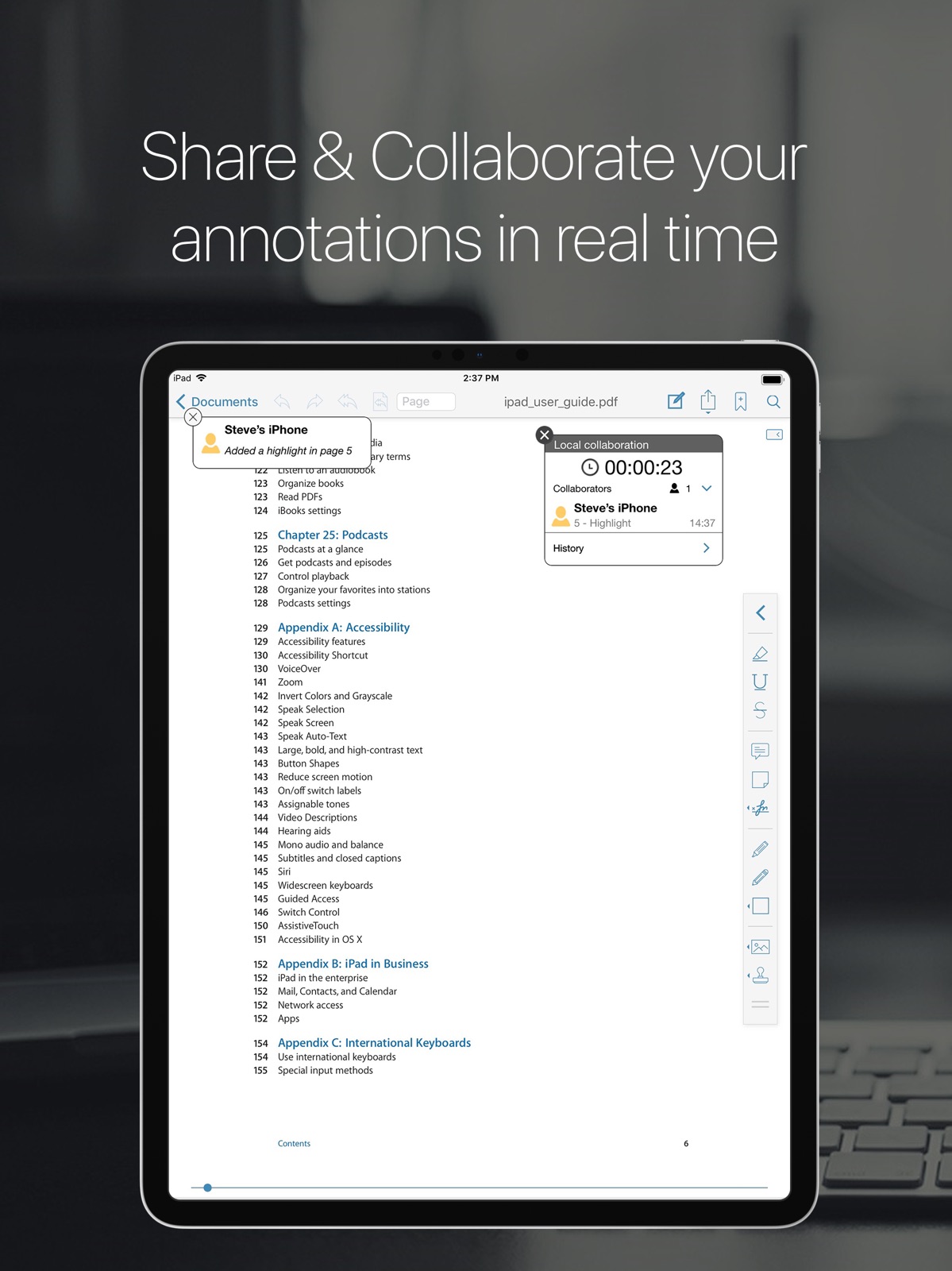
24 store screenshots



Pricing & paywalls
App Store
- Price: $1.99
Ratings & reviews
App Store
-
4/5Does ok after figure it out
Their support team answered quickly, but took me a while to figure out how to get pdf’s out of email to the app. The app needs to make these directions clear when you buy it and it does not. I bought two other unnecessary purchases I thought I needed to make it work before I got the email showing me how it’s done. It’s easy , so why you don’t get these simple instructions in the how to, is beyond me. That’s why 4 instead of 5 stars. It should have in the “how to” and isn’t even mentioned except in the selling it info. But it does do it. Hurray and thank you to the app team.
Ocaoivorew · 30 Jul 2026
-
5/53 year hardcore user
I've been using this app for the last 3 years and it's by far the best PDF app you will find for the iPad. We are a team of 10 engineers, 20 sales guys and 5 IT guys, we all have been using this app for quite some time and we all agree is the best one out there, it's like a good wine, it only gets better with time, they don't update the app every week like other apps do (very annoying) but when they do they usually add some great features or they upgrade the user interface to make it even easier to use. One of the features we use every day is the online collaboration feature that allow us to work on the same PDF file even if we are not at the office, this is great for the sales team because they can get an update on our files in real time while they are selling our products. I also want to mention that the tech support team is just great, I had a small issue last week and they replied to me in less than a day (yes less than a day! that's just amazing) that why I decided to finally write a well deserved review to this app, not only because it works and it's great but because their support team was really really helpful and that's something you don't see every day. I'm just waiting to see what the next update will bring (hopefully some great additions to the features already has).
Blockchain King · 30 Jul 2026
-
5/5Great App; One Feature We’d Like To Have That’s Missing...
I’m a musician and my band and I have been using this app for a little over a year now and we love it! It’s very easy to use and we find it’s collaboration and annotation features beneficial to our workflow in that they maximize our time and keep us on the same page (no more fumbling through piles of paper to find page 2 or 3 of a particular song or the song sheet itself). One feature we would love to have added however, is the ability to use a Bluetooth page turner so we could use a foot pedal to turn pages. Being musicians, our hands are usually busy playing our instruments so turning pages can be a little cumbersome. The ability to use a foot pedal would greatly enhance this app in our opinion. That’s our only caveat when other musicians ask us what app we recommend for organizing and viewing our material. We realize this app wasn’t engineered for the working musician but everyone in my band has used other apps specifically designed for that purpose and this app suits our all-around needs better any others we’ve tried but we’d love to have that one missing feature. (I’m also a minister officiating weddings occasionally and a hands-free page turner would also be beneficial in my role as such.) Bottom line, we love the app! This is just a suggestion for a wish list item :) Thank you iTech.
BonzeJustice · 30 Jul 2026
-
1/5New update is terrible
the new update is a disaster. The text in list mode is harder to read. The app is less intuitive to use, and worst of all, it crashes when I try to copy a pdf from a browser to it, which was probably one of its greatest strengths; it is the whole reason I bought the app. I contacted the developer about this, and they tried to make me feel like this just never happens and I am the only one complaining. I find that hard to believe. Update: I don’t use pdf reader pro anymore. It still crashes every time I try to copy a pdf from my browser. I use the Kindle app now, which is ok, but obviously not meant to do all the good things that a pdf reader should do.
Standard Gamble · 30 Jul 2026
-
1/5Very bad to annotate. Don’t pay
This is quarantine time and my kids are getting online packets of work that they need to complete by printing and working on them; then I need to scan them to PDFs to the teacher so she could grade it. When I looked at this app, I thought this is what I was looking for and instinctively paid for this app, but alas! Wasn’t I wrong? The pencil I used, the Logitech Crayon was writing on the PDFs in a very thick line, while the bar on the left shows as fine. The school work on pages give little space to write your answers and this is an unacceptable bug to treat this as a useful app. But luckily, I ran into another free app that is helping me do exactly what I am looking for. Please don’t pay for this app and l am sure you will find better ones for free..
C Bapatla · 30 Jul 2026
Privacy & accessibility
App Store
Privacy
- Data Not Collected Developer declared
Accessibility
No accessibility labels collected yet.
Versions
App Store
-
5.0
Our best update yet! Added support to Vitrium PDF protected PDF files (Support for DRM protected PDF files that are used on some universities ebooks, like University of Phoenix) ATTENTION: we noticed that there is an issue when trying to authenticate the username and password with University of Phoenix servers, We were able to fix the problem, we already have an update available that will be available for download soon. New annotations features: New signature mode (it will allow you to stamp your signature on a PDF file). Free Highlighter mode (specially designed to highlight scanned documents). Free handwriting mode. DropBox, Box.net, iDisk (Mobileme.com), GoogleDocs and SugarSync support (now you can download/upload your PDF files to any of these services). Annotations performance enhancements (fixed an issue when highlighting a 2 column format PDF file). Performance enhancements.
-
5.0.1
Fixed an issue when trying to authenticate the username and password with University of Phoenix servers (for Vitrium Protected PDF files). Our best update yet! Added support to Vitrium PDF protected PDF files (Support for DRM protected PDF files that are used on some universities ebooks, like University of Phoenix) New annotations features: New signature mode (it will allow you to stamp your signature on a PDF file). Free Highlighter mode (specially designed to highlight scanned documents). Free handwriting mode. DropBox, Box.net, iDisk (Mobileme.com), GoogleDocs and SugarSync support (now you can download/upload your PDF files to any of these services). Annotations performance enhancements (fixed an issue when highlighting a 2 column format PDF file). Performance enhancements.
-
5.1
Rotation function (Now you can rotate a page or the entire PDF file). copy/paste enabled (now you can copy text from a PDF file). Reflow Mode. Hyperlink support (internal and external links support) Performance enhancements. Annotations performance enhancements. Bug fixes. New copy/move user interface. New annotations (line, arrow, rectangle and circle). NOW WHEN USING THE FULL SCREEN MODE TAP WITH 2 FINGERS TO ENABLE/DISABLE FULL SCREEN MODE.
-
5.2
iCloud support (iOS 5 or later). iOS 5 built-in dictionary support. Google and Wikipedia Search option (now you can search a word on Google or Wikipedia). Now you can email single pages from a PDF file. PDF extraction (now you can extract pages from a PDF file and create a new one). New annotations (stamps and dynamic stamps supports). Added Author field on settings for dynamic stamps. Now you can move the annotations tool bar to the bottom, left or right side of the screen. New settings user interface. Back button (now you can go back to a previous page after using a hyperlink, jump to page and other functions). Performance enhancements. Bug fixes. This update improves compatibility with iOS 5.
-
5.2.1
Performance enhancements. PDF forms support improvements. Bug fixes. ATTENTION UNIVERSITY OF PHOENIX STUDENTS: Please do NOT update to this version, we have been getting some reports that some users are having problems when trying to unlock their ebooks, we are working to resolve this issue as soon as possible. If you are having problems please don't leave a negative review on the App Store since we don't have a way to reply to your comments, please send us an email to [email protected] We apologize for the inconvenience and we really appreciate your patience and support while we resolve this issue, we are trying our best to resolve this issue as soon as possible. These files use a special type of protection that is extremely complicated and so far we are the only company that offers support to these files on any mobile device so we really appreciate your patience and support while we fix this issue. A new update has been uploaded and is pending Apple's approval.
-
5.2.2
Performance enhancements. PDF forms support improvements. Bug fixes. This update fixes an issue that was causing some problems with University of Phoenix ebooks.
-
5.2.3
Retina display support. Performance enhancements. PDF forms support improvements (now most interactive fields with calculations are supported). Flattening feature. Bug fixes.
-
5.2.4
Performance enhancements. Bug fixes.
-
5.2.5
Performance enhancements. Bug fixes.
-
5.2.6
• Support for iOS 6
-
6.0
The best update is here! The first and most powerful PDF reader specially designed for the iPad has been completely redesigned with a new and more powerful user interface. We have also made a lot of improvements under the hood. Huge improvements in the performance and rendering engine. Vault folder: with this new feature you can securely store your important PDF files. Performance enhancements. Bug fixes. *Note to University of Phoenix students* There is a problem that is only affecting some specific protected PDF files from University of Phoenix, our developers are working to resolve that issue, we will release a free update to address that issue as soon as possible so we recommend that you don't update your app until version 6.0.1 is available"
-
6.0.1
Fix an issue with protected PDF files. New version 6.0 The best update is here! The first and most powerful PDF reader specially designed for the iPad has been completely redesigned with a new and more powerful user interface. We have also made a lot of improvements under the hood. Huge improvements in the performance and rendering engine. Vault folder: with this new feature you can securely store your important PDF files. Performance enhancements. Bug fixes.
-
7.0
New major feature: Share & Collaborate: Now you can share & collaborate your PDF files and annotations in real time. iOS 7 compatibility update. Works beautifully on iOS 7. Performance enhancements. This update contains stability improvements.
-
7.1
The biggest update is here!! •Fresh new user interface specially design to merge beautifully with iOS7. •Real-time online collaboration & chat. Now you can collaborate and add annotations with other users on the same file over the internet in real time and you can chat about your progress simultaneously. They will be able to see what changes you are making as you make them all in real time. •Performance enhancements. This update contains stability improvements.
-
7.1.1
The biggest update is here!! •Fresh new user interface specially design to merge beautifully with iOS7. •Real-time online collaboration & chat. Now you can collaborate and add annotations with other users on the same file over the internet in real time and you can chat about your progress simultaneously. They will be able to see what changes you are making as you make them all in real time. •Performance enhancements. This update contains stability improvements. •compatibility update for iOS 6 users.
-
7.1.2
iOS 8 compatibility fix Performance enhancements. This update contains stability improvements.
-
8.0
-Universal version 1 universal version that works on iPhone & iPad. -Review mode. A great new way to review and annotate your PDF files, just tap on the text that you want to replace or correct and it will work as you were working on a text document (all the changes will be saved as standard annotations). -Touch ID support Unlock the vault using Touch ID instead of your password. -Hand off support Thanks to this new feature exclusively from iOS8 now you can easily switch between your iPhone and iPad. You can start reading and annotating a file on your iPhone and finish it on your iPad. -iCloud drive support Now thanks to iCloud drive you can safely store all your documents in your PDF Reader Pro Edition iCloud folder and access them on any device with iCloud drive support. -Open files from iCloud Drive using Document picker Now you can get your PDF files stored on your iCloud Drive (from other apps and devices) and open them on PDF Reader Pro Edition. -Improved drawing/handwriting engine A smoother writing, signing and drawing experience. -Multiple signatures Now you can store multiple signatures (including customer signatures) to easily sign contracts or any other important document that requires a signature. -Custom stamps Now you can create your own text stamps. -Localization: PDF Reader Pro Edition has gone global! Now with support for Spanish, French, Italian, German, Japanese, Simplified Chinese, Traditional Chinese, Korean, Portuguese and Russian. -Annotations support for special protected pdf files. After a lot of work we have been able to add annotations support for special protected pdf files (in-app purchase). -Performance enhancements. This update contains stability improvements. Stay tuned for more updates!
-
8.1
-General iOS 9 compatibility. -New image stamp annotations Now you can add image stamp annotations to your PDF files. -64 bit support. -Performance enhancements. This update contains stability improvements. Split view and spotlight search coming soon! Stay tuned for more updates.
-
8.2
• Improved Apple Pencil support Using free drawing and free highlight has never been better. Now thanks to the amazing technology inside the Apple Pencil you can draw lines of any weight by just applying pressure. Press harder to draw thicker lines or just a gentle touch for wispy hairlines. • Multitasking Split view support (You can use it with iPad Pro, iPad Air 2 or iPad mini 4) Slide over support (You can use it with iPad Pro, iPad Air, iPad Air 2, and iPad mini 2 or later) Now you can read, annotate and work with your PDF files while you work on other apps. • 3D Touch Using free drawing and free highlight has never been better. Now thanks to the new 3D Touch technology you can draw lines of any weight by just applying pressure. Press harder to draw thicker lines or just a gentle touch for wispy hairlines. • Quick Actions Access your most recent files instantly from your home screen (iPhone 6s and 6s Plus). • Spotlight Search Spotlight Search helps you find and open your PDF files directly from your Home Screen. • Flatten files improvements. Now you can save a Flatten copy of your file without having to email the file. • Performance enhancements. This update contains stability improvements.
-
8.3
• iOS 10 ready. PDF Reader Pro Edition is now fully compatible with iOS 10. • Performance enhancements. This update contains stability improvements.
-
8.4
• iMessage integration Now it’s easier to share your PDF files with your teammates and friends. Now you can share your PDF files right from where you’re chatting. Our new iMessage integration for iOS 10 lets you select PDF files from within iMessage. Share files in-line with your conversations without having to switch back and forth between apps. • Improved Apple Pencil and 3D Touch integration for a better free handwriting/highlighting experience. • Real-time online collaboration. We want everybody to be able to use this great feature so we are making it free to all our users! • Annotations support for special protected PDF files. • OneDrive integration. • Fixed an issue with Google Drive login. • Fixed a login issue for some especial protected PDF files. • Performance enhancements. This update contains stability improvements.
-
8.4.5
• iMessage integration Now it’s easier to share your PDF files with your teammates and friends. Now you can share your PDF files right from where you’re chatting. Our new iMessage integration for iOS 10 lets you select PDF files from within iMessage. Share files in-line with your conversations without having to switch back and forth between apps. • Improved Apple Pencil and 3D Touch integration for a better free handwriting/highlighting experience. • Real-time online collaboration. We want everybody to be able to use this great feature so we are making it free to all our users! • Annotations support for special protected PDF files. • OneDrive integration. • Fixed an issue with Google Drive login. • Fixed a login issue for some especial protected PDF files. • Fix an issue for devices running iOS 9. • Performance enhancements. This update contains stability improvements.
-
8.5
• Drag and drop (iOS 11) Now you can easily move your files from one app to another. • Optimized for iOS 11. • iMessage integration. • Performance enhancements. This update contains stability improvements. More features coming soon!!
-
8.6
• iPhone X support Face ID support. • Drag and drop (iOS 11) Now you can easily copy and move text from your PDF files to another app. Drop text from any app to add it a text annotation to your PDF file. Now you can easily drag PDFs from your email and other apps in and out of PDF Reader Pro Edition. • Optimized for iOS 11 • Performance enhancements. This update contains stability improvements. • More features coming soon!
-
9
· 25 Jun 2019
• Completely new user interface especially designed for the new iPhone and iPad Pro. • Optimized for iOS 12. • iPhone Xs, Xr and new iPad Pro support. • Performance enhancements. This update contains stability improvements. • Under-the-hood updates for better performance. • Bug fixes and performance improvements.
Availability by market
- US
Data quality & evidence
- Page completeness
- Live store listing
- Last verified
- 30 Jul 2026
- Sources
- App Store
- Independent summary has not been published yet.