
Quick verdict
- What it is
- Store information collected; an Apoku editorial summary is not yet published.
- At a glance
-
- $4.99
Categories and search queries
Official categories
- Food & Drink
Apoku categories
Key functions
| Function | Availability | Access | Scope | Evidence |
|---|---|---|---|---|
| Family Sharing | Unknown | Unknown | Scope unknown | Store published |
| Siri Shortcuts | Unknown | Unknown | Scope unknown | Store published |
Screens
App Store
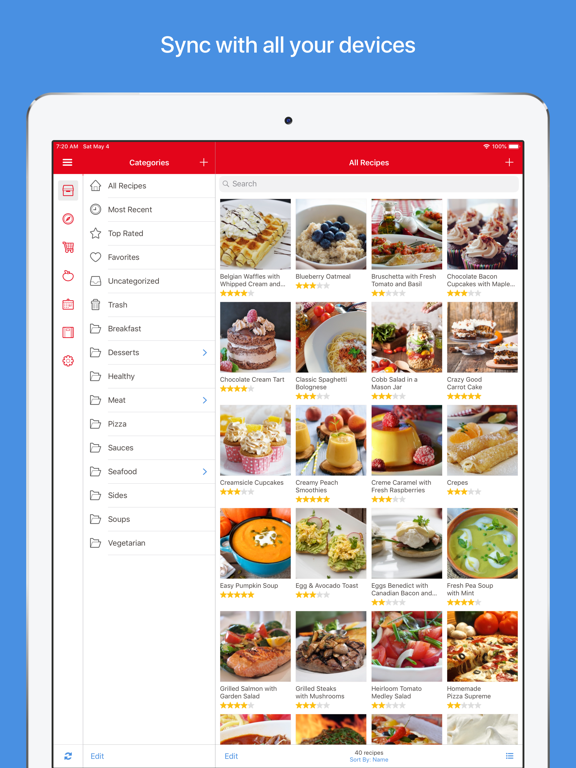
16 store screenshots



Pricing & paywalls
App Store
- Price: $4.99
Ratings & reviews
App Store
-
5/5Definite YES
Let me start by saying I rarely write reviews…but I do read reviews a lot prior to most online purchases. So in an effort to be a better human I am doing my part by sharing my experience with this app! I have had the app for about little over 6 mos. It has literally changed my life for the better…by saving time, reducing frustration, improving my nutrition by planning in advance and saving money by eating what I already own . I am stilllearning the nuances of the app but as a lifelong Apple products user I would say the app is pretty intuitive and easy to navigate. I am just now beginning to use the built in grocery shipping list which you can coordinate with the various saved recipes you select for a weeks worth of meals….still don’t have it down but love it. Since I only have Paprika on my IPad and not my phone…I just take a photo of the list and then I have it when I am physically at the store ( down side is you can digitally check off the items as you place in your cart, so just go ahead and buy the version across all platforms!) One of my favorite features is you can search through your saved recipes by using spa few ingredients you may have on hand to find a recipe that will use those specific items…especially useful when food is going to spoil soon! Also, love that you can create folder categories to save recipes by how you think of things….” Chicken”or “Italian” or “Keto” whatever you want! Best money I spent in a long time!
so cal beachy · 29 Sep 2026
-
5/5A wonderful tool if you finally want to organize your cooking life
For many years, my significant other and I have been struggling with trying to organize our recipes. We have tried binders, boxes, bookmarking recipes online, saving recipes into folders (digital and analog). Nothing has worked…until now. The Paprika app has made it so easy not only to collect recipes from online, but also to easily organize them into multiple categories as needed. We also can create a Favorites list for those evenings when we simply don’t know what to make and need a reminder of our go-tos. We haven’t even tried the grocery list and meal planning functions yet, but I can only imagine they are going to add even more functionality to this app for us. I’ve only been using the app for a few weeks, and already I have been cooking more often, simply because I can find the recipes I want to use more quickly without having to sort through any complicated haphazard system. My SO also has purchased the app for his tablet, so we both have access to our recipes. We generally aren’t “app people,” but we were so frustrated with dealing with the “What are we going to have for dinner?” question that we finally decided to turn to technology. This system has been awesome. I think my only criticism is that I don’t love the design of the app icon! But I can totally live with that. This is the best money I’ve ever spent on an app. Our only worry is that the developers will update it in some way that ruins its functionality for us—please don’t!
Teebizzoo · 29 Sep 2026
-
5/5Best App I’ve ever owned
It is rich with features and fits so comfortably into every day life. It is thoughtfully designed. I constantly add recipes. With over 2000, it’s impt to categorize. I include family names as categories so that when I can easily meal plan for birthdays or visits. With that in mind, I can input the recipes when I narrow them down onto the calendar. From there, I can create an easy shopping list to use in the grocery store, marking them off as they go into the cart. When cooking, I frequently scale it for church gatherings. How easy to use, just have to be aware that if numbers are spelled out which some sources do, then they don’t scale. It can throw your ingredients but that’s not the apps fault. BTW, church is a category example so when needed, I don’t start from scratch to plan. Just go to that category and pick. Big time saver. As I work thru the recipe, I can mark off the ingredient so I don’t forget what I’ve added plus I can highlight the paragraph of the step I’m on to easily find my place. Sharing recipes is real fine. When someone asks for one, I just pull it up on the app and email it right there from my cell. Plus of course brag about the app and they generally end up both getting and praising it. Grabbing recipes from the net takes seconds. Literally. Even sites that require a password. Get the app. It’ll change how you plan, shop, and cook - all while having fun.
JoRoHoCo · 29 Sep 2026
-
4/5Best Recipe Keeper; needs a few tiny adjustments
Let me start by saying that Paprika is probably one of my most used apps. I’ve used it at least since 2015, and have gotten several friends and family members using it too. Why I love it: works offline. Helps you organize your recipes in a way that makes sense for you and your cooking. Downloads recipes from websites so you can make your adjustments (as many home cooks do. Allows you to create menus, link recipes to one another, make meal plans, grocery lists and so much more. It’s a buy once, own for life model, and I have more than got my money’s worth. If there were one improvement (this app has been the same since I originally purchased it, I have three suggestions. (1)I would add a more robust notes field. I would love to be able to add a date-stamped note each time I make a recipe, so I can see how I adjusted it over time. (2)It would also be great if instead of only tracking the last time you made a recipe (if you use the meal planning function), it tracked the number of times and captured all the dates you cooked it. (3) support for translating a recipe to Metric or swapping between Imperial and Metric measurements. That’s all! I love this app (so much that I bought both iPad and iPhone versions), and highly highly recommend it. 4 stars out of 5 just because of those small improvements.
sin razon · 29 Sep 2026
-
5/5Highlighting Features I LOVE
These reviews here are on the mark! I won’t reiterate, but I will share a couple of what I think are the coolest features, one of which I just found after a month of using the app. (It’s like a new car in which you just keep finding little compartments you didn’t know existed!) The first one is timers—not just one timer in the top menu—timers throughout each recipe! Just click on the blue text anywhere in the instructions (and these recipes are downloaded from the internet), and you can set a timer for each action (i.e., stir for 2 minutes, cook 5 minutes uncovered). A list of the timers will show up on the left side of the screen. This second feature helping me be a better planner is Meals. It lets you add any recipe to a calendar, and when you go into your calendar you just click on the recipe to go to it. There are so many other features that are so well designed and thought out, and some I haven’t taken advantage of yet! Go for it and buy this app! You won’t be disappointed! (Have to add that during this time when our family is spending much more time at home, I decided to go through my old cooking magazines and pull out the recipes I want to try. Many are available on the internet, so I’ve been able to download them rather than type in the whole recipe! Great project!)
Momtomatt · 29 Sep 2026
Privacy & accessibility
App Store
Privacy
- Data Linked to You — App Functionality — Contact Info — Email Address Developer declared
- Data Linked to You — App Functionality — User Content — Other User Content Developer declared
- Data Linked to You — App Functionality — User Content — Photos or Videos Developer declared
- Data Linked to You — Contact Info Developer declared
- Data Linked to You — User Content Developer declared
- Data Not Linked to You — Analytics — Usage Data — Other Usage Data Developer declared
- Data Not Linked to You — App Functionality — Diagnostics — Crash Data Developer declared
- Data Not Linked to You — App Functionality — Diagnostics — Other Diagnostic Data Developer declared
- Data Not Linked to You — Diagnostics Developer declared
- Data Not Linked to You — Usage Data Developer declared
Accessibility
No accessibility labels collected yet.
Versions
App Store
-
3.5.0
Added support for viewing your grocery lists on your Apple Watch.
-
3.5.1
Added the ability to duplicate a menu. Fixed an issue causing the edit dialog to incorrectly appear when rearranging meals on iOS 13. Fixed an issue where grocery items marked as purchased on the Apple Watch were not syncing quickly to other devices.
-
3.5.2
Added the ability to copy items between different grocery lists and to/from the pantry. Added the ability to swipe to delete custom grocery list suggestions. Added a Cancel Search button that is shown when all of the recipes are filtered out by a search term. Expired and sold out pantry items are now marked in red. Tweaked the ingredient scaler to prevent the scaling of units into fractional quantities. Fixed an issue with the scaling of servings. Fixed an issue on iPad that could cause the categories pane to end up hidden.
-
3.6.0
Apple Watch: You can now view and control your recipe timers from your Apple Watch. We have also resolved some connectivity issues between grocery lists on the watch and phone. Printing: You can now print multiple recipes at a time from the main recipes list by pressing the Edit button and selecting the desired recipes, and then choosing Print from the actions menu. Additional recipe printing options have been added so you can print to A4, A5, and A6 paper sizes, choose whether to include additional recipe photos, and re-position the thumbnail photo. Misc: Landscape mode is now enabled on the iPhone so you can view recipe ingredients and directions side-by-side. The Keep Screen On setting will now also be applied when you have a grocery list open to prevent the screen from turning off while you are shopping. The recipe sharing options have been extended so you can choose between sharing the recipe source link, file, or text using the system share sheet. Sort buttons have been added to the categories screen, grocery lists, and menus, so you can choose between sorting these items alpahbetically or manually.
-
3.6.1
Fixed crash when scaling ingredients. Upgraded crash reporting system.
-
3.6.2
Timers: Due to the lowered volume level of timer alarms played by the iOS notification system, we have switched back to playing timer alarms directly within the app when a timer goes off. This should restore the volume level for users who felt the previous alarm was not loud enough. Calendar: Paprika will now export meals to an iCloud calendar by default to prevent error messages that might occur if your device's default calendar did not support adding custom events. (If you would like to export to a non-iCloud calendar you can still do so by specifying the calendar's name in Paprika's Settings.) Added an option to set the time zone when exporting meals to the Calendar app. Importers: Added support for importing recipe .zip files from CopyMeThat. Fixed importing of prep times and direction headers from MacGourmet. Fixed a memory leak and potential crash that might occur when importing from certain apps if those files contained many photos that needed to be downloaded and processed.
-
3.6.3
Fixed the ability to select files to import via iTunes File Sharing. Prevent the app from being accidentally dismissed via swipe gesture when using the share extension in Safari.
-
3.6.4
When importing Paprika files, the importer will now update any recipes that have already been imported before.
-
3.6.5
Fixed a few crashes.
-
3.6.6
Importing a recipe that was previously moved to the Trash will now automatically remove it from the Trash. Fixed importing certain recipes from My Recipe Book which can apparently have ingredient quantities set to infinity. Fixed scale button getting cut off when bold fonts were enabled via accessibility. Fixed last prepared date not showing up correctly for recipes which were scheduled on future dates. Fixed edit category popups not showing up in the right place on iPad.
-
3.7.0
Added support for scaling ingredients that have alternative measurements listed, such as: 1 cup (200g). Fixed a few crashes.
-
3.7.1
To make it easier to add items to the grocery list and pantry, the "add item" box is now permanently visible and the search box has been moved into the toolbar. Added the ability to select the Favorites, Uncategorized, or Trash categories in the recipe search options. Incresed the maximum timer limit to 99 hours. Remember the last selected grocery list when re-opening the app. Use the currently selected ingredient units when printing recipes. You can now request the deletion of your Paprika account from within Settings -> Cloud Sync -> Manage Account. Minor user interface tweaks.
-
3.7.2
Fixed an issue with photo selection on iOS 15.
-
3.7.3
Added support for importing Paprika recipe files directly from Messages. Made recipe timer notifications time-sensitive. Improvements to grocery list ingredient parsing. Fixed browser getting stuck when downloading certain recipes. Fixed inability to delete certain custom meal types. Fixed a few translations.
-
3.7.4
Fix for app not loading on earlier versions of iOS.
-
3.7.5
Fixed recipes getting cut off when the system text size is changed on iOS 16.
-
3.7.6
Fixed another issue with recipes getting cut off on iPads when the screen is rotated.
-
3.7.7
Prevent a potential issue with deleting unintended recipes while emptying the Trash category.
-
3.7.8
Added a cancel button to the grocery list and pantry search boxes on iPad. Fixed category selection not working properly on iPad. Fixed the main menu button having the wrong size on iPad. Fixed issues interacting with Siri via HomePod. Fixed a crash when importing MasterCook .mxp files.
-
3.8.0
Improved compatibility with iOS 17. Fix for permission issues when exporting to Reminders or Calendar. Notes should be italicized in the meal planner month view. Meal planner day view now shows the weekday name. Meal plan printouts now include weekday names. Add menu wizard now follows the menu sort setting. Changed default recipe export location to iCloud Drive.
-
3.8.1
Show the scaling amount when printing or emailing a recipe with scaled ingredients. Fixed a crash when editing recipes.
-
3.8.2
Improvements to account security and syncing performance. Added a workaround for importing our recipe files shared via Discord with the wrong file extension. Minor bug fixes.
-
3.8.3
Show an error when trying to import an invalid Paprika recipe file.
-
3.8.4
Fixed links not working.
-
3.8.5
· 16 Jul 2026
Fixed printed text getting cut off.
Alternatives
- Recipe Keeper — Same category + similar ratings
- America's Test Kitchen — Same category + similar ratings
Availability by market
- US
Data quality & evidence
- Page completeness
- Live store listing
- Last verified
- 29 Sep 2026
- Sources
- App Store
- Apoku editorial summary has not been published yet.