
Quick verdict
- What it is
- Create beautiful documents with Pages on iPhone, iPad and Mac. Start with an Apple-designed template and add images, movies, audio, tables, charts, and shapes.
- Best for
-
- someone who creates documents
- someone who edits documents
- someone who collaborates on documents
- At a glance
-
- From $12.99/mo
- Free to download
- In-app purchases
Categories and search queries
Official categories
- Productivity
- Business
AppCorpus categories
Key functions
| Function | Availability | Access | Scope | Evidence |
|---|---|---|---|---|
| Free app | Yes | Free | — | Store published |
| In-app purchases | Yes | Limited free | — | Store published |
| PDF export | Yes | Unknown | — |
From listing
|
Screens
App Store
40 store screenshots


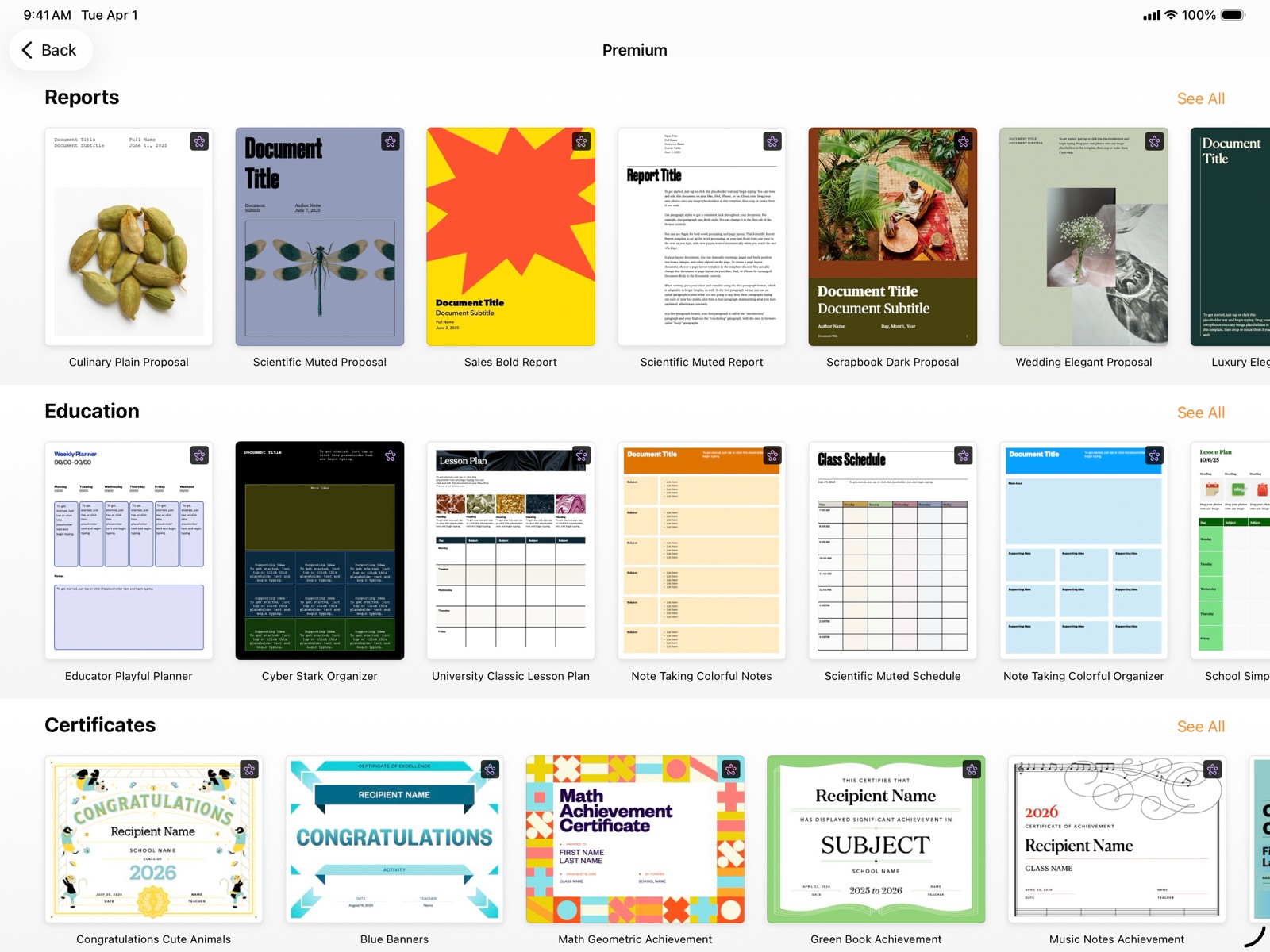
Pricing & paywalls
App Store
- Monthly — $12.99/month
- Monthly — $129.00/year ($10.75/mo)
Ratings & reviews
App Store
-
5/5Best word processor for a writer
I usually don’t write reviews, but I do think that this app deserves a writer’s review. As a straight ipad and iphone user and blogger/author, I use this app every day, all day at work. I love the flexibility of the features. Being able to save articles to iCloud or import them to other apps is very useful. Also because I am the only only worker who uses Apple products in an office of Windows computers, being able to export the files I am working on into word docs is very helpful. I am very happy with the newest feature of being able to add a table of contents to my work since I am a book author too and have been unable to add this important feature to my work until the latest update to pages for iOS. I would highly recommend this app for anyone writing reports, books, blogs or anything else that requires basic word processing. Importing pictures into documents is very easy if the pictures are on your drive. One annoying issue I have is that Pages puts text into text boxes which keeps the table of contents generated from recognizing the headings. You have to cut out the text from the text box and then repast it into the document body in order for it to register in the table of contents generated in the front of the document. If this feature could be corrected so that text is not automatically put into text boxes I would be very happy and the workflow issue would be greatly improved. But I am still giving this app a 5 star rating because of the easy nature of the layout. I have used Microsoft Word for years before switching to an ipad and I am so much happier with Pages than I ever was with Word.
MacLoverPro9 · 2 Sep 2026
-
2/5Terrible end of sentence sequence
One of the last updates to the app has resulted in an almost unusable on-the-fly editing. If I backspace to enter a period at end of a word at end of sentence, it highlights the word and suggests an incorrect spelling of some other replacement. If I enter the period, or any other entry, it deletes the correct word I had there. If I simply enter the period instead of backspace to avoid this result, I end up with a space between my last word and the period at end of sentence. There’s a lot of corrective measures you have to do to fix this which slows productivity and messes with stream of consciousness typing. If you’re not paying attention and doing all the edit manipulations it makes in error for you, you’ll end up with sentences missing the words you thought you typed, including having words in it you never typed in first place as well as mispelled words that their algorithm selects for you. Note that the whole thing is triggered by the backspace for the period. It’s designed to remove the space between the period and last word after you insert the period— after you’ve added a space. But the problem is no one puts a space between the last word and period as they type. So virtually every sentence you type is unnaturally expecting you to add the period after you enter a space at the end of a word. Whoever created that sequence clearly doesn’t write in English language.
TheLabrynthMan · 2 Sep 2026
-
2/5Good, but some really frustrating problems PLEASE READ
Pages is a really helpful app and it’s great way to be creative. It does have a few problems though. One of them is that it auto-positions things. Like, I want to move a text box to a very specific spot, but it moves it elsewhere because it wants everything to be in alignment. The opposite thing happens sometimes when I delete a drawing or a picture on a page where there’s a few other things. When I delete it, the whole page goes out of alignment. So weird! And very frustrating. I wish that there was some way to turn off the auto-alignment thing. Another problem is that there’s no easy way to add a page when you are in a document that is not a template. You have to select a page, duplicate it, drag it to the place you want to go, and then delete everything on the page. I think you should add a tool to add a page on the blank template. A similar thing happens when I try to delete one specific page. Sometimes, all the pages have connected text. So, when you want to delete one page, it might delete all of them. Then, I have to delete everything on the page one by one, and sometimes that thing where everything goes out of alignment happens. It’s a good app, but it has some problems that stop it from reaching it’s full potential. Apple, please read my message and try to fix these issues.
Ella says hi · 31 Jul 2026
-
5/5From grate great to best
My learning curve this is flatter than I’d like it to be. I keep chatting most of the Apple people that Apple‘s finest hour is it graphic interactive audio but even a pure language page can utilize symbols and motion to provide guidance step from step a lot of Apple stuff is all written like the arcade Gutenberg Bible Long lines of thousands of pages of pros packed with Apple by remember the medium is the message so there’s a lot that doesn’t make sense to me about pages and other wordprocessors. There’s so much reading in order to do writing that’s not necessary. What’s necessary as a word processor that has motion and sound and Reactions now then that’s an Apple product that is worth putting out so fine-tune pages the style of just listening, lots of parts and assuming that people know to start with what they want, but it’s hidden what’s given as a bunch of parts and that’s not the way humans think we start with what we want our end goal we start at the end that we’d like to see, and then we learned backward to where we are each step connecting to what we wantin fact logistically the instructional style in Apple is the opposite of that so it comes down to a choice do you really mean to serve your customers then you’ve got to establish rapport with them which is the match they’re thinking Matt Manor that’s what I have to say. How do I send
Doc-1A · 2 Sep 2026
-
4/5really good overall, a couple of bugs, a couple wishes!
I’m in high school and attempting to write a legit novel, which I’m really excited about. I love pages and I think it’s really helpful. I do wish, however, that there were some more editing options when it comes to layering photos for a cover? Like, for instance, if I wanted to add a photo for the cover of my book, the text isn’t able to lay on top of the photo? I would really love it if there was some form of software for this? Another suggestion is that maybe like how ChatGPT is able to be in other apps and you can use it without exiting (I’m not talking about split view, I’m talking about how chatgpt is able to be in apps like Messages as long as you allow it as kind of a plug-in) I would like the same for Word Hippo? I don’t know the dev’s standpoint on that app, but it would be nice to have that as an option so you could find better synonyms and adjectives? I just dont like switching between apps so much. And another thing, I have a bug that is really annoying. Sometimes the document will randomly scroll ALL THE WAY UP for absolutely no reason and then I’m forced to scroll all the way back down? Sorry for the rant, like i seriously apologize, but that’s my view. Love the app, love ALMOST everything about it, and thank you!!
Ori_thefrogg · 2 Sep 2026
Privacy & accessibility
App Store
Privacy
- Data Linked to You — Analytics — Identifiers — Device ID Developer declared
- Data Linked to You — Analytics — Identifiers — User ID Developer declared
- Data Linked to You — Analytics — Purchases — Purchase History Developer declared
- Data Linked to You — App Functionality — Contact Info — Email Address Developer declared
- Data Linked to You — App Functionality — Contact Info — Name Developer declared
- Data Linked to You — App Functionality — Contact Info — Phone Number Developer declared
- Data Linked to You — App Functionality — Financial Info — Payment Info Developer declared
- Data Linked to You — App Functionality — Identifiers — Device ID Developer declared
- Data Linked to You — App Functionality — Identifiers — User ID Developer declared
- Data Linked to You — App Functionality — Purchases — Purchase History Developer declared
- Data Linked to You — App Functionality — User Content — Audio Data Developer declared
- Data Linked to You — App Functionality — User Content — Other User Content Developer declared
- Data Linked to You — App Functionality — User Content — Photos or Videos Developer declared
- Data Linked to You — Developer’s Advertising or Marketing — Contact Info — Email Address Developer declared
- Data Linked to You — Developer’s Advertising or Marketing — Contact Info — Name Developer declared
- Data Linked to You — Developer’s Advertising or Marketing — Identifiers — Device ID Developer declared
- Data Linked to You — Developer’s Advertising or Marketing — Purchases — Purchase History Developer declared
- Data Linked to You — Contact Info Developer declared
- Data Linked to You — Financial Info Developer declared
- Data Linked to You — Identifiers Developer declared
- Data Linked to You — Purchases Developer declared
- Data Linked to You — User Content Developer declared
- Data Not Linked to You — Analytics — Diagnostics — Other Diagnostic Data Developer declared
- Data Not Linked to You — Analytics — Diagnostics — Performance Data Developer declared
- Data Not Linked to You — Analytics — Other Data — Other Data Types Developer declared
- Data Not Linked to You — Analytics — Usage Data — Other Usage Data Developer declared
- Data Not Linked to You — Analytics — Usage Data — Product Interaction Developer declared
- Data Not Linked to You — App Functionality — Diagnostics — Other Diagnostic Data Developer declared
- Data Not Linked to You — App Functionality — Diagnostics — Performance Data Developer declared
- Data Not Linked to You — App Functionality — Usage Data — Other Usage Data Developer declared
- Data Not Linked to You — App Functionality — Usage Data — Product Interaction Developer declared
- Data Not Linked to You — Developer’s Advertising or Marketing — Usage Data — Product Interaction Developer declared
- Data Not Linked to You — Diagnostics Developer declared
- Data Not Linked to You — Other Data Developer declared
- Data Not Linked to You — Usage Data Developer declared
Accessibility
- Dark Interface — SUPPORTED Store published
- Differentiate Without Color Alone — SUPPORTED Store published
- Larger Text — SUPPORTED Store published
- Reduced Motion — SUPPORTED Store published
- Sufficient Contrast — SUPPORTED Store published
- Voice Control — SUPPORTED Store published
- VoiceOver — SUPPORTED Store published
Versions
App Store
-
10.0
• Use Pages on an iPad with Magic Keyboard, a mouse, or a trackpad for a new way to work with your documents. Requires iPadOS 13.4. • Select from a variety of gorgeous new templates to help you get started. • Add a Pages document to a shared iCloud Drive folder to automatically start collaborating. Requires iPadOS 13.4 or iOS 13.4. • Add a drop cap to make a paragraph stand out with a large, decorative first letter. • Apply a color, gradient, or image to the background of any document. • Touch and hold, then drag across multiple objects to select them. • Easily access recently used templates in a redesigned template chooser. • Print or export a PDF of your document with comments included. • Edit shared documents while offline and your changes will upload when you’re back online. Requires iPadOS or iOS 13 or later. • Enhance your documents with a variety of new, editable shapes.
-
10.1
• Use the new reading view to scroll and zoom your documents without unintentional edits. • Play YouTube and Vimeo videos right in your documents.* • Easily add captions and titles to images, videos, shapes, and other objects. * May not be available in all regions.
-
10.2
• Use Scribble to write by hand with Apple Pencil, and your words will automatically convert to text. Requires iPadOS 14. • Select from new report templates to help you get started. • Enhance your documents with a variety of new, editable shapes. • Easily find pictures and videos using new zoom and search capabilities in the redesigned image picker. Requires iOS 14 or iPadOS 14.
-
10.3.5
• Stability and performance improvements
-
10.3.9
This update contains stability and performance improvements.
-
11.0
• Precise editing controls in the Arrange Inspector for adjusting the look and placement of objects • Onscreen keypads for entering exact values for text size, spacing, table size, and more • Ability to add or remove objects or table cells from a selection by tapping or dragging across them • Setting to always open documents in edit mode • Ability to add phone number links to table cells, text objects, and shapes
-
11.1
• Link to web pages, email addresses, and phone numbers from objects such as shapes, lines, images, drawings, or text boxes • Teachers using the Schoolwork app to assign activities in Pages can now view student progress, including word count and time spent
-
11.2
• Screen View on iPhone automatically displays text, images, and other elements in a continuous flow optimized to fit your screen so documents are even easier to read and edit • Improved book publishing with 2-page spreads, optimized images, and more flexible versioning • Quick Format bar on iPhone lets you quickly change paragraph styles, text formatting, alignment, list styles, and more • Drag and drop to copy text, images, and other items between apps on iPhone* • Instant translation lets you translate selected text in up to 11 languages and add the translation to your document with a tap** • Flexible collaboration allows participants to add others to a shared document** • Radar charts help you visually compare multiple variables at once to easily show similarities and differences in your data • Audio graph makes charts accessible to people with vision impairments by playing an audio tone that changes pitch to represent different values** * Requires iOS 15 ** Requires iOS 15 or iPadOS 15
-
12.0
• Publish directly to Apple Books with larger file sizes up to 2 GB • Insert page numbers anywhere in your document • Edit font size more precisely with up to two decimal places • Quickly start writing a new document on iPhone—just touch and hold the Pages app icon on the Home Screen • Read comments and track changes using VoiceOver
-
12.1
- Use mail merge to quickly create personalized letters, cards, and envelopes for multiple recipients - Select from stylish new templates for event invitations and student certificates - Export your Pages documents as TXT files
-
12.2
• An all-new activity view shows recent changes in collaborative documents, including when people join, comment, and make edits • Get notifications when others join or make changes in your shared documents • Share a document in Messages to instantly start collaborating with your team and see updates right in the Messages conversation (Requires iOS 16 or iPadOS 16) • Send a message or start a FaceTime call right from a collaborative document (Requires iOS 16 or iPadOS 16) • The new Blank Layout template makes it easy to start documents that let you freely arrange text and graphics • Be even more productive on iPad with iPadOS 16 - Quickly insert objects and get to your favorite tools with the customizable toolbar - Find common actions like print, rename, and more in the new document menu - Work across multiple documents more easily with Stage Manager on supported iPad models • A new option lets you automatically remove an image’s background to isolate its subject (Requires iOS 16 or iPadOS 16) • Style charts with additional controls for colors, lines, and number formats
-
12.2.1
This update contains bug fixes and improvements.
-
13.0
• Apple Pencil hover makes it easy to navigate, write, sketch, and illustrate with greater precision on supported iPad models • Export and send a copy of your document in a different format right from the Share menu • Templates for reports, notes, letters, and resumes now include placeholder text with instructions • Includes improvements and bug fixes for mail merge and collaboration activity
-
13.1
• Start writing in Notes, then open your note in Pages to continue editing with powerful design and layout features • Create business reports, school papers, and greeting cards with updated templates • Insert date and time fields into your document • Add scalable vector graphics (SVGs) to your documents and preserve visual quality at any size • Break apart imported SVG images and save them to your shapes library for future use • Retain SVG images when exporting books into EPUB format, including book cover art • Show subtotal summary labels in stacked bar, column, and area charts • Insert and play ProRes videos in your document, now on iPhone and iPad • Export the pages of your document as image files
-
13.2
• Bring new dimension to your documents with 3D objects in USDZ format • Make your documents more expressive by adding Stickers* • See inline predictions for text as you type* • Easily begin collaborating on a document with others while on a FaceTime call* • Find and open suggested documents when searching for Pages with Spotlight* • Drag documents to the Pages icon on your Home Screen to open or import them* • Use the new Minimalist Report template featuring elegant typography, colors, and layout • Style paragraphs with new options for borders and background colors • Remove external borders on charts imported from Microsoft Office files * Requires iOS 17 or iPadOS 17 and later
-
14.0
• On iPad, press and hold the Command key on a connected keyboard to select noncontiguous words, sentences, or paragraphs using a trackpad or mouse • Streamlined in-app notifications inform you when a person joins a collaborative document for the first time • Preserve file format and full quality when adding HEIC photos taken on iPhone or iPad • Additional stability and performance improvements
-
14.1
This update contains bug fixes and performance improvements.
-
14.2
• Squeeze Apple Pencil Pro to quickly switch tools, line weights, and colors. • Use the new document browser to easily create a new document or find a recent one. (Requires iOS 18 or iPadOS 18) • Additional bug fixes and performance improvements.
-
14.3
• Proofread, rewrite, summarize, and compose text for your document with Writing Tools* • Create fun, original images for your document with Image Playground* • Siri can use ChatGPT to answer questions about content in your document* * Requires Apple Intelligence
-
14.4
• Screen View on iPad displays text, images, and other elements in a continuous flow optimized to fit your screen • Make text edits using Writing Tools directly in your document (requires Apple Intelligence and iOS or iPadOS 18.4) • Add additional pages into a word-processing document more easily • Export documents into other formats using Shortcuts (requires iOS or iPadOS 18.4) • Improved copy and paste with Freeform (requires iOS or iPadOS 18.4)
-
15.1
Pages is now part of Apple Creator Studio, an amazing collection of Apple’s most powerful creative apps designed to help you bring your ideas to life. The suite includes Final Cut Pro, Logic Pro, Pixelmator Pro, Motion, Compressor, and MainStage — plus premium content and intelligence features* in Keynote, Pages, Numbers, and Freeform**, all in one simple plan. Creating, viewing, and editing documents in Pages, as well as collaborating with others in real-time, does not require a subscription. For Apple Creator Studio Subscribers: • Make your work stand out with an exclusive new collection of professionally-designed templates • Explore high-quality photos, graphics, and illustrations for your document in the all-new Content Hub • Find inspiration faster with collections of new Apple-curated content in the Content Hub • Create stunning images and graphics right in your document, apply quick edits, or adjust the style using AI • Increase the clarity and detail of existing images and graphics using Super Resolution • Use Auto Crop to generate suggestions for how to frame your image • Collaborate on larger files shared via iCloud–now up to 4GB Other New Features: • Experience a new, more fluid way to work on your documents with Liquid Glass • Access the full set of advanced options and controls right from the new menu bar in iPadOS 26 • Add personality to your work with new editable shapes * Some features of Apple Creator Studio require an Apple Intelligence–capable device. For full system requirements and usage limits for Apple Creator Studio intelligence features, see Apple Support article 125029. ** Premium content and features in Freeform are not currently available and are expected to be included in the Apple Creator Studio subscription later this year.
-
15.1.1
This update contains bug fixes and performance improvements.
-
15.2
• This update includes stability improvements and bug fixes Also Recently Added: For Apple Creator Studio Subscribers: • Make your work stand out with an exclusive new collection of professionally-designed templates • Explore high-quality photos, graphics, and illustrations for your document in the all-new Content Hub • Find inspiration faster with collections of new Apple-curated content in the Content Hub • Create stunning images and graphics right in your document, apply quick edits, or adjust the style using AI • Increase the clarity and detail of existing images and graphics using Super Resolution • Use Auto Crop to generate suggestions for how to frame your image • Collaborate on larger files shared via iCloud–now up to 4 GB Other New Features: • Experience a new, more fluid way to work on your documents with Liquid Glass • Access the full set of advanced options and controls right from the new menu bar in iPadOS 26 • Add personality to your work with new editable shapes
-
15.3
· 30 Jun 2026
For Apple Creator Studio Subscribers: • Open an image from Pages directly in Pixelmator Pro on iPad and see the edited version in your document • Generate custom, editable shapes from a text description to illustrate your document For Everyone: • Automatically hyphenate text as you type • Show or hide invisible formatting symbols • More easily replace images in your document from the Content Hub
-
5.2.1
This update contains stability and performance improvements.
Availability by market
- US
Data quality & evidence
- Page completeness
- Independent summary published
- Last verified
- 2 Sep 2026
- Sources
- App Store