
Our Groceries Shopping List
Manage your family's grocery shopping with a shared list and automatic updates.
iPhone · iPad · Android
Quick verdict
- What it is
- OurGroceries is a shared grocery list app that keeps your family's shopping list up to date across all devices. It allows you to add items quickly, organize your list by category or aisle, and even add photos to ensure you get the right items.
- Best for
-
- someone who shares a grocery list with family members
- a household with multiple shoppers
- At a glance
-
- Free download · core features require a paid plan
- In-app purchases
- Subscription
Categories and search queries
Official categories
- Shopping
- Lifestyle
AppCorpus categories
Key functions
| Function | Availability | Access | Scope | Evidence |
|---|---|---|---|---|
| Free app | Yes | Free | — | Store published |
| In-app purchases | Yes | Limited free | — | Store published |
| Siri Shortcuts | Yes | Unknown | App Store | Store published |
| Subscription | Yes | Paid | — | Store published |
Screens
14 store screenshots


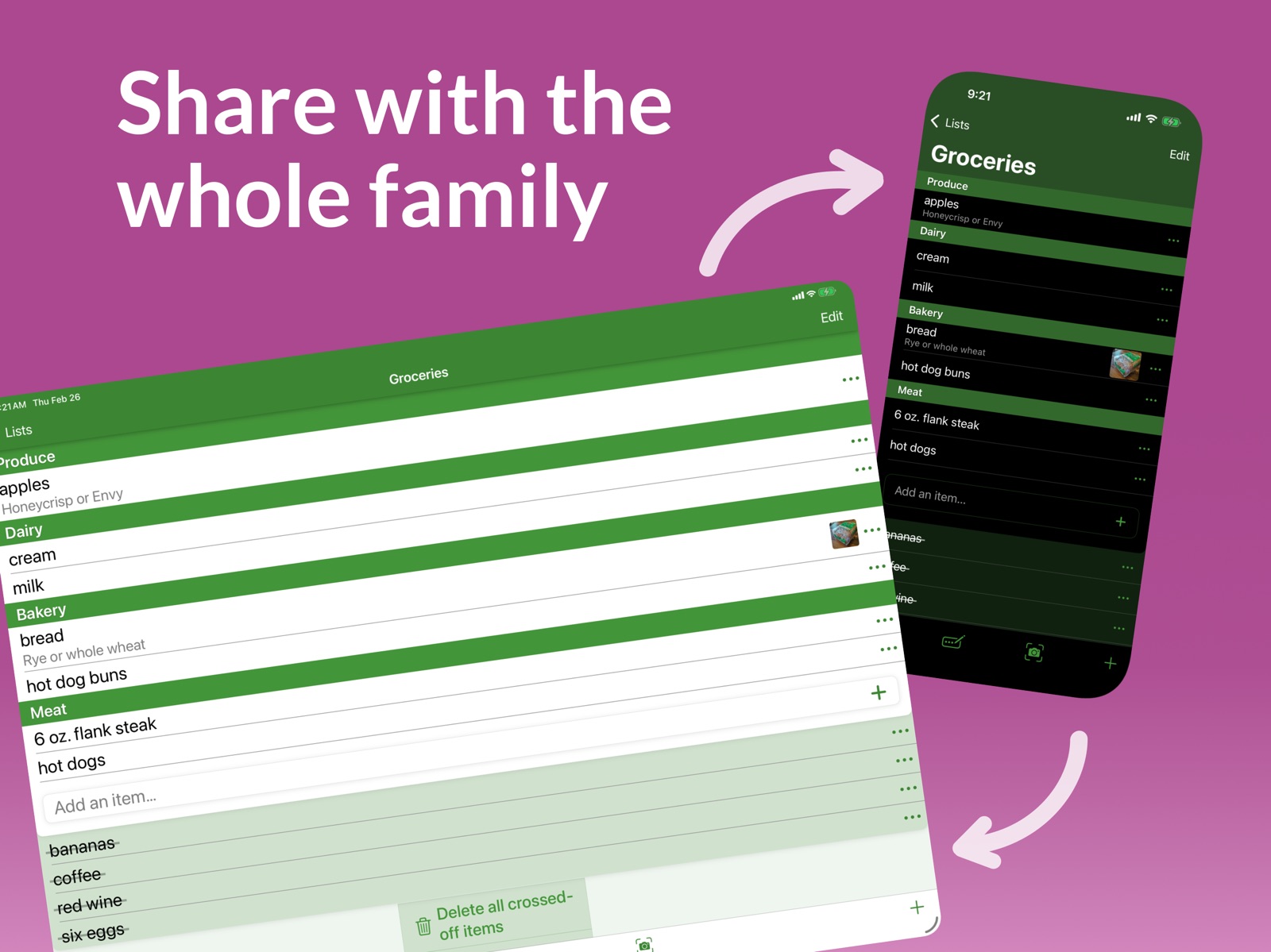
10 store screenshots


Pricing & paywalls
- Remove Ads — $0.99
- Free download · core features require a paid plan
- In-app purchases: $0.99 - $17.99 per item
- Subscription
Ratings & reviews
-
5/5Almost perfect, but needs to consider the shopper
So this app is basically what I realized I needed, and fortunately found it existed already so I didn’t have to build it myself. The coordination between recipes and shopping is great, but could use a little tweaking. 1) For example, let’s say I have two recipes, each calling for 1/2 onion. If I add the item to my shopping list, do I get 1 onion or do I get 1/2 onion x2? Gets worse with 1/4 etc. So recipes should have units (selected in the menu; volume/mass depending on how your region does cooking measurements. 1/4 cup onion vs 0.5 onion vs 100g onion etc 2) Also, adding a “Store” & “aisle” column would be so helpful, especially if it could handle two or more stores. I frequently hit two or three stores, and they stock things in different places. For instance, Rotel canned tomatoes with chilies is in the tomato aisle in one store and the Mexican food aisle at another store. In my other system, I simply used the initial of the store (G for Giant, W for Wegmans,etc) and the aisle number so I knew to look for it in G10 or W01b. This also allows for increased efficiency if you are going to your favorite store and can select (sort by Store/aisle) so I only have to make one pass down each. Right now, I store this info in the notes, but that won’t sort. 90% of the way there! 3) can you make the crossed out category headers gray? Having them be almost the same shade as the active one with a slightly darker green “crossed out” divisor like you have now is hard to read. In other words: active category is green, inactive/crossed out is gray
/)(&,5)! · 30 Aug 2026
-
5/5My whole family uses it!
So many things I like about this app, and some things I'd like to see added to it. THINGS WE LOVE... (1) It syncs with my husband and son so we all know what we need. If my husband picked up batteries at one store, I can see it right away and I don't buy them too while I'm out. (2) I can make different lists for different stores. Something I need from the hardware store won't be listed in the grocery store. We also made lists for other reasons, like camping lists so I remember what to pack, or a "LENDING LIST" to keep track of who borrowed what. (3) I can categorize items into the aisles or departments of the store (such as dairy, produce, etc.) Saves a LOT of legwork. (4) Notifications lets me know ASAP if something was added to the list while I'm out so I don't get all the way home just to find out my husband discovered we need eggs. THINGS I'D LIKE TO SEE ADDED... (1) I'd like to increase or change the quantity right from the actual list without having to add the entire item again or go into the item description. (2) I'd like to enter a size, such as so many ounces or pounds. (3) It would be great if I could mark the item somehow so I know I have a coupon, or if there is a sale (buy one get one free, etc). (4) I'd like to be able to write a note, such as "Get Hazelnut if they don't have Irish Cream." (5) I wish there was a feature (and maybe a note function would do this) where I could enter what price I paid last time. This way, when I see a "sale" or coupon I would know if it was a good deal or not. ALL IN ALL... This is an amazing app and I don't see how we ever lived without it!!!
MaryBall143 · 30 Aug 2026
-
5/5Have used this app for many years and LOVE it!
My husband and I use this app to share, not just grocery lists, but a whole database of the items we buy. We are 100% Apple. There are native apps that would allow us to share a grocery list, but Our Groceries allows us to create a whole database of things we buy. Additionally, we can create unlimited lists to fit the way we shop. We created a list for each of the stores we frequent. When you add an item to a list, that item exists in your shared database of items. You can use categories provided by Our Groceries or create your own categories. So a grocery list doesn’t have to be one run-on list; it is broken into categories like “produce” with everything we buy from produce section of the store all in one section of our list. It updates in real time so we can split up in the grocery store and when we mark items off the list as we grab them it updates for everyone sharing the list immediately as long as they have data or wi-fi. If my husband is at a store and I find something else he needs to buy, I can add it to the list and he sees it immediately. This is one of those app downloads that has been incredibly useful for many years in keeping our very busy lives organized. Highly recommended!
DavdsGirl · 30 Aug 2026
-
5/5One of the best I’ve tried
I like a grocery app that has both a phone and a watch app. This one has that and does it fairly well. Going through the store checking your watch is easier than pulling your phone in and out and turning it on and off. This app lets you categorize products and it remembers the categories once you set them. It lets you add the same product to multiple store lists. I love the look of the app and it’s instant sync functionality. The areas of improvement the maker should address is that I find the flow for the addition of groceries to be clunky. It would be nicer if you could start to type an item select from the matching list and straight away specify how many and the category ( if it’s uncategorized ) without having to navigate around into the info screen for the product. I also find myself accidentally touching products to get to that information screen and instead it removes it from the list. This is counterintuitive. They should use a check box or a swipe left or right to remove the item from the list, which is more conventional. If you don’t wanna change now that you have a base of users, at least make it a preference setting for the newcomers.
The Teaman · 30 Aug 2026
-
5/5Excellent app
I have been using this application for many years. My wife and I find it incredibly helpful to coordinate our grocery buying, simplifying the process of purchasing groceries for a large family. I especially like the recipes feature. The one request I have at this time is to simplify access to recipes from an individual grocery list. For example, if I go into the recipes select add to grocery list, I either need to have the recipe assigned to a particular list already or I have to select which grocery list for each individual item in the recipes. Alternatively, from within whatever grocery list I’m working on, I can add a recipe. However, I need to scroll down through the entire database of foods I have ever used in the application prior to getting to the recipes. If, within a particular grocery list, there was a button that says add recipe that would bypass this need to scroll through several pages of grocery items. It is a small thing, but it would be a functionality I would use on a regular basis. Overall, I would like to congratulate you on an excellent application.
b23323 · 30 Aug 2026
No store reviews collected for Google Play · US
Privacy & accessibility
Privacy
- Data Linked to You — Analytics — Diagnostics — Other Diagnostic Data Developer declared
- Data Linked to You — Analytics — Identifiers — Device ID Developer declared
- Data Linked to You — Analytics — Identifiers — User ID Developer declared
- Data Linked to You — Analytics — Purchases — Purchase History Developer declared
- Data Linked to You — Analytics — User Content — Other User Content Developer declared
- Data Linked to You — App Functionality — Contact Info — Email Address Developer declared
- Data Linked to You — App Functionality — Diagnostics — Other Diagnostic Data Developer declared
- Data Linked to You — App Functionality — Identifiers — Device ID Developer declared
- Data Linked to You — App Functionality — Identifiers — User ID Developer declared
- Data Linked to You — App Functionality — Purchases — Purchase History Developer declared
- Data Linked to You — App Functionality — User Content — Other User Content Developer declared
- Data Linked to You — App Functionality — User Content — Photos or Videos Developer declared
- Data Linked to You — Developer’s Advertising or Marketing — Contact Info — Email Address Developer declared
- Data Linked to You — Third-Party Advertising — Identifiers — Device ID Developer declared
- Data Linked to You — Third-Party Advertising — User Content — Other User Content Developer declared
- Data Linked to You — Contact Info Developer declared
- Data Linked to You — Diagnostics Developer declared
- Data Linked to You — Identifiers Developer declared
- Data Linked to You — Purchases Developer declared
- Data Linked to You — User Content Developer declared
- Data Not Linked to You — Analytics — Usage Data — Product Interaction Developer declared
- Data Not Linked to You — App Functionality — Diagnostics — Crash Data Developer declared
- Data Not Linked to You — App Functionality — Diagnostics — Performance Data Developer declared
- Data Not Linked to You — Third-Party Advertising — Usage Data — Advertising Data Developer declared
- Data Not Linked to You — Diagnostics Developer declared
- Data Not Linked to You — Usage Data Developer declared
- Data Used to Track You — Identifiers — Device ID Developer declared
- Data Used to Track You — Identifiers Developer declared
- Data Used to Track You — Usage Data — Advertising Data Developer declared
- Data Used to Track You — Usage Data Developer declared
Accessibility
No accessibility labels collected yet.
Privacy
- Data collected — Analytics — App activity — App interactions Developer declared
- Data collected — Analytics — App info and performance — Crash logs Developer declared
- Data collected — Analytics — App info and performance — Diagnostics Developer declared
- Data collected — Analytics — Device or other IDs Developer declared
- Data collected — App functionality — App activity — Other user-generated content Developer declared
- Data collected — App functionality — Photos and videos — Photos Developer declared
- Data collected — App functionality, Analytics — Personal info — User IDs Developer declared
- Data collected — App functionality, Developer communications, Account management — Personal info — Email address Developer declared
- Data shared — Advertising or marketing — App activity — Other user-generated content Developer declared
- Data shared — Advertising or marketing — Device or other IDs Developer declared
- Data shared — Advertising or marketing — Location — Approximate location Developer declared
- Security practices — Your data is transferred over a secure connection — Data is encrypted in transit Developer declared
- Security practices — The developer provides a way for you to request that your data be deleted — You can request that data be deleted Developer declared
Accessibility
No accessibility labels collected yet.
Versions
App Store
-
4.9.2
Fix a problem where user was sometimes prompted for a category even though one is already set.
-
4.9.3
• Minor fixes and improvements
-
5.0.4
Now available in French!
-
5.1.3
Now available in German!
-
5.2.2
New app icon and logo design.
-
5.3.0
A few small improvements—we hope you enjoy the updates!
-
5.4.0
A few small improvements—we hope you enjoy them!
-
5.5.1
Now available in Spanish!
-
5.6.3
Now available in Danish, Dutch, Italian, Norwegian, and Swedish!
-
5.7.0
• Our Apple Watch app is even better! Try it while shopping. • Use Lock Screen widgets for instant list access.
-
5.7.1
Fixes crash at startup on macOS.
-
5.8.2
New Apple Watch widgets: show your top shopping lists or the contents of a specific shopping list. The widgets can be added to the Smart Stack, and placed on watch faces that have a large rectangular complication. Tapping on a widget opens the OurGroceries watch app. Requires watchOS 10+.
-
5.9.1
Now includes dark and tinted app icons for iOS 18 users, and also takes advantage of other new iOS 18 capabilities like tinted widgets!
-
5.9.3
A few small improvements—we hope you enjoy them!
-
6.0.1
You can now add an item just by taking a photo of it! OurGroceries will automatically suggest the words to go with the photo. Tap the camera icon in the top right corner of any shopping list to get started. Also, when showing that an item is already on a list (such as when adding an item or looking at a recipe), the item’s weight or volume is now displayed. For example: “Potatoes - 5 lbs on Shopping List”.
-
6.1.1
Show item note when viewing an item’s photo full screen (just tap the photo from the shopping list!).
-
6.1.2
A few small improvements—we hope you enjoy them!
-
6.2.3
A few small improvements—we hope you enjoy them!
-
6.2.4
A few small improvements—we hope you enjoy them!
-
6.2.7
Added Control Center widgets to quickly open the app, including one for “Add with Camera”.
-
7.0.4
• Moved “Add Item” buttons to the bottom of the screen, so you can use the app one-handed. • Choose from 13 new colorful themes. • Updated the design to improve the contrast between different screens, and between normal and crossed-off items on your list. We’re still fine-tuning the new look—tell us what you love or miss at [email protected]
-
7.0.5
• Hide list notes for shopping lists. • Bring back the “Crossed Off” heading at the top of the crossed-off section. • When the Cross-off Action is set to "Swipe", allow swipes in both directions (left-to-right and right-to-left). • Many small fixes and improvements based on your feedback. Thank you!
-
7.0.6
A few small improvements—we hope you enjoy them!
-
7.1.0
· 25 May 2026
• Pick from 20 beautiful themes in Settings!
-
7.2.0
· 29 Jul 2026
Add your list to Instacart with a tap! This feature is available in the US and Canada.
Alternatives
- Grocery List ◎ — Same category + similar ratings
- Christmas Gift List Tracker — Same category + similar ratings
Availability by market
- US
Data quality & evidence
- Page completeness
- Independent summary published
- Last verified
- 30 Aug 2026
- Sources
- App Store, Google Play