Quick verdict
- What it is
- Store information collected; independent summary not yet available.
- At a glance
-
- From $0.41/mo
- Free to download
- In-app purchases
Categories and search queries
Official categories
- Graphics & Design
- Productivity
AppCorpus categories
Key functions
| Function | Availability | Access | Scope | Evidence |
|---|---|---|---|---|
| Family Sharing | Yes | Unknown | App Store | Store published |
| Free app | Yes | Free | — | Store published |
| In-app purchases | Yes | Limited free | — | Store published |
Screens
App Store
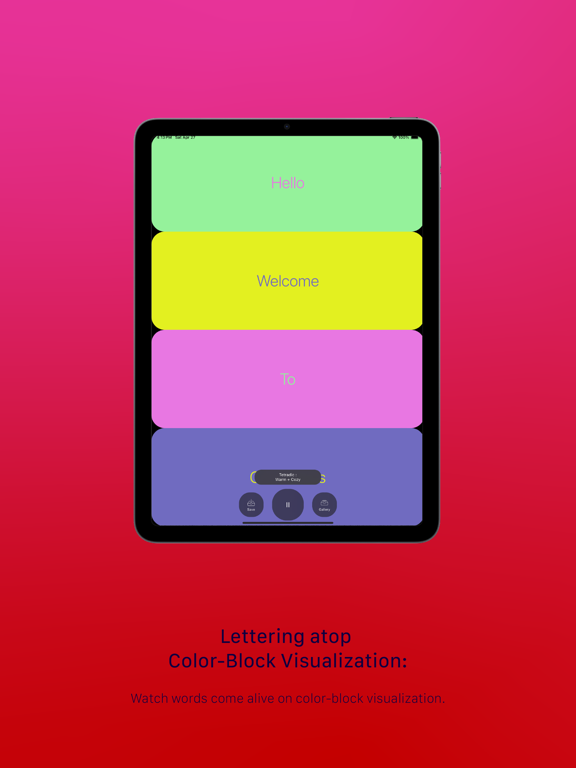
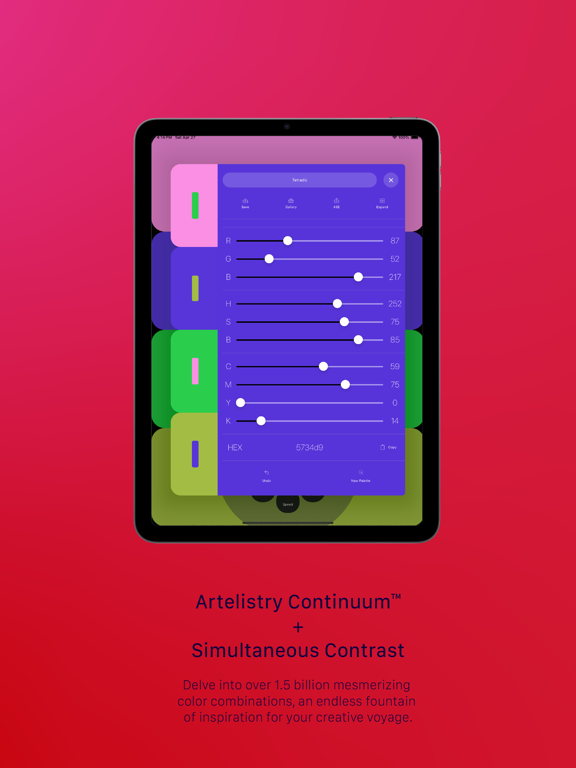
26 store screenshots


Pricing & paywalls
App Store
- Chromatics AI Yearly Access — $4.99/year ($0.41/mo)
- Monthly Innovator's Pass — $4.99/month
Ratings & reviews
App Store
-
5/5Find perfect color combination
Charomatics AI is a great resource for anyone needing to find the right variations of colors for their projects. Personally, I use this app for finding complimentary colors for surface pattern designs. The app is easy to navigate, and its clean, minimalistic design enhances the overall user experience. I particularly appreciate how straightforward it is to use when I'm in the middle of a design project and need to quickly find the perfect color combination. Another aspect I love about this app is its calming effect. Watching the subtle transitions between colors can be quite soothing, providing a brief, meditative break during a busy workday :) Charomatics AI has proven to be a useful and delightful addition to my creative toolkit. I highly recommend it to designers and artists looking for a reliable and enjoyable way to explore color variations.
Sophia C. L. · 7 Aug 2026
-
5/5Very smart app for color inspiration
I really like how simple the interface is and how selective those colors are. Provides good inspirations in an efficient way, save me lots of time and also delivers me the results I am looking for. Strongly recommend it if you are sick of browsing thousands of color swatches on other apps.
Carmenleaf · 7 Aug 2026
-
5/5Nice for color selection!
This is a wonderful app that I was waiting for a long time, which inspired me so much that I can easily to find the matched color and palette. And the main wheel menu is really creative, and easy to use and go back to previous feature. Love it and highly recommend!
Vanna J. · 7 Aug 2026
Privacy & accessibility
App Store
Privacy
- Data Not Collected Developer declared
Accessibility
No accessibility labels collected yet.
Versions
App Store
- 1.1
-
1.1.1
- The palette re-size behavior has been updated. - Saved update from the color component confluence view. - Improved navigation stack order.
-
1.5
**Artelistry Update Notes (Version 1.5)** Hello, Artelistry Community! We are excited to announce the release of Artelistry, with Micro-Zine a fantastic new feature available to all subscribers. In this update, we've focused on enhancing your creative experience by introducing fresh and unique features that will give you an evergreen source of inspiration. Let's dive into the details! **Introducing Artelistry Ai:** Artelistry Ai offers an advanced algorithm to create more compelling color harmonies and palettes, saving you valuable time. This mode uses machine learning-powered techniques to generate various color schemes that work well together, making finding the perfect combination for your design projects easier. **Introducing Artelistry Micro-Zine:** - Color inspiration from trending avant-garde photography: Stay ahead of the curve with color palettes inspired by the latest in avant-garde photography. - An evergreen source of fresh inspirations: Discover new sources of creativity and inspiration with regularly updated content. **New Features and Improvements:** 1. Color Hex Code Copy: Easily copy the hex code of your chosen colors with a simple click, streamlining your workflow and saving you time. 2. ASE Image/Export: Export your color palettes in Adobe Swatch Exchange (ASE) format, allowing you to seamlessly integrate your Artelistry creations into your favorite Adobe application and Figma within plugin 3. Harmony Sync: Automatically sync your color palettes with Harmony for a smoother and more cohesive design experience. 4. Master Palette Creation: Build your own master color palettes by combining and refining existing palettes, giving you complete control over your creative process. 5. Quick Generation: Generate stunning color palettes in an instant with our new and improved algorithm, perfect for when you need inspiration on the fly. 6. Aesthetic Update: We've revamped the look and feel of our platform, delivering a cleaner and more intuitive user experience. 7. Harmony Selector: Access the harmony selector in both the Continuum and Fitness sections, allowing you to effortlessly find the perfect balance and harmony in your color palettes. We are confident that these new features will take your creative journey to new heights. Thank you for being a part of the Artelistry community, and happy creating!
-
1.5.1
**Artelistry Update Notes (Version 1.5.1)** **From 1.5 > 1.5.1 : Minor Performance Update** Hello, Artelistry Community! We are excited to announce the release of Artelistry with Micro-Zine, a fantastic new feature available to all subscribers. In this update, we've focused on enhancing your creative experience by introducing fresh and unique features that will give you an evergreen source of inspiration. Let's dive into the details! **Introducing Artelistry Ai:** Artelistry Ai offers an advanced algorithm to create more compelling color harmonies and palettes, saving you valuable time. This mode uses machine learning-powered techniques to generate various color schemes that work well together, making finding the perfect combination for your design projects easier. **Introducing Artelistry Micro-Zine:** - Color inspiration from trending avant-garde photography: Stay ahead of the curve with color palettes inspired by the latest in avant-garde photography. - An evergreen source of fresh inspirations: Discover new sources of creativity and inspiration with regularly updated content. **New Features and Improvements:** 1. Color Hex Code Copy: Easily copy the hex code of your chosen colors with a simple click, streamlining your workflow and saving you time. 2. ASE Image/Export: Export your color palettes in Adobe Swatch Exchange (ASE) format, allowing you to seamlessly integrate your Artelistry creations into your favorite Adobe application and Figma within plugin 3. Harmony Sync: Automatically sync your color palettes with Harmony for a smoother and more cohesive design experience. 4. Master Palette Creation: Build your own master color palettes by combining and refining existing palettes, giving you complete control over your creative process. 5. Quick Generation: Generate stunning color palettes in an instant with our new and improved algorithm, perfect for when you need inspiration on the fly. 6. Aesthetic Update: We've revamped the look and feel of our platform, delivering a cleaner and more intuitive user experience. 7. Harmony Selector: Access the harmony selector in both the Continuum and Finesse sections, allowing you to effortlessly find the perfect balance and harmony in your color palettes. We are confident that these new features will take your creative journey to new heights. Thank you for being a part of the Artelistry community, and happy creating!
-
15.1
interface improvement
-
15.2
name update
-
1.6
Artelistry AI V1.6 Release Notes Greetings, esteemed artists and creators! We're thrilled to bring another layer of richness to your palette with Artelistry AI V1.6. This release is no less than a vibrant splash of innovation, just the kind you've come to expect from us. So, let's dive right in and explore these freshly mixed hues. Color Contrast Checker: First up, we've introduced a new Color Contrast Checker. This tool ensures your creations aren't just aesthetically pleasing but also accessible, providing a much-needed balance between creativity and usability. Now, you can say goodbye to clashing hues and hello to harmonious color coordination. High Contrast Monochromatic Generator: The new color generation feature, High Contrast Monochromatic, is no less than an ode to the power of a single color. It's all about the subtlety of shades and tints, offering a stark, bold contrast that can be as dramatic as a well-written sonnet. Micro-Zine Update: Our Micro-Zine has been revitalized with broader categories for color inspiration. Whether you're seeking the tranquillity of blues or the passion of reds, our Micro-Zine has you covered. It's time to let your creativity flow with colors that truly inspire you. RYB vs. RGB Mode: We're also bringing back an old friend, the RYB vs. RGB mode. This feature revives the traditional color model. Color Brightness Sorting: Our new update allows for color brightness sorting versus dynamic presentation with no sorting. This means you can control your color scheme, allowing your work to shine in the way you envision. Innovator's Pass: We're excited to re-introduce the monthly subscription service as Innovator's Pass. You'll receive exclusive access to premium features, additional storage, and more if you subscribe. It's our way of saying thank you for your commitment to us and your art. Color Storage Gallery Sorting and Filtering: Lastly, we've added sorting and filtering to the Color Storage Gallery. Now, managing your palettes will be as smooth as a well-mixed gradient. Each feature has been crafted with you, our artistic community, in mind. We strive to bring you the best tools to express your creativity and make the world more colorful. As always, we welcome your feedback. After all, this is a collaboration, and you are our most important partner. Let's continue to paint this world with the colors of innovation. Artelistry AI
-
16.0
In our latest enhancement, we introduce the semantic filter feature, meticulously crafted to lead you swiftly to the ideal color combinations, thereby refining your workflow and enriching your artistic endeavors.
-
16.1
In our latest enhancement, we introduce the semantic filter feature, meticulously crafted to lead you swiftly to the ideal color combinations, thereby refining your workflow and enriching your artistic endeavors.
-
1.6.2
UX Improvement
-
16.2
In our latest enhancement, we introduce the semantic filter feature, meticulously crafted to lead you swiftly to the ideal color combinations, thereby refining your workflow and enriching your artistic endeavors.
-
1.6.3
Feature Refinement
-
16.3
In our latest enhancement, we introduce the semantic filter feature, meticulously crafted to lead you swiftly to the ideal color combinations, thereby refining your workflow and enriching your artistic endeavors.
-
16.4
We’ve refined the interface for a smoother, more intuitive experience. Enjoy improved navigation, enhanced visual clarity, and a more seamless workflow. Let us know what you think!
-
16.5
We've added Image Search in Trend
-
16.6
· 8 Nov 2025
Intent Based Palette Finder
-
1.7
performance update
-
1.8
interface improvements
-
1.85
interface improvement
-
1.86
icon update
Alternatives
- KolorHub: Color Palette Studio — Same category + similar ratings
- Colorific: Color Palette — Same category + similar ratings
- Palette Up — Same category + similar ratings
- Palette Collect - Match colors — Same category + similar ratings
- ColorDesk — Same category + similar ratings
- Palettte — Same category + similar ratings
Availability by market
- US
Data quality & evidence
- Page completeness
- Live store listing
- Last verified
- 7 Aug 2026
- Sources
- App Store
- Independent summary has not been published yet.