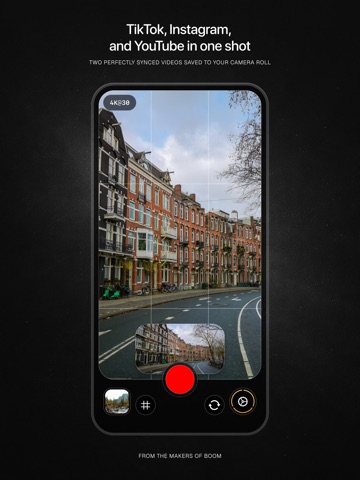
AppCorpus MCP gives your agent current app data, prices, screens, features and sources.
View JSON
GET /api/v3/apps/6761380003
{
  "app_id": 6761380003,
  "canonical_url": "https://appcorpus.com/apps/oneshot-dual-video-camera-6761380003",
  "identity": {
    "name": "OneShot — Dual Video Camera",
    "slug": "oneshot-dual-video-camera",
    "developer": {
      "name": "Boom Vision Company Inc.",
      "url": "https://appcorpus.com/developers/boom-vision-company-inc-developer_ed79989f545d702d3de79a43074aa65c"
    },
    "icon_url": "https://is1-ssl.mzstatic.com/image/thumb/Purple211/v4/6d/81/5a/6d815ad0-f15a-ad18-ee99-9b204f811e2c/AppIcon-0-0-1x_U007epad-0-1-85-220.png/512x512bb.jpg",
    "stores": [
      "apple"
    ],
    "platforms": [
      "iphone",
      "ipad"
    ],
    "status": {
      "state": "active",
      "label": "Active",
      "last_checked": "2026-08-07",
      "last_checked_label": "7 Aug 2026",
      "banner": null,
      "region_note": null
    }
  },
  "listings": [
    {
      "store": "apple",
      "status": "ACTIVE",
      "url": "https://apps.apple.com/us/app/oneshot-dual-video-camera/id6761380003?uo=4",
      "rating": 2.8,
      "rating_count": 4,
      "formatted_price": "Free",
      "is_free": true,
      "has_iap": true,
      "has_subscription": false,
      "version": "1.5.1",
      "updated": "2026-07-28",
      "currency": "USD"
    }
  ],
  "summary": {
    "one_liner": null,
    "summary": null,
    "best_for": [],
    "not_for": [],
    "status": "fallback",
    "at_a_glance": [
      "From $2.99/mo",
      "Free to download",
      "In-app purchases"
    ]
  },
  "categories": {
    "official": [
      "Photo & Video",
      "Utilities"
    ],
    "appcorpus": [
      {
        "category_id": "photo-video",
        "label": "Photo & video",
        "url": "https://appcorpus.com/categories/photo-video"
      },
      {
        "category_id": "utilities",
        "label": "Utilities",
        "url": "https://appcorpus.com/categories/utilities"
      }
    ]
  },
  "use_cases": [],
  "features": [
    {
      "capability_id": "free_app",
      "label": "Free app",
      "availability": "yes",
      "access_level": "free",
      "scope": null,
      "evidence": "Store published"
    },
    {
      "capability_id": "in_app_purchases",
      "label": "In-app purchases",
      "availability": "yes",
      "access_level": "free_limited",
      "scope": null,
      "evidence": "Store published"
    }
  ],
  "pricing": [
    {
      "store": "apple",
      "formatted_price": "Free",
      "is_free": true,
      "has_iap": true,
      "has_subscription": false,
      "currency": "USD",
      "market": "us",
      "last_verified": "2026-08-07",
      "rows": [
        "OneShot Pro (Monthly) — $1.99/week",
        "OneShot Pro (Monthly) — $2.99/month",
        "OneShot Pro (Monthly) — $14.99/year ($1.24/mo)",
        "OneShot Pro (Lifetime) — $6.99",
        "OneShot Pro (Lifetime) — $9.99",
        "OneShot Pro (Lifetime) — $14.99"
      ]
    }
  ],
  "screens": [
    {
      "url": "https://is1-ssl.mzstatic.com/image/thumb/PurpleSource221/v4/34/4f/9a/344f9a37-cbef-c4da-7a2a-56289f471408/iPad.png/1600x1600bb.jpg",
      "store": "apple",
      "platform": "ipad",
      "alt": "OneShot — Dual Video Camera ipad screenshot 1"
    },
    {
      "url": "https://is1-ssl.mzstatic.com/image/thumb/PurpleSource221/v4/34/4f/9a/344f9a37-cbef-c4da-7a2a-56289f471408/iPad.png/360x480bb.jpg",
      "store": "apple",
      "platform": "ipad",
      "alt": "OneShot — Dual Video Camera ipad screenshot 2"
    },
    {
      "url": "https://is1-ssl.mzstatic.com/image/thumb/PurpleSource221/v4/cb/3d/80/cb3d80d1-9fbe-ba74-d88a-d4df90a7232e/iPad-1.png/1600x1600bb.jpg",
      "store": "apple",
      "platform": "ipad",
      "alt": "OneShot — Dual Video Camera ipad screenshot 3"
    },
    {
      "url": "https://is1-ssl.mzstatic.com/image/thumb/PurpleSource221/v4/cb/3d/80/cb3d80d1-9fbe-ba74-d88a-d4df90a7232e/iPad-1.png/360x480bb.jpg",
      "store": "apple",
      "platform": "ipad",
      "alt": "OneShot — Dual Video Camera ipad screenshot 4"
    },
    {
      "url": "https://is1-ssl.mzstatic.com/image/thumb/PurpleSource221/v4/8f/d4/bb/8fd4bb82-64fc-fc12-6124-b704bf982ebe/iPad-2.png/1600x1600bb.jpg",
      "store": "apple",
      "platform": "ipad",
      "alt": "OneShot — Dual Video Camera ipad screenshot 5"
    },
    {
      "url": "https://is1-ssl.mzstatic.com/image/thumb/PurpleSource221/v4/8f/d4/bb/8fd4bb82-64fc-fc12-6124-b704bf982ebe/iPad-2.png/360x480bb.jpg",
      "store": "apple",
      "platform": "ipad",
      "alt": "OneShot — Dual Video Camera ipad screenshot 6"
    },
    {
      "url": "https://is1-ssl.mzstatic.com/image/thumb/PurpleSource221/v4/2b/29/e1/2b29e1b8-7954-d157-b0fc-893e36d37046/iPhone.png/1290x1600bb.jpg",
      "store": "apple",
      "platform": "iphone",
      "alt": "OneShot — Dual Video Camera iphone screenshot 7"
    },
    {
      "url": "https://is1-ssl.mzstatic.com/image/thumb/PurpleSource221/v4/2c/de/ef/2cdeef6e-876a-97a6-e45d-bd1430229e5c/iPhone-1.png/1290x1600bb.jpg",
      "store": "apple",
      "platform": "iphone",
      "alt": "OneShot — Dual Video Camera iphone screenshot 8"
    },
    {
      "url": "https://is1-ssl.mzstatic.com/image/thumb/PurpleSource221/v4/37/77/42/377742d3-6d7f-0d57-ffc3-4521dee255b4/iPhone-2.png/1290x1600bb.jpg",
      "store": "apple",
      "platform": "iphone",
      "alt": "OneShot — Dual Video Camera iphone screenshot 9"
    }
  ],
  "ratings": [
    {
      "store": "apple",
      "average": 2.8,
      "count": 4,
      "market": "us",
      "observed_at": "2026-08-07",
      "reviews": [
        {
          "rating": 1,
          "title": "Just an Advertisement",
          "body": "This is not a functional app. When you try to record, an advertisement opens instead of making a recording.",
          "author": "Geo_",
          "date": "7 Aug 2026"
        },
        {
          "rating": 5,
          "title": "Great app!",
          "body": "Love the capability of filming the two shots at once but it needs the camera stabilization as I'm the videos come out very shaky if you're trying to walk and film",
          "author": "mikey jn",
          "date": "7 Aug 2026"
        }
      ]
    }
  ],
  "privacy": [
    {
      "store": "apple",
      "declarations": [
        {
          "title": "Data Linked to You",
          "detail": "Analytics — Purchases — Purchase History",
          "source": "Developer declared"
        },
        {
          "title": "Data Linked to You",
          "detail": "App Functionality — Purchases — Purchase History",
          "source": "Developer declared"
        },
        {
          "title": "Data Linked to You",
          "detail": "Developer’s Advertising or Marketing — Purchases — Purchase History",
          "source": "Developer declared"
        },
        {
          "title": "Data Linked to You",
          "detail": "Developer’s Advertising or Marketing — Usage Data — Advertising Data",
          "source": "Developer declared"
        },
        {
          "title": "Data Linked to You",
          "detail": "Purchases",
          "source": "Developer declared"
        },
        {
          "title": "Data Linked to You",
          "detail": "Usage Data",
          "source": "Developer declared"
        },
        {
          "title": "Data Not Linked to You",
          "detail": "Analytics — Usage Data — Product Interaction",
          "source": "Developer declared"
        },
        {
          "title": "Data Not Linked to You",
          "detail": "App Functionality — Diagnostics — Crash Data",
          "source": "Developer declared"
        },
        {
          "title": "Data Not Linked to You",
          "detail": "App Functionality — Usage Data — Product Interaction",
          "source": "Developer declared"
        },
        {
          "title": "Data Not Linked to You",
          "detail": "Diagnostics",
          "source": "Developer declared"
        },
        {
          "title": "Data Not Linked to You",
          "detail": "Usage Data",
          "source": "Developer declared"
        },
        {
          "title": "Data Used to Track You",
          "detail": "Purchases — Purchase History",
          "source": "Developer declared"
        },
        {
          "title": "Data Used to Track You",
          "detail": "Purchases",
          "source": "Developer declared"
        },
        {
          "title": "Data Used to Track You",
          "detail": "Usage Data — Advertising Data",
          "source": "Developer declared"
        },
        {
          "title": "Data Used to Track You",
          "detail": "Usage Data",
          "source": "Developer declared"
        }
      ],
      "accessibility": []
    }
  ],
  "changes": [
    {
      "store": "apple",
      "version": "1.0.0",
      "released_at": null,
      "notes": ""
    },
    {
      "store": "apple",
      "version": "1.1.0",
      "released_at": null,
      "notes": "What's New in v1.1 · Double-tap the preview to flip instantly between front and rear cameras · Pause and resume mid-recording — perfect for resetting between takes · Refreshed icons and a more polished look throughout the app · If you read this far, tap \"Write a Review\" in Settings to leave us one (please!)"
    },
    {
      "store": "apple",
      "version": "1.2.0",
      "released_at": null,
      "notes": "What's New in 1.2 · Improved performance and battery life · Double-tap the preview to flip instantly between front and rear cameras · Pause and resume mid-recording — perfect for resetting between takes · Refreshed icons and a more polished look throughout the app · If you read this far, tap \"Write a Review\" in Settings to leave us one (please!)"
    },
    {
      "store": "apple",
      "version": "1.3.0",
      "released_at": null,
      "notes": "WHAT'S NEW IN 1.3 · Sharper, more detailed landscape video · Improved framing on the front camera · Fixed a bug where completing a purchase could unexpectedly start a recording · If you read this far, tap \"Write a Review\" in Settings to leave us one (please!)"
    },
    {
      "store": "apple",
      "version": "1.4.0",
      "released_at": null,
      "notes": "WHAT'S NEW IN 1.4 · Pinch to zoom while recording with the rear cameras, one of the most-requested features! · Zoom out to 0.5× for an ultra-wide view, perfect for shooting indoors or in tight spaces · Zoom in up to 3× to get closer to your subject without moving the camera · The landscape preview follows along automatically as you zoom · If you read this far, tap \"Write a Review\" in Settings to leave us one (please & thanks!)"
    },
    {
      "store": "apple",
      "version": "1.5.0",
      "released_at": null,
      "notes": "TELEPROMPTER Read your script while you record. The new teleprompter overlays your text right on the camera preview and auto-scrolls as you speak: · Adjustable scroll speed and font size · Manual drag to find your place · Plays when you start recording, pauses when you stop · Do a test run to rehearse your script before you record Turn it on in Settings under Recording Tools. SMARTER SAVING If a recording can't save because Photos access wasn't enabled, OneShot now holds onto your clip instead of losing it. Just grant access in iOS Settings and return to the app. Your video saves automatically, with no need to re-record. VOLUME BUTTON FIXES More reliable start and stop when using your volume buttons to record. If you read this far, tap \"Write a Review\" in Settings to leave us one (please & thanks!)"
    },
    {
      "store": "apple",
      "version": "1.5.1",
      "released_at": "2026-07-28",
      "notes": "Under-the-hood improvements to keep things running smoothly. Thanks for using OneShot!"
    }
  ],
  "alternatives": [
    {
      "app_id": 6761290962,
      "name": "SnapX - Xoom Camera",
      "url": "https://appcorpus.com/apps/snapx-xoom-camera-6761290962",
      "reason": "Same category + similar ratings"
    },
    {
      "app_id": 6759357866,
      "name": "Superpose: AI Pose Camera",
      "url": "https://appcorpus.com/apps/superpose-ai-pose-camera-6759357866",
      "reason": "Same category + similar ratings"
    },
    {
      "app_id": 6771737219,
      "name": "Take Double-Front&Back Camera",
      "url": "https://appcorpus.com/apps/take-double-front-back-camera-6771737219",
      "reason": "Same category + similar ratings"
    }
  ],
  "evidence_summary": {
    "index_state": "S1",
    "evidence_level": 1,
    "level_label": "Live store listing",
    "indexable": true,
    "last_verified_at": "2026-08-07",
    "unknown_fields": [
      "Independent summary has not been published yet."
    ],
    "sources": [
      "App Store"
    ]
  },
  "availability_markets": {
    "live": [
      "us"
    ],
    "selected": "us",
    "note": null
  },
  "feature_events": {
    "events": []
  },
  "features_slice": {
    "plans": [
      {
        "code": "pro",
        "label": "OneShot Pro (Monthly)",
        "kind": "subscription",
        "status": "store_listed",
        "prices": [
          {
            "storefront": "us",
            "formatted": "$2.99",
            "billing_period": "monthly"
          },
          {
            "storefront": "us",
            "formatted": "$1.99",
            "billing_period": "weekly"
          },
          {
            "storefront": "us",
            "formatted": "$14.99",
            "billing_period": "yearly"
          }
        ],
        "trial": null
      },
      {
        "code": "pro-lifetime",
        "label": "OneShot Pro (Lifetime)",
        "kind": "unknown",
        "status": "store_listed",
        "prices": [
          {
            "storefront": "us",
            "formatted": "$14.99",
            "billing_period": "one_time"
          },
          {
            "storefront": "us",
            "formatted": "$6.99",
            "billing_period": "one_time"
          },
          {
            "storefront": "us",
            "formatted": "$9.99",
            "billing_period": "one_time"
          }
        ],
        "trial": null
      }
    ],
    "features": [],
    "unknown_features": [],
    "data_cutoff": "7 Aug 2026"
  }
}