
Quick verdict
- What it is
- Store information collected; independent summary not yet available.
- At a glance
-
- $9.99
Categories and search queries
Official categories
- Business
- Productivity
AppCorpus categories
Key functions
| Function | Availability | Access | Scope | Evidence |
|---|---|---|---|---|
| Family Sharing | Yes | Unknown | App Store | Store published |
Screens
App Store
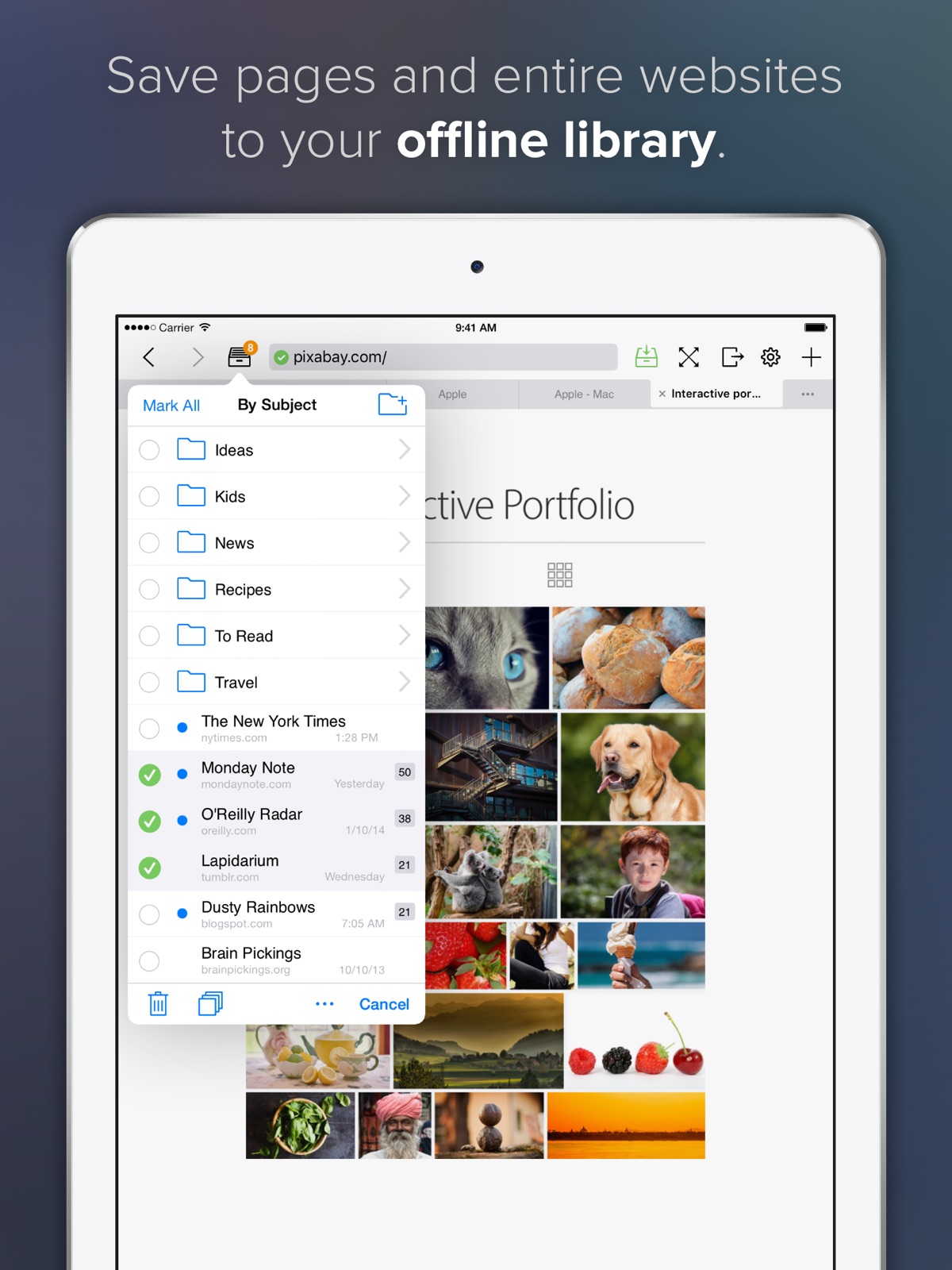
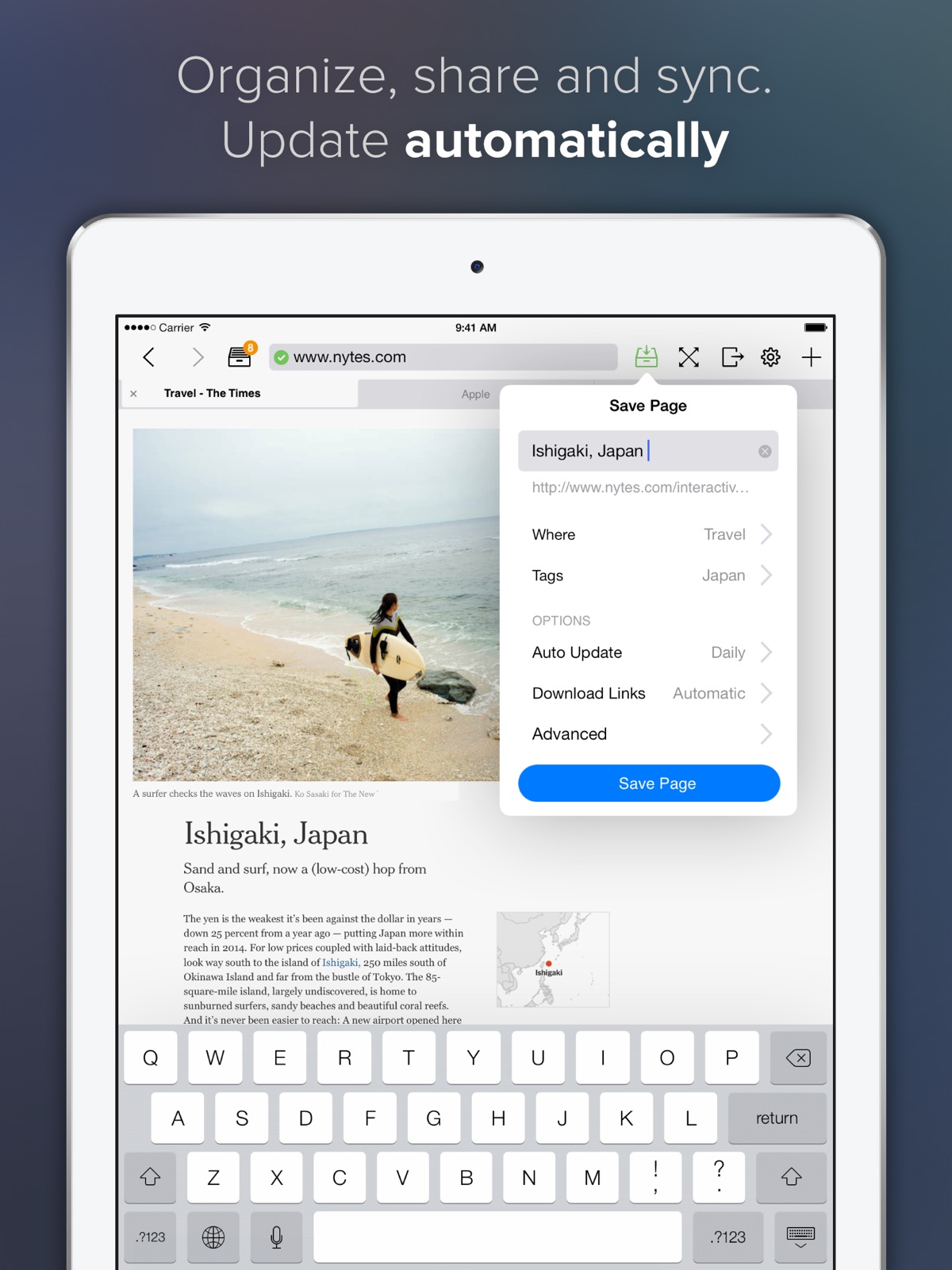
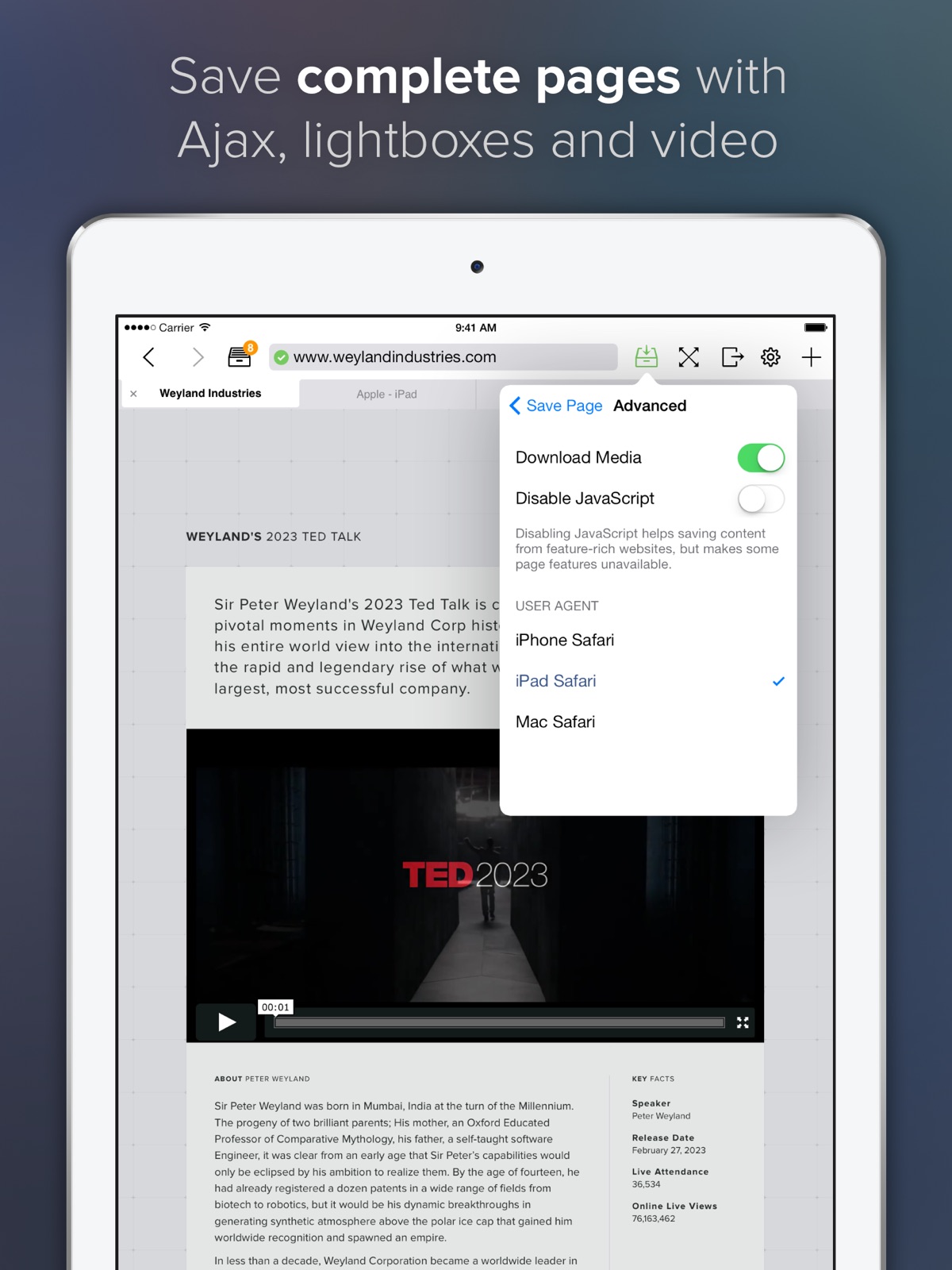
8 store screenshots
Pricing & paywalls
App Store
- Price: $9.99
Ratings & reviews
App Store
-
3/5Needs better sort/search
Useful app but it needs a better way to sort through saved pages. It has tagging functionality but as far as I can tell there's no way to search or filter by tag? It also randomly loses your tabs.
cas3y5 · 31 Jul 2026
-
5/5Very nice innovative offline reader and crawler spider
This app is much more than a solid web crawler/spider but I will start with its basic crawling ability. This app actually crawls where you tell it to and does a great job of rendering the crawled website accurately. Not sure why so many crawlers seem to fall off the rails when it comes to how far they crawl and limit where you tell it to but this app gets it right. This app includes a cloud sync service which syncs your crawled pages to all your devices where the app is installed aka iPhone, iPad, and if you buy the Mac version, on your Mac. The app really comes alive if you have a Mac and buy the Mac version of this app. On the Mac there is an export option under the File menu allowing you to save a local crawled copy of the website. I use this to store important sites on Dropbox— I copy the local website folder created by offline reader to Dropbox. The app lets you setup a “secret” email address where you can email web pages to be crawled or documents. Great for quick notes and reminders. On top of this there are a large range of innovative features including the ability to update previously crawled pages, a very fast built-in reader, integration with the native iOS safari app via a bookmark, spotlight integration, and many other features.
TechClock · 31 Jul 2026
-
5/5Apps still works after eight years
I'm not sure what other websites people are downloading, when they say this app does not work. Every app I have tried to download for the last eight years has always downloaded seamlessly. If I had to guess, as to why other people are unable to download websites, they are most likely trying to download websites where the respective webmasters have disabled the ability for those websites to be publicly scraped. If people are having difficulty in getting website links to work on the sites they have downloaded, that option is available under the advanced settings when you go to download the website. As I previously stated, in the eight years I have used this app I have had no issues in downloading any websites that I have needed off-line access to.
Matthew123454321 · 31 Jul 2026
-
3/5Is this app still supported in any way ?
No real updates of any kind in years. Is this product abandoned by developer? Reluctant to rely on it if so.
333M333 · 31 Jul 2026
-
5/5Almost perfect.
It is really useful and has many parameters for special requirements. It fails less than 1 in 20 sites when complex advertisements, overlays and pop ups confuse it.
Taber246 · 31 Jul 2026
Privacy & accessibility
App Store
Privacy
- No Details Provided Developer declared
Accessibility
No accessibility labels collected yet.
Versions
App Store
-
1.2.2
- Improved support for password-protected websites - Improved performance - Many bug fixes
-
1.3
- Universal app for iPad, iPhone and iPod touch - Retina display support - User accounts - Bug fixes
-
1.3.1
- Full iOS 4 multitasking with background downloading - Printing via AirPrint - Instant update checks using RSS and Atom feeds - Improved speed and responsiveness - Bug fixes
-
1.4
✓ Automatic detection and download of multi-page articles. ✓ Secret e-mail inbox. This new feature allows you to add pages by sending links or actual documents to a secret e-mail address. ✓ In-app sharing via Facebook, Twitter, Tumblr, Pinboard, Instapaper, and others. ✓ Custom link download mode with expert settings. ✓ HTTP authentication in built-in browser. ✓ Fullscreen mode in landscape orientation on iPhone/iPod touch. ✓ Local notifications for download completion on iOS 4+. ✓ New convenience settings. ✓ Improved page load performance in offline mode.
-
1.4.1
✓ Now available in German and Japanese ✓ Improved tagging system ✓ Fixed bug with inconsistent download of very large websites
-
1.5
✓ Scheduling updates to specific times of the day. ✓ Video download (HTML5 and MP4 only) ✓ Saving PDFs or Office documents directly from Mail or Safari ✓ Advanced settings for User-Agent, JavaScript on/off ✓ Many bug fixes and performance improvements.
-
1.5.1
iOS 5 compatibility. Bug fixes: - Auto update schedule was inconsistent with daily option - Errors in German and Japanese UI - Other minor issues.
-
1.5.2
- Improved AI for selection of links in Intelligent mode - Improved quality of multi-page article detection - Improved SSL support - More efficient file storage - App is now optimized for dual-core processors inside iPhone 4S and iPad 2 - Improved app performance and responsiveness during downloads - Many bug fixes
-
1.5.3
✓ Open In... menu for sending documents to other apps ✓ Improved web application support ✓ Fixed crash opening password-protected websites on iOS 4.3
-
1.6
✓ iOS 6 and iPhone 5 optimizations ✓ Improved support for offline galleries, slideshows and VR panoramas ✓ New features: - More granular link download controls - Thorough update mode - URL blacklist ✓ Now requires iOS 4.3, iPhone 3GS, iPod touch 3rd generation or later ✓ Bug fixes
-
1.7
- Fullscreen mode on iPad - Over 100 bug fixes
-
1.7.1
- Fix for an issue with custom link download mode.
-
1.7.2
- Offline Pages Pro is now available in French, Italian, Russian and Spanish - Website default limit is increased to 1,000 pages (Note: You can still save up to 50,000 pages using Custom mode.) - Security improvements - Bug fixes
-
2.0
- New stunning user interface - Tabbed browser (iOS 7 only) - Folders (iOS 7 only) - YouTube and Vimeo download support (PRO)
-
2.0.1
- Offline Pages is now a 64-bit app - Redesigned fullscreen mode - Improved AJAX, YouTube and Vimeo support - In-app sharing to Facebook, Twitter, Tumblr, Google+, LinkedIn, Dropbox, Evernote and many more. - Bug fixes and performance improvements.
-
2.1
- Cloud sync between all signed-in devices - Improved support for new websites and web technologies, including TypeKit, Wix, iWeb, YouTube channels, and many more. - HTTP caching and download speed improvements - Delete Downloaded Pages feature - Folders in iOS 5 and iOS 6 - Added exit button in Fullscreen mode - Many smaller UX enhancements and bug fixes.
-
2.10
· 8 Jun 2017
This update from Apple will improve the functionality of this app. No new features are included. Version 2.10 fixes a problem with saved page access on iOS 7 and 8. Previously in Version 2.9: - Added diagnostics and logging for power users - Improved support for Wix, Typekit and many other web products - Bug fixes and usability improvements.
-
2.1.1
Version 2.1.1: - Bug fixes Version 2.1: - Cloud sync between all signed-in devices - Improved support for new websites and web technologies, including TypeKit, Wix, iWeb, YouTube channels, and many more. - HTTP caching and download speed improvements - Delete Downloaded Pages feature - Folders in iOS 5 and iOS 6 - Added exit button in Fullscreen mode - Many smaller UX enhancements and bug fixes. - Offline Pages standard edition also allows automatic video download from selected providers.
-
2.2
- Support for iOS 8, iPad Air 2, iPhone 6 and iPhone 6 Plus. - Support for Background Fetch and silent Push Notifications for synchronization - Share extension - Improved fullscreen on iPhone - Bug fixes and minor improvements across the board.
-
2.3
New in 2.3 - Improved speed and stability of full website downloads - Improved support for HTML5 VR panos and interactive galleries - Additional stability improvements Previously in 2.2 - Support for iOS 8, iPad Air 2, iPhone 6 and iPhone 6 Plus - Support for Background Fetch and silent Push Notifications for synchronization - Share extension - Improved fullscreen on iPhone - Bug fixes and minor improvements across the board.
-
2.4
New in 2.4: - Dynamic fullscreen mode on iPhone. - iTunes Sharing: a) Export of previously downloaded websites as reusable .offlinePages packages. b) Import of .offlinePages packages created on other devices. c) Import of locally stored documents or websites previously downloaded with SiteSucker, wget, or similar tools. - Support for Action and Share Extensions implemented by other apps, including Dropbox, Microsoft Office, Evernote, and many more. - Improved download reliability: a) Automatic pausing of active downloads when iOS forces the app to sleep to preserve battery life. b) Automatic resuming of paused downloads on app relaunch. - Public Offline Pages API and support for offline web apps built specially for Offline Pages. You can now link to Offline Pages rules in your pages using LINK element. - Improved support for many web products and technologies, including TypeKit, Krpano, Wix, Squarespace, and more. - Improved support for generic HTML5 interactive features such as 3D panoramas, HTML5 document viewers, and photo slideshows. - Bug fixes. Previously in 2.3 - Support for iOS 8, iPad Air 2, iPhone 6 and iPhone 6 Plus. - Support for Background Fetch and silent Push Notifications for synchronization. - "Save to Offline Pages” Share Extension.
-
2.5
VERSION 2.5 New features • iOS 9 and iPad Pro support • Search in saved pages using Spotlight • Multitasking using iOS 9 slideover or split mode • Access to important functions directly from home screen using 3D Touch • New actions for saving or emailing page as PDF • New action for bookmarking a page Other changes • Disabled download of third-party videos from YouTube (contact support for more information) • Reinstated option "Landscape Fullscreen" for forcing fullscreen mode in landscape orientation on iPhone • Improved performance on older devices running iOS 7, 8 • Bug fixes PREVIOUSLY IN VERSION 2.4 • Dynamic fullscreen mode on iPhone. • iTunes Sharing: a) Export of previously downloaded websites as reusable .offlinePages packages. b) Import of .offlinePages packages created on other devices. c) Import of locally stored documents or websites previously downloaded with SiteSucker, wget, or similar tools. • Support for Action and Share Extensions implemented by other apps, including Dropbox, Microsoft Office, Evernote, and many more. • Improved download reliability: a) Automatic pausing of active downloads when iOS forces the app to sleep to preserve battery life. b) Automatic resuming of paused downloads on app relaunch. • Public Offline Pages API and support for offline web apps built specially for Offline Pages. You can now link to Offline Pages rules in your pages using LINK element. • Improved support for many web products and technologies, including TypeKit, Krpano, Wix, Squarespace, and more. • Improved support for generic HTML5 interactive features such as 3D panoramas, HTML5 document viewers, and photo slideshows.
-
2.6
Version 2.6 adds support for Offline Kiosk for iPad. Offline Kiosk allows you to turn your downloaded website into a perfect offline kiosk. It allows you to: - Secure full screen mode. Protect your kiosk pages from curious eyes and tampering. Lock the iPad in full screen kiosk mode with no menus and no exit button. - Speed up deployment. It is easy to deploy the kiosk to all iPads in your company. You can create kiosks by duplicating, importing, or even loading pre-made pages from Mac or PC. - Automatic login. Running a password protected website? Not a problem. Offline Kiosk can login users automatically to download updates so all your information stays secure. - Fill out forms. Slow Wi-Fi at the venue should not stop you from taking orders or collecting sign-ups. You can set up Offline Kiosk to handle form submissions even when device is offline. - Update remotely. Your deployed kiosks will keep up with your business. Schedule automatic updates or send push notifications to make sure all kiosks run the current version of your website. Version 2.6 also improves support for many web products: Adobe Web Fonts, HYPE.js, MathJax, Wix, and more.
-
2.7
New in Version 2.7 - Swipe to access frequent functions in Saved Pages view. - See how much storage your websites are using in Settings > Manage Storage. - Support for internationalized domain names (IDN). - Improved support for Wix, Typekit, jQuery Forms, jQuery Validation, and other frameworks. - Bug fixes and interface improvements Previously in Version 2.6 - Added support for Offline Kiosk for iPad. Offline Kiosk allows you to turn your downloaded website into a perfect offline kiosk with Secure Fullscreen, Offline Forms, Idle Timer, Night Mode, automatic background updates, and more. - Improved support for many web products: Adobe Web Fonts, HYPE.js, MathJax, Wix.
-
2.9
Version 2.9: - Added diagnostics and logging for power users - Improved support for Wix, Typekit and many other web products - Bug fixes and usability improvements.
Availability by market
- US
Data quality & evidence
- Page completeness
- Live store listing
- Last verified
- 31 Jul 2026
- Sources
- App Store
- Independent summary has not been published yet.