
Quick verdict
- What it is
- Store information collected; independent summary not yet available.
- At a glance
-
- $7.99
Categories and search queries
Official categories
- Productivity
- Business
AppCorpus categories
Key functions
| Function | Availability | Access | Scope | Evidence |
|---|---|---|---|---|
| Family Sharing | Yes | Unknown | App Store | Store published |
Screens
App Store
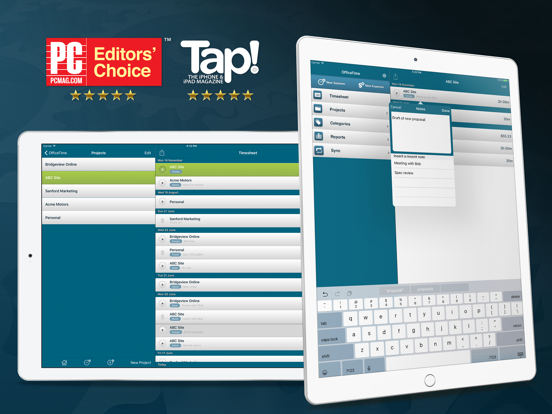
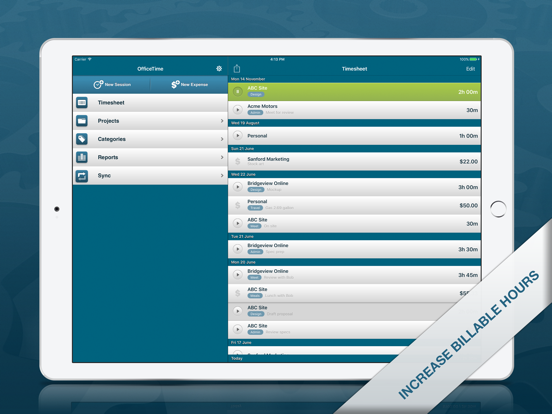
20 store screenshots


Pricing & paywalls
App Store
- Price: $7.99
Ratings & reviews
App Store
-
4/5Good App
Good app for tracking work time on projects and allows for setting job cost rate to make it easier to invoice clients. Does allow multiple timers. Can export your tracked time data in various file formats including tab delimited, .csv, .txt and .xls. Can include or exclude column id field. Also offers file name prefixing when exporting if the data should need to be imported into a database program. It now includes a Today Widget to offer access to current/recent projects to quickly start and stop timers. I personally wish that the widget feature had been integrated 2 years ago, but I guess better late than never; can you say Agile, unfortunately not. Now I just need to decide if and when I'm willing to export all of my data from the app I switched too a couple of years ago.
SeekerJones · 6 Aug 2026
-
3/5So far, SO close!
I used the free version of OfficeTime for a week to see if it would be worth investing in the paid version. After the first few days, I knew this was exactly the sort of timesheet app I’d been looking for. Working for a nonprofit company with a small staff means I’ve fingers in more than one pie on any given day. The higher ups like to know exactly what us worker bees get done on Project A, Project B, etc, and how many hours each of these projects occupy in a given day. OfficeTime makes it wildly simple (after setting up the various Categories & Projects to suit my needs) to seamlessly switch my time tracking between tasks as the demands of the day dictate. I can’t yet give the app a full 5 star rating due to one major (for me) disappointment: there doesn’t appear to be any option to sync my data between multiple devices. Some of my duties tie me to a desk/keep my around the main office, where it’s convenient to keep my time running on my iPad (it’s already propped up on the desk for note taking, anyway). Another major part of my duties, however, keeps me on my feet & nowhere near a desk, and I’d prefer to be able to track & adjust my times from my iPhone for those tasks. As of now, it looks as if I’d need to track my office tasks on the iPad & the “field” tasks on iPhone — meaning I’d have to combine the data from two separate data exports for my weekly timesheets. I’ve also yet to figure out how I can input my name to be included with the data export, even though the export settings menu says my name can/will be included. Deal-breaking caveats that will send me rallying for a refund? Not at all. Inconvenient & inefficient? Very. Even so, I am very pleased with the level of detail this app provides my timekeeping, and I look forward to seeing it evolve in future updates.
S. Gresham · 6 Aug 2026
-
1/5Lost time sheets
I can’t express how disappointed I am with this app. Once you figure out how to get it to work, it’s pretty convenient to click on and off from the time sheet window. Project setup is easy. Yes are easy to input. BUT...and here is the big BUT that had us stop using it today. I have been diligent about using this app to do freelance billing. Today, when going back to do my two-week billing, I found two whole WEEKS of projects and time sheets completely missing! I have to go back and recreate them or not get paid. Hours and hours and hours of work. I do a lot of segmented work with different clients, often an hour here or a half-hour there, or even ten minutes for phone calls or edits. That is impossible to find again. This is the third time this has happened. Today, we downloaded Toggl. It integrates with our project management software, so this may work out. Otherwise, it’s back to pencil and paper. I’ve tried now something like nine time tracking products. All fail or aren’t flexible enough. This one, had it worked reliably, was pretty good. But, I can’t have lost time like this.
Clip maker · 6 Aug 2026
-
5/5Happy her for over 10 years 😎👍🏻
Yes, I have been using this app for over 10 years and I use it to time my job so I know how much to charge based on the hourly rate that I set for each client. it’s working very well on my Mac, iPhone, and iPad. I did purchase the subscription because I wanted to use the cloud sync which works very well. I emailed their support the other day and they were fairly quick to respond to the email and was very helpful. There also is a reporting feature so if you need to calculate for tax season all the jobs and how much you made, you can easily do that by filtering for the whole year or doing a custom filter for other years. Personally, I think it’s good to make a project for each client or at least that is is what I’m doing. When you’re in the projects, you can select a project tap the edit button and you can set a default hourly rate for that project. You set the hourly rates in the categories area. So basically when you’re in the settings for the projects, you can set a default category for that project so every time you add a new timer to that project it will use that hourly rate, but you can always change the hourly rate/category on the fly also.
DudemanLA · 6 Aug 2026
-
5/5Love this app!
I have been using this app for about 2 years now to keep track of my hours. I am a Real Estate Professional and sometimes track big blocks of time, sometimes just a few minutes for a phone call. This app is so easy to use. The data is easy to export. My accountant loves the report I give to her. It saves a lot of time and I love the real time details. I know there is even more that I need to take advantage of with this app, but I like that you can also keep it simple! I have just started using the desktop version with my phone and love how easy the data syncs! I almost lost my phone to a water accident and was happy that I have the synced data on my computer!!
mi happy camper · 6 Aug 2026
Privacy & accessibility
App Store
Privacy
- Data Not Linked to You — App Functionality — Diagnostics — Crash Data Developer declared
- Data Not Linked to You — Diagnostics Developer declared
Accessibility
No accessibility labels collected yet.
Versions
App Store
-
10
A few stability improvements.
-
10.2
The sync friendly update. Lots of love and TLC has been given to ensure everything is consistent and ready across all your devices. - Syncs only when needed to enable faster syncing. - Categories with billable rates that used pennies (like $50.55) work better - Changing a categories rate now properly applies the new rate to other devices - Now consistently updates to show incoming changes - Eliminates a crash that could cause it to not update in the background - Starting a timer on another device will now update OfficeTime's badge icon to show that a timer is running even if you don't open the app.
-
10.3
A quick little update to fix a bug that could prevent the stop button from, well, stopping.
-
10.4
Improved export plus we added a handy button to delete a session right on the editing screen.
-
10.5
The last update didn't get export working right for everyone. This one does! :)
-
10.6
Just a quick hot fix to visually align some session durations properly.
-
10.7
Spring Tidy Up. We like to keep things clean. Improvements to cloud sync, Apple Watch and general stability.
-
10.9
Making things happy for iOS 18. Includes improvements to the Apple Watch version and cloud sync.
-
11.0
A little update to make things better. Hourly rates that include pennies (like $39.99) now properly cloud sync out to desktop devices.
-
11.1
A few little updates to improve cloud sync and stability.
-
11.2
Always improving. Fixes and improvements plus support for category archiving and team rates available in coming desktop editions.
-
11.3
A little update to improve (optional) cloud sync.
-
11.4
We've been hard at work making both private, local sync and cloud sync work better. * Wii sync: Supports private sync of all your desktop computers via your mobile device as part of OfficeTime Pro for desktop version 3. * Cloud sync: No longer sometimes appears frozen after syncing with OfficeTime closed * Cloud sync: Much improved sync when OfficeTime is closed * Cloud sync: Fixed sometimes falsely complaining your trial is over * Solved rare crash. * iOS 26 compatible
-
11.5
A little update to work with the upcoming OfficeTime 3 for desktop.
-
11.6
Some little visual fixes to make things work better on the iPad under iOS 26.
-
11.7
A little update to make it easier to reset wifi sync by choosing "none" and then your computer again.
-
11.8
A little update to improve syncing for teams.
-
11.9
Always improving. A little update to make wifi sync better, support team project archiving, and improve iPad display.
-
12.0
Just a handy update to help with cloud sync.
-
12.1
A little update to make cloud sync work better.
-
12.2
· 24 Jul 2026
Always improving. Stability improvements and better sync.
-
9.5
We've got some nice changes including improved sync, particularly in the background and exporting now better respects your rounding preference.
-
9.6
Always improving! This release provides stability improvements.
-
9.7
Faster, more reliable sync! Sending changes to other devices is now almost twice as fast.
-
9.8
Fixes expense creation which was affecting some people. Stability improvements and better background sync.
Alternatives
- WorkingHours • Time Tracker — Same category + similar ratings
- Clockify Time Tracker — Same category + similar ratings
- Plaud: AI Note Taker — Same category + similar ratings
- ClickUp: Tasks, Chat, Docs, AI — Same category + similar ratings
- Planmore: Schedule Planner App — Same category + similar ratings
Availability by market
- US
Data quality & evidence
- Page completeness
- Live store listing
- Last verified
- 6 Aug 2026
- Sources
- App Store
- Independent summary has not been published yet.