
Quick verdict
- What it is
- Store information collected; independent summary not yet available.
- At a glance
-
- Free to download
Categories and search queries
Official categories
- Productivity
- Developer Tools
AppCorpus categories
Key functions
| Function | Availability | Access | Scope | Evidence |
|---|---|---|---|---|
| Free app | Yes | Free | — | Store published |
Screens
App Store
9 store screenshots


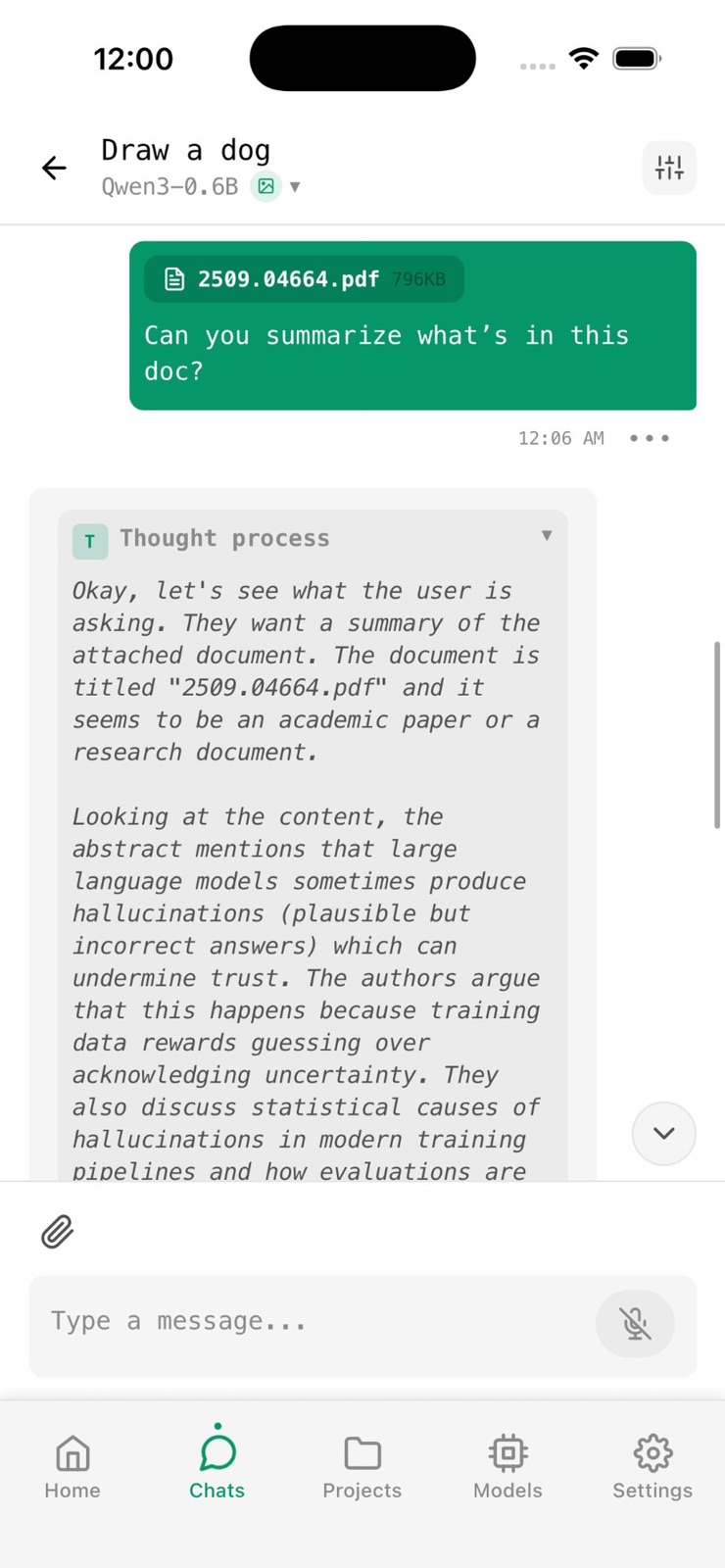

Pricing & paywalls
App Store
- Free
Ratings & reviews
App Store
-
3/5Has gone down hill
This once was what I was looking for to run AI on IOS. However now sends incomplete prompts and is remarkably slow and stutters even with plenty of ram and small models. When I originally downloaded it was much more responsive and sent the full prompt you typed. Now it unpredictably cuts off part of your prompt at random and sends duplicate prompts that make it barely usable. Now that it runs like trash they have the audacity to ask you to purchase the pro version.
Idontcarejustgivemeaname · 7 Aug 2026
-
4/5My Current Main Local AI App
I really like this app among the slew of other similar local ai apps in the App Store. But this one has a lot of the features I like and need. You can download models from their huggingspace search, including uncensored models or I can drop in my own models from the files app. Their text2image models doesn’t seem to work on my iPhone 17 Pro Max (2TB model), this wasn’t on my immediate needs but would like to revisit in the future. I like the UI, very clean and not flashy. Some gripes: When editing messages in chat, you cannot click on the text to select, it keeps making the keyboard disappear making it impossible to select text or move cursor manually. Editing text is the limited to using hold space to move cursor. But I can’t select, copy and/or pasting. For vision models, the + symbol for adding attachments, it add an unnecessary step to add from photos or camera. Instead of just two selections, photo and file, they should just add a third camera in one go. It makes you click photo, then I have to choose between camera or photo library. Make it seamless in one go. Suggestion to add Kokoro TTS, would make chats immersive.
callmetuan · 7 Aug 2026
-
1/5Off Grid until it’s not
Really solid app in general with a few gripes. The minor one is the edit function is totally borked. Attempting to select text aside from the very end of the prompt causes the text menu to instead move out of the way and close the keyboard. To actually edit anything earlier in the prompt, you have to delete everything after it. The really awful thing is that the app calls itself “Off Grid” but has a built in, untoggleable web search tool that it uses within your chats without direct user prompting. You could be asking your model a private question and it will just throw your prompt into a search engine without your consent. What about that is “off grid”? Why is it not clearly surfaced to the user and able to be disabled?
Cameronm487 · 7 Aug 2026
-
4/5It’s very good
Nice and straightforward UI, and I really appreciate how customizable it is compared to other apps, it has everything that you could need, but 1 editing text is broken, 2 thinking constantly leaks into messages as well as the AI will abruptly restart its thinking or its output, 3 the app keeps auto downloading models I don’t want Edit: what I mean in 3 is that it will sometimes download SmolLM2-135M, by itself when I never downloaded it. And if I delete a llm, it either never gets deleted, or more likely, is re-downloaded again, maybe some local or memory issue?
keepon3 · 7 Aug 2026
-
4/5Great UI- Still in Development
The UI for this app is about the best I’ve found for a local AI interface, however the feature to add a document or load context is completely broken for me as of now, which is a pretty important aspect for me. Also, even for models that support higher context length (such as Qwen 3.5 which says it supports 262k) the app still seems to limit you to 32k, which is a shame. Great app otherwise, clean, customizable, and easy to use
Erawoken · 7 Aug 2026
Privacy & accessibility
App Store
Privacy
- Data Not Collected Developer declared
Accessibility
No accessibility labels collected yet.
Versions
App Store
-
0.0.100
Now with Voice Mode Talk to your AI hands-free, fully on-device. No accounts, no tracking. Voice Mode: speak naturally, hear it answer back. Adjustable speed + tap-to-seek replay. Built-in transcription with multiple Whisper models. Pro: connect email, calendar, and external tools over MCP. Smarter model routing and faster loading. Offline license verification — no account needed. Update and say hello, out loud.
-
0.0.101
Voice Power: Auto-send voice notes and see transcriptions in Chat. Speed Boost: Major performance and stability improvements for a smoother experience. UI Polish: New features and cleaner design elements on the Home screen.
-
0.0.102
Aggressive Loading mode for max single-model performance. "Load Anyway" when a model won't fit. Fixes: voice transcripts never send empty, voice image requests route correctly, no more reasoning text leaking into replies, cleaner model cards, and fewer out-of-memory crashes.
-
0.0.103
· 16 Jul 2026
This is a big stability and control release. New: - Model Loading modes (Lean, Balanced, Aggressive) to control how much memory models get - Model manager shows what's loaded and its RAM, with per-model Eject and Eject All (voice and transcription included) - Transcription (STT) and Text-to-Speech (TTS) now in Model Settings - Turn Thinking on or off for reasoning models right from chat - Cloud marker distinguishes remote models from on-device ones - Repair action for vision models missing their projector file - "Stay in the loop" card in Settings, plus Follow on X and Join Slack links Fixes & improvements: - Downloads interrupted by an app-kill come back as retryable cards instead of vanishing; queued downloads survive a restart and resume - Failed downloads show in the badge count and Download Manager - Voice notes and dictation transcribe reliably; push-to-talk has a clear slide-to-cancel pill and the mic stays usable while a model loads - Stopping a reply keeps what was already written, reasoning included, and no longer wedges the chat or mislabels a stopped turn; a genuine token-limit cutoff now shows a clear indicator - Thinking toggle applies to the current turn; remote reasoning (LM Studio, Ollama) now shows in the Thinking block - Broken or partly-downloaded models are caught before generation with a plain error instead of a silent failure - 9B models load and run fast; switching models goes through the memory-aware loader so it doesn't run out of RAM - Load Anyway is offered for any model over budget and measures real free memory after clearing space - Image generation guides you on the GPU speed/quality trade-off and no longer produces garbage-resolution output - Image settings use your values, and Reset to Defaults resets them too - Context-length slider goes up to each model's real trained maximum - Knowledge-base search only runs when you turn it on - The image viewer closes before the Save prompt, and audio releases before the photo picker, fixing input and voice-mode hangs - Faster first launch, and Aggressive mode no longer overcommits memory
-
0.0.58
Your AI just got smarter - and it's still 100% offline. Off Grid now supports tool use: web search, calculator, date/time, and device info — all running on-device with automatic reasoning loops. Ask a question, your AI finds the answer, no cloud required. Also new: configurable KV cache for faster inference, expanded vision models, and dozens of polish and stability improvements. Your AI. Your device. Your data.
-
0.0.63
Qwen 3.5 support You can now run Qwen 3.5 models locally on your device. Smarter conversations You can now send URLs to the AI and it will read and summarize web pages for you. All built-in tools are now enabled by default so you get the full experience right away. Faster responses We've optimized inference speed with dynamic context scaling, so you'll notice quicker replies especially during longer conversations. Image generation fixed on iOS SDXL image generation models now work correctly. Previously the app would crash when using models like Apple's CoreML Stable Diffusion XL. That's sorted out now. Stability improvements Fixed a crash that could occur on older iPhones with limited RAM (like iPhone XS). Also resolved a data race issue in the download manager on iOS.
-
0.0.78
- Connect to Ollama, or LM Studio on your network — with automatic LAN discovery - Knowledge Base for projects: attach documents and use them as context in chats - Bug fixes and performance improvements
-
0.0.81
Bug fixes, and performance enhancements
-
0.0.93
• Introducing a new PRO Experience • Support for Gemma 4 models • Import vision models with mmproj support • Better download recovery and retry handling • Improved document picker and UI modals • Fixed SDXL validation issues • Fixed knowledge base upload handling with iCloud • Added remote model API key support • Performance improvements and bug fixes
- 1.0
Availability by market
- US
Data quality & evidence
- Page completeness
- Live store listing
- Last verified
- 7 Aug 2026
- Sources
- App Store
- Independent summary has not been published yet.