
Quick verdict
- What it is
- Store information collected; an Apoku editorial summary is not yet published.
- At a glance
-
- $9.99
- In-app purchases
Categories and search queries
Official categories
- Travel
- Utilities
Apoku categories
Key functions
| Function | Availability | Access | Scope | Evidence |
|---|---|---|---|---|
| In-app purchases | Yes | Limited free | Context-specific | Store published |
Screens
App Store
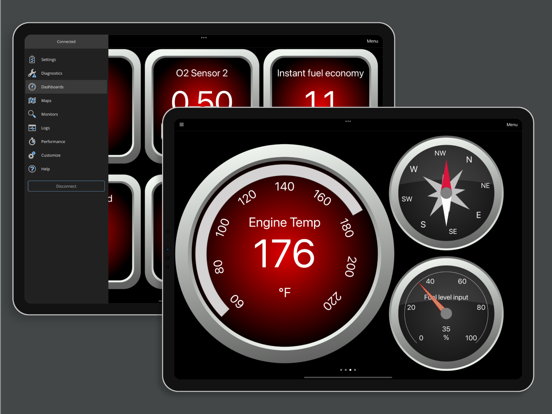
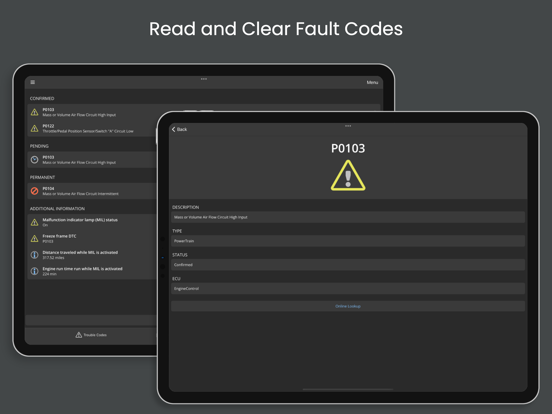
28 store screenshots


Pricing & paywalls
App Store
Shown for US
- Price: $9.99
- Ford 2005 Enhanced Diagnostics
- Ford 2006 Enhanced Diagnostics
- Ford 2013 Enhanced Diagnostics
- Toyota 2005 Enhanced Diagnostics
- Toyota 2006 Enhanced Diagnostics
- Toyota 2007 Enhanced Diagnostics
- Toyota 2008 Enhanced Diagnostics
- Toyota 2010 Enhanced Diagnostics
- Toyota 2017 Enhanced Diagnostics
- Toyota 2021 Enhanced
Ratings & reviews
App Store
Shown for US
-
5/5Easy as pie
I’m not all that comfortable with modern tech, but even for me this app was easy to set up and use. I highly recommend buying the enhanced add on. It provides a wealth of additional information. I also recommend the MX+ dongle. Paired together they work well. I have been able to add customized gauges, like a transmission fluid temp gauge. No complicated formulas, just follow a menu. Presto,you have a gauge. Very easy to delete a gauge. Setting up a graph was just as easy. And you can read if the vehicle is emissions ready. I also appreciate the excellent customer service I received from Matt. I had couple of pre sale questions and a post sale question and he responded promptly. I would do business with this company again. BTW: I operate this Fusion program on an IPad via Bluetooth, so it can function while I’m on the road. Beats the heck out of my old $30 plug in scanner.
Waddy51 · 30 Sep 2026
-
5/5Amazing App for Scan Tool
I purchased the Veepeak OBDCheck BLE OBD2 Bluetooth Scanner and this app plus its add-on for my vehicle family. This app recommended the Veepeak scanner. Its site recommended this app. It sounded like the perfect combination for an app-based scan tool, so I got them both. I couldn't be more pleased! The scan tool, I think, is very good. It gathers the complete OBDII required data and, it appears, any extensions the vendor adds. This app is infinitely configurable. It appears to be able to collect the full OBDII set and any and all vendor extensions. However, they may require the purchase of add-ons within the app. There are two screens of "instruments" that come with the app. You can add more screens and instruments and fully customize them to display data the way you want to see it until you go blind. Looking into the settings, I can't imagine there's anything missed. I'll also add another plug for this scanner/software pair. I believe the Veepeak is the only one for iOS that doesn't connect using Wi-Fi. It connects via Bluetooth LE. Also, you don't pair it. OBDFusion connects with it directly. This makes setup very easy and, more important, it leaves your Wi-Fi, cellular data and Bluetooth untouched and available! Very nice.
Jus' Groovin' · 30 Sep 2026
-
4/5Good program, needs some work
This works well with my OBD2 dongle. The information seems accurate and helped me when buying a used car by showing me the error codes, which I showed the dealer. He then gave us a new battery based on the report with no change in the price of the car. There are a few annoyance. It does not connect with the Bluetooth with out some finagling. Once the phone is turned off, it loses the connection. The data does not seem to be saved. Once I use it on another car, the data for the first car is lost (or I can’t find it). It “forgets” vehicles so I have to to re-enter the information when I change cars. It would be nice to be able to download the information to a desktop for storage. Overall works well for diagnostic information but it would be nice to store each car’s information and be able to reference it later.
Jim Worm · 30 Sep 2026
-
5/5Solid, and what apps actually improve over time? Suddenly CarPlay addition
After toying with every and all iOS OBD display apps available, every time I eventually went back to this workhorse. It might lack some of the shiny offerings other apps do, but by far this has been the easiest to connect, make significant edits/customizations to PIDs and troubleshoot or log issues. My last car started to be a PITA 2 years ago and this app was a godsend both in immediate warnings and long term tuning/improvements to gas efficiency. And this is all free. Now there’s a CarPlay screen. Would be nice if it wasn’t just a text list display and instead a mirror of your app dashboard, but it’s an appreciated addition. Love love love this app!
Toto from the Chi · 30 Sep 2026
-
2/5Disappointed in CarPlay support
This review applies only to the CarPlay support in the App. While I was pleased to find the integration, I am disappointed in what can be displayed. I was hoping to see a dashboard presentation, like in the App, on CarPlay. At time of writing (28 Mar 2024) I can only see a few PIDs and cannot seem to add or change anything other than the basics of economy, engine temperature, RPM, and speed — all of which I get from the dash display of the cars I presently driver. If other PIDs can be added - such as fuel trim, manifold pressure, or ignition timing, the method to do so is not known to me. Regarding the general functionality - 5 stars. I purchased the add-in for Toyota. It provides me capability to read all the computer codes and monitor live data. Been using it for years. On one of my cars, which has an aftermarket supercharger, it is the only instrument that allows me to see the boost level (as the SC kit did not include any installable boost gauges).
Savvy Engineer · 30 Sep 2026
Privacy & accessibility
App Store
Privacy
- Data Not Linked to You — Analytics — Identifiers — Device ID Developer declared
- Data Not Linked to You — Analytics — Usage Data — Product Interaction Developer declared
- Data Not Linked to You — Analytics — User Content — Other User Content Developer declared
- Data Not Linked to You — App Functionality — Diagnostics — Crash Data Developer declared
- Data Not Linked to You — App Functionality — Diagnostics — Other Diagnostic Data Developer declared
- Data Not Linked to You — App Functionality — User Content — Customer Support Developer declared
- Data Not Linked to You — App Functionality — User Content — Other User Content Developer declared
- Data Not Linked to You — Diagnostics Developer declared
- Data Not Linked to You — Identifiers Developer declared
- Data Not Linked to You — Usage Data Developer declared
- Data Not Linked to You — User Content Developer declared
Accessibility
No accessibility labels collected yet.
Versions
App Store
-
5.35.0
• Added support for the latest SAE PIDs and Info Types. • Made improvements to FCA enhanced diagnostics. • Minor bug fixes and improvements.
-
5.37.0
• Added support for FCA 2024 enhanced diagnostics. • Added support for Ford 2023 enhanced diagnostics. • Made improvements to Toyota and Mitsubishi enhanced diagnostics. • Minor bug fixes and improvements.
-
6.0.0
This is a major release with a ton of updates and a revamped user-interface. We worked extremely hard to rewrite the app to provide the best user experience. If you run into any issues or just have feedback, please reach out to us! Here are some highlights of what's new in this version. CarPlay Support! • View vital driving information in a list on your CarPlay screen. • Note that real-time gauges are not supported by CarPlay, so you can't view your OBD Fusion pages such as dashboards on CarPlay. Dashboard Improvements • Added a Map gauge • Added the ability to copy and paste gauges between dashboards. • Added the ability to resize gauges directly on the dashboard. • The compass gauge now rotates the scale instead of the needle. This option can be changed in the style editor. • Added an extra fine dashboard snap to grid mode. Graphing Improvements • Improved the graphing configuration. You can now configure multiple graphs in rows and columns. Refresh Rate Improvements • Added a new option to combine SAE PID requests (aka PID stuffing). When enabled, this can more than double refresh rates on vehicles that use the CAN protocol. • Added a help file page for tips on getting the best PID refresh rate. Data Logging and Maps • Viewing a logged data file now displays your trip on a map. • Revamped the Maps page. You can open a logged file and play back your route on the map. PID Values Improvements • Added the ability to re-order PIDs on the PID Values page. • Added the ability to view PID values for certain PIDs in hexadecimal or binary. You can change the setting for certain PIDs when connected by long-pressing the item. Enhanced Diagnostics Improvements • Added a customization page that's available with the Toyota and Lexus enhanced add-on. Accessibility Improvements • Made accessibility improvements when using larger text sizes. Various • There are a ton of other improvements and new features - too many to list here. We hope you enjoy this update!
-
6.0.1
This is a major release with a ton of updates and a revamped user-interface. We worked extremely hard to rewrite the app to provide the best user experience. If you run into any issues or just have feedback, please reach out to us! Here are some highlights of what's new in this version. CarPlay Support! • View vital driving information in a list on your CarPlay screen. • Note that real-time gauges are not supported by CarPlay, so you can't view your OBD Fusion pages such as dashboards on CarPlay. Dashboard Improvements • Added a Map gauge • Added the ability to copy and paste gauges between dashboards. • Added the ability to resize gauges directly on the dashboard. • The compass gauge now rotates the scale instead of the needle. This option can be changed in the style editor. • Added an extra fine dashboard snap to grid mode. Graphing Improvements • Improved the graphing configuration. You can now configure multiple graphs in rows and columns. Refresh Rate Improvements • Added a new option to combine SAE PID requests (aka PID stuffing). When enabled, this can more than double refresh rates on vehicles that use the CAN protocol. • Added a help file page for tips on getting the best PID refresh rate. Data Logging and Maps • Viewing a logged data file now displays your trip on a map. • Revamped the Maps page. You can open a logged file and play back your route on the map. PID Values Improvements • Added the ability to re-order PIDs on the PID Values page. • Added the ability to view PID values for certain PIDs in hexadecimal or binary. You can change the setting for certain PIDs when connected by long-pressing the item. Enhanced Diagnostics Improvements • Added a customization page that's available with the Toyota and Lexus enhanced add-on. Accessibility Improvements • Made accessibility improvements when using larger text sizes. Various • There are a ton of other improvements and new features - too many to list here. We hope you enjoy this update!
-
6.0.2
6.0.2: • Fixed a bug that could cause an error to occur when using different date time settings. • Fixed a bug that prevented some Nissan enhanced PIDs from being read correctly. 6.0.1: This is a major release with a ton of updates and a revamped user-interface. We worked extremely hard to rewrite the app to provide the best user experience. If you run into any issues or just have feedback, please reach out to us! Here are some highlights of what's new in this version. CarPlay Support! • View vital driving information in a list on your CarPlay screen. • Note that real-time gauges are not supported by CarPlay, so you can't view your OBD Fusion pages such as dashboards on CarPlay. Dashboard Improvements • Added a Map gauge • Added the ability to copy and paste gauges between dashboards. • Added the ability to resize gauges directly on the dashboard. • The compass gauge now rotates the scale instead of the needle. This option can be changed in the style editor. • Added an extra fine dashboard snap to grid mode. Graphing Improvements • Improved the graphing configuration. You can now configure multiple graphs in rows and columns. Refresh Rate Improvements • Added a new option to combine SAE PID requests (aka PID stuffing). When enabled, this can more than double refresh rates on vehicles that use the CAN protocol. • Added a help file page for tips on getting the best PID refresh rate. Data Logging and Maps • Viewing a logged data file now displays your trip on a map. • Revamped the Maps page. You can open a logged file and play back your route on the map. PID Values Improvements • Added the ability to re-order PIDs on the PID Values page. • Added the ability to view PID values for certain PIDs in hexadecimal or binary. You can change the setting for certain PIDs when connected by long-pressing the item. Enhanced Diagnostics Improvements • Added a customization page that's available with the Toyota and Lexus enhanced add-on. Accessibility Improvements • Made accessibility improvements when using larger text sizes. Various • There are a ton of other improvements and new features - too many to list here. We hope you enjoy this update!
-
6.1.0
CarPlay Improvements • Fixed an issue connecting to Bluetooth LE adapters from CarPlay. • Added support for automatic connections from CarPlay. • Fixed an issue displaying enhanced PIDs in CarPlay. • Fixed an issue staying connected to Wi-Fi adapters from CarPlay when the main iPhone app is in the background. EV/Hybrid PIDs • Added EV and Hybrid energy and energy economy PIDs. • You must configure the powertrain type for your vehicle in the vehicle editor. If you have an Electric or Plug-in Hybrid vehicle, you must also configure the high voltage battery capacity in the vehicle editor. Improvements • When configuring PIDs while not connected, you now have the option to display only PIDs supported by the active vehicle. • Updated the Ford enhanced add-on to include some additional 2020 and 2021 model year vehicles. You will need to download new content for the add-ons on the Settings > Purchase Extras page. Bug Fixes • Fixed a bug that could cause part of the graph to get cutoff on the Logs > Graphing page. • Fixed a bug that could cause an error to occur when opening a file on the Logs > Files page. • Fixed a bug that prevented the Combine SAE PID Requests option from working with some PIDs. • Various other bug fixes and improvements. As always, if you run into any issues or just have feedback, please reach out to us!
-
6.10.0
• Improved the FCA enhanced add-on to detect additional PIDs on some vehicles. A PID rescan is required to get access to the additional PIDs. • Added the ability to manually configure the y-axis min and max values for each PID being graphed. • Added a button to easily insert an existing PID into a user-defined PID equation. • Added support for the CAR2LS Bluetooth LE adapter. • Increased the range of values that can be entered for Volumetric Efficiency. • Various bug fixes and improvements.
-
6.11.0
• Added support for real-time data logging and playback. You can configure data logging on the Settings > Preferences > Logging page. You can playback your data logs on the Logs > Files page. • Added German language support. • Updated the Spanish, French, Italian, Greek, and Czech translations. • Added the ability to select the app language in settings. • Added a trip cost PID. • Added calculations for electric energy cost for EVs and plug-in hybrid vehicles. You must set the electric energy cost in the vehicle editor. • Added a new push button gauge actions for starting and stopping data logging and capturing a diagnostic report. • Multiple bug fixes and improvements.
-
6.12.0
• Added Simplified Chinese and Portuguese language support. • Added Ford 2025 enhanced diagnostics. • Added enhanced diagnostics for a few 2024 Ford vehicles that were previously missing. • Fixed a bug that prevented the units from being written to CSV files in some cases. • Fixed a bug that caused the vehicle speed multiplier to be applied twice in some cases. • Multiple bug fixes and improvements.
-
6.13.0
• Added FCA 2026 enhanced diagnostics and enhanced support for a few additional 2024/2025 vehicles. • Added support for Alerts, which can be configured on the Settings > Preferences > Alerts page. • Added support for vehicle-specific CarPlay configurations. • Added a trip PID for average speed. • Added support for specifying start and stop commands for user-defined PIDs. • Improved the settings import/export. • Improved the help page. • The trip map can now be expanded to full-screen. • Multiple bug fixes and improvements.
-
6.2.2
• Added Mazda 2024 enhanced diagnostics. Some previous years require downloading new content and re-scanning for supported PIDs. • Added an option to automatically connect only when the app is started from CarPlay. • Added support for 11-bit CAN extended addressing in user-defined PIDs. • The maps page now displays a color-coded route when opening a log file. • Keep the screen on while reading diagnostic reports. • Added an option to import/export CSV logs when importing or exporting settings. • Added an option to reset the min/max indicators on radial gauges. • Added support for manually selecting the Bluetooth LE adapter. By default, OBD Fusion will automatically connect to the first Bluetooth LE adapter that it finds. You can change this on the Communication settings page and manually select a Bluetooth LE adapter to connect. • Fixed a bug in the trip electric energy economy unit conversion. • Various bug fixes and improvements.
-
6.3.0
• Added a new top-level trips page. This page allows you to view each trip on a map, including where trip events occurred. You can view statistics about each trip, filter trips, tag and add notes to trips, and export a report of all of your trips. • Moved the trip statistics and trip meter pages to the new trips page. • Added the ability to view trouble codes in CarPlay. You can configure the CarPlay settings and screens on the Settings > Preferences > CarPlay page on your phone when not connected to CarPlay. • Added the ability to customize the order of pages on the main app screen. You can customize the order on the Settings > Preferences > Appearance page. • Added a new clock dashboard gauge. • Improved fuel calculations for newer vehicles. • Fixed a bug that prevented editing some fields in the vehicle editor with cultures that use a decimal comma. • Fixed a bug that prevented adding more than two dashboard gauges at a time. • Various bug fixes and improvements.
-
6.4.0
• Added a user-defined PID function to convert bytes directly to an IEEE754 floating point value • Added support for copying (duplicating) a user-defined PID • Added support for importing all user-defined PID fields from a CSV file • Added support to user-defined PIDs for setting the 11-bit CAN receive address • Added new neon gauge style templates • Add support for the DND Echo Bluetooth LE device • Various bug fixes and improvements
-
6.5.0
• Added Ford 2024 enhanced diagnostics • Added FCA 2025 enhanced diagnostics • For some vehicles, you can now access multiple enhanced diagnostic networks when connected over generic OBD2. Availability depends on the network protocols. • Fixed a bug using a decimal comma in user-defined PID equations • Various changes to power future features and improve app performance • Various bug fixes and improvements
-
6.5.2
• Added Ford 2024 enhanced diagnostics • Added FCA 2025 enhanced diagnostics • For some vehicles, you can now access multiple enhanced diagnostic networks when connected over generic OBD2. Availability depends on the network protocols. • Fixed a bug using a decimal comma in user-defined PID equations • Various changes to power future features and improve app performance • Various bug fixes and improvements
-
6.6.0
• Added an option to auto-hide the navigation bar on the dashboards page. • Increased the range of valid values for the fuel economy scale factor. • Added support for toggling HUD mode on the dashboards page. • Added a menu button to reset the min/max values for all gauges on a dashboard page. • Fixed a bug that could cause the y-axis range to be calculated incorrectly when graphing. • Fixed a bug that could cause importing from a local settings file to fail. • Various bug fixes and improvements.
-
6.7.0
• The focus of this release was fixing bugs and improving performance. • Improved searching in the PID selector. You can now search at the category level and search by unit name. • Fixed a bug that could cause an error to occur when opening the PID selector. • Fixed a bug that prevented some enhanced networks on older vehicles from being accessible when connected to generic OBD2. • Various bug fixes and improvements.
-
6.8.0
• Made significant improvements to the time it takes to load FCA enhanced diagnostics and connect to enhanced networks. You will notice the improvement the second time you connect to an FCA enhanced network. • Updated the trouble code definition database • Various bug fixes and improvements
-
6.9.0
• Added enhanced diagnostics for 2023 and 2024 Mitsubishi vehicles. • Made improvements to Mazda enhanced diagnostics. On some vehicles, you might be prompted to perform a network scan the next time you connect due to the addition of modules. • Fixed a bug that could cause the Network Scan prompt to be displayed every time you connect to a Ford vehicle, even after successfully completing the scan. • Various bug fixes and improvements.
-
7.0.0
This release includes new features, updates to improve performance, and updates to the UI to provide a better experience. • Added a new Manufacturer PID type that includes some enhanced PID definitions for GM vehicles. It's no longer necessary to import built-in user-defined PID definitions, and they are included in the Manufacturer PIDs. • Made improvements to graphing including support for cursors. • Fixed a bug that could cause an error to occur when converting a data log to a CSV file. • Multiple bug fixes and improvements.
-
7.0.1
Bug fixes and improvements
-
7.1.0
• Added some manufacturer PIDs for GM vehicles. • Added the ability to export and import individual dashboards. • Added the ability to reference enhanced PIDs in user-defined PID equations. An enhanced add-on is required to read an enhanced PID. • Added support for exporting user-defined PID definitions. • New user-defined PID equations must now use a decimal point for decimal numbers, even when the current culture uses a decimal comma. • Added the latest PIDs and InfoTypes from the OBD2 standard. • Updated the trouble code definition database. • Multiple bug fixes and improvements.
-
7.2.0
• Added enhanced diagnostics for 2025 and 2026 Mazda vehicles. • Added support for state displays to user-defined PIDs. A state display is a textual value that's mapped to a numeric value (e.g. 0 = "Off", 1 = "On"). • Added support for state displays to digital gauges. • Digital gauges can now be rectangular and are no longer restricted to being square. • Made improvements to distance calculations and added a distance calculation method preference. • Multiple bug fixes and improvements.
-
7.3.0
• Added support for displaying Info Types on gauges, graphs, etc. • Added manufacturer PIDs for transmission temperature for some Subaru vehicles. • Multiple bug fixes and improvements.
-
7.4.0
· 16 Jul 2026
• Added enhanced diagnostics for 2026 Ford vehicles. Use the vehicle editor to check support for your vehicle. • Added some additional Manufacturer PIDs for GM vehicles. • Made improvements to the Trip Statistics page. • Multiple bug fixes and improvements.
Availability by market
- DE
- GB
- ES
- US
Data quality & evidence
- Page completeness
- Live store listing
- Last verified
- 30 Sep 2026
- Sources
- App Store
- Apoku editorial summary has not been published yet.