
Quick verdict
- What it is
- Store information collected; independent summary not yet available.
- At a glance
-
- From $11.99/mo
- Free to download
- In-app purchases
Categories and search queries
Official categories
- Health & Fitness
- Food & Drink
AppCorpus categories
Key functions
| Function | Availability | Access | Scope | Evidence |
|---|---|---|---|---|
| Family Sharing | Yes | Unknown | App Store | Store published |
| Free app | Yes | Free | — | Store published |
| In-app purchases | Yes | Limited free | — | Store published |
Screens
App Store
25 store screenshots


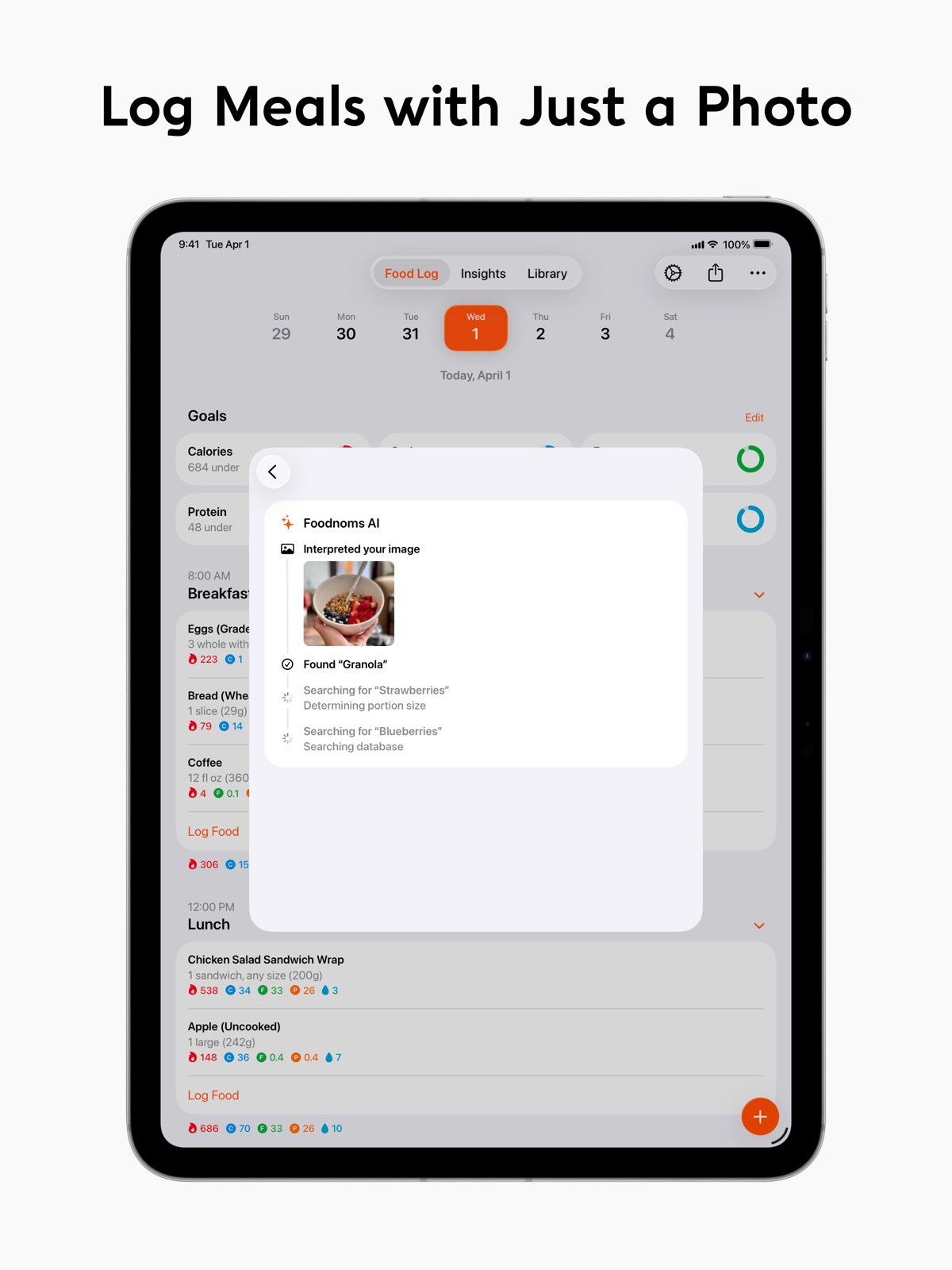
Pricing & paywalls
App Store
- Foodnoms+ Monthly — $5.99/month
- Foodnoms+ Monthly — $11.99/month
- Foodnoms+ Monthly — $39.99/year ($3.33/mo)
- Foodnoms+ Monthly — $59.99/year ($4.99/mo)
- Foodnoms+ Monthly (Family) — $9.99/month
- Foodnoms+ Monthly (Family) — $19.99/month
- Foodnoms+ Monthly (Family) — $69.99/year ($5.83/mo)
- Foodnoms+ Monthly (Family) — $109.99/year ($9.16/mo)
Ratings & reviews
App Store
-
5/5For all MFP users looking for a better food tracker...
...FoodNoms is the tracker for you. My wife and I are long-time MyFitnessPal users. Over the last 6 yrs we have observed MFP diminish in functionality. (The removal of easy sharing of meal information with other MFP users and general app instability have been our biggest concerns with MFP.) FoodNoms addresses so many of the issues that my wife and I have encountered with MFP. It runs smoothly and reliably and offers the abillity to easily share foods, receipes, and complete meals with other FoodNoms users via iMessage & AirDrop. The interface is beautiful and intuitive and operates seamlessly, syncing through iCloud across iOS, iPadOS, WatchOS, and MacOS devices. It has strong privacy protections and demonstrates a respect and appreciation for its users which has felt lacking in MyFitnessPals offering for a while now. By the way, the annual subscription for the premium version of FoodNoms is much less expensive than the premium MFP annual subscription, and FoodNoms allows family sharing of the subscription where MFP does not. It integrates seamlessly with Apple Health. I am convinced that if Apple were to offer a native food-tracking app it would work exactly like FoodNoms. To the developer -- well done!! Thanks for putting so much thought and effort into FoodNoms!
Dr Dirt Bike Joe · 5 Aug 2026
-
5/5The Absolute Best
I’ve been a Foodnoms user for a few years, having switched after trying some of the other big names. This app leaves them all in the dust. I’ve used this app to lose weight, gain weight, track water, track macros, and help me reach all kinds of health and fitness goals. It doesn’t intrude or get annoying, it just does its job beautifully and painlessly. Foodnoms is built natively by an indie developer, making it the best way to track and log calories, water, and more on any Apple device. From a design standpoint, there’s simply no competition. The user experience is clearly well considered, and the implementation of Apple’s Human Interface Guidelines is so good that you sometimes forget it’s not a first-party app. The clean integrations into Apple Health reinforce that. As someone who uses a smart scale and tracks their exercise with Apple Watch, Foodnoms is an integral part of the way I stay on top of my goals each and every day, and one of the most valuable parts of even owning a phone to me anymore.
joeyeatsfridays · 5 Aug 2026
-
2/5Achingly close to good
I really want to like FoodNoms, but after a year on the paid plan, I'm letting my subscription lapse and moving to a competitor. FoodNoms has a lot going for it: native on all Apple platforms, data stored privately in iCloud, straightforward UI, and a sizable food database. I'm leaving for two reasons. First, sync is just broken for me — after I hit about 1,000 log entries, new ones don't show up everywhere. I tried a full iCloud data wipe, but that didn't fix it. Second, while I know logging what you eat will always be tedious, I'm frustrated by how much *unnecessary* tapping FoodNoms makes you do. For example, when you go to the add food screen, you have to tap into the serving count every time. The app could put the cursor in there automatically. Moreover, if you have a kitchen scale and measure food by weight, you have to change the units on each and every food entry. The app could offer a setting to make measuring by weight the default, but doesn't. These are just examples; there's others, and cumulatively, they add up to dozens of extra taps per day. The competitor I've left for has these basics worked out, and as a result, I'm able to log the same foods in about one third less time.
antititus · 5 Aug 2026
-
5/5Update: Comment and Star rating
The only downside for ME personally and that’s why I have canceled, is the fact that I have to put manually the food stuff. I don’t know NOTHING about the food stuff. I just know what I have to eat but in here I have to put ALL the food information. Sheesh! That’s a big waste of time. If the app bring the food information by default and we just need to log/add the food and move on, that’s would be GREAT! I would pay the annual subscription or a full lifetime payment without a problem. For now, I have to pass this app and continue with another. Update: I gave time to the app and use it. I want to say I’ll use and I’ll renew the subscription! At the end the app convinced me! Just one recommendation! Put or create a different tone for the notifications please. Right the push notifications use the standard iPhone notifications sound and it will be BETTER if the app have his own notification sound, tone so we can identify the notifications quickly. Thanks! 5 Star ⭐️
owendrakos · 5 Aug 2026
-
5/5Best app I’ve tried
I’m a diligent nutrient tracker. I used to use MyFitnessPal but the problem I had with it is it wouldn’t sync ALL of the information to Apple Health. No water or vitamin syncs. Also MFP would hide anything except micronutrients behind a toggle and if the information is incorrect you can report it but have to wait for it to be fixed. Plus it still allows you to do recipes and meals like MFP! This app fixes that by creating a local copy of the correct nutrient information to log. One thing I never knew I needed was also adding a drink to the list and it tracks both calories and the amount of oz to water, that’s a game changer for me. I was having to switch between two apps to track water intake and food intake. The main dashboard is beautiful and shows you everything at a glance. All macronutrients are color coded. Drilling into food, you can see ALL nutrients right up front. Plus FULL syncing to apple health. The data scientist in me is very happy and I decided to go for premium!
EricTurner · 5 Aug 2026
Privacy & accessibility
App Store
Privacy
- Data Linked to You — Analytics — Purchases — Purchase History Developer declared
- Data Linked to You — Analytics — Search History Developer declared
- Data Linked to You — Analytics — Usage Data — Product Interaction Developer declared
- Data Linked to You — App Functionality — Contact Info — Email Address Developer declared
- Data Linked to You — App Functionality — Contact Info — Name Developer declared
- Data Linked to You — App Functionality — Diagnostics — Other Diagnostic Data Developer declared
- Data Linked to You — App Functionality — Health & Fitness — Fitness Developer declared
- Data Linked to You — App Functionality — Health & Fitness — Health Developer declared
- Data Linked to You — App Functionality — Identifiers — User ID Developer declared
- Data Linked to You — App Functionality — Purchases — Purchase History Developer declared
- Data Linked to You — App Functionality — Search History Developer declared
- Data Linked to You — App Functionality — User Content — Customer Support Developer declared
- Data Linked to You — App Functionality — User Content — Other User Content Developer declared
- Data Linked to You — Developer’s Advertising or Marketing — Contact Info — Email Address Developer declared
- Data Linked to You — Contact Info Developer declared
- Data Linked to You — Diagnostics Developer declared
- Data Linked to You — Health & Fitness Developer declared
- Data Linked to You — Identifiers Developer declared
- Data Linked to You — Purchases Developer declared
- Data Linked to You — Search History Developer declared
- Data Linked to You — Usage Data Developer declared
- Data Linked to You — User Content Developer declared
Accessibility
- Dark Interface — SUPPORTED Store published
- Larger Text — SUPPORTED Store published
- VoiceOver — SUPPORTED Store published
Versions
App Store
-
2025.14
Bug Fixes - Resolved an issue that prevented nutrition data from importing from Apple Health
-
2025.16
Bug Fixes - Fixed an issue where you couldn't switch between foods, recipes, and meals in the Library when you didn't have any foods saved to library - Fixed an issue where selecting "Other" meal type would incorrectly change to "Breakfast" when logging - Fixes and minor improvements to account management flows
-
2025.17
What's New - Redesigned Apple Watch app with support for Smart Stack widgets and the ability to log favorites directly from your wrist
-
2025.18
Bug Fixes - Fixed sugar alcohols not being displayed in the nutrition label section when editing and viewing foods - Re-enabled % Daily Value and other metrics in the Nutrition Totals section of the Daily Summary - Fixed an issue where creating a new food would show an error if you weren't signed in - Other minor bug fixes
-
2025.19
What's New - Refreshed Design – redesigned layout with improved navigation and feature placement throughout the app - Insights – track your progress in a new customizable dashboard - Enhanced Label Scanner – scan nutrition labels faster with improved accuracy - Improved Charts – new yearly view and ability to scroll through previous dates - Browse All Nutrients – view charts for any tracked nutrient, even without an active goal - Calorie Balance Tracking – visualize your daily calorie deficit and surplus trends over time - Collapsible Meal Sections – tap to collapse meals in your daily log for a cleaner view - Photo Library Integration – select existing photos directly from the scanner interface - Quick Past Meal Logging – streamlined workflow for adding previously consumed meals - Swipe Actions – swipe on logged items to quickly delete or re-log them - Simplified Portion Controls – redesigned portion size input with more intuitive controls Bug Fixes - Various performance improvements and minor bug fixes
-
2025.20
Bug Fixes - Various performance improvements and minor bug fixes
-
2025.21
What's New - We've brought back the tab bar, meal totals, swiping between days, and daily goal details - Restored "Copy Previous Meal" buttons, with an option to disable them in the app settings - Added ability to scroll forward in charts - Accessibility enhancements Bug Fixes - Fixed navigation issues when selecting meals from search results - Fixed recipe sharing - Fixed Calorie Balance surplus/deficit color indicators for weight gain goals - Fixed favorites not remembering last used portion size and measurement unit when logging - Fixed stone unit conversion issue when changing calorie goal - Various performance improvements and minor bug fixes
-
2025.22
Bug Fixes - Fix "Copy Previous Meal" buttons not being visible - Several other minor bug fixes
-
2025.23
What's New - New option to select multiple logged food items to quickly edit, log again, or delete in bulk - Change date and time for entire meals or selected entries - The app now remembers which meals you've collapsed Bug Fixes - Fixed scanned nutrition labels not saving to your library - Fixed adding foods to "Other" meal groups - Fixed issues related to logging food after making corrections - Fixed multiple haptic vibrations when logging meals with multiple items - Fixed day boundary rounding issues in scrollable charts - Fixed opening goal details from widgets - Accessibility enhancements - Various performance improvements and minor bug fixes
-
2025.24
Bug Fixes - Fixed barcode scanner incorrectly prompting to sign in when scanning foods - Fixed goals in Food Log tab not updating immediately after logging food - Fixed issue where times were automatically added when logging food without a specific time - Fixed session expiring too soon, requiring you to sign in more often than necessary
-
2025.25
Bug Fixes - Fixed issue with sharing logged meals - Fixed session expiring too soon, requiring you to sign in more often than necessary - Fixed top food percentages and improved average calculation for year charts - Various performance improvements and minor bug fixes
-
2025.26
Bug Fixes - Various performance improvements and minor bug fixes
-
2025.27
What's New - New way to customize your Apple Watch complications and widgets - New "Today" and "Now" buttons when editing dates Bug Fixes - Fixed a crash that can occur when opening the app - Other misc. bug fixes
-
2025.28
What's New - Voice Entry – speak to log what you ate - Share images from other apps to log food or create recipes Bug Fixes - Various performance improvements and minor bug fixes
-
2025.29
What's New - New Shortcut action to open Voice Entry Bug Fixes - Other minor bug fixes
-
2025.30
Bug Fixes - Fixed missing icon in main tab bar - Other misc. bug fixes
-
2025.31
What's New - New and redesigned Home Screen widgets featuring streaks, macros, and weekly charts - Shareable Summaries – create images of your streaks, charts, and goals to share with friends - Smart Scale Support – connect to compatible Bluetooth kitchen scales to quickly weigh portions - Streak History – visualize your logging habits - New option to separate or combine items from Foodnoms AI results Bug Fixes - Fixed meal types not appearing in dropdowns when editing favorites and other screens - Fixed "Heads Up" alert repeatedly being shown - Fixed macros chart showing summed totals instead of daily averages for year view - Fixed changing meal type overriding your manually set date or time - Fixed salt goals not displaying correctly in charts - Fixed food log not returning to today after reopening the app - Improved widget reload reliability - Crash fixes and other misc. bug fixes
-
2026.1
What's New - Support for Etekcity ENS-L221S-SUS smart scale - Single tap interaction to edit portion when reviewing or logging meals - New setting to hide the portion history button Bug Fixes - Fixed chart widgets not refreshing when logging food on previous days - Fixed smart scale portions not being marked as accurate - Fixed Quick Actions widget displaying bright square backgrounds in Clear or Tinted appearance modes - Fixed Active Energy detail view not displaying values in kilojoules when that is the preferred energy unit - Fixed issue where scrolling the fraction bar dismissed the keyboard - Accessibility improvements - Various performance improvements and minor bug fixes
-
2026.2
What's New - New weekly calendar at the top of the Log Food tab for faster, more intuitive navigation - The log food button has moved to be right next to the tab bar - The Add Food button now consistently uses the last food entry's time - Filter search results by type (Generic, Branded, Library) when adding ingredients to recipes or items to meals - Tap on ingredients or items to edit portion when editing recipes or meals - The date when you most recently logged an item is now shown in Previously Logged search results - The accuracy dropdown is now available when using a smart scale Bug Fixes - Fixed nutrition label scanner not applying "Add Fiber to Carbohydrates" regional setting - Fixed text truncation for range goals in the Goals List widget - Fixed smart scale not being available for foods with volume units (ml, fl oz) but no gram unit - Various performance improvements and minor bug fixes
-
2026.3
Bug Fixes - Fixed recipe ingredients incorrectly keeping accuracy ranges - Fixed edits to foods disappearing after a few seconds due to sync conflicts - Fixed delete button not appearing when editing a food from the Recently Modified section in the Library - Fixed device orientation handling in scanner views - Fixed nutrition label cutout mask on iPad - Fixed custom foods with "Amounts Represent 100g" defaulting to "1 serving (100g)" instead of "100g" - Various performance improvements and minor bug fixes
-
2026.4
Bug Fixes - Various performance improvements and minor bug fixes
-
2026.5
Bug Fixes - Fixed goals disappearing or resetting across devices - Fixed nutrition data not syncing to Apple Health from other devices - Fixed interactive widgets occasionally not logging - Fixed some nutrients not appearing when creating a new goal - Fixed some nutrients not importing from Apple Health - Fixed Acaia scale repeatedly disconnecting during use
-
2026.6
Bug Fixes - Fixed Sign in with Apple sometimes failing silently with no error - Faster and more reliable initial iCloud sync when restoring data on a new device - Other important bug fixes
-
2026.7
Bug Fixes - Fixed an issue that could cause iCloud sync to stop working - Fixed shared food file sheet dismissal - Fixed Open Foodnoms AI shortcut ignoring the estimate mode parameter - Fixed "Other" entries ordering when timeless meal types precede timed ones - Other important bug fixes
-
2026.8
· 27 Jul 2026
What's New - Weight logging with charts to track your progress over time - New Body Profile for managing your height, weight, and activity level in one place - Calibrated Energy: personalized energy targets based on your logged food and weight trend - Easier macro goals using percentage splits or grams per body weight - Simpler goal setup for setting a target and staying within a custom range - Redesigned settings screens - Customizable profile avatars for your Foodnoms account - Share a text summary of your day's nutrition Bug Fixes - Fixed deleted items occasionally reappearing when syncing across devices - Fixed incorrect dates on devices using the Buddhist calendar - Fixed daily nutrition totals in Apple Health sometimes adding up to less than your logged food entries - Fixed Apple Health data from other apps sometimes not importing until manually re-imported - Fixed some nutrients missing when importing foods from Apple Health - Improved reliability of logging favorites from Apple Watch - Fixed Insights not refreshing when a new day starts - Fixed widget buttons sometimes not responding when the app isn't running - Fixed settings changes occasionally not saving - Fixed adding a password to your account sometimes failing silently - Fixed the Foodnoms AI input field being hidden behind the keyboard - Improved sync error reporting with clearer guidance when sync can't proceed - Fixed several rare crashes - Various performance improvements and minor bug fixes
Alternatives
- AteMate Food Journal: AI Coach — Same category + similar ratings
Availability by market
- US
Data quality & evidence
- Page completeness
- Live store listing
- Last verified
- 5 Aug 2026
- Sources
- App Store
- Independent summary has not been published yet.