
Quick verdict
- What it is
- Store information collected; independent summary not yet available.
- At a glance
-
- From $14.99/mo
- Free to download
- In-app purchases
Categories and search queries
Official categories
- Health & Fitness
AppCorpus categories
Key functions
| Function | Availability | Access | Scope | Evidence |
|---|---|---|---|---|
| Free app | Yes | Free | — | Store published |
| In-app purchases | Yes | Limited free | — | Store published |
Screens
App Store
31 store screenshots


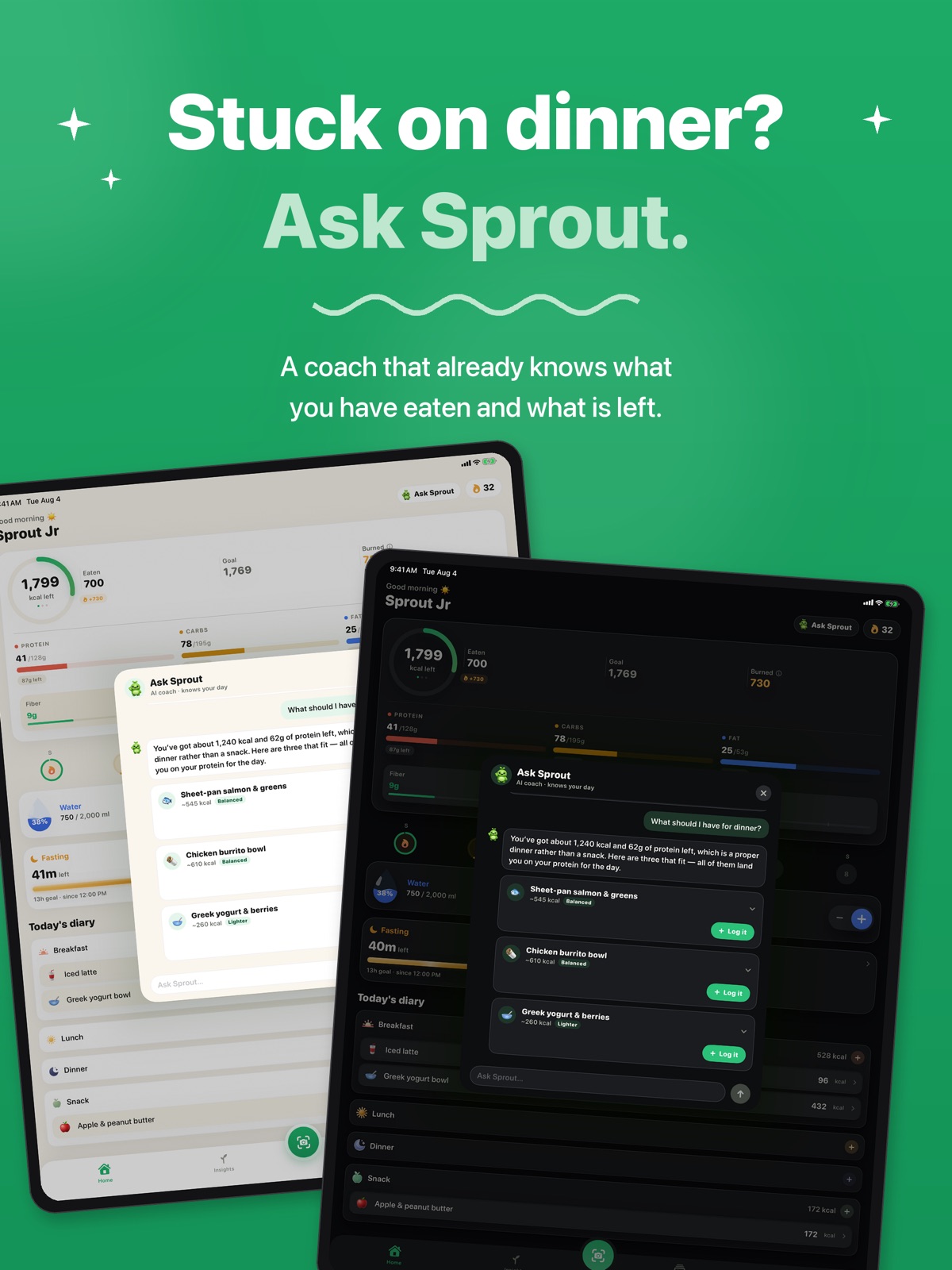
Pricing & paywalls
App Store
- Pro Monthly — $4.99/week
- Pro Monthly — $14.99/month
- Pro Monthly — $49.99/year ($4.16/mo)
- NutriSnap Pro — Lifetime — $199.99
- Streak Restore — $0.99
Ratings & reviews
App Store
-
5/55 Star
Super easy and quick options to log anything you want! Food, Water, Workouts and more!
Yiri111 · 6 Aug 2026
Privacy & accessibility
App Store
Privacy
- Data Linked to You — App Functionality — Contact Info — Email Address Developer declared
- Data Linked to You — App Functionality — Contact Info — Name Developer declared
- Data Linked to You — App Functionality — Health & Fitness — Fitness Developer declared
- Data Linked to You — App Functionality — Health & Fitness — Health Developer declared
- Data Linked to You — App Functionality — Identifiers — User ID Developer declared
- Data Linked to You — App Functionality — Purchases — Purchase History Developer declared
- Data Linked to You — App Functionality — User Content — Photos or Videos Developer declared
- Data Linked to You — Contact Info Developer declared
- Data Linked to You — Health & Fitness Developer declared
- Data Linked to You — Identifiers Developer declared
- Data Linked to You — Purchases Developer declared
- Data Linked to You — User Content Developer declared
- Data Not Linked to You — Analytics — Identifiers — Device ID Developer declared
- Data Not Linked to You — Analytics — Purchases — Purchase History Developer declared
- Data Not Linked to You — Analytics — Usage Data — Product Interaction Developer declared
- Data Not Linked to You — Developer’s Advertising or Marketing — Identifiers — Device ID Developer declared
- Data Not Linked to You — Developer’s Advertising or Marketing — Purchases — Purchase History Developer declared
- Data Not Linked to You — Developer’s Advertising or Marketing — Usage Data — Product Interaction Developer declared
- Data Not Linked to You — Identifiers Developer declared
- Data Not Linked to You — Purchases Developer declared
- Data Not Linked to You — Usage Data Developer declared
Accessibility
No accessibility labels collected yet.
Versions
App Store
- 1.0
-
1.1
Apple Watch app — your calorie ring, macros, and water on your wrist, plus watch-face complications (Pro) Lock Screen widgets — your day at a glance without opening the app Top + Side scan — snap two angles and the AI reads portion thickness for sharper calorie estimates Smarter photo scanning — upgraded AI identifies meals more accurately Nutrition quality — fiber, sugar, and sodium tracking on Home and Insights, free for everyone Fasting timer — a live countdown to your eating window (Pro) Meal planning — plan meals ahead, confirm with one tap when you ate them, and copy whole days (Pro) Recipes with servings — build meals once, log by the serving Faster logging — quick-log saved meals from the diary, a redesigned scan menu, and smart meal reminders Plus a fresh look for macro bars, a graduated over-budget ring, faster camera startup, and plenty of polish. Happy tracking!
-
1.2
NEW — GLP-1 Support Taking Ozempic, Wegovy, Mounjaro, or Zepbound? Flip one switch and NutriSnap reshapes around your shot week: • Shot rhythm — log each injection, see where you are in your week, rotate sites, get a shot-day reminder • Estimated medication level — watch the rise and fall between shots (a rhythm, not a measurement) • Dose journey — your titration story, exactly as you logged it • Appetite intelligence — finds your low-appetite days so protein can meet you there • Side-effect patterns — see which days after your shot they cluster on • Doctor report — dose history, weight trend, protein average & side effects as one clean PDF for your next appointment On appetite-suppressing medication, eating ENOUGH is the goal — so coaching flips to protein-first muscle protection. NutriSnap tracks nutrition only; it never gives medication advice. Log with your voice • "Hey Siri, log a meal in NutriSnap" — no app-opening required • Dictate meals from your Apple Watch • Or tap the new mic button and just say what you ate Also new • Your Journey — a cinematic look at the road from first weigh-in to goal • Trophy room — badges for streaks, milestones, and a few secrets • Adaptive Targets (Pro) — weekly calorie tuning measured from your real results • Interactive water widget — log a glass from your Home or Lock Screen • Plus fixes and polish throughout
-
1.3
• A fresh look for your diary — every meal type now has its own colorful icon • A clearer calorie chart: today's bar fills from gray to green as you log, the goal line got a cleaner look, and every time range shows a real calendar — even on day one • Patterns now unlock after 10 days instead of 14 • New in Profile: "How NutriSnap works" — quick answers about widgets, Apple Watch, scanning, and your subscription • Fixed: Macro balance and Patterns no longer hide on the Week view • A smoother welcome for new snappers • Clearer messages on the rare occasion a scan can't go through • Keep an eye out — Sprout might have a gift for you • NutriSnap is now available in Spanish
-
1.4
NutriSnap 1.4 is our biggest release yet: • Menu Scan — point your camera at a restaurant menu and NutriSnap reads it, then ranks the dishes that fit what's left of your day: calories, protein, all of it. Ordering out just got easy. • Your plan, made personal — new setup questions that actually change your targets: how you want to lose it (keep your muscle, or trade fat for muscle), weekend flex (eat more on weekends, weekly total unchanged), day type, dieting history, meal rhythm, and cycle-aware weigh-ins. Already set up? Answer anytime in Profile → "Have things changed?" • Dark mode — the whole app, hand-tuned to feel calm and premium at night. Follow your system setting or pin it in Profile → Appearance. • Fix it with AI — scan result slightly off? Tell Sprout what the camera missed and Sprout corrects the estimate. Free, on every AI scan. • Bring your history — import food-diary and weight CSVs from MyFitnessPal, Lose It, and similar trackers. Re-imports never duplicate. • Widgets, rebuilt — a proper dark mode plus quick actions: scan a meal, scan a menu, or log a glass of water straight from your Home Screen. • Your week at a glance — a new strip on Home shows every day's ring and streak flame. • Charts, redesigned — your calorie trend drawn honestly with a goal-zone band and over days that rise past the track, plus a new weight chart with a smoother curve and cleaner range switching. • Steps on your Activity card via Apple Health. • Plus: better barcode coverage for store brands, a tighter Home layout, a more delightful plan reveal, deeper day details, smarter sugar & sodium meters, a proper welcome when you go Pro, and dozens of polish fixes. Private by design: no ads, no selling your data — your food log stays yours.
-
1.5
THE FULL NUTRIENT PANEL Scan a barcode or a nutrition label and NutriSnap now fills in the rest of the label: saturated fat, added sugars, cholesterol, potassium, calcium, iron, and vitamin D, alongside fiber, sugar, and sodium. Each is measured against its daily value, so you can see what you're consistently short on before it becomes a habit. Photo scans can't read these, and NutriSnap won't pretend otherwise — a nutrient the source didn't declare stays blank instead of quietly reading zero. (Pro) INSIGHTS, REBUILT Insights now opens into three rooms. Trends holds your calories and weight. Nutrition holds macro balance, quality, and the new panel. Milestones is where the badges you've earned live. A NEW WAY IN Onboarding is illustrated end to end — six hand-painted atmospheres, a plan reveal that shows its math, and questions that finally have room to breathe. APPLE HEALTH GOES DEEPER Your logged meals now carry nine more nutrients into Apple Health — fiber, sugar, sodium, saturated fat, cholesterol, potassium, calcium, iron, and vitamin D — alongside calories and macros. If you already sync with Health, you'll see a one-time prompt to allow the new types. PAY ONCE, PRO FOREVER The paywall grows a fourth option: Lifetime. One purchase, every Pro feature, no renewals — ever. It's the one wearing gold. SMALLER THINGS - Review & fix: ingredient rows open like a drawer, and long names wrap instead of truncating - Choosing Maintain no longer asks you for a goal weight - Water, weigh-ins, and edits stay in step with Health, so changing a meal updates it there too
-
1.6
Ask Sprout — your coach can talk now Tap "Ask Sprout" on the home screen and you're in a conversation with a coach that already knows your day: what you've eaten, what's left, and what you're aiming for. No re-explaining yourself every time. Ask what to eat with 500 calories left. Ask whether tonight's restaurant order fits. Ask what to do with what's actually in your fridge. Recipes you can keep Tell Sprout what you have and it writes a real recipe — ingredients with amounts, a step-by-step method, cooking temperatures, and how many people it serves. Save it to "My Meals" and both halves come along: the method, so you can cook it again next month, and an itemized nutrition breakdown, so logging a portion later is one tap. The serving count travels too, so a recipe for four logs as one plate instead of four. Log it without leaving the chat When Sprout suggests a meal, tap "Log it". It goes through the same analyzer as everything else you log, and you review the numbers before anything saves. A tidier home screen The calorie ring reads better at a glance and takes less room. Water and Activity now share a row instead of stacking, so your diary starts higher up the screen. More honest numbers Bone-in cuts — chicken thighs, wings, chops, a whole fish — were being counted as though you ate the bone. They aren't any more. Ask Sprout and recipes are part of NutriSnap Pro.
-
1.7
· 4 Aug 2026
ACTIVITY, IN ONE PLACE Tap Activity on your home screen and the whole picture opens up: this week at a glance, today's sessions, and two weeks of history. Your Apple Watch workouts arrive on their own — Running, Cycling, Strength, and the rest — right beside the ones you log by hand. COUNTED ONCE Apple Health's active energy already includes your Watch workouts, so NutriSnap no longer adds them a second time. A run your Watch recorded and you also logged is one run now. A gym session your Watch never saw still counts in full. One heads-up: if you sync Apple Health, log workouts by hand, and have "add burned calories to budget" turned on, your daily budget may read a little lower than it used to. The old number was counting the same workout twice. REVIEW & FIX, REBUILT The screen you see after every scan finally got the attention it deserved. The photo, the meal name and the totals now live in one card, ingredients read as a clean list, and the full nutrient panel — saturated fat, added sugars, cholesterol, potassium, calcium, iron and vitamin D — shows up where you can actually see it. Editing a saved meal no longer quietly drops those values. We softened the language too. Portions are an estimate and always were; that's why they're editable. It didn't need saying five times on one screen. SMALLER THINGS • Trends, Nutrition and Milestones are a proper segmented control now, so it's obvious you can switch between them • Slimmer meal headers in Today's diary — a real difference in dark mode • The ingredient and portion pickers open and close smoothly instead of snapping shut • The meal picker is easier to read in dark mode
Availability by market
- US
Data quality & evidence
- Page completeness
- Live store listing
- Last verified
- 6 Aug 2026
- Sources
- App Store
- Independent summary has not been published yet.