
Quick verdict
- What it is
- Store information collected; independent summary not yet available.
- At a glance
-
- Free to download
- In-app purchases
Categories and search queries
Official categories
- Music
- Music & Audio
- Education
AppCorpus categories
Key functions
| Function | Availability | Access | Scope | Evidence |
|---|---|---|---|---|
| Free app | Yes | Free | — | Store published |
| In-app purchases | Yes | Limited free | — | Store published |
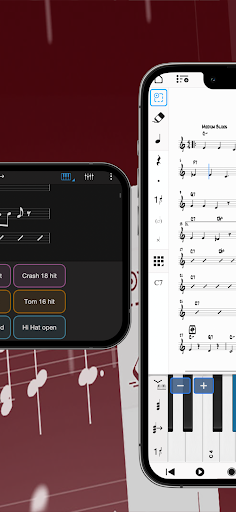
Screens
13 store screenshots


17 store screenshots



Pricing & paywalls
- Feature Bundle — $14.99
- Free to download
- In-app purchases: $14.99 per item
Ratings & reviews
-
4/5Pros and cons of Notion
There are benefits to the program like it is easy to navigate, it is IPad friendly, and has good sound quality. The things that should be improved is that instruments should be of a wider variety, for example; I wish there was percussion staffs that are 5 lines without it being drum set, and that percussion notation is wrong like Flam should not be written as a word in the staff, it is like writing fingerings instead of accidentals. There are other things that I could harp about but I just think the producers should check some of their tools and compare them to other popular programs like MuseScore and Dorico and see what they should change. Other than that, I don’t plan to stop using this program.
YoungComposer_classicalmusic · 5 Aug 2026
-
5/5I Keep Coming Back
I have used varying notation software on both a desktop and on iPad over the years. I’ve used both types (desk top and iPad versions of many products trying to be as mobile as possible. That wasn’t truly a possible for a long time. Because of this, I have tried many if not most of the music notation software out there. Say what you will, but I keep coming back to Notion for its ease of use, simplicity and straight forward tools. It makes sense to me how they have structured and organized the tools. It plays well with other DAWs when I need to move my scores to other platforms for recording work. I can even use Notion in conjunction with other DAWs. It has printed full orchestral scores and their parts for me as accurately as I’ve prepared the scores. It has even alerted me to times when I haven’t prepared them well, allowing me to catch issues before printing. I know there are other names out there that people feel are the “go to” notation software. I’ve used them and wasn’t impressed. But honestly, no one has ever complained about my work in Notion, or even known I used it instead of something else, and for that I’m grateful to this software for letting me focus on the music instead of the “how to’s” of getting music into a physical space that I can share with others. All software can use or need updates and improvements. I look forward to the new updates coming in the next version of Notion. Notion is a workhorse that I won’t be dropping any time soon. Thanks, Notion. Keep up the great work. I don’t really leave reviews but I actually wanted to. My two cents. :)
Jojed · 5 Aug 2026
-
5/5More percussion and instruments plus more
Great app supper amazing I have one issue though theres a lack of percussion instruments I really want like wind chimes and more. Also we need instruments like the alto clarinet which would make a huge impact on the game also we need other instruments that are able to do glissandos like flutes saxs every instrument need to be able to do a fall or a glissando not just jazz instruments that would really help In making fun tunes that would sound really nice also can we have more sound effects? I feel like the instruments should have a setting in tools where you can add a sound effect like shhhh or haaa and like claps, stomps a way to blow into the instrument without making sound like a wind sound effect. Other than that the game is really great and awesome hope the developers can see this and try to make it like that I known programming the instruments is hard but hope you can pull through.
City smash fannnn · 5 Aug 2026
-
4/5I really like this app!
This app is great, but some things are missing. For example, there could be more instruments like a simple wind chime. I usually use the wind chime in most pieces but here, I have to use another instrument. Also, could you maybe add some features like playing second time only for repeats? That would help a lot! Also, speaking of repeats, could you guys also add separate dynamics for each repeats pass? That would also be nice! Thanks for reading! Hope you can add the features I mentioned!
Kailas0723 · 5 Aug 2026
-
4/5Could be better
So finicky to use. I can’t swipe up out of the app to look at the list of the instruments I wanted, it’ll take me out of the list. I swipe up, not even exiting the app, just to look at something, and suddenly, I can’t place notes anymore. I have to go in and out and in and out constantly. Variety of instruments. That may be one of the only good things, and the biggest thing, compared to what I used before. Codas don’t work. I can’t make it co back to the coda or D.S. Al Coda.
Nickjohn824 · 5 Aug 2026
No store reviews collected for Google Play · US
Privacy & accessibility
Privacy
- Data Not Collected Developer declared
Accessibility
No accessibility labels collected yet.
Privacy
- Data collected — App functionality, Account management — Device or other IDs Developer declared
- Data collected — App functionality, Account management — Personal info — Email address Developer declared
- Data collected — App functionality, Account management — Personal info — Name Developer declared
- Security practices — The developer has committed to follow the Play Families Policy for this app. See the policy — Committed to follow the Play Families Policy Developer declared
- Security practices — Your data is transferred over a secure connection — Data is encrypted in transit Developer declared
- Security practices — The developer provides a way for you to request that your data be deleted — You can request that data be deleted Developer declared
Accessibility
No accessibility labels collected yet.
Versions
-
3.0.2
Welcome to Notion Mobile 3 — mobile composition, redefined. Rewritten from the ground up, Notion Mobile is a brand new application - if you’re updating from the previous Notion iOS version, then here’s a long list of improvements and new features for you! If you're looking for tips and help, then join our new Notion Mobile forum at forums.presonus.com or search for our 'PreSonus Notion Users' Facebook group. Notion Mobile 3.0.2: Issue fixed when registering Notion Mobile 3.0.1: Bug fixes: Fixes for iCloud Handwriting options in the Options Menu are not unlocked after 'Restore Purchases' Cannot delete final measure when part of a selection Notes only go into treble staff when using step/real-time record with a grand staff Dragging a pitch left/right on input does not take key signature into account Cross-staff beaming crashes Notion if both staves are selected Notion Mobile 3.0: Native cross-platform support PreSonus Sphere Support - unlock all features and sounds with your PreSonus Sphere membership Features and sounds can alternatively be unlocked with a per platform in in-app purchase Forum access available for Sphere members, or with free registration at my.presonus.com Handwriting Recognition: Pen / finger automatic option can be chosen Now available on phone Recognition improvements Timer can be adjusted between handwriting, and the digital recognition With Apple Pencil 2, double tap the pencil to force recognition App Design: New Welcome Page Palette can be positioned on left or right side Option for large or small palette icons Option for standard width or compact palette UI can be shown in dark or light Score can be shown dark or light On-screen instruments: Keyboard key width can be changed Octave up/down buttons and range slider added to keyboard Drum pad can be used to enter pitch for non-drum instruments Capo can be edited from either the score text direction, or from the on-screen guitar fretboard Note entry: Enter up to four voices per staff Change duration of selected notes by tapping a duration on the palette Keyboard shortcuts on all platforms Option to use letters for durations (e.g. ‘e’ for eighth note) Tab notes can be typed directly into tablature staff Move notes between hands on a grand staff Show/hide stems when viewing tablature only Grace note slashes can now be hidden (so appoggiaturas can be written) New insertion caret Drum labels show when hovering over drum staff Change the accidental of a pending/existing note by dragging it left and right Change the technique of a drum pitch, by dragging a pending/existing note left and right L & R sticking for drums now added to palette Allow user to hide instrument key in score/part (e.g. Clarinet "in Bb") Selection: New selection tool is now object based rather than range based A selection can be initiated by a simple press and drag New shortcut icons for a selection for quicker copy/paste/transpose Paste Reflow paste selection into new a rhythmic position in the bar, and Notion will re-spell durations over barlines Add element (e.g. dynamic) to all selected staves at once Ability to select highest/lowest notes in a selection Selection of notes can be dragged to transpose Selection of notes can be changed to rests and vice versa Selected notes can be turned into grace notes and vice versa Selection of similar elements can be edited together by dragging. e.g. adjusting one hairpin in a selection affects all hairpins in the selection at that same position) Text: Line breaks can be added to text boxes Smart verses entry in Lyrics mode Chord symbols now do not affect note spacing if there is space for them Metronome in playback Export: Send score between Notion Mobile running on two different devices over network Send score or audio over a local network to Notion 6 desktop or Studio One 6 New export audio formats: m4a, Opus or FLAC New browser-based Help available
-
3.0.3
Welcome to Notion Mobile 3 — mobile composition, redefined. Rewritten from the ground up, Notion Mobile is a brand new application - if you’re updating from the previous Notion iOS version, then here’s a long list of improvements and new features for you! If you're looking for tips and help, then join our new Notion Mobile forum at forums.presonus.com or search for our 'PreSonus Notion Users' Facebook group. Notion Mobile 3.0.3: Performance and stability fixes NS-3484 - Notion not finishing at 'Fine' after DS - in playback and export NS-3494 - Accent Shortcut (circumflex symbol (^) does not work on Mac NS-3633 - Cannot delete final measure when part of a selection NS-3635 - Context-menu is missing rounded corners NS-3649 - Delete measure only deletes contents of measure, not the measure itself NS-3655 - Note entry via real-time record is not splitting notes between left and right hands on a grand staff NS-3670 - Chord jumps to minor from half-diminished when de-selecting the 7th NS-3671 - Playback caret is hidden if top staff is hidden [NS] - Guitar and piano not appearing in top group of instrument picker in non-English languages
-
3.0.4
New in Notion 3.0.4: Improvements Stability fixes and performance improvements Allow fretboard to swipe left and right New icons to access tuplet command Dark/light mode switching improvements Fixes Breath marks at barline applied too early in playback Main Channel pan issue with scores saved in Notion Mobile and reopened in Notion 6 Repeat barline at the end of a piece does not repeat Transpose key signature option is not showing as expected when the selection contains a key signature change Advancing in Step time removes open ties from chords Issue entering lyrics for verse 2 under verse 1 on the bottom staff of a system Tapping a score location during playback re-starts from the new location twice Notes that are 'tied to', are sometimes misplaced on MIDI import If you're looking for tips and help or want to see the long list of new features and improvements in Notion Mobile 3, then join our new Notion Mobile forum at forums.presonus.com or search for our 'PreSonus Notion Users' Facebook group.
-
3.1
Welcome to Notion Mobile 3.1. New features include lasso selection*, playback of selected staves, adding multiple chords to empty measures, new demo files to explore. Plus over 100 enhancements and fixes. For the full guide, check: www.shorturl.at/eqY27 *Part of the handwriting recognition tool, available as part of the Feature Bundle (in-app purchase required)
-
3.1.1
Welcome to Notion Mobile 3.1.1 maintenance release. For the full guide, check: www.shorturl.at/fgAG2
-
3.1.2
Welcome to Notion Mobile 3.1.2 maintenance release. For the full guide, check: https://shorturl.at/lvIKR For hints, tips and more help, visit our new Notion Mobile forum at forums.presonus.com
-
3.2
Welcome to Notion Mobile 3.2. For the full guide, check: https://shorturl.at/gmFGY For hints, tips and more help, visit our new Notion Mobile forum at forums.presonus.com 3.2 Release Notes Summary: Notion Mobile is now part of Studio One+ (the new name for PreSonus Sphere) Notation Mid-staff Instrument change now possible (Shift+I) Slides and glissandi can now be added to grace notes Pedal up/down tool now available to Vibraphone Different harmonic type text now available for score entry: Harp Harmonic (HH), Tap Harmonic (TH), Pinch Harmonic(PH) Increased spacing between a time signature change and any following accidentals Cross-staff tuplet number no longer shows between staves Stems on cross-staff notes now show correctly when beam is dragged Beam is now shown on correct side if all notes in a group are cross-staff Fingering numbers can now be stacked vertically for chords Finger substitution dashes and numbers now can be added (hold shift while adding the finger number) Notes do not now overlap when they have different durations and in different voices Issue fixed where on some occasions a gliss could not be added to the 3rd beat Editing New ‘Fill with Rhythm Slashes’ tool (Context menu>Tools) Can now paste lyrics text from an external source (e.g. system clipboard) Can now advance lyrics on iOS with tab key (as well as space) Entering lyrics after a melisma now does not skip the next note Can now flip a tie below/above notes (Context menu>Attachments>Show Above/Below, or Ctrl+Shift+F) Can now hide the tuplet number (Context menu>Make Custom Tuplet>Hide Number) Fingerings can be realigned (Make a selection>Context menu>Tools) Tempo markings can now be shortened, hidden, and deleted (Make a selection>Context Menu>Attachments) Measure tools in the Context Menu now affect the measure in which the menu was opened (rather than where the caret is located) Note Entry New ‘Transpose Entry’ option in Options>Record Setup. This will transpose notes entered with both a MIDI instrument, and with the onscreen instruments Now easier to create mixed duration tuplets, both by touch and in Step Time Chords More chord diagrams added for banjo Maj9 chords now play back as expected (i.e. not as dom9) Better handling of chord alterations (e.g. C13b9) Layout Titles on following pages can now be set at different sizes to page 1 as expected UI Palette spacing improvements Tooltips added for the Tools Grid Drumpad octave up/down buttons now represented with arrows General Soundsets now retained when device is low on storage (iOS) Rests are now not added to measures that have a one-measure repeat sign on MusicXML export Documentation updated
-
3.2.1
Welcome to Notion Mobile 3.2.1 Maintenance Release. For release notes visit: https://shorturl.at/CDEQ6 For hints, tips and more help, visit our new Notion Mobile forum at forums.presonus.com 3.2.0 Release Notes Summary: For the full guide, check: https://shorturl.at/gmFGY Notion Mobile is now part of Studio One+ (the new name for PreSonus Sphere) Notation Mid-staff Instrument change now possible (Shift+I) Slides and glissandi can now be added to grace notes Pedal up/down tool now available to Vibraphone Different harmonic type text now available for score entry: Harp Harmonic (HH), Tap Harmonic (TH), Pinch Harmonic(PH) Increased spacing between a time signature change and any following accidentals Cross-staff tuplet number no longer shows between staves Stems on cross-staff notes now show correctly when beam is dragged Beam is now shown on correct side if all notes in a group are cross-staff Fingering numbers can now be stacked vertically for chords Finger substitution dashes and numbers now can be added (hold shift while adding the finger number) Notes do not now overlap when they have different durations and in different voices Issue fixed where on some occasions a gliss could not be added to the 3rd beat Editing New ‘Fill with Rhythm Slashes’ tool (Context menu>Tools) Can now paste lyrics text from an external source (e.g. system clipboard) Can now advance lyrics on iOS with tab key (as well as space) Entering lyrics after a melisma now does not skip the next note Can now flip a tie below/above notes (Context menu>Attachments>Show Above/Below, or Ctrl+Shift+F) Can now hide the tuplet number (Context menu>Make Custom Tuplet>Hide Number) Fingerings can be realigned (Make a selection>Context menu>Tools) Tempo markings can now be shortened, hidden, and deleted (Make a selection>Context Menu>Attachments) Measure tools in the Context Menu now affect the measure in which the menu was opened (rather than where the caret is located) Note Entry New ‘Transpose Entry’ option in Options>Record Setup. This will transpose notes entered with both a MIDI instrument, and with the onscreen instruments Now easier to create mixed duration tuplets, both by touch and in Step Time Chords More chord diagrams added for banjo Maj9 chords now play back as expected (i.e. not as dom9) Better handling of chord alterations (e.g. C13b9) Layout Titles on following pages can now be set at different sizes to page 1 as expected UI Palette spacing improvements Tooltips added for the Tools Grid Drumpad octave up/down buttons now represented with arrows General Soundsets now retained when device is low on storage (iOS) Rests are now not added to measures that have a one-measure repeat sign on MusicXML export Documentation updated
-
3.2.2
Welcome to Notion Mobile 3.2.2 Maintenance Release All fixes and changes here: https://shorturl.at/dENX0 Performance and stability enhancements NS-3917 Ukulele and banjo strings in the onscreen fretboard now drawn as expected NS-3936 Transpose key option shows as expected in C major and A minor NS-4011 Quarter and eighth note on same pitch in different voices now share the same notehead as expected NS-4013 Metronome click no longer plays one more beat at the end of the project NS-4014 Alignment problem on different voicings fixed when augmentation dots are present NS-4015 Select part now does not always select the first part NS-4016 Next note sounds as expected when glissandi / portamenti are not connected to an end note NS-4017 Copy / Paste no longer creates unintended shifts on multi parts scores NS-4018 Issue fixed when trying to insert objects into empty score when no parts are present yet NS-4020 Mouse preview now updating when using keyboard shortcut to change duration NS-4021 Can now edit title text if no instruments are present SO-15021 Entering TAB on the 7th string is now possible SO-15193 Ties now taken into account when pasting lyrics with hyphens Missed the 3.2 new features announcement? Check them out here: https://shorturl.at/gmFGY
-
3.2.3
Welcome to Notion Mobile 3.2.3 maintenance release. For the full guide, check: https://shorturl.at/etuEL For hints, tips and more help, visit our new Notion Mobile forum at forums.presonus.com Performance and stability enhancements NS-4039 Text box is unresponsive after tapping on the score NS-4044 Repeat sign adds a empty measure to the beginning if clicked off the page in print view NS-4048 Users cannot download Core Sounds without registering TEC-1660 Lyrics placement improved SO-15256 Undo can cause issue when entering notes in the score editor
-
3.2.4
Welcome to Notion Mobile 3.2.4 maintenance release. For the full guide, check: https://shorturl.at/exEOR General General stability improvements NS-3999 Improvements to rhythm conversion after real time recording Playback NS-4023 Note no longer hangs when clicking tab while an existing tab edit box is open NS-4059 Drum rolls now play back as expected when score is reopened NS-4062 Playback fixed for specific instruments when playing with virtual keyboard (harpsichord, bell tree, sand blocks, whistle, ukulele, banjo) NS-4069 After changing the instrument, playback is now possible if there are trills NS-4088 Tremolo playback now completes with tied notes UI NS-3822 Background of start page unlock icon is no longer transparent NS-4072 Long file name now fits the text box in the Export dialog window NS-4123 Number now visible when typing in ‘Insert Measures’ dialog NS-4124 Popups can now be dismissed while overscroll animation still running Notation NS-4107 Accidentals preview displayed as expected when entering with mouse NS-4112 Spacing increased between chord symbol and notes above the staff NS-4050 Minor Chord symbols no longer overlap NS-4094 Change Instrument now uses the default instrument name NS-4096 Page Numbers now appear as expected in parts on reopening file NS-4103 Issue adding / removing ties in some cases resolved For hints, tips and more help, visit our new Notion Mobile forum at forums.presonus.com
-
3.3
Welcome to Notion Mobile 3.3 All new features and changes here: https://shorturl.at/amrDW Top Features: -New Layout Control tools added to Feature Bundle -Notation improvements -Harp Tuning Tool -Document Recovery For hints, tips and more help, visit our new Notion Mobile forum at forums.presonus.com
-
3.3.1
Welcome to Notion Mobile 3.3.1 maintenance release. For the full guide, check: https://shorturl.at/qBXY1 For hints, tips and more help, visit our new Notion Mobile forum at forums.presonus.com
-
3.3.2
Welcome to Notion Mobile 3.3.2 maintenance release. For the full guide, check: https://shorturl.at/VclTQ For hints, tips and more help, visit our new Notion Mobile forum at forums.presonus.com
-
3.3.3
Welcome to Notion Mobile 3.3.3 maintenance release. For the full guide, check: https://shorturl.at/oxAkV For hints, tips and more help, visit our new Notion Mobile forum at forums.presonus.com
-
3.3.4
Welcome to Notion Mobile 3.3.4 maintenance release. For the full guide, check: https://shorturl.at/Kmpjo For hints, tips and more help, visit our new Notion Mobile forum at forums.presonus.com
-
3.4
Welcome to Notion Mobile 3.4. For the full guide, check: https://shorturl.at/hRN5B
-
3.4.1
Welcome to Notion Mobile 3.4.1. For the full guide, check: https://shorturl.at/xl0Pc
-
3.4.2
Welcome to Notion Mobile 3.4.2. For the full guide, check: https://shorturl.at/RaLhW
-
3.5
Bug fixes and performance improvements For the full guide, check: https://shorturl.at/moFGG
-
3.5.1
Bug fixes and performance improvements
-
3.6
Welcome to Fender Notion Notion is now part of the Fender Studio family. Everything you know and love about Notion Mobile is still here, now just called ‘Fender Notion’. You can transfer notation and audio direct from Fender Notion to Fender Studio Pro 8, anywhere on the same network. And you can use your Fender Studio Pro+ membership to unlock Fender Notion’s Feature Bundle. Bug fixes and performance improvements For the full guide, check: https://shorturl.at/5bfLZ
-
3.6.1
Bug fixes and performance improvements Welcome to Fender Notion Notion is now part of the Fender Studio family. Everything you know and love about Notion Mobile is still here, now just called ‘Fender Notion’. You can transfer notation and audio direct from Fender Notion to Fender Studio Pro 8, anywhere on the same network. And you can use your Fender Studio Pro+ membership to unlock Fender Notion’s Feature Bundle. For the full guide, check: https://shorturl.at/5bfLZ
-
3.6.2
Bug fixes and performance improvements Welcome to Fender Notion Notion is now part of the Fender Studio family. Everything you know and love about Notion Mobile is still here, now just called ‘Fender Notion’. You can transfer notation and audio direct from Fender Notion to Fender Studio Pro 8, anywhere on the same network. And you can use your Fender Studio Pro+ membership to unlock Fender Notion’s Feature Bundle. For the full guide, check: https://shorturl.at/sAETQ
-
3.7
· 3 Aug 2026
Welcome to Notion 3.7 Maintenance Release For the full guide, check: https://shorturl.at/sAETQ
- 3.7.0.113158 · 24 Jul 2026
Alternatives
- Piascore - Smart Music Score — Same category + similar ratings
Availability by market
- US
Data quality & evidence
- Page completeness
- Live store listing
- Last verified
- 7 Aug 2026
- Sources
- App Store, Google Play
- Independent summary has not been published yet.