
Quick verdict
- What it is
- Store information collected; independent summary not yet available.
- At a glance
-
- Free to download
- In-app purchases
Categories and search queries
Official categories
- Productivity
- Business
AppCorpus categories
Key functions
| Function | Availability | Access | Scope | Evidence |
|---|---|---|---|---|
| Free app | Yes | Free | — | Store published |
| In-app purchases | Yes | Limited free | — | Store published |
Screens
App Store
15 store screenshots


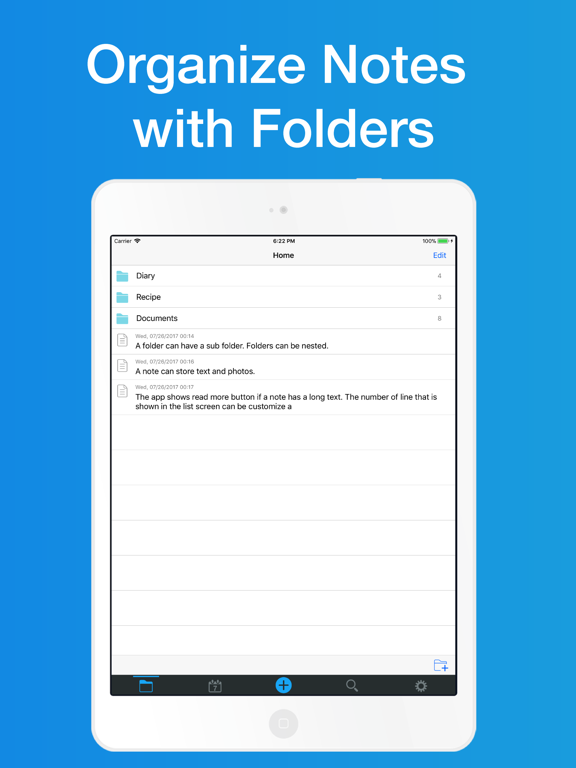

Pricing & paywalls
App Store
- Remove Ads — $3.99
Ratings & reviews
App Store
-
5/5Good app
Finally,,,a place to store info. I’m not the most tech savvy so I do kinda bumble around in it to store stuff. I’m sure others would find it easier to navigate, but I manage to store passwords, banking, maintenance info for my vehicles and home, and technical information for my job. I like that it’s separately passworded from my phone and CANNOT be opened with my face. (Nothing nefarious in there but you never know) Supreme Court ruled if a device can be opened with your face, it isn’t search protected BUT a physical password requires a warrant. You can also store photos (in my case, work) and then delete them from your phone’s library reducing clutter.
Farmer1ab · 6 Aug 2026
-
5/5My new favorite Notes app - the Best
Apple Notes was good, it allowed photos but no sub folders. Genius Notes was better, it allowed sub folders but no photos. And a screenshot photo is sometimes the only way to capture something off the Internet. In Notes&Folders you can include multiple photos from you Photos library, but only IF you put the photos in first THEN add the text afterward. A bit cumbersome. The photos all stay at the top of the note. You cannot just copy a photo into the text where you want it. Quite restrictive. I hope this is made more flexible. The Search feature is valuable and works fine. Sure, there are other needed improvements - like Highlighting, Boldface, Italics, Underlining, color-coding for priority markings and back-up syncing - but I’ll bet more bells and whistles are coming. (A year ago, reviewer “andintroducing” requested fewer preview lines. Now, you can select whatever number of preview lines you want!) Man, I sure wish I could somehow bulk copy my folders and sub folders from my old notes app into this one! Six stars for anticipated updates. 😃
Nimbleswitch · 6 Aug 2026
-
2/5App backup ability
Liked the app and its filing form but don’t like it much cause when you delete the app and reinstall it all your data gets deleted and are not recoverable. It also doesn’t have the ability or feature to back up your files onto the cloud like most other apps.
Taken9876 · 6 Aug 2026
-
4/5Great app; could be better
I love the app, think the folders are great, but would really love it if there were more editing features available - simple things like bold, underline, bullets, etc. I would also like to see auto-correct suggestions when clicking on mis-spelled words. Still, the foundation is there, and is solid.
FloridaSaint · 6 Aug 2026
-
4/5Nice little program
Wanted a small simple program to keep notes in. I believe that I found it. I really like it. My only complaint is the help section is lacking. In addition, I currently have found no way to back up or sync with limits use of app to basics.
Swimmer-Bear · 6 Aug 2026
Privacy & accessibility
App Store
Privacy
- Data Not Linked to You — Third-Party Advertising — Diagnostics — Crash Data Developer declared
- Data Not Linked to You — Third-Party Advertising — Diagnostics — Performance Data Developer declared
- Data Not Linked to You — Third-Party Advertising — Identifiers — Device ID Developer declared
- Data Not Linked to You — Third-Party Advertising — Usage Data — Advertising Data Developer declared
- Data Not Linked to You — Diagnostics Developer declared
- Data Not Linked to You — Identifiers Developer declared
- Data Not Linked to You — Usage Data Developer declared
- Data Used to Track You — Identifiers — Device ID Developer declared
- Data Used to Track You — Identifiers Developer declared
- Data Used to Track You — Usage Data — Advertising Data Developer declared
- Data Used to Track You — Usage Data Developer declared
Accessibility
No accessibility labels collected yet.
Versions
App Store
-
6.0.0
Thank you for using Notes and Folders! - Improved database performance -> The app uses the new version database. The app automatically migrates data from previous database. If you have any migration issues, manually migrate in the Preferences screen - Fixed some bugs We appreciate your feedbacks.
-
6.0.1
Thank you for using Notes and Folders! - Fixed: Crash when take a snapshot of the internal browser - Fixed: Hide the toolbar height in the edit screen inside trash Below is the release note of the version 6.0.0 === - Improved database performance -> The app uses the new version database. The app automatically migrates data from previous database. If you have any migration issues, manually migrate in the Preferences screen - Fixed some bugs We appreciate your feedbacks.
-
6.0.2
Thank you for using Notes and Folders! - Fixed: Fixed that the menu does not return to the normal mode, when pressing the completion button after pressing the edit button on the folder list screen - The selection mode will be canceled when you edit texts in the editing screen. - Photos will be inserted order by you selected them from photo library. We appreciate your feedbacks.
-
6.0.3
* Clear cookie and cache data of internal web browser * Max visible text length is 1,000 in list screen. It is a measure to display the long text very slowly.
-
6.0.4
Thank you for using Notes and Folders. Bug fix: If you use Face ID to unlock passcode, the app crash
-
7.0.0
-NEW: Support Backup by Dropbox -NEW: You can search text in editing screen -NEW: Added "select all" and "move to beginning of document" and "move to end of document" buttons in edit tool bar -NEW: Can display folder's name in search list screen -Bug Fix: The height of editing toolbar in iPhone X series -Bug Fix: The number of lines does not return even after completion of editing after rearranging on the list screen You can create / restore your data backup from settings page. It uses Dropbox, so you needs to have its account.
-
7.1.0
-NEW: You can select insert position of notes for folder screen. Set it in preferences screen. -NEW: Added gestures in photo detail screen. Swipe up or down image to close screen. Double tap image to zoom in or down image. -Bug Fix: If any notes have not been attached photos, the app fails backup to Dropbox.
-
7.2.0
- Updated the inside of the app for the latest conditions - In the internal browser, links that could not be opened in another window can now be opened in the same window.
-
7.2.1
- Fixed: Screen can not be seen in dark mode - Little improvements
-
7.2.2
- Fixed stability issues
-
8.0.0
## Title Function - Title can be added to the note - Title visible setting in the list screen - Date and title visible setting in edit screen ## Others - Hide other than the text when scrolling a long text - Play videos inline with in-app browser - The maximum number of characters has been changed to 800 in list screen. - Fixed the behavior when the maximum number of characters in the note exceeds 50,000. - Fixed the issue where turning off the power when using biometrics on the passcode screen would cause strange behavior - Fixed an issue where manually scrolling and then tapping would result in a strange scrolling position while editing a note.
-
8.0.1
- [Fixed] Ads would hide notes while editing the body of the note on some devices
-
8.1.0
- [NEW] You can now set the line spacing of the body of the memo. - Changed the maximum number of characters of body text to 100,000 characters - Fixed an issue where banner ads would overlap to contents
-
8.1.1
- [Fixed] The text was garbled when the body text has the emoji on the list screen. - [Fixed] The body text color setting is not reflected on the list screen for the first time displaying.
-
8.1.2
- improvement text in internal browser menu - other improvements
-
8.1.3
- Fixed an issue where ads overlap the body text while editing notes under certain conditions
-
8.2.0
- Fixed an issue that caused an error when creating a Dropbox backup - Made other minor fixes
-
8.2.1
- Fixed an issue that caused an error when creating a Dropbox backup
-
8.3.0
- Stability improvements - iOS 16 support
-
8.3.1
- Stability improvements
-
8.4.0
- Supported widgets for iOS 14 or later. Add it on your home screen. It can also be set as the lock screen for iOS 16 or later. Widget sizes for iPhone are large, medium and small. When you tap the note on the widget for large and medium, the app will launch and open the corresponding note. Previously, the app supported the Today widget that can be displayed in the notification center, but since the function was abolished with the OS update, it now supports a new widget. - The minimum version that can be installed is iOS 14.5 or later - Minor fixes
-
8.5.0
- The minimum version that can be installed is iOS 16.0 or later - Minor fixes
-
8.5.1
We fixed the issue where the app can not open if you were using a password. We apologize for the inconvenience.
-
8.5.2
Fixed an issue where widget text was not visible when in dark mode.
-
8.6.0
· 23 Nov 2024
- You can now search for titles as well - You can now display only titles on the list screen
Alternatives
- Nested Folder Notes: CrumbNote — Same category + similar ratings
- Simple Notes - Notepad Manager — Same category + similar ratings
- Simple Notepad -BestNote- — Same category + similar ratings
- Simple Notes. — Same category + similar ratings
- Easy Notebook - simple notes - — Same category + similar ratings
- Nested Folder Notes - Folino — Same category + similar ratings
Availability by market
- US
Data quality & evidence
- Page completeness
- Live store listing
- Last verified
- 6 Aug 2026
- Sources
- App Store
- Independent summary has not been published yet.