
Quick verdict
- What it is
- Store information collected; independent summary not yet available.
- At a glance
-
- Free to download
Categories and search queries
Official categories
- News
- Social Networking
AppCorpus categories
Key functions
| Function | Availability | Access | Scope | Evidence |
|---|---|---|---|---|
| Free app | Yes | Free | — | Store published |
Screens
App Store
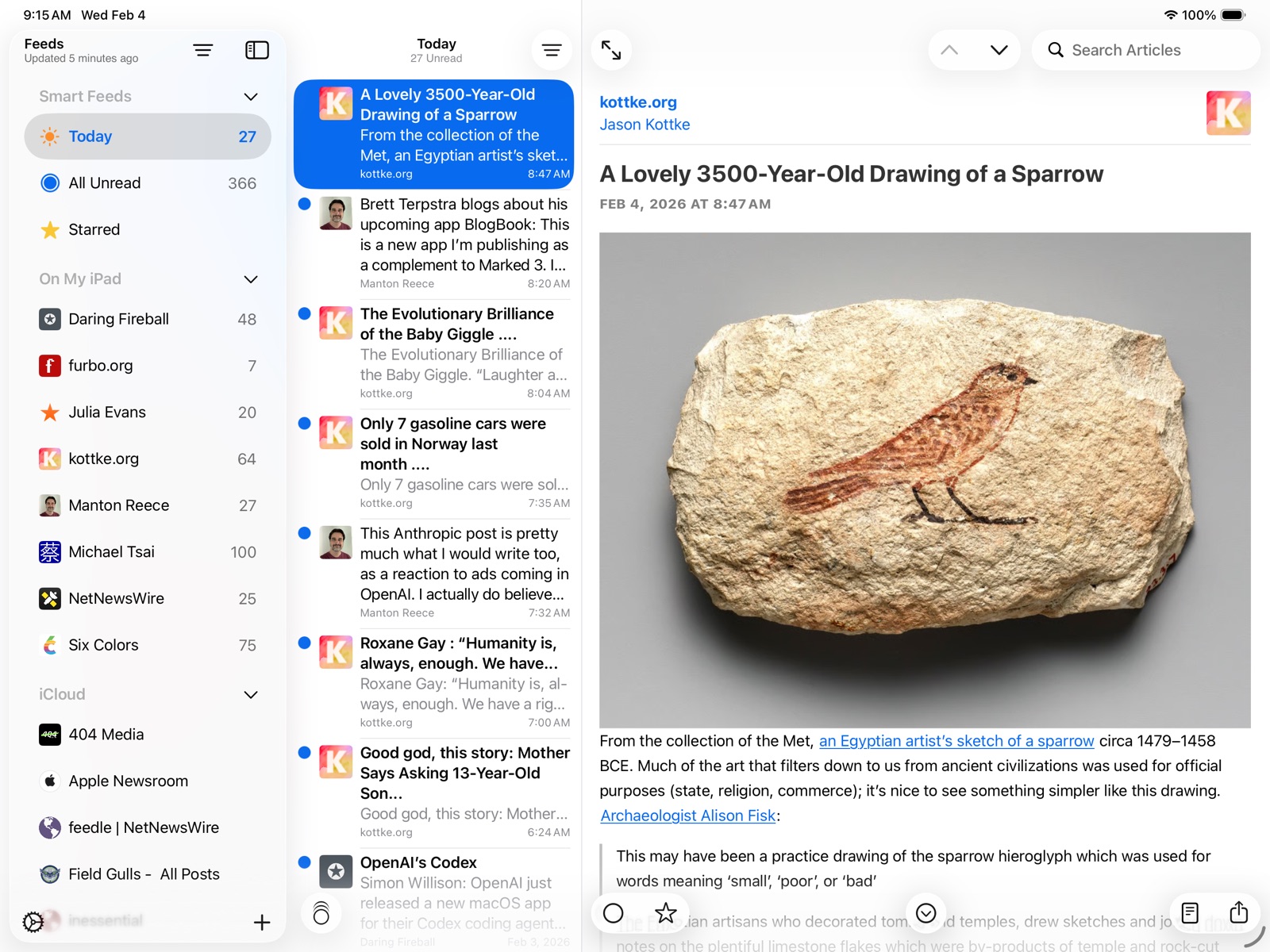
8 store screenshots

Pricing & paywalls
App Store
Shown for US
- Free
Ratings & reviews
App Store
Shown for US
-
5/5Could be more awesome
This app is great. I like being able to view RSS feeds in a simple view and access all of the features of a typical feed reader. However, there should be some other features too. 1. Group your RSS feeds. If I have multiple feeds that relate to the same topic, why can’t I group them? There should be a way to browse through your articles by group and see articles that are only related to a specific topic while maintaining iCloud sync in one account. 2. There should be an option to manually “delete” RSS feed items by swiping left instead of right. This is different from deleting an entire feed and all of the articles in it. By “delete”, I mean hide an article from your list and remove the download from your device. 3. Speaking of downloads, there should be an option to see how much space your downloaded RSS feed articles take up on your device and manage the ones you no longer need. 4. More themes would be great. You should be able to make a custom theme using a main color and an accent color. For example, the app can be made green with the menu buttons being a lighter green. Maybe there could be an option to change the app icon for NetNewsWire. Other than that, I think this app is great!
CorrupteDylan · 31 Jul 2026
-
5/5Long Live RSS
NetNewsWire does everything I’m personally looking for in an RSS reader and does it well. If you’re coming from Feedly it handle opening in browser much better. There’s a button for reader mode that fetches the page but skips all the banners, ads, and autoplaying videos that have become too common on the major news outlet websites. With Feedly this is at least two or 3 taps. Feeds can be stored locally or in iCloud so they sync across devices. I’m a big fan of this and use the distinction for some feeds I want on my phone but not everywhere. Finally and most importantly I love what NNW isn’t. No suggested stories algorithm to keep me scrolling endlessly. No AI features. No features hiding behind a subscription. Just a clean and simple way to be in control of news and web content you would like to see.
Danny Lebsock · 31 Jul 2026
-
5/5Coming from Feedly
NetNewsWire doesn’t do everything Feedly does of course. But Feedly is far from perfect as well and the company behind it caters more and more to corporations. NetNewsWire offers almost everything I need and I actually use this feed reader for my job. The only thing missing for me are tags for saved items. Other than that I’m happy. I use the iCloud sync. I’ve installed the apps on my iPhone, iPad and two Macs. So far everything works flawlessly. I hope iCloud does its job reliably. As we all know that’s not always the case. Nothing NetNewsWire can do about it. Thank you to everyone involved in this app for making it possible!
Torben Friedrich · 31 Jul 2026
-
5/5Good, but could be significantly better
I used to use NetNewsWire years ago and loved it, I was so disappointed when it went away. I was excited to hear NNW coming back and that it would be available on my current devices (iPad/iPhone). However, over the years have experienced many new ways to consume my news including Feedly and News+. When NNW was released, I was hoping that it would significantly improve my news reading experience, as it did years ago. Unfortunately, NNW feels to be the same app/workflow as it was back then with little evolution other than being on my iDevice. Adding features such as Category (folder) views, device feed sharing (iCloud Drive), newspaper style view, duplicate elimination/aggregation, recommended feeds, auto category forward, and auto-read would make NNW my go-to news reading solution. Until then it will have to remain a throwback novelty. Hopefully, these suggestions will help NNW become better and eventually become THE best RSS Feed reader available, as it once was.
newmans99 · 31 Jul 2026
-
5/5So Happy to be Using Again
NetNewsWire was an RSS pioneer. If I’m not mistaken, I paid for it years ago . . . and then other readers came along, were better, and I jumped ship. There are plenty of excellent readers out there, but this version of NNW is amazingly fast, simple to use, and minimalist. Over the years, apps became more sophisticated, adding so many features that ultimately just added complexity and bloat. While NNW is lacking in some areas, I just don’t need or want anything more that what NNW offers now. Polish, yes. Occasional UI improvements, sure. Added services, bring ‘me on. But, for the most part, NNW is fantastic as is and makes RSS reading a joy again. Thanks to the developer(s). Well done.
dlangendorf · 31 Jul 2026
Privacy & accessibility
App Store
Privacy
- Data Not Linked to You — App Functionality — Identifiers — User ID Developer declared
- Data Not Linked to You — Identifiers Developer declared
Accessibility
No accessibility labels collected yet.
Versions
App Store
-
5.0.5
* Increased performance downloading feeds in the On My iPhone/iPad account * Feeds list: make sure the star icon doesn’t have a gray background * Feedbin: fixed bug where credentials couldn’t be updated * Settings: fixed a cosmetic glitch with the slider on the Timeline Layout setting view * Fixed an image scaling crash
-
6.0
* Sync via iCloud, BazQux, Inoreader, NewsBlur, The Old Reader, and FreshRSS * Share extension * Widgets for Today, Unread, and Starred articles * Special support for Reddit and Twitter feeds
-
6.0.1
Fixed bug where BazQux-synced feeds might stop updating Fixed bug where words prepended with $ wouldn’t appear in Twitter feeds Fixed bug where newlines would be just a space in Twitter feeds Fixed a crashing bug in Twitter rendering Fixed bug where hitting b key to open in browser wouldn’t always work Fixed a crashing bug due to running code off the main thread that needed to be on the main thread Fixed bug where article unread indicator could have wrong alpha in specific circumstances Fixed bug using right arrow key to move focus to Article view Fixed bug where long press could trigger a crash Fixed bug where external URLs in Feedbin feeds might be lost Fixed bug where favicons wouldn’t be found when a home page URL has non-ASCII characters Fixed bug where iCloud syncing could stop prematurely when the sync database has records not in the local database Fixed bug where creating a new folder in iCloud and moving feeds to it wouldn’t sync correctly
-
6.0.2
Makes a particular crash on startup, that happens only on iPad, far less likely.
-
6.1
* Article themes: several themes included with the app, and you can create your own — make the reading experience exactly the way you want it * Some syncing bugs and some crashing bugs fixed
-
6.1.10
Updated default feeds for new users, since one of the feeds in the previous default feeds list has gone wonky.
-
6.1.2
Because Twitter has ended for-free access to the Twitter API, we’ve had to remove Twitter integration from the app. We’ve left your Twitter feeds intact. If you have any starred items from those feeds, they will remain as long as you don’t delete those feeds. You can still read whatever you have already downloaded. However, those feeds will no longer update. Other changes… We’ve fixed several crashing bugs. We’ve given the satellite in the app icon some cool golden wings.
-
6.1.3
Because Reddit has ended for-free access to the Reddit API, NetNewsWire will stop using the Reddit API on June 30. We’ve left your Reddit feeds intact. If you have any starred items from those feeds, they will remain as long as you don’t delete those feeds. You can still read whatever you have already downloaded. Feeds using the Reddit API will no longer update, starting June 30. However, if you remove the Reddit extension from NetNewsWire, you can subscribe to Reddit RSS feeds and continue to follow Reddit activity.
-
6.1.4
We’ve removed the Extensions section from the settings screen — along with the rest of the Reddit API code. Removing this code has the nice side effect of providing some small performance enhancements, though probably too small to be noticeable.
-
6.1.5
* Uses less bandwidth * Includes dark and tint mode app icons
-
6.1.6
Fix a crashing bug that would most commonly appear on closing a web page Fix weird border issues with widgets Fix bug updating account and feed names on Feeds screen after names have been edited Fix a bug where some feeds can be slow to update (drop Cache-Control support except for openrss.org) Fix display bug with footnote links (remove link underline) Adopt modern iOS split view
-
6.1.7
• Fix crash on rotation on Max phone when in fullscreen and going from portrait to landscape • Improve the look of tables in the default article theme
-
6.1.8
• Improved usability of split view in iPad • Fixed bug where you could get two refresh progress bars at the same time on iPad • Fixed a bug where sometimes feed icons wouldn’t show up until switching screens • Fixed crash in the starred articles widget
-
6.1.9
- Fixed bug where links in footnotes — in light mode, using the default theme — would be invisible - Fixed double-underlines on 404 Media links - Fixed a number of other small bugs
-
6.2
- Added support for Markdown in RSS via the source:markdown element. When present, the Markdown is rendered as HTML - Made several performance enhancements, most notably in scrolling the timeline - Added a dotted underline to links in the Sepia theme, to make links more visible - Added new setting: you can now enable/disable JavaScript (in the Settings screen) - Improved http/https caching, reducing bandwidth and battery use - Fixed bug where a feed could be read twice on being added - Fixed bug where the initial download for a new feed didn’t store conditional GET info - Added some special cases where we can and should avoid doing some specific work (such as downloading the home page to find a feed icon) - Worked around a server bug where a server would always respond with a 304 when any conditional GET info is sent (the app drops conditional GET info every 8 days) - Fixed a possible cause of feeds not updating by caching (non-429) 4xx responses for some hours rather than for the duration of the app run - Fixed a couple Atom parser bugs (one with relative URLs, one with root level author elements) - Fixed bug where contextual menu in timeline could be slow to appear - Fixed a possible cause of app icon unread count badge to be out of date - Fixed bug where timeline text could be truncated early when showing max number of lines in timeline and small text - Fixed a bug where images that are links could get underlined in the default theme - Fixed a bug finding a feed in a page that has no body tag - Fixed bug with some favicons rendering weird, with dark vertical lines. Note: due to caching, the fix may take a few days to take effect - Improved iCloud error dialog - Fixed some cosmetic UI glitches - Removed support for multiple windows
-
6.2.1
This version fixes several bugs, including bugs having to do with state restoration, navigation, removing read articles, and selecting an OPML file to import. It also fixes a crashing bug.
-
7.0
Now with Liquid Glass! Looks great!
-
7.0.1
• Fixed several accessibility bugs • Fixed a performance bug with NewsBlur syncing • Fixed bug where the unread circle would take precedence over star in timeline rows • Fixed a bug where you couldn’t swipe back from article view when it was in fullscreen mode • Fixed a crash that could happen when trying to add a folder and none of the active accounts support folders • Fixed a bug where images in the article view could get vertically stretched in some conditions
-
7.0.2
We’ve added a new Error Log screen to help with troubleshooting. Open the settings screen, tap on Troubleshooting, and tap on Error Log.
-
7.0.3
Fixed an authentication bug with some of the syncing systems.
-
7.0.4
- Now runs on iOS 17 and iOS 18 - Adds some iCloud sync enhancements
-
7.0.5
- Added notifications settings feature — long-press on an account in the Feeds list, choose Notifications, then toggle notifications per feed - Added a bunch of performance enhancements - Made the app use less memory
-
7.0.6
Made database fetches faster, fixed several crashing bugs, and lowered memory use.
-
7.1
The Current Activity screen shows what’s happening. The Activity Log shows what did happen. The Dinosaurs screen shows stale feeds. The Account Stats screen shows database sizes and statistics. Also: timeline scrolling is now faster and smoother.
-
7.1.1
· 30 Jun 2026
Fixed some feed icon handling bugs. Handled Reddit’s new rate limiting (one feed per minute). Fix text contrast bug when swiping a row in the timeline.
Alternatives
- Inoreader: News & RSS reader — Same category + similar ratings
- RSS Mobile — Same category + similar ratings
Availability by market
- US
Data quality & evidence
- Page completeness
- Live store listing
- Last verified
- 31 Jul 2026
- Sources
- App Store
- Independent summary has not been published yet.