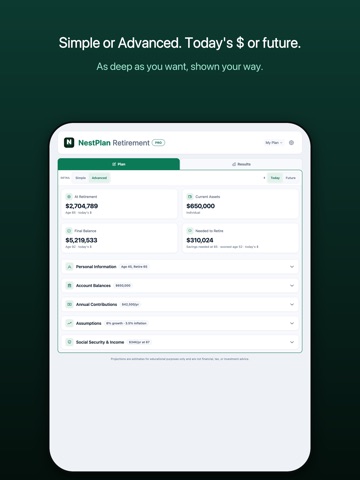
AppCorpus MCP gives your agent current app data, prices, screens, features and sources.
View JSON
GET /api/v3/apps/6757770121
{
  "app_id": 6757770121,
  "canonical_url": "https://appcorpus.com/apps/nestplan-retirement-planner-6757770121",
  "identity": {
    "name": "NestPlan Retirement Planner",
    "slug": "nestplan-retirement-planner",
    "developer": {
      "name": "CoreForge LLC",
      "url": "https://appcorpus.com/developers/coreforge-llc-developer_d2c985ce13e2612e3b78b52e6ff6c529"
    },
    "icon_url": "https://is1-ssl.mzstatic.com/image/thumb/Purple211/v4/4b/91/2a/4b912aaa-87f1-15d2-bac1-e2b7ac22d936/AppIcon-0-0-1x_U007emarketing-0-8-0-sRGB-85-220.png/512x512bb.jpg",
    "stores": [
      "apple"
    ],
    "platforms": [
      "iphone",
      "ipad"
    ],
    "status": {
      "state": "active",
      "label": "Active",
      "last_checked": "2026-08-06",
      "last_checked_label": "6 Aug 2026",
      "banner": null,
      "region_note": null
    }
  },
  "listings": [
    {
      "store": "apple",
      "status": "ACTIVE",
      "url": "https://apps.apple.com/us/app/nestplan-retirement-planner/id6757770121?uo=4",
      "rating": 5.0,
      "rating_count": 4,
      "formatted_price": "Free",
      "is_free": true,
      "has_iap": true,
      "has_subscription": false,
      "version": "6.7.9",
      "updated": "2026-07-27",
      "currency": "USD"
    }
  ],
  "summary": {
    "one_liner": null,
    "summary": null,
    "best_for": [],
    "not_for": [],
    "status": "fallback",
    "at_a_glance": [
      "From $3.99/mo",
      "Free to download",
      "In-app purchases"
    ]
  },
  "categories": {
    "official": [
      "Finance"
    ],
    "appcorpus": [
      {
        "category_id": "finance",
        "label": "Finance",
        "url": "https://appcorpus.com/categories/finance"
      }
    ]
  },
  "use_cases": [],
  "features": [
    {
      "capability_id": "family_sharing",
      "label": "Family Sharing",
      "availability": "yes",
      "access_level": "unknown",
      "scope": "App Store",
      "evidence": "Store published"
    },
    {
      "capability_id": "free_app",
      "label": "Free app",
      "availability": "yes",
      "access_level": "free",
      "scope": null,
      "evidence": "Store published"
    },
    {
      "capability_id": "in_app_purchases",
      "label": "In-app purchases",
      "availability": "yes",
      "access_level": "free_limited",
      "scope": null,
      "evidence": "Store published"
    }
  ],
  "pricing": [
    {
      "store": "apple",
      "formatted_price": "Free",
      "is_free": true,
      "has_iap": true,
      "has_subscription": false,
      "currency": "USD",
      "market": "us",
      "last_verified": "2026-08-06",
      "rows": [
        "NestPlan Pro Monthly — $3.99/month",
        "NestPlan Pro Monthly — $29.99"
      ]
    }
  ],
  "screens": [
    {
      "url": "https://is1-ssl.mzstatic.com/image/thumb/PurpleSource211/v4/f4/be/27/f4be2767-1681-79e2-a525-58a67bb6e354/01_hero.png/1600x1600bb.jpg",
      "store": "apple",
      "platform": "ipad",
      "alt": "NestPlan Retirement Planner ipad screenshot 1"
    },
    {
      "url": "https://is1-ssl.mzstatic.com/image/thumb/PurpleSource211/v4/f4/be/27/f4be2767-1681-79e2-a525-58a67bb6e354/01_hero.png/360x480bb.jpg",
      "store": "apple",
      "platform": "ipad",
      "alt": "NestPlan Retirement Planner ipad screenshot 2"
    },
    {
      "url": "https://is1-ssl.mzstatic.com/image/thumb/PurpleSource221/v4/1f/e2/67/1fe26798-e7e0-6c6e-0b6c-585a251cd92c/02_modes.png/1600x1600bb.jpg",
      "store": "apple",
      "platform": "ipad",
      "alt": "NestPlan Retirement Planner ipad screenshot 3"
    },
    {
      "url": "https://is1-ssl.mzstatic.com/image/thumb/PurpleSource221/v4/1f/e2/67/1fe26798-e7e0-6c6e-0b6c-585a251cd92c/02_modes.png/360x480bb.jpg",
      "store": "apple",
      "platform": "ipad",
      "alt": "NestPlan Retirement Planner ipad screenshot 4"
    },
    {
      "url": "https://is1-ssl.mzstatic.com/image/thumb/PurpleSource221/v4/8d/9d/8d/8d9d8d73-c16b-cb12-1eae-c5ccdd5e8ce5/03_accounts_in.png/1600x1600bb.jpg",
      "store": "apple",
      "platform": "ipad",
      "alt": "NestPlan Retirement Planner ipad screenshot 5"
    },
    {
      "url": "https://is1-ssl.mzstatic.com/image/thumb/PurpleSource221/v4/8d/9d/8d/8d9d8d73-c16b-cb12-1eae-c5ccdd5e8ce5/03_accounts_in.png/360x480bb.jpg",
      "store": "apple",
      "platform": "ipad",
      "alt": "NestPlan Retirement Planner ipad screenshot 6"
    },
    {
      "url": "https://is1-ssl.mzstatic.com/image/thumb/PurpleSource221/v4/ca/46/37/ca4637a9-9114-da99-71af-09b3e492536d/04_balance.png/1600x1600bb.jpg",
      "store": "apple",
      "platform": "ipad",
      "alt": "NestPlan Retirement Planner ipad screenshot 7"
    },
    {
      "url": "https://is1-ssl.mzstatic.com/image/thumb/PurpleSource221/v4/ca/46/37/ca4637a9-9114-da99-71af-09b3e492536d/04_balance.png/360x480bb.jpg",
      "store": "apple",
      "platform": "ipad",
      "alt": "NestPlan Retirement Planner ipad screenshot 8"
    },
    {
      "url": "https://is1-ssl.mzstatic.com/image/thumb/PurpleSource221/v4/9c/3f/60/9c3f603a-3f4b-98a3-8966-f2646789395f/05_bytype.png/1600x1600bb.jpg",
      "store": "apple",
      "platform": "ipad",
      "alt": "NestPlan Retirement Planner ipad screenshot 9"
    },
    {
      "url": "https://is1-ssl.mzstatic.com/image/thumb/PurpleSource221/v4/9c/3f/60/9c3f603a-3f4b-98a3-8966-f2646789395f/05_bytype.png/360x480bb.jpg",
      "store": "apple",
      "platform": "ipad",
      "alt": "NestPlan Retirement Planner ipad screenshot 10"
    },
    {
      "url": "https://is1-ssl.mzstatic.com/image/thumb/PurpleSource211/v4/b5/78/e8/b578e862-65b9-3a35-49e1-fc24226e625e/06_table.png/1600x1600bb.jpg",
      "store": "apple",
      "platform": "ipad",
      "alt": "NestPlan Retirement Planner ipad screenshot 11"
    },
    {
      "url": "https://is1-ssl.mzstatic.com/image/thumb/PurpleSource211/v4/b5/78/e8/b578e862-65b9-3a35-49e1-fc24226e625e/06_table.png/360x480bb.jpg",
      "store": "apple",
      "platform": "ipad",
      "alt": "NestPlan Retirement Planner ipad screenshot 12"
    },
    {
      "url": "https://is1-ssl.mzstatic.com/image/thumb/PurpleSource221/v4/e2/41/09/e2410970-c065-7749-a315-97c45d56ab1d/07_montecarlo.png/1600x1600bb.jpg",
      "store": "apple",
      "platform": "ipad",
      "alt": "NestPlan Retirement Planner ipad screenshot 13"
    },
    {
      "url": "https://is1-ssl.mzstatic.com/image/thumb/PurpleSource221/v4/e2/41/09/e2410970-c065-7749-a315-97c45d56ab1d/07_montecarlo.png/360x480bb.jpg",
      "store": "apple",
      "platform": "ipad",
      "alt": "NestPlan Retirement Planner ipad screenshot 14"
    },
    {
      "url": "https://is1-ssl.mzstatic.com/image/thumb/PurpleSource221/v4/56/02/79/56027953-ff90-f461-81fc-4cbb72d4913d/08_progress.png/1600x1600bb.jpg",
      "store": "apple",
      "platform": "ipad",
      "alt": "NestPlan Retirement Planner ipad screenshot 15"
    },
    {
      "url": "https://is1-ssl.mzstatic.com/image/thumb/PurpleSource221/v4/56/02/79/56027953-ff90-f461-81fc-4cbb72d4913d/08_progress.png/360x480bb.jpg",
      "store": "apple",
      "platform": "ipad",
      "alt": "NestPlan Retirement Planner ipad screenshot 16"
    },
    {
      "url": "https://is1-ssl.mzstatic.com/image/thumb/PurpleSource221/v4/10/e8/1c/10e81ce9-db53-35ca-f06d-dc048614a08a/09_settings.png/1600x1600bb.jpg",
      "store": "apple",
      "platform": "ipad",
      "alt": "NestPlan Retirement Planner ipad screenshot 17"
    },
    {
      "url": "https://is1-ssl.mzstatic.com/image/thumb/PurpleSource221/v4/10/e8/1c/10e81ce9-db53-35ca-f06d-dc048614a08a/09_settings.png/360x480bb.jpg",
      "store": "apple",
      "platform": "ipad",
      "alt": "NestPlan Retirement Planner ipad screenshot 18"
    },
    {
      "url": "https://is1-ssl.mzstatic.com/image/thumb/PurpleSource211/v4/08/85/30/088530ee-f19a-0c6e-a5df-33d3847ea484/10_lightdark.png/1600x1600bb.jpg",
      "store": "apple",
      "platform": "ipad",
      "alt": "NestPlan Retirement Planner ipad screenshot 19"
    },
    {
      "url": "https://is1-ssl.mzstatic.com/image/thumb/PurpleSource211/v4/08/85/30/088530ee-f19a-0c6e-a5df-33d3847ea484/10_lightdark.png/360x480bb.jpg",
      "store": "apple",
      "platform": "ipad",
      "alt": "NestPlan Retirement Planner ipad screenshot 20"
    },
    {
      "url": "https://is1-ssl.mzstatic.com/image/thumb/PurpleSource211/v4/cf/f0/3e/cff03e93-6b08-a3e5-4455-ebb9e78ea1fe/01_hero.png/1290x1600bb.jpg",
      "store": "apple",
      "platform": "iphone",
      "alt": "NestPlan Retirement Planner iphone screenshot 21"
    },
    {
      "url": "https://is1-ssl.mzstatic.com/image/thumb/PurpleSource221/v4/e5/20/dd/e520ddb5-8a86-1511-1710-ed76baf75dc2/02_modes.png/1290x1600bb.jpg",
      "store": "apple",
      "platform": "iphone",
      "alt": "NestPlan Retirement Planner iphone screenshot 22"
    },
    {
      "url": "https://is1-ssl.mzstatic.com/image/thumb/PurpleSource221/v4/48/2b/f2/482bf2d3-0fee-0eca-bbd2-5c1ec398f645/03_accounts_in.png/1290x1600bb.jpg",
      "store": "apple",
      "platform": "iphone",
      "alt": "NestPlan Retirement Planner iphone screenshot 23"
    },
    {
      "url": "https://is1-ssl.mzstatic.com/image/thumb/PurpleSource221/v4/dc/b6/ec/dcb6ec83-5dc3-0f8a-a999-c6d31f88a863/04_balance.png/1290x1600bb.jpg",
      "store": "apple",
      "platform": "iphone",
      "alt": "NestPlan Retirement Planner iphone screenshot 24"
    },
    {
      "url": "https://is1-ssl.mzstatic.com/image/thumb/PurpleSource221/v4/32/21/54/32215460-157e-112f-3204-0c39a3e129da/05_bytype.png/1290x1600bb.jpg",
      "store": "apple",
      "platform": "iphone",
      "alt": "NestPlan Retirement Planner iphone screenshot 25"
    },
    {
      "url": "https://is1-ssl.mzstatic.com/image/thumb/PurpleSource221/v4/ca/25/8b/ca258b8e-90e9-5101-43be-27d53aa98b43/06_table.png/1290x1600bb.jpg",
      "store": "apple",
      "platform": "iphone",
      "alt": "NestPlan Retirement Planner iphone screenshot 26"
    },
    {
      "url": "https://is1-ssl.mzstatic.com/image/thumb/PurpleSource221/v4/74/dc/fc/74dcfc80-9ec5-e2be-bdab-5d0a76686ac5/07_montecarlo.png/1290x1600bb.jpg",
      "store": "apple",
      "platform": "iphone",
      "alt": "NestPlan Retirement Planner iphone screenshot 27"
    },
    {
      "url": "https://is1-ssl.mzstatic.com/image/thumb/PurpleSource221/v4/3a/99/1f/3a991f2d-da22-3f6c-c6f5-35af70c7f2c5/08_progress.png/1290x1600bb.jpg",
      "store": "apple",
      "platform": "iphone",
      "alt": "NestPlan Retirement Planner iphone screenshot 28"
    },
    {
      "url": "https://is1-ssl.mzstatic.com/image/thumb/PurpleSource211/v4/de/e0/cb/dee0cb5f-beaa-fc5c-95e0-0b655069a1fd/09_settings.png/1290x1600bb.jpg",
      "store": "apple",
      "platform": "iphone",
      "alt": "NestPlan Retirement Planner iphone screenshot 29"
    },
    {
      "url": "https://is1-ssl.mzstatic.com/image/thumb/PurpleSource211/v4/a9/94/10/a9941016-954c-2b7b-77c6-184b28f3c9d3/10_lightdark.png/1290x1600bb.jpg",
      "store": "apple",
      "platform": "iphone",
      "alt": "NestPlan Retirement Planner iphone screenshot 30"
    }
  ],
  "ratings": [
    {
      "store": "apple",
      "average": 5.0,
      "count": 4,
      "market": "us",
      "observed_at": "2026-08-06",
      "reviews": [
        {
          "rating": 5,
          "title": "Showed me when I can retire and with how much money!",
          "body": "I've been running numbers in spreadsheets for years and always second-guessed myself. NestPlan runs thousands of Monte Carlo scenarios and shows me exactly what happens to my balance year by year, not just a \"you're on track\" thumbs up. Plugged in my SS timing options and could immediately see how waiting to 70 changed the 25th percentile outcome. This is what retirement planning software should have been doing all along.",
          "author": "kbcolon",
          "date": "6 Aug 2026"
        },
        {
          "rating": 5,
          "title": "The best",
          "body": "This is the best app I found so far. Great user interface. And easy to use",
          "author": "Damo2179",
          "date": "6 Aug 2026"
        },
        {
          "rating": 5,
          "title": "Excellent app",
          "body": "Great financial app. Easy to use and very helpful.",
          "author": "Is this or who?",
          "date": "6 Aug 2026"
        }
      ]
    }
  ],
  "privacy": [
    {
      "store": "apple",
      "declarations": [
        {
          "title": "Data Not Collected",
          "detail": "",
          "source": "Developer declared"
        }
      ],
      "accessibility": []
    }
  ],
  "changes": [
    {
      "store": "apple",
      "version": "5.4",
      "released_at": null,
      "notes": ""
    },
    {
      "store": "apple",
      "version": "5.5",
      "released_at": null,
      "notes": "Fixed chart display when collapsing and expanding sections. Updated default values for new users. Improved free and Pro feature tiers."
    },
    {
      "store": "apple",
      "version": "5.6",
      "released_at": null,
      "notes": "- 7-day free trial: New users get full Pro access for 7 days - Trial reminders appear as your trial nears its end - Updated subscription screen with clearer pricing"
    },
    {
      "store": "apple",
      "version": "6.0",
      "released_at": null,
      "notes": "NestPlan 6.0 — Redesigned Navigation! • Streamlined 3-tab layout: Plan, Summary, Analysis • Scenario management moved to Plan tab for faster workflow • New dropdown + overflow menu for scenarios (save, rename, delete, export) • Tighter spacing and cleaner UI throughout • Final Balance now a Pro feature with blur for free users • JSON export saves with proper NestPlan filename • Simplified footer with just Privacy, Terms, Support links"
    },
    {
      "store": "apple",
      "version": "6.2",
      "released_at": null,
      "notes": "New and Beautifully Redesigned Layout! • Streamlined 3-tab layout: Plan, Summary, Analysis • Scenario management moved to Plan tab for faster workflow • New dropdown + overflow menu for scenarios (save, rename, delete, export) • Tighter spacing and cleaner UI throughout • JSON export saves with proper NestPlan filename • Bug Fixes"
    },
    {
      "store": "apple",
      "version": "6.2.1",
      "released_at": null,
      "notes": "New and Beautifully Redesigned Layout! • Streamlined 3-tab layout: Plan, Summary, Analysis • Scenario management moved to Plan tab for faster workflow • New dropdown + overflow menu for scenarios (save, rename, delete, export) • Tighter spacing and cleaner UI throughout • JSON export saves with proper NestPlan filename • Bug Fixes for Paid Subscriptions"
    },
    {
      "store": "apple",
      "version": "6.3",
      "released_at": null,
      "notes": "New and Beautifully Redesigned Layout! • Streamlined 3-tab layout: Plan, Summary, Analysis • Scenario management moved to Plan tab for faster workflow • New dropdown + overflow menu for scenarios (save, rename, delete, export) • Tighter spacing and cleaner UI throughout • JSON export saves with proper NestPlan filename • Added \"Other Income\" for pensions or other income during retirement. • Bug Fixes"
    },
    {
      "store": "apple",
      "version": "6.4",
      "released_at": null,
      "notes": "New and Beautifully Redesigned Layout! • Streamlined two-tab layout: Plan & Analysis • New menu for scenarios (save, rename, delete, export) • Tighter spacing and cleaner UI throughout • JSON export saves with proper NestPlan filename • Added \"Other Income\" for pensions or other income during retirement. • Bug Fixes"
    },
    {
      "store": "apple",
      "version": "6.5",
      "released_at": null,
      "notes": "New and Beautifully Redesigned Layout! • Streamlined two-tab layout: Plan & Analysis • New menu for scenarios (save, rename, delete, export) • Tighter spacing and cleaner UI throughout • JSON export saves with proper NestPlan filename • Added \"Other Income\" for pensions or other income during retirement. • Bug Fixes"
    },
    {
      "store": "apple",
      "version": "6.6",
      "released_at": null,
      "notes": "A cleaner, more refined NestPlan: • Refreshed, easier-to-read charts and colors throughout • Tap the ⓘ on any field for a plain-English explanation • Drag across either chart to read your balance at any age • Sensitivity view now shows your actual return rates • Combined income summary across you, your spouse, and other sources • Now supports people who are already retired • Polish and fixes, including the account Clear button"
    },
    {
      "store": "apple",
      "version": "6.7.1",
      "released_at": null,
      "notes": "The biggest NestPlan update yet: • New Simple and Advanced modes. Start simple, switch to full detail anytime, and each keeps its own plan. • See every amount in today's dollars or future dollars, with one tap. • A cleaner, more institutional redesign throughout. • Simple mode now assumes a realistic tax mix across pre-tax, Roth, and taxable, and grows your savings with inflation. • Redesigned Monte Carlo: a clear success rate plus a typical-range outlook. • The earliest age you can retire is now front and center. • Results open automatically, with polish and fixes throughout."
    },
    {
      "store": "apple",
      "version": "6.7.2",
      "released_at": null,
      "notes": "The biggest NestPlan update yet: • New Simple and Advanced modes. Start simple, switch to full detail anytime, and each keeps its own plan. • See every amount in today's dollars or future dollars, with one tap. • A cleaner, more institutional redesign throughout. • Simple mode now assumes a realistic tax mix across pre-tax, Roth, and taxable, and grows your savings with inflation. • Redesigned Monte Carlo: a clear success rate plus a typical-range outlook. • The earliest age you can retire is now front and center. • Results open automatically, with polish and fixes throughout."
    },
    {
      "store": "apple",
      "version": "6.7.4",
      "released_at": null,
      "notes": "Your plan, now tracked over time: • New: Your Progress. NestPlan saves a snapshot each time you run a projection, so you can watch your retirement odds and savings move month over month. Review your history and remove any entry. • Your first market stress-test now runs automatically when you open Results. • Simple mode: choose how your savings are split for taxes (mostly pre-tax, balanced, or Roth-heavy), and see why Advanced can show different results. • A prominent Simple/Advanced switch and Today's/Future dollars toggle, visible on both tabs. • Social Security age is now a simple dropdown (62 to 70). • State tax is now a percentage you set yourself (default 0). • Improved Monte Carlo accuracy and clearer volatility guidance. • Now with a 14-day free trial. Polish and fixes throughout."
    },
    {
      "store": "apple",
      "version": "6.7.5",
      "released_at": null,
      "notes": "A big design refresh: • New: Dark Mode. Choose Light, Dark, or Auto in Settings. • A cleaner, more polished look across every screen, with a redesigned Settings menu and navigation. • The Savings account is now Cash & CDs, so it clearly covers savings, CDs, money market, and other cash holdings. • Your Progress now updates the moment you change a balance. • Clearer charts, a rebuilt year-by-year table, and simpler Monte Carlo controls. • Dozens of polish and readability improvements throughout."
    },
    {
      "store": "apple",
      "version": "6.7.6",
      "released_at": null,
      "notes": "A big design refresh: • New: Dark Mode. Choose Light, Dark, or Auto in Settings. • A cleaner, more polished look across every screen, with a redesigned Settings menu and navigation. • The Savings account is now Cash & CDs, so it clearly covers savings, CDs, money market, and other cash holdings. • Your Progress now updates the moment you change a balance. • Clearer charts, a rebuilt year-by-year table, and simpler Monte Carlo controls. • Dozens of polish and readability improvements throughout."
    },
    {
      "store": "apple",
      "version": "6.7.7",
      "released_at": null,
      "notes": "A cleaner, faster NestPlan: • New: Dark Mode. Choose Light, Dark, or Auto in Settings. • New: Your Progress. Watch your retirement odds move month over month. • The Savings account is now Cash & CDs, covering savings, CDs, money market, and cash. • Redesigned navigation. Plan and Results are now clear tabs at the top, and each opens into its own card so you always know where you are. • Simple or Advanced and Today's or Future dollars are now labeled controls you can find and switch from either tab. • Tidier Scenarios and Settings. Save, rename, and delete a plan from one row, and back up or restore your data in a tap. • Now runs fully on device. NestPlan opens fast and works without a connection, and nothing leaves your iPhone. • Accessibility improvements throughout, including clearer VoiceOver labels and better keyboard support. • Dozens of design and readability refinements across every screen."
    },
    {
      "store": "apple",
      "version": "6.7.8",
      "released_at": null,
      "notes": "A cleaner, faster NestPlan: • Bug Fixes • New: Dark Mode. Choose Light, Dark, or Auto in Settings. • New: Your Progress. Watch your retirement odds move month over month. • The Savings account is now Cash & CDs, covering savings, CDs, money market, and cash. • Redesigned navigation. Plan and Results are now clear tabs at the top, and each opens into its own card so you always know where you are. • Simple or Advanced and Today's or Future dollars are now labeled controls you can find and switch from either tab. • Tidier Scenarios and Settings. Save, rename, and delete a plan from one row, and back up or restore your data in a tap. • Now runs fully on device. NestPlan opens fast and works without a connection, and nothing leaves your iPhone. • Accessibility improvements throughout, including clearer VoiceOver labels and better keyboard support. • Dozens of design and readability refinements across every screen."
    },
    {
      "store": "apple",
      "version": "6.7.9",
      "released_at": "2026-07-27",
      "notes": "A cleaner, faster, beautiful NestPlan: • Bug Fixes • New: Dark Mode. Choose Light, Dark, or Auto in Settings. • New: Your Progress. Watch your retirement odds move month over month. • The Savings account is now Cash & CDs, covering savings, CDs, money market, and cash. • Redesigned navigation. Plan and Results are now clear tabs at the top, and each opens into its own card so you always know where you are. • Simple or Advanced and Today's or Future dollars are now labeled controls you can find and switch from either tab. • Tidier Scenarios and Settings. Save, rename, and delete a plan from one row, and back up or restore your data in a tap. • Now runs fully on device. NestPlan opens fast and works without a connection, and nothing leaves your iPhone. • Accessibility improvements throughout, including clearer VoiceOver labels and better keyboard support. • Dozens of design and readability refinements across every screen."
    }
  ],
  "alternatives": [
    {
      "app_id": 6741595414,
      "name": "Retirement Calculator.",
      "url": "https://appcorpus.com/apps/retirement-calculator-6741595414",
      "reason": "Same category + similar ratings"
    },
    {
      "app_id": 6740252670,
      "name": "Retirement Advisor",
      "url": "https://appcorpus.com/apps/retirement-advisor-6740252670",
      "reason": "Same category + similar ratings"
    },
    {
      "app_id": 6462524908,
      "name": "The Retirement Planner",
      "url": "https://appcorpus.com/apps/the-retirement-planner-6462524908",
      "reason": "Same category + similar ratings"
    },
    {
      "app_id": 6736375058,
      "name": "Best Retirement Calculator",
      "url": "https://appcorpus.com/apps/best-retirement-calculator-6736375058",
      "reason": "Same category + similar ratings"
    },
    {
      "app_id": 6461267560,
      "name": "Retirement Income Calc",
      "url": "https://appcorpus.com/apps/retirement-income-calc-6461267560",
      "reason": "Same category + similar ratings"
    }
  ],
  "evidence_summary": {
    "index_state": "S1",
    "evidence_level": 1,
    "level_label": "Live store listing",
    "indexable": true,
    "last_verified_at": "2026-08-06",
    "unknown_fields": [
      "Independent summary has not been published yet."
    ],
    "sources": [
      "App Store"
    ]
  },
  "availability_markets": {
    "live": [
      "us"
    ],
    "selected": "us",
    "note": null
  },
  "feature_events": {
    "events": []
  },
  "features_slice": {
    "plans": [
      {
        "code": "pro",
        "label": "NestPlan Pro Monthly",
        "kind": "subscription",
        "status": "store_listed",
        "prices": [
          {
            "storefront": "us",
            "formatted": "$29.99",
            "billing_period": null
          },
          {
            "storefront": "us",
            "formatted": "$3.99",
            "billing_period": "monthly"
          }
        ],
        "trial": null
      }
    ],
    "features": [],
    "unknown_features": [
      "family_sharing"
    ],
    "data_cutoff": "6 Aug 2026"
  }
}