
My Wonderful Days Journal
Keep a private daily journal with photos, videos, and mood tracking.
iPhone · iPad
Quick verdict
- What it is
- My Wonderful Days is a private daily journal app that allows users to write notes, add photos and videos, and track their mood. It also includes features like passcode protection, text formatting, and the ability to export entries as PDF files.
- Best for
-
- someone who wants to keep a private journal
- someone who wants to track their mood
- At a glance
-
- Free to download
- In-app purchases
Categories and search queries
Official categories
- Lifestyle
- Productivity
AppCorpus categories
Key functions
| Function | Availability | Access | Scope | Evidence |
|---|---|---|---|---|
| Family Sharing | Yes | Unknown | App Store | Store published |
| Free app | Yes | Free | — | Store published |
| In-app purchases | Yes | Limited free | — | Store published |
| PDF export | Yes | Unknown | — |
From listing
|
Screens
App Store
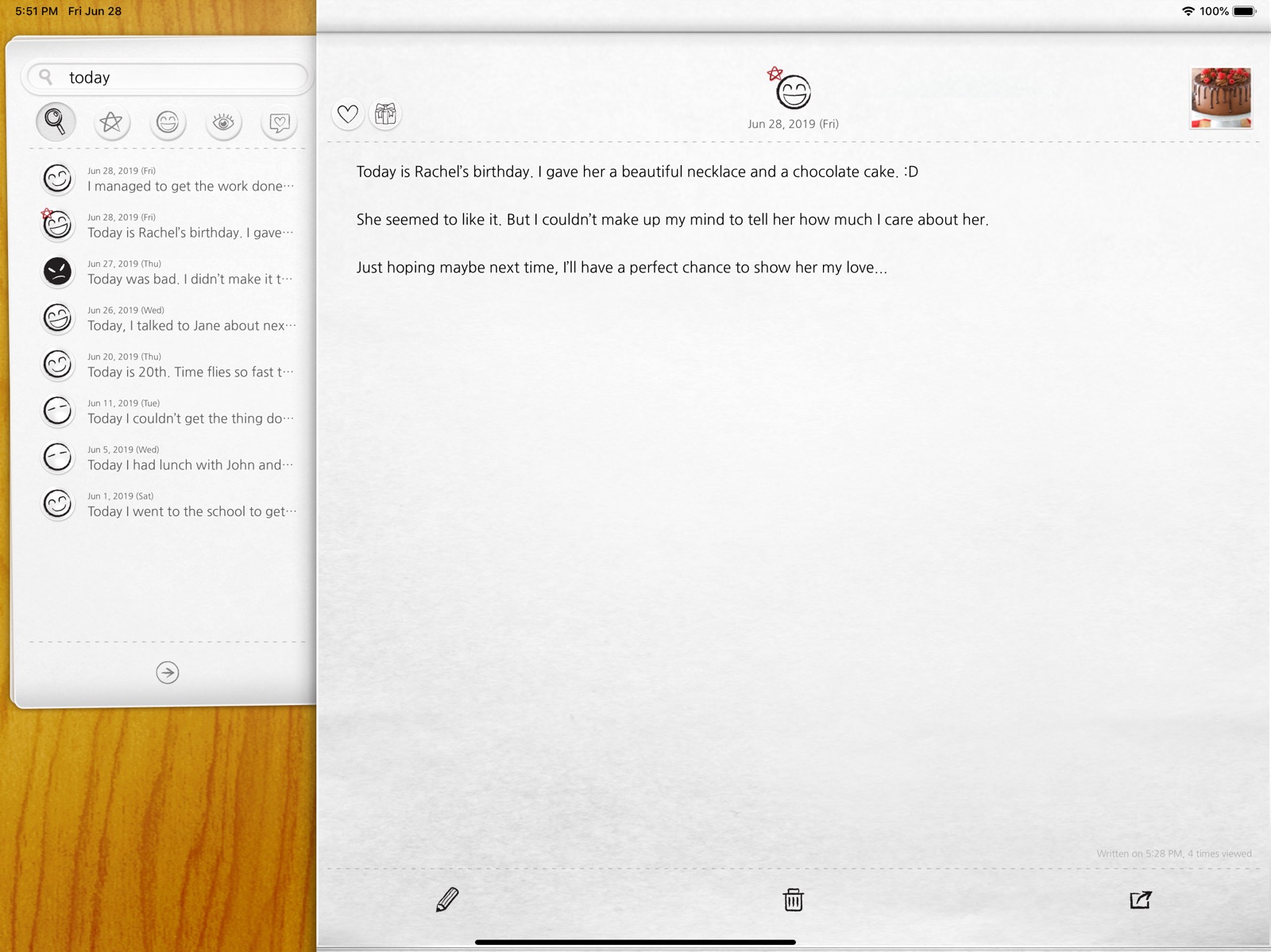
12 store screenshots


Pricing & paywalls
App Store
- Subscription
Ratings & reviews
App Store
-
5/5To the creator of this app: Never remove this app. Please.
iv been using this app since 2012 and lately i’v been noticing that iv been suffering from memory loss, not sure why yet but it’s a scary feeling. Going through my entries in this app since 2012 brings me so much joy especially when i don’t remember 90% of them. If this app was ever removed, i will quite literally lose a big part of my life. the years i documented on this app were the most important and transitioning years of my life. I’v started this app when i was in highschool and now i’m going to be 30 soon. I would hate to lose that part of my life (considering how my brain has been acting) when this app is one day gone forever. I will buy the life time subscription, just please, keep it running. One day i will show my kids the wild times i had in the 2010s. Thank you!
Rahffss · 5 Aug 2026
-
4/5A good journaling app
I use this app to journal my thoughts from the day. I like it a lot - it's very simple to use, and no-frills. One of the other reviewers said the paid version is the same as the free one, but it isn't -- I believe there's a limit to the number of entries you can write a month on the free version, and maybe other limitations in terms of back-up and the like. The only reason I give it four stars instead of five is because of the back-up function. I like to convert my entries to PDFs every month or so and email them to myself so I have an external record of my writing. However, when you attach photos to a day's entry (which I do with some frequency), the app does NOT reduce the size of those photos and the pdfs become ridiculously large and impossible to manage. Sometimes I have to export day by day to PDF because four or five photos attached to an entry and boom, you're at like 12MB or something. It would be nice to have the ability to save as a smaller file size with the photos. Other than that, I really enjoy the app and it has encouraged me to write more often, which is very therapeutic to me.
Barcelonina · 5 Aug 2026
-
5/5It has become vital to my day and life!
I have been using “Wonderful Days” for almost 5 years and it has become vital to my day and life. I log memories, thoughts, song lyrics, significant moments and, most of all, inspirational and helpful sayings. Being able to add a photo or a video is “Wonderful” as well. I like being able to look at my entries in the past, which helps me see all the great things that I’ve happened and also the difficult things that I overcome. I try to add things on a daily basis that I am thankful for as well. It is intuitive and easy to use, and easier than writing in a logbook (and also less likely to get loss than a logbook). If I could give more than 5 stars, I would. It has improved my life and I highly recommend.
It is truly wonderful! · 5 Aug 2026
-
5/5READ THIS BEFORE LATEST UPDATE
I did the latest update and all my notes got deleted from the last SEVEN years. If you have backups on in the app you can restore from there. BUT they only backup the first of every month. So I had lost one month of (important) entries. In the app perform a backup now before you upgrade the app! If you did not do this and find you are missing data like me please keep reading. I used the trial version of the iMazing app and with the phone connected I found a temp folder in the My W Days app. These are all .entry files. I cloned the folder to my desktop, then selected the entries for my lost month and drag and dropped them back into the iMazing app under the latest backup folder. Then I went into the app on my phone and restored that latest backup and the entries were there. Note the photos were not (for that month only) but that is nothing compared to getting this months of data back. I love this app and have been using it for years so I’m keeping my rating high. I just ask that they vet their updates a little more going forward. This experience was very emotionally taxing.
Mentalllygone · 5 Aug 2026
-
5/5Secure App with Simple Features
I’ve been using this app for several years now. I love how it can easily capture my mood as an emoji as well as my writing. To have photos and videos attached to any given day to remind me as well, just excellent. I started using it because i knew i’d always have my phone with me. I didn’t want something sitting around that could be snooped either, it had to feel secure to allow me to really express myself. Well this is more than secure, it’s encrypted. But it’s in the cloud? Yep and backed up and moves between phones. I’m not worried about the world cracking encryption for me, a nobody, just people i know reading my personal thoughts. Finally, i love how i can use voice instead of typing.
Dejer Buenas Frutas · 5 Aug 2026
Privacy & accessibility
App Store
Privacy
- Data Not Linked to You — Analytics — Diagnostics — Crash Data Developer declared
- Data Not Linked to You — Analytics — Diagnostics — Performance Data Developer declared
- Data Not Linked to You — Analytics — Identifiers — Device ID Developer declared
- Data Not Linked to You — Analytics — Identifiers — User ID Developer declared
- Data Not Linked to You — Analytics — Purchases — Purchase History Developer declared
- Data Not Linked to You — Analytics — Usage Data — Other Usage Data Developer declared
- Data Not Linked to You — Analytics — Usage Data — Product Interaction Developer declared
- Data Not Linked to You — App Functionality — Purchases — Purchase History Developer declared
- Data Not Linked to You — Diagnostics Developer declared
- Data Not Linked to You — Identifiers Developer declared
- Data Not Linked to You — Purchases Developer declared
- Data Not Linked to You — Usage Data Developer declared
Accessibility
No accessibility labels collected yet.
Versions
App Store
-
4.6.0
- Dark Mode! : You can set it up inside settings. 'Auto' will change it automatically according to brightness of your screen. & other fixes and improvements Thanks!
-
4.6.1
- Dark Mode! : You can set it up inside settings. 'Auto' will change it automatically according to brightness of your screen. & other fixes and improvements Thanks!
-
4.7.0
- Better iOS 13 support - Auto Dark Mode follows system settings - Other minor bug fixes
-
4.7.1
- Better iOS 13 support - Auto Dark Mode follows system settings - Other minor bug fixes
-
4.7.2
Bug fixes and improvements. :)
-
4.7.3
Bug fixes and improvements. :)
-
4.7.4
Minor bug fixes and performance improvements. :)
-
4.7.5
Bug fixes and improvements :)
-
4.8.0
- Slide Show! : Go into search page and tap the button at the bottom. You can watch slide show with your photos from photo library or photos in app. : You can view entries on the date or write a new entry. Lock the app while watching it with others or letting others watch. - Better keyboard control on iPad - New icon & other fixes and improvements Thanks!
-
4.8.1
- Slide Show! : Go into search page and tap the button at the bottom. You can watch slide show with your photos from photo library or photos in app. : You can view entries on the date or write a new entry. Lock the app while watching it with others or letting others watch. - Better keyboard control on iPad - New icon & other fixes and improvements Thanks!
-
4.8.2
Bug fixes and stability improvements (Previously..) - Slide Show! : Go into search page and tap the button at the bottom. You can watch slide show with your photos from photo library or photos in app. : You can view entries on the date or write a new entry. Lock the app while watching it with others or letting others watch. - Better keyboard control on iPad - New icon & other fixes and improvements Thanks!
-
4.8.3
Bug fixes and stability improvements (Previously..) - Slide Show! : Go into search page and tap the button at the bottom. You can watch slide show with your photos from photo library or photos in app. : You can view entries on the date or write a new entry. Lock the app while watching it with others or letting others watch. - Better keyboard control on iPad - New icon & other fixes and improvements Thanks!
-
4.8.4
Bug fixes and stability improvements (Previously..) - Slide Show! : Go into search page and tap the button at the bottom. You can watch slide show with your photos from photo library or photos in app. : You can view entries on the date or write a new entry. Lock the app while watching it with others or letting others watch. - Better keyboard control on iPad - New icon & other fixes and improvements Thanks!
-
4.8.5
Bug fixes and stability improvements (Previously..) - Slide Show! : Go into search page and tap the button at the bottom. You can watch slide show with your photos from photo library or photos in app. : You can view entries on the date or write a new entry. Lock the app while watching it with others or letting others watch. - Better keyboard control on iPad - New icon & other fixes and improvements Thanks!
-
4.9.0
Take a look at your monthly entries: Simply head to the search page where you can choose the current month to see all entries for this month on a single page. You can also manually select a specific day or month to view 'On This Day' for any date or see monthly entries for any chosen month. Plus, there are other fixes and improvements included. Wishing you wonderful holidays! Thank you!
-
4.9.1
Bug fixes and improvements (v4.9) Take a look at your monthly entries: Simply head to the search page where you can choose the current month to see all entries for this month on a single page. You can also manually select a specific day or month to view 'On This Day' for any date or see monthly entries for any chosen month. Plus, there are other fixes and improvements included. Wishing you wonderful holidays! Thank you!
-
4.9.2
On this day and month views now have buttons to move directly to previous or next date Bug fixes and improvements (v4.9) Take a look at your monthly entries: Simply head to the search page where you can choose the current month to see all entries for this month on a single page. You can also manually select a specific day or month to view 'On This Day' for any date or see monthly entries for any chosen month. Plus, there are other fixes and improvements included. Thank you!
-
4.9.3
Bug fixes and improvements (Previously) On this day and month views now have buttons to move directly to previous or next date (v4.9) Take a look at your monthly entries: Simply head to the search page where you can choose the current month to see all entries for this month on a single page. You can also manually select a specific day or month to view 'On This Day' for any date or see monthly entries for any chosen month. Plus, there are other fixes and improvements included. Thank you!
-
4.9.4
Dark and tinted icon for iOS 18 Bug fixes and improvements (Previously) On this day and month views now have buttons to move directly to previous or next date (v4.9) Take a look at your monthly entries: Simply head to the search page where you can choose the current month to see all entries for this month on a single page. You can also manually select a specific day or month to view 'On This Day' for any date or see monthly entries for any chosen month. Plus, there are other fixes and improvements included. Thank you!
-
4.9.5
Bug fixes and improvements (Previously) Dark and tinted icon for iOS 18 On this day and month views now have buttons to move directly to previous or next date (v4.9) Take a look at your monthly entries: Simply head to the search page where you can choose the current month to see all entries for this month on a single page. You can also manually select a specific day or month to view 'On This Day' for any date or see monthly entries for any chosen month. Plus, there are other fixes and improvements included. Thank you!
-
4.9.6
Bug fixes and improvements (Previously) Dark and tinted icon for iOS 18 On this day and month views now have buttons to move directly to previous or next date (v4.9) Take a look at your monthly entries: Simply head to the search page where you can choose the current month to see all entries for this month on a single page. You can also manually select a specific day or month to view 'On This Day' for any date or see monthly entries for any chosen month. Plus, there are other fixes and improvements included. Thank you!
-
4.9.7
Bug fixes and improvements (Previously) Dark and tinted icon for iOS 18 On this day and month views now have buttons to move directly to previous or next date (v4.9) Take a look at your monthly entries: Simply head to the search page where you can choose the current month to see all entries for this month on a single page. You can also manually select a specific day or month to view 'On This Day' for any date or see monthly entries for any chosen month. Plus, there are other fixes and improvements included. Thank you!
-
4.9.8
You can now use quotes("") for word search Bug fixes and improvements (Previously) Dark and tinted icon for iOS 18 On this day and month views now have buttons to move directly to previous or next date (v4.9) Take a look at your monthly entries: Simply head to the search page where you can choose the current month to see all entries for this month on a single page. You can also manually select a specific day or month to view 'On This Day' for any date or see monthly entries for any chosen month. Plus, there are other fixes and improvements included. Thank you!
-
4.9.9
You can now use quotes("") for word search Bug fixes and improvements (Previously) Dark and tinted icon for iOS 18 On this day and month views now have buttons to move directly to previous or next date (v4.9) Take a look at your monthly entries: Simply head to the search page where you can choose the current month to see all entries for this month on a single page. You can also manually select a specific day or month to view 'On This Day' for any date or see monthly entries for any chosen month. Plus, there are other fixes and improvements included. Thank you!
-
5.0.0
· 13 Jul 2026
- Saving photos follow the order of selection. - More supporting options (Previously..) You can now use quotes("") for word search Bug fixes and improvements Thank you!
Availability by market
- US
Data quality & evidence
- Page completeness
- Independent summary published
- Last verified
- 5 Aug 2026
- Sources
- App Store