
My Macros+ | Macro Tracker
A diet tracker that helps users track their daily food intake and reach their fitnessgoals
iPhone · iPad
Quick verdict
- What it is
- My Macros+ is a diet tracker that allows users to track their daily food intake, set macro goals, and monitor their progress. It also includes features such as barcode scanning, food database search, and macro tracking.
- Best for
-
- someone who wants to track their daily food intake
- athletes
- people who want to lose weight
- At a glance
-
- From $3.99/mo
- Free to download
- In-app purchases
Categories and search queries
Official categories
- Health & Fitness
- Lifestyle
AppCorpus categories
People use this app to
Relevant searches
- export a week of meals
- food diary with amounts
- scan a packet to log a meal
Key functions
| Function | Availability | Access | Scope | Evidence |
|---|---|---|---|---|
| Free app | Yes | Free | — | Store published |
| In-app purchases | Yes | Limited free | — | Store published |
| Meal logging | Yes | Unknown | — |
From listing
|
Screens
App Store
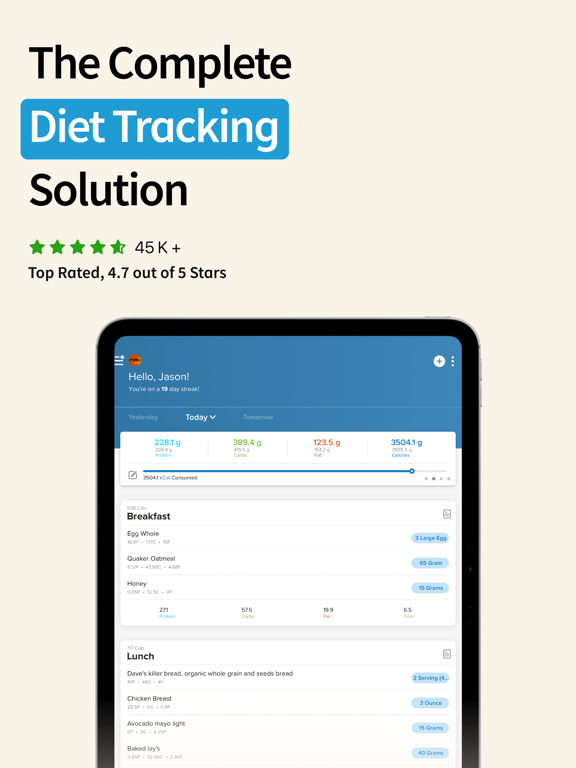
37 store screenshots



Pricing & paywalls
App Store
- My Macros+ Pro Monthly — $3.99/month
- My Macros+ Pro Monthly — $29.99/year ($2.49/mo)
- My Macros+ Pro Monthly — $34.99/year ($2.91/mo)
- Macro Coach — $9.99
- My Macros+ Pro Subscription — $1.99
- My Macros+ Pro Subscription — $2.99
- My Macros+ Pro Subscription — $19.99
- My Macros+ Pro Subscription — $29.99
Ratings & reviews
App Store
-
1/5App functionality is nice - accuracy is sketch
I loved using MyFitnessPal when I was tracking calories, but the basic app was too limited when I started focusing on macros. MM+ has the functionality I need, even in the basic version. I REALLY love the ability to build out recipes - I often cook and freeze recipes for later, and this app allows me to do that really easily! The issues I have are relative to the search functionality. Searching is very tricky - for example, if you search for chicken, the first result isn’t raw chicken or plain cooked chicken - it’s a plethora of specific chicken recipes or products. There’s a lot of trial and error to find basic ingredients, which I really hate. Many of them also have differing macros, which I also hate. Hard to have confidence in the accuracy of the app when the results are all very different. I was often circumventing this by using favorites or the barcode scan; however, this is also problematic as the results are REGULARLY WRONG and require editing. I wish I had known this earlier bc for a while I thought the barcode method was foolproof and wasn’t double checking. When you’re having to edit the nutritional values of most barcode scans, the value of that functionality diminishes greatly as you’re basically manually adding all your macros at this point. Overall good product, but there’s still work to do to making this my go-to app. Appreciate the recipe functionality and do use this DAILY for tracking macros, but I would love some improvement.
SarNeese · 4 Sep 2026
-
3/5Many quirks
Took me FOREVER to become accustomed to this app after MFP. I’m still super frustrated by it. It’s annoying when you’re searching something by typing in the item and all these irrelevant things come up. So you go to your favorites and you have to type in the item again. If you go to “recents” first and it’s not there, you’re typing it in for a 3rd time. Many small time wasters like this when you just want to eat. The only way this really works if you don’t pay attention to any other entries but your own and you eat the same things all the time and make sure you include the grams in the description because if you threw away the packaging, you won’t know the serving size. But you can waste time going to the website to find it and now your food is cold or your partner is done eating. Scanning the barcode apparently doesn’t work because the values are wrong and it’s somewhat true. Just making it more difficult. I don’t pretend to be smarter than these app developers. It’s probably my age or my short attention span but after 3 months, it’s only moderately easier. Thank goodness for AI in many of my cases. Minor annoyance, I wish it would show you your week’s averages so if you had 1 cheat day and 6 really good days, you could see where you averaged.
MarlyHaysDom · 4 Sep 2026
-
2/5Not worth the money
I purchased the app about a year and a half ago, previously being a MyFitnessPal user. The app had a lot of promise seeing as you could use as many meals as you want and set customizable goals. But with the promise of updating a larger consumer database the developers have seriously neglected their customers. I’ve been waiting for months on end for the database to become better and nothing while myfitnesspal has moved past the three strict meals. I strongly regret my purchase and would switch back over to myfitnesspal if I didn’t already log my weights for the past year in this program. It’s been a huge pain to manually enter all my food. An app is suppose to make your life easier, logging food on myfitnesspal with their database takes less then two minutes. While having to manually enter and create a new food item on macros+ can take 5-10 minutes. I find myself using myfitnesspal’s database to create foods on this app, I’ll probably switch back over soon and just bite my ego and take the loss on the purchase and just relog my info when I have the time. If your stuck between the two apps stick with myfitnesspal, this app has been a headache and a half as regular tracker.
tp2017tp · 4 Sep 2026
-
5/5Frustrating
As some of the previous reviewers have mentioned, the barcode scanner is hit or miss. I have contacted customer service about this several times but have never gotten the issue resolved. When creating a recipe, and using the barcode scanner, you are unable to filter your results by serving size or brand. The same is also true when creating a recipe and searching for a single ingredient. I have also contacted customer support about this issue, but it has not been resolved and the response was simply that they are working on it. The food database is not comprehensive. I often have to manually enter ingredients or create items which is frustrating and takes a lot of time. As others have also mentioned I, too, feel like I should just switch back to myfitnesspal, but the things that I do you like about this app are that you can adjust your macros by the gram, have different macro goals for different days, or that it also includes more meal options and simply breakfast lunch or dinner. However now that I have gone back to consistently tracking my food after taking six months off and realizing that these issues have not been fixed I am definitely frustrated by the clunky features and the inability of the barcode to work consistently.
Amg_10 · 4 Sep 2026
-
4/5Please let us change total daily carbs to net carbs!
Following a Keto way of eating (I refuse to call it a diet due to the stigma around the word... If you eat food ever then you're "on a diet" is how I see it) limits the amount of carb intake, but it's net carbs not just total carbs (being into fitness, I'm sure you're aware of this). Right now it's a bit difficult to track the total net carbs on the app. Yes, you can change carbs to net carbs shown for each individual meal, but it doesn't count the net carbs in the daily totals. When looking at the daily total, summary and macro breakdown it looks like I'm over most days on my carbs and didn't hit my goal when this is isn't the case. PLEASE let us change the total carbs to total net carbs! This is the most important change I'd love to see. I also agree with some of the other reviews... The app is pretty nice, but I'd love it more if it were a bit more user friendly. The serving sizes/options are sometimes off, the barcode scanning can be hit or miss (once I got a completely different item than what I scanned), and there's SOOO many options when searching an item.. In some ways this can be nice, but mostly it's just confusing because they all differ slightly on the counts and you aren't sure which to choose, especially when you don't have a nutrition label to go off of. I think this is a pretty nice app, it's clean looking and has a lot of great features. But please consider adding an option to change daily total to net carbs! Thank you!
saint317 · 4 Sep 2026
Privacy & accessibility
App Store
Privacy
- Data Linked to You — Analytics — Diagnostics — Crash Data Developer declared
- Data Linked to You — App Functionality — Identifiers — User ID Developer declared
- Data Linked to You — Other Purposes — Diagnostics — Crash Data Developer declared
- Data Linked to You — Product Personalization — Health & Fitness — Health Developer declared
- Data Linked to You — Diagnostics Developer declared
- Data Linked to You — Health & Fitness Developer declared
- Data Linked to You — Identifiers Developer declared
- Data Not Linked to You — Analytics — Usage Data — Other Usage Data Developer declared
- Data Not Linked to You — Analytics — Usage Data — Product Interaction Developer declared
- Data Not Linked to You — App Functionality — Contact Info — Email Address Developer declared
- Data Not Linked to You — App Functionality — Contact Info — Name Developer declared
- Data Not Linked to You — Contact Info Developer declared
- Data Not Linked to You — Usage Data Developer declared
Accessibility
- Audio Descriptions — SUPPORTED Store published
- Dark Interface — SUPPORTED Store published
- Larger Text — SUPPORTED Store published
- VoiceOver — SUPPORTED Store published
Versions
App Store
-
2025.09
We’ve been hard at work preparing My Macros+ for the upcoming iOS 26—and this update is packed with refinements across the board: • Faster, Smarter Food Logging: Improved performance when adding meals and foods, especially for users with lots of custom meal names or saved items. • Refreshed Designs in More Places: We redesigned the Water Tracker, Macro Calculator, and Weekly Summary screens with smoother, cleaner layouts powered by SwiftUI. • Nutrition Label Scanning Just Got Smarter: Our scanner now uses advanced built-in AI models (on supported devices) for better recognition and improved accuracy. • Better My Circle Performance: Major behind-the-scenes upgrades to make My Circle faster, more stable, and ready for the future. • Smooth Sailing on iOS 26: We’ve made tons of under-the-hood updates to support iOS 26—everything from toolbar behavior to window management. • Updated Minimum Requirement: My Macros+ now requires iOS 17 or newer. And as always, we’ve fixed bugs and made performance tweaks to keep your tracking experience smooth and reliable.
-
2025.10
We’ve been hard at work preparing My Macros+ for the upcoming iOS 26—and this update is packed with refinements across the board: • Faster, Smarter Food Logging: Improved performance when adding meals and foods, especially for users with lots of custom meal names or saved items. • Refreshed Designs in More Places: We redesigned the Water Tracker, Macro Calculator, and Weekly Summary screens with smoother, cleaner layouts powered by SwiftUI. • Nutrition Label Scanning Just Got Smarter: Our scanner now uses advanced built-in AI models (on supported devices) for better recognition and improved accuracy. • Better My Circle Performance: Major behind-the-scenes upgrades to make My Circle faster, more stable, and ready for the future. • Smooth Sailing on iOS 26: We’ve made tons of under-the-hood updates to support iOS 26—everything from toolbar behavior to window management. • Updated Minimum Requirement: My Macros+ now requires iOS 17 or newer. • All-New Water Tracking Flow: Tracking your water is now faster and more intuitive, with a redesigned experience focused on simplicity and speed. • Recipe Ingredient Order Fix: Fixed an issue where ingredients in saved recipes might not always stay in the correct order. And as always, we’ve fixed bugs and made performance tweaks to keep your tracking experience smooth and reliable.
-
2025.11
We’ve been hard at work preparing My Macros+ for the upcoming iOS 26—and this update is packed with refinements across the board: • Faster, Smarter Food Logging: Improved performance when adding meals and foods, especially for users with lots of custom meal names or saved items. • Refreshed Designs in More Places: We redesigned the Water Tracker, Macro Calculator, and Weekly Summary screens with smoother, cleaner layouts powered by SwiftUI. • Nutrition Label Scanning Just Got Smarter: Our scanner now uses advanced built-in AI models (on supported devices) for better recognition and improved accuracy. • Better My Circle Performance: Major behind-the-scenes upgrades to make My Circle faster, more stable, and ready for the future. • Smooth Sailing on iOS 26: We’ve made tons of under-the-hood updates to support iOS 26—everything from toolbar behavior to window management. • Updated Minimum Requirement: My Macros+ now requires iOS 17 or newer. • All-New Water Tracking Flow: Tracking your water is now faster and more intuitive, with a redesigned experience focused on simplicity and speed. • Recipe Ingredient Order Fix: Fixed an issue where ingredients in saved recipes might not always stay in the correct order. And as always, we’ve fixed bugs and made performance tweaks to keep your tracking experience smooth and reliable.
-
2025.12
We’ve been hard at work preparing My Macros+ for the upcoming iOS 26—and this update is packed with refinements across the board: • Faster, Smarter Food Logging: Improved performance when adding meals and foods, especially for users with lots of custom meal names or saved items. • Refreshed Designs in More Places: We redesigned the Water Tracker, Macro Calculator, and Weekly Summary screens with smoother, cleaner layouts powered by SwiftUI. • Nutrition Label Scanning Just Got Smarter: Our scanner now uses advanced built-in AI models (on supported devices) for better recognition and improved accuracy. • Better My Circle Performance: Major behind-the-scenes upgrades to make My Circle faster, more stable, and ready for the future. • Smooth Sailing on iOS 26: We’ve made tons of under-the-hood updates to support iOS 26—everything from toolbar behavior to window management. • Updated Minimum Requirement: My Macros+ now requires iOS 17 or newer. • All-New Water Tracking Flow: Tracking your water is now faster and more intuitive, with a redesigned experience focused on simplicity and speed. • Recipe Ingredient Order Fix: Fixed an issue where ingredients in saved recipes might not always stay in the correct order. And as always, we’ve fixed bugs and made performance tweaks to keep your tracking experience smooth and reliable.
-
2025.13
Introducing Fast Track + AI, our all-new AI-powered Food Scanner. • Simply snap a photo and let My Macros+ automatically estimate your meal’s macros with remarkable speed — no barcode, no search, no typing required. • Powered by the leading AI Models, Fast Track + AI delivers fast nutrition estimates to make tracking easier than ever. • Alongside that, we've also polished up the interface and fixed a few bugs to make tracking smoother than ever. • Updated our Privacy Policy to reflect the new AI Food Scanner feature.
-
2025.14
Thanks for using My Macros+! We’ve got a great new update ready for you: • New “Add To Meal” option to make logging foods into meals even faster. • Updated Profile screen with a simpler layout for notifications and weekly summaries. • Refreshed Video Tutorials, FAQ, and Support views so it’s easier to find answers when you need them. • Plus a bunch of behind-the-scenes clean up and performance improvements to keep everything running smoothly.
-
2026.01
What’s New in Version 2026.01 Thanks for using My Macros+! We’re kicking off 2026 with a fresh update packed with redesigns and smarter tools to help you track better. — Copy Meals Redesign We’ve completely rebuilt the Copy Meals page. It now features a modern, smoother look that makes copying your favorite meals easier than ever. — Smart Serving Conversions Adding new serving sizes to your foods just got smarter. We’ve introduced a new 3-step process that guides you through auto-conversions, making it simple to get the exact measurements you need. — Water Widget Refresh Stay hydrated with a revamped Water Widget! We’ve updated the UI and swapped the old glass icon for a sleek new water drop to match the rest of the app’s style. Plus, we’ve made improvements to VoiceOver accessibility, updated the Fast Track view for better navigation, and squashed some bugs behind the scenes. Happy Tracking!
-
2026.02
What’s New in This Version • Smoother, faster performance: Major under-the-hood improvements to make the app feel more responsive and reliable. Weekly Summary improvements: • A refreshed layout and cleaner flow for reviewing your week. • New Daily Totals view — Quickly swipe through daily totals and jump into your meals for any day right from the Weekly Summary.
-
2026.03
What’s New in This Version Smarter search suggestions • Search now pre-fills with helpful “Smart Search”-style results to get you to the right food faster. Improved exporting • Exporting daily totals has been rebuilt for better reliability and smoother performance.
-
2026.04
Big upgrade for faster tracking: New Food Scanners are here. We combined Barcode Scan + Nutrition Label Scan + AI Food Scan into one streamlined experience so you can choose the best way to log—right when you need it. You’ll find the new scanner across the app (Left Menu, Custom Foods, Recipes, and Add to Meal), plus a few UI refinements to keep things clean and quick.
-
2026.05
Big upgrade for faster tracking: New Food Scanners are here. We combined Barcode Scan + Nutrition Label Scan + AI Food Scan into one streamlined experience so you can choose the best way to log—right when you need it. You’ll find the new scanner across the app (Left Menu, Custom Foods, Recipes, and Add to Meal), plus a few UI refinements to keep things clean and quick.
-
2026.06
Big upgrade for faster tracking: New Food Scanners are here. We combined Barcode Scan + Nutrition Label Scan + AI Food Scan into one streamlined experience so you can choose the best way to log—right when you need it. You’ll find the new scanner across the app (Left Menu, Custom Foods, Recipes, and Add to Meal), plus a few UI refinements to keep things clean and quick.
-
2026.07
Big upgrade for faster tracking: New Food Scanners are here. We combined Barcode Scan + Nutrition Label Scan + AI Food Scan into one streamlined experience so you can choose the best way to log—right when you need it. You’ll find the new scanner across the app (Left Menu, Custom Foods, Recipes, and Add to Meal), plus a few UI refinements to keep things clean and quick. * In this version (v2026.07) we reintroduced the auto-detecting barcode scanner. It should be much more accurate when picking up barcodes in your camera feed.
-
2026.08
What’s New: An All-New Pro Macro Calculator • We’ve completely redesigned the Pro Macro Calculator! It’s now incredibly easy to fill out and much faster to access right when you’re setting up your new macro goals. Refreshed Goal Screens • Managing your targets just got smoother. We’ve updated the look and feel of the "Set Nutritional Goals" and "Active Goal" screens, giving them a cleaner, more streamlined design. UI Polish & Bug Fixes • Fixed a pesky issue where extra-long meal names would overflow or get cut off when adding foods to a meal. Your meal titles will now stay perfectly centered. • We also made a few under-the-hood tweaks to keep the app running smoothly!
-
2026.09
Improved Serving Name Conversions • Our AI suggestions are now smarter and format properly without any visual hiccups. We also added haptic feedback throughout the process so it feels better than ever. Bug Fixes • Resolved an issue where a specific icon was missing in the Pro Calculator for pre-iOS 26 users. Plus, a handful of under-the-hood optimizations to keep the app running smoothly!
-
2026.10
We’re back with another update to make tracking your macros faster and more intuitive! Here is what’s new: Smarter, Richer Search - Searching for foods just got a massive upgrade. Your search results now display more nutritional data at a glance. Plus, we’ve cleaned up the clutter by smartly grouping different serving options together in the list. Quick Add Custom Foods - Can't find what you're looking for? If a search comes up empty, you can now seamlessly create and add a custom food right from the empty search screen. Redesigned Food Details Page - The "Track a Food" screen has been completely modernized. It’s cleaner, easier to read, and helps you visually digest all the nutritional info before logging your meal. Performance Boosts - Massive behind-the-scenes updates to the tracking screens for a faster, more responsive feel. Happy Tracking!
-
2026.11
We’re back with another update to make tracking your macros faster and more intuitive! Here is what’s new: Smarter, Richer Search - Searching for foods just got a massive upgrade. Your search results now display more nutritional data at a glance. Plus, we’ve cleaned up the clutter by smartly grouping different serving options together in the list. Quick Add Custom Foods - Can't find what you're looking for? If a search comes up empty, you can now seamlessly create and add a custom food right from the empty search screen. Redesigned Food Details Page - The "Track a Food" screen has been completely modernized. It’s cleaner, easier to read, and helps you visually digest all the nutritional info before logging your meal. Performance Boosts - Massive behind-the-scenes updates to the tracking screens for a faster, more responsive feel. Happy Tracking!
-
2026.12
We’re back with another update to make tracking your macros faster and more intuitive! Here is what’s new: Smarter, Richer Search - Searching for foods just got a massive upgrade. Your search results now display more nutritional data at a glance. Plus, we’ve cleaned up the clutter by smartly grouping different serving options together in the list. Quick Add Custom Foods - Can't find what you're looking for? If a search comes up empty, you can now seamlessly create and add a custom food right from the empty search screen. Redesigned Food Details Page - The "Track a Food" screen has been completely modernized. It’s cleaner, easier to read, and helps you visually digest all the nutritional info before logging your meal. Performance Boosts - Massive behind-the-scenes updates to the tracking screens for a faster, more responsive feel. Happy Tracking!
-
2026.13
We’re back with another update to make tracking your macros faster and more intuitive! Here is what’s new: Smarter, Richer Search - Searching for foods just got a massive upgrade. Your search results now display more nutritional data at a glance. Plus, we’ve cleaned up the clutter by smartly grouping different serving options together in the list. Quick Add Custom Foods - Can't find what you're looking for? If a search comes up empty, you can now seamlessly create and add a custom food right from the empty search screen. Redesigned Food Details Page - The "Track a Food" screen has been completely modernized. It’s cleaner, easier to read, and helps you visually digest all the nutritional info before logging your meal. Performance Boosts - Massive behind-the-scenes updates to the tracking screens for a faster, more responsive feel. Happy Tracking!
-
2026.14
We're back with some great updates. New Onboarding • A completely redesigned setup experience that helps new users nail their macro targets and weight goals from day one. Better Recipe Building • Selecting ingredients for recipes now features improved visual feedback so you know what ingredients are added while you're adding them. Cleaner Settings • We reorganized the Settings tab with a dedicated profile section, clearer headers, and a new Community row. Bug Fixes • Resolved an issue with the AI Food Scanner not always showing results properly when accessed via the Add Meals screen. Performance • Cleaned up behind-the-scenes code for a faster, smoother experience.
-
2026.15
We’re back with another update to make your tracking experience even better! Here is what’s new: Redesigned Macro Coach Dashboard • We’ve completely refreshed the UI for the Macro Coach dashboard. • Whether you have an active goal or not, the new layout makes it much clearer to read and digest your information at a glance. Smoother Tracking • Fixed an issue where the daily totals wouldn't properly reload after deleting a full meal. Check-in Fixes • Corrected an issue in the Macro Coach Check-in where it might not reload your dashboard after checking in right away.
-
2026.16
We’re back with another update to make your tracking experience even better! Here is what’s new: Smarter Food Search • Finding the exact food you want just got much faster. • Our search algorithm has been upgraded to understand brand names alongside food items. You can now search for things like "Skippy Peanut Butter" to instantly find the right brand and food combination without needing to use extra filters. - In Case You Missed It in the Last Update - Redesigned Macro Coach Dashboard • We completely refreshed the dashboard UI. • The new layout makes your information much clearer and easier to digest at a glance, whether you have an active goal or not. - Happy Tracking!
-
2026.17
We’re back with another update to make your tracking experience even better! Here is what’s new: Enhanced Readability • We’ve made major improvements to how the app handles custom text sizes. • If you use larger text settings (Dynamic Type) on your device, My Macros+ will now scale beautifully to make logging and reading your daily macros much easier and more comfortable. - In Case You Missed It in the Last Update - Smarter Food Search • Finding the exact food you want just got much faster. • Our search algorithm has been upgraded to understand brand names alongside food items. You can now search for things like "Skippy Peanut Butter" to instantly find the right brand and food combination without needing to use extra filters. Redesigned Macro Coach Dashboard • We completely refreshed the dashboard UI. • The new layout makes your information much clearer and easier to digest at a glance, whether you have an active goal or not. - Happy Tracking!
-
2026.18
We’re back with another update to make your tracking experience even better! Here is what’s new: Smarter Food Search • Finding the exact food you want just got much faster. • Our search algorithm has been upgraded to understand brand names alongside food items. You can now search for things like "Skippy Peanut Butter" to instantly find the right brand and food combination without needing to use extra filters. - In Case You Missed It in the Last Update - Redesigned Macro Coach Dashboard • We completely refreshed the dashboard UI. • The new layout makes your information much clearer and easier to digest at a glance, whether you have an active goal or not. - Happy Tracking!
-
2026.19
· 23 Jul 2026
We’re back with another great update to make your tracking experience even better! Here's what’s new: Instant Unit Conversion • We added a brand new button right on the serving selection screen. With a single tap, you can now instantly convert serving sizes between grams and ounces! Faster Custom Searches • Searching for your go-to meals is speedier than ever. We heavily optimized how the app searches through your Custom Foods and Favorites, so your results surface instantly without any lag while you type. Lighter App Size & Performance Polish • We did some major spring cleaning under the hood! The app now takes up noticeably less storage space on your device.
Alternatives
- Macro Sync — Same category + similar ratings
- Macros - Calorie Counter — Same category + similar ratings
Availability by market
- US
Data quality & evidence
- Page completeness
- Independent summary published
- Last verified
- 4 Sep 2026
- Sources
- App Store