
Quick verdict
- What it is
- Store information collected; an Apoku editorial summary is not yet published.
- At a glance
-
- Free to download
Categories and search queries
Official categories
- Music
- Entertainment
Apoku categories
Key functions
| Function | Availability | Access | Scope | Evidence |
|---|---|---|---|---|
| Free app | Yes | Free | Context-specific | Store published |
Screens
App Store
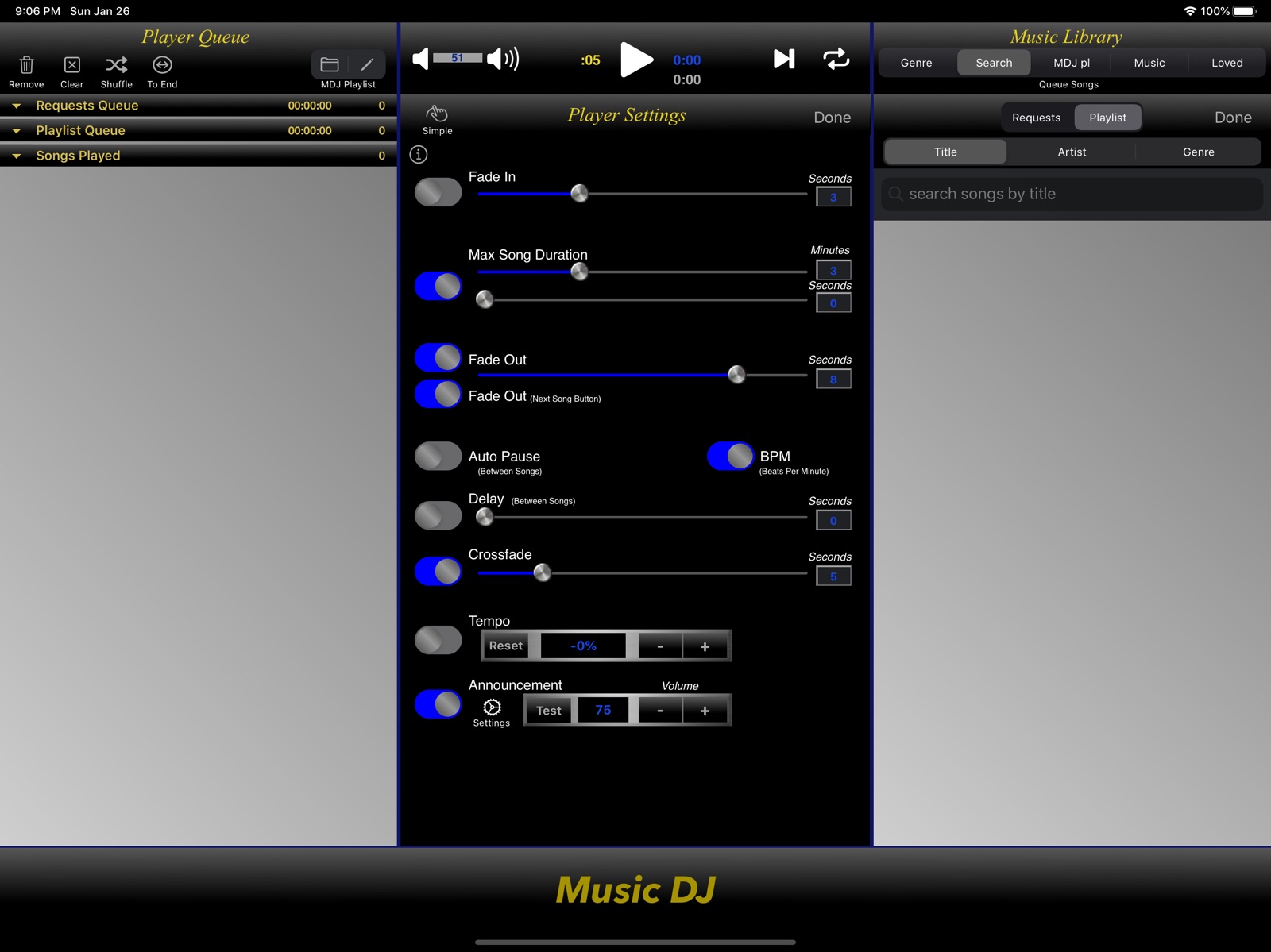
13 store screenshots


Pricing & paywalls
App Store
- Free to download
Ratings & reviews
App Store
-
4/5A Really Good Playlist Mixer
I have used Music DJ for a couple of weeks, and I’m enjoying the mixing of playlists. I actually have a couple of pre-recorded voicelines that I tried mixing into the song playlists, and the crossfade feature turns your voicelines and music into an automated DJ (or custom radio station on your phone, a music podcaster without you running the show live, etc.) There’s two things that are holding me back from giving this a 5-star review: 1. The ability to use pre-recorded voicelines for song announcements. I know you can use text to speech or pre-record your voice for announcements, but I want to have the ability to take an edited voice clip and use that as the announcement. 2. The app doesn’t use your setting on Music. So if you have a song set to end earlier in Apple Music but really goes on for a few seconds without any noise, you will get dead air if you don’t manually move on to the next song, which definitely kills the vibe. If those two items are addressed, this app deserves 5-stars. This is a really good playlist mixing app, for sure. :)
vgfan100 · 7 Aug 2026
-
5/5Just What I Was Looking For
The playlist in the iphone has some serious limitations. This app solves them. In particular, I needed a playlist that allows you to pause between songs. This app allows you to do that and much more. Please keep up the excellent work, and continue to enhance this valuable app! ** UPDATE ** I was a little disappointed to find that the iPhone’s Equalizer settings don’t work with the app. This is an issue for me because the PA system that I pair with through Bluetooth has no base/treble adjustment on that channel, and I wanted a way to adjust that, at least through the iPhone. This function would make this app a true all-in-one for me. Other than that, the app appears to perform well with no glitches.
Joey Loves This App · 7 Aug 2026
-
2/5Only able to import 25% of your Apple music
I’ve been looking for years for a way to mix my Apple playlists so that when it goes to the next song in a playlist that you don’t hear a pause or break in the music. The biggest problem I’ve experienced with all the apps I’ve tried so far is that they don’t have licensing to all the music I have on my phone. For example, with this app, I wanted to import 171 songs from my playlist to mix and I was only able to import 48 of them due to the limitations of this app. It’s like that on all these apps. Not sure why they can’t get the rights to all the music…. If you don’t have all the music that you love, then what’s the point? I did however give 2 stars because their user interface is pretty basic and easy to navigate and gives a good amount of control over intro / outro mixing.
JenniferK310 · 7 Aug 2026
-
5/5Game Changer for performers
I perform live with backing tracks and also playing break music. Not only is this one of the first ios apps that allows you to auto- crossfade a playlist, but, the interface is actually designed to be used during a performance. So much much better than anything elso ios out there.
Tshapiro1000 · 7 Aug 2026
-
5/5Great app - Music DJ
Been using it since a different app stopped working with iOS 10 and wasn't being updated by the maker. Love the cross fade especially! GUI is far from attractive, but it gets the job done and has tons of extra features that make up for it. Five stars!
Kidjo2 · 7 Aug 2026
Privacy & accessibility
App Store
Privacy
- Data Linked to You — Analytics — Diagnostics — Performance Data Developer declared
- Data Linked to You — Analytics — Identifiers — Device ID Developer declared
- Data Linked to You — Analytics — Location — Coarse Location Developer declared
- Data Linked to You — Analytics — Usage Data — Advertising Data Developer declared
- Data Linked to You — Analytics — Usage Data — Product Interaction Developer declared
- Data Linked to You — Third-Party Advertising — Diagnostics — Performance Data Developer declared
- Data Linked to You — Third-Party Advertising — Identifiers — Device ID Developer declared
- Data Linked to You — Third-Party Advertising — Location — Coarse Location Developer declared
- Data Linked to You — Third-Party Advertising — Usage Data — Advertising Data Developer declared
- Data Linked to You — Third-Party Advertising — Usage Data — Product Interaction Developer declared
- Data Linked to You — Diagnostics Developer declared
- Data Linked to You — Identifiers Developer declared
- Data Linked to You — Location Developer declared
- Data Linked to You — Usage Data Developer declared
- Data Not Linked to You — Analytics — Diagnostics — Crash Data Developer declared
- Data Not Linked to You — Third-Party Advertising — Diagnostics — Crash Data Developer declared
- Data Not Linked to You — Diagnostics Developer declared
- Data Used to Track You — Diagnostics — Crash Data Developer declared
- Data Used to Track You — Diagnostics — Performance Data Developer declared
- Data Used to Track You — Diagnostics Developer declared
- Data Used to Track You — Identifiers — Device ID Developer declared
- Data Used to Track You — Identifiers Developer declared
- Data Used to Track You — Location — Coarse Location Developer declared
- Data Used to Track You — Location Developer declared
- Data Used to Track You — Usage Data — Advertising Data Developer declared
- Data Used to Track You — Usage Data — Product Interaction Developer declared
- Data Used to Track You — Usage Data Developer declared
Accessibility
No accessibility labels collected yet.
Versions
App Store
-
13.0.0
iOS 13 updates and interface updates.
-
13.0.1
iOS 13 screen enhancements.
-
13.0.2
iOS 13 update.
-
13.0.3
Interface enhancements.
-
13.1.0
Added support for iOS split screen multi-tasking. Interface improvements/updates. Support for more screen orientations on both iPhones and iPads.
-
13.1.1
Maintenance release.
-
13.1.2
Maintenance release.
-
13.1.3
Added new Route button (AirPlay 2 devices, external speakers), AirPlay fix and enhancements.
-
13.2.0
iOS 14 maintenance update.
-
13.3.0
iOS 14 maintenance update.
-
13.4.0
New shortcut feature enhancement. Double tap any song in your playlist to start playing immediately! No drag and drop required. Specifically, you can double tap any of the songs in your Requests Queue, Playlist Queue, or Songs Played Queue and it will move to the top of your Playlist Queue and start playing. If a song is currently playing, the song will transition based on your player settings (i.e. Fade Out, Crossfade).
-
13.5.0
Maintenance release.
-
13.6.0
Bug fix.
-
13.7.0
Fixed lyrics view issue on iOS 16.
-
13.7.1
Fixed Music Library view for iOS 15+
-
13.7.2
Maintenance update.
-
13.7.3
Bug fix.
-
15.0.0
iOS 15+ compatibility updates.
-
15.0.1
Bug fix for recording feature.
-
15.0.2
Bug fix.
-
15.0.3
Maintenance release.
-
15.1.0
Maintenance release. Interface update for iPadOS.
-
15.1.1
General maintenance update.
-
15.2
User interface updates.
-
15.2.1
· 17 Jun 2026
Fixed distorted switch button issues.
Alternatives
- DJ Music Mixer - Dj Remix Pro — Same category + similar ratings
- DJ Control - Remix music live — Same category + similar ratings
Availability by market
- US
Data quality & evidence
- Page completeness
- Live store listing
- Last verified
- 6 Aug 2026
- Sources
- App Store
- Apoku editorial summary has not been published yet.