
Quick verdict
- What it is
- Store information collected; independent summary not yet available.
- At a glance
-
- $29.99
- In-app purchases
- Subscription
Categories and search queries
Official categories
- Photo & Video
- Utilities
AppCorpus categories
Key functions
| Function | Availability | Access | Scope | Evidence |
|---|---|---|---|---|
| Game Center | Yes | Unknown | App Store | Store published |
| In-app purchases | Yes | Limited free | — | Store published |
| Subscription | Yes | Paid | — | Store published |
Screens
App Store
17 store screenshots


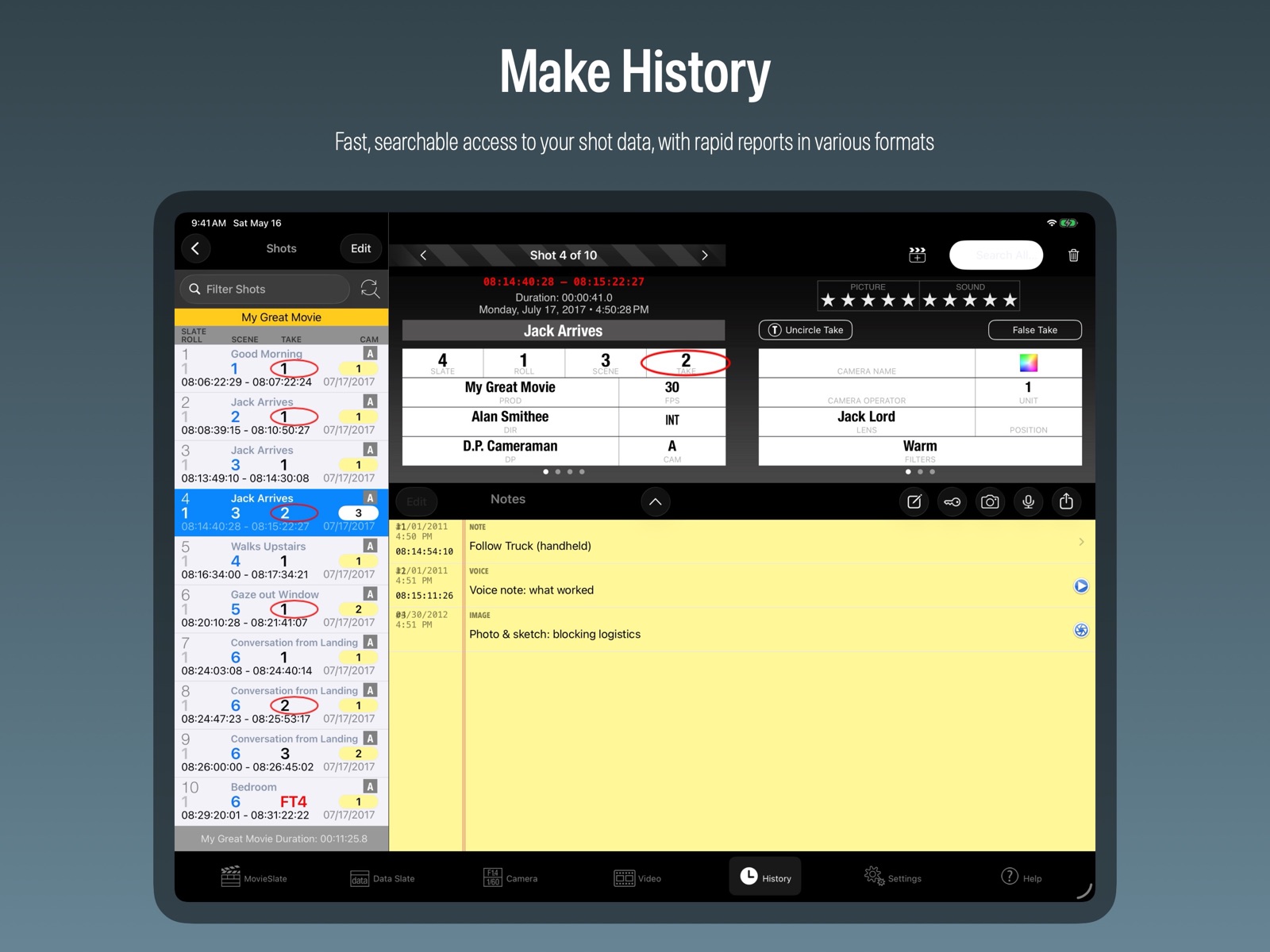
Pricing & paywalls
App Store
- Price: $29.99
- MovieSlate® 8 Pro Features — $29.99
- Script Dept — $29.99
Ratings & reviews
App Store
-
5/5Perfection got even better
I am a small company and freelancer. This app is perfect. It is always with me, and is WAY more capable than my needs, but it fits the bill perfectly in its simplicity. Watching the videos from Movie Slate (there are quite a few bite size videos covering everything in simple but comprehensive detail) showed me just how robust this app is. I was upset that the older version does not work on my newer iPhones and iPad, necessitating an upgrade and another payment, but the truth is it is such a sweet price point, and the app is so helpful, I did not mind paying again. I work on a lot of very small productions, this app makes me look pretty pro if they do not have a slate on set already. On my own projects it just saves time in post, especially if I am working with multiple cameras or with scripts and other moving parts.
Ivan Machiz · 5 Aug 2026
-
5/5Stellar tool for set
I have been using MovieSlate since 2009 and watched it grow into an indispensable production tool. The shot logs are easy to parse and send to my editor, the app is amazingly customizable, and it saves me a lot of $ since I don’t need to buy an expensive slate. The best part? The developer is incredibly responsive to feedback and suggestions. Recently I inquired about adding a tail slate option to the app, and within a week the developer had implemented the feature! In short, this is a stellar app that continues to get BETTER with each version. 5 stars.
anicesunset · 5 Aug 2026
-
5/5The BEST App for Script Supervisors
This app is by far the best script supervision app or software out there, and trust me I'm tried them all. The script lining interface alone is worth the monthly subscription. Additionally, there are tons of setting options to adapt the program to your individual needs, and the customer service is top notch!! If you're a Script Supervisor looking for an intuitive and flexible digital option, this is the app for you.
LJBransky · 5 Aug 2026
-
2/5Not impressed
I had this app as version 7 and recently purchased a cinema camera that I wanted to use app with again only to realize it was no longer supported and I would have to re-purchase the app I already had. I was not necessarily irritated about that however when I realized that my pro licence was no transferrable from 7 and that it was a monthly subscription or an insanely expensive one time purchase that killed it for me. I get that a real timecode slate costs more than all of the features mentioned but I already purchased them before and do not feel as though I should have to purchase them again.
sakspot · 5 Aug 2026
-
5/5Works Good for me and my clients
I’m not buying any more marker boards slates since using this. I have the iPad Air 2 in a Melamount case and it serves our purposes on film shoots. No more looking for the marker, eraser, and trying to remove old marks on a clapper. I just wish they sold a wood clapper for the iPad to slide into for the real wood clap sound (not a big deal).
Artful One · 5 Aug 2026
Privacy & accessibility
App Store
Privacy
- Data Not Collected Developer declared
Accessibility
No accessibility labels collected yet.
Versions
App Store
-
26.0
• Now requires iOS/iPadOS 17 or newer. • Version now begins with the OS version it's optimized for (26); Build uses date/time format "YYYY.MMDD.HHMM". • Fixed many obscure crashes and bugs. • After a crash, you can now email us the crash report for diagnosis (please do!). • History - new "Undo Delete" for Projects, Days, and Shots (via the Undo button, Edit > trashcan, or Settings > Shot Log History). • Reports - new AI-friendly JSON and Markdown formats to feed data into AI models. • Textfields - new gear button to choose Keyboard Editing Styles. • Chat > Start new Thread - new "Choose Recipients" screen. • Settings > Data Sync & Remote Control - new Presets, new "See Other MovieSlates" screen, and network improvements. • Settings > Snippets > Abbreviations - fixed insert/expand bug. • In-App Purchases - added age verification for new legislation. • MovieSlate Cloud > Restore - UI improvements. • Translations - Script, Sound, Camera and HTML reports are now properly formatted and translated; fixed lots of stray English text. • Tentacle sync - updated SDK & UI. • Timecode WiFi Sync: + Major improvements for WiFi mesh networks and OS 26. + Now supports more than one timecode master on the network. + New Device Chooser for timecode, chat, data sync, remote control. + New IP address Connect & Copy buttons if auto-detect fails. • Script Dept - new SnapLines feature: + Mark camera coverage with clean, professional lines instead of hand-drawn scribbles. + Arm the tool, tap a paragraph (drag to extend); a coverage editor opens automatically. + Choose Straight, Squiggle, or None per camera, aligned down the text column, with an auto scene/take header and camera legend. + Tap any SnapLine to edit its style or title, or remove it. SnapLines stay locked in their own layer, safe from the eraser. • Script Dept - new Annotation Layers (replaces Public/Private): + Every annotation now lives on a Layer - tap the Layers tool to manage them. + Visibility and opacity are remembered separately for "Log + Mark" vs "Breakdown", and each layer has its own opacity slider. + Coverage lines, rulers, scene/dialogue numbers, highlights, and imported images each auto-file into their own layer, and you can create and name your own. + Exporting a Script PDF adds an "Included Layers" step - pick which layers appear, with per-layer opacity and one-tap presets (No/All Layers, Log + Mark, Breakdown, or department sets). + Existing "Private" annotations move into a "Personal" layer. • Script Dept: + New "Sides" report with watermarking. + Annotation Toolbar now splits into two sections when space is tight. + Swiping SCENE/TAKE buttons now increment SETUP/TAKE fields. + Fixed Performance Laps > Notes layout for OS 26. + Fixed annotation save and "wrong PDF" issues in Breakdowns & Logging. + Fixed portrait layout of PDF Scanning UI; PDF AI scanning tweaks. + Settings - Coverage Lines reorganized; added Squiggle Style options. + Updated PDF Editor (fixes many memory issues and three crashes).
-
26.1
· 26 Jul 2026
• Fixed crash bugs. • Settings > MovieSlate Cloud: + Backups & Share Data - more granular control over included files. + Streamlined user interface. • External Clapper Sticks: + Greatly improved Sound Detection. + Fixed "Shot in Progress" screen reappearing. + Settings > Behavior > Shot Triggers - added Sound Recognition options. • Chat - added remote typing indicator. • Script Dept: + Avoids out-of-memory crashes on older iPads with only 3GB of RAM. + Layers can now all be unlocked/locked (except SnapLines). + Fixes Layers button display issues on OS 26+ (Liquid Glass). + Typing text annotations works again (bug in previous beta). + Disabled "Missing File" alert for MSCloud backups/restores. • Script Dept Breakdowns: + Auto deleting Scene Number & Line Number annotations when adding new ones. + Ruler Lines can now appear at start or end of scene.
-
8.9.33
• Settings > Behavior - added new "Sleep & Screen Brightness" section. • Sound Dept > Sound Tracks (iPhone) - bug fixes. • Script Dept: + Updated PDF Editor engine. + PREFX field - keypad now includes ABC button. + Breakdown Reports - bug fixes. + Progress Reports - bug fixes.
-
8.9.34
• iOS 13 is no longer supported (due to licensed code library updates). • Slate - clapper graphic (if chosen) now appears when external clappersticks close. • Settings > Camera Control - added "Start/Stop Shots when a Synced Camera Rolls". • Script Dept: • Log + Mark > Highlight Characters - better recognizing side-by-side character names. • Log + Mark > Highlight Characters - added plus button to enter character names. + PDF Scan for Characters - added support for voiceover characters. + Breakdown PDF scan - PDF scenes marked OMITTED now have PAGES = 0 and TIME = 0. + Breakdown reports - elements again print in user-specified colors. • Settings > ScriptDept > Breakdown Reports - added "Include Story Day in Estimated Timing Reports". + SROLL field - added MOS button to keypad. + Facing Pages report - SND roll no longer hidden when only one take in the scene. • Camera Sync - now compatible with shots owned by Script Dept. • Updated PDF Editor engine.
-
8.9.35
• Slate - shots started from external clappersticks are again properly saved to History. • Settings > Behavior > Shot Triggers - removed "Tap Clapper or Change Volume" option because "volume button pressed" detection is no longer available to developers. • Script Dept: + Updated PDF Editor Engine. + Progress Report - fixed issues with related "MORE" scenes (added using plus sign). + Breakdown Reports - no longer capitalizing cast in scene description. + Estimated Timing Breakdown report - fixed obscure issue when Story Day is not included. + Breakdown PDF Scan > prefix scenes - added leading zeros to scenes less than 10. + Annotation Tools - modified logic for saving/restoring of line widths and colors. + Camera Sync - SSCEN & TAKE GUI now properly updates when camera Scene/Take change. + Camera Sync - Script Page number now saved to History when camera starts/stops shots. + Settings > Apple Pencil Double Taps - added three new options. + History - changing a Scene’s PARTIAL/COMPLETE or CREDITED status now applies to that scene on that day, regardless of prefix.
-
8.9.36
• Built for iOS 16 and the latest iOS hardware. • MovieSlate tab: + Added "Start Shot" button on sliding panel, right of sticks. + Added "Tail Slate" button to "Shot in Progress" screen. + Production field is now properly refreshed after receiving a project from another MovieSlate on the network. • MovieSlate Cloud: + Backup - bugfix: images & sounds are again included in backups. + Fixed an issue that sometimes prevented Backups from appearing. • History Reports > Share/Print > Save to Files - bugfix: missing images & sounds. • Script Dept: + Setup screen - call/meal times can now use 12 or 24 hour system format. + Setup screen - Scheduled Scenes are now properly saved after loading from Breakdown data. + Breakdowns - list can now show Acts/Scenes, Shoot Days, Unshot Scenes, or Omitted Scenes. + Breakdowns - added Search box above Acts/Scenes list. + Breakdowns - fixed several bugs involving logged Scenes. + Breakdowns > Element Snippet list - added Edit button to rearrange list items. + Breakdowns > Edit - now hiding "Sort Acts" button when appropriate. + Breakdowns > text fields - changed fonts to better accomodate field data. + Breakdowns > PDF Scanning - enhanced support for Portuguese language Script PDFs. + Breakdowns Reports - added option to enter a custom report title. + Breakdowns Reports - retired the "Updated Breakdown" report. + Estimated Timing Breakdown report - fixed cosmetic issue with totals. + Progress Reports - fixed issue with some missing scene notes. + Reports > Script PDF - added "Include Image Annotations" on/off switch. + Log+Markup > Thumbnail Pages > Import button - added option to import last used PDF (when available). + Log+Markup > Slated Scene - "LOGGED" label sometimes appeared inappropriately. + History > MoreScenes - added logic to support editing an existing MoreScene’s SSCEN field. + Settings > Script Dept > Breakdown Reports - added "Show Column Headers" option. + Settings > Script Dept > Breakdown Reports - added "Elements in ALL CAPS" option. + Updated PDF Editor Engine.
-
8.9.37
• History > Search - improved filtering for scenes with setups. • History > Reports - Avid report scope now includes dates/times. • Sound Dept: + Split View - Sound Tracks auto-collapse adjustments. • Script Dept: + Updated PDF Editor Engine. + Setup Screen > Scheduled Scenes field was sometimes not getting saved. + Reports - when building a single report, default report name now includes report type. + Reports > Share / Print - fix for sharing sheet never appearing. + Breakdown Progress Report - fix for Script REV sometimes not matching REV field on Script Dept setup screen. + Breakdown > Cast list - better height adjustment when typing on hardware keyboard. + Breakdowns - fix for deleting element text containing accented characters. + Facing Pages Reports - now bolding first occurance of Shoot Day on each Facing Page.
-
8.9.38
• Reports (saved as PDF) - fix for subtle iOS change which suppressed report background colors. • Timecode Display - added fix for smaller than desired digits on iOS 16. • Timecode Sync - added workaround for issues with TCS Hubs. • KeyClips > full screen notes editor - fixed issue with starting timecode. • Script Dept: + Dialogue Numbering - slight improvement for side-by-side translations. + Updated PDF Editor engine.
-
8.9.39
• Settings > Text Fields > File style > Elements > Data list - added "Date Second (ss)" option. • Script Dept: + Updated PDF Editor engine. + Ruler Line annotations - when added, are now automatically sent to the background. + Dialogue Number annotations - when added, are now automatically sent to the background.
-
8.9.40
• Script Dept > Breakdowns > PDF Highlights - fixed crash.
-
8.9.41
• Added iOS 17 support; Dropped iOS 14 support. • Settings > Behavior > Speak Credits > Voice + Options - now supports iOS 17 "Personal Voice" (when enabled). • Script Dept: + Character Highlighting - fix for unexpected character name trailing punctuation (on first line of dialog blocks). + Breakdown PDF Scan - fix for unexpected character name trailing punctuation (on first line of dialog blocks). + Breakdown > Script PDF > Select text - restored the missing "+ Breakdown" menu item. + Updated PDF engine. • Tentacle Sync - updated software library.
-
8.9.42
• Popovers (including KeyPad) - fixed crashes that could happen on iOS/iPadOS 17. • Script Dept: + Settings > Script Dept > Facing Pages - added new preference: "Include Note Images when Inserting Facing Pages". + Settings > Script Dept > Include Note Images (Facing Pages & Editors Log)- added small, medium, large size options. + Facing Pages Reports - fix for images with filenames containing accented characters. + Facing Pages Reports - fix for unwanted characters in date/time text. + Updated PDF editing engine.
-
8.9.43
• History > Formatted HTML reports - fixed several bugs. • Script Dept: + Reports - added option to share "Script PDF as Text File". + Breakdown Reports > DESC field - line breaks are now honored in reports. + Breakdown > DESC field - now supports bold, italic, underline text. + Setup screen - First/Lunch/Dinner/Wrap shot times now honor the Scene’s "Include in Progress Report" on/off switch and so match times shown in the Progress Report. + Logging screen - Teradek screen grabs can now be saved as Take or Scene Image Notes. + Updated PDF Editing engine (includes fix for pages sometimes disappearing from watermarked PDFs). + Script Breakdown Reports - the story day field (such as D1 or N1) now appears in red for days; blue for nights; purple if no "D" or "N" prefix.
-
8.9.44
• Keypad - up/down arrow keys now change values when numeral keys are tapped (with many field input styles). • Email Reports - attachments no longer vanish when emails are saved as drafts. • HTML, CSV, Plain Text reports - field labels are no longer always uppercase. • Settings > Text Fields - label text can now be entered as upper and lower case, but will be displayed in all caps everywhere except in Settings and HTML, CSV, Plain Text reports. • Settings > TextField Data Sync & Remote Control: + Fields to Receive > Camera - added NOTES field. + Added "Fields to Send" and "Remote Control Hosting" options. + Added better support for Script Dept syncing. + User Guide - updated Textfield Data Sync & Remote Control chapter. + When a client chooses a remote control host, the client now requests all host data. + Tapping remote control client start/stop buttons now requires confirmation to override host. + Tapping remote control host start/stop buttons are now faster to start/stop client takes. • Sound Dept: + Can now import more kinds of Zaxcom CSV files. • Script Dept: + Progress Report - a confirmation alert now appears when some scenes are marked as partial. + Progress Report - fixed HTML encoding for several note types. + EditorsLog + FacingPages Reports - fixed issue with image notes sometimes not appearing. + Log+Mark - added a new "Tramline Squiggle" tool (see Help > UserGuide for instructions). + Log+Mark - Open PDF in pane/tab now working again. + Log+Mark - Uncircle All Takes now works again. + Log+Mark - removed redundant close button from annotation toolbar. + Log+Mark > import PDF - now refreshing existing annotations. + Log+Mark > TIME field > keypad - added "PR NOTES" button. + Settings - added "Selection Tool Remains On (until tool is tapped again)" on/off switch. + Breakdowns > Scan PDF - improved scene page count calculations. + Settings > History Reports > Report Contents - added Camera Subject and Camera Framing fields. + Settings > Textfield Data Sync > Fields to Receive > Script - added fields. + History > Reports > Script Camera Notes - now include "CAM" letter prefix. + MovieSlate XML export - can now export individual reports for each Script Dept camera. + MovieSlate Cloud - backups now contain images from Scene Notes. + Updated PDF Editing engine - includes rendering fixes for pages appearing upside-down or too-small.
-
8.9.45
• Formatted HTML report - fixed issue with diacritics in notes. • Script Dept: + Call, Lunch, Dinner, Wrap fields - disabled swipe up/down gestures. + Scheduled Scenes - fixed issue with keypad buttons. + Log+Mark > Import & Replace pages - existing annotations now update properly after import. + Log+Mark - after closing a PDF pane, the annotation toolbar can again be positioned at left, right, or top. + Breakdowns > Scan PDF - fixed issue with Omitted Scenes which lacked Sluglines. + Breakdowns > Scan PDF - "INT" and "EXT" (without ".") are now considered valid slugline prefixes. + Updated PDF Editing engine.
-
8.9.46
• Timecode display > Sync > Receive > Wired Microphone Input - fixed crash on iOS/iPadOS 18. • Project editor - fixed bug which could allow for multiple projects with the same name. • Keypad - tapping digit buttons update previous/next buttons-- but now only when they’re visible. • Settings > Text Fields: + Notes field - label can now be edited (used for CSV reports only). + Added "Circled Take" field label (used for CSV reports only). • CSV Reports: + Take field with single-digit numeric value is now prefixed with "0". + CircledTake column now contains "0" or "1" values (instead of blank or "O"). • Script Dept: + Log+Mark > show PDF in pane - fixed issue where PDFs sometimes did not load. + Log+Mark - changed behavior of plus button (top left) when PDFs are side-by-side (in panes). + History > Shot > Notes - now includes "PR Notes" rows. + History > Shot > TIME > keypad - now includes "PR Notes" button. + History > Shot > Add Note button - now includes "Progress Report Notes" item. + Facing Pages - Sound Rolls are no longer sometimes blank for a scene’s first take. + Updated PDF Editing engine.
-
8.9.47
• MovieSlate app icons now support iOS 18 large, tinted, dark modes. • Pro Features - fixed crash when syncing with TCB Wave and Pulse devices. • Slate - the "Start Shot" button is again functional. • Script Dept - Updated PDF Editing engine
-
8.9.48
• Tentacle Sync - updated library now supports additional Tentacle products and UserBits for SyncE mk2 and newer Tentacle devices. • iOS 15 is no longer supported (due to licensed code library updates). • Script Dept: + Breakdown - fixed issue with deleting element snippets containing accented characters. + Breakdown > Scan - added fix to detect sluglines with "INT/EXT." prefix. + Updated PDF Editing engine.
-
8.9.49
• MovieSlate again supports iOS 15 (until September 2025). • Notes Editor - long notes now scroll properly again. • Script Dept: + Freshly Cloned Projects now include Script Data. + Downgraded PDF Editing engine (to support iOS 15).
-
8.9.51
• Settings > Text Fields > Camera > FILE - can now edit label for this field. • History Reports - FILE label now used in headers (on CSV and Plain text formats). • Sound Dept: + SROLL notes can no longer be created/edited with blank SROLL numbers. + History - now filtering out SROLL notes containing blank SROLL numbers. + Settings - now repairing an orphaned legacy SoundRoll Notes input style. • Script Dept: + Progress Reports - inadvertantly deleting some data for scenes that had both prefixes and MoreScenes. + Logging > SSCEN > plus button > details > duration - added "PR Notes" button. + FacingPages Reports - fixed issue with large number of tracks.
-
8.9.52
• Script Dept: + Breakdowns - fix for identifying scenes in some PDFs. + Script Reports - fixed formatting issues caused by changes in iOS/iPadOS 18.5.
-
8.9.53
• Added support for iOS / iPadOS / macOS 26 with Liquid Glass UI elements: + Menubar is now available on iPads in addition to Macs. + Menubar’s “View” menu has command-key shortcuts to access tabs. + Tabbar can now be completely hidden on iPad & Mac. + Added Liquid Glass support and elements. + Many buttons are rounder. + Many popover screens are roomier to accomodate the rounder popover corner radius on iPadOS 26. + On iPad and Mac, MovieSlate’s window can be resized (minimum size is 320 x 768). • Settings > Tabs: + Added option: "Wide Tab Buttons (space permitting)". + Added option: "Show Single Tab (tap it for Menu of Tabs)" - for iOS 17.4 or newer (very helpful on iPhones). + Tabbar - tapping a selected tab icon will present a menu of all enabled tabs - for iOS 17.4 or newer. + Added command-key shortcuts to change tabs - for iPadOS 26 & macOS 26. • Settings: + Long lists of settings can now be collapsed/expanded by tapping on a Section title. + Added button in upper-right corner to collapse/expand all Sections in a Category. + MSCloud > Restore - better flow for those with access to multiple MSCloud Groups. + Behavior > Speak Credits - stop button now available when previewing voices. + Field Input Styles > Camera > FILE - fixes for field elements editor. • History > Projects list: + Project titles now wrap to two lines and therefore use larger font. + Added date of most recent shot for each project. + Added a Searchbar and (in edit mode) a Sortbar. + Shoot Days list - added Project title to top of the list. • History Details (iPad): + Fixed a crash. + HTML Reports - fixed a bug preventing some images from appearing in reports. + Script Dept start/shot button and title sometimes contained the wrong or blank text. • Now regularly reminding folks to backup their data. • Keypad - improved landscape layout on devices with dynamic islands. • MovieSlate tab - "Tail Slate" button no longer appears when inappropriate. • Music Video - the song SYNC badge no longer appears on the Camera tab (bugfix). Changed tabbar "SYNC" badge text to "SONG". On iPad, the SONG badge now appears on the MovieSlate tab, and badge text is a musical note and "REC" when a shot was started from that tab. • Script Dept: + Reports - fixed a bug preventing some images from appearing in reports. + Logging > Insert Facing Pages - fixed a crash. + Logging > Dialog Numbering - improved detection of character parentheticals and side-by-side dialogue. + Logging > Add PDF in Tab or Pane - fixed the appearance of the tabs and close buttons. + Logging > Stopwatch/Timecode - added menu options and Lap Notes. + Breakdowns - added support for some novel slug line prefixes. + Breakdowns - adjusted UI to better handle super long Scene text. + Settings > Script Dept > Breakdowns - added "Include Cast" on/off switch. + Settings > Script Dept > Stopwatch Options - Stopwatch Options - added several on/off switches.
-
8.9.54
• In App Store - fixed issue with purchases sometimes disappearing. • Fixed several crashes. • Settings (OS 26) > All button - fixed color of chevron. • Settings > MovieSlate Cloud: + Send Shared Data - fixed issue with AirDropped data files. + Further prep when data is shared or backed up to MSCloud. + Added "Daily Backup Reminders" on/off switch. + Fixed height of members tableview on shorter screens. + Fixed color of some buttons when switching to/from dark mode. • Settings > Script Dept > Auto-Save Performance Laps when Shot Ends - now saving only when there’s more than one Lap or LapNotes were entered for the first Lap. • Script Dept > Breakdown: + Scan PDF - now removing trailing scene numbers (if any) from sluglines. + SLUG & DESC fields - can now undo/redo a tap of their "delete text" buttons. + List - fixed color of description text in dark mode. • Script Dept > Facing Pages: + "{br}" text no longer appears in camera notes. + Added logic to recover orphaned camera framing & subject data.
-
8.9.55
• MovieSlate no longer runs on iOS 15 because included code libraries no longer support iOS 15. • Backup Reminders alert - added a "Stop Reminding Me" button. • Settings > MovieSlate Cloud - changed the row title to "Backups / MovieSlate Cloud". • Settings > MSCloud (when not logged in) - added "Backups" section with two items: + Daily Backup Reminders switch - to re-enable the reminder alerts. + Save/AirDrop Backup File - to the Files app, or another iPhone, iPad, or Mac. • Settings > MSCloud (when logged in): + Changed Backup row title/details text. + Backup button now asks: Backup to MSCloud or Save/AirDrop Backup File. • Restore from Shared Data: + Made popover much wider on iPad. + Put Projects at bottom of list. • Settings > Text Fields > File Input Style > Element Editor: + Fixed keyboard open/close/open when Editor first appears. + Fixed unwanted animations of Text/Number/Data button. + Fixed appearance of Text/Number/Data button for OS 26. + Fixed NUM field incrementing with unwanted extra padding. • Settings > Script Dept > Stopwatch Options: + Added option: "More than One Lap Required to Auto-Save Note". • Script Dept: + PDF Editor - updated to new version (with OS 26 support). + Edit Text Annotation - improved visibility of toolbar that floats above keyboard. • Settings - Fixed: disabled on/off switches no longer react to taps.
-
8.9.56
• Added translations for many languages; choose from Settings tab > Globe button. • Settings > Text Fields - added Translate button for additional, optional English to Spanish translations. • Added Onboarding screen to approve access to system features in an organized way. • When tabbar is hidden, there’s now a "TABS" button (in lower left corner) to show tabbar. • Settings > Tabs - added option to show/hide badges on tabbar buttons. • Settings > Text Snippets - fixed issue with adding new Snippets and Groups. • Settings > Appearance: + Slate Options - added "Show Auto-Increment" Icons on/off switch. + Theme - added share buttons to export MovieSlate Theme (".mst") files. • Settings > Timecode + Sync > Calibrate Timecode Lag - now works for Tentacles. • MovieSlate Theme (".mst") files can now be imported into MovieSlate. • MovieSlate Backup (".msh") files were sometimes not imported. • Added a QuickLook extension to preview MovieSlate files from the Files app. • iPadOS 26 - added "Show All Shortcuts" to Help menu (or hold down command key for a few seconds). • iPadOS 26 - added "Save Annotations" to File menu (for Script Dept), and Open to File menu for importing msh and mst files (and pdfs in Script Dept). • Many, many improvements and bug fixes (particularly for Liquid Glass). • Userbits - are now properly restored after force-quitting the app. • Music Sync - many user interface fixes and improvements. • Sound Dept > Edit Tracks - wider slider, new track count menu & adjustment stepper. • Script Dept: + Logging - added auto-increment to Script Camera fields (tap a field’s label to enable). + Logging - "More Scenes" behavior/layout changes and new pref in Settings > Script Dept. + Logging - fixes for choosing multiple days when inserting Facing Pages. + Logging & Breakdowns - fixed appearance of many navigation bar buttons (OS 26). + Breakdowns > PDF Scan - added "AI Scanning" to populate descriptions, props, costumes, and other elements (OS 26). + Breakdowns > PDF Scan > Characters - now include voiceover and offscreen suffixes (if any). + Breakdowns - added element count badges. + Breakdowns > SYNOPSIS > Add Rulerlines can now optionally add Scene Numbers too. + Breakdowns > Element lists > Edit > 3 dots button - added "Move To" and "Uppercase". + Breakdown Reports - added option to build/preview/send as CSV files. + Progress Report - some scene notes were appearing when they shouldn’t have. + Facing Pages & Editors Log Reports - added "Camera Data Prefixes" footer. + History - Script Camera field labels now match those on the Logging screen. + Settings > Script Dept > Data Logging - added "Adjust Notes Text Size". + PDF Editor - updated to new version.
Alternatives
- Tentacle Timebar — Same category + similar ratings
Availability by market
- US
Data quality & evidence
- Page completeness
- Live store listing
- Last verified
- 5 Aug 2026
- Sources
- App Store
- Independent summary has not been published yet.