
Quick verdict
- What it is
- Store information collected; independent summary not yet available.
- At a glance
-
- Free download · core features require a paid plan
- In-app purchases
- From $1.04/mo
Categories and search queries
Official categories
- News
- Entertainment
AppCorpus categories
Key functions
| Function | Availability | Access | Scope | Evidence |
|---|---|---|---|---|
| Free app | Yes | Free | — | Store published |
| In-app purchases | Yes | Limited free | — | Store published |
| Subscription | Yes | Paid | — | Store published |
Screens
App Store
38 store screenshots


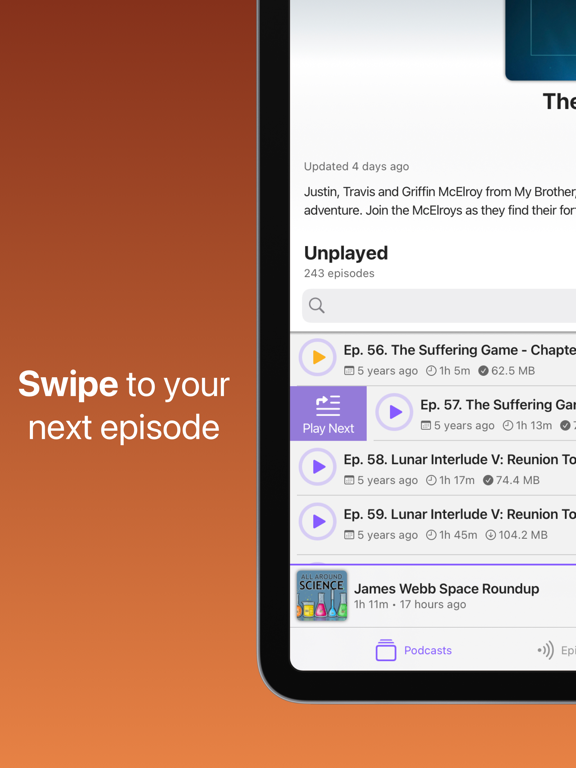
Pricing & paywalls
App Store
- Mimir Subscription — $12.49/year ($1.04/mo) (derived from the IAP title)
Ratings & reviews
App Store
-
3/5Continued Bugginess Holds Mimir Back
I really like the layout and design of the Mimir app. Unfortunately it continues to have bugs that make it a less-than-ideal experience. For example, when opening the app in CarPlay, the “Now Playing “ app often won’t play; a work-around that sometimes works is to manually play the next podcast episode, than go back. Another example: when managing podcast episodes (especially if you’re managing several at a time), the player interface may freeze momentarily or not reflect your changes. This often necessitates restarting Mimir. All of the little quirks together add up to an often frustrating experience. Finally, I like the recent swipe interface changes to play next/last, and Mark as played/remove from playlist. That said, I’d like to see that expanded to the Now Playing/Next screen instead of only being accessible within each individual podcast.
CCfmATL · 7 Aug 2026
-
4/5a very small feature idea
Coming from old iTunes-based podcast listening. I use a non-Apple mp3 player (I don't carry a phone, long story). Since Apple's Podcast app is so over-simplified and user-hostile, and its display of information is so graphic based (I prefer dense text), I gravitated quickly to Mimir. I've only used it three times, but so far so gool Suggestion: I'd like to restrict the display of recent episodes of each podcast, to say, the ten most recent. This lets me focus on relevant items, yet still maintains high density of information. Thanks for the app! I'm considering upgrading to Pro, but want to use it a while longer.
KilroyWasHere0000 · 7 Aug 2026
-
5/5Impressive and Feature Rich Desktop Podcast App
Disclaimer, I am not a podcast listener on my iPhone, but rely on my Mac to transfer podcasts to a clunky USB memory stick I play in a very old car radio. Tired of the routine, I was looking for a new robust MacOS Desktop App that would make my “drag and drop” ritual a bit easier. Thus, I visited Mr. Google and came across Mimir. I had never heard of it and was reluctant to try an untested third-party app. However, it WAS on the Mac App Store and the few ratings looked decent. The free trial helped and I pulled the trigger. 24 hours later I could not believe I had lived so long without Mimir. It provided solutions to problems I didn’t even know I had. Mimir is everything I could ever want in a DESKTOP podcast app. I can download podcasts willy-nilly, find the ORIGINAL files on my computer, choose where my podcasts are saved (I like to save straight to my iCloud drive), create intricate playlists with auto-queuing set by MY priority levels, select a bunch of podcasts at once and mark them played/unplayed/download/delete etc.. The recommendations feature (free trial and then subscription is needed) is shockingly good and gives the incumbent podcast app search feature a run for its money. And guess what? You can still search in Apple’s app and then simply paste in the feed URL into Mimir if you prefer the depth of Apple’s recommendation algorithm. My final worry was conquered when I tried to put my PAID Wondery podcast streams into Mimir. Easy! Took the URL feeds and Mimir provides me delicious ad-free Wondery content automatically. One final note, check out how often this app is updated. It is clearly being tended to and lovingly cared for by its coder(s). Bought a yearly subscription and haven’t looked back.
The Orange Lobster · 7 Aug 2026
-
3/5A hidden gotcha with iOS.
In many ways, this looks like a promising app, so promising I decided to purchase the desktop app. Since I am trying to get away from subscriptions, I opted for the one-time purchase. When it caame time to set up the iOS version, I figured: why not? And went to purchase the iOS app even though it is in beta. Much to my chagrin, the single Pro version does not remove ads, which is really annoying. If I had known that, I would have just opted for the subscription for both. So I knowed off a start because it should be abundantly clear what is, and is not, included on each version of the app, so a user can make an informed purchasing decision.
Araquen · 7 Aug 2026
-
4/5Almost the best
So far Mimir is almost the best podcast app I've used. The only one that edges it out is Overcast, except that Overcast doesn't have a reasonable desktop app. A few changes would put Mimir on top for me: 1. A native CarPlay interface. 2. The ability to automatically download new episodes, right now they can be set to download when played, when queued, or not at all. 3. The big one: The Continuous Play is great, but I'd love to be able to set it to only add episodes to the end. For example: If Podcast A has 10 episodes that should sort higher than everything else, but I have it set to only show 1 of them, it will show that one episode and then episodes of different podcasts. However, when that 1 episode ends, it will insert the next episode of Podcast A into the queue in sort order, rather than at the end of the list. That means that even though I initially only see that 1 episode in the upcoming list, it will play all 10 episodes before getting to the rest of the list. I would like it to instead play through what's already shown and any new episodes at the end. Otherwise, I'm not sure what the point of respecting the episode limit is, since all it does is not accurately show you what it will actually be playing. Those first two features would put it on par with Overcast's features. That third would make it the best by far. EDIT: Great to hear that these features are being worked on. I like Mimir a lot, and being able to switch seamlessly between iOS and MacOS is a killer feature. Looking forward to future updates!
JClark · 7 Aug 2026
Privacy & accessibility
App Store
Privacy
- Data Not Linked to You — Analytics — Diagnostics — Crash Data Developer declared
- Data Not Linked to You — Analytics — Identifiers — Device ID Developer declared
- Data Not Linked to You — Analytics — Purchases — Purchase History Developer declared
- Data Not Linked to You — Analytics — Usage Data — Product Interaction Developer declared
- Data Not Linked to You — App Functionality — Diagnostics — Crash Data Developer declared
- Data Not Linked to You — Diagnostics Developer declared
- Data Not Linked to You — Identifiers Developer declared
- Data Not Linked to You — Purchases Developer declared
- Data Not Linked to You — Usage Data Developer declared
Accessibility
No accessibility labels collected yet.
Versions
App Store
-
1.0.2
- Hotfix to resolve issue with curated list feed loading
-
1.0.3
This update improves support for Setapp integration: - Adds user feedback when unlocking premium features, or encountering issues - Updates the purchases view to reflect when features have been unlocked via Setapp - Fixes a text wrapping issues on the purchases view for iOS 14 users
-
1.1.0
Happy New Year! Mimir is starting off 2023 with a big update that adds a new Downloads view and a reworked custom audio player that fixes many playback issues for a solid playback experience. Thank you for your support while I continue to update the app to make it a great podcast player. Expect to see many new updates coming this year! New Features: Audio Player 2.0 - Internally reworked to be much more stable and accurate - Added an AirPlay menu to the main player controls - Improved controls for Bluetooth headsets (e.g. Airpods) with skipping forward/backward in an episode - Many bugs fixes and stability improvements Automatic Downloads - Enabled in Podcast Settings, Mimir will now download new episodes added to the feed for your selected podcasts - This setting syncs with other devices Added a new Downloads view to the tab bar. From here you can see all files that have been downloaded and manage your downloads. - View a summary of the number of files and total space used - View downloads organized by podcast - Search to quickly find downloaded episodes - Sort by most file size, number of files, or podcast title - Quickly remove individual files, all files for a podcast, or all downloads in the library. Bug Fixes: - Updated the Setapp SDK. This should fix issues some users were having activating the app from their Setapp account. - Fixed an issue where a separate download could start when the audio player also downloads the same file. This fixes issues with studdering audio when loading a new episode on a poor network connection. - Fixed an issue that kept downloaded files on disk longer than they should because they were not being properly marked as played. - Fixed a crash that could occur when reading data that caused a race condition - Fixed a memory leak that could occur when parsing audio data packets - Fixed issues where the episode could complete too early when skipping forward - Fixed a crash that could occur when updating the recommendations view - Fixed an issue where a separate download could start when the audio player also downloads the same file. This fixes issues with studdering audio when loading a new episode on a poor network connection. - Fixed an issue where audio from the beginning of the file could be played when the player is rebuilt from an audio session interruption - Fixes an issue where some podcasts would appear as though they did not import from an OPML file or Apple Podcasts if the title of the podcast did not match the RSS feed title. - Fixed an issue where the keyboard page would reset when entering numbers on the podcast detail page when searching episodes - Fixed an issue where all play icons for episode lists would show an error state if the current playing episode failed playback - Fixed an issue where the wrong podcast image would continue showing when switching playing episodes and the incoming image was slow or failed to load - Fixed a button alignment issue in the Up next playlist rows - Fixed an issue where a second podcast entry could be created in the library when the RSS feed changed the podcast title
-
1.10.0
· 25 Jul 2026
Podcast Seasons Release 1.10.0 New Features Podcast Seasons: For podcasts that publish seasons, browse by season, play or queue an entire season, and choose a season as a Continuous Playback source. Improvements Episode List Header: See how many episodes are shown versus the total when a filter, search, or season narrows the list, along with a clearer filter and sort caption. Bug Fixes Fixed a crash that could occur while the library was updating in the background. Fixed blank refresh buttons on iOS 17.
-
1.1.1
Today's update is a small one to fix a couple minor issues with the audio player. - Fixes a crash that could occur from a race condition in the audio player - Fixes an issue where the audio player could keep audio hardware running when paused, using more energy than necessary
-
1.2.0
This update introduces Continuous Playback modes (Append, Shuffle, Legacy), Return to Queue feature for interrupted episodes, updated Playlist Sidebar UI with new buttons and settings, improved performance with bug fixes and changes to the audio player, and podcast feed updates. I hope you like the updates! -Grant New Features: • Added Continuous Playback Modes - Append Mode: An initial playlist is generated and suggested episodes are appeneded to the end of the Continuous Playback playlist. Pressing the refresh button will return the playlist to its original order. - Shuffle Mode: Episodes that would normally display in Continuous Playback are shuffled for a randomized playlist and new episodes are appended to the list. Pressing the refresh button will generate a new randomized list. - Legacy Mode: The classic sorting style. Episodes are sorted in a standard fashion, and when sorting by highest priority, episodes will always retain their position in the playlist based on their priority. • Return to Queue - You can now automatically have an episode return to the top of the Up Next playlist when it is interrupted and has not yet finished playing. - Added a button to enable this feature in the Settings > Playback preferences - Added a button to the current playing episode cell to stop playback and return the episode to the top of Up Next • Background Updates - The app now fully supports background tasks to perform feed updates while not using the app. Changes: - Added new refresh button to Continuous Playback list - Added append mode selection to Continuous Playback settings - Added new "rating request" alerts that will gently ask users to write a review. Users will be prompted for a review after 3 app launches and asked again every 2 weeks if they choose not to. - Improved logic around updating subscribed podcast feeds - Fixed a crash that could occur when the audio player is interrupted by another audio source - Fixed issue with the mini player queue count circle not looking very circle-like - Fixed an issue where the audio player could end episodes early if it received a `contentLength` that was smaller than the actual audio file
-
1.3.0
CarPlay support is now available! This update brings the familiar Mimir interface to your car so you can manage podcast playback on the go, as well as a bunch of fixes for the most annoying iCloud and audio player bugs. The new CarPlay interface includes the following tabs and features: Playlist - View the playing episode, Up Next, and Continuous Playback playlists - Play episodes from Up Next or Continuous Playback - Clear currently playing episode - Clear the Up Next queue Podcasts - View the groups and podcasts in your library. (The number of subgroups may be limited by your CarPlay device.) - Quickly change library sorting - View and play podcast episodes Episodes - View and play episodes from: - Just Added - Highest Priority - Favorites - Downloaded - Continue Listening - Recently Played Settings - Enable Continuous Playback - Enable Return to Queue - Change Skip Forward/Backward seconds - Enable Audio Effects (Silence Skip, Skip Sound, Voice Boost) Other changes and fixes: - Improved caching of network requests - Improved the loading performance when first opening the episodes tab for large libraries - Fixed issue with in-app purchase buttons not working - Fixed issue with error alerts stacking when multiple errors occur. New error alerts will only display when no other error alert is present. - Fixed a rare crash that could occur when scheduling updates - Fixed a sync issue when importing playlist items on a device that is missing the episode because the feed is out of date - Fixed an issue where private feeds could not load when the device was locked - Fixed a rare crash that could occur when updating podcast feeds - Fixed an issue where an episode synced to another device would not automatically download - Fixed an issue where an episode with a previous playback position could start back at the beginning when played again - Fixed an issue where pausing the player could incorrectly adjust the timeline position - Fixed an issue where an interrupted download could load audio from the beginning of the file when resuming playback - Fixed a crash that could occur when displaying the activity HUD when performing import or export library actions - Fixed a crash that could occur when applying colors to the airplay button - Fixed issue seeking to the correct player position when changing to a new episode - Fixed issue with audio skipping backward when switching audio devices
-
1.3.1
This update includes a quick hotfix for a couple player issues: - Fixed issues where the Now Playing play/pause button in Control Center would not match the player - Downloaded, local files should now use more accurate duration values as compared to the estimated durations used when we don't know the full size of the uncompressed audio.
-
1.3.2
- Fixed an issue unlocking premium features from Setapp activation links - Fixed an issue refreshing the playlist in CarPlay when hitting X on the playing item
-
1.4.0
This relatively small release includes some new sharing features, UI improvements, and bug fixes. You can now share links to episodes or podcasts through various sharing services. In a future update I plan on adding support for sharing to specific timestamps, or sharing a short audio clip. - Added share actions to context menus when long pressing episodes or podcasts in the library or episode tabs - Added a "more" button to the podcast detail with several actions: Share podcast, Refresh Feed, and Settings - Added a "more" button to the Now Playing view's navigation bar with several actions: Share, Return Episode to Queue, Clear Now Playing - Added some user reviews to the purchases window. Thanks for all the stars! - Fixed an issue where the last publish date for a podcast could show "53 years ago" - Fixed issue with Now Playing view not updating when clearing the current episode - Fixed a memory leak that could lead to a crash from download operations
-
1.4.1
This update includes a few fixes to some of the most common crashes and bugs in the app. - Fixes a crash that could occur when opening a share link - Fixes a crash that could occur when downloading an episode - Fixes a crash that could occur when searching for episodes in the podcast detail - Fixed the copyright date on the launch screen - Fixed an issue where filtering downloaded episodes would show episodes previously downloaded but have since been deleted
-
1.4.2
- Fixed a bug that could delete a previously downloaded file when loading the player - Updated the swipe action for episode cells in Downloads with a "Delete File" action - Removed all ads
-
1.4.3
- Added a CarPlay setting to only show unplayed episodes in the Podcast Library - Fixed a bug that could delete a previously downloaded file when loading the player - Fixed an issue where the media player downloading a partial file when the episode had a playback position
-
1.4.4
- Fixes for iOS 18 - Fixes for various UI alignment issues - Fixes issue where downloaded files would not be deleted on a synced device when another device removes episodes from the playlist
-
1.5.0
New Features - Custom Podcast Settings: Each podcast can now be configured with different settings for skip forward/backward seconds, silence skip, voice boost, and playback speed. These can be configured from podcast settings or from Now Playing. - Fresh New Designs: The main player, podcast view, episode view, and navigation buttons have been given a new vibrant look with better readability and usability - New Sleep Options: You can now choose to sleep the player after 10 minutes, 15 minutes, or once an episode finishes playing - New Up Next Playlist Swipe Actions: Quickly remove episodes from Up Next, or enqueue episodes from Continuous Playback with a swipe. - New Long-Press Options: You can now long press buttons in the player controls to set skip seconds, playback speed, and silence skip options. Bug Fixes - Fixed issues properly sizing cells when scrolling a lists - Fixed an issue where more than one download could start for queued episodes when launching the app - Fixed issues with downloaded episodes were not being deleted in certain cases - Fixed an issue in the mini player where the queue count text could become very, very tiny - Fixed issues displaying an error alert message for superfluous sync errors - Fixed an issue with the navigation bar not appearing translucent when scrolling making visibility difficult - Fixed an issue where skipping forward at the end of the episode would not seek to the end - Fixed issues where the episode might end too early before playing all audio - Fixed a crash that could occur when switching audio devices
-
1.5.1
Minor release that fixes issues for Setapp users when activating pro features
-
1.6.0
- iOS 26 Liquid Glass support - New app icon! Now support light, dark, clear, and tinted variations - Improved gesture support on the now playing and episode detail views to bring up and dimiss the bottom sheet - Fixed an issue where temporary audio files were stored longer than needed
-
1.7.0
NEW FEATURES - Completely rebuilt cloud sync engine for faster, more reliable syncing of podcasts, playlists, playback progress, and settings across all your devices. - Added a new podcast identifier system so custom podcast names and multiple podcasts with the same name are saved correctly across devices. - Rename any podcast with a custom title that syncs across all your devices. - Added a "What's New" screen that highlights changes after each update. Revisit it anytime from Settings. - The app now alerts you when system notification badge permissions are disabled and prompts you to enable them. - Redesigned Voice Boost for smoother, more consistent loudness across all slider positions. IMPROVEMENTS - Marking all episodes as played or unplayed is now significantly faster, especially for podcasts with many episodes. - Episode descriptions now render more accurately with improved HTML and Markdown processing. - Podcast artwork loads faster and uses less memory. - The unplayed episode badge count is now more accurate and updates properly after batch operations. - Playback position updates from other devices are applied more reliably. - Updated fonts with a refined type style system for a cleaner, more consistent look. - Refined background colors and layout spacing for a more polished appearance. - Improved background feed refresh so new episodes are ready when you open the app. - Podcasts with feed errors now show a visible indicator so you know when something needs attention. - VBR MP3, AAC, and M4A files now show accurate durations much earlier during playback. - CarPlay now properly pauses podcast playback for interruptions like text messages and turn-by-turn directions. BUG FIXES - Fixed errored podcast feeds becoming hidden and inaccessible. - Fixed a crash when navigating between views. - Fixed playback progress sometimes not updating correctly from cloud sync. - Fixed the downloads list not refreshing after cloud-triggered downloads. - Fixed continuous playback not starting correctly on app launch. - Fixed swipe actions conflicting with back swipes on iOS 26. - Fixed HTML decoding for episode descriptions. - Fixed playback ending slightly before audio finished, especially on Bluetooth devices. - Fixed an audio glitch when seeking in MP3 and AAC files. - Fixed a brief burst of audio from the start of a track when resuming from a saved position. - Fixed several memory leaks that could prevent the player from being released properly. - Fixed a data race that could cause incorrect speed calculations.
-
1.8.0
New Features - Intro And Outro Skip — Choose how much to skip at the start and end of each episode from each podcast's settings. Available for Pro and Premium users. Improvements - Now Playing Scrubber — The progress slider now updates the timestamps during drag and is smoother when seeking to a new position. - Downloads Sorting — Your preferred sort order in the downloads list is remembered. Bug Fixes - Fixed incorrect interface scaling on iOS 26 that affected share sheets. - Fixed a crash that could occur when playing some audio files.
-
1.8.1
Bug Fixes - Fixed an issue restoring the last playback position for free users
-
1.8.2
Bug Fixes - Fixed issues playing some M4A audio files - Fixed a crash that could occur when trying to sync episodes with very long identifiers
-
1.8.3
AUDIO BUG FIXES Recently I've been working on adding support to play additional audio file types other than the standard MP3. This lead to new bugs popping up, and I had to do some pretty big architecture changes to get everything happy. This update should bring the player back to a stable place while also expanding support for more audio types. If you still are having issues please email [email protected] - Improved audio playback stability when playing non-MP3 files - Fixed a bug where seeking forward/back could adjust the position by 2x the correct amount - Fixed playback issues when seeking forward/back that could put the player into an error state
-
1.8.4
- Fixed a crash when opening the app using iOS 27 Beta - Fixed an issue where the audio player could stop playback after finishing downloading the file - Fixed an issue where the audio player advance to the next track when first loading
-
1.8.5
Fixed an issue where in-app purchases were not displaying
-
1.9.0
- Added more playback speeds. You can now choose from a new set of default speeds, or enter your own desired speed from 0.5x-3.0x using 0.1 increments. - Fixed an issue with the audio player where some audio formats using formats other than 44k sample rates could skip forward to the wrong position
Alternatives
- Lysten: Podcast Player — Same category + similar ratings
- Pods- Podcast Player — Same category + similar ratings
- Shadow. Podcast Player — Same category + similar ratings
- iCatcher! Podcast Player — Same category + similar ratings
- Podcast Guru - App & Player — Same category + similar ratings
- Moon FM - The Podcasts App — Same category + similar ratings
Availability by market
- US
Data quality & evidence
- Page completeness
- Live store listing
- Last verified
- 7 Aug 2026
- Sources
- App Store
- Independent summary has not been published yet.