
Quick verdict
- What it is
- Store information collected; independent summary not yet available.
- At a glance
-
- Free (App Store) · Free (Google Play)
- In-app purchases
Categories and search queries
Official categories
- Personalization
- Utilities
- Productivity
AppCorpus categories
Key functions
| Function | Availability | Access | Scope | Evidence |
|---|---|---|---|---|
| Free app | Yes | Free | — | Store published |
| In-app purchases | Yes | Limited free | — | Store published |
Screens
20 store screenshots


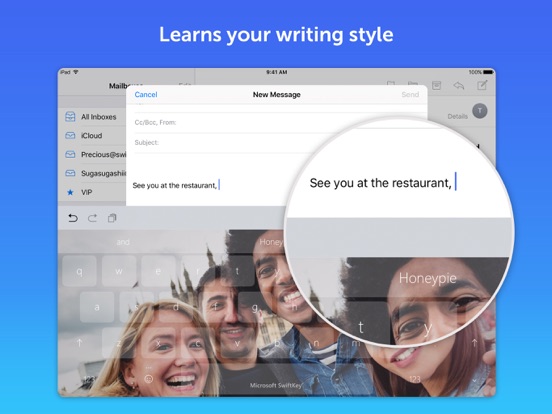
8 store screenshots
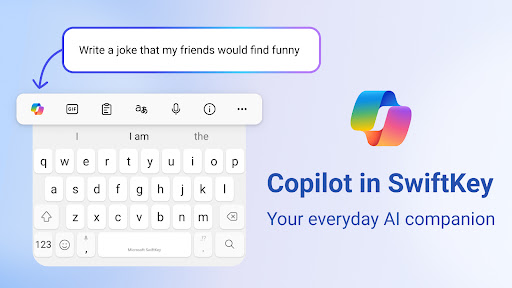


Pricing & paywalls
- Bubble Gum theme — $0.00
- Minimal Aqua theme — $0.00
- Minimal Blush theme — $0.00
- Minimal Carbon theme — $0.00
- Minimal Coal theme — $0.00
- Minimal Iceberg theme — $0.00
- Nickel Dusk theme — $0.00
- Nickel Rose theme — $0.00
- Nickel Watermelon theme — $0.00
- Shooting Stars theme — $0.00
- Free to download
Ratings & reviews
-
5/5Must have for anyone who has an electronic device!
I've been using SwiftKey for a few years now. I started with my cell phone and now I have it on all 7 devices we have in our home. It's a must have for anyone who can appreciate just how much it does and without even realizing. It keeps track of your choice of words and easily guesses and or auto corrects as you go. Can't begin to imagine how much time just that alone has saved me/my family over the years. It does it with such accuracy that when I had to use someone else's device I was amazed. I didn't realize how much this simple app did for me in my every day typing of texts, sending emails, even searching the web. It took all of 30 seconds into using my friends tablet for me to stumble over such basic words, but in a good way. I'd gotten so used to SwiftKey guessing my desired word after only the first or second letter. I recommend SwiftKey to anyone who has an electronic device used for texts, emails, notes, calendars, and any and everything in between and can appreciate the time this app saves you. I'm team SwiftKey 1000% and I never take the time to leave reviews for anything. I mean ever which clearly shows just how awesome this app is. You will not be disappointed!!!
SuzieJenke1 · 2 Sep 2026
-
3/5Better than the worst, better than GBoard
The settings were really irritating because they didn't cover enough for me.... You are limited to two languages, you cannot customize or add or remove anything and are stuck with what is provided. The number row is basically the only reason to buy and use this keyboard... You can just use ChatGPT in your browser, and it has absolutely no integration with real clipboard apps like Copy Better and Snippety. It feels good like the iOS keyboard; Swype does not feel as good although it does work (and autocorrect is better) and Swyping is uglier than on the iOS keyboard. The more you use the keyboard, the better it gets, but you'll never be able to fix the main issues like key misplacement (commas and other special characters are stuck inside the 123). I wish the icon itself looked better and that the app was more useful and looked better. If I was Microsoft, the app itself would at least be ChatGPT and the settings would go into the details of your typing and so on (what the app is now). I hate to have an icon I'll never (want to) open! MICROSOFT READ THIS CAREFULLY: *I wish/demand that I could not be limited to moving the cursor from just the keyboard! At one point there was a beta or final version of iOS that allowed the cursor to be moved anywhere on the screen from anywhere on the keyboard AND THIS NEEDS TO COME BACK*. At the very least, I would like the ability to press into my keyboard ANYWHERE besides just the spacebar to move the cursor. Thanks!
YesImBiased · 2 Sep 2026
-
3/5Completely Ruined!
Been using this app since way before Microsoft bought it. And I didn't even mind the little label on the space key that says "Microsoft SwiftKey". But the new toolbar is horrific. First there is an ugly square button on the left (btw... it doesn't even match any of the keyboard themes) for Bing. Bing. Really? The one search engine that no one likes. And also there is no way to remove the button or even allow you to change it to a real search engine. The center of the toolbar now has a border which is ugly and they added an icon menu on the right that doesn't even do everything the original toolbar could do and now I have to press another button. Stop forcing Bing on people and don't fix what isn't broke. I'm praying this is just a nightmare and that everything will go back to normal by the next update or I'm shopping for a new keyboard. Addendum… You made the button a little more theme-friendly, but I still don't want it. And if you read EVERY other review since you added it, I am clearly not alone. Nobody wants Bing and NO ONE wants to be forced into it. Everyone has their preferred search engine. This is also why so many people are switching to Mac. No one wants to be forced into anything. This is wrong! Fix it! Update: Increasing to 3 stars as they at least have an option to remove that dumb button to that search engine that no one likes. But stop making changes now! Just fix the bugs and be done with it.
Scottie NH · 2 Sep 2026
-
1/5Not as useful to me as word flow
1) Misses a lot of words; for instance i can't even simply type "you're" (i don't rely on auto correct and as you can see from this, Swype doesn't properly capitalize "i" like word flow did, it also doesn't space words properly but it does get apostrophes right. 2) Requires full keyboard access just to use the swiping feature. Blah. 3) There's a third thing but i forgot what it is since these keyboards mess up my train of thought with their problems. Word flow didn't do that. Yeah, i would use word flow still if it worked on my iPhone x but i had some issues so tried to check this out. Back to Swype i guess. Edit: The “team” responded to my review after SIX YEARS. As we know, MS often changes the features and abilities of apps, adding and removing features as they go along like they’re throwing things at the wall to see what sticks. The point being a review from six years ago is hardly relevant, why are you wasting time now addressing only the smallest issue I brought up (#2) in the review? I’ll add a new negative note that I thought of it, the amount of space available for your app is reduced because this keyboard uses more space. Some apps don’t like that, putting things you need to see while typing i’m the covered area. It appears this is not configurable in the keyboard to turn off unused features if you’re only trying to get swiping, but Apple includes that now (except for the aforementioned ability to recognize and capitalize “I”).
DJ Scorchie · 2 Sep 2026
-
5/5Julie silvey
I have used SwiftKey for many many years, even before it was strictly for Microcsoft! It did not have as much to offer like now. But it was a super keyboard with the changeable screens to personalize to your liking! Plus you have added some extras like the moving or active screens. I do wish though that we could customize the shapes outlines of the buttons and the colors of the buttons & make them a separate color than the screen! I do have other keyboards that you can do that and it makes it so much better seeing while typing! And it seems like you use to be able to change the color of the keyboard with your own imagination, which I have an extremely active & a beautiful one. It has been a gift from GOD as I see it and according to over 6 various Therapists & Psychiatrists that have treated me over 35 years due to severe Post Traumatic events, they have said that to me. A gift in exchange for all the Terror I have been through. Just one more thing would be, if we could also be able to change the fonts on the keys as I also do Word Art! I know it is possible to get as I have a few that allow me do that. Thanks again for making it available for Apple users!!! >Jackee_Blooze🌳🌿🍃
Jackee/Bleu · 2 Sep 2026
-
5/5
Love it been using it for years
Lin Khoo · 1 Aug 2026
-
1/5
App is amazing.I don't even have trouble with the emoji section now.But a bigger problem remains: the ai features.I've been using this app for many years on multiple devices and it worked perfectly fine without ai.Microsoft users don't even get the right to decide whether we want ai on our devices or not.Putting ai in a keyboard app is messed up, you literally use it for everything!Since a long while now, this app already takes our typed data and doesn't delete it even if we clear it in settings
Giulia Iannella · 1 Aug 2026
-
1/5
I don't need to signin for my keyboard to work properly, stop the harassment with that question!
Braveheart_Fox · 1 Aug 2026
-
2/5
was my keyboard of choice for many years. However the latest update has made it absolute garbage. Auto features like capitalization, punctuation, and spacing suddenly don't work properly. predictive or autocorrect cause more problems and solve none, I'll spell out a word manually and at the last couple letters it decides to finish incorrectly. but then a single tap of the backspace clears the whole word. many other problems too. I want the old version back
Daniel Brockman · 1 Aug 2026
-
1/5
I keep getting "refresh sign in" message constantly, and it won't let me do it. Incredibly frustrating. Used to be my favourite keyboard but I'm close to uninstalling.
John Smith · 1 Aug 2026
Privacy & accessibility
Privacy
- Data Linked to You — App Functionality — Contact Info — Email Address Developer declared
- Data Linked to You — App Functionality — Identifiers — Device ID Developer declared
- Data Linked to You — App Functionality — Identifiers — User ID Developer declared
- Data Linked to You — Contact Info Developer declared
- Data Linked to You — Identifiers Developer declared
- Data Not Linked to You — Analytics — Usage Data — Product Interaction Developer declared
- Data Not Linked to You — App Functionality — Diagnostics — Crash Data Developer declared
- Data Not Linked to You — App Functionality — Diagnostics — Other Diagnostic Data Developer declared
- Data Not Linked to You — App Functionality — Diagnostics — Performance Data Developer declared
- Data Not Linked to You — App Functionality — Usage Data — Product Interaction Developer declared
- Data Not Linked to You — App Functionality — User Content — Audio Data Developer declared
- Data Not Linked to You — App Functionality — User Content — Other User Content Developer declared
- Data Not Linked to You — Other Purposes — User Content — Audio Data Developer declared
- Data Not Linked to You — Diagnostics Developer declared
- Data Not Linked to You — Usage Data Developer declared
- Data Not Linked to You — User Content Developer declared
Accessibility
No accessibility labels collected yet.
Privacy
- Data collected — Advertising or marketing, Personalization — Device or other IDs Developer declared
- Data collected — Analytics — App activity — App interactions Developer declared
- Data collected — Analytics — App info and performance — Crash logs Developer declared
- Data collected — Analytics — App info and performance — Diagnostics Developer declared
- Data collected — App functionality — App activity — Other user-generated content Developer declared
- Data collected — App functionality — Photos and videos — Photos Developer declared
- Data collected — App functionality, Account management — Personal info — User IDs Developer declared
- Data collected — App functionality, Advertising or marketing — Location — Approximate location Developer declared
- Data collected — App functionality, Advertising or marketing — Location — Precise location Developer declared
- Data collected — App functionality, Advertising or marketing, Personalization — App activity — In-app search history Developer declared
- Data collected — App functionality, Analytics — App activity — Installed apps Developer declared
- Data collected — App functionality, Personalization, Account management — Personal info — Email address Developer declared
- Security practices — Your data is transferred over a secure connection — Data is encrypted in transit Developer declared
- Security practices — The developer provides a way for you to request that your data be deleted — You can request that data be deleted Developer declared
Accessibility
No accessibility labels collected yet.
Versions
-
4.1.0
General improvements to ensure your Microsoft SwiftKey Keyboard runs smoothly.
-
4.1.1
General improvements to ensure your Microsoft SwiftKey Keyboard runs smoothly.
-
4.1.2
General improvements to ensure your Microsoft SwiftKey Keyboard runs smoothly.
-
4.1.3
General improvements to ensure your Microsoft SwiftKey Keyboard runs smoothly.
-
4.1.4
General improvements to ensure your Microsoft SwiftKey Keyboard runs smoothly.
-
4.1.5
General improvements to ensure your Microsoft SwiftKey Keyboard runs smoothly.
-
4.1.6
General improvements to ensure your Microsoft SwiftKey Keyboard runs smoothly.
-
4.1.7
General improvements to ensure your Microsoft SwiftKey Keyboard runs smoothly.
-
4.1.8
General improvements to ensure your Microsoft SwiftKey Keyboard runs smoothly.
-
4.1.9
General improvements to ensure your Microsoft SwiftKey Keyboard runs smoothly.
-
4.2.0
General improvements to ensure your Microsoft SwiftKey Keyboard runs smoothly.
-
4.2.1
General improvements to ensure your Microsoft SwiftKey Keyboard runs smoothly.
-
4.2.10
General improvements to ensure your Microsoft SwiftKey Keyboard runs smoothly.
-
4.2.3
General improvements to ensure your Microsoft SwiftKey Keyboard runs smoothly.
-
4.2.4
General improvements to ensure your Microsoft SwiftKey Keyboard runs smoothly.
-
4.2.5
General improvements to ensure your Microsoft SwiftKey Keyboard runs smoothly.
-
4.2.6
General improvements to ensure your Microsoft SwiftKey Keyboard runs smoothly.
-
4.2.7
General improvements to ensure your Microsoft SwiftKey Keyboard runs smoothly.
-
4.2.8
General improvements to ensure your Microsoft SwiftKey Keyboard runs smoothly.
-
4.2.9
General improvements to ensure your Microsoft SwiftKey Keyboard runs smoothly.
-
4.3.0
- As announced via email you can now back up your data securely to your Microsoft OneDrive. - Stability and performance improvements across the keyboard experience.
-
4.3.1
- As announced via email you can now back up your data securely to your Microsoft OneDrive. - Stability and performance improvements across the keyboard experience.
-
4.3.2
- As announced via email you can now back up your data securely to your Microsoft OneDrive. - Stability and performance improvements across the keyboard experience.
-
4.3.3
General improvements to ensure your Microsoft SwiftKey Keyboard runs smoothly.
-
4.3.4
· 13 Jul 2026
General improvements to ensure your Microsoft SwiftKey Keyboard runs smoothly.
-
4.3.5
· 25 Aug 2026
- New Liquid Glass theme - General improvements to ensure your Microsoft SwiftKey Keyboard runs smoothly.
- 9.13.11.5 · 21 Jul 2026
- 9.13.14.5 · 19 Aug 2026
Availability by market
- US
Data quality & evidence
- Page completeness
- Live store listing
- Last verified
- 2 Sep 2026
- Sources
- App Store, Google Play
- Independent summary has not been published yet.