
Quick verdict
- What it is
- Store information collected; an Apoku editorial summary is not yet published.
- At a glance
-
- From $0.83/mo
- Free download · core features require a paid plan
- In-app purchases
Categories and search queries
Official categories
- Graphics & Design
- Utilities
Apoku categories
Key functions
| Function | Availability | Access | Scope | Evidence |
|---|---|---|---|---|
| Free app | Yes | Free | Context-specific | Store published |
| In-app purchases | Yes | Limited free | Context-specific | Store published |
| Subscription | Yes | Paid | Context-specific | Store published |
| Family Sharing | Unknown | Unknown | Scope unknown | Store published |
Screens
App Store
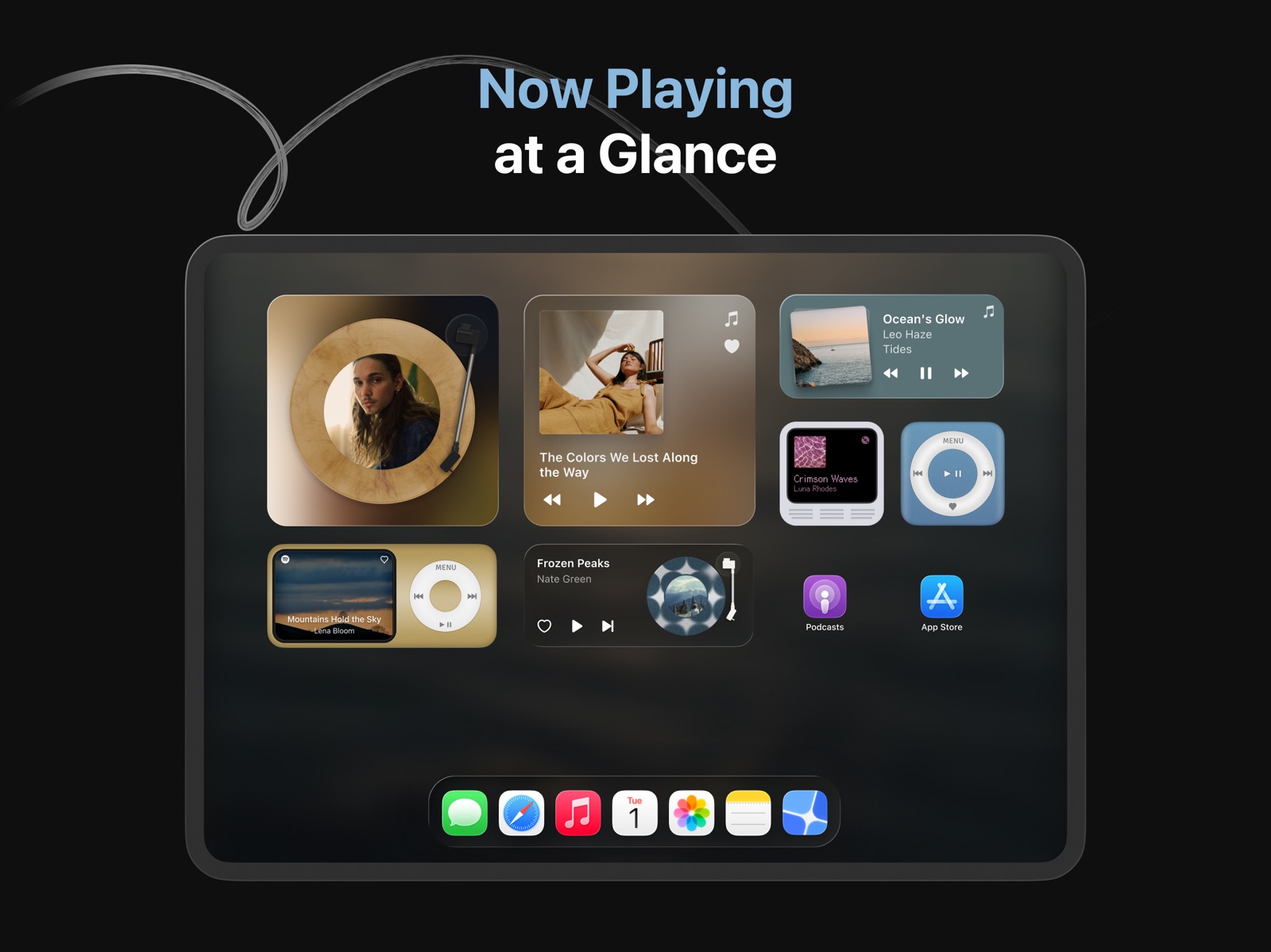
20 store screenshots


Pricing & paywalls
App Store
- MD Widgets Pro ( ) — $9.99/year ($0.83/mo) (derived from the IAP title)
Ratings & reviews
App Store
-
4/5Wallpapers
I love this app, from the invisible widget name to the positioning and alignment of the widgets themselves. This app works seamlessly when editing my widgets. I only have one problem. Customization is really what this app is all about. Personally, I’m using focus modes to change the aesthetic of my phone buy changing the wallpaper. Unfortunately, when I do this, the widgets will stay on the previous image. What would make this app great would be if there was a way to have multiple widgets with multiple images. What I mean by this is to have one image selected for some widgets, then have another image selected for other widgets, and have both widgets be working on the same home screen (really just at the same time). By implementing this feature, this app would be perfect for customization and multiple wallpapers. I hope the developers see this comment and take the opportunity to better this app.
y=6.9x+420 · 31 Jul 2026
-
2/5Disappointed
It works perfectly fine but there is only 3 analog clocks to choose from and they are all ugly. There isn’t even a clock with a circular border, you know like a clock 🕝. I’m disappointed, it seemed like there was a lot of customizability looking through the gallery but really it’s a lot of the same assets with different color schemes. There’s plenty of fonts for the text widgets, that’s nice. But yeah 3 analog clocks just called “watch” in the app, (on that note if they’re supposed to be “watches” then there’s just no clocks at all?) I don’t know, also it’s the same 4 themes for every widget in every category! If 2 of them are ugly that’s half of the whole catalogue, and they are! At least 2 are ugly and the other 2 are nearly identical except one is rounded at the edges and the other one is squared. I bought pro but I was deciding between this one and another blank widget app now I wish I had gone with the other one. I checked and it has so much more options now! I would not recommend this app to anyone, a standard analog clock is like the bare minimum of widgets and it doesn’t even have that. I hope more is added soon because that’s just not cool you guys.
Malice Fortune · 31 Jul 2026
-
3/5Multiple Issues
Overall the idea is there, but the execution is not. Don’t get me wrong, if you use one wallpaper only, it works very well. But, after trying to use multiple wallpapers through their suggested method of using focus modes, the transparent widgets would not sink up with the wallpaper after activating a focus mode and would instead stay as the last wallpaper. Also, there are very few widgets to choose from and most of those I believe would not appeal to most. However, unlike multiple other apps it is very nice that they offer their pro features for only a one time purchase opposed to almost very other app that charges you monthly, annually or give an option for permanent pro features but at a ridiculous price. Only $3 for a pro version seems like it would be an actually good deal but since their app does not work as advertised no money should be spent. I am disappointed after buying the pro version and will ask for a refund that will hopefully get approved. I hope this review helped and have a wonderful rest of your day!!
Joeshiah Barrios · 31 Jul 2026
-
5/5Great customization, seamless Home Screen
I downloaded this app in hopes to clean my home screen of the text clutter that you get from “normal” widgets. Shortcuts allow you to remove text from apps, but not widgets. I’m glad the devs of this app have found a work around while implementing innovative solutions to give the user limitless creative control. The free version is very fair in what functionality you’re provided to start; and the price for lifetime access for pro is quite good too. The user interface takes some getting used to at first. I had to tamper with it for awhile, but once you get a hang of it it’s very user friendly. On screen tutorials would be beneficial for some functions. Something I would recommend that I would like to see is the option to change the time format from 24 hours to 12 hours in the clock and Iboard widgets. Otherwise, phenomenal app!
B1RDM4N! · 31 Jul 2026
-
4/5Mostly love this app!
I’ve been using the widgets for over a year but noticed some glitches lately with iOS 18! Wanted to review so the developer knows in case they are able to combat this update. I setup the tinted home screen a few days ago which changes all widgets and apps to one color, and it worked for 1-2 days with my transparent widgets, but now the last 2 days it has been glitching and not working with transparent widgets and turns them to default black background (system dark mode). I know iOS 26 will be dropping soon so I’m sure more bugs will happen with their new liquid glass feature but hopefully this app gets an update shortly after that release so we can continue using transparent backgrounds along with tinted home screens!
Krista4ever · 31 Jul 2026
Privacy & accessibility
App Store
Privacy
- Data Not Linked to You — Analytics — Diagnostics — Crash Data Developer declared
- Data Not Linked to You — Diagnostics Developer declared
Accessibility
- Dark Interface — SUPPORTED Store published
- Differentiate Without Color Alone — SUPPORTED Store published
- Sufficient Contrast — SUPPORTED Store published
Versions
App Store
-
3.10
- Enjoy a refreshed look with the new Liquid Glass design.
-
3.10.1
- Enjoy a refreshed look with the new Liquid Glass design.
-
3.10.2
- Bug fixes and improvements
-
3.11
- Added 6 new styles for Clock Widget — from bold to minimal. - Improved spacing in Zen Widget on transparent backgrounds. - Improved performance and stability.
-
3.11.1
- Small changes for Xmas & New Year! Recent updates: - Added 6 new styles for Clock Widget — from bold to minimal. - Improved spacing in Zen Widget on transparent backgrounds. - Improved performance and stability.
-
3.11.2
- Small changes for Xmas & New Year! Recent updates: - Added 6 new styles for Clock Widget — from bold to minimal. - Improved spacing in Zen Widget on transparent backgrounds. - Improved performance and stability.
-
3.11.3
- New option to keep Photo Widget photos from changing.
-
3.12
- Introducing Retro Pod: A nostalgic new theme for Music Widget. - Choose from multiple styles and vibrant colors, inspired by the iconic portable music era. Miss the days of carrying your music everywhere? Update now and relive them!
-
3.12.1
- Introducing Retro Pod: A nostalgic new theme for Music Widget. - Choose from multiple styles and vibrant colors, inspired by the iconic portable music era. Miss the days of carrying your music everywhere? Update now and relive them!
-
3.12.2
- Improved performance and stability.
-
3.12.3
- Improved performance and stability.
-
3.12.4
- Improved performance and stability.
-
3.12.5
- Improved performance and stability.
-
3.12.6
- Improved performance and stability.
-
3.12.7
- Improved performance and stability.
-
4.0
Introducing Live Wallpaper in MD Widgets 4.0. - Explore 150+ stunning live wallpapers. - Customize wallpapers with colors, effects, and fine details. - Set wallpapers with a tap using Shortcuts. - Download Live Photos to use as Live Wallpapers. Choose a wallpaper you love, customize it to match your screen, and make it yours. You can try any wallpaper with 3 free tries. We hope you enjoy the new Live Wallpaper experience. If you do, we’d love to hear your thoughts in a review.
-
4.0.1
Introducing Live Wallpaper in MD Widgets 4.0. - Explore 150+ stunning live wallpapers. - Customize wallpapers with colors, effects, and fine details. - Set wallpapers with a tap using Shortcuts. - Download Live Photos to use as Live Wallpapers. We hope you enjoy the new Live Wallpaper experience. If you do, we’d love to hear your thoughts in a review.
-
4.0.2
Introducing Live Wallpaper in MD Widgets 4.0. - Explore 150+ stunning live wallpapers. - Customize wallpapers with colors, effects, and fine details. - Set wallpapers with a tap using Shortcuts. - Download Live Photos to use as Live Wallpapers. - Fixed an issue where widgets might not be saved on iOS 16. We hope you enjoy the new Live Wallpaper experience. If you do, we’d love to hear your thoughts in a review.
-
4.1
- Back up and restore your widgets, wallpapers and controls. Recent updates: - Explore 150+ stunning live wallpapers. - Customize wallpapers with colors, effects and fine details. - Set wallpapers with a tap using Shortcuts. - Download Live Photos to use as Live Wallpapers. We hope you enjoy the new Live Wallpaper experience. If you do, we’d love to hear your thoughts in a review.
-
4.1.1
- Back up and restore your widgets, wallpapers and controls. Recent updates: - Explore 150+ stunning live wallpapers. - Customize wallpapers with colors, effects and fine details. - Set wallpapers with a tap using Shortcuts. - Download Live Photos to use as Live Wallpapers. We hope you enjoy the new Live Wallpaper experience. If you do, we’d love to hear your thoughts in a review.
-
4.2
- Add Glass Background Widgets to your Home Screen — no Clear appearance needed. - Improved the widget experience for smoother everyday use.
-
4.2.1
- Add Glass Background Widgets to your Home Screen — no Clear appearance needed. - Improved the widget experience for smoother everyday use.
-
4.2.2
- Add the new Glass widget to your Home Screen for a Liquid Glass look. - Background options are now easier to use when editing widgets.
-
4.2.3
- Add the new Glass widget to your Home Screen for a Liquid Glass look. - Background options are now easier to use when editing widgets.
-
4.2.4
· 29 Jul 2026
- Add the new Glass widget to your Home Screen for a Liquid Glass look. - Background options are now easier to use when editing widgets.
Alternatives
- LockWidget - LockScreen Themes — Same category + similar ratings
- Photo Widget: Theme Wallpapers — Same category + similar ratings
Availability by market
- US
Data quality & evidence
- Page completeness
- Live store listing
- Last verified
- 31 Jul 2026
- Sources
- App Store
- Apoku editorial summary has not been published yet.