
Quick verdict
- What it is
- Store information collected; an Apoku editorial summary is not yet published.
- At a glance
-
- Free to download
- In-app purchases
Categories and search queries
Official categories
- Maps & Navigation
- Travel
- Navigation
Apoku categories
Key functions
| Function | Availability | Access | Scope | Evidence |
|---|---|---|---|---|
| Free app | Yes | Free | Context-specific | Store published |
| In-app purchases | Yes | Limited free | Context-specific | Store published |
Screens
18 store screenshots


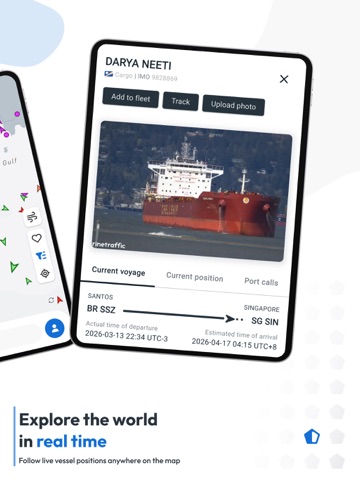
6 store screenshots


Pricing & paywalls
- Access Plus 24 — $0.99
- Augmented Reality — $2.99
- Mobile Pro Plan — $4.99
- Mobile Pro Plan — $29.99
- Route Planner — $0.99
- Free to download
- In-app purchases: $0.99 - $29.99 per item
Ratings & reviews
-
4/5Free unlocks expire when app closed
I was looking for an app to track my vehicle shipment. This app does a great job of that and more. There’s a catch for free accounts, however. You get three “past route” and three “vessel info” unlocks before having to register and pay. No problem, I thought. Just want to track one ship over a period of 3-5 days. So day one I unlock the past route and vessel info for my ship. Very cool info! Day two I go to check on the vessel and… I have to use another unlock for both the past route and vessel info. Now day two again, but I closed the app and it wants to use my final unlock for both the route and vessel info. It’s the same ship on the same route. If you’re going to subscribe, this won’t matter to you. If you’re like me and only have a single, one-off use of the app, go for it but don’t close the app! You’ll have to use your limited unlocks again and quickly run out. I hope the app dev will consider allowing each unlock to last for the current sailing of the selected ship instead of what seems to expire as soon as I close the app.
Jsauceqw · 30 Sep 2026
-
2/5Greed takes over again
I purchased this app last year and was very happy with how it performed. After using it for about 4 months it started to fail as a useful tool. Now when i use it i am very disappointed in how it works. It only gives vessel names and tracks within possibly 5 miles of land. After that it says purchase for tracking info .99 cents for 24 hr satellite info. Also my screen is full of ghost ships. Boats that were there previously but arent there now. Maybe they went off range but the icons are still on screen and they remain there for days. When i first purchased it i could see vessel names and tracks as far away as 150 to 200 miles off the new england coast. I used to track fishing boats from new bedford mass. Now as i stated i can only track as far as maybe 5 miles offshore. Not very happy with the app now. Its just a ploy now to have you make purchases to see vessels offshore. For this reason i am only giving 2 stars. Response to your reply,,,, ive given you all the details and you have given the same exact response to everyone who leaves a review. Its a computer generated reply. I purchased this app for full price because i thought i would be getting the same performance from it that i was before i purchased it in the trial version. That all changed after i made my purchase. Now if i want to track any vessel i have to pay again. If i want to track multiple vessels i might as well give up my weeks paycheck. That is not right. I gave an honest review and an honest 2 star rating. Thank you very much
mysierra4x4 · 30 Sep 2026
-
1/5Awful after recent update to 5.1.10
I work as a tugboat captain and have been using this app since I was in the maritime academy, over a decade ago. Since then I have loved it and it has been the go to tracking app. After automatically updating itself to the new version, I’m sad to say that it feels like a different app in all the worst ways. It can still show locations for ships using AIS, but not all will show up no matter if their AIS is working or not. Any ability to use vectors is now gone for basic or loyalty membership. With that in mind, most of the customization is also gone on the app. I used to be able to use the route tracking feature and had saved routes in there, but that has now been removed and put behind a paywall. The only thing that was “added” to my plan was weather tracking which I couldn’t care less about when compared to the many other features I had access to before. When trying to contact them to try and get some info on where to find some of the live data (vectors, angle indicators, etc.) that used to be there, their contact form said it couldn’t take an email address from aol, gmail, yahoo, or hotmail. It doesn’t say what, if any, email addresses would work so here I am leaving a poor review for a once great app. I can’t say I recommend this app to others, will be searching for a different one to use going forward, and hope everyone else does as well.
Dalopez.7 · 30 Sep 2026
-
1/5False Advertising
The basic app is fine, but expensive at $4.99, but knowing you could follow a vessel on a long journey with additional in app purchases would be great.... UNTIL you realize the company is dishonest and incapable of producing the information you just paid for. SO, if you get sucked into purchasing the $.99 for 24 hour tracking a vessels when they are outside regular communication distance, then joke is on you. They want you to believe you can follow offshore vessels using their connections to satellite information. HOWEVER, what they don’t tell you is the information they give you could be 11 or more hours off in their location. (Remember you just paid for 24 hours) The boat we following looked like it was 50-75 + miles out, only to find out they were already on the dock! When I contacted the company, they first blamed the vessels equipment ( which I know is first rate) next they stuttered and back peddled to blamed the satellites, then last, after several emails, they admitted their inability and uncertainty about connecting to nearby satellites and how they cannot control how close a satellite will be to get a signal. OK, fine, if that is true, BUT, If you can’t guarantee the information is correct, or even relatively close, then you shouldn’t charge for it. It’s not so much the .99 but the sheer deception in its accuracy. You want me to pay money for your 24 hour service when you fully know your information could be off by half? That is deceptive marketing. The company has no problem letting people fund their company knowing what we are paying for is inaccurate? Don’t bother buying if your vessel is going off shore, you will never know where they are.
Sailor00 · 30 Sep 2026
-
2/5Did Ubisoft buy you guys
This app does paywall a lot and I get that but you would think AIS is owned by these people when it’s tax payer funded and supported. I give credit by making an App that takes all the free data and puts it on a plate for you to enjoy and understand that cost money but at the end of the day most of what you sell is from a system funded by governments all over the world. It’s like the GPS system that the whole world uses but completely owned and operated in the US and paid for by the Americans. One huge issue is the misleading advertising and marketing. When you click on a ship updates it location via satellite instead of receiver it will ask if you want to add satellites to your app, if yes use Apple Pay for .99 cents. Apple Pay says it for satellites and a one time purchase so you feel like you are adding more to your plan to include satellite tracking but that’s not the case, nope. You are paying for the satellite tracking for that one ship for only 24 hours. Very shady how they did this and to be honest that data is reported to them for free (American taxpayers) I would even bet the satellites are American too.
ILMEDIC · 30 Sep 2026
-
2/5
Not as good as it was. Less information about vessels than there used to be. Tapping a vessel now "moves" the screen away from where you were viewing. The information shown about the vessels is now very basic. A few years ago I'd have given it 5 stars.
Simon B · 29 Jul 2026
-
5/5
This is a great way to follow shipping, ports and weather.
Gina Glot · 29 Jul 2026
-
1/5
the new version is completely rubbish compared to the old version, i don't know what they are thinking about
Alfred Bitar · 29 Jul 2026
-
1/5
No longer free.
Bill MacDonald · 29 Jul 2026
-
1/5
lol, you guys really screwed the pooch on this one. This used to be a great app, now its garbage. I had a paid version, but now I can't sign into it. I even tried to go through the process of signing up again, but it told me there was a problem and to try again later. Absolutely garbage now.
Halfass Bikeguy · 29 Jul 2026
Privacy & accessibility
Privacy
- Data Linked to You — Analytics — Identifiers — Device ID Developer declared
- Data Linked to You — Analytics — Identifiers — User ID Developer declared
- Data Linked to You — Analytics — Location — Coarse Location Developer declared
- Data Linked to You — Analytics — Search History Developer declared
- Data Linked to You — Analytics — Usage Data — Product Interaction Developer declared
- Data Linked to You — App Functionality — Contact Info — Email Address Developer declared
- Data Linked to You — App Functionality — Identifiers — Device ID Developer declared
- Data Linked to You — App Functionality — Identifiers — User ID Developer declared
- Data Linked to You — App Functionality — Usage Data — Other Usage Data Developer declared
- Data Linked to You — App Functionality — User Content — Customer Support Developer declared
- Data Linked to You — Developer’s Advertising or Marketing — Contact Info — Email Address Developer declared
- Data Linked to You — Contact Info Developer declared
- Data Linked to You — Identifiers Developer declared
- Data Linked to You — Location Developer declared
- Data Linked to You — Search History Developer declared
- Data Linked to You — Usage Data Developer declared
- Data Linked to You — User Content Developer declared
- Data Used to Track You — Usage Data — Advertising Data Developer declared
- Data Used to Track You — Usage Data Developer declared
Accessibility
No accessibility labels collected yet.
Privacy
- Data collected — Account management — Personal info — Email address Developer declared
- Data collected — Account management — Personal info — Name Developer declared
- Data collected — Account management — Personal info — User IDs Developer declared
- Data collected — App functionality — Device or other IDs Developer declared
- Security practices — Your data is transferred over a secure connection — Data is encrypted in transit Developer declared
- Security practices — The developer provides a way for you to request that your data be deleted — You can request that data be deleted Developer declared
Accessibility
No accessibility labels collected yet.
Versions
-
4.1.20
Various fixes and improvements
-
4.1.24
- Support for iPhone 16 series - Fixed a broken link in the Help section - Bug fixes and improvements
-
4.1.26
- Fixes issue with in-app purchases
-
4.1.28
- Updated Advanced Weather Maps
-
4.1.42
- Fixes issue with lighthouses - Fixes issue with photo rating - Density Maps updates
-
4.1.62
- Map layers update - Support for iPhone 16e - Bug fixes and improvements
-
4.1.78
- Bug fixes and improvements
-
4.1.80
- Support for iPhone 17 series - Fixes and improvements
-
4.1.86
- Fixed issue with advanced weather maps - Other fixes and improvements
-
4.1.93
- Fixes issue with iPhone 17 Pro Max - Other fixes and improvements
-
4.2.6
- Fixes issue with Augmented Reality - Other fixes and improvements
-
5.1.10
Welcome to the new and improved MarineTraffic You spoke, we listened. Based on years of feedback, MarineTraffic has been updated to deliver a faster, clearer, and more dependable way to monitor marine traffic and use a powerful vessel tracker for ships worldwide. If you’ve used MarineTraffic before, you’ll feel at home straight away. The main features remain familiar, now supported by clearer maps, smoother interactions, and a more robust foundation built for long-term use.
-
5.1.5
A unified MarineTraffic experience The new MarineTraffic brings core tools together into one unified mobile app experience. The new app focuses on clarity, reliability, and ease of use, improving performance while keeping the experience familiar. Maps load faster, interactions feel smoother, and information is presented more clearly, supporting both everyday use and professional maritime workflows. What’s improved in MarineTraffic: Faster performance across maps and weather views Clearer visuals and smoother interactions throughout the app Improved platform stability and reliability Unlock more with the Mobile Pro Plan The Mobile Pro Plan brings advanced capabilities together for users who need deeper visibility and extended coverage. With Mobile Pro, you can: Track vessels beyond coastal coverage using Satellite AIS, including activity in open oceans Access advanced fleet monitoring tools for wider oversight Follow vessels with extended historical data and deeper insights Gain access to additional maritime data layers for professional use Mobile Pro expands your vessel tracking capabilities when standard AIS coverage is not enough. Mobile Pro is designed for users who need a broader, more complete view of global vessel movement.
-
5.1.8
Welcome to the new and improved MarineTraffic You spoke, we listened. Based on years of feedback, MarineTraffic has been updated to deliver a faster, clearer, and more dependable way to monitor marine traffic and use a powerful vessel tracker for ships worldwide. If you’ve used MarineTraffic before, you’ll feel at home straight away. The main features remain familiar, now supported by clearer maps, smoother interactions, and a more robust foundation built for long-term use.
-
5.1.9
Welcome to the new and improved MarineTraffic You spoke, we listened. Based on years of feedback, MarineTraffic has been updated to deliver a faster, clearer, and more dependable way to monitor marine traffic and use a powerful vessel tracker for ships worldwide. If you’ve used MarineTraffic before, you’ll feel at home straight away. The main features remain familiar, now supported by clearer maps, smoother interactions, and a more robust foundation built for long-term use.
-
5.2.0
Bug fixes and map improvements.
-
5.2.1
Bug Fixes • Text display issue (formatting) - Some users with a large device text size were experiencing hidden/cut-off text in the app. → The device text size setting will no longer affect the app. All users will now see all text correctly regardless of their device font size. • Filtered ships reappearing - Ships that were filtered out were incorrectly reappearing when opening a detail page. This edge case will be fixed in next version • Special characters in ship names - Ships with special characters (e.g. Mike O'Leary) can now be searched and found correctly in the mobile app. New Feature • Coordinate format in unit settings - Users will be able to update coordinate formats directly in the units bottom sheet, choosing between DD, DDM, or DMS
-
5.3.0
Plan your voyages directly from the app! The full Voyage Planner is now available : calculate routes, distances, and ETAs on the go. Improvements & Bug fixes - Smoother zoom when tapping on a vessel - Ship names displayed closer to their icon - Larger map refresh button for low-connectivity areas - Port calls fully aligned with the web app - Fixed vessels not appearing at certain zoom levels - Fixed Class B vessel characteristics showing errors
-
5.3.1
Plan your voyages directly from the app! The full Voyage Planner is now available : calculate routes, distances, and ETAs on the go. Improvements & Bug fixes - Smoother zoom when tapping on a vessel - Ship names displayed closer to their icon - Larger map refresh button for low-connectivity areas - Port calls fully aligned with the web app - Fixed vessels not appearing at certain zoom levels - Fixed Class B vessel characteristics showing errors
-
5.4.0
- Smoother, more harmonized navigation across the app - Wind details added to port and ship sheets - Vessel tracks now colored by speed - Multiple bug fixes and small improvements
-
5.4.1
- Smoother, more harmonized navigation across the app - Wind details added to port and ship sheets - Vessel tracks now colored by speed - Multiple bug fixes and small improvements
-
5.6.0
- Multiple bug fixes and small improvements
-
5.7.0
Minor fix and improvements
-
5.7.1
Voyage Planner enhancements Map pinpoint selection : tap anywhere on the map to set a point, and use it to measure distances directly. Multi-leg voyages : plan trips with multiple stops in a single voyage, instead of point-to-point only. New timezone setting You can now choose how times are displayed across the app: UTC, Local time, or Device time. Find it in Units settings. Wind detail bug fix Fixed an issue affecting the accuracy of wind detail information.
-
5.7.2
· 16 Jul 2026
Fixes - Fixed an issue where Android user location was incorrect on app opening - Improved readability of wind direction on nautical maps - Fixed logout issue - sessions now last longer, reducing unexpected automatic logouts Improvements - Added a new setting to choose your preferred distance unit (nm, km, or miles) - Improved loading experience in the Voyage Planner - Refreshed Augmented Reality map overlay for improved accuracy
-
5.8.0
New features: - Route Forecast (Mobile Pro) : See where a vessel is heading and what weather it will meet on the way. Scrub the timeline to follow the route point by point with wind each step. - Prediction vectors (Mobile Pro) : Now cover the next 30 minutes for every vessel. - When zooming, a new scale bar shows distances in both nautical miles and kilometres. - Vessel length and width are now visible without a subscription. - A Voyage Planner user guide is now available at the top of the page. - Port call lists now show country flags. Fixes: - Fixed an issue where, sometimes, a vessel's position could be out of date after the map refreshed. - Fixed an issue where vessels that don't report their size could be drawn at the wrong scale on the map. - Small UI improvements in My Fleets and Voyage Planner. - On Android, fixed an issue where some external web links could fail to open.
-
5.8.1
Minor fixes and improvements
-
5.8.3
· 20 Aug 2026
Minor fixes and improvements.
-
5.8.4
Minor fixes and improvements
-
5.8.5
Minor fixes and improvements.
-
5.8.7
· 26 Sep 2026
- Authentication improvements: fewer unexpected logouts, less friction when accessing Mobile Pro Plan and a smoother sign-in experience. - Vessel details now show reported AIS destination and reported ETA (Mobile Pro Plan users can see the crew's entered information).
- 5.7.2 · 16 Jul 2026
- 5.8.3 · 19 Aug 2026
- 5.8.7 · 23 Sep 2026
Alternatives
- iNavX: Marine Navigation — Same category + similar ratings
- CruiseMapper — Same category + similar ratings
Availability by market
- ES
- DE
- GB
- US
Data quality & evidence
- Page completeness
- Live store listing
- Last verified
- 30 Sep 2026
- Sources
- App Store, Google Play
- Apoku editorial summary has not been published yet.