
Quick verdict
- What it is
- Store information collected; independent summary not yet available.
- At a glance
-
- Free download · core features require a paid plan
- In-app purchases
- From $1.41/mo
Categories and search queries
Official categories
- Productivity
- Education
AppCorpus categories
Key functions
| Function | Availability | Access | Scope | Evidence |
|---|---|---|---|---|
| Family Sharing | Yes | Unknown | App Store | Store published |
| Free app | Yes | Free | — | Store published |
| In-app purchases | Yes | Limited free | — | Store published |
| Subscription | Yes | Paid | — | Store published |
Screens
App Store
36 store screenshots


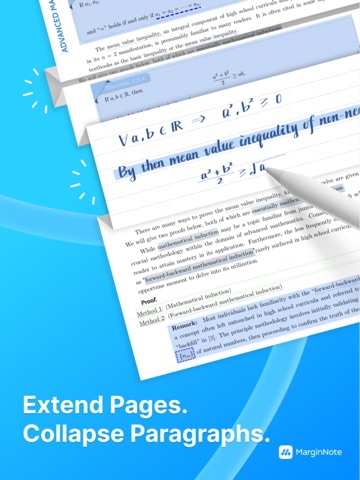

Pricing & paywalls
App Store
- MarginNote Max — $16.99/year ($1.41/mo) (derived from the IAP title)
- Unlock PRO Forever (New) — $12.99
Ratings & reviews
App Store
-
4/5TBD
I rarely post reviews, but MarginNote is probably the most important app in my toolbox. AT THIS TIME, I would just caution people with older computers or huge study sets to realize that MN has its limitations when interacting and updating. The app works fine on my iPad 11" Pro and iPhone 15 Pro Max, but it’s too slow and/or glitchy on my MacBook Air M1 with 16GB of memory and 1TB of storage. No idea why this app is so slow other than the fact that I have some massive medical textbooks and pictures. I have also been bogged down by a really really slow interface, despite other apps zipping by. I have lost work. I have been frustrated studying really boring topics that otherwise MN is great in helping me stay on top of, and it’s made my ADHD worse as I go down the rabbit hole looking for alternatives, I start pulling out physical note cards (impossible given the amount of things I’m studying), and counting my pennies to see what I can afford. Heptabase is sleek and useful, but it doesn’t have a review section like MN, and MN is better for students at the moment. Unfortunately, it has become unusable for now on my mac, which has something to do with the computer’s ability to run my study sets. I typically run many apps simultaneously to switch back and forth while learning and looking up things, but it’s only since updating to Sequoia that I have been having issues with MN. I am debating moving over to something else like LiquidText although I really don’t want toooo :(
ahclevername · 6 Aug 2026
-
4/5Best app for research and annotating PDF’s
I have been using MarginNote 4 for macOS and iPad for some of my classes that have me downloading lots PDF’s of journal articles for various assignments and research projects, and every feature in this app makes reading and annotating easier and more productive. I really like the mind map flowcharts and how easy it is to have all the important information I highlight all in one place, especially when there are several documents pertaining to the research topic. The workspace is highly customizable so you can put different things “away” when you aren’t using them, like the extend space, notebook, or mind map. Overall it’s a really solid PDF annotator, and works with other document formats as well. There is only one thing I wish the app would implement: handwriting/line smoothing. The apple pencil pressure/tilt support is nice, but I wish there were some sort of line smoothing option available to make handwriting look just a little nicer.
gianbortion · 6 Aug 2026
-
5/5This app saved / is saving my life
I have severe adult adhd inattentive type with an incredibly hyper active non-linear thinking style. Margin note has helped me cope more than any other app to help me organize all of these thoughts and information I am constantly taking in and trying to create sense of / integrate. My brain works so hard and is always on 5 topics at once. Things click for me at random times, not when they would for typical people and not linearly. If I don’t capture that in that moment and put it into a web of other knowledge, it will be lost forever and I will have to return to the same scenario repeating mistakes without having learned. Margin note lets me keep sources and context with my ideas while also organizing them into hierarchies and defining relations later when I have time so my momentary awareness can stick and nothing is lost. My data and information input is more likely to become Learning. Rather than it disappearing into the disorganized inbox of my mind.
JJRainwater · 6 Aug 2026
-
4/5A complete PDF study tool
Marginnote 4 is not beginner friendly and has a very steep learning curve. But it is surprisingly the best tool for studying multiple documents i have come accross. You can take notes and keeping track of sources for all information. ONCE MASTERED it changes how you study fundamentally allowing you to think more and organize more efficiently. I LOVE THE APP. It is what i have been looking for, for a long long time. That being said it still needs a good manual. Showing the capability of marginnote by simple workflow videos for multiple recommended study styles may make it more appealing to beginners.
MN4 user · 6 Aug 2026
-
5/5Amazing with a Learning Curve
Ok, I’m revising my review. If you’re looking to go knee-deep, head in into your study of any subject, this is it. I initially felt the same frustration anyone trying to get started with this program feels. It it comprehensive and lacks the proper instructions, but once you spend a month using this, nothing else out there compares. I’m appreciative the developers have worked so well on this app and have remained steady in improving it. I started from MN3 and never used it although it looked fantastic because of the learning curve and lack of instructions. But, since putting my head down and studying a subject every night using MN4, after a relatively hard start, I quickly learned why everyone falls in love with this app. There’s no comparison.
abeautifulnewworld · 6 Aug 2026
Privacy & accessibility
App Store
Privacy
- Data Not Linked to You — Analytics — Diagnostics — Crash Data Developer declared
- Data Not Linked to You — Analytics — Diagnostics — Other Diagnostic Data Developer declared
- Data Not Linked to You — Analytics — Identifiers — Device ID Developer declared
- Data Not Linked to You — Analytics — Usage Data — Other Usage Data Developer declared
- Data Not Linked to You — Analytics — Usage Data — Product Interaction Developer declared
- Data Not Linked to You — Diagnostics Developer declared
- Data Not Linked to You — Identifiers Developer declared
- Data Not Linked to You — Usage Data Developer declared
- Data Used to Track You — Identifiers — Device ID Developer declared
- Data Used to Track You — Identifiers Developer declared
Accessibility
No accessibility labels collected yet.
Versions
App Store
-
4.1.14
Optimizations: • Added a photo capture and image insertion feature in the document interface. • Optimized the white space function to support saving rich text content. • Enhanced text box editing logic, fixing issues with layout disorder and abnormal text positioning upon exit. • Improved the stability of synchronizing handwritten annotations between mind maps and documents. • Allowed the main document and the attached notebook to be the same document in dual-text comparison mode. • Enhanced the auxiliary excerpt feature to support more precise block recognition (the one-click excerpt function has been moved to the PRO version and is enabled by default on devices with over 4GB of RAM). Fixes: • Fixed the issue where the disappearing pen in documents did not automatically vanish. • Resolved the problem where attached notebooks could not be added to study sets and disassociation failed. • Corrected the issue where selected fonts reverted to the default during subsequent edits. • Fixed the Markdown syntax not rendering correctly when exporting outlines as PDF. • Resolved the issue in the mind map card editor where pasting rich text failed on the first attempt and fonts were inconsistent. • Fixed the lag when opening review card groups in certain study sets. • Corrected the misrecognition of full-width punctuation as half-width in Chinese text excerpts from PDFs. • Fixed the crash issue during polygon excerpts in PDFs. • Resolved synchronization issues with handwritten annotations and the disappearance of original annotations. • Corrected the problem where mind map card links shifted upward unexpectedly. • Resolved the issue where automatically added tags were not searchable within review card groups. • Corrected the issue with the handwritten layer bound to cards: when switching handwritten layers, writing on the book will no longer inadvertently trigger the card; you must adjust the excerpt range and refresh the card for the changes to take effect.
-
4.1.15
• Fixed an issue where certain devices experienced frequent crashes after the previous update. • Raised the standard for automatically enabling auxiliary excerpting, now requiring a higher memory configuration. • Added a toggle setting for auxiliary excerpting in the app settings. • Corrected the previous update’s description regarding one-click excerpting: the one-click excerpt function still requires MAX to be enabled, while other assistive excerpt features have been moved to PRO. • Fixed the issue where opening password-protected PDFs repeatedly triggered the password prompt. • Fixed an issue with merging document notebooks. • Changed the photo capture feature on document pages and mind maps to use a system scanner for taking photos. • Fixed the issue where full-text PDF indexes could not be shared across different database channels.
-
4.1.16
Optimized the layout mode of the document directory and changed it to Dock mode. Optimized the black bar menu of the selection area to avoid the problem of the menu being too long. Optimized the language settings of the translation. Fixed several bugs.
-
4.1.17
The selection menu item supports customization. Fixed a startup crash issue. Fixed the issue that pressing the Esc key during review would cause the interface to become messy. Fixed the issue that adding a document would cause the original directory to be lost. Added a paste function to the mind map focus mode.
-
4.1.18
Improvements: • New Sidebar Comment Feature: Users can now add comments directly in the document sidebar, improving annotation efficiency and readability. • Quick Tab Close Function: Added the ability to quickly close tabs, making it easier to manage multi-tab browsing. • Optimized Margin Display Logic: Adjusted the margin width display and now supports simultaneous use of sidebar margin and embedded margin for a more balanced visual layout. • Improved Split View Interaction: Refined the behavior and saving mechanism of “Split View” versus “Attached Notebook.” A new entry has been added to the document “…” menu for opening attached notebooks independently. • Translation No Longer Automatically Creates Excerpts: Inserting blank space for translation no longer generates excerpts by default, aligning better with actual usage habits. • Card Grouping Board View Now Available in Pro Version: The Card Grouping Board feature has been moved from the Max version to the Pro version. Bug Fixes: • Fixed an issue where PDFs with large blank margins would stutter when scrolling, improving overall smoothness. • Resolved lag during the playback and switching of review cards, significantly enhancing the performance for large study sets during entry, navigation, and review. • Fixed an issue where cards without a title or excerpt could not enable the fill-in-the-blank feature when added to reviews. • Resolved a problem where more than 1000 review cards could not be sorted after filtering. • Fixed a bug where handwritten content in newly created notebooks could not be copied after being referenced. • Fixed the issue where the “Copy” button for translations would not disappear automatically after being tapped. • Fixed the inability to scroll in the custom tools settings interface. • Fixed an issue where auto-generated tags by the excerpt tool in review card groups could not be searched. • Fixed abnormal behavior of the “Clear” button when adding documents from the Study Set document interface. • Resolved a display issue where text inside text boxes turned white when Dark Mode was enabled on Mac. • Fixed an issue in the English interface where short translation content would cause the “Target language” label to be cut off and overlap with the “Copy” button.
-
4.1.19
New Features & Optimizations: Supports importing Office documents: Includes Word, PPT, and Excel files, meeting the need for unified management of multi-format materials. White Space view switching: The "Normal," "Page Margin," and "Collapsed" modes can now be quickly switched via options in the Document Management panel. Toolbar button adjustment: The "Add Comment" button in the black toolbar is changed to "Text (White Space/Comment)" to distinguish it from the "Add as Comment" function. Improved Notebook & Handwriting Layer UI: Optimized the interface for switching and managing between the Document Notebook and Handwriting layer, enhancing smoothness and clarity of operation. Mind Map & Document Sync Toggle: Added a position sync toggle button on the Mind Map / Document splitter bar for one-click synchronization of document and mind map positioning. Enhanced Markdown linking: Supports using [[ or 【【 followed by keywords to search for cards. Supports using ]] after typing to create a new card directly, generating an inline card link, improving knowledge organization and citation efficiency. Optimized Study Set Document Addition: Improved the entry point for adding documents to Study Sets, making the process more convenient and smoother. Fixes: Fixed and improved Baidu Translation: Enhanced translation experience and stability. Fixed MAX permission error: Resolved an issue where Pro users switching to a sub-mind map or opening the Group Board in Document Mode would incorrectly receive a prompt requiring MAX permissions. Fixed Apple Pencil Pro display anomaly: Fixed a UI display issue caused by pressing the Apple Pencil Pro. Fixed text selection issue with Auto-Join: Fixed an issue where canceling White Space mode prevented selected text from being added to the mind map despite "Auto-Join to Mind Map" being enabled. Fixed excerpt tooltip text: Corrected the erroneous description "摘录" (Excerpt) for the eraser tool function. Fixed card view document navigation: Fixed an issue in the Card Kanban view where clicking a card and then navigating to the document view prevented closing the document to return to the card view. Fixed missing expand button: Fixed an issue where the top expand button didn't appear after collapsing long content. Fixed misplaced White Space button: Fixed an issue where the right-side buttons in the White Space panel became misplaced when zooming a PDF while the panel was open. Fixed duplicate 'White Space' menu item: Resolved an issue causing two "White Space" options to appear in the document menu bar on iOS 26. Special Note: Major upgrades are coming soon to the benefits and features included with the MAX version. Stay tuned!
-
4.1.20
Urgently fixed the edit text selection bug in the previous version. Added Japanese localization. ———————————————— New Features & Optimizations: Supports importing Office documents: Includes Word, PPT, and Excel files, meeting the need for unified management of multi-format materials. White Space view switching: The "Normal," "Page Margin," and "Collapsed" modes can now be quickly switched via options in the Document Management panel. Toolbar button adjustment: The "Add Comment" button in the black toolbar is changed to "Text (White Space/Comment)" to distinguish it from the "Add as Comment" function. Improved Notebook & Handwriting Layer UI: Optimized the interface for switching and managing between the Document Notebook and Handwriting layer, enhancing smoothness and clarity of operation. Mind Map & Document Sync Toggle: Added a position sync toggle button on the Mind Map / Document splitter bar for one-click synchronization of document and mind map positioning. Enhanced Markdown linking: Supports using [[ or 【【 followed by keywords to search for cards. Supports using ]] after typing to create a new card directly, generating an inline card link, improving knowledge organization and citation efficiency. Optimized Study Set Document Addition: Improved the entry point for adding documents to Study Sets, making the process more convenient and smoother. Fixes: Fixed and improved Baidu Translation: Enhanced translation experience and stability. Fixed MAX permission error: Resolved an issue where Pro users switching to a sub-mind map or opening the Group Board in Document Mode would incorrectly receive a prompt requiring MAX permissions. Fixed Apple Pencil Pro display anomaly: Fixed a UI display issue caused by pressing the Apple Pencil Pro. Fixed text selection issue with Auto-Join: Fixed an issue where canceling White Space mode prevented selected text from being added to the mind map despite "Auto-Join to Mind Map" being enabled. Fixed excerpt tooltip text: Corrected the erroneous description "摘录" (Excerpt) for the eraser tool function. Fixed card view document navigation: Fixed an issue in the Card Kanban view where clicking a card and then navigating to the document view prevented closing the document to return to the card view. Fixed missing expand button: Fixed an issue where the top expand button didn't appear after collapsing long content. Fixed misplaced White Space button: Fixed an issue where the right-side buttons in the White Space panel became misplaced when zooming a PDF while the panel was open. Fixed duplicate 'White Space' menu item: Resolved an issue causing two "White Space" options to appear in the document menu bar on iOS 26. Special Note: Major upgrades are coming soon to the benefits and features included with the MAX version. Stay tuned!
-
4.1.21
New Features & Enhancements: Enhanced Study Set Style Management: Study sets now have exclusive style customization. Highlight colors and handwriting toolbars can be individually personalized. Enable this in the Annotation Tool settings. Study Set Style Import/Export: Import/export study set styles. Selectively import specific elements (including highlight colors, custom toolbar favorites, etc.). UI & Experience Optimizations: Improved interaction for pop-up menus (Annotation Card, Mind Map, Outline, etc.), making them easier to operate. Customizable favorites in the toolbar menu. Quick access to frequently used tools improves personalization and efficiency. Optimized visual cues for enabling inline links, making the feature more intuitive. Bug Fixes: Fixed unresponsive Enter and ESC keys in Outline editing mode. Resolved longstanding undo functionality bugs, addressing undo failures and cases where large sections were accidentally reverted. Fixed the bug where rich text formatting (fonts, etc.) wasn't saved when modified in the Card Editor or blank editor areas. Fixed the bug preventing the complete deletion of inline links. Addressed a series of bugs affecting devices running OS26.
-
4.1.22
Fix serious issues in the previous version. New Features & Enhancements of the previous version: Enhanced Study Set Style Management: Study sets now have exclusive style customization. Highlight colors and handwriting toolbars can be individually personalized. Enable this in the Annotation Tool settings. Study Set Style Import/Export: Import/export study set styles. Selectively import specific elements (including highlight colors, custom toolbar favorites, etc.). UI & Experience Optimizations: Improved interaction for pop-up menus (Annotation Card, Mind Map, Outline, etc.), making them easier to operate. Customizable favorites in the toolbar menu. Quick access to frequently used tools improves personalization and efficiency. Optimized visual cues for enabling inline links, making the feature more intuitive. Bug Fixes: Fixed unresponsive Enter and ESC keys in Outline editing mode. Resolved longstanding undo functionality bugs, addressing undo failures and cases where large sections were accidentally reverted. Fixed the bug where rich text formatting (fonts, etc.) wasn't saved when modified in the Card Editor or blank editor areas. Fixed the bug preventing the complete deletion of inline links. Addressed a series of bugs affecting devices running OS26.
-
4.1.23
New & Improved • Upgraded Popup Menu Experience: Add, sort, and delete favorites for more efficient management of frequently used tools. • Enhanced Custom Highlight Colors: Custom color menus, group boards, and shortcuts now display both colors and their numeric codes, making filtering and operations faster and consistent across devices. • Improved Study Set Style Import/Export: Batch-select components during import/export for a clearer and safer workflow. • Upgraded Manual Sync: To prevent data loss from overwriting local changes or conflicts, manual sync now supports a pre-sync backup option. Choose between “Backup & Sync” or “Sync Directly” for better data protection. Fixes • Fixed an issue where custom highlight colors did not immediately refresh in tools or menus. • Fixed an issue where favorite menus were not properly imported with study set styles. • Fixed an issue where spaces between words in Baidu Translate queries appeared as plus signs, reducing translation accuracy. • Fixed overlapping buttons in the table of contents at narrow widths and corrected the “+” symbol to English text. • Fixed an issue preventing YouTube videos from displaying due to “robot verification” and improved Bilibili video playback for better multi-platform compatibility. • Fixed an issue where Pro users were not immediately notified when selecting brushes beyond their access level; added clearer prompts. • Fixed a crash caused by dragging blank space into the page comment area. • Fixed app freezes triggered by paste operations. • Fixed crashes that could occur when importing study set style templates on lower system versions. Other • Continued improvements to overall stability and user experience.
-
4.2.0
More Than Answers – Now with "Execution": MarginNote AI Expands to 15 Core Features, Breaking Down PDF, Mind Map, and Review Scenarios into Actionable "Micro-Tasks" to Supercharge Your Learning Highlights at a Glance: - Document: Generate an AI Table of Contents for entire PDFs, ask questions about the entire document, and create excerpts automatically. - Mind Map: Instantly outline knowledge structures, create sub-mind maps, and rearrange frameworks. - Cards: Rewrite titles, create cloze deletions, polish multiple cards in bulk, and convert handwriting/formulas to Markdown. Detailed Updates: I. Enhanced AI Core Capabilities & Smart Scenarios Integration of Advanced Large Language Models: Incorporates multiple leading models, significantly boosting capabilities in intelligent Q&A, content comprehension, contextual dialogue, and learning assistance. Deep Integration of AI Q&A and Multi-turn Dialogue: - Floating `Ask` Window: Quickly ask questions from within documents or mind maps. - Side Panel `Chat`: Supports conversation history, content logging, and in-depth follow-up questions. - Create cards directly from AI responses or as reference cards; reference cards and AI chats support bidirectional sync and backlinking. - Unified entry point for `Ask` and `Chat`, allowing flexible switching between modes. - `Ask` supports history navigation (back/forward) and can be sent to `Chat` with one click; both are interconnected. Prompt List & Quick Modules: Save and manage frequently used prompts. - Rich preset prompt modules (tools, rules, tone, goals, etc.) for reuse and nesting. - View descriptions and full prompt text for modules. - AI Automatic Context Understanding: Advanced algorithms automatically sense the context of the current document/mind map, delivering more precise answers and aggregated content. Multimodal Content Support: Image and text for integrated multimodal learning. Diversified Learning Modes: New `Guide`, `Explain`, and `Quiz` modes actively guide understanding, auto-generate key explanations, and create self-tests to improve knowledge absorption. AI Points System Introduced: Purchase and manage AI Points to meet diverse, advanced user needs. II. AI-Powered Content Structuring & Knowledge Organization AI Smart PDF Table of Contents Generation: Instantly generate a high-quality AI TOC for documents. Switch seamlessly between the AI TOC and the original document TOC without overwriting either, enhancing navigation for large documents. TOC-Structure-Driven AI Dialogue: Interact with AI based on the document's TOC structure, enabling deeper understanding of content and structure for more professional Q&A. Handwriting to Markdown: Use the lasso tool to select handwritten content, and AI converts it to Markdown with one click, including mathematical formula recognition, for efficient knowledge digitization. Batch Card AI Analysis & Processing: Select multiple cards for batch AI processing, improving efficiency for high-frequency operations. III. Comprehensive Enhancement of AI Tools & Mind Map Operations Significantly Expanded AI Tool Capabilities: - Card Operations: AI can create/modify/delete text & excerpt cards; get/set card content & metadata (color, tags, hierarchy, etc.). - Mind Map Operations: AI can collapse/expand branches, collapse sub-mind maps, set branch styles, and perform batch card copying, referencing, linking, merging, and hierarchy adjustment. - Content Acquisition: Get study set structure, document TOC, specific PDF page content, generate smart summaries, perform cross-platform web searches, and fetch web page content. - Global Database Search: Search notes across all your data. - Safety Mechanism: All AI operations support "Accept/Reject" confirmation, ensuring safety and flexibility. Full Mermaid Diagram Support in Markdown: Insert Mermaid flowcharts directly into Markdown cards for clearer structural expression. IV. Stability & Bug Fixes
-
4.2.1
Extract & Recognize Instantly! AI OCR Is Here Max users unlock advanced features. AI OCR handles tedious typing and formatting for you. - Wide Recognition Support: Accurately recognize formulas, tables, handwriting, images, text boxes, vertical text, and multiple languages. - Direct Use After Recognition: Recognized content like Markdown formulas and tables flows directly into excerpts, mind maps, and cards. - Low Cost Shown in Real-Time: AI OCR cost is displayed live (typically just 0.01~0.1 points). Extra Actions for Max Users: Use custom prompts to make AI organize, translate, summarize, or create flashcards. - Edit, add, and manage prompts. - 5 Ready-to-Use Preset Templates: Translate to English/Chinese, generate Mermaid flowcharts, create flashcards, or build tree-style mind maps. - Deep Thinking Mode: Activate a more powerful model using keywords like "deep thinking" , “analyze deeply” or "深度思考". Enable AI OCR: Document Top Toolbar → Double-tap Hand/Excerpt/Extend Tool settings → Enable `AI OCR` (Max users: also enable "Extra Actions"). Learn more: In-app `?` → `User Manual`. --- What's Improved & New - Better AI Models: All four core models (Balanced, Light, Deep,Task) updated for faster responses and improved comprehension. Default "Light" model is quicker and more efficient, reducing points cost. - New `Full Tools` Prompt Module: One-click access to all tools with interactive confirmation. - New `fetch_url` Tool: Enables web search and content fetching. - Custom Prompt Model Selection: Assign specific models to prompts, overriding the default. - Custom Template Sync & Export: Supports iCloud sync and export. - Improved Assistive Excerpt: Adjusted button to prevent accidental Ask window triggers. - Better TOC Display: Line breaks supported for long text. - More Accurate AI TOC Mind Map Positioning: Excerpt cards insert more precisely when using "Groupted (By Table of Contents)". - Enhanced Explain Mode: Refined prompts and responses. - Streamlined Multi-Card Dialogue: Consistent interface when multiple cards are selected. - Default AI Sidebar in Document Mode: Opens in sidebar for convenience. - Expandable Ask Window: Collapsed Ask window can be expanded. - Improved Markdown & Mermaid Display. - New Floating Right Panel: Displays Cards, Review, AI Chat, and Research as draggable windows (Study Set "..." → "Floating Right Panel"). Fixes - Handwriting-to-text, eraser mode, and editor misalignment fixes. - Tool call feedback button fixed. - AI TOC mind map structure issues resolved. - Lag from collapsing content fixed. - Card drift after "Add Response to Mind Map" fixed. - Mermaid rendering errors fixed. - Mac window shortcut focus issue fixed. - iPad `.mmap` import fix. - EPUB `get_page_content` crash fixed. - Other minor optimizations and bug fixes. Feedback Welcome - International Community: https://forum.marginnote.com - Support Email: [email protected]
-
4.2.2
"AI Breakdown" Feature Now Available: - Full-Book Breakdown: Initiate breakdown directly from the table of contents (under 100 pages for direct breakdown; over 100 pages, break down by chapter). - Template Mode: Includes six major professional templates – Academic, Exam Prep (General/Math & Science/Medicine/Law), Exercise-Oriented Learning, Language Learning, Literature, and Self-Improvement – for structured AI breakdown tailored to different scenarios. - Question-Driven Mode: A Q&A-focused approach for structured breakdowns targeting specific goals: Deep Understanding / Practical Application / Knowledge Organization / Teaching Preparation / Problem Solving. - Custom Requirements & Quick Options: Input natural language to fine-tune breakdown goals; use quick options (e.g., "Add Mnemonic," "Grade by Difficulty") to generate professional prompts with one click, precisely controlling output granularity. - Background Operation: Breakdown tasks run silently in the background, allowing uninterrupted work while processing long documents. - Manual Model Switching for Breakdown (Max Feature): Switch models manually to suit different tasks. User Benefits Upgrade (Effective Post-Update): - Max User Monthly Quota: Increased to 500 points/month (auto-refreshes). - New User Bonus Increased: Newly purchased users now receive 500 Permanent Points (existing users receive a 200-point supplement). (Check your points balance: In-app `Settings` -> `AI Points`) New Features & Optimizations: AI Interaction & Core Capabilities: - New Points Cost Indicator: Estimated points/credit consumption is clearly displayed when using AI TOC and the new AI Breakdown feature for greater transparency. - Multimodal & Model Selection: Light and Balanced models now natively support **multimodal input**, significantly improving recognition accuracy for mixed text and image content. - Automated Review Flow: The new add_to_review parameter for tool calls allows AI-generated cards to be **automatically added to the review queue**, closing the "Breakdown-Review" loop. Core Experience Improvements: - New Toggle Eraser Shortcut (Shift+E): Optimizes tool switching efficiency during handwritten note-taking for a smoother writing and editing experience. - PDF Engine Optimization: Improved logic for restoring deleted PDF pages and support for resetting page order confusion caused by page operations. - Other ongoing experience details and stability optimizations. Learn more about AI features: In-app ? -> User Manual.
-
4.2.3
This update focuses on refining the experience and improving stability for AI Book Breakdown and AI OCR. We’ve added a (coarse-grained) screenshot mode for book breakdown with a smoother output workflow, enhanced the Smart Dictionary breakdown and card templates, and made math-heavy and high-frequency card-creation workflows more fluid and controllable. Highlights • AI Book Breakdown (Enhanced Screenshot Mode): Optimized for math/science content with a more coarse-grained screenshot breakdown, making complex formulas and charts easier to turn into structured notes. • Smart Dictionary Breakdown: Introduces automatic title-link creation, supports general concept extraction, adds a dedicated English vocabulary mode, and includes a new Practice Mode for organizing questions into study cards. • AI OCR Card Templates Upgrade: Introduces template-based configuration (the old prompt-only editing mode is deprecated, but existing prompts remain usable). Supports per-field settings (Rich Text/Markdown, cloze, etc.), plus font and color controls. Detailed Updates 1) AI Book Breakdown: More Stable, Clearer Output Workflow • Upgraded to a two-stage workflow: Take notes first → Organize & generate output, breaking the 100-page limit (processing very large batches may require more time and resources). • Reduced overhead in screenshot mode to lower the cost of large-scale screenshot breakdown. • Improved output visibility: makes the “note collection” process more transparent and easier to learn from. • Default output is now Outline/Framework Mode. • Enhanced question-driven prompts to better support theme-based reading and structured understanding. 2) Smart Dictionary Breakdown: Auto Indexing & Auto Linking • New Smart Dictionary breakdown with automatic title-link creation for quick indexing and traceability. • Three modes available: • General Mode: Structured extraction of concepts, theorems, names, places, and more. • English Learning Mode: Specialized extraction for vocabulary and language learning. • Practice Mode: Extracts exercises from documents and organizes them into cards by question number for efficient practice and review. 3) AI OCR: Stronger Card Template System • New Card Template Configuration: • Per-field configuration. • Supports Rich Text or Markdown. • Supports Cloze (fill-in-the-blank) settings. • Rich text fields support custom fonts and colors. • Markdown cloze supports tap-to-reveal answers. • UI improvements for AI OCR. 4) Stability & Fixes • Fixed two crash issues. • Fixed YouTube playback issues. • Fixed an issue where deleting a # tag could invalidate all tags. • Fixed an issue where continuous rectangle excerpts could not use AI OCR.
-
4.2.4
AI Chat Upgrades: All models now support Deep Thinking Mode, helping to generate more logical and structured answers. Added a Comprehensive Reasoning Model to enhance reasoning performance in complex scenarios. Optimized the versions of core models, improving dialogue comprehension, reasoning ability, and making responses more precise and efficient. Fixes: Fixed crashes that occurred with the AI TOC feature in certain scenarios, enhancing application stability. Fixed compatibility issues where the Text Model and AI TOC failed to work properly in some situations, ensuring stable and reliable functionality.
-
4.2.5
Fixes / Improvements: * Fixed an issue where the Kimi model was unavailable, restoring normal use of AI Book Breakdown and Chat. * Improved Markdown rendering performance to reduce rendering latency and occasional white screens on cards, enhancing reading and editing smoothness. * Improved the browsing smoothness of Markdown cards in Review Mode, reducing stutter when scrolling and switching.
-
4.3.0
This update brings major improvements to backup and version history, mind map editing, handwriting, cloud import, AI features, and overall stability. New in this version - Rebuilt backup engine with content-addressable storage and differential sync for lower storage usage and faster recovery - Added multiple backup destinations: WebDAV, Local Folder, Baidu Netdisk, and Google Drive - Added flexible backup schedules, including manual, hourly, daily, and weekly options - Added version history browsing and notebook rollback for easier recovery from data loss or corruption - Backup now runs quietly in the background without interrupting your study - Added full keyboard shortcuts for mind map editing - Improved selection and view restoration after focus switching - Upgraded pen width adjustment from stepped levels to a continuous slider - Added direct document import from Baidu Netdisk - Added support for QR code login and SMS password authorization - Reorganized the import menu for clearer navigation - Upgraded the built-in AI model for stronger reasoning - Added a new onboarding tour for first-time users - Updated example notebooks with more practical sample content Fixes - Fixed pop-up blocking and homepage scaling issues on Bilibili - Fixed incorrect color sync in the hand tool menu after importing Topic Style - Improved stability and overall experience
-
4.3.1
- Fixed an issue where Baidu Netdisk could not be used - Fixed a data loss issue that could occur when binding handwriting to cards The previous version introduced major updates to backup and version history, mind map keyboard shortcuts, handwriting improvements, Baidu Netdisk import, AI enhancements, and onboarding. For more details, please refer to the previous version notes.
-
4.3.2
This update focuses on stability improvements and bug fixes. Improvements: Improved brush thickness adjustment and interaction feedback Reduced memory usage when exporting history to improve long-session stability Improved performance of the version history interface, including loading and scrolling Enhanced export experience Improved Markdown formula rendering Fixes: Fixed issues related to model hot updates and removed Kimi model support Fixed AI OCR issues Fixed an issue where blank areas could not be collapsed after restoring version history Fixed automatic backup issues and incorrect progress display Fixed an issue where using the eraser in mind map handwriting could trigger collapsible handwriting unintentionally Fixed formula rendering issues Fixed an issue where Study Sets could not be tapped on app launch
-
4.4.0
This update brings the brand-new Immersive mode and significantly adjusts the Feedback & Customer Service and purchase and upgrade processes. We've also continued to optimize Backup & Restore, AI recall experience, multi-language support, and overall stability. New Immersive Mode * Brand-new Immersive mode (Full Screen): A simplified toolbar provides a larger reading space, significantly improving screen utilization efficiency. * New App Icon exclusive to Immersive mode (switch in Settings, iOS only). Optimized Recall Mode * AI hints added to recall mode: Supports Apple Intelligence and offline AI (requires device support), and supports expanding mind map levels on demand, helping users control the recall scope more flexibly. * After tapping cloze/emphasize, the content remains displayed, and all cloze/emphasize items can be unlocked sequentially for a more coherent review experience. * The entry to recall mode has been moved to a secondary menu within Immersive mode. New Customer Service & Feedback Flow (Entry: MN4 Home - More - Feedback & Support) * Submit issues and suggestions directly to customer service within the app for quick feedback. * Supports attaching images. * Supports instant notifications for customer service replies. * Supports cross-platform sync of customer service records. Purchase & Upgrade * New Max annual subscription purchase path, allowing new users to subscribe to Max directly. Adjusted the purchase page structure and entitlement descriptions. Backup & Restore * Version Library now includes a search function, and adds version backup schedule execution notifications for easier management and confirmation of backup results. * Auto Backup now includes the "Include Original Documents" option. When this option is turned off, subsequent backups will no longer include local original documents, effectively saving remote storage space. * Optimized the deletion process for study sets and version history. When deleting a study set, you can now choose to delete its version history as well. Other Optimizations & Fixes * Added Korean language support in localization. * Optimized Mac trackpad and scrolling experience, improving stability when browsing documents and mind maps, and reducing interference and jumping during scrolling. * Optimized AI workflows and network compatibility. * Fixed crashes and login anomalies during Google Drive backup and restore processes. * Fixed the issue of incorrect device display in the "Restore from Version Backup" list. * Fixed the issue where the content of "Full Export" did not match the selected options. * Continuous optimization of other experience and stability issues. Feedback & Suggestions * In-app "Feedback & Support" within MN4
-
4.4.1
New/Improvements: Immersive Mode & Recall Mode Experience Optimization - Added the hand tool to the handwriting toolbar in Immersive/Recall mode, which can be used to drag the canvas or browse pages. - The bottom toolbar in Immersive mode can now be collapsed into a three-dot control to reduce interface obstruction. - Immersive mode now supports Research Browser: You can open the Research Browser panel for document excerpts/mind map cards while in Immersive mode, presented as a floating window, making it easy to look up information while reading. - Optimized excerpt/handwriting toolbar menus in Immersive mode: Supports adjusting the tool order in the menu bar, keeping it consistent with classic mode, and duplicated tools will now be fully displayed. - iPhone experience optimization: When opening a study set that hasn't recorded an immersive state for the first time, it now defaults to Immersive mode, significantly improving the small-screen experience without affecting the same study set's settings on iPad and Mac; the document/mind map linked view now supports adjusting the split ratio. - Added a "Show One-by-One" option in recall mode. When enabled, only one revealed excerpt or mind map card is displayed at a time, making the recall pace more controllable. - Handwriting is now supported in recall mode. New "Legacy Features" Settings Section - Centralized management of toggles for Trash (Legacy), legacy recall mode, legacy handwriting toolbar icons, and more (Settings → Legacy Features). The legacy recall mode is only available in non-immersive mode, and related menus and keyboard shortcuts will be limited accordingly. Overall Performance & Experience Optimization - Reduced potential stutter during selection changes while keeping the interface refreshing normally; also optimized stability when handling AI conversation errors. Fixes: - Fixed the issue where the eraser shortcut was not working in Immersive mode on Mac, and improved the stability of related shortcuts. - Fixed the issue where formula styles were not loaded correctly on macOS 26.5. - Fixed the issue where math formulas in note cards could display abnormally. - Fixed a display anomaly with the toolbar in Immersive mode. - Fixed the issue where tapping on a blank area could not clear the text selection when prompt status was enabled in immersive recall mode. - Fixed the issue where the tool order could be lost after handwriting tool settings were synced. - Fixed the issue where recall prompt screenshots could capture the wrong page under virtual documents. - Fixed the issue where typing or tapping was temporarily unresponsive right after a plugin pop-up appeared. - Fixed display anomalies with colors, cursor, and prompt labels in the chat input box under dark mode. - Fixed the issue where Korean book titles could be truncated or displayed abnormally in the book switcher.
-
4.4.2
This update introduces PDF Condense and Block Selection, along with a new External Agent Book Breakdown feature. It also upgrades Immersive Mode and the AI chat panel, while continuing to improve Backup & Sync, text box editing, Markdown rendering, and the in-app feedback experience. New PDF Condense • After selecting PDF content, you can condense the original text into a short summary displayed in a collapsed form at the original location, making it easier to recall and review. • Condense settings support condensation granularity, output language, font, and font size. You can also choose between cloud AI and on-device offline AI. On-device offline AI requires Apple Intelligence support and does not consume MarginNote built-in AI credits. New PDF Block Selection • After enabling Assistive Excerpt, you can select one or multiple text blocks and then perform Excerpt or Condense. • This mode is designed for more precise selection and organization by paragraph or content block, making PDF excerpting and condensing more flexible. New External Agent Book Breakdown • Chapter content can be exported as a breakdown task package and saved to iCloud, the app directory, or another location accessible to external agents such as Claude Code, Codex, or OpenClaw. • After processing, the package can be imported back into MarginNote to generate source-linked mind map cards. • External Agent Book Breakdown does not consume MarginNote built-in AI credits. Immersive Mode Improvements • Document-only view now also supports Immersive Mode. • The document menu in Immersive Mode now includes Show Document Notebook Bar, Dual-Document Comparison, Table of Contents, Import Document, and Linked Documents, allowing you to browse and jump through the table of contents, import documents, compare documents side by side, and manage linked documents while staying immersed. • The AI chat window in Immersive Mode has been upgraded to a floating window. • Floating windows, including AI Chat and Research Browser, now support dragging, resizing, and minimizing to a bubble. They also remember their last position and size to reduce obstruction of reading content. Text Box Editing Improvements • Improved text box editing, including cursor positioning, text selection, keyboard avoidance, and content clipping. Also fixed an issue where the background color could be lost when remembering text box styles. • Newly created text boxes are now constrained within the page by default to avoid overflow. Customer Support Upgrade • In-app Feedback & Support now supports directly attaching files such as images, documents, logs, crash files, archives, and videos, with a single attachment limit of 20 MB. • Users can now like support replies, helping us continuously improve support quality. Other Improvements and Fixes • Optimized PDF selection, Markdown formula rendering, and web import experience, reducing menu anomalies, rendering issues, and import freezes. • Optimized backup and import processes for WebDAV, Google Drive, and other services, improving transfer and login compatibility. • Optimized the large-file upload process for Baidu Netdisk, reducing memory usage during uploads and improving backup stability for large files. • Optimized the restore purchase process, improving the accuracy of restoring entitlements such as Max and Pro-to-Max upgrades, and providing clearer prompts when restoration fails. • Fixed multiple display issues in Immersive Mode, including toolbar residue, invisible top navigation, mind map covering documents, and icon flickering. • Added multilingual text and fixed some localization issues. • Reduced the frequency of in-app rating prompts to minimize interruptions during learning. • Continued improvements to overall experience and stability.
-
4.4.3
This update focuses on improvements to AI Breakdown (Extract Questions), Condense, the Immersive mode reading experience, and backup security. AI Extract Questions Upgrade - AI Breakdown now includes a standalone Extract Questions entry, allowing you to quickly extract and split exercises and exam papers. - Extract Questions will try to create cards as complete questions, grouping question stems, sub-questions, options, materials, and answer explanations together, reducing missed questions, duplicate cards, and incorrect extraction. - Improved recognition of Chinese/English question numbers, chapter question numbers, consecutive number items, and exam sub-questions. Enhanced cross-page question handling, text recognition effectiveness, and stability. - A quick entry for Extract Questions has been added to Immersive mode, supporting selection of the entire document or by table of contents range for question extraction. Version Library & Space Management - Added a space management entry in Version Library that can scan for and release safely recoverable space, displaying the actual freed amount after release. - Before restoring a version history, the backup data integrity is now checked. If the cloud sync is incomplete, the restore will be stopped to avoid accidentally deleting current content. - When exiting a study set with unsaved changes, an automatic version history is now generated more quickly. Immersive Reading Experience - Added a document side navigation bar in Immersive mode. You can drag it to quickly jump pages, with the page number displayed while dragging. The bar auto-fades when reading. Condense & Selection Optimizations - Condense results have been upgraded to three levels: One Sentence, Key Points List, and Detailed Summary, meeting different scenario needs. You can directly switch levels, and press to copy the condensed result. - In recall mode, condensed results now support progressive hints to help recall collapsed condensed content. - The selection handle for assistive excerpt now includes a Continuous / Single selection switch. Continuous selection is the default; switching to single selection makes a tap directly select a single block, restoring the assistive excerpt selection behavior from v4.4.1. - The continuous block selection tool now has a "Clear & Reselect" button, letting you reselect without exiting the mode. Other Optimizations & Fixes - Added a "Tap page edge to turn page (Legacy)" toggle in Settings; it is off by default to reduce accidental page turns. - The minimize button hit area for AI/Research floating windows has been enlarged for easier tapping. - Added a "Auto-open title link on hover" toggle in title link settings. - Fixed an issue where mind map menu shortcuts were not working. - In Immersive mode, the excerpt tool range hint now appears only once. - Fixed issues where the text box would accidentally exit editing in Apple Pencil mode and text would become blurry in split view or when zoomed in. - Fixed premature line breaks after restoring text box styles. - Fixed an issue where tapping to select a block could accidentally select a large area. - Fixed difficulty in tapping PDF selection/excerpt adjustment handles with large windows or at high zoom levels. - Fixed a potential crash when exiting a study set instantly. - Fixed the issue of the Feedback & Customer Service page being interrupted by background network fluctuation pop-ups. - Continuous optimization of other experience and stability
-
4.4.4
This update focuses on enhancing AI Extract Questions and AI Breakdown, Custom AI, document and mind map export & print, Markdown text box, and plugin management. It also fixes various stability issues. AI Extract Questions - Improved recognition accuracy for questions, answers, explanations, order, cross-page questions, and multi-column layouts. Optimized question-answer matching and hierarchy restoration. - Support for more question number formats, chapter titles, bracket labels, and textbook layout styles. - Enhanced recognition of English question types. - Enhanced recognition of "exercise books with extend note". Even if an exercise book contains multiple blank spaces, questions can now be accurately recognized and excerpted, adapting to the blank space practice scenario. - Updated the AI Breakdown interface, optimizing the breakdown workspace, task progress, and interruption recovery entry for a clearer workflow. Custom AI (Max Feature) - New Custom AI support (Max feature). You can configure your own AI provider, model, and API Key in Settings. - Once Custom AI is configured, all AI features will use your custom AI by default without consuming MarginNote AI credits. Export & Print - Document export now includes page selection. You can select specific pages via thumbnails, table of contents, page range, or annotations. - Mind map export now supports two formats: "Mind Map" and "Card Outline". Mind map branches can also be individually exported as a mind map. - When exporting a mind map, you can now print level by level and adjust the density. Markdown Text Box - New Markdown text box, allowing you to insert and edit Markdown directly in a document. - Markdown text box supports adjustable width and font size. - Markdown text box supports URL links. - You can find Markdown text boxes through document keyword search and on annotation pages. Other Improvements - Added an image cropping feature. - Added a document positioning button in the title link pop-up window. It can automatically open split view and navigate to the original text location of the concept card. - Support for auto-repairing missing excerpt images. - One-click pause and resume plugins in the plugin toolbar to reduce the impact of plugins on app stability. - Optimized plugin resource cleanup, start/stop state synchronization, abnormal configuration protection, and runtime diagnostics. - Optimized the display of the collapsed mind map count in recall mode. - Optimized the operating experience and scrolling performance of the extend note expand/collapse button. - Optimized OCR image processing protection to avoid crashes caused by abnormal or oversized images. - Optimized handwriting and excerpt shortcuts in Immersive mode, adding shortcuts for various excerpt and annotation tools. - Optimized the document menu in Immersive mode; temporarily opened documents are now displayed in a separate group. - Fixed the issue where excerpt tool colors were displayed incorrectly in Immersive mode.
-
4.4.5
· 24 Jul 2026
This update introduces a visual formula editor and Custom AI provider presets, continues refining AI Extract Questions, and focuses on improving the stability of plugins and Markdown editing. Formula & Markdown Editing - New MathLive visual formula editor, accessible via the ƒx button in the Markdown editing toolbar. It supports inserting inline and block formulas. - Formula editing can now be used in Markdown text boxes, document extend notes, mind map cards, and other scenarios. - Text boxes can now be switched between plain text and Markdown modes, and the last input mode is automatically saved. AI Extract Questions - Improved answer pairing for centralized answer key areas and pure-screenshot question cards, reducing issues such as missing answer cards or failed links. Question number relationships are now saved with the cards, supporting re-splitting and cross-session recovery. - Optimized full-book AI Breakdown for virtual documents and multi-document notebooks. Appended PDFs can also be included in the breakdown process, and the issue of skipping subsequent documents when no table of contents exists has been fixed. - Fixed an issue where a few pages of a newly created virtual document were incorrectly expanded into numerous processing segments. Pages clearly unsuitable for question recognition in appended documents are now skipped, reducing invalid AI requests and long wait times. - "Generate Title & Summary" has been adjusted to "Generate Title", allowing AI to generate concise key-point titles while preserving original question numbers as much as possible. - Question cards and answer cards no longer duplicate low-quality OCR text, reducing content duplication, blurriness, and noise with screenshots. - Streamlined the AI Breakdown settings panel. Custom AI - New Custom AI provider presets: selecting a preset automatically fills in the Base URL and recommended Mini/Normal models while preserving any previously entered API Key. - Enhanced compatibility testing for Custom AI. Other Optimizations & Fixes - Fixed issues such as consecutive crashes, loading failures, abnormal toolbar buttons, failed pause or resume, and some plugin features becoming unavailable caused by runtime changes to plugins. - Optimized handwriting rendering for large mind maps, now only processing strokes that intersect the currently visible area, reducing unnecessary computation and improving performance during zooming and scrolling. - Fixed a display issue with the floating AI chat window in full-screen document mode. - Fixed a state cleanup issue after canceling an AI conversation.
Availability by market
- US
Data quality & evidence
- Page completeness
- Live store listing
- Last verified
- 6 Aug 2026
- Sources
- App Store
- Independent summary has not been published yet.