
Quick verdict
- What it is
- Store information collected; independent summary not yet available.
- At a glance
-
- From $9.99/mo
- Free to download
- In-app purchases
Categories and search queries
Official categories
- Productivity
- Business
AppCorpus categories
Key functions
| Function | Availability | Access | Scope | Evidence |
|---|---|---|---|---|
| Free app | Yes | Free | — | Store published |
| In-app purchases | Yes | Limited free | — | Store published |
Screens
App Store
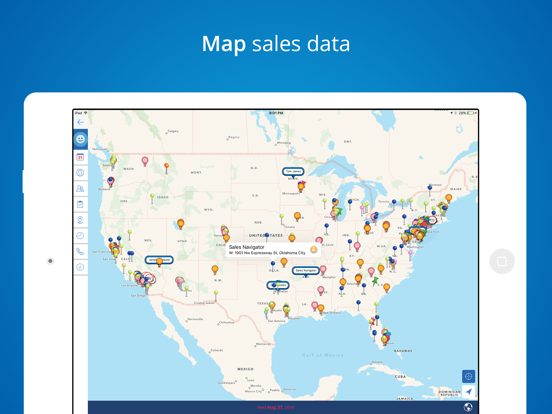
14 store screenshots



Pricing & paywalls
App Store
- Pro Quarterly — $29.99/quarter
- Pro Quarterly — $95.99/year ($7.99/mo)
- Pro Quarterly — $11.99
- Add On — $2.99
- Basic — $4.99
- Sales Navigator Calling Credit — $4.99
Ratings & reviews
App Store
-
5/5Support does not respond. Basic features don’t work.
I’m going one star because I have been using Mapview for 3 years now and most recently I have been having issues with trips not optimizing, the app closes randomly when doing various activities such as importing spreadsheets, optimizing trips, searching for names, changing filters, etc. These are the basics features that used to make this app the best for work. Unfortunately I have not received any response from customer support regarding my issues and now feel they are intentionally not responding to me. I will update or remove this review if these issues are resolved. Until then do not waste your money investing in the app, you’re better off going with free one. I’m paying $13/mo for an app that doesn’t work. Makes no sense.
0608032828 · 6 Aug 2026
-
5/5The Game Changer for Efficient Sales Routing
This app stands above the rest. It’s in a class all by itself. It does everything I always wished my other contact manager and mapping apps would do. I can see exactly where I am, where I’m going, where my leads & customers are AND I can even make notes about each one to help me remember later. I recently contacted the developer for help in syncing (the excessive number of custom contact filters I had created on) my iPhone with my iPad. Not only did they CALL me immediately to walk me through the process, but they also attended to me as if I were their only customer. I’ve NEVER had such a positive experience with an app developer. These guys are the real deal when it comes to a priceless app / tool and exceptional customer service. Bravo! Thank you!
TheLaneTeam · 6 Aug 2026
-
5/5Game Changing Resource
This application is a game changer for insurance agents regardless if you’re a telesales agent or a face to face agent. You’re able to import excel sheets by converting to cvs files and loading all the data in in a matter of minutes rather than manually entering client information in. Once loaded you have a “map” birds eye view of all your clients in the location they live. You can set filters to each client based on the criteria you want. You also can log client conversations or any additional material inside each clients individual file. Helps tremendously for follow up calls to have quick access at notes. There’s also a route optimization feature to plan your route for the day, and it will show you the optimum route based on your preference. Quick features such as one click to dial from inside the clients file allows you to call blitz an area to schedule close proximity appointments, and a one click to pull up the map and route to someone’s house. When it comes to organizing your book of business and an app that helps you with one management look to Mapview. I would pay more money for it, it helps me that much!
Dman9999 · 6 Aug 2026
-
5/5So disappointed
This app use to be the best on the market. Did everything I needed as a field sales rep. Now it closes unexpectedly when I am in the middle of entering data into a lead. Some times it takes me 3-4 tries to finish a task. I sent an email to the support team over a week ago and they haven’t gotten back to me. In the past, I would get a call or email within hours of having an issue. This issue is completely unacceptable and needs to be fixed.
anp2357 · 6 Aug 2026
-
3/5It’s Crashing On The Rocks
I’ve used this app for a few years with great success and also good support from the developer. This past week it’s started crashing once the app was turned on for use. The developer answered the phone the first time I called me and offered a fix yet that hasn’t fixed the problem and thus this app is not operational. I’ve been respectfully (phone call only once a day, one text per day, one email per day) reaching out to the developer for the last two plus days and am hearing only crickets. I hope the developer is okay yet I’m kind of dead in the water with working my book of business and new leads.
G.U.M.P · 6 Aug 2026
Privacy & accessibility
App Store
Privacy
- Data Linked to You — Analytics — Identifiers — User ID Developer declared
- Data Linked to You — App Functionality — Contact Info — Email Address Developer declared
- Data Linked to You — App Functionality — Contact Info — Name Developer declared
- Data Linked to You — App Functionality — Contact Info — Phone Number Developer declared
- Data Linked to You — App Functionality — Identifiers — User ID Developer declared
- Data Linked to You — App Functionality — User Content — Customer Support Developer declared
- Data Linked to You — Contact Info Developer declared
- Data Linked to You — Identifiers Developer declared
- Data Linked to You — User Content Developer declared
- Data Not Linked to You — Analytics — Usage Data — Product Interaction Developer declared
- Data Not Linked to You — App Functionality — Diagnostics — Crash Data Developer declared
- Data Not Linked to You — Diagnostics Developer declared
- Data Not Linked to You — Usage Data Developer declared
- Data Used to Track You — Contact Info — Email Address Developer declared
- Data Used to Track You — Contact Info — Name Developer declared
- Data Used to Track You — Contact Info — Phone Number Developer declared
- Data Used to Track You — Contact Info Developer declared
Accessibility
No accessibility labels collected yet.
Versions
App Store
-
8.0.3
- Fixed a minor issue when creating tasks using the Lasso Feature - Improved calendars syncing so all calendars syncing to Mapview are now displayed - Brought back the Route Optimization feature
-
8.0.4
Minor bug fixes
-
8.0.5
- Improved mapping for international addresses - Introduced the in-app route optimization
-
8.0.6
- Fixed an issue where app or the geocode process may hang during geocode process - Implemented in app review feature - Increased the default spreadsheet import limit to 5,000 - Upgraded the geocode process so that residents within the US and Canada only use MapQuest - Fixed an issue where the screen for users to pick values to generate auto groups would become unresponsive if there were no values in spreadsheet - Fixed an issue where app may become unresponsive after adding a new address - Fixed an UI issue at map option screen where "Text Size" text wasn't aligned
-
8.0.7
- Fixed a potential crash when mapping contacts
-
8.1
iOS 14 support
-
8.1.1
Minor bug fixes
-
8.1.2
Minor bug fixes
-
8.2
Minor bug fixes
-
8.2.1
Minor bug fixes
-
8.3
Minor bug fixes
-
8.4
Minor bug fixes
-
8.4.1
Minor bug fixes
-
8.4.10
What's New in Mapview [8.4.10] We're excited to roll out this update to the Mapview app, packed with features and improvements based on your valuable feedback. Here's what you can look forward to in the latest version: • Direct Call/Email from Activity Log: Enhancing your efficiency, now you can call or email contacts directly from the activity log. This streamlined feature saves you time and simplifies your workflow, making communication a breeze. • Revamped Activity Log Screen: Experience a more cohesive and user-friendly interface with our updated activity log screen. It now features a unified style that clearly displays linked contact details, making it easier to view. • Smart Address Selection for New Visits: When creating a new visit task, if your contact has multiple addresses, the app now smartly prompts all available addresses as options. This means faster input and less manual entry, allowing you to plan your visits more efficiently. • UI Fix in Contact Detail Screen: We've ironed out a UI issue in the contact detail screen, specifically in the activities tab. We are committed to continuously improving the Mapview app to suit your needs. This update is a testament to our dedication to provide you with a tool that not only meets but exceeds your expectations. Update to the latest version today and experience these enhancements first-hand. As always, we welcome your feedback and suggestions for future updates! Happy navigating with Mapview!
-
8.4.12
We're excited to announce a new update to Mapview, designed to make your navigation and contact management even more intuitive and efficient. Here's what's new in this release: • Customizable Text Under Pins: - Enhanced Display Options: You now have the power to control what's displayed under the pins on your map. Choose between showing a contact's name or the company name directly under the pin, giving you the flexibility to tailor the map display to your needs. - Dual Information Visibility: This new feature enables you to see both the contact's name and the company name for a pin, making it easier to navigate through your contacts and manage your day more effectively. • Performance Improvements: - We've turbocharged the app's performance, especially when displaying a large number of pins in a compact area. Expect smoother interactions and quicker load times, enhancing your overall Mapview experience. This update is part of our ongoing commitment to provide you with the most efficient and user-friendly mapping solution available. Whether you're planning your sales route, scheduling deliveries, or simply organizing your contacts, these new features are here to support your success. Update Mapview today to start taking advantage of these new enhancements. As always, we value your feedback and look forward to bringing you even more improvements in the future. Happy mapping!
-
8.4.13
minor bug fixes
-
8.4.14
minor bug fixes
-
8.4.15
- Fixed an issue where a contact access permission setting could prevent the app from correctly reading contacts from your device. - You can now manage and view your selected contacts more smoothly, with a more stable and reliable experience. Thank you for your support and feedback—Mapview gets better with you! Keep exploring, keep connecting!
-
8.4.16
We’ve made some behind-the-scenes improvements to keep your Mapview experience smooth and reliable. This update includes a fix for the segmented control display in the contact list, along with other minor enhancements and performance improvements.
-
8.4.17
This version brings important improvements to ensure Mapview continues to run smoothly and reliably across the latest devices. iOS 26 Compatibility Enhancements We’ve updated the app to align with the newest iOS requirements and behaviors, ensuring a seamless and stable experience on iOS 26 and newer devices. General Improvements & Fixes Based on feedback from our users and customer support team, we've resolved a number of defects and polished key interactions throughout the app. These updates focus on stability, responsiveness, and overall usability. Thank you for helping us make Mapview better with every release. If you encounter any issues or have suggestions, please reach out—we’re always listening.
-
8.4.18
· 17 Jul 2026
Call Directory — know who’s calling Build a Call Directory from your Mapview custom groups so incoming calls from saved contacts show the contact name on your iPhone—just like a contact in your address book. • Turn on Mapview under iPhone Settings → Phone → Call Blocking & Identification • Open Settings → Call Directory in Mapview • Select one or more custom groups and tap Build • See how many eligible contacts each group includes before you build To avoid duplicate or conflicting caller labels, contacts imported from your iPhone’s address book are excluded—Mapview only identifies numbers you manage in the app.
-
8.4.2
Minor bug fixes
-
8.4.4
Minor bug fixes
-
8.4.6
Minor bug fixes
-
8.4.8
What's New in [8.4.8] We're excited to roll out this update, packed with improvements and new features to enhance your Mapview experience. Here's what you can look forward to: Direction Arrow Fix: We heard your feedback loud and clear! The issue with the 'direction arrow' button not functioning as expected has been resolved. Navigate seamlessly with hassle-free, one-tap directions. Expanded Navigation Support: Exploring your world just got easier and more versatile. In addition to our existing navigation tools, we've now integrated with more platforms (if apps are installed): • Here WeGo: For an immersive mapping experience. • Uber: Directly book rides to your destinations. • Tencent Map: Catering to our users who prefer this popular option, especially our friends in Asia. And More: We've also added several smaller enhancements and performance tweaks to make your app experience smoother and more reliable. Your feedback is invaluable to us. It's what drives us to keep improving and adding features that matter to you. So, if you have any thoughts, suggestions, or issues, please don't hesitate to reach out. Update now and explore these new features! Happy navigating, The Mapview Team
Alternatives
- Canvass: Sales Tool — Same category + similar ratings
Availability by market
- US
Data quality & evidence
- Page completeness
- Live store listing
- Last verified
- 6 Aug 2026
- Sources
- App Store
- Independent summary has not been published yet.