
Quick verdict
- What it is
- Store information collected; independent summary not yet available.
- At a glance
-
- $5.99
- In-app purchases
Categories and search queries
Official categories
- Health & Fitness
- Navigation
AppCorpus categories
Key functions
| Function | Availability | Access | Scope | Evidence |
|---|---|---|---|---|
| In-app purchases | Yes | Limited free | — | Store published |
Screens
App Store
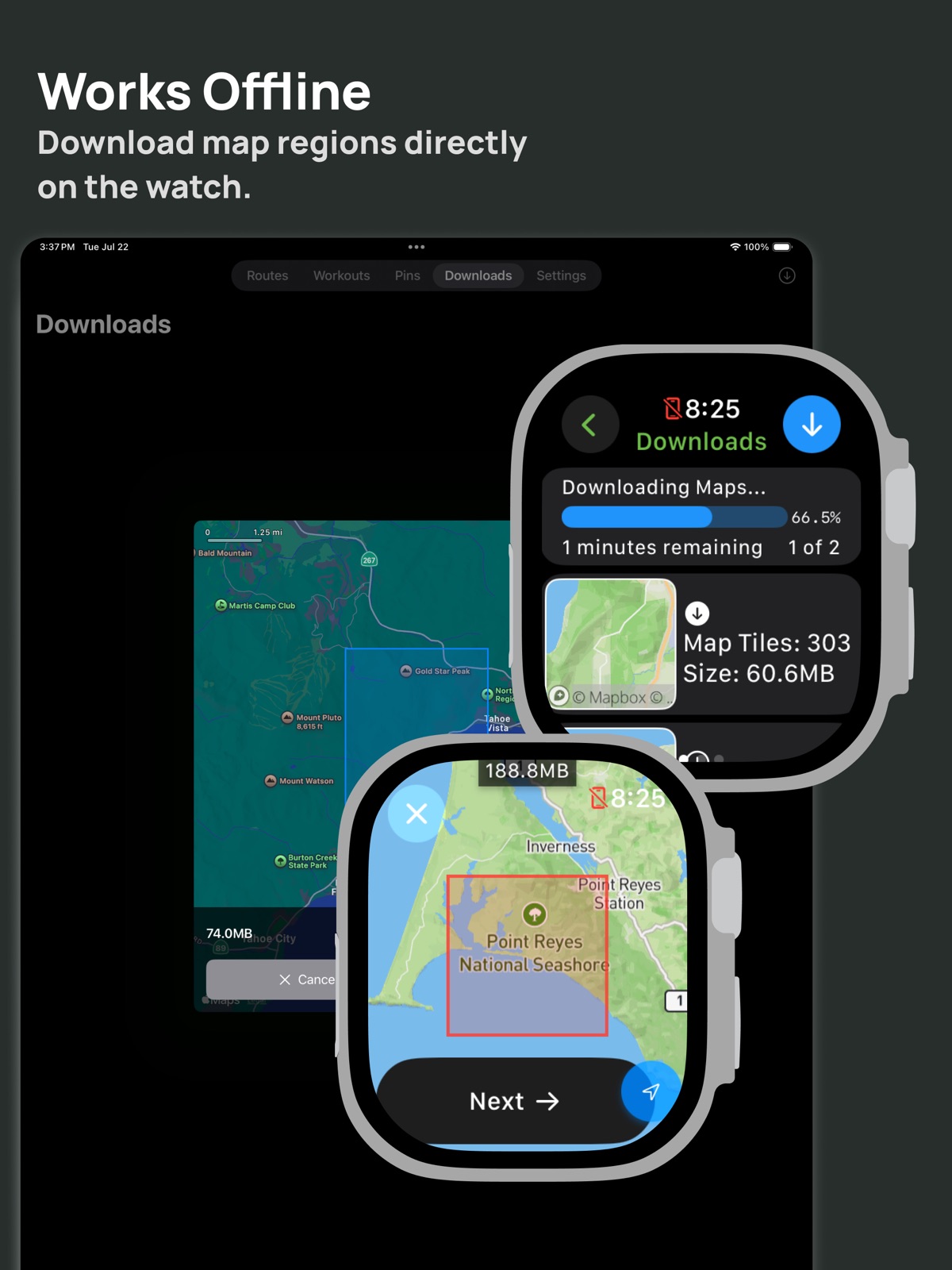
17 store screenshots


Pricing & paywalls
App Store
- Price: $5.99
- In-app purchases
Ratings & reviews
App Store
-
5/5The app I’ve been looking for!
So stoked to finally have an app like this for all my outdoor activities. Works so much better than anything else I’ve tried.
Ezrar · 31 Jul 2026
-
5/5Impressive
I’ve been looking for an app that shows me how much altitude gain I’ve done for backcountry skiing. This is perfect, and comes with a ton more features! Well worth the price!
Miss-Claudia · 31 Jul 2026
-
5/5Best offline navigation app for Apple Watch
I’m a long time Garmin watch user coming over to an Apple Watch Ultra 3. The biggest gap for me was Apple Watch’s lack of rich offline base maps, compared to Garmin. I tried a few different apps but eventually found Mappa and loved it from the start. It’s incredibly easy to sync routes from Strava and then download the region to the watch for offline use. I went on a 3 day backpacking trip where I was off the grid with no cell reception the entire time, and Mappa performed great. I was able to load the routes I had synced from Strava and navigate them offline. When I returned to civilization the hiking activities that I recorded in Mappa synced to Apple Health and Strava. Great app!
CincyTriGuy · 31 Jul 2026
Privacy & accessibility
App Store
Privacy
- Data Linked to You — App Functionality — Contact Info — Email Address Developer declared
- Data Linked to You — App Functionality — Health & Fitness — Fitness Developer declared
- Data Linked to You — App Functionality — Health & Fitness — Health Developer declared
- Data Linked to You — App Functionality — Location — Precise Location Developer declared
- Data Linked to You — Contact Info Developer declared
- Data Linked to You — Health & Fitness Developer declared
- Data Linked to You — Location Developer declared
Accessibility
No accessibility labels collected yet.
Versions
App Store
-
1.14
New: Connect your Ride With GPS account to import routes New: Sort options for the workout list: distance, start date, elevation gain, elevation loss. New: Show elevation loss for workouts. New: File share sheet when exporting routes and workouts Fixed: Map performance and battery life when displaying tracks from a long workout (>2 hours)
-
1.15
Fixed: Watch login issue on app install.
-
1.16
New: Long press on the map to view a location's details (coordinates, altitude, distance), share the location with a friend, or generate a route (hiking or cycling). New: Workout options - enable/disable switching to the map screen when starting a workout and an option to hide current route when ending a workout. New: Show turn by turn direction cue sheet for routes that support it (routes created in Mappa and Ride with GPS). Fixed: Direction of route arrows not showing correctly for GeoJSON files.
-
1.17
New: Workouts synced to the Fitness app now show the full route and weather information. New: Weather data field for workouts. New: Show workout stats on the paused screen. New: Play/resume toolbar buttons on the workout screen, and a search toolbar button on the settings screen. New: Share route and workout file exports directly from the watch New: Button to access the system settings for Mappa. New: Show the link for a route on the watch. Tap it to share directly from the watch. Fixed: Elevation calculation for certain routes Fixed: "Show on watch" button not always working when the app has no internet connection.
-
1.18
New: - TCX route file import and export. - Export the map pin list as a GPX file. - Import Strava and Ride with GPS routes on the watch - Export workout files from the Watch. - Compass view when viewing a location and search results to help you orient to a location. Fixed: - Workout crash on the watch. - "Route to" button not always accessible on the phone companion app.
-
2.0
New: - Select map regions to download from the phone companion app - Always-on-display map settings (full, battery saving, off, and custom) - Elevation chart now shows the grade of uphill climbs - Drag on the elevation chart to highlight the point on the map (Phone only) - Heart rate zones chart view - shows the time spent in each zone. - Set the upper and lower limit of each heart rate zone - AppIntents - Import/export route, import/export workout, always-on-display setting - Route to pin - generate walking/cycling routes to pins - Export an individual pin as a GPX file - Add notes to routes and workouts Fixed: - Disabled search when offline - Download the closest zoom level
-
2.1
New: Mappa can automatically enable "Water Lock" when you start a workout. This can be enabled for water activities (Swiming, Kayaking, Paddle-boarding), all activities, or a custom set. New: Route and workout list redesign New: "Show + Center" button loads a route on the map and centers it. New: Route and workout filter and sort options (link, notes, duration, proximity, exported state). New: Import a list of map pins or a waypoint-only route file. New: The name and notes for map pins are now included in exports Fixed: Route and workout export option on the phone not showing all available apps. Fixed: Route to pin now uses the name of the pin if available.
-
2.10
New: - Export workouts as TCX and FIT files - Map pin Shortcuts: Drop a pin, Edit, Find, Open, Import, Export - Batch edit routes and workouts using Shortcuts Fixed: - Include a route's turn by turn steps when exporting to a GPX file
-
2.11
Improved watch and phone background sync
-
2.12
New: • Share to Mappa improvements - open locations from Google or Apple Maps to create a route or drop a pin. • When deleting a workout there is now an additional option to also delete the data in Health. • Tapping "End" for a workout now shows a countdown timer by default. The confirmation dialog option is now a setting. • Simplified Shortcuts for navigating settings • New app translations: Italian and German • Import workouts without location data and view them in Mappa. • Multi track elevation support - route and workout screens now show the elevation profile for all of the tracks in an imported file. Fixed: • Workout pause/resume issues: map data fields not visible when paused, track segments not always split properly on the map. • Filtering by route or workout activity and going to back to the list keeps the filter selected. • Distance calculations when trimming a workout. • Improved file handling: additional time formats for GPX files, KML crash fixes, and KML polygon support. • Current trackpoints not immediately showing when starting a workout. • Watch download screen issues with multiple previously downloaded zones.
-
2.13
New: • Handoff support for workouts and pins. Fixed: • Mappa not always quitting in the background on the watch. • Trimming the start of a workout not updating all map views. • Switching back to the route or workout list losing the scroll position. • Workout completed sheet sometimes closing too soon.
-
2.14
New: • Import workouts from the Health app. In Mappa, go to Workouts > top right toolbar button > Import from Health. Fixed: • Create route from directions in the share to Mappa page.
-
2.15
New: • Search for a location on the download maps screen • Support unnamed waypoints from imported route files. Fixed: • File import options missing from share to Mappa screen. • Map Pin delete option not working on the watch. • Digital crown focus not working properly on the Map Pin edit screen.
-
2.16
New: • Pause map downloads when switching to low power mode Fixed: • Switching to low power mode mid-workout crashing the app. • Pins on the watch bezel showing in the wrong locations when tracking heading and panning simultaneously.
-
2.17
New: • Pin icon options: Water, Campfire, Fish, Parking, First Aid Fixed: • Show workout option buttons in the finish workout screen popup. • Crash accessing storage view on some devices • Fix syncing issues on iOS 18 and watchOS 8
-
2.18
New: • New Location coordinate format option "Degrees Minutes Decimal", toggle in "Map Settings" on either the watch or phone in Map Settings. Fixed: • Image stretched on the finish workout screen. • Nearby recommended workout types are now more accurate based on workout history.
-
2.19
· 2 Jul 2026
New: • Open map pin coordinates in Apple or Google maps • Copy map pin coordinates to the clipboard • Search using coordinates in the "Route to" screen Fixed: • Map not always rotating properly outside of a workout
-
2.2
New: Trim a workout New: Record notes during a workout Fixed: Slow workout sync at the end of a workout
-
2.3
New: Download a map region for a route on the phone New: Save a search suggestion as a map pin
-
2.4
New: Improved RideWithGPS route imports. All routes are now synced included pinned routes. Fixed: Route track colors are now handled properly from Garmin GPX files. You can also now disable the custom colors in Settings > Route Settings.
-
2.5
Fixed: RideWithGPS issue where routes were not updating. There is also a new option to fully sync or disconnect your account from the route import screen. Fixed: Route track colors are now handled properly from Garmin GPX files on the watch map as well. Fixed: Route Settings are now synced between the watch and phone.
-
2.6
New: Select multiple map pins to batch export and delete Fixed: "Route to Pin" button when selecting a pin from the map Fixed: Issue syncing some RideWithGPS accounts
-
2.7
New: - iOS 26 and watchOS 26 updates - Swipe to delete a pin from the list Fixed: - Workout tracking will now work within Mappa even if you have the Workout write permission to Health app disabled. You can export workouts to Health at a later date if you decide to enable this permission. - Crash when syncing RideWithGPS
-
2.8
New: - Merge multiple workout files. You can now merge a workout from Mappa and another device and choose the data you would like to keep from each (Location, Heart Rate, Cadence, Power). - Long press on a route from the route list to export. - French and Spanish translations - Tip jar Fixed: - Map pin list on watch crash
-
2.9
New: - Korean and Japanese translations Fixed: - Shortcuts not running - Deleting a route or workout from the detail menus in the phone app
Alternatives
- Tooboo - Hiking Trail Guides — Same category + similar ratings
Availability by market
- US
Data quality & evidence
- Page completeness
- Live store listing
- Last verified
- 31 Jul 2026
- Sources
- App Store
- Independent summary has not been published yet.