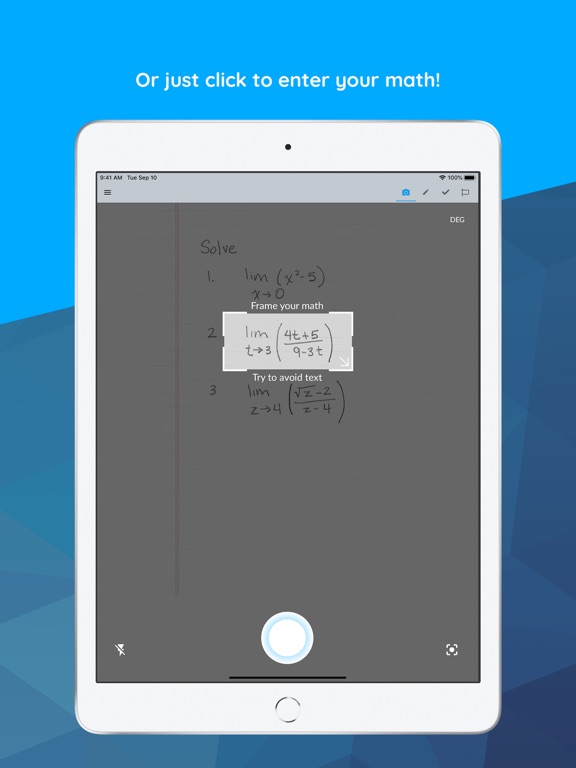
Apoku MCP provides app discovery, detailed cards, evidence, sources and screenshots where available. Unknown or conflicting prices stay explicit.
View JSON
GET /api/v3/apps/1466659419
{
  "app_id": 1466659419,
  "canonical_url": "https://appcorpus.com/apps/maple-calculator-math-solver-1466659419",
  "identity": {
    "name": "Maple Calculator: Math Solver",
    "slug": "maple-calculator-math-solver",
    "developer": {
      "name": "Maplesoft",
      "url": "https://appcorpus.com/developers/maplesoft-developer_a27cb0762b83288abf9553a367772ccd"
    },
    "icon_url": "https://is1-ssl.mzstatic.com/image/thumb/Purple211/v4/ce/80/42/ce8042ef-0940-db86-d736-9d3ae9e57146/AppIcon-0-0-1x_U007emarketing-0-8-0-85-220.png/512x512bb.jpg",
    "stores": [
      "apple"
    ],
    "platforms": [
      "iphone",
      "ipad"
    ],
    "status": {
      "state": "active",
      "label": "Active",
      "last_checked": "2026-08-06",
      "last_checked_label": "6 Aug 2026",
      "banner": null,
      "region_note": null,
      "data_state": "stale",
      "data_state_label": "Some store data may be out of date"
    }
  },
  "listings": [
    {
      "store": "apple",
      "status": "ACTIVE",
      "url": "https://apps.apple.com/us/app/maple-calculator-math-solver/id1466659419?uo=4",
      "rating": 4.7,
      "rating_count": 1521,
      "formatted_price": "Free",
      "is_free": true,
      "has_iap": true,
      "has_subscription": null,
      "version": "4.3.3",
      "updated": "2026-08-06",
      "currency": "USD"
    }
  ],
  "summary": {
    "one_liner": null,
    "summary": null,
    "best_for": [],
    "not_for": [],
    "status": "fallback",
    "at_a_glance": [
      "From $2.49/mo",
      "Free to download",
      "In-app purchases"
    ]
  },
  "categories": {
    "official": [
      "Education",
      "Utilities"
    ],
    "appcorpus": [
      {
        "category_id": "education",
        "label": "Education",
        "url": "https://appcorpus.com/categories/education"
      },
      {
        "category_id": "utilities",
        "label": "Utilities",
        "url": "https://appcorpus.com/categories/utilities"
      }
    ]
  },
  "use_cases": [],
  "features": [
    {
      "capability_id": "free_app",
      "label": "Free app",
      "availability": "yes",
      "access_level": "free",
      "scope": null,
      "evidence": "Store published"
    },
    {
      "capability_id": "in_app_purchases",
      "label": "In-app purchases",
      "availability": "yes",
      "access_level": "free_limited",
      "scope": null,
      "evidence": "Store published"
    }
  ],
  "pricing": [
    {
      "store": "apple",
      "formatted_price": "Free",
      "is_free": true,
      "has_iap": true,
      "has_subscription": null,
      "currency": "USD",
      "market": "us",
      "last_verified": "2026-08-06",
      "rows": [
        "12 months — $6.99/month",
        "12 months — $29.99/year ($2.49/mo)",
        "12 months — $25.99"
      ],
      "state": "current"
    }
  ],
  "screens": [
    {
      "url": "https://is1-ssl.mzstatic.com/image/thumb/Purple112/v4/e6/99/bd/e699bdf7-f80d-3d62-6a6c-56bab11c1845/pr_source.jpg/1600x1600bb.jpg",
      "store": "apple",
      "platform": "ipad",
      "alt": "Maple Calculator: Math Solver ipad screenshot 1"
    },
    {
      "url": "https://is1-ssl.mzstatic.com/image/thumb/Purple122/v4/de/e8/27/dee827e1-556b-ae15-de86-f243b61a454f/pr_source.jpg/576x768bb.jpg",
      "store": "apple",
      "platform": "ipad",
      "alt": "Maple Calculator: Math Solver ipad screenshot 2"
    },
    {
      "url": "https://is1-ssl.mzstatic.com/image/thumb/Purple122/v4/ce/fe/8f/cefe8fd6-e999-f0cf-8835-ff749d6ec69e/pr_source.jpg/1600x1600bb.jpg",
      "store": "apple",
      "platform": "ipad",
      "alt": "Maple Calculator: Math Solver ipad screenshot 3"
    },
    {
      "url": "https://is1-ssl.mzstatic.com/image/thumb/Purple122/v4/24/68/22/24682207-077e-5878-180a-e16b73aa45d9/pr_source.jpg/576x768bb.jpg",
      "store": "apple",
      "platform": "ipad",
      "alt": "Maple Calculator: Math Solver ipad screenshot 4"
    },
    {
      "url": "https://is1-ssl.mzstatic.com/image/thumb/Purple122/v4/44/02/72/44027252-4a97-d861-3291-9683131e85c0/pr_source.jpg/1600x1600bb.jpg",
      "store": "apple",
      "platform": "ipad",
      "alt": "Maple Calculator: Math Solver ipad screenshot 5"
    },
    {
      "url": "https://is1-ssl.mzstatic.com/image/thumb/Purple122/v4/39/ad/f8/39adf879-8e46-f3c7-8344-72b6d8bd735d/58c64c35-87b7-42f1-8398-8f6bfb3a4977_6.jpg/576x768bb.jpg",
      "store": "apple",
      "platform": "ipad",
      "alt": "Maple Calculator: Math Solver ipad screenshot 6"
    },
    {
      "url": "https://is1-ssl.mzstatic.com/image/thumb/Purple122/v4/6e/cf/37/6ecf3701-cbf8-c07c-dc41-1f69a414661a/c3b07dd3-0190-40b6-b2b0-927c369fe7c9_9.jpg/1600x1600bb.jpg",
      "store": "apple",
      "platform": "ipad",
      "alt": "Maple Calculator: Math Solver ipad screenshot 7"
    },
    {
      "url": "https://is1-ssl.mzstatic.com/image/thumb/Purple122/v4/73/96/a6/7396a6c8-9588-134e-03e2-7124ff0cfbde/2f1e5e5e-3bd5-4c4f-a769-161d87e50645_9.jpg/576x768bb.jpg",
      "store": "apple",
      "platform": "ipad",
      "alt": "Maple Calculator: Math Solver ipad screenshot 8"
    },
    {
      "url": "https://is1-ssl.mzstatic.com/image/thumb/Purple122/v4/96/75/13/9675132d-d48b-e1d5-5890-e3a0497e6e3c/a85cb9d2-5308-4cdf-9cc5-f790de02aeef_8.jpg/1600x1600bb.jpg",
      "store": "apple",
      "platform": "ipad",
      "alt": "Maple Calculator: Math Solver ipad screenshot 9"
    },
    {
      "url": "https://is1-ssl.mzstatic.com/image/thumb/Purple122/v4/1f/62/47/1f624705-4db0-432f-05ba-9869347af321/6ee9a5a6-9c68-4f04-ab39-cc320318b592_8.jpg/576x768bb.jpg",
      "store": "apple",
      "platform": "ipad",
      "alt": "Maple Calculator: Math Solver ipad screenshot 10"
    },
    {
      "url": "https://is1-ssl.mzstatic.com/image/thumb/Purple122/v4/77/a9/b4/77a9b44f-b2d8-0fe6-83f8-9a8f81d532e2/pr_source.jpg/1600x1600bb.jpg",
      "store": "apple",
      "platform": "ipad",
      "alt": "Maple Calculator: Math Solver ipad screenshot 11"
    },
    {
      "url": "https://is1-ssl.mzstatic.com/image/thumb/Purple112/v4/bc/29/ef/bc29efe2-c0ea-6fd3-9574-3bfc7cc58373/pr_source.jpg/576x768bb.jpg",
      "store": "apple",
      "platform": "ipad",
      "alt": "Maple Calculator: Math Solver ipad screenshot 12"
    },
    {
      "url": "https://is1-ssl.mzstatic.com/image/thumb/Purple122/v4/82/8f/42/828f4215-7aaf-0f67-7d7b-77c68c6a30b8/pr_source.jpg/1600x1600bb.jpg",
      "store": "apple",
      "platform": "ipad",
      "alt": "Maple Calculator: Math Solver ipad screenshot 13"
    },
    {
      "url": "https://is1-ssl.mzstatic.com/image/thumb/Purple112/v4/f8/a7/b4/f8a7b43a-e267-ee33-25b1-75e13bfb9716/pr_source.jpg/576x768bb.jpg",
      "store": "apple",
      "platform": "ipad",
      "alt": "Maple Calculator: Math Solver ipad screenshot 14"
    },
    {
      "url": "https://is1-ssl.mzstatic.com/image/thumb/Purple122/v4/e6/c1/0f/e6c10f7c-dac7-f721-763a-e79cf3e8c8f8/pr_source.jpg/1600x1600bb.jpg",
      "store": "apple",
      "platform": "ipad",
      "alt": "Maple Calculator: Math Solver ipad screenshot 15"
    },
    {
      "url": "https://is1-ssl.mzstatic.com/image/thumb/Purple122/v4/fd/95/25/fd9525fa-40fb-2772-39cd-a27129c94c79/pr_source.jpg/576x768bb.jpg",
      "store": "apple",
      "platform": "ipad",
      "alt": "Maple Calculator: Math Solver ipad screenshot 16"
    },
    {
      "url": "https://is1-ssl.mzstatic.com/image/thumb/Purple122/v4/43/d0/fa/43d0fa55-bd3f-cd98-0416-1f39d9d04fd4/cd8d0392-ba42-45a5-8f84-b67e02a5cd8c_7.jpg/1600x1600bb.jpg",
      "store": "apple",
      "platform": "ipad",
      "alt": "Maple Calculator: Math Solver ipad screenshot 17"
    },
    {
      "url": "https://is1-ssl.mzstatic.com/image/thumb/Purple122/v4/00/b4/a7/00b4a738-a879-82f8-842e-187a5082fd59/e1a3dbfc-9a50-4433-bc88-4b448939f09f_7.jpg/576x768bb.jpg",
      "store": "apple",
      "platform": "ipad",
      "alt": "Maple Calculator: Math Solver ipad screenshot 18"
    },
    {
      "url": "https://is1-ssl.mzstatic.com/image/thumb/PurpleSource122/v4/80/54/ca/8054caf2-f815-2985-f9fb-25b99049d193/d15c06a7-0292-4c5e-a556-1d4907148d33_10.jpg/1600x1600bb.jpg",
      "store": "apple",
      "platform": "ipad",
      "alt": "Maple Calculator: Math Solver ipad screenshot 19"
    },
    {
      "url": "https://is1-ssl.mzstatic.com/image/thumb/PurpleSource112/v4/31/a3/f3/31a3f320-1e68-e519-7f72-a18cbe0f0dd1/3ae4d421-ada4-4d0b-b617-a9e8e94631ec_10.jpg/576x768bb.jpg",
      "store": "apple",
      "platform": "ipad",
      "alt": "Maple Calculator: Math Solver ipad screenshot 20"
    },
    {
      "url": "https://is1-ssl.mzstatic.com/image/thumb/Purple122/v4/1f/d7/7b/1fd77b58-6d87-2d96-3dac-883e0c6bba9e/8e17e177-df4b-4a49-b835-3f8f5b9f9aa6_1.jpg/1242x1600bb.jpg",
      "store": "apple",
      "platform": "iphone",
      "alt": "Maple Calculator: Math Solver iphone screenshot 21"
    },
    {
      "url": "https://is1-ssl.mzstatic.com/image/thumb/Purple122/v4/ad/4e/12/ad4e1270-7fd9-6920-a24b-653bc3cecfbf/dcde1e15-5e4f-4ca1-a71f-3b7b41e9e18c_2.jpg/1242x1600bb.jpg",
      "store": "apple",
      "platform": "iphone",
      "alt": "Maple Calculator: Math Solver iphone screenshot 22"
    },
    {
      "url": "https://is1-ssl.mzstatic.com/image/thumb/Purple112/v4/43/61/df/4361df92-a193-ab76-84db-afa4b4d53b03/55596f44-ab03-4d7c-8977-0ce56ebf89cf_1242x2688bb__U00282_U0029.png/1242x1600bb.jpg",
      "store": "apple",
      "platform": "iphone",
      "alt": "Maple Calculator: Math Solver iphone screenshot 23"
    },
    {
      "url": "https://is1-ssl.mzstatic.com/image/thumb/Purple112/v4/78/7c/d3/787cd373-c488-6e77-54ff-7c4280208113/d817c8c8-e930-4db5-87ef-05d822ebf5fb_9.jpg/1242x1600bb.jpg",
      "store": "apple",
      "platform": "iphone",
      "alt": "Maple Calculator: Math Solver iphone screenshot 24"
    },
    {
      "url": "https://is1-ssl.mzstatic.com/image/thumb/Purple122/v4/e8/11/51/e811516f-d08e-3519-b6dd-033b9a5b788e/545d18b3-164f-4006-9d9b-f7bf7ba1dae3_8.jpg/1242x1600bb.jpg",
      "store": "apple",
      "platform": "iphone",
      "alt": "Maple Calculator: Math Solver iphone screenshot 25"
    },
    {
      "url": "https://is1-ssl.mzstatic.com/image/thumb/Purple122/v4/f4/0c/1c/f40c1c7c-38fa-9b66-f9df-e4451cce402a/9bb4dcd7-6438-4108-860b-8a9a536ef1ab_3.jpg/1242x1600bb.jpg",
      "store": "apple",
      "platform": "iphone",
      "alt": "Maple Calculator: Math Solver iphone screenshot 26"
    },
    {
      "url": "https://is1-ssl.mzstatic.com/image/thumb/Purple112/v4/83/1a/d5/831ad5c3-8049-f9b8-e263-169f15891a95/263cae99-a5bc-4166-b6f0-11c4e3b2cc32_4.jpg/1242x1600bb.jpg",
      "store": "apple",
      "platform": "iphone",
      "alt": "Maple Calculator: Math Solver iphone screenshot 27"
    },
    {
      "url": "https://is1-ssl.mzstatic.com/image/thumb/Purple122/v4/a9/d1/f4/a9d1f483-0377-1109-6bb6-e0754441684b/4205fbaf-2f71-44ac-8d2c-5aaf22af2df3_5.jpg/1242x1600bb.jpg",
      "store": "apple",
      "platform": "iphone",
      "alt": "Maple Calculator: Math Solver iphone screenshot 28"
    },
    {
      "url": "https://is1-ssl.mzstatic.com/image/thumb/Purple122/v4/8b/3b/39/8b3b39e7-97f8-faf1-39e6-64f1e43ce608/173f0e86-0d91-4982-bd2d-e13b73081163_7.jpg/1242x1600bb.jpg",
      "store": "apple",
      "platform": "iphone",
      "alt": "Maple Calculator: Math Solver iphone screenshot 29"
    },
    {
      "url": "https://is1-ssl.mzstatic.com/image/thumb/PurpleSource112/v4/e7/19/9d/e7199d33-fa50-bf20-0354-ac400bf2f7fe/ff46c6d6-6268-4cfb-82ee-615ad9599bbe_10.jpg/1242x1600bb.jpg",
      "store": "apple",
      "platform": "iphone",
      "alt": "Maple Calculator: Math Solver iphone screenshot 30"
    }
  ],
  "data_states": {
    "screens": "current"
  },
  "ratings": [
    {
      "store": "apple",
      "average": 4.7,
      "count": 1521,
      "market": "us",
      "observed_at": "2026-08-06",
      "state": "current",
      "reviews": [
        {
          "rating": 5,
          "title": "It does what it’s supposed to do perfectly",
          "body": "I use it on my calculator and it works perfectly. Now he won’t solve equations but it will give you the steps on how to solve it as in-depth as you need it to do. The choice of how in-depth it goes it’s up to you.",
          "author": "Leo, (not the constellation)",
          "date": "7 Aug 2026"
        },
        {
          "rating": 5,
          "title": "Recommend!",
          "body": "I definitely recommend this app!!! Math used to be my favorite subject but I started getting off track and my grades were slipping but this app has really helped me improve my grade so yes I give this a 10/10 !",
          "author": "Mommy.Milker",
          "date": "7 Aug 2026"
        },
        {
          "rating": 5,
          "title": "Amazingly beautiful",
          "body": "Is this the same company from Amiga times? I remember back then it was amazing. It seems amazing now. That’s some 30 years of consistency if so.",
          "author": "Cyric Ozgur",
          "date": "7 Aug 2026"
        },
        {
          "rating": 1,
          "title": "Almost useless with the Iphone",
          "body": "Entering an equation by typing has been a frustrating experience, if not impossible, here’s why: no spacebar, no “:”, no “;”, virtually very limited punctuation marks. typing words have to be done with twice the effort because the default mode is the calculator pad (switches everytime we type a letter). Maybe app is not suited for the iphones which have very limited keyboard real estate.",
          "author": "Bprijadi",
          "date": "7 Aug 2026"
        },
        {
          "rating": 1,
          "title": "Advertised as useful, but useless in practice.",
          "body": "When trying to take a photo in the app the camera quality appears to blurry, and a picture cannot be taken. When I go to my phone’s camera app the camera works fine and pictures are clear, so it’s clearly an issue with the app. Cool concept, but ought to function as advertised.",
          "author": "wih4him",
          "date": "7 Aug 2026"
        }
      ]
    }
  ],
  "privacy": [
    {
      "store": "apple",
      "declarations": [
        {
          "title": "Data Linked to You",
          "detail": "Analytics — User Content — Photos or Videos",
          "source": "Developer declared"
        },
        {
          "title": "Data Linked to You",
          "detail": "App Functionality — User Content — Photos or Videos",
          "source": "Developer declared"
        },
        {
          "title": "Data Linked to You",
          "detail": "User Content",
          "source": "Developer declared"
        },
        {
          "title": "Data Not Linked to You",
          "detail": "Analytics — Diagnostics — Other Diagnostic Data",
          "source": "Developer declared"
        },
        {
          "title": "Data Not Linked to You",
          "detail": "Analytics — Diagnostics — Performance Data",
          "source": "Developer declared"
        },
        {
          "title": "Data Not Linked to You",
          "detail": "Analytics — Location — Coarse Location",
          "source": "Developer declared"
        },
        {
          "title": "Data Not Linked to You",
          "detail": "Analytics — Usage Data — Product Interaction",
          "source": "Developer declared"
        },
        {
          "title": "Data Not Linked to You",
          "detail": "Diagnostics",
          "source": "Developer declared"
        },
        {
          "title": "Data Not Linked to You",
          "detail": "Location",
          "source": "Developer declared"
        },
        {
          "title": "Data Not Linked to You",
          "detail": "Usage Data",
          "source": "Developer declared"
        }
      ],
      "accessibility": []
    }
  ],
  "changes": [
    {
      "store": "apple",
      "version": "3.3.12",
      "released_at": null,
      "notes": "• The Maple Calculator now comes with a handwriting palette. Use the palette to enter math with your fingertip. You’ll find the new handwriting palette in the editor screen. • This update includes bug fixes for plots."
    },
    {
      "store": "apple",
      "version": "3.3.13",
      "released_at": null,
      "notes": "• The Maple Calculator now comes with a handwriting palette. Use the palette to enter math with your fingertip. You’ll find the new handwriting palette in the editor screen. • This update includes bug fixes for plots."
    },
    {
      "store": "apple",
      "version": "3.3.14",
      "released_at": null,
      "notes": "• The Maple Calculator now comes with a handwriting palette. Use the palette to enter math with your fingertip. You’ll find the new handwriting palette in the editor screen. • This update includes bug fixes for plots."
    },
    {
      "store": "apple",
      "version": "3.3.15",
      "released_at": null,
      "notes": "• The Maple Calculator now comes with a handwriting palette. Use the palette to enter math with your fingertip. You’ll find the new handwriting palette in the editor screen. • This update includes bug fixes for plots."
    },
    {
      "store": "apple",
      "version": "3.3.17",
      "released_at": null,
      "notes": "• The Maple Calculator now comes with a handwriting palette. Use the palette to enter math with your fingertip. You’ll find the new handwriting palette in the editor screen. • This update includes bug fixes for plots."
    },
    {
      "store": "apple",
      "version": "3.3.18",
      "released_at": null,
      "notes": "• The Maple Calculator now comes with a handwriting palette. Use the palette to enter math with your fingertip. You’ll find the new handwriting palette in the editor screen. • This update includes bug fixes for plots."
    },
    {
      "store": "apple",
      "version": "3.3.19",
      "released_at": null,
      "notes": "• The Maple Calculator now comes with a handwriting palette. Use the palette to enter math with your fingertip. You’ll find the new handwriting palette in the editor screen. • This update includes bug fixes for plots."
    },
    {
      "store": "apple",
      "version": "3.3.20",
      "released_at": null,
      "notes": "• The Maple Calculator now comes with a handwriting palette. Use the palette to enter math with your fingertip. You’ll find the new handwriting palette in the editor screen. • This update includes bug fixes for plots."
    },
    {
      "store": "apple",
      "version": "3.3.21",
      "released_at": null,
      "notes": "• The Maple Calculator now comes with a handwriting palette. Use the palette to enter math with your fingertip. You’ll find the new handwriting palette in the editor screen. • This update includes bug fixes for plots."
    },
    {
      "store": "apple",
      "version": "3.4.0",
      "released_at": null,
      "notes": "Word Problem Support: Maple Calculator now offers enhanced support for word problems. Simply take a picture of your word problem, and let the app do the rest!"
    },
    {
      "store": "apple",
      "version": "3.4.1",
      "released_at": null,
      "notes": "Word Problem Support: Maple Calculator now offers enhanced support for word problems. Simply take a picture of your word problem, and let the app do the rest!"
    },
    {
      "store": "apple",
      "version": "4.0.0",
      "released_at": null,
      "notes": "Driven by user feedback: the redesigned editor screen now supports multiple expressions and keeps a history of your calculations for easy access."
    },
    {
      "store": "apple",
      "version": "4.0.1",
      "released_at": null,
      "notes": "Driven by user feedback: the redesigned editor screen now supports multiple expressions and keeps a history of your calculations for easy access."
    },
    {
      "store": "apple",
      "version": "4.0.4",
      "released_at": null,
      "notes": "Driven by user feedback: the redesigned editor screen now supports multiple expressions and keeps a history of your calculations for easy access."
    },
    {
      "store": "apple",
      "version": "4.1",
      "released_at": null,
      "notes": "Introducing \"Check My Work\"! Students can now take a picture of their fully handwritten math solution, and Maple Calculator will identify where they made a mistake. No more second-guessing — get clear feedback and learn where you went wrong."
    },
    {
      "store": "apple",
      "version": "4.2.1",
      "released_at": null,
      "notes": "Introducing \"Check My Work\"! Students can now take a picture of their fully handwritten math solution, and Maple Calculator will identify where they made a mistake. No more second-guessing — get clear feedback and learn where you went wrong."
    },
    {
      "store": "apple",
      "version": "4.2.11",
      "released_at": null,
      "notes": "Introducing \"Check My Work\"! Students can now take a picture of their fully handwritten math solution, and Maple Calculator will identify where they made a mistake. No more second-guessing — get clear feedback and learn where you went wrong."
    },
    {
      "store": "apple",
      "version": "4.2.4",
      "released_at": null,
      "notes": "Introducing \"Check My Work\"! Students can now take a picture of their fully handwritten math solution, and Maple Calculator will identify where they made a mistake. No more second-guessing — get clear feedback and learn where you went wrong."
    },
    {
      "store": "apple",
      "version": "4.2.5",
      "released_at": null,
      "notes": "Introducing \"Check My Work\"! Students can now take a picture of their fully handwritten math solution, and Maple Calculator will identify where they made a mistake. No more second-guessing — get clear feedback and learn where you went wrong."
    },
    {
      "store": "apple",
      "version": "4.2.7",
      "released_at": null,
      "notes": "Introducing \"Check My Work\"! Students can now take a picture of their fully handwritten math solution, and Maple Calculator will identify where they made a mistake. No more second-guessing — get clear feedback and learn where you went wrong."
    }
  ],
  "alternatives": [
    {
      "app_id": 517249689,
      "name": "PocketCAS lite for Mathematics",
      "url": "https://appcorpus.com/apps/pocketcas-lite-for-mathematics-517249689",
      "reason": "Same category + similar ratings"
    },
    {
      "app_id": 548861535,
      "name": "WolframAlpha",
      "url": "https://appcorpus.com/apps/wolframalpha-548861535",
      "reason": "Same category + similar ratings"
    },
    {
      "app_id": 1487886467,
      "name": "PhotoMath Solver AI: MathBox",
      "url": "https://appcorpus.com/apps/photomath-solver-ai-mathbox-1487886467",
      "reason": "Same category + similar ratings"
    },
    {
      "app_id": 1507786749,
      "name": "SnapMath - Photo Word Math",
      "url": "https://appcorpus.com/apps/snapmath-photo-word-math-1507786749",
      "reason": "Same category + similar ratings"
    },
    {
      "app_id": 1024251561,
      "name": "MathPapa - Algebra Calculator",
      "url": "https://appcorpus.com/apps/mathpapa-algebra-calculator-1024251561",
      "reason": "Same category + similar ratings"
    },
    {
      "app_id": 1267331464,
      "name": "SnapCalc - Math Problem Solver",
      "url": "https://appcorpus.com/apps/snapcalc-math-problem-solver-1267331464",
      "reason": "Same category + similar ratings"
    }
  ],
  "evidence_summary": {
    "index_state": "S1",
    "evidence_level": 1,
    "level_label": "Live store listing",
    "indexable": true,
    "last_verified_at": "2026-08-06",
    "unknown_fields": [
      "Apoku editorial summary has not been published yet."
    ],
    "sources": [
      "App Store"
    ]
  },
  "availability_markets": {
    "live": [
      "us"
    ],
    "selected": "us",
    "note": null
  },
  "feature_events": {
    "events": []
  },
  "features_slice": {
    "plans": [
      {
        "code": "plan",
        "label": "12 months",
        "kind": "subscription",
        "status": "store_listed",
        "prices": [
          {
            "storefront": "us",
            "formatted": "$25.99",
            "billing_period": null,
            "scope_status": "scoped",
            "market_mismatch": false,
            "source_market": "us",
            "observed_at": "2026-08-07 01:02:01.622896+00:00"
          },
          {
            "storefront": "us",
            "formatted": "$6.99",
            "billing_period": "monthly",
            "scope_status": "scoped",
            "market_mismatch": false,
            "source_market": "us",
            "observed_at": "2026-08-07 01:02:01.622896+00:00"
          },
          {
            "storefront": "us",
            "formatted": "$29.99",
            "billing_period": "yearly",
            "scope_status": "scoped",
            "market_mismatch": false,
            "source_market": "us",
            "observed_at": "2026-08-07 01:02:01.622896+00:00"
          }
        ],
        "trial": null
      }
    ],
    "features": [],
    "unknown_features": [],
    "data_cutoff": "6 Aug 2026"
  }
}