
Quick verdict
- What it is
- Store information collected; an Apoku editorial summary is not yet published.
- At a glance
-
- From $4.99/mo
- Free to download
- In-app purchases
Categories and search queries
Official categories
- Photo & Video
- Lifestyle
Apoku categories
Key functions
| Function | Availability | Access | Scope | Evidence |
|---|---|---|---|---|
| Free app | Yes | Free | Context-specific | Store published |
| In-app purchases | Yes | Limited free | Context-specific | Store published |
Screens
App Store
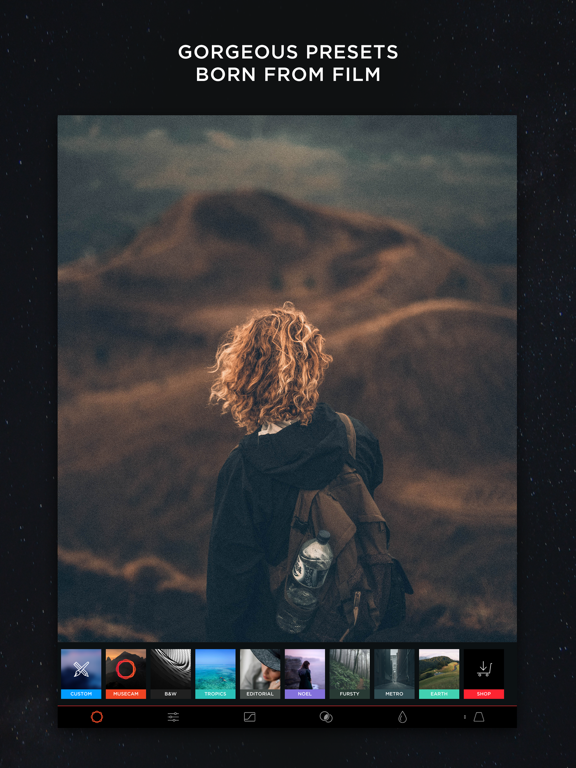
15 store screenshots



Pricing & paywalls
App Store
- MuseCam Pro - 1 Month — $4.99/month
- Earth Presets — $2.99
- Fursty Collection — $3.99
- MC Roberto Nickson Collection — $0.00
- Metro Collection — $2.99
- MuseCam Bundle — $5.99
- MuseCam Pro Kit — $3.99
- Noel Collection — $2.99
- Split Toning Add-On — $1.99
- Tropics Collection — $2.99
Ratings & reviews
App Store
-
5/5SammyDuck
I get a little sad when I find an app like Musecam because I know I likely won’t be using, at least not often, other camera and photo editing apps I have. This is perhaps the best combo camera and photo editor I have found on the ios app store. Your just-taken photos are ready immediately for editing. Couldn’t be more convenient. And the emphasis on getting the colors just right for your personal tastes is quite laudable. The free version is a steal, but you should go ahead and purchase the pro version at $4. That way you’ll have access to more features and some really good free photo-filter packs, including a magnificent black-and-white filter pack, as well as some great paid ones. Don’t see any subscription plans here, and they won’t hassle you with ads. Can’t beat that! The basic editing functions, the RGB tone curves, the vibrance adjust function, the recording of and ability to undo each edit action, the ability to save custom presets...all these features add up to one of the best values on the app store. You’ll learn mainly by doing—usually the best way—and you’ll develop more confidence in your photo taking and editing skills. If you’re “on the fence”, try the free version and compare to others.
SammyDuck · 7 Aug 2026
-
5/5Great image editor, except for editing RAW
As a photographer/cinematographer, I shoot in RAW. The only thing is, is that when I import a RAW image from my DSLR, the app freaks out and slows to a point where a slug could loop the world twice by the time MuseCam loads an image. I have to edit JPEG for now. Oh well. On a brighter note, I am still giving the app 5 stars. By far the best image editor out there. I had the app before the update that makes you pay for the curves, and I did pay, because they are worth the $4. The HSL sliders and the Tone Curve tools are such advanced tools for an iPhone. I can give any image the signature orange & teal look in about three minutes. I highly recommend the app to beginner and professional photographers alike. Come on, does the $4 kill you? It's the price of a cup of coffee at Starbucks. Get over it. Upgrade.
Awesome app 554472 · 7 Aug 2026
-
5/5RAW just got real.
A camera app that shoots RAW with an auto mode AND has the most powerful RAW editor in iOS? Is this Christmas or what? If you've bought RAW camera apps and couldn't see the point, I'm with you. I've wasted money on a half dozen confusing RAW camera apps and a few underperforming RAW editors as well. I'd pretty much given up when I stumbled across MuseCam. It makes shooting RAW as easy as using the built-in Camera app and has the largest set of RAW-specific editing tools I've seen in iOS. I'm really looking forward to shooting with this app on my iPhone and editing with it on my iPad. The only negative is the severe lack of help. You won't find it in the app nor on the dedicated site. (Search is NOT your friend in either. I just found a lot of template pages on the site filled with greeking.) Most camera functions are fairly logical, but I spent an obsessive few hours tinkering until I figured out the depth of the controls for the camera and RAW editor. Now that I got that down, this app definitely gets 5 stars.
Wolfe with an e · 7 Aug 2026
-
2/5Needs to stop reverting images
This is an OK app, nothing special over other apps. I don't use it because every time I open a photo it ignores any cropping or work I've done prior to opening that photo in MuseCam and automatically reverts to the original image. Sorry but I do not like that. It's like starting to work on the image all over again. I imagine that there should be some illogical logic behind it, but the app should not disregard prior changes to the image, it should be the choice of the user. I look around the app to see if there was a setting I could switch to prevent it from doing this, but no luck. For that reason I almost never use this app. To top it off I purchased some presets and bundles and they are not loading up. I deleted the app and reinstalled it and restored purchases, the wheel just keeps turning but nothing happens.
Yaslicious · 7 Aug 2026
-
1/5Used to be great but now crashes on launch
When I first started using Musecam it was impressively great. It really pushed the iPhone’s camera to its known limits and I regularly found myself using it to take photos. Over the past few months however, it became increasingly unstable on my iPhone 6 running iOS 11.4.1 and at this point it just continuously keeps crashing on launch. I just went ahead and removed it from my phone because it became completely useless. From other reviewers I’ve seen who are experiencing the same exact problem, I see no point even trying to contact the dev’s as they’ve made it nearly impossible to reach them and at this point I know they are aware of this problem but haven’t even tried to fix it. If they ever get around to patching it and making it usable again I’ll redownload it and rewrite my review.
Cyntrifical · 7 Aug 2026
Privacy & accessibility
App Store
Privacy
- Data Not Linked to You — App Functionality — Diagnostics — Crash Data Developer declared
- Data Not Linked to You — App Functionality — Diagnostics — Other Diagnostic Data Developer declared
- Data Not Linked to You — Developer’s Advertising or Marketing — Identifiers — Device ID Developer declared
- Data Not Linked to You — Diagnostics Developer declared
- Data Not Linked to You — Identifiers Developer declared
- Data Used to Track You — Identifiers — Device ID Developer declared
- Data Used to Track You — Identifiers Developer declared
Accessibility
No accessibility labels collected yet.
Versions
App Store
-
1.2.1
Fixed issue with RGB curves ---- New in 1.2.0 Thanks for using MuseCam! We're excited to announce our new Pro Kit bundle, which includes many of the tools you already love, along with our new CMYK curve tool, now available with this update. We have many other great things in store while making MuseCam faster and smoother than ever. Please let us know what we're missing [email protected]
-
1.2.2
Bug fixes and improvements
-
1.2.3
We've updated MuseCam for the iPhone X. We've also made some minor adjustments to the UI and fixed a few pesky bugs. We're also beginning work on a big new MuseCam 2.0 update - stay tuned. Please follow us on Instagram (@musecam.co) and use #MuseCam to be featured on our social feeds!
-
1.3.1
1.3.1 Update - When optimizing for iPhone X, we noticed a small bug with the menu for some other screen sizes. That's now fixed! Previous Update Notes: We've updated MuseCam for the iPhone X. We've also made some minor adjustments to the UI and fixed a few pesky bugs. We're also beginning work on a big new MuseCam 2.0 update - stay tuned. Please follow us on Instagram (@musecam.co) and use #MuseCam to be featured on our social feeds!
-
1.3.2
We fixed a bug in our most recent update affecting some image adjustments. Thank you for your patience. As always, please reach us at [email protected] for immediate assistance with the app. Also feel free to connect with us Instagram (@musecam.co) and use #musecam to be featured on our gallery. Thanks!
-
1.3.4
For this update, we've fixed a pesky bug that was sometimes causing the app to crash when "open to camera" was set by default in the preferences section. Additionally we've made some minor UI improvements, and have made some other preparations for future updates. As always, please reach out to us with any comments or questions regarding the app, and feel free to join the community on Instagram (@musecam.co)
-
1.3.5
Thank you for all of the wonderful feedback. Your suggestions are always taken into account as we continually work to build MuseCam. This update introduces a 'try before you buy' preview mode that allows users to use the advanced tools from the MuseCam Pro Kit before purchasing. Use #MuseCam to be featured on our Instagram gallery (@musecam.co)
-
1.3.6
Thank you for all of the wonderful feedback. Your suggestions are always taken into account as we continually work to build MuseCam. This update introduces a 'try before you buy' preview mode that allows users to use the advanced tools from the MuseCam Pro Kit before purchasing. 1.3.6: We've fixed 'try before you buy' toolbar not disappearing Use #MuseCam to be featured on our Instagram gallery (@musecam.co)
-
1.3.7
Thank you for all of the wonderful feedback. Your suggestions are always taken into account as we continually work to build MuseCam. This update introduces a 'try before you buy' preview mode that allows users to use the advanced tools from the MuseCam Pro Kit before purchasing. 1.3.7: UI improvements Use #MuseCam to be featured on our Instagram gallery (@musecam.co)
-
1.4.0
In this version, we've fixed some pesky bugs, and have made some improvements & tweaks that have increased performance under-the-hood. Thanks for using MuseCam! If you have any questions, comments, or suggestions - please connect with us on Instagram (@musecam.co)
-
1.4.1
In this update, we fixed an issue a small group of users were experiencing regarding the ability to restore purchases. Thanks for using MuseCam! If you have any questions, comments, or suggestions - join us on Instagram (@musecam.co)!
-
1.4.2
In this update, we fixed camera UI issues. Thanks for using MuseCam! If you have any questions, comments, or suggestions - join us on Instagram (@musecam.co)!
-
1.4.3
Thanks for using MuseCam! What's new in this version: - Improvements to the HSL tool - Slight UI tweaks
-
1.4.4
What's new in this version: - UI Updates for the new iPhone 12 lineup! - Performance improvements Thanks for using MuseCam! For questions, comments, or feature suggestions - please email us [email protected] or connect with us on Instagram @musecam.co.
-
1.4.5
Fixed an issue regarding the store UI for iPhone 12 Pro Max.
-
1.4.6
- Added new presets - Performance and stability improvements Love the app? Rate us! Got questions? Contact us via Support section.
-
1.5.0
- Added new presets - Performance and stability improvements Love the app? Rate us! Got questions? Contact us via Support section.
-
1.5.1
- Added new presets - Performance and stability improvements Love the app? Rate us! Got questions? Contact us via Support section.
-
1.5.2
- Added new presets - Performance and stability improvements Love the app? Rate us! Got questions? Contact us via Support section.
-
1.6.0
- Added new presets - Performance and stability improvements Love the app? Rate us! Got questions? Contact us via Support section.
-
1.6.1
- Added new presets - Performance and stability improvements Love the app? Rate us! Got questions? Contact us via Support section.
-
1.6.2
- Added new presets - Performance and stability improvements Love the app? Rate us! Got questions? Contact us via Support section.
-
1.6.3
- Added new presets - Performance and stability improvements Love the app? Rate us! Got questions? Contact us via Support section.
-
1.6.4
- Added new presets - Performance and stability improvements Love the app? Rate us! Got questions? Contact us via Support section.
-
1.6.5
· 22 Dec 2025
- Added new presets - Performance and stability improvements Love the app? Rate us! Got questions? Contact us via Support section.
Alternatives
- Manual Camera, Pro DSLR | RAW+ — Same category + similar ratings
- Pro Camera with RAW & Focus — Same category + similar ratings
- Filter Camera & Photo Editor — Same category + similar ratings
- StageCameraHD - Pro camera — Same category + similar ratings
- Pro Camera RAW: Modus ProCam — Same category + similar ratings
- Yamera (Manual Camera) — Same category + similar ratings
Availability by market
- US
Data quality & evidence
- Page completeness
- Live store listing
- Last verified
- 7 Aug 2026
- Sources
- App Store
- Apoku editorial summary has not been published yet.