
Quick verdict
- What it is
- Store information collected; independent summary not yet available.
- At a glance
-
- From $8.00/mo
- Free to download
- In-app purchases
Categories and search queries
Official categories
- Productivity
- Health & Fitness
AppCorpus categories
Key functions
| Function | Availability | Access | Scope | Evidence |
|---|---|---|---|---|
| Free app | Yes | Free | — | Store published |
| In-app purchases | Yes | Limited free | — | Store published |
Screens
App Store
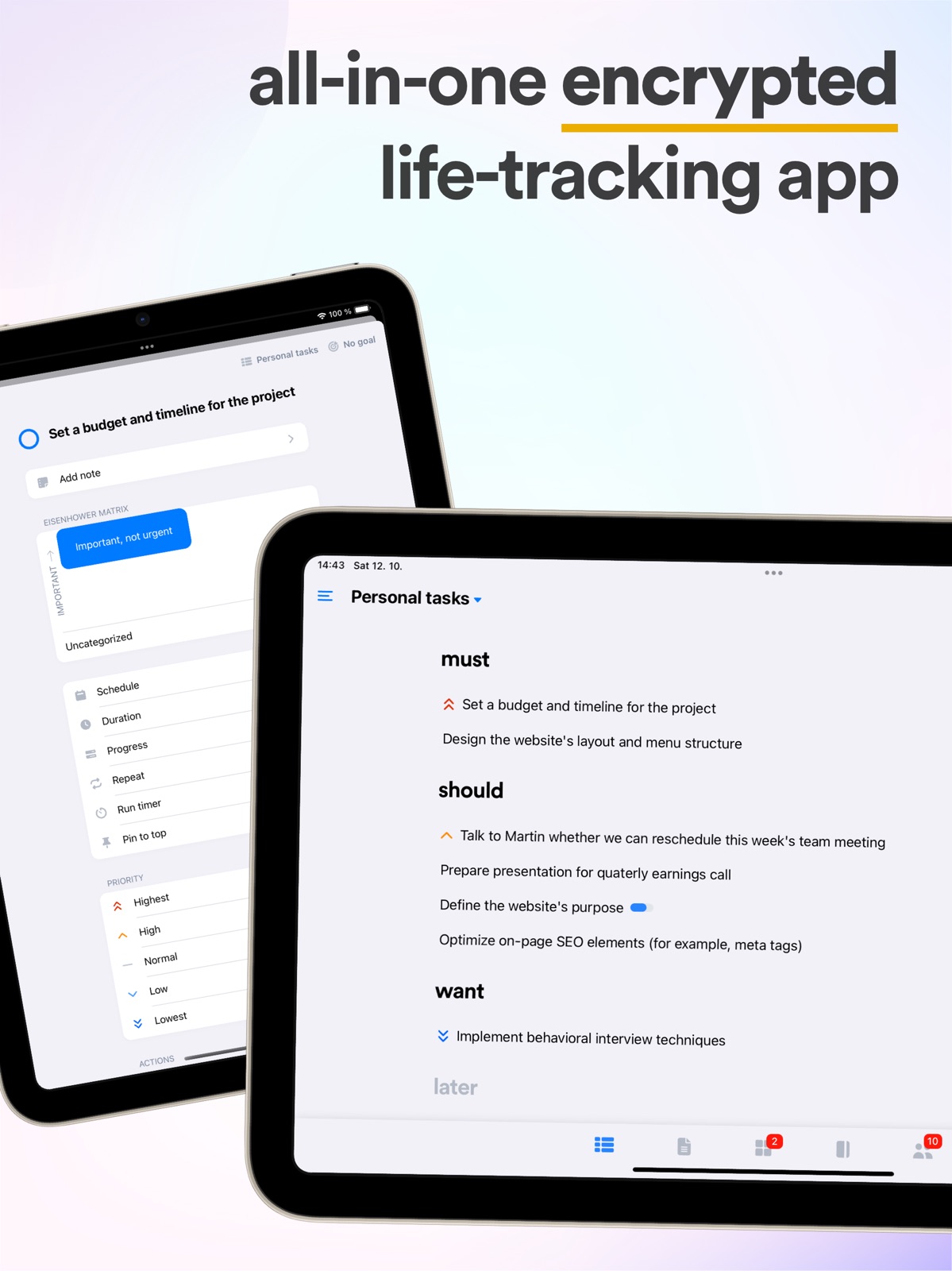
19 store screenshots


Pricing & paywalls
App Store
- Premium (Monthly) — $8.00/month
- Premium (Monthly) — $72.00/year ($6.00/mo)
Ratings & reviews
App Store
-
5/5Love this app!
The task prioritization options are phenomenal. I did subscribe to access the Eisenhower Matrix, which is my favorite. Sometimes I feel the need to switch it up a bit so I will look at how my tasks look in other formats such as Do Now/Do Later. I like that each goal/life area can use a different prioritization system. Don’t use notes much yet. The habit tracker and mood tracker are great! I think my favorite part about them is that the mood tracker allows you to select multiple emotions. You don’t have to sum a day up in one word. Days can be complex. I won’t use a one-word mood tracker. The corresponding smiley is highlighted in multiple mood colors to match! This makes me happy every time I log my mood - to see the range of emotion areas. The journal is convenient and I like that it’s secured with a pin. The Happy Memories entries help boost my mental health, and really call out the highlights of my life as I scroll back through the journal. I like the personal CRM a lot! I document interactions/conversations, and am testing out the ‘reconnect by x’ feature. This is a great feature to have while disconnecting from social media platforms. I get to control how often I want to see/interact with others, instead of having an algorithm trying to decide for me. I didn’t even realize I needed this. Thank you!
criscoheinz · 7 Aug 2026
-
5/5Thoughtful Productivity App
Lunatask is the most thoughtful and intentional productivity app that I’ve come across yet. It takes task management to the next level by organizing tasks how they often come to us — in the context of a goal serving an Area of Life (aka Area of Focus in other productivity frameworks). That’s in addition to the many mundane spontaneous to-dos that pop up in everyday life. The thoughtful integration of practical Habit, Mood, Energy, and Emotion tracking features and the UX makes it more likely to actually use those features in a way that benefits you IRL. Don’t forget Notes and Journaling with the ability to keep everything worth remembering in context using backlinks and regular old hyperlinks. The documentation is fantastic. It makes getting the most out of the app nearly effortless. Tons of great productivity advice too. That reminds me of the ability to switch to any of several incredibly effective workflows at anytime. These go way beyond simple prioritization. The author can be proud of this work. I can tell there will be more great features to come. You can even contribute ideas!
Rob N. Time · 7 Aug 2026
-
5/5By far the best to do app I’ve used (and I’ve used most all)
Underrated app by far. I’ve inserted it into my primary toolkit. It’s not perfect, but I find most to do apps severely lacking in terms of how I think of and prefer to organize my work. I love working in Areas and Goals/Projects, even had my own to do database set up in Notion which followed the same ideas. But Lunatask gave me a better experience to work in. And one of the simple beauties is each Area can support any flavor or work style, whether you prefer to use GTD (now/later), Kanban, Eisenhower, must/should/want, simple priority list, and other flavors, it supports them all! And each area can run a different flavor! And despite that robust capability, it’s beautifully simple. And as a keyboard power user on desktop I am grateful they support most features with simple hotkeys (and everything else with a power search at least on desktop). It is lacking in some ability to filter and find stuff, but it supports enough to get by. And there certainly are other features that could be added, other nice to haves, but they’ve got a great foundation at least so far as user experience, and whatever they add I hope they things simple moving forward. I’ve looked far and wide for a to do app I can tolerate, and I’ve seriously considered many times writing my own because everything I’ve used (including my custom notion database) is lacking in something important to me. But thankfully Lunatask spared me from having to do so, I’m on board with no plans to switch. Thanks Lunatask team! Keep up the great work!
thezimmee · 7 Aug 2026
-
5/5Helped me get my life together
This is THE best habit and task tracking app I’ve ever used. I have ADHD and can easily fall out of good habits if there are too many moving parts to keep track of. Having my journal, notes, relationship tracker, habits, AND tasks in one app is the best thing ever. The informative clarity available through the changes log and the sincere communication and receptive attitude via the Idea Portal make it clear that Mike sincerely cares about providing a product that will help people. The free version alone is overwhelmingly worthwhile on its own. And the paid versions are reasonable prices. [not to mention the student/educator discounts offered]. User friendly graphics and user interface. Clear and non-condescending explanations for each component. I feel empowered through Lunatask!! A heartfelt thank you for such a wonderful product. <3
KaleBale25 · 7 Aug 2026
-
4/5Best to do app I’ve tried
I’ve tried so many to do apps. I was frustrated with all of them and was considering writing my own to do app. Finding Lunatask spared me having to do so (so far). It works like I think, in Areas and Goals, and provides freeform markdown notes. And it provides a “what should I do next?” list, immensely useful. It’s not perfect. It lacks in some filterability. It doesn’t do projects great (not a big for me with my personal productivity, I just link to project boards or wherever as needed) or dependencies (but I don’t think that’s its goal). And I think the pinned features is misguided in its current state, it can’t pin tasks across Areas. I’d give it 5 stars if it offered a way to pin or somehow prioritize tasks across areas. But it works well enough, better than all others.
thezimmee · 7 Aug 2026
Privacy & accessibility
App Store
Privacy
- Data Linked to You — App Functionality — Contact Info — Email Address Developer declared
- Data Linked to You — App Functionality — Diagnostics — Crash Data Developer declared
- Data Linked to You — App Functionality — Identifiers — User ID Developer declared
- Data Linked to You — Developer’s Advertising or Marketing — Contact Info — Email Address Developer declared
- Data Linked to You — Contact Info Developer declared
- Data Linked to You — Diagnostics Developer declared
- Data Linked to You — Identifiers Developer declared
Accessibility
No accessibility labels collected yet.
Versions
App Store
-
2.1.0
Lunatask 2 is here with Relationship Tracking, our take on a Personal CRM featuring fully customizable fields, beautiful hierarchy visualization, reconnect rules, and memories timeline with journal integration. Keep track of everything related to your friends and family, what to talk about next time you meet, and say goodbye to missed anniversaries forever. What's new in v2.1.0? This update is mainly a complete internal rewrite of our Markdown editor, bringing support for tables, images, yellow highlights, quotes, horizontal lines, language-aware syntax highlighting in code blocks, markdown pasting, and many more. See our website for the complete changelog.
-
2.1.10
Lunatask 2 is here with Relationship Tracking, our take on a Personal CRM featuring fully customizable fields, beautiful hierarchy visualization, reconnect rules, and memories timeline with journal integration. Keep track of everything related to your friends and family, what to talk about next time you meet, and say goodbye to missed anniversaries forever. What's new in v2.1.10? - Our habit tracker has been redesigned and is no longer split into two screens, previously requiring you to go to a different screen to actually track a habit - When inserting an image at the end of the document, the cursor is now placed in a new paragraph after it, so you can immediately continue typing - The option to edit template for new journal entries is now accessible within the journal section itself, not just hidden deep in Settings - Notebook picker was redesigned a little bit to make it clear that "All notes" is not a notebook, which could have been confusing to newcomers - When navigating to or closing an entity’s detail, the list no longer scrolls if the item is still visible on screen. Instead, the item will simply flash to help you locate it quickly. Scrolling still occurs if the item’s position has changed and it's now outside the viewport. - Fixed entity picker scroll view in linking dialog not resetting scroll position on query changes - The logic for centering a cursor in editor viewport is now using a more precise calculation - Fixed a recently introduced issue where modals weirdly scroll after entity (like a task) is created - Fixed broken layout of search results when "show more" buttons are present after the last update - Other minor onboarding and copy changes
-
2.1.11
Lunatask 2 is here with Relationship Tracking, our take on a Personal CRM featuring fully customizable fields, beautiful hierarchy visualization, reconnect rules, and memories timeline with journal integration. Keep track of everything related to your friends and family, what to talk about next time you meet, and say goodbye to missed anniversaries forever. What's new in v2.1.11? - Added dark mode and tinted app icons - Friendly "How are you feeling today?" reminder prompt lost during last week's redesign of our habit tracker is now back - You can now hide mood tracker history charts at the top of our habit tracker when you don't need them - Person notes on the timeline have been refreshed with a card-style design to match the look of journal entries and notes - Link Extraction feature now recognizes and handles internal links correctly - Other minor visual improvements
-
2.1.12
Lunatask 2 is here with Relationship Tracking, our take on a Personal CRM featuring fully customizable fields, beautiful hierarchy visualization, reconnect rules, and memories timeline with journal integration. Keep track of everything related to your friends and family, what to talk about next time you meet, and say goodbye to missed anniversaries forever. What's new in v2.1.12? - Added a new goal picker at the top of the area picker, making it easier to switch between goals within the current area without extra scrolling - Added “all highest priority“ area badge option - Renamed “all actionable“ to “all current“ in area badge settings - The app now always shows the year when displaying start/end date for recurring tasks to remove any possible ambiguity - Reworked the editor’s scrolling logic — it now scrolls only when the cursor moves out of view or behind the keyboard, reducing unnecessary scrolling and flicker - Resolved an issue where the editor wouldn’t scroll when adjusting one side of a text selection — it now works from both ends - Fixed “next“ label showing in initial task status picker in area settings instead of “now“ when in Now/Later workflow
-
2.1.13
Lunatask 2 is here with Relationship Tracking, our take on a Personal CRM featuring fully customizable fields, beautiful hierarchy visualization, reconnect rules, and memories timeline with journal integration. Keep track of everything related to your friends and family, what to talk about next time you meet, and say goodbye to missed anniversaries forever. What's new in v2.1.13? - Refreshed the app's design to better match the look and feel of iOS 26 - Tapping a notification for scheduled habit now opens the habit tracker, automatically scrolling to and highlighting the habit, instead of opening the calendar - The "coming up" section is now called "just came up" to reduce ambiguity and make things a bit clearer for everyone, especially new users - Fixed a regression that caused the calendar to remain stuck at midnight instead of scrolling to the task when tapping a task notification - A couple of more minor changes and fixes here and there
-
2.1.15
Lunatask 2 is here with Relationship Tracking, our take on a Personal CRM featuring fully customizable fields, beautiful hierarchy visualization, reconnect rules, and memories timeline with journal integration. Keep track of everything related to your friends and family, what to talk about next time you meet, and say goodbye to missed anniversaries forever. What's new in v2.1.14? - “Plan Your Week” workflow was renamed to “Plan Your Days” as one does not necessarily need to plan their whole week and can use it to have just a simple “Today / Tomorrow / Later” task list, which might not have been obvious from its previous name - The option to mark a task time block as complete has been removed to simplify the workflow - In Plan Your Days workflow, time-blocking a task in “later” section now moves it into “today” section automatically – the same happens for past tasks, such as those in “yesterday” section - Pressing the “Documentation” button in the left drawer now opens the list of all documentation pages instead of going straight into the documentation for managing tasks - Fixed setting a birthdate before 1970 previously shifting the date one day - Fixed moving task out of “just came up” section into must/should/want sections not clearing the date in Must/Should/Want workflow - Minor fixes to our editor's URL normalization so it does not strip text fragments from links - Fixed vertical line on the calendar in the left drawer showing in cases and places where it shouldn't - Options like "Plan into my day" or "Run timer for 25 minutes" have been removed from the long-press action sheet on completed tasks in the logbook - Minor onboarding improvements and help text changes
-
2.1.16
Lunatask 2 is here with Relationship Tracking, our take on a Personal CRM featuring fully customizable fields, beautiful hierarchy visualization, reconnect rules, and memories timeline with journal integration. Keep track of everything related to your friends and family, what to talk about next time you meet, and say goodbye to missed anniversaries forever. What's new in v2.1.16? - We redesigned the “Show multi-line task names“ task list option, previously buried deep in the app's settings and hard for newcomers to discover, and we’re now making it a first-class citizen. You can now pick and easily freely switch between two different task list looks – our “minimal” look showing only little information about tasks on a single line (with swipe to complete action), and the new “full“ multi-line look showing tasks’ goal, age, and with checkboxes to complete them. - Deep linking is now officially supported – feel free to use our "lunatask://" prefixed URLs wherever you like to link to specific entities like tasks, notes, people, journal entries, lists like areas, goals, or notebooks in Lunatask from outside of Lunatask in any other app, including Shortcuts on iOS/Mac - The flow for adding happy memories has been redesigned, and when assigning a person to a happy memory, our apps now ask you whether you also want to update last reconnect date with that person to match the date of the happy memory automatically - New deep links were added to open specific sections or parts of Lunatask, i.e. "lunatask://tasks", "lunatask://notes", "lunatask://habits", "lunatask://journal", or "lunatask://relationships" - You can now paste a deep link, such as "lunatask://tasks/xyz", into our global search or editor’s linking dropdown, and they will find the entity - Our mobile app’s bottom tabs menu has been redesigned into a bubble shape to better fit into the look of iOS 26 - The look of our task lists on iPads has been redesigned and now mirrors the look of our desktop app’s task list for a better experience, utilizing iPad's larger screen - Fixed an issue in our Markdown serializer where placing two line breaks after each other placed a "br" tag into the note content after note reload - Other minor visual fixes and improvements
-
2.1.17
Lunatask 2 is here with Relationship Tracking, our take on a Personal CRM featuring fully customizable fields, beautiful hierarchy visualization, reconnect rules, and memories timeline with journal integration. Keep track of everything related to your friends and family, what to talk about next time you meet, and say goodbye to missed anniversaries forever. What's new in v2.1.17? - Several minor weekly improvements and bug fixes
-
2.1.18
Lunatask 2 is here with Relationship Tracking, our take on a Personal CRM featuring fully customizable fields, beautiful hierarchy visualization, reconnect rules, and memories timeline with journal integration. Keep track of everything related to your friends and family, what to talk about next time you meet, and say goodbye to missed anniversaries forever. What's new in v2.1.18? - Added new “Extended family” relationship category for those with larger families, where a single “Family“ category may not be enough - In area settings, you can now configure where newly created tasks should be initially placed when using “Plan Your Days” workflow (whether in “today” or “later”), to mirror a similar setting available in “Now/Later“ and “Kanban“ workflows - “Next to work on” overview now shows only first 10 tasks for areas using “Priority List” workflow - Formatting toolbar's “Checklist” option was renamed to “Subtasks” in task descriptions - Better onboarding into our reconnect reminder, as well as a few minor onboarding improvements to tasks and goals - The app now offers the option to disable list animations in its accessibility settings - Fixed formatting toolbar not working in goal description/breakdown
-
2.1.2
Lunatask 2 is here with Relationship Tracking, our take on a Personal CRM featuring fully customizable fields, beautiful hierarchy visualization, reconnect rules, and memories timeline with journal integration. Keep track of everything related to your friends and family, what to talk about next time you meet, and say goodbye to missed anniversaries forever. What's new in v2.1.2? - WhatsApp support has been added to phone numbers in our relationship tracker - You can now customize the template new journal entries are initialized with directly in the mobile app - The order of statuses in status pickers is now consistent with how they are shown in the task list - Sorting of tasks in the "pinned" section of the task list now takes assigned date into account - Schedules/Deferred tasks whose date has already come now show on top of the task list in Priority List workflow - A task timer's length no longer defaults to 25 minutes for tasks with estimates shorter than that (e.g. 10 minutes) - Fixed applying yellow highlight not working in the formatting toolbar - Incomplete tasks from archived goals no longer show in the main list of tasks for an area and in the "Next to work on" overview - Fixed clicking or pressing a link with bold or italic formatting in notes not opening the browser - The behavior of pressing “Enter“ inside table cells was fixed and improved - Minor reliability improvements to data sync, other visual and editor-related fixes
-
2.1.20
Lunatask 2 is here with Relationship Tracking, our take on a Personal CRM featuring fully customizable fields, beautiful hierarchy visualization, reconnect rules, and memories timeline with journal integration. Keep track of everything related to your friends and family, what to talk about next time you meet, and say goodbye to missed anniversaries forever. What's new in v2.1.20? - You can now long-press any area or goal in the area picker to open its settings - Fixed red area badge incorrectly showing also for tasks in archived goals - Minor naming and help text changes
-
2.1.21
Lunatask 2 is here with Relationship Tracking, our take on a Personal CRM featuring fully customizable fields, beautiful hierarchy visualization, reconnect rules, and memories timeline with journal integration. Keep track of everything related to your friends and family, what to talk about next time you meet, and say goodbye to missed anniversaries forever. What's new in v2.1.21? - Auto-lock is back! We've fixed the issues that were causing problems with this feature in the past. Protected notebooks, journal, and relationship tracker now properly lock when you background or close the app. - Addressed reported issues where existing tasks would sometimes display as blank after adding additional new tasks - Minor data sync improvements, onboarding, and other internal changes and upgrades
-
2.1.22
Lunatask 2 is here with Relationship Tracking, our take on a Personal CRM featuring fully customizable fields, beautiful hierarchy visualization, reconnect rules, and memories timeline with journal integration. Keep track of everything related to your friends and family, what to talk about next time you meet, and say goodbye to missed anniversaries forever. What's new in v2.1.22? - Auto-lock is back! The issues that previously caused this feature to be temporarily disabled are now fixed. Protected notebooks, journal, and relationship tracker now lock properly when you background or close the app. - Addressed reported issues of existing tasks sometimes displaying as blank after adding new tasks - Minor data sync improvements, onboarding, interface, and other internal changes and upgrades
-
2.1.23
Lunatask 2 is here with Relationship Tracking, our take on a Personal CRM featuring fully customizable fields, beautiful hierarchy visualization, reconnect rules, and memories timeline with journal integration. Keep track of everything related to your friends and family, what to talk about next time you meet, and say goodbye to missed anniversaries forever. What's new in v2.1.23? - Tag filter now only shows tags inside the currently selected notebook - The screen for adding tags now visually separates tags used in the current notebook and those used elsewhere - Opened notes now feature a button in the header to quickly jump to the tag picker - Options in “display and filter options“ were reordered so tag filtering is shown first in the notes sectio - Label “All notes“ on top of the note list was changed to "All notebooks" when no notebook is selected - The logic for figuring out which time blocks to mark as complete was vastly improved when completing “many-times” habits via the habit tracker itself and not the calendar - People’s initials generator function was improved to ignore certain leading characters - Fixed an issue where people’s initials may not have always been shown in uppercase letters - Fixed the app opening or flashing briefly in light mode when the system is set to dark mode caused by a regression in previous update - Task repeat settings no longer calculate and show next occurrences when "after completion" is checked - A few new good morning messages were added - Fixed a couple of misaligned error messages across the app and a few other minor visual fixes
-
2.1.24
Lunatask 2 is here with Relationship Tracking, our take on a Personal CRM featuring fully customizable fields, beautiful hierarchy visualization, reconnect rules, and memories timeline with journal integration. Keep track of everything related to your friends and family, what to talk about next time you meet, and say goodbye to missed anniversaries forever. What's new in v2.1.24? - Tag filter now only shows tags inside the currently selected notebook - The screen for adding tags now visually separates tags used in the current notebook and those used elsewhere - Opened notes now feature a button in the header to quickly jump to the tag picker - Options in “display and filter options“ were reordered so tag filtering is shown first in the notes sectio - Label “All notes“ on top of the note list was changed to "All notebooks" when no notebook is selected - The logic for figuring out which time blocks to mark as complete was vastly improved when completing “many-times” habits via the habit tracker itself and not the calendar - People’s initials generator function was improved to ignore certain leading characters - Fixed an issue where people’s initials may not have always been shown in uppercase letters - Fixed the app opening or flashing briefly in light mode when the system is set to dark mode caused by a regression in previous update - Task repeat settings no longer calculate and show next occurrences when "after completion" is checked - A few new good morning messages were added - Fixed a couple of misaligned error messages across the app and a few other minor visual fixes
-
2.1.26
Lunatask 2 is here with Relationship Tracking, our take on a Personal CRM featuring fully customizable fields, beautiful hierarchy visualization, reconnect rules, and memories timeline with journal integration. Keep track of everything related to your friends and family, what to talk about next time you meet, and say goodbye to missed anniversaries forever. What's new in v2.1.26? - Search now ignores partial matches inside words – giving you cleaner, more relevant results - Our Markdown editor now auto-links parsed URLs using "tel", "mailto", "ftp", and "lunatask" protocols - A set of safeguards and auto-recovery mechanisms was added to our editor to prevent rare glitches like disappearing text, cursor, and other related issues - Minor visual fixes – such as corrected rounding in the area picker, preventing “good morning” messages from appearing over the onboarding modals, etc.
-
2.1.27
Lunatask 2 is here with Relationship Tracking, our take on a Personal CRM featuring fully customizable fields, beautiful hierarchy visualization, reconnect rules, and memories timeline with journal integration. Keep track of everything related to your friends and family, what to talk about next time you meet, and say goodbye to missed anniversaries forever. What's new in v2.1.27? - Onboarding improvements and some minor fixes
-
2.1.28
Lunatask 2 is here with Relationship Tracking, our take on a Personal CRM featuring fully customizable fields, beautiful hierarchy visualization, reconnect rules, and memories timeline with journal integration. Keep track of everything related to your friends and family, what to talk about next time you meet, and say goodbye to missed anniversaries forever. What's new in v2.1.28? - Priority picker shows more prominently in task detail and long-press actions menu - Estimate presets were added to task detail, mirroring those available on desktop - Moving a task between goals no longer switches currently shown task list - Many onboarding and other minor improvements and fixes
-
2.1.3
Lunatask 2 is here with Relationship Tracking, our take on a Personal CRM featuring fully customizable fields, beautiful hierarchy visualization, reconnect rules, and memories timeline with journal integration. Keep track of everything related to your friends and family, what to talk about next time you meet, and say goodbye to missed anniversaries forever. What's new in v2.1.3? - WhatsApp support has been added to phone numbers in our relationship tracker - You can now customize the template new journal entries are initialized with directly in the mobile app - The order of statuses in status pickers is now consistent with how they are shown in the task list - Sorting of tasks in the "pinned" section of the task list now takes assigned date into account - Schedules/Deferred tasks whose date has already come now show on top of the task list in Priority List workflow - A task timer's length no longer defaults to 25 minutes for tasks with estimates shorter than that (e.g. 10 minutes) - Fixed applying yellow highlight not working in the formatting toolbar - Incomplete tasks from archived goals no longer show in the main list of tasks for an area and in the "Next to work on" overview - Fixed clicking or pressing a link with bold or italic formatting in notes not opening the browser - The behavior of pressing “Enter“ inside table cells was fixed and improved - Minor reliability improvements to data sync, other visual and editor-related fixes
-
2.1.4
Lunatask 2 is here with Relationship Tracking, our take on a Personal CRM featuring fully customizable fields, beautiful hierarchy visualization, reconnect rules, and memories timeline with journal integration. Keep track of everything related to your friends and family, what to talk about next time you meet, and say goodbye to missed anniversaries forever. What's new in v2.1.4? - This update introduces the ability to change your master password directly within the mobile app, along with several minor visual and other enhancements.
-
2.1.5
Lunatask 2 is here with Relationship Tracking, our take on a Personal CRM featuring fully customizable fields, beautiful hierarchy visualization, reconnect rules, and memories timeline with journal integration. Keep track of everything related to your friends and family, what to talk about next time you meet, and say goodbye to missed anniversaries forever. What's new in v2.1.5? - Opportunities to connect: Our mobile app now features a new streamlined overview of opportunities to connect in its relationship tracker - Formatting toolbar in our mobile app now features an option to insert a line break within a single paragraph, similarly to how our desktop offers this via Shift+Enter - Formatting toolbar now allows inserting a link even when no text is selected - Fixed embedding of images from Google Drive where the file's ID in its share URL contains a dash - Formatting toolbar and its option to insert a link now correctly handles and treats as valid links with custom protocols (e.g. obsidian://open?vault=foo&file=bar) - Fixed links using xmpp: protocol being incorrectly picked up by our email handling logic and being treated as email addresses - There's a new documentation page with tutorials on how to create image share links and embed URLs for Google Drive, OneDrive, and Dropbox on our documentation portal
-
2.1.6
Lunatask 2 is here with Relationship Tracking, our take on a Personal CRM featuring fully customizable fields, beautiful hierarchy visualization, reconnect rules, and memories timeline with journal integration. Keep track of everything related to your friends and family, what to talk about next time you meet, and say goodbye to missed anniversaries forever. What's new in v2.1.6? - Native support has been added for embedding images hosted on Nextcloud - Faster and more reliable data sync - The look of many screens was updated (especially in the settings and relationship tracker) - Many UI components were visually updated (for example, task priority picker, PIN code input, and more) - To simplify the workflow, the 'Later Today' calendar in the app’s left drawer no longer displays past time blocks that haven't been marked as complete - Long press gestures to open action sheets now detect the gesture and open faster - Fixed an issue where the task name on the task timer screen did not reflect updates made in the task detail - Spacing between formatting toolbar items now automatically adjusts and shrinks on smaller screens to fit everything in nicely - The limit for tracked relationships on our Free plan has been increased to 30
-
2.1.7
Lunatask 2 is here with Relationship Tracking, our take on a Personal CRM featuring fully customizable fields, beautiful hierarchy visualization, reconnect rules, and memories timeline with journal integration. Keep track of everything related to your friends and family, what to talk about next time you meet, and say goodbye to missed anniversaries forever. What's new in v2.1.7? - There's now a "done today" section at the bottom of the "Next to work on" overview - The action sheet for adding a new person timeline note or happy memory in person's profile now features a description of both entities and what to use each for - Fixed "Show inside goal/area" actions in the long-press action sheet for tasks not scrolling to the task after navigating inside the area or goal - Fixed the editor not making space for the keyboard when opened, making a large chunk of text at the end of a note/journal entry/etc inaccessible since the last update
-
2.1.8
Lunatask 2 is here with Relationship Tracking, our take on a Personal CRM featuring fully customizable fields, beautiful hierarchy visualization, reconnect rules, and memories timeline with journal integration. Keep track of everything related to your friends and family, what to talk about next time you meet, and say goodbye to missed anniversaries forever. What's new in v2.1.8? - Linking has arrived! You can now easily link notes in other notes, or tasks, people in journal entries, areas, goals, and beyond – just search for any entity in the insert link dropdown of our editor - The Settings now include a new “Integrations“ section - The task estimate option previously labeled “Remaining time“ is now called “Remaining effort“ - Improved onboarding for new users, offering a clearer introduction to Areas, Goals, and their various workflows - Dialogs for editing people's names or inserting images and links in the editor were redesigned - Opening a search result now works with a single tap — no need to dismiss the keyboard first - Fixed an issue where jumping to notebooks from search results didn’t work, as well as jumping to an area from within one of its goals - Fixed an issue where recurring tasks with a future start date didn’t move to the bottom of “Later“ when originally in “Now“ - Completing a task now correctly resets any manually set progress - Minor visual, onboarding, and other improvements
-
2.36.1
· 14 Jul 2026
Lunatask 2 is here with Relationship Tracking, our take on a Personal CRM featuring fully customizable fields, beautiful hierarchy visualization, reconnect rules, and memories timeline with journal integration. Keep track of everything related to your friends and family, what to talk about next time you meet, and say goodbye to missed anniversaries forever. What's new in v2.36? - Actually useful notifications are here, showing task and habit names while still maintaining your privacy - You can now swipe down any modal screen, such as task or note detail, to close it without reaching for the “Close” button - Refreshed UI and improved compatibility with iOS 26 - Major performance improvements across the board, including faster app startup, better in-app runtime performance, smoother animations, faster rendering of long lists, and improved editor loading speed - You can now long-press and drag in a single gesture to move a task or habit on the calendar, where this previously required two separate gestures - Rendering issue that could cause tasks to seemingly disappear from the list, leaving empty space after some operations, was fixed - Moving a task between areas or goals no longer switches the currently opened list - Added a “Delete relationship” option to the long-press quick actions menu on avatars in the relationship tracker - Confirmation dialogs for destructive actions, such as deleting a task, now show the confirmation button in red text - Moving tasks back to “Later” or “Uncategorized” via the long-press actions menu now correctly closes the menu when in Eisenhower Matrix workflow - Additional calendar-related improvements, and various reliability, stability, and quality-of-life changes and fixes across the app
Availability by market
- US
Data quality & evidence
- Page completeness
- Live store listing
- Last verified
- 7 Aug 2026
- Sources
- App Store
- Independent summary has not been published yet.