
Quick verdict
- What it is
- Store information collected; independent summary not yet available.
- At a glance
-
- $0.99
- In-app purchases
Categories and search queries
Official categories
- Productivity
- Business
AppCorpus categories
Key functions
| Function | Availability | Access | Scope | Evidence |
|---|---|---|---|---|
| In-app purchases | Yes | Limited free | — | Store published |
Screens
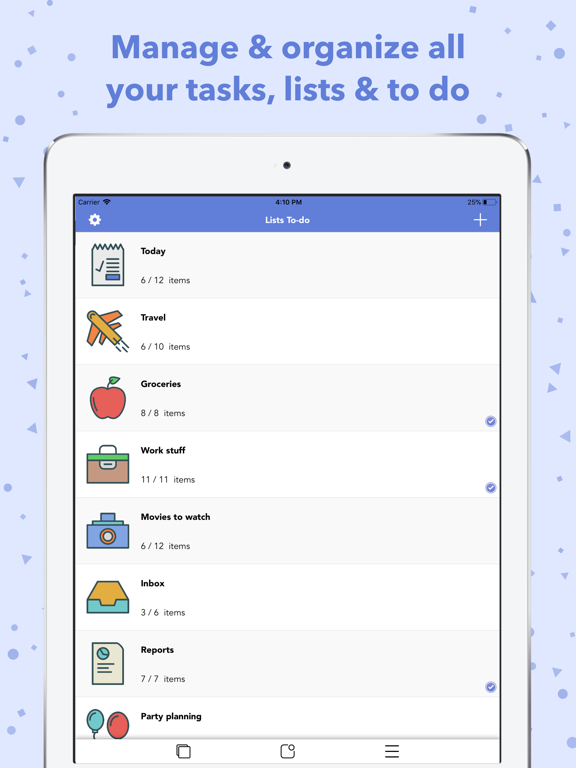
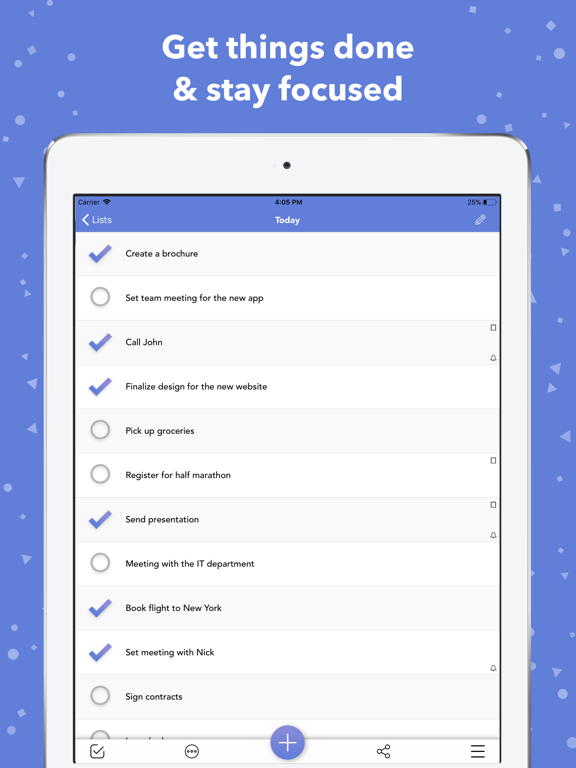
App Store
28 store screenshots


Pricing & paywalls
App Store
- Price: $0.99
- Theme Colors and Stickers Pack — $0.99
Ratings & reviews
App Store
-
4/5Simple, useful, well worth the cost, needs a few tweaks
Pros: -Love the layout, simple and effective. -The grouping to sub divide tasks is very helpful and huge selling point for me. -Overall well worth the price and a solid buy for anyone looking to organize life a little better. Tweaks / Suggestions: -The app will crash when you go over something like 35 characters for any action item. Don't know how hard it would be to add more capacity or limit the amount of type able characters so people don't loose what they wrote over and over. -The reminders tab should really just be a default list item to minimize searching thru the settings. -It would be helpful if there was a master List where it breaks things out in 3 color priority which can be assigned to each task in all other Lists. -The "Rate this app" pop up is highly annoying. I haven't had more than a half hours worth or using the app and was asked 7 times. Simmerdonna :p -There is another cheap to do list app called Task that I think you should contact. If you guys stitch the two apps so Task runs in portrait and this app in landscape you'd have a pretty nice thing going. Task is very very basic but using that functionality to view "today's" plan that is fed from this app would be useful to me at least. All in all I don't regret buying and hope further tweaks will improve an already useful app.
zerocooll21 · 6 Aug 2026
-
5/5At Last! This is what I've been looking for
I've tried seven other to-do lists. Some I've paid three to five times as much as this app costs. They just didn't work for me. Part of it was my fault because I didn't know what I needed. After a few decades of professional work, that work mind-set influenced my decisions and I kept trying the types of to-do lists I had used before. But my life isn't like that anymore. I don't need 16 levels if prioritization. I don't need a list that categorizes items as critical and immediate or just critical. What I needed, and didn't realize it, was multiple lists to organize the different types of tasks (i.e., handyman, housework, correspondence). Now, when I look back, I can see that in addition to the to-do organizer lists I had for work, I could have benefitted from having this app as well. Of course, I had nothing to run the app on, as the iPad wasn't around yet.
Skayell · 6 Aug 2026
-
1/5What's the deal?
Had List, but just now trying it out. Spent 30 min. setting up categories, icons, etc. It let me enter 4 items in 1st category and crashed upon saving a 5th. Also crashes when I click the other icons and won't let me enter anything for those cats. Have upgraded to System 8, so is that the problem? If I delete the app & reinstall, will I lose all my work? And, will I have to pay? Bummed that I spent all that time for nothing. Will revise rating if there's an easy fix. Please advise. NOTE: Just uninstalled and then reinstalled from the cloud icon. Didn't have to pay, but did lose all data that I had set up. May use it. Will see how consistent it is from here. Raised stars from 2 to 3. If I have other issues I'll change it. Oh, yes-- other issue is you can't re- order anything. Just started crashing again. Can't afford the time. Sorry. Dropped to 1 star.
Daffodil girl · 6 Aug 2026
-
5/5Excellent!!
This is exactly what I needed!! I tried at least 10 other apps, some more complicated and many of which did NOT include iCloud sync, but this worked the best for my purposes. I needed a listing program that would let me copy my unchecked items over to a MASTER packing list for RV'ing. We want to be able to easily create a checklist for each trip, including the grocery items we'll need for our menus. We were creating a new list for each trip & hoping we didn't forget something. Now with lists for all our favorite recipes & ingredients needed, we can decide what we're taking and copy it all over to a printable checklist before we leave. I'm also making lists for all the other trip preparation items & activities. This way we can customize our needs for each trip without starting from scratch. It will be as simple as copying over items to the Master list. I LOVE how it syncs to all the household gadgets so each of us can add to a list. It will save so much time when planning each RV trip. Many other uses too!! Sometimes simple is better!! Love the icons. Please add more & color options too. Thanks for a great app!! 😃😃👍👏💜
Tomich99224 · 6 Aug 2026
-
4/5Small issue with iOS 8
Love this app. Very simple without a lot of visual clutter. Easy to use. The only problem prior to iOS 8 occurred if I added a new list item with too many characters. The app would quit suddenly, but I could easily get back into the app and my list and try adding the item with fewer characters. No big deal. After upgrading to iOS 8.0.2 the problem became worse. I accidentally added an item with too many characters and the app quit. But when I tried to reopen the list, the app quit again. I finally figured out that I could delete the app & reinstall it and get back my lists. It's annoying, yes, but manageable. Now I'm much more careful to avoid adding a long list item. I think I can safely add one with 32 characters. Regardless, this is still my preferred app for lists.
ERRinMO · 6 Aug 2026
Privacy & accessibility
App Store
Privacy
- Data Not Linked to You — Analytics — Diagnostics — Crash Data Developer declared
- Data Not Linked to You — Analytics — Diagnostics — Other Diagnostic Data Developer declared
- Data Not Linked to You — Analytics — Diagnostics — Performance Data Developer declared
- Data Not Linked to You — Analytics — Identifiers — Device ID Developer declared
- Data Not Linked to You — Analytics — Identifiers — User ID Developer declared
- Data Not Linked to You — Analytics — Location — Coarse Location Developer declared
- Data Not Linked to You — Analytics — Usage Data — Other Usage Data Developer declared
- Data Not Linked to You — Analytics — Usage Data — Product Interaction Developer declared
- Data Not Linked to You — Diagnostics Developer declared
- Data Not Linked to You — Identifiers Developer declared
- Data Not Linked to You — Location Developer declared
- Data Not Linked to You — Usage Data Developer declared
Accessibility
No accessibility labels collected yet.
Versions
App Store
- 1.0
-
1.1
-Customize size of list items -Reorder lists -Minor UI Enchantments
-
1.2
-Duplicate Lists -Various improvements -Minor bug fixed
-
1.3
-Themes -Reminders -New icon -iCloud sync -Various improvements
-
1.4
- Bugs fixed
-
1.5
-Bugs fixed
-
2.0
-Lists icons -Move items between lists -Red Badge Icon for unchecked items of a list -Post lists to Facebook and Twitter -Take lists screenshots -Customizable font size of list items
-
2.1
- New UI updated to iOS 7 If you have problems with the app after iOS 7 update, please uninstall and reinstall. If you have set up an iCloud account on your device, your data will restore automatically. Just make sure that you have an active internet connection before uninstalling and reinstalling. After reinstalling it may take a couple of minutes for the data to appear. Open and close the app until they finally appear.
-
2.1.1
-iOS 7 updated If you have problems with the app after iOS 7 update, please uninstall and reinstall. If you have set up an iCloud account on your device, your data will restore automatically. Just make sure that you have an active internet connection before uninstalling and reinstalling. After reinstalling it may take a couple of minutes for the data to appear. Open and close the app until they finally appear.
-
3.0
Brand new design, amazing functionalities!! Explore the new, stunning user experience of Lists To-do!!!
-
3.0.1
- Print a list using AirPrint directly through the app - Sort the list of lists: manually, alphabetically or by date created Thank you for using Lists To-do!! You are awesome :)
-
3.1.0
1) Lists Stickers for iMessages!! With over 40 different stickers to choose from, there are lots of ways to share lists stickers and make your messages more fun!! 2) Allowing Users to Manage Data Stored in iCloud: • Delete iCloud data • Export iCloud data • Turn On/Off iCloud Storage 3) Master Reset Option to delete all data from the app. Thank you for using Lists To-do!! You are awesome :)
-
3.1.1
1) Lists Stickers for iMessages!! With over 40 different stickers to choose from, there are lots of ways to share lists stickers and make your messages more fun!! 2) Allowing Users to Manage Data Stored in iCloud: • Delete iCloud data • Export iCloud data • Turn On/Off iCloud Storage 3) Master Reset Option to delete all data from the app. Thank you for using Lists To-do!! You are awesome :)
-
3.2
Are you ready??? A bunch of new features are out: 1) Pin Lists & Items Pin lists or list items to the top, to easily access the important ones. Just swipe left on a list or item and select the pin button! 2) Recover Deleted Items Have you accidentally deleted a list item? You can now recover it instantly! A bar with an "Add Back" button will appear every time you delete a list item. Alternatively, you can just open the settings and select the "Recently Deleted Items" option, to see a full list of all the items you have deleted in the last 30 days. 3) Lists Statistics View the progress of all your lists combined, as well as each list individually. You have to check every last task to get that 100%!!! Just open the setting menu and select “See Lists Statistics”. 4) Universal Search Search for the list or list item you want. Just select the search icon in the bottom toolbar of the home screen! 5) When a note is available for a list item, it appears now on the right side of the row. By pressing it, you can easily access it, share it or print it. 6) Now the red badge icon can show the number of unchecked items for all lists combined! 7) Enable/Disable autocorrection when typing a list name or an item 8) Various minor bugs fixed And finally….. 9) New pack with more than 130 amazing list icons and 37 theme colours to make your lists stand out!!! Thank you for using Lists To-do!! You are awesome :)
-
3.2.1
Upcoming list items are here! View now all your upcoming items, based on the reminders you have set, for all your lists combined. Just select the calendar icon in the bottom toolbar of the home screen! Thank you for using Lists To-do!! You are awesome :)
-
3.3
New features: - Dark mode is here! You can now personalize the appearance of Lists with new skins: Dark mode & Dark Blue ;) - Explore section is here! You can now discover trending, hand-picked products that will boost your productivity and increase your life quality. To open explore section, just select the fourth icon of home screen's bottom toolbar. The Red Badge Icon has been moved into settings. - Add Multiple Items: Long press the add button on a list, in order to instantly add multiple list items at once - Change the size of lists - Settings redesigned Thank you for using Lists To-do!! You are awesome :)
-
3.4
Minor bugs fixed :)
-
3.5
· 24 May 2026
Minor bugs fixed :)
Alternatives
- To Do List| — Same category + similar ratings
- Life Lists Organizer: All-in-1 — Same category + similar ratings
- Clear: To Dos & Reminders — Same category + similar ratings
- ToDo List - Task manager list — Same category + similar ratings
- Checklist – Simple Task Lists — Same category + similar ratings
- List Maker ◎ — Same category + similar ratings
Availability by market
- US
Data quality & evidence
- Page completeness
- Live store listing
- Last verified
- 6 Aug 2026
- Sources
- App Store
- Independent summary has not been published yet.