AppCorpus MCP gives your agent current app data, prices, screens, features and sources.
View JSON
GET /api/v3/apps/1575860488
{
  "app_id": 1575860488,
  "canonical_url": "https://appcorpus.com/apps/lightcut-ai-video-editor-1575860488",
  "identity": {
    "name": "LightCut - AI Video Editor",
    "slug": "lightcut-ai-video-editor",
    "developer": {
      "name": "Yue-Jie Innovations Science and Technology Co. , Ltd.",
      "url": "https://appcorpus.com/developers/yue-jie-innovations-science-and-technology-co-ltd-developer_af23a54cba09521a3fdc12cecd01020d"
    },
    "icon_url": "https://is1-ssl.mzstatic.com/image/thumb/Purple211/v4/d7/b5/1f/d7b51ff0-2821-572c-f966-df128370eddd/AppIcon-0-0-1x_U007emarketing-0-7-0-85-220.png/512x512bb.jpg",
    "stores": [
      "apple"
    ],
    "platforms": [
      "iphone",
      "ipad"
    ],
    "status": {
      "state": "active",
      "label": "Active",
      "last_checked": "2026-08-30",
      "last_checked_label": "30 Aug 2026",
      "banner": null,
      "region_note": null
    }
  },
  "listings": [
    {
      "store": "apple",
      "status": "ACTIVE",
      "url": "https://apps.apple.com/us/app/lightcut-ai-video-editor/id1575860488?uo=4",
      "rating": 4.9,
      "rating_count": 17043,
      "formatted_price": "Free",
      "is_free": true,
      "has_iap": false,
      "has_subscription": false,
      "version": "4.100.0",
      "updated": "2024-11-08",
      "currency": "USD"
    }
  ],
  "summary": {
    "one_liner": null,
    "summary": null,
    "best_for": [],
    "not_for": [],
    "status": "fallback",
    "at_a_glance": [
      "Free to download"
    ]
  },
  "categories": {
    "official": [
      "Photo & Video"
    ],
    "appcorpus": [
      {
        "category_id": "photo-video",
        "label": "Photo & video",
        "url": "https://appcorpus.com/categories/photo-video"
      }
    ]
  },
  "use_cases": [],
  "features": [
    {
      "capability_id": "free_app",
      "label": "Free app",
      "availability": "yes",
      "access_level": "free",
      "scope": null,
      "evidence": "Store published"
    }
  ],
  "pricing": [
    {
      "store": "apple",
      "formatted_price": "Free",
      "is_free": true,
      "has_iap": false,
      "has_subscription": false,
      "currency": "USD",
      "market": "us",
      "last_verified": "2026-08-30",
      "rows": [
        "Free"
      ]
    }
  ],
  "screens": [
    {
      "url": "https://is1-ssl.mzstatic.com/image/thumb/PurpleSource126/v4/e3/fb/c6/e3fbc650-ed2a-70bf-d182-9b71daf6eea7/eec640cb-3870-4016-a862-419399b72ebe__U4e00_U952e_U6210_U7247.png/1600x1600bb.jpg",
      "store": "apple",
      "platform": "ipad",
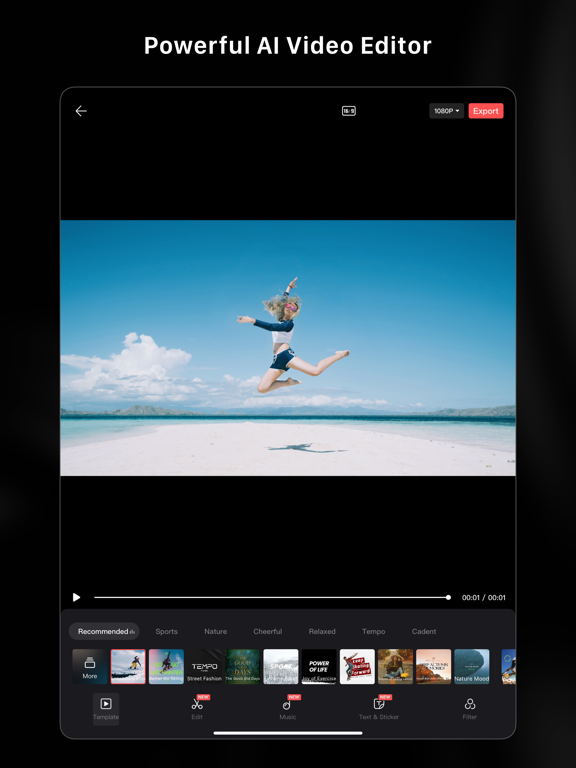
      "alt": "LightCut - AI Video Editor ipad screenshot 1"
    },
    {
      "url": "https://is1-ssl.mzstatic.com/image/thumb/PurpleSource116/v4/81/c5/2a/81c52a8a-acb7-0f31-ffdf-1f27b1dc14c9/dd19812b-d4c8-45fd-a804-2525db983634__U6a21_U677f_U5e7f_U573a.png/1600x1600bb.jpg",
      "store": "apple",
      "platform": "ipad",
      "alt": "LightCut - AI Video Editor ipad screenshot 2"
    },
    {
      "url": "https://is1-ssl.mzstatic.com/image/thumb/PurpleSource116/v4/14/81/ad/1481ad5b-3aa4-e6c3-db43-3fb532aeee3b/4141cc66-e5ca-4e82-a9eb-0fe7a417fe90__U4e00_U952e_U6210_U7247.png/576x768bb.png",
      "store": "apple",
      "platform": "ipad",
      "alt": "LightCut - AI Video Editor ipad screenshot 3"
    },
    {
      "url": "https://is1-ssl.mzstatic.com/image/thumb/PurpleSource116/v4/06/79/cb/0679cb3f-25bc-5e83-7829-94f74a772ff7/94349acc-bc14-4cec-8dd3-cd31c38f0013__U81ea_U7531_U526a_U8f91.png/1600x1600bb.jpg",
      "store": "apple",
      "platform": "ipad",
      "alt": "LightCut - AI Video Editor ipad screenshot 4"
    },
    {
      "url": "https://is1-ssl.mzstatic.com/image/thumb/PurpleSource116/v4/d9/64/f4/d964f43e-37e9-dfdd-3cfe-5031164a8325/8c172487-05ee-4782-acab-9dc969f4c35b__U6a21_U677f_U5e7f_U573a.png/576x768bb.png",
      "store": "apple",
      "platform": "ipad",
      "alt": "LightCut - AI Video Editor ipad screenshot 5"
    },
    {
      "url": "https://is1-ssl.mzstatic.com/image/thumb/PurpleSource116/v4/f5/a1/f2/f5a1f23a-2261-fe2e-afe2-ea706c829f57/c55764d7-badb-47ee-9673-a19d16ae683b__U7075_U611f_U62cd_U6444.png/1600x1600bb.jpg",
      "store": "apple",
      "platform": "ipad",
      "alt": "LightCut - AI Video Editor ipad screenshot 6"
    },
    {
      "url": "https://is1-ssl.mzstatic.com/image/thumb/PurpleSource116/v4/75/ad/cd/75adcd05-dd62-474c-b1e0-fec80e497497/1139c466-e40a-4afc-af96-286ba89b9362__U81ea_U7531_U526a_U8f91.png/576x768bb.png",
      "store": "apple",
      "platform": "ipad",
      "alt": "LightCut - AI Video Editor ipad screenshot 7"
    },
    {
      "url": "https://is1-ssl.mzstatic.com/image/thumb/PurpleSource116/v4/c6/bf/d4/c6bfd483-9587-5ff3-e68b-990073d9c701/5538b1bb-278e-4f00-a5c1-d9c909b3466c__U786c_U4ef6_U8fde_U63a5.png/1600x1600bb.jpg",
      "store": "apple",
      "platform": "ipad",
      "alt": "LightCut - AI Video Editor ipad screenshot 8"
    },
    {
      "url": "https://is1-ssl.mzstatic.com/image/thumb/PurpleSource116/v4/60/9d/e5/609de5bb-10a9-2b72-52ab-36908df09983/63686134-526b-4dac-b8ae-db8acf9f5103__U7075_U611f_U62cd_U6444.png/576x768bb.png",
      "store": "apple",
      "platform": "ipad",
      "alt": "LightCut - AI Video Editor ipad screenshot 9"
    },
    {
      "url": "https://is1-ssl.mzstatic.com/image/thumb/PurpleSource116/v4/3d/6c/fb/3d6cfbcd-a779-0b21-d767-aaa08187271c/efbf5998-00b9-4ade-854a-11ceb4e96481__U822a_U62cd_U00281_U0029.png/1600x1600bb.jpg",
      "store": "apple",
      "platform": "ipad",
      "alt": "LightCut - AI Video Editor ipad screenshot 10"
    },
    {
      "url": "https://is1-ssl.mzstatic.com/image/thumb/PurpleSource116/v4/bd/78/43/bd78437a-36c2-fdc6-3205-afbb4675c7ab/e4222dd2-b067-4e54-9a1f-90ac9c4a7d90__U786c_U4ef6_U8fde_U63a5.png/576x768bb.png",
      "store": "apple",
      "platform": "ipad",
      "alt": "LightCut - AI Video Editor ipad screenshot 11"
    },
    {
      "url": "https://is1-ssl.mzstatic.com/image/thumb/PurpleSource126/v4/af/cd/35/afcd353e-24c3-346f-5254-3f062f37a1ac/06fc409c-2c9c-47c0-a23b-5b5699c0dd2d__U53d8_U901f.png/1600x1600bb.jpg",
      "store": "apple",
      "platform": "ipad",
      "alt": "LightCut - AI Video Editor ipad screenshot 12"
    },
    {
      "url": "https://is1-ssl.mzstatic.com/image/thumb/PurpleSource126/v4/f8/70/3f/f8703f39-46e2-92d8-db57-ce13557b5516/1ed10adb-2ba9-4fdb-b7c7-b57ff2d4c066__U53d8_U901f.png/576x768bb.png",
      "store": "apple",
      "platform": "ipad",
      "alt": "LightCut - AI Video Editor ipad screenshot 13"
    },
    {
      "url": "https://is1-ssl.mzstatic.com/image/thumb/PurpleSource126/v4/ed/16/7c/ed167cc7-d6b3-77ee-dae0-f1fb8c43611c/6383dd6b-6089-4344-85e2-8135892d4bbf__U6ee4_U955c.png/1600x1600bb.jpg",
      "store": "apple",
      "platform": "ipad",
      "alt": "LightCut - AI Video Editor ipad screenshot 14"
    },
    {
      "url": "https://is1-ssl.mzstatic.com/image/thumb/PurpleSource116/v4/9f/39/f5/9f39f54b-451a-6109-2ee0-0e776393d084/649a59b4-ce90-4571-8ce5-e62d7b0eb543__U6ee4_U955c.png/576x768bb.png",
      "store": "apple",
      "platform": "ipad",
      "alt": "LightCut - AI Video Editor ipad screenshot 15"
    },
    {
      "url": "https://is1-ssl.mzstatic.com/image/thumb/PurpleSource116/v4/4e/3d/e0/4e3de0fc-4d30-010e-f41c-d033ae892027/04270846-c923-4cb1-894a-40ea2ed7dfcd__U8d34_U7eb8.png/1600x1600bb.jpg",
      "store": "apple",
      "platform": "ipad",
      "alt": "LightCut - AI Video Editor ipad screenshot 16"
    },
    {
      "url": "https://is1-ssl.mzstatic.com/image/thumb/PurpleSource116/v4/c4/36/b5/c436b577-e90f-4839-52a1-cb90b9c348c1/d19c3c09-b857-4aab-84d7-10c96e9db1da__U8d34_U7eb8.png/576x768bb.png",
      "store": "apple",
      "platform": "ipad",
      "alt": "LightCut - AI Video Editor ipad screenshot 17"
    },
    {
      "url": "https://is1-ssl.mzstatic.com/image/thumb/PurpleSource116/v4/65/92/bf/6592bf4e-0696-e2d3-8f4d-4a3b169780be/23f7f25c-a6ea-4a49-b523-4f7f24b99f38__U5206_U4eab.png/1600x1600bb.jpg",
      "store": "apple",
      "platform": "ipad",
      "alt": "LightCut - AI Video Editor ipad screenshot 18"
    },
    {
      "url": "https://is1-ssl.mzstatic.com/image/thumb/PurpleSource116/v4/e9/46/dc/e946dc73-ab22-6e11-a8cc-1525baf6a1ab/b4b3e494-fe80-48c6-a36c-9582f3d74231__U822a_U62cd_U00281_U0029.png/576x768bb.png",
      "store": "apple",
      "platform": "ipad",
      "alt": "LightCut - AI Video Editor ipad screenshot 19"
    },
    {
      "url": "https://is1-ssl.mzstatic.com/image/thumb/PurpleSource116/v4/be/e2/08/bee208c7-9478-9823-a0fe-fe02b18c6b2b/4d13ce91-94da-4462-bb36-fb563bc200bd__U5206_U4eab.png/576x768bb.png",
      "store": "apple",
      "platform": "ipad",
      "alt": "LightCut - AI Video Editor ipad screenshot 20"
    },
    {
      "url": "https://is1-ssl.mzstatic.com/image/thumb/Purple126/v4/c7/9f/c4/c79fc416-60ea-78af-72c7-e1279891821f/60ecb124-f85b-43d1-ac24-00b4b410fe55__U4e00_U952e_U6210_U7247.png/1242x1600bb.jpg",
      "store": "apple",
      "platform": "iphone",
      "alt": "LightCut - AI Video Editor iphone screenshot 21"
    },
    {
      "url": "https://is1-ssl.mzstatic.com/image/thumb/Purple126/v4/c1/b4/f7/c1b4f743-cd1b-f096-396b-e8ae58eaea16/39a5557b-74ae-4927-8ae5-e482270cd513__U6a21_U677f_U5e7f_U573a.png/1242x1600bb.jpg",
      "store": "apple",
      "platform": "iphone",
      "alt": "LightCut - AI Video Editor iphone screenshot 22"
    },
    {
      "url": "https://is1-ssl.mzstatic.com/image/thumb/Purple126/v4/e2/be/59/e2be599f-e207-c5c1-14d0-3c6ee0bcfe6d/4d9bd9c5-b52c-4133-9c4d-126016b1bdf6__U81ea_U7531_U7f16_U8f91.png/1242x1600bb.jpg",
      "store": "apple",
      "platform": "iphone",
      "alt": "LightCut - AI Video Editor iphone screenshot 23"
    },
    {
      "url": "https://is1-ssl.mzstatic.com/image/thumb/Purple116/v4/17/ac/25/17ac255d-75e2-2629-61ad-5b7334242f52/91573f9a-7a21-4973-8b0f-a489c695d84d__U7075_U611f_U62cd_U6444.png/1242x1600bb.jpg",
      "store": "apple",
      "platform": "iphone",
      "alt": "LightCut - AI Video Editor iphone screenshot 24"
    },
    {
      "url": "https://is1-ssl.mzstatic.com/image/thumb/Purple116/v4/45/1b/96/451b96e3-8766-1cdd-b1f3-0861dbdd307d/b6f91e13-3ab6-45e0-b7d7-5d6a81452ad8__U786c_U4ef6_U8fde_U63a5.png/1242x1600bb.jpg",
      "store": "apple",
      "platform": "iphone",
      "alt": "LightCut - AI Video Editor iphone screenshot 25"
    },
    {
      "url": "https://is1-ssl.mzstatic.com/image/thumb/Purple126/v4/3a/31/9f/3a319ffe-ffad-d763-12a8-076da69ac6f0/ad6dfb63-61cc-4640-ab37-9f2c0a0babc1__U822a_U62cd_U9884_U89c8.png/1242x1600bb.jpg",
      "store": "apple",
      "platform": "iphone",
      "alt": "LightCut - AI Video Editor iphone screenshot 26"
    },
    {
      "url": "https://is1-ssl.mzstatic.com/image/thumb/Purple116/v4/46/85/e8/4685e89f-b9af-d79b-6aa6-e3a08f819705/b1f9e4e0-cdd6-4dba-b3e8-c69fd8d46907__U53d8_U901f.png/1242x1600bb.jpg",
      "store": "apple",
      "platform": "iphone",
      "alt": "LightCut - AI Video Editor iphone screenshot 27"
    },
    {
      "url": "https://is1-ssl.mzstatic.com/image/thumb/Purple126/v4/31/87/71/31877110-0cc4-349d-2669-e7977b6aa84e/2eff9895-e504-4ba2-945d-b8c436ba0147__U6ee4_U955c.png/1242x1600bb.jpg",
      "store": "apple",
      "platform": "iphone",
      "alt": "LightCut - AI Video Editor iphone screenshot 28"
    },
    {
      "url": "https://is1-ssl.mzstatic.com/image/thumb/Purple116/v4/76/da/af/76daafa7-8d71-a998-a86c-b96344deae97/2f5e3297-cbbc-475d-bc29-34ad2f3a3d30__U8d34_U7eb8.png/1242x1600bb.jpg",
      "store": "apple",
      "platform": "iphone",
      "alt": "LightCut - AI Video Editor iphone screenshot 29"
    },
    {
      "url": "https://is1-ssl.mzstatic.com/image/thumb/Purple116/v4/da/21/dc/da21dcf7-09d1-6db3-7ad7-8f519124b56b/a7fc6ff6-7162-46e9-acac-9f0e00794cf7__U5206_U4eab.png/1242x1600bb.jpg",
      "store": "apple",
      "platform": "iphone",
      "alt": "LightCut - AI Video Editor iphone screenshot 30"
    }
  ],
  "ratings": [
    {
      "store": "apple",
      "average": 4.9,
      "count": 17043,
      "market": "us",
      "observed_at": "2026-08-30",
      "reviews": [
        {
          "rating": 5,
          "title": "Making my first video",
          "body": "I recently bought a new mini pro 4 drone and took it on a few flights. To my amazement the drone is incredibly easy to use. So after I flew it I saw this program as it was part of the drone package. Well I couldn’t believe the things I could do to make my videos and pictures from my flights into these awesome movie/videos!! It is awesome how you can personalize them and add your own flair. Not to mention they give you so many templates to use to make your video/pictures better!! I did my first video and it turned out ok, but as I use the program more and more I’m sure I can produce some amazing stuff. Thank you DJI for creating such and amazing product!!!!!! I’m so glad I went with you guys instead of some other drone company.",
          "author": "friel,s",
          "date": "30 Aug 2026"
        },
        {
          "rating": 5,
          "title": "A User-Friendly Gem: LightCut Video Editor Review",
          "body": "As someone who has always been daunted by the complex interfaces and intricate functionalities of most video editing software, discovering LightCut Video Editor was like a breath of fresh air. This program strikes a perfect balance between simplicity and effectiveness, making it an ideal choice for beginners and intermediate users alike. Ease of Use: The standout feature of LightCut is undoubtedly its user-friendly interface. Unlike other video editing tools that can overwhelm with an array of buttons and options, LightCut presents a clean and intuitive interface. This simplicity did not translate to a compromise in functionality. Instead, it allowed me to jump right into editing without the steep learning curve typically associated with video editing software. Amazing Effects: Despite its straightforward approach, LightCut doesn’t skimp on features. I was particularly impressed with the range of effects available. From basic color adjustments to more sophisticated effects, the software provides a wide array of options to enhance videos. These effects are not just plentiful but also of high quality, adding a professional touch to even the most basic edits. Performance: In terms of performance, LightCut runs smoothly, even on less powerful computers. It handles high-resolution videos well, without significant lag or crashes, a common issue in many other video editors. Conclusion: In conclusion, LightCut Video Editor is a remarkable tool for anyone who seeks an easy-to-use yet capable video editing solution. Its intuitive interface, coupled with a rich selection of effects, makes it a go-to choice for those who want to create high-quality videos without the complexity of professional-grade software. Whether you’re a beginner or an experienced editor who values simplicity and efficiency, LightCut is definitely worth a try.",
          "author": "Knit SewFabulous",
          "date": "30 Aug 2026"
        },
        {
          "rating": 5,
          "title": "Simple , helps you with ideas with the one touch edit",
          "body": "LightCut is an absolute game-changer in the world of video editing apps! With its sleek and intuitive interface, creating stunning videos has never been easier. The app boasts an impressive array of features that cater to both beginners and seasoned editors. From trimming and cutting clips to adding transitions and special effects, the possibilities are endless. One of the standout features of LightCut is its seamless integration with social media platforms, allowing users to effortlessly share their masterpieces with the world. The real-time preview function is a blessing, as it enables users to see the changes as they happen, enhancing the editing experience significantly. Moreover, the app's speed and efficiency are unparalleled, making the editing process smooth and enjoyable. The user-friendly tutorials and customer support ensure that even novices can quickly grasp the app's functionalities and unleash their creativity. In conclusion, LightCut is a top-notch video editing app that elevates video creation to a whole new level. Whether you're a content creator, vlogger, or just a video enthusiast, this app is a must-have!",
          "author": "sambenn",
          "date": "30 Aug 2026"
        },
        {
          "rating": 5,
          "title": "So Easy To Use!",
          "body": "For someone who has enough film experience to know just how difficult it is to create quality work I was skeptical about the positive reviews of this product. However having used it just once I was stunned by the results. I used a template to get started then built my film from there. Lightcut worked beautifully. Considering this is included with my purchase of the DJI Osmo Pocket 3 this is real value for money. I’m still just learning but Lightcut reduces the learning curve considerably. Well done! Update: I continue to use and learn more and more about the platform, and sure it lacks in certain areas - it takes a lot of time to figure out how to achieve your goals and there is no easy way to learn it, you just have to do it. But with every video I make I get better and better at using Lightcut. And let’s keep in mind that this is editing your videos IN YOUR HAND! I prefer to do it while lying down in bed (although that can mean some very late nights!).",
          "author": "DKinDallas",
          "date": "30 Aug 2026"
        },
        {
          "rating": 2,
          "title": "It’s cool but…",
          "body": "I find it rather concerning that it will not let me continue any project unless I give it complete access to all of the videos and photos in my pictures. Other editors doing require this. They don’t even keep the files in the app they’re linked to the video that they have gotten permission to to remove. And the info of the edit is kept in the apps memory. I’d assume it works similarly however the app wants full access likely because the terms of service says they don’t upload pics unless they get your consent and id wager that consent is all they need. Nothing is free and the fact the app is free means a certain user data is harvested and sold to data brokers. It’s unfortunate that the app won’t allow me to access my projects unless I give it all my photos and videos and it’s a good app but it’s not worth the violation personal privacy.",
          "author": "Mattstar69",
          "date": "30 Aug 2026"
        }
      ]
    }
  ],
  "privacy": [
    {
      "store": "apple",
      "declarations": [
        {
          "title": "Data Not Linked to You",
          "detail": "Analytics — Identifiers — Device ID",
          "source": "Developer declared"
        },
        {
          "title": "Data Not Linked to You",
          "detail": "Analytics — Usage Data — Product Interaction",
          "source": "Developer declared"
        },
        {
          "title": "Data Not Linked to You",
          "detail": "Analytics — User Content — Audio Data",
          "source": "Developer declared"
        },
        {
          "title": "Data Not Linked to You",
          "detail": "Analytics — User Content — Photos or Videos",
          "source": "Developer declared"
        },
        {
          "title": "Data Not Linked to You",
          "detail": "App Functionality — Diagnostics — Crash Data",
          "source": "Developer declared"
        },
        {
          "title": "Data Not Linked to You",
          "detail": "App Functionality — Diagnostics — Performance Data",
          "source": "Developer declared"
        },
        {
          "title": "Data Not Linked to You",
          "detail": "App Functionality — Identifiers — Device ID",
          "source": "Developer declared"
        },
        {
          "title": "Data Not Linked to You",
          "detail": "App Functionality — Usage Data — Product Interaction",
          "source": "Developer declared"
        },
        {
          "title": "Data Not Linked to You",
          "detail": "Diagnostics",
          "source": "Developer declared"
        },
        {
          "title": "Data Not Linked to You",
          "detail": "Identifiers",
          "source": "Developer declared"
        },
        {
          "title": "Data Not Linked to You",
          "detail": "Usage Data",
          "source": "Developer declared"
        },
        {
          "title": "Data Not Linked to You",
          "detail": "User Content",
          "source": "Developer declared"
        },
        {
          "title": "Data Used to Track You",
          "detail": "Identifiers — Device ID",
          "source": "Developer declared"
        },
        {
          "title": "Data Used to Track You",
          "detail": "Identifiers",
          "source": "Developer declared"
        }
      ],
      "accessibility": []
    }
  ],
  "changes": [
    {
      "store": "apple",
      "version": "4.100.0",
      "released_at": "2024-11-08",
      "notes": "This release focuses on enhancing the user experience and fixing critical crash issues."
    },
    {
      "store": "apple",
      "version": "4.82.5",
      "released_at": null,
      "notes": "[Fix] Fixed some bugs and crashes"
    },
    {
      "store": "apple",
      "version": "4.84.0",
      "released_at": null,
      "notes": "-【New】Supports connection to DJI Avata 2 -【New】One-Tap Edit,recommend exclusive FPV templates and capture flight highlight clips for DJI Avata 2 -【New】Support DJI Avata 2 Dlog-m material for Color Recovery"
    },
    {
      "store": "apple",
      "version": "4.85.0",
      "released_at": null,
      "notes": "-【New】Supports connection to DJI Avata 2 -【New】One-Tap Edit,recommend exclusive FPV templates and capture flight highlight clips for DJI Avata 2 -【New】Support DJI Avata 2 Dlog-m material for Color Recovery"
    },
    {
      "store": "apple",
      "version": "4.85.5",
      "released_at": null,
      "notes": "-【Renew】Fixed some bugs"
    },
    {
      "store": "apple",
      "version": "4.86.0",
      "released_at": null,
      "notes": "-【Renew】Fixed some bugs"
    },
    {
      "store": "apple",
      "version": "4.87.5",
      "released_at": null,
      "notes": "-【Renew】Fixed some bugs"
    },
    {
      "store": "apple",
      "version": "4.87.6",
      "released_at": null,
      "notes": "-【New】Supports Sky VFX for DJI Avata 2 to make your flight videos more interesting"
    },
    {
      "store": "apple",
      "version": "4.88.5",
      "released_at": null,
      "notes": "【New】Supports Sky VFX for DJI Avata 2 to make your flight videos more interesting"
    },
    {
      "store": "apple",
      "version": "4.89.5",
      "released_at": null,
      "notes": "user experience optimization"
    },
    {
      "store": "apple",
      "version": "4.90.0",
      "released_at": null,
      "notes": "Preliminary adaptation for iOS 18 Beta version, fixed material import issue."
    },
    {
      "store": "apple",
      "version": "4.90.5",
      "released_at": null,
      "notes": "1. User experience optimization"
    },
    {
      "store": "apple",
      "version": "4.91.5",
      "released_at": null,
      "notes": "Improved app experience"
    },
    {
      "store": "apple",
      "version": "4.92.0",
      "released_at": null,
      "notes": "fixed some issues"
    },
    {
      "store": "apple",
      "version": "4.92.5",
      "released_at": null,
      "notes": "1. User experience optimization"
    },
    {
      "store": "apple",
      "version": "4.93.0",
      "released_at": null,
      "notes": "1. Fix online crashes"
    },
    {
      "store": "apple",
      "version": "4.93.5",
      "released_at": null,
      "notes": "1. Fix online crashes"
    },
    {
      "store": "apple",
      "version": "4.94.5",
      "released_at": null,
      "notes": "Optimized some experiences"
    },
    {
      "store": "apple",
      "version": "4.95.5",
      "released_at": null,
      "notes": "Optimize some user experience"
    },
    {
      "store": "apple",
      "version": "4.96.5",
      "released_at": null,
      "notes": "Optimize some user experience"
    }
  ],
  "alternatives": [
    {
      "app_id": 1479649251,
      "name": "DJI Fly",
      "url": "https://appcorpus.com/apps/dji-fly-1479649251",
      "reason": "Same category + similar ratings"
    },
    {
      "app_id": 1581363826,
      "name": "DaVinci Resolve for iPad",
      "url": "https://appcorpus.com/apps/davinci-resolve-for-ipad-1581363826",
      "reason": "Same category + similar ratings"
    }
  ],
  "evidence_summary": {
    "index_state": "S1",
    "evidence_level": 1,
    "level_label": "Live store listing",
    "indexable": true,
    "last_verified_at": "2026-08-30",
    "unknown_fields": [
      "Independent summary has not been published yet."
    ],
    "sources": [
      "App Store"
    ]
  },
  "availability_markets": {
    "live": [
      "us"
    ],
    "selected": "us",
    "note": null
  },
  "feature_events": {
    "events": []
  },
  "features_slice": {
    "plans": [
      {
        "code": "free",
        "label": "Free",
        "kind": "free",
        "status": "inferred",
        "prices": [],
        "trial": null
      }
    ],
    "features": [],
    "unknown_features": [],
    "data_cutoff": "30 Aug 2026"
  }
}